Integrate Command Code with DSH, providing model catalog, inference requests, image input, and account usage viewing capabilities.

- Language
- TypeScript
- License
- MIT
- Branch
- main
Install
$ dsh plugin --profile web add @mars-sea/dsh-commandcode-providerRun the command above in your terminal to install this plugin via the dsh CLI. You can switch Profile in the top-right corner. New to dsh? Read the beginner tutorial
Install via your agent
Install the DeepSeek Harness plugin Mars-Sea/dsh-commandcode-provider for me: review the repository at https://github.com/Mars-Sea/dsh-commandcode-provider first, then run the install command and verify the plugin loads successfully.
Paste this instruction to the DSH Web GUI assistant — it will install and verify for you.
One-line Description
This plugin integrates Command Code into DSH, allowing you to browse and use models provided by Command Code directly from DSH's model selector. It also provides a dedicated settings page, account usage viewing, and model list organization by plan.
Key Features
- Integrate Command Code Models: Register a
commandcodemodel provider, converting DSH's conversations, tool calls, and streaming output into Command Code requests. - Synchronize Model Catalog: Fetch real-time model list from Command Code, and use local cache to continue displaying the existing catalog when network is unavailable.
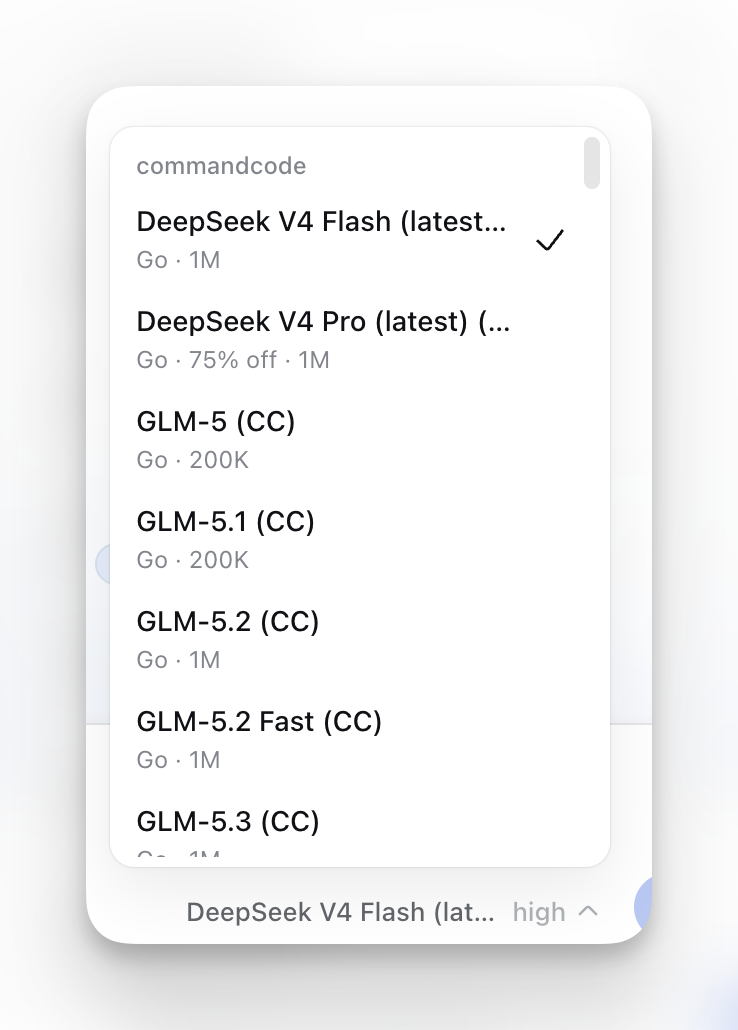
- Display Model Usage Information: Mark minimum plan, promotions, image capability, and context window in the model selector, sorted by plan tier.
- Filter Models by Account Plan: Hide models not supported by the subscription plan by default; retain full list when billing information is uncertain, actual permissions are still determined by the server.
- Support Reasoning Intensity and Image Input: Provide optional reasoning intensity for known models; Vision models can receive images, which are read through DSH's attachment service.
- View Account Usage: Check request count, spending, tokens, quotas, time window limits, and subscription information via the
/commandcodecommand and the account card in the settings page.
Technical Implementation
- Language: TypeScript
- Key Dependencies:
@deepseek-ai/dsh-llm,@deepseek-ai/dsh-settings,@deepseek-ai/dsh-credentials, React - Architecture Pattern: DSH bundle registers both Host-side model adapter and configurable provider, and inserts plugin configuration through Cordis patch; Web client additionally registers Command Code settings page. Account usage is obtained by Host-side through Remote gateway, browser does not hold API key directly.
- Entry Files:
src/index.ts; model request and catalog adapter located atsrc/adapter.ts, browser entry atsrc/client/index.ts.
Use Cases
Suitable for users who want to use Command Code accounts and models in DSH, and view plans and image capabilities in the same model selector. Users who need to understand account quotas, request spending, or 5-hour/weekly window usage can also directly use the settings page or /commandcode command.
Prerequisites and Compatibility
| Dependency | Minimum Version | Description |
|---|---|---|
| DSH Runtime | ^0.1.0-rc.6 peer dependency | Requires DSH's LLM, credentials, settings, client connection and other services; plugin package declares corresponding peer dependencies. |
| Node.js | >=22 | Required by package.json engines field. |
| React | ^18.2.0 | Web settings page uses React for rendering. |
| Platform | Cross-platform | package.json does not declare os or cpu restrictions. |
| Native Modules | None | No native module dependencies such as node-pty, node:sqlite declared. |
Installation
dsh plugin --profile web add github:Mars-Sea/dsh-commandcode-provider
Configuration Options
| Option | Type | Description | Default |
|---|---|---|---|
apiKeyEnv | String | Specifies the name for reading API key from DSH credentials service or startup environment. Settings page also uses this reference when saving keys. | COMMANDCODE_API_KEY |
apiKey | String | API key directly written to plugin composition config; suitable for host configuration injection, takes priority over credential reference. | Not set |
apiBase | String | Base address for Command Code API, convenient for using endpoints other than the default. | https://api.commandcode.ai |
workingDir | String | Submitted to Command Code as project working directory; uses DSH process current directory when empty. | Current working directory |
modelsCachePath | String | Location for saving model catalog cache, used for fallback display when network is temporarily unavailable. | ~/.commandcode/models-cache.json |
requestTimeoutMs | Number | Maximum wait time to receive first byte of response for generation requests. | 60000 ms |
streamIdleTimeoutMs | Number | When streaming response has continuous no data, connection is considered invalid after exceeding this time. | 300000 ms |
filterModelsByPlan | Boolean | Controls whether model selector hides models beyond account subscription plan; shows full catalog when turned off. | true |
FAQ
Q: Does this plugin need an API key?
A: Model catalog can be browsed without a key, but sending requests and viewing account usage require a valid Command Code API key. The plugin first checks direct configuration, then resolves through DSH credentials service; falls back to reading startup environment, and finally to ~/.commandcode/auth.json.
Q: What image inputs are supported?
A: Only models registered as Vision in the source code accept images, and DSH needs to have attachment service enabled. Text models will not silently discard images; instead, they return an unsupported content error.
Q: Why is a certain model missing from the model list?
A: The default model selector hides models beyond permissions based on account subscription plan. Opening may fail when billing query fails, plan is unknown, or there's on-demand balance; turning off filterModelsByPlan also shows the full catalog, but server may still return plan permission errors.
Q: What to do when requests interrupt during long thinking?
A: Default waits 60 seconds for first byte, and allows 300 seconds of stream idle time. When network is slow or model outputs for a long time, you can increase requestTimeoutMs or streamIdleTimeoutMs in settings page; request connection failures, rate limits, and some server errors retry according to DSH default policy.
Q: Why does the request return MODEL_NOT_IN_PLAN?
A: This means the selected model is not in the current Command Code plan. You can select a model included in the current plan, or adjust the account plan; plan markers in the model list are only for reference, the server is the ultimate source of permissions.
Q: Is stop sequence supported?
A: No. Command Code's request format does not have a stop field; requests with this option will explicitly return an unsupported option error.
Q: Settings page shows unconfigured, but requests still succeed. Why?
A: The key may come from the official CLI login file ~/.commandcode/auth.json instead of DSH credential store. Saving the key to settings page will allow settings page to accurately display configured status.
Q: Will uninstalling the plugin delete the API key?
A: No. The uninstall command only removes the plugin package and its configuration layer; keys in DSH credential store and ~/.commandcode/auth.json are retained.
Learning Curve
Beginner — After installing the plugin, fill in API key and connection parameters mainly through "Settings → Command Code", then select model from model selector; check advanced configuration only when you need to adjust options based on plan or network conditions.
Known Issues and Limitations
stopsequence is not supported; requests with this option will returnUNSUPPORTED_OPTION.- Image input is limited by Vision model list and depends on DSH attachment service; switching to text model in sessions with images will also be rejected by DSH.
- Model capabilities, plans, promotions, and peak/off-peak prices are static snapshots in source code; plugin update is required to fully sync after official catalog or plan changes.
- When model catalog refresh fails, it falls back to local cache; if cache doesn't exist or is invalid, model selector may have no old catalog to display, but explicit model requests are still handled by server.
- Account usage depends on Command Code's account interface and API key; each interface degrades independently; when some interfaces fail, the report retains other available data.
- Default stream idle timeout is 300 seconds; very long reasoning processes or network stalls exceeding this value will still be marked as timeout.
- Plugin only reads the official CLI's
~/.commandcode/auth.jsonas the last fallback, and does not read authentication files from other tools like pi/OMP.
English | 简体中文






Unofficial DeepSeek Harness LLM provider plugin for Command Code, ported from pi-commandcode-provider (MIT). It registers a commandcode provider whose requests are translated to Command Code's Provider API (POST /alpha/generate, reverse-engineered by the pi plugin, [email protected]).
This is a community integration. You need your own Command Code account and API key or subscription, and Command Code's terms apply. This project is not affiliated with Command Code, Inc.
What you get
- Plugin bundle installable into any dsh profile with
dsh plugin add, plus acommandcodeprovider route with a live catalog (GET {apiBase}/provider/v1/models, cached at~/.commandcode/models-cache.json). - Dedicated "Command Code" settings page (Settings → Command Code) with an API-key field, connection knobs (API base, working directory, request/stream timeouts), a live "Account usage" card (stats, credits, window-limit bars, subscription plan badge) and a Hide out-of-plan models toggle. The key is stored through the dsh credentials service; connection fields land in the
llm-commandcodesection and apply to the very next request, no restart. - API key resolution order:
config.apiKey→ credential refapiKeyEnv(defaultCOMMANDCODE_API_KEY) → launch environment → the official CLI auth file (~/.commandcode/auth.json, fromcommand-code login). - Model-picker annotations: every model shows the minimum plan that includes it (
KNOWN_PLANS), an active deal orFREEbadge (KNOWN_DEALS, expiry-aware so lapsed discounts hide themselves), the current peak/off-peak state (Peak/Half) for time-of-day-priced models, anImagemarker for Vision models, and the context window (1M/256K/262K) — e.g. "Go · 50% off · Image · 1M", "Go · Half · 1M". The list is sorted by plan tier (Go → GOAT → Pro → Provider/Max), so the models your plan can use lead the picker. - Plan-aware picker filtering: the picker hides models above your subscription tier outright (resolved live from your account's billing state). It fails open — an unreachable billing endpoint, an unknown plan, or a positive on-demand credit balance (which the official CLI treats as unlocking every model) all keep the full catalog visible — and the server stays the final gate. Set Hide out-of-plan models off on the settings page (or
filterModelsByPlan: falsein thellm-commandcodesettings section) to always list every model. - Reasoning-effort support for models the official catalog marks as such (
KNOWN_EFFORTS, matching[email protected]); reasoning models without effort levels still think automatically, exactly like the official CLI. - Image input for Vision-capable models (sent in the official wire format via the dsh attachment service); text-only models refuse images loudly (
UNSUPPORTED_CONTENT) rather than dropping them.
Getting an API key
Command Code API keys never expire. The easiest path is the official CLI (Node.js 22+):
npm i -g command-code@latest
cmd login        # macOS/Linux; native Windows: cmdc login
cmd login opens a browser to authenticate; the key is written to ~/.commandcode/auth.json — picked up automatically as a last-resort fallback. Alternatively create a key in the browser (Command Code Studio) and paste it into Settings → Command Code, or export COMMANDCODE_API_KEY="user_...".
Install
From npm (recommended)
The bare name dsh-commandcode-provider is taken by an unrelated package, so this plugin is published as @mars-sea/dsh-commandcode-provider:
dsh plugin --profile web add @mars-sea/dsh-commandcode-provider
From GitHub
# Pin a release tag (recommended — readable and immutable)
dsh plugin --profile web add github:Mars-Sea/dsh-commandcode-provider#v0.2.2
# Or pin any exact commit by its SHA
dsh plugin --profile web add github:Mars-Sea/dsh-commandcode-provider#<full-commit-sha>
The #<ref> suffix pins one exact revision (pnpm git-dependency syntax). Without it the install tracks the default branch, so a later push can silently change what you get.
A git install fetches sources, so the package's prepare script builds lib/ after install. pnpm ≥10 blocks that script by default — run the add, then copy the exact package key pnpm prints into ~/.dsh/profiles/web/pnpm-workspace.yaml:
allowBuilds:
  '@mars-sea/dsh-commandcode-provider@github:Mars-Sea/dsh-commandcode-provider#<full-commit-sha>': true
and re-run the add.
From a local checkout
npm install
npm run build                          # git/tarball installs do this via `prepare` automatically
dsh plugin --profile web add /path/to/dsh-commandcode-provider
After changing src/, re-run npm run build and restart the app.
What the install does
dsh plugin add links the package into the profile (pnpm records it under the true package name @mars-sea/dsh-commandcode-provider), appends that name to dsh.profile.bundles, and activates the cordis.patch.yml layer:
- insert:
    - id: llm-commandcode
      name: "@mars-sea/dsh-commandcode-provider"
      config:
        apiKeyEnv: COMMANDCODE_API_KEY
The patch name must be the full package specifier, quoted — the loader imports it as a module from the profile's node_modules, where pnpm only links the scoped name. A bare name fails with ERR_MODULE_NOT_FOUND and crashes the app on boot; an unquoted @mars-sea/... fails YAML parsing (see Troubleshooting).
Verify the composed layer, then (re)start the web app:
dsh --profile web --dump-config          # shows a "# == @mars-sea/dsh-commandcode-provider" layer
dsh web                                  # or restart your running instance
Updating
The patch layer is read from the installed package at every boot, so updating the package brings the fixed row automatically — no need to hand-edit cordis.patch.yml unless you copied it into your own profile layer.
# npm: always the latest published release
dsh plugin --profile web update @mars-sea/dsh-commandcode-provider

# GitHub (pinned): point at the new tag — no uninstall needed, pnpm swaps it in place
dsh plugin --profile web add github:Mars-Sea/dsh-commandcode-provider#v0.2.2

# local checkout: pull, rebuild, restart
git -C /path/to/dsh-commandcode-provider pull
npm run build --prefix /path/to/dsh-commandcode-provider
dsh web
Then restart the web app. Verify with dsh --profile web --dump-config — the layer should show name: '@mars-sea/dsh-commandcode-provider'.
updatesays "Already up to date" but the version did not move (pnpm ≥ 11)? pnpm 11'sminimumReleaseAgesupply-chain policy can refuse a freshly published version. Pin the exact version instead:dsh plugin --profile web add @mars-sea/[email protected](orpnpm config set minimumReleaseAge 0 --location projectinside the profile directory).
Upgrading from ≤0.1.6 (or a broken hand-edited profile): if you copied the old patch row into your profile's own
cordis.patch.yml, that copy still wins over the bundle layer — fix it toname: "@mars-sea/dsh-commandcode-provider"or remove it (see Troubleshooting).
To uninstall instead:
dsh plugin --profile web remove @mars-sea/dsh-commandcode-provider(the scoped name — pnpm records the dependency under its real name). Your API key in the dsh credential store and~/.commandcode/auth.jsonare left untouched.
Verify it works
After restart: Settings → Command Code shows the dedicated page — enter your API key and click Save (the badge flips to 已配置/Configured once the Host holds it). Settings → Models shows a Command Code card; the model picker lists the live catalog under commandcode. Send a message with a model your plan includes — deepseek/deepseek-v4-flash works on entry-level plans, and open-weight models (DeepSeek/Qwen/Kimi/MiniMax) generally do, while frontier models (Claude/GPT/Gemini/Grok) may require Pro/Max plans or on-demand usage.
Usage dashboard
The plugin registers a /commandcode slash command (requires the dsh commands service, present in the standard web profile) showing your account state from the official account endpoints:
/commandcode (or /commandcode status)
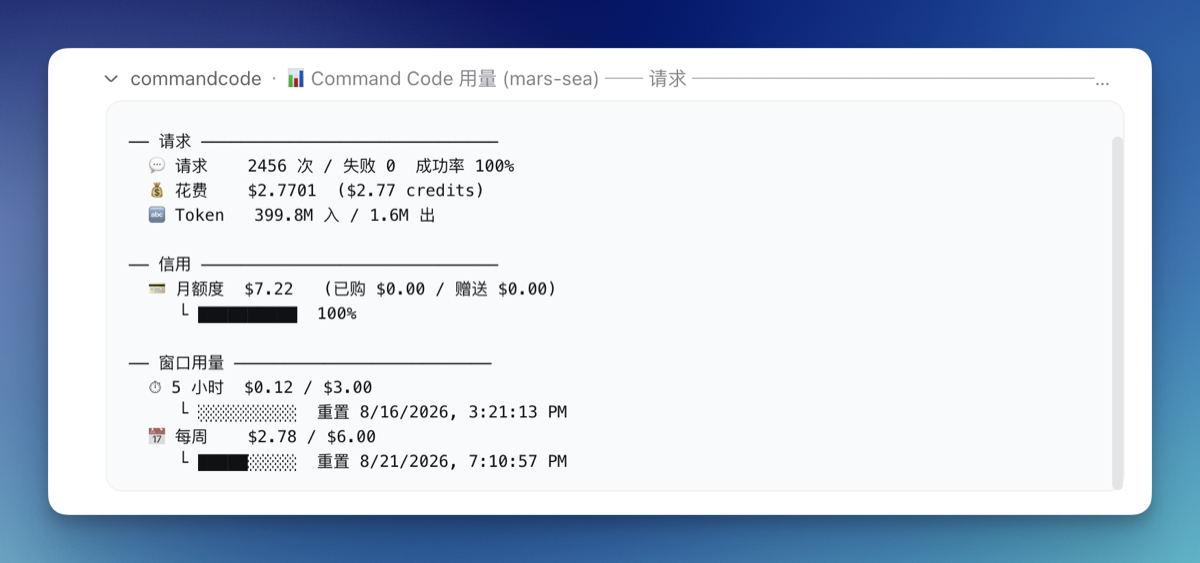
Each endpoint degrades independently — a temporary failure of one leaves the rest visible and notes the failure inline.
Configure
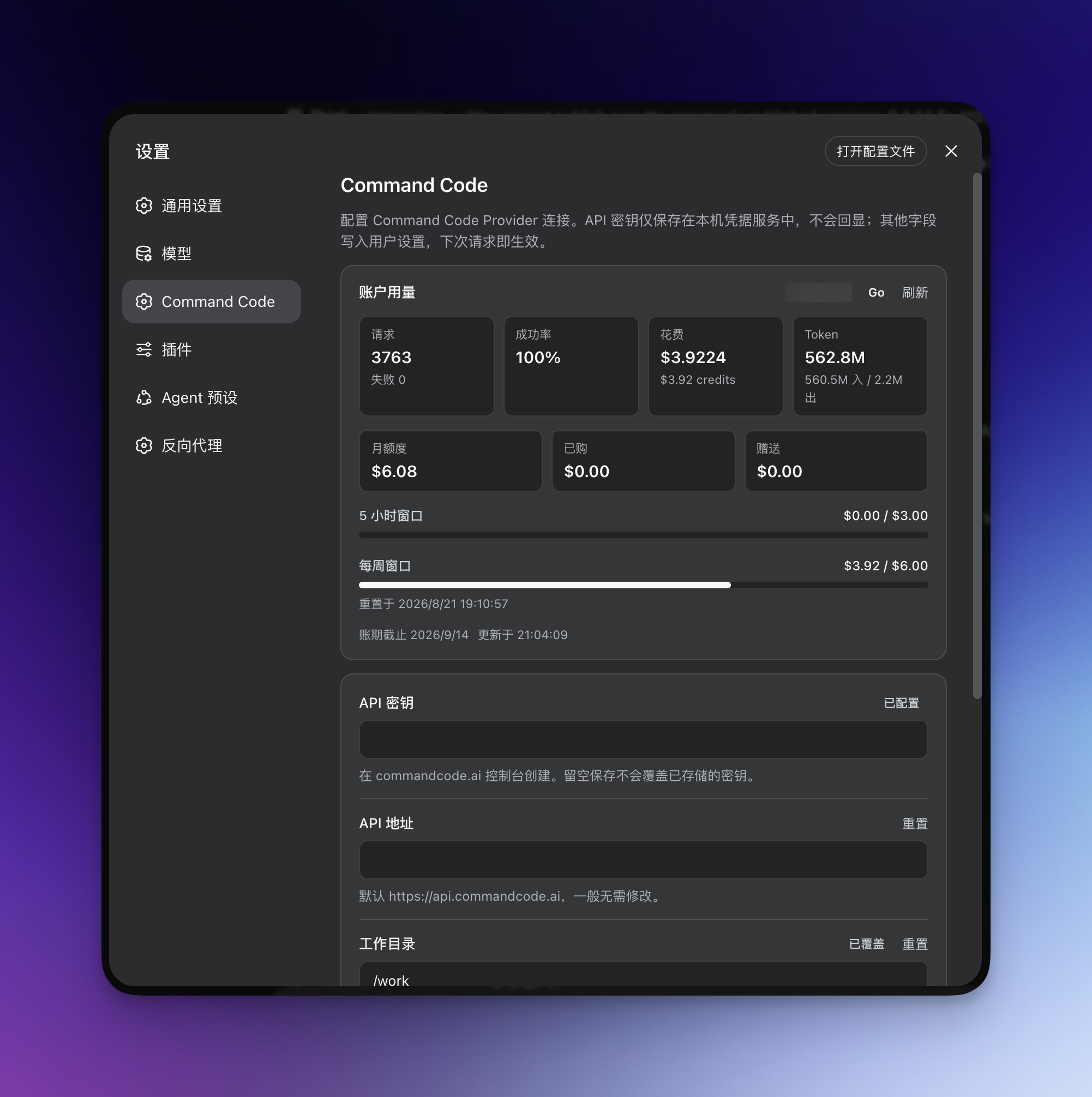
Settings → Command Code is the primary surface: an API-key field (stored in $DSH_HOME/.credentials.yaml via the credentials service; write-only, reports whether a key is set), plus API base URL, working directory, and request/stream timeout fields, all written to the llm-commandcode section. The catalog is browsable without a key. The working directory is optional — leave it blank and the placeholder shows the process cwd it resolves to.
Once a key is configured, the page header shows a live Account usage card — the same account, spend, credit, and window-limit facts as /commandcode, plus your subscription plan badge and billing period end — fetched Host-side (the key never leaves it) and rendered natively:
The same knobs live in $DSH_HOME/settings.yaml (per-request overrides, no restart):
llm-commandcode:
  apiKeyEnv: COMMANDCODE_API_KEY   # credential reference resolved per request
  apiBase: https://api.commandcode.ai
  workingDir: /path/to/project     # reported to the API (project slug, config block)
  modelsCachePath: ~/.commandcode/models-cache.json
  requestTimeoutMs: 60000          # max wait for the first response byte (default 60s)
  streamIdleTimeoutMs: 300000      # stream stall before treated as dead (default 300s — generous, so long-thinking models are not cut off)
The composition-entry config (cordis.patch.yml) accepts the same keys; a literal apiKey there takes precedence over the credential reference.
Troubleshooting
Command Code API request to .../alpha/generate failedwith retries — a transport-layer failure:fetch()never got an HTTP response (a 401/403/429 would say "API error"). Since 0.1.8 the message names the real root cause (ECONNREFUSED,ENOTFOUND,CERT_HAS_EXPIRED,socket hang up, …). Common causes: a required proxy (Node'sfetch/undici ignoresHTTP_PROXY/HTTPS_PROXY— configure a dispatcher or whitelistapi.commandcode.ai), connection reset/throttled (firewall, GFW-style interference, unstable Wi-Fi), TLS interception (corporate MITM), or a transient blip retry recovers from.- A long generation stops mid-stream — since 0.1.8 the adapter aborts after
requestTimeoutMs(60s) with no first byte, and treats a stream stalling paststreamIdleTimeoutMs(300s by default) as dead. Both surface asTIMEOUTwith the stall duration; tune the knobs for slow-but-stable networks. - "Reconnects" when a reasoning model thinks for a long time — the stream idle watchdog used to default to 120s, which is shorter than a frontier reasoning model's silent thinking phase (xhigh/max effort can stay quiet for minutes, and the official CLI sets no idle cap at all). Since 0.2.3 the default is 300s; if you still hit spurious timeouts on very long thinking, raise
streamIdleTimeoutMsin thellm-commandcodesection or on the settings page. - Boot crash:
ERR_MODULE_NOT_FOUND: Cannot find package 'dsh-commandcode-provider'— the patch row'snameis the bare name, but pnpm only links the scoped name. Fix the row toname: "@mars-sea/dsh-commandcode-provider"— note the quotes (an unquoted@-prefixed scalar fails YAML parsing) — then restart. MODEL_NOT_IN_PLAN(403) — the model isn't in your plan. Pick an open-weight model or upgrade; the error names the model and links the docs.MISSING_CREDENTIAL— no key anywhere. Store one via the settings page,export COMMANDCODE_API_KEY, setconfig.apiKey, or runcommand-code login. The route and catalog stay browsable without a key.- Models card shows "not configured" but requests work — the key came from
~/.commandcode/auth.json(thecmd loginfallback), not the credential store. Paste it into the card once; both coexist fine. - A reasoning model returns no visible text on short requests — it consumes output tokens on reasoning first; a small
maxTokenscan be exhausted before visible text. Normal. allowBuildserrors ondsh plugin addfrom git — copy the exact package key pnpm printed intopnpm-workspace.yamland re-run (see Install).
Notes & limitations
- Image input is model-gated: only models the official registry lists with Vision accept images (see
KNOWN_IMAGE_MODELSinsrc/adapter.ts). Text-only models throwUNSUPPORTED_CONTENT; Command Code's own CLI's client-side VISION fallback is not reproduced here — switch to a Vision model instead. Image input also requires the dsh attachment service. - Switching to a text-only model in an image-bearing session is rejected by dsh itself — a harness-level guard (
dsh-host-apiproxy'sselectModel) refusesmodel-unavailableand cannot be relaxed from the plugin side. This bundle makes the message friendlier via its client half: it rewrites the rejection to "当前会话已包含图片,而模型 <model> 不支持图片输入;请选择支持图片的模型,或先移除会话中的图片。" (the error code and details pass through unchanged). Select a model the picker marksImage, remove the images first, or use an image-routing bundle (e.g.@deepseek-ai/dsh-llm-image-routing). - No
stopsequences (the wire format has none): requests carrying one throwUNSUPPORTED_OPTION. - Reasoning blocks are not replayed into later turns (matches the official CLI); only tool calls with a paired tool result are replayed.
- The catalog endpoint is public;
/alpha/generaterequires your key.
Permissions & privacy
This plugin operates entirely within your dsh profile and your Command Code account. Local files: reads ~/.commandcode/auth.json only as a last-resort key fallback; reads/writes ~/.commandcode/models-cache.json; reads your key from $DSH_HOME/.credentials.yaml via the standard credential seam (never logged). Network: GET {apiBase}/provider/v1/models (public catalog) and POST {apiBase}/alpha/generate (your requests, authenticated), the body including your configured workingDir. No telemetry — the only outbound host is the Command Code API (api.commandcode.ai by default, configurable via apiBase).
Disabling / uninstalling
-
Disable without removing: edit your profile's
cordis.patch.ymland comment out (or remove) thellm-commandcoderow, or setdisabled: true, then restart. -
Uninstall completely:
dsh plugin --profile web remove @mars-sea/dsh-commandcode-providerThis removes the bundle dependency and its layer; your API key in the dsh credential store and
~/.commandcode/auth.jsonare left untouched.
Development
npm install
npm run typecheck   # tsc --noEmit
npm run build       # tsdown -> lib/
Community & feedback


License
MIT — see LICENSE. Portions ported from pi-commandcode-provider (MIT).
Read the usage guide →
Install steps, key points, FAQ and compatibility for this plugin — auto-derived from indexed fields.
Listing badge

[](https://deepseek-plugin.org/plugins/Mars-Sea/dsh-commandcode-provider)Paste this markdown into your GitHub README to link back to this listing. The badge only states the listing — not a security endorsement.