Adds multi-Agent team collaboration to DeepSeek Harness: the current session acts as team leader, using natural language to break down tasks, assign members, advance based on dependencies, and summarize results.

- Language
- TypeScript
- License
- MIT
- Branch
- main
Install
$ dsh plugin --profile web add @nanmicoder/dsh-agent-teamsRun the command above in your terminal to install this plugin via the dsh CLI. You can switch Profile in the top-right corner. New to dsh? Read the beginner tutorial
Install via your agent
Install the DeepSeek Harness plugin NanmiCoder/dsh-agent-teams for me: review the repository at https://github.com/NanmiCoder/dsh-agent-teams first, then run the install command and verify the plugin loads successfully.
Paste this instruction to the DSH Web GUI assistant — it will install and verify for you.
At a Glance
Turns the current DeepSeek Harness session into a team leader, delegating goals to multiple resumable sub-agents running in parallel. Tools, state, and web overlay are all built into the plugin—just install and go.
Core Capabilities
- Transforms the current session into a team leader; natural language instructions can recruit team members
- Recruits sub-agent members with role assignments, each member is a session that can be resumed across rounds
- Splits goals into dependent tasks; tasks with unmet dependencies won't be claimed
- Shared scheduler automatically assigns ready tasks to idle members, safely revokes old attempts when reassigning
- Members and leader communicate directly through persistent mailboxes, messages wake up the recipient
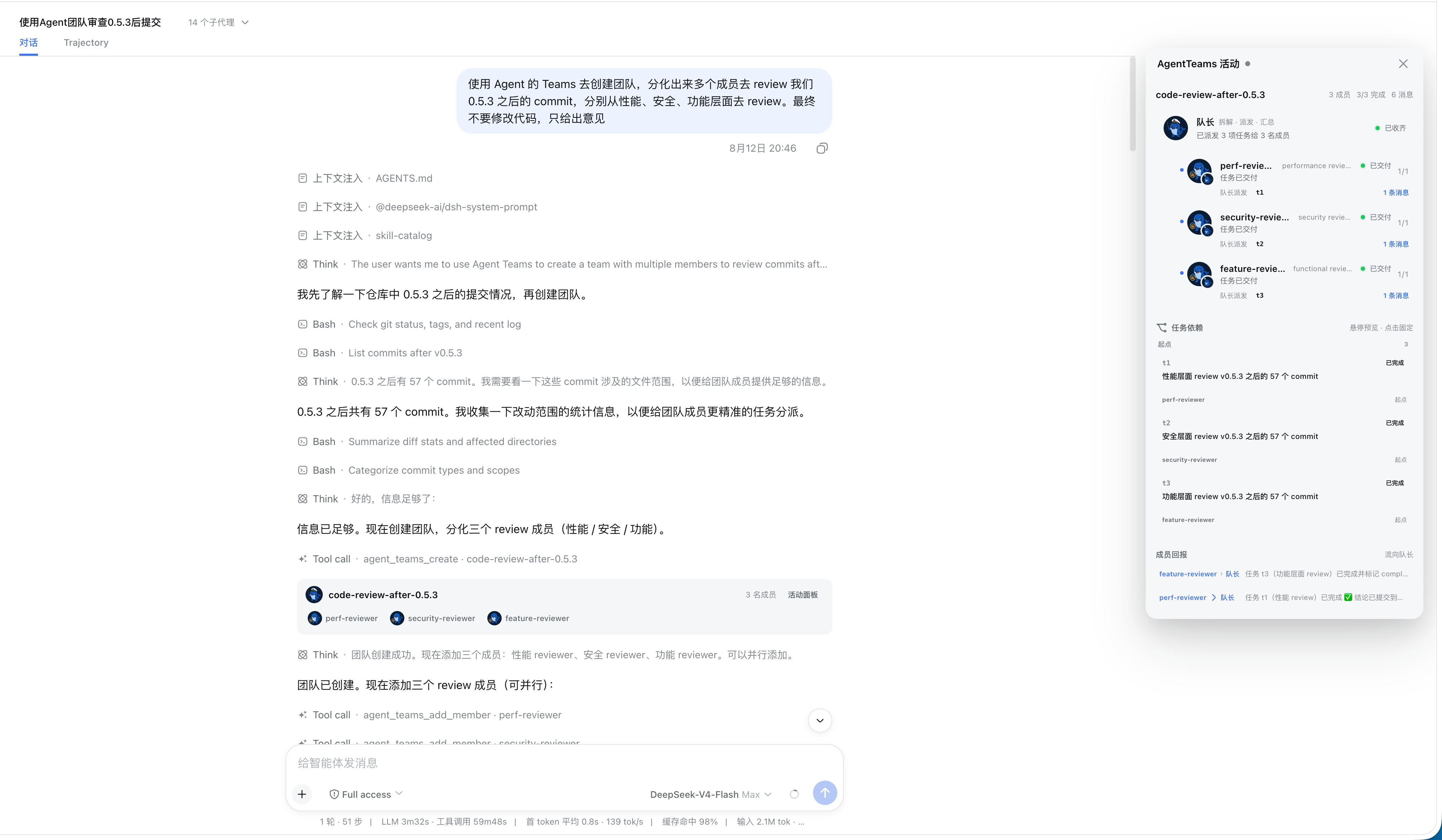
- Real-time activity panel in the web interface displays member status, task DAG, and mail
Technical Implementation
- Language: TypeScript (with React client)
- Key Dependencies:
@deepseek-ai/cordis,@deepseek-ai/dsh-subagent,@deepseek-ai/dsh-tools,@deepseek-ai/dsh-system-prompt - Architecture Pattern: Host-side cordis plugin, injected via bundle patch; registers 10
agent_teams_*tools inctx.tools, injects usage strategy section intoctx.systemPrompt; Web side presents as body portal overlay + in-session cards - Entry Files:
src/index.ts(host side),src/client/index.tsx(browser side)
Use Cases
When a task that can be solved in a single DeepSeek Harness session isn't enough—like simultaneously reviewing code, checking security, investigating products, and doing research—use natural language to have the current session recruit a team, split by role to push forward, pass results to each other, and synthesize into a complete response.
Dependencies & Compatibility
| Dependency | Min Version | Description |
|---|---|---|
| DeepSeek Harness | 0.1.0-rc.6 | Host framework; plugin injects as cordis bundle |
| Node | ^22.19.0 or >=24 | From package.json engines.node |
| Subagent runtime | 0.1.0-rc.6 | Provides resumable member capability; selected via cordis.patch.yml's memberProvider: spawn |
| Platform | Cross-platform | Only Node version specified; no OS constraints |
Installation
dsh plugin --profile web add github:NanmiCoder/dsh-agent-teams
Configuration
| Config | Type | Description | Default |
|---|---|---|---|
| stateDir | string | Subdirectory name for team state files under leader workspace (contains team.json and each agent's mailbox files) | .agent-teams |
| memberProvider | string | Subagent runtime backend for creating members (e.g., spawn/fork), not LLM provider | spawn |
| memberModel | string | Model identifier used by all members; empty inherits leader's current model | Not set |
| memberMaxDepth | number | Max depth members can delegate further down; 0 disables delegation | 1 |
| maxMembers | number (≥1) | Maximum team size allowed | 8 |
| promptSectionOrder | number | Sorting weight for usage strategy section in system prompt | 117 |
FAQ
Q: Any additional configuration needed after installation?
A: Works with default parameters. Restart DSH after installation; only modify in profile config when changing team size or member backend.
Q: Can one session lead multiple teams at once?
A: Only one. The system checks during agent_teams_create if the current session is already a leader—duplicate creation errors out directly, requiring the old team to end first.
Q: How do members communicate with each other?
A: Via persistent mailbox. Any member or leader can call agent_teams_send_message to deliver messages directly to someone's mailbox and,顺便wake them up for the next round—no need for leader relay.
Q: Is team data preserved after the team ends?
A: Yes. agent_teams_delete moves the entire team directory to the archive area, preserving members, tasks, dependency graph, and mailbox history. The web panel can still review historical snapshots.
Q: What happens to incomplete tasks after a crash or interrupt?
A: Scheduling is event-driven, not polling-based. When the leader returns or status tools are called, the scheduler finds idle members still holding incomplete tasks, revokes old attempts and generates new attempts to automatically wake original members to continue.
Q: Will multiple people editing the same team simultaneously cause conflicts?
A: Each team is serialized within a single DSH process, no cross-overwrites. However, officially noted: multiple processes modifying the same team simultaneously doesn't guarantee consistency—single process usage is recommended.
Q: Which LLM needs to be selected to use this?
A: No mandatory requirement. Members default to inheriting the leader's current provider and model, with a snapshot of reasoning intensity at that moment; only when explicitly specifying a role to use a different model is the optional model parameter needed.
Q: Can this plugin run standalone without installing DSH?
A: No. It's a host-side plugin, relying on cordis services, subagent registry, and system prompt injection points; without a host there are no registration targets.
Getting Started
Beginner — Install and use immediately with a single command, natural language instructions, zero interaction; only review configuration when fine-tuning team size or member backend.
Known Issues & Limitations
- Scheduler is event-driven rather than polling; when leader is offline for extended periods, can't actively recover members—must wait for leader to return or for scheduler to trigger after calling status tools
- A leader can only lead one active team at a time; excess creation is directly rejected by the tool
- Members don't have their own independent tool whitelist—they still retain all regular tools like bash, filesystem, networking—only the role persona is replaced
- Team state uses file persistence; serialization within the same process is handled, but no consistency guarantee for cross-process simultaneous modifications to the same team
- Activity panel directly displays real state from disk; won't do task wrap-up on behalf of the model—if a member completes work but forgets to call the update tool, the leader needs to rely on status queries rather than the panel to summarize
- Web overlay mounts via body portal; on ultra-wide screens the main conversation column smoothly gives way, narrow screens revert to overlay overlay mode, left navigation always stays in place
English · 简体中文




One prompt. A working team.
dsh-agent-teams turns the current DeepSeek Harness session into a captain that can assemble durable sub-agents, split a goal into dependency-aware tasks, and coordinate work through direct messages.
Ask in natural language. The plugin provides the team protocol, ten coordination tools, persistent state, an automatic shared-task scheduler, and a live Web UI—without requiring a separate workflow engine.
Releases
Read the latest release notes or browse the complete release history. The same Markdown notes are included in the npm package under release-notes/.
Why AgentTeams?
| Capability | What it changes |
|---|---|
| Captain-led delegation | The current session creates the team, assigns roles, and consolidates the final result. |
| Durable members | Members are continuable DSH sub-agents that can be woken for focused follow-up turns. |
| Dependency-aware tasks | Tasks move through explicit states and cannot be claimed before their dependencies finish. |
| Automatic reuse and safe takeover | Idle members claim the next ready task; reassignment revokes stale attempts before new work starts, and cold recovery retries stranded open attempts. |
| Direct messaging | Members send durable mailbox messages directly to teammates or the captain—no relay required. |
| Live activity panel | The Web UI combines segmented progress, a collapsible roster, and an interactive task DAG; completed archives retain their full member and task history. |
Install
[!NOTE] Requires an existing DeepSeek Harness installation.
npm
dsh plugin --profile web add @nanmicoder/dsh-agent-teams
Build from source
git clone https://github.com/NanmiCoder/dsh-agent-teams.git
cd dsh-agent-teams
pnpm install
pnpm build
dsh plugin --profile web add .
Run pnpm build again after changing the source. The local plugin install remains linked to this checkout.
Validate the composed profile, restart DSH, and refresh the Web UI:
dsh --profile web --dump-config
dsh web
Then ask for a team directly:
Use AgentTeams to review the commits after v0.5.3 from performance, security, and product perspectives. Return one consolidated report.
How it works
- The current session creates a team and becomes its captain.
- The captain adds role-specific members backed by continuable sub-agents.
- The goal becomes tasks with owners and explicit dependencies.
- The shared scheduler uses real
running / idle / readystate to atomically claim one ready task per idle member and wake it. If an idle/ready member still owns an open task after an interrupted turn or process restart, the scheduler retries it with a fresh attempt. - Members update with the current
attempt_id; reassignment or captain takeover revokes the old attempt and waits for the old worker to quiesce before a new attempt starts. - The captain presents the combined result, then archives the complete team record.
Team state is stored under <workspace>/.agent-teams/; the Web panel reads that disk truth and combines it with live sub-agent activity.
Member creation is zero-interaction by default: a member on the captain's current LLM route snapshots that provider, model, and reasoning effort, while a member on a requested alternative route snapshots the target model's default effort; later continuations restore the resolved snapshot. Only an explicit heterogeneous-team request (for example, “backend on provider A/model X, frontend on provider B/model Y”) supplies a member-specific provider + model; there is no per-member model or reasoning prompt.
Slash command
No “use AgentTeams” phrasing required. The plugin registers the
closed-namespace /agent-teams host command, so the Web GUI slash menu shows
an agent-teams placeholder with an input hint: pick it (or type the
command), describe the goal, and press Enter.
/agent-teams research the pricing pages of three competitors
The command pipeline claims the line, then preserves that exact input as an
ordinary user follow-up so it remains visible in the main chat. The gesture
boundary adds the deterministic activation directive at pre-step, so the
captain protocol still starts immediately. The invocation is also durably
logged (command/run / command/done).
Surfaces without command adjudication (for example the headless CLI) get the
same deterministic activation through a gesture boundary: any genuine user
message starting with /agent-teams activates the protocol for the rest of
the text. Mid-sentence mentions stay ordinary prose.
Configuration
Defaults work without extra setup. A trusted profile can override member behavior:
- id: agent-teams
  config:
    stateDir: .agent-teams
    memberProvider: spawn
    memberModel: deepseek-v4
    memberMaxDepth: 1
    maxMembers: 8
memberProvider is the sub-agent runtime backend (spawn / fork), not an LLM provider. Cross-LLM-provider routing uses the optional provider + model fields of agent_teams_add_member; memberModel is only a model default for all members. A member on the captain's current provider/model inherits the captain's reasoning effort, while a changed provider or model automatically uses the target model's default. To request a particular effort, pass the optional reasoning_effort field — one of the target model's supported effort ids, or "default" to force the model's own default.
slashCommand: false disables the deterministic /agent-teams activation surfaces (slash command and gesture boundary), leaving the natural-language trigger as the only entry point.
Boundaries
- One captain leads one active team at a time.
- Idle members are automatically reused for ready work; messages that cannot be delivered live remain durable and are retried at a later status boundary.
- State is file-backed and serialized within one DSH process; concurrent processes editing the same team are not coordinated.
- The activity panel reports persisted state as-is. Models may occasionally finish work without performing the expected task-state update.
See docs/usage.md for the full tool reference, state model, Web UI behavior, configuration, and known limits.
Plugin development Skill
The repository also ships the open Agent Skills package dsh-plugin-development:
npx skills add NanmiCoder/dsh-agent-teams --skill dsh-plugin-development
Documentation
| Guide | Covers |
|---|---|
| Usage | Architecture, UI behavior, tools, configuration, limits, and validation |
| Verification | Offline, composition, real e2e, and GUI verification |
| Plugin development | Human-readable guide built from this plugin |
| README writing | Repository documentation conventions |
Development
pnpm install
pnpm build
pnpm verify
License
Read the usage guide →
Install steps, key points, FAQ and compatibility for this plugin — auto-derived from indexed fields.
Listing badge

[](https://deepseek-plugin.org/plugins/NanmiCoder/dsh-agent-teams)Paste this markdown into your GitHub README to link back to this listing. The badge only states the listing — not a security endorsement.