把 15 种外部 AI 编程 agent(Claude Code/Codex/ChatGPT/Cursor/opencode 等)的对话历史全保真导入为可继续的 DSH 会话,并支持反向导出与跨机器迁移。

- 语言
- JavaScript
- License
- MIT
- 分支
- main
安装
$ dsh plugin --profile web add dsh-chat-import在终端中运行以上命令,通过 dsh CLI 安装此插件。可在右上角切换 Profile。 第一次用 dsh?看这篇新手教程
对话式安装
帮我安装 DeepSeek Harness 插件 Nwflower/dsh-chat-import:先查看仓库 https://github.com/Nwflower/dsh-chat-import 确认安全性,然后执行安装命令并验证插件加载成功。
把这段指令粘贴给 DSH Web GUI 里的助手,由它代你完成安装与验证。
一句话定位
把 Claude Code、Codex、ChatGPT、Cursor、opencode、ZCode、Grok Build、Hermes 等 15 种外部 AI 编程 agent 的本地对话历史(以及任意本地 JSONL)全保真地导入为可在 DSH 中继续聊天的会话,同时支持反向导出到 Claude Code/Codex/Kimi 和跨机器可移植备份。
核心能力
- 导入 15 种来源的本地历史:Claude Code / Codex-ChatGPT CLI / ChatGPT 网页导出 / Cursor / Gemini CLI / Reasonix / opencode / ZCode / Grok Build / OpenClaw / Pi Coding Agent / Hermes / Kimi CLI&Code / Qoder CLI,加上 DSH 自身会话日志与任意本地 JSONL
- 保留工具调用与结果、思考块、标题、模型与时间戳;ChatGPT 导出支持分支还原,opencode/zcode/pi 尊重源端压缩摘要并可选全量
- 幂等且增量:源文件未变跳过、增长只追加新增轮、缩小主动报告;
force:true用新 id 另存完整副本 - 反向矩阵:DSH 会话可导出为 Claude Code JSONL、Codex rollout、Kimi wire,以及带 SHA-256 双指纹的可移植交换包
- 反向同步:
sync_to_claude把 DSH 新增轮次增量写回 Claude Code JSONL,带防覆盖守卫,从不静默覆盖 - 浏览器侧边栏:「导入会话」按钮 + 工作区分组的浏览面板 + 单选/多选导入,共享只读发现缓存
- 配套工具:导入 agent/skill 配置、生成 MCP 镜像片段、配置迁移建议、
verify_session结构校验、doctor健康检查、sync_to_claude/export_bundle/restore_bundle
技术实现
- 语言: JavaScript ESM(纯 ESM、零构建,源码即发布产物)
- 关键依赖:
@deepseek-ai/cordis(DSH 插件框架)、@deepseek-ai/dsh-tools(DSH 工具注册 API)、@deepseek-ai/dsh-client-locale(侧边栏文案多语言)、fzstd(DSH 会话日志 .zstd 解压) - 架构模式: 原生 Cordis 插件,通过
apply(ctx)注册 22 个 DSH 工具并延迟挂载浏览器面板路由(ctx.inject(['webServer']));lib/convert/*与lib/export/*保持零 DSH 依赖纯函数,可独立单测;lib/*.mjs(消费 ctx 的 host 面)负责编排与落盘 - 入口文件:
index.mjs(薄组合层)+lib/tools.mjs(22 个工具注册)+cordis.patch.yml(profile bundle insert)
适用场景
- 已经在 Claude Code / Codex / Cursor 等工具里积累了大量上下文,切换到 DSH 后想无缝接着聊而不是从头开始
- 想跨 AI 编码工具搬运会话(Claude ↔ DSH ↔ Codex ↔ Kimi)做备份或多平台对照
- 多台机器迁移时希望带会话一起走,且不破坏源文件、不丢失工作区归组
- 想把外部 agent 的自定义 prompt、skill、配置统一迁移到 DSH 的 skills 目录
前置依赖与兼容性
| 依赖 | 最低版本 | 说明 |
|---|---|---|
| DeepSeek Harness (dsh-tools) | 0.1.0-rc.6+ | peer @deepseek-ai/dsh-tools ^0.1.0-rc.6,测试基于 dsh 0.1.0-rc.6 |
| @deepseek-ai/cordis | ^4.0.1 | peer 依赖,DSH 插件框架 |
| @deepseek-ai/dsh-client-locale | >=0.1.0-rc.6 | peer 依赖,侧边栏面板文案多语言 |
| react | >=18.0.0 | peer 依赖,侧边栏 Bundle 渲染 |
| Node.js | >=22.13 | engines.node,首个内置 node:sqlite 的版本 |
| 平台 | 跨平台 | macOS / Windows / Linux 均可;opencode / zcode / hermes 三个 SQLite 来源依赖 node:sqlite,CI 在 Linux 跑测试通过 |
安装方式
dsh plugin --profile web add github:Nwflower/dsh-chat-import
配置项
本插件无需在 profile 中预先声明配置;行为通过调用参数与环境变量控制。下表是工具调用的常用参数与环境变量。
| 配置 | 类型 | 说明 | 默认值 |
|---|---|---|---|
path | string | 源文件或源目录路径(单文件或目录批量) | 必填 |
force | boolean | true 时即便已导入也以新 id 另存完整副本 | false |
budget | integer | 上下文预算(token 数);优先级:本参数 > DSH_IMPORT_CONTEXT_BUDGET > 动态模型窗口 > 550k | 未设 |
preview / dryRun | boolean | true 时只解析不写盘,零副作用 | false |
sessionId | string | 覆盖目标 DSH 会话 id(单文件模式) | import-<源id> |
recursive | boolean | 目录模式是否递归子目录 | true |
expectedHash | string | 源文件期望 SHA-256(小写 hex),不匹配则拒绝落盘 | 未设 |
restamp | boolean | true 时把会话时间戳平移到当前时间(保持相对间隔) | false |
workspaceMode | string | auto/per-project 按 cwd 或源目录归组;dedicated 全部挂到同一个工作区 | auto |
workspaceDir | string | workspaceMode=dedicated 时的工作区目录 | $DSH_HOME/dsh-chat-import-workspace |
DSH_IMPORT_CONTEXT_BUDGET | env | 上下文预算 token 数(整库导入预算链) | 未设 |
DSH_IMPORT_SESSION_HINT | env | =0 时关闭新会话起始的迁移提示 | 开 |
DSH_IMPORT_CONTEXT_BRIDGE | env | =1 时把 Claude memory/CLAUDE.md/skills 桥接到当前 agent | 关 |
导入侧边栏面板路由、命令面(
/import、/resume-claude等)在 web/profile 组合下自动启用;headless / 无 webServer 服务的 profile 下不会挂载面板路由,但 16 个导入工具照常可用。
常见问题
Q: 安装后要不要配置什么才能用?
A: 装好后重启 dsh 即可,插件默认消费 host 公开服务。如果机器上没装对应 agent 的本地数据目录,导入工具在缺路径时直接报错,不会自动创建。
Q: 会改写我原本的 Claude Code / Codex 历史文件吗?
A: 不会。源 transcript 和 SQLite 数据库全程只读;导入结果只往 DSH 会话目录里追加新事件,导入元数据写到 $DSH_HOME/dsh-chat-import/imports.json。sync_to_claude 会追加写回到 Claude Code 文件,但带防覆盖守卫(源缩小或被外部修改会跳过并上报),force:true 才重锚定。
Q: 重复导入同一份历史会不会产生重复会话?
A: 不会。源文件 mtime/size 未变会幂等跳过,完全不再读源数据;源文件增长则只追加新增轮次到同一会话;源文件缩小会被检测并报告。force:true 可以跳过幂等检查,用新 id 另存完整副本。
Q: 导入的会话能接着聊天吗,工具面板正常吗?
A: 能。导入时尽量走 host 的 agents.create 路径并挂载默认 preset scope 和默认模型,工具面与原生 DSH 会话一致,刷新会话列表即可接着聊;若 agents 服务不可用则自动回退到 sessionPersistence,不会因此中断。
Q: 我有上百个历史,想一次全导怎么办?
A: 浏览器侧边栏点「导入会话」打开面板,按工作区分组浏览 + 多选导入;或在 DSH 会话里直接跑 scan_discover() 看清单,再依次调用 import_<source>({ path: "<数据根>" })。目录路径会递归扫描,每个 transcript 各成一个会话。
Q: 怎么撤销已导入的会话?
A: 用 retract_import({ sessionId })(或 sourcePath),插件只移除 registry 记录并返回手动删除工件路径的引导,从不调用任何删除。按引导手动删工件后再 force:true 重导就能得到全新会话。
Q: 在另一台机器上能接着导过来的会话聊吗?
A: 能。用 export_bundle({ sessionId }) 导出 .dshbundle.json(带 SHA-256 双指纹 + 跨机器落点信息),复制到另一台机器后跑 restore_bundle({ path });原 cwd 在新机器不可达时会回退到 bundle 文件所在目录并在结果里上报 cwdAvailable:false,不会静默归到「未分组」。
Q: 报「TOOL_RUNTIME_SCHEDULER 缺失」怎么办?
A: 这是 host 的 @deepseek-ai/dsh-tools 版本低于 0.1.0-rc.6 时插件主动抛错(防止用旧 ABI 注册工具污染会话历史)。升级 host 即可。
上手难度
入门 — 装好插件重启 DSH 即可用默认参数导入单文件;面板浏览 + 多选导入不写代码。复杂场景(预算裁剪、跨机器迁移、专用工作区)涉及 1-2 个额外参数,看 README 即可上手。
已知问题与限制
node:sqlite首次可用版本是 Node 22.13;Windows / Linux / macOS 均可,但宿主环境必须满足>=22.13import_dsh与export_bundle走相同的转换器,但 DSH 自身历史默认不进入scan_discover的 15 种自动根(需要显式 path 或 format)- Kimi 子代理会话在父 wire 中以
SubagentEvent形式记录时被跳过;需要单独导入子代理目录或新布局agents/<agentId>/wire.jsonl - Cursor agent transcript 不包含
tool_result,只导入tool_use调用历史 sync_to_claude默认严格守卫(源缩小 / 外部修改 / tail 失配 / 并发写者均跳过并报告);force:true会重锚定水印与链尾,可能覆盖外部修改- 浏览器面板路由依赖 host 的
webServer服务晚挂载,headless / 无 webServer 服务的 profile 不挂载面板但导入工具照常可用
📥 DSH Chat Import
Import 15 external agent conversation histories into DeepSeek Harness as full-fidelity, resumable sessions — and export / sync back to Claude Code, Codex, Kimi, or a portable interchange bundle.











💡 Concept · ✨ Features · 🗂 Supported sources · 🚀 Quick start · 🛠 Usage · 🔑 Key behaviors · 🏗️ Tech Stack · 🗺️ Roadmap · ⭐ Star History · 🤝 Contributing
15 agent sources, one plugin — full-fidelity import into DeepSeek Harness, seamless resume, matrix interop / backup / handoff on the way out.
Changelog: CHANGELOG.md · Roadmap: ROADMAP.md · Interchange protocol: docs/INTERCHANGE.md
💡 Concept
dsh-chat-import imports conversation histories from Claude Code, Codex, ChatGPT, Cursor, Gemini, Reasonix, opencode, ZCode, Grok Build, OpenClaw, Pi Coding Agent, Hermes, Kimi CLI / Kimi Code, Qoder CLI and DSH session logs — tool calls, reasoning and all — as full-fidelity, resumable DeepSeek Harness sessions. Source files are read read-only (never rewritten), the DSH engine is never touched, and every import becomes a fresh session grouped into the workspace of its source cwd (resolved via the authoritative ~/.claude.json project mapping, greedy slug decoding for Reasonix, with a home-directory sandbox guard).
The reverse direction is covered too: export_claude serializes a DSH session back into a Claude Code JSONL transcript that Claude Code can load with --resume (read-only — your DSH log is never modified), sync_to_claude incrementally appends a session's new turns back to a Claude Code file — guarded, never silently overwriting — and the same matrix extends to Codex rollouts (export_codex) and Kimi wire files (export_kimi), plus a portable interchange bundle (export_bundle / restore_bundle, REQ-56/62) with SHA-256 fingerprints and cross-machine restore.
✨ Features
| Category | Feature | Description |
|---|---|---|
| Import | 15 sources + local JSONL, one plugin | One tool per source — from Claude Code JSONL and Codex rollouts to SQLite databases and session directories, including the Reasonix desktop app and Claude-3p new client roots. |
| Import | Full fidelity | Tool calls & results, thinking blocks, titles, models and timestamps carry over wherever the source records them. |
| Import | Batch import | Point at a directory (or a whole database) and every file / conversation becomes its own session, with a per-file summary. |
| Import | ChatGPT branches | import_chatgpt({ branch: 'all' }) restores every root→leaf branch as its own session; tool messages become real tool/call + tool/result. |
| Import | Tool name mapping | opencode tool names are mapped to DSH equivalents (websearch → web_search, question → ask_user_question, task → subagent, …) so resumed tool calls stay meaningful. |
| Resume | Seamlessly resumable | Open an imported session and keep chatting exactly where the source left off — fully tool-enabled (default preset scope + bound default model). |
| Resume | Auto workspace grouping | Sessions land in the workspace of their source cwd (authoritative mapping, then slug decode, with a home-directory sandbox guard; falling back to the source file's directory when that path does not exist locally) — no more "ungrouped". |
| Interop | Matrix export | export_claude / export_codex / export_kimi serialize any DSH session into the target format — DSH↔Claude↔Codex↔Kimi four-way interop. |
| Interop | Fidelity degradation reporting | Every export lists its lossy items (degradations: orphan results, skipped injections, skipped attachments) — nothing is silently dropped. |
| Backup | Portable bundle | export_bundle writes a fingerprint-verified interchange bundle; restore_bundle restores it on this machine or another (cwd-unreachable fallback is reported, not silent). |
| Reverse | Sync back | sync_to_claude appends a session's new complete turns to its Claude Code file — guarded, never overwriting. |
| Handoff | Resume from external history | /resume-claude / /resume-codex generate a handoff summary (untrusted history → goal, files, stop point, next step) into the current session; multi-match lists candidates without guessing. |
| Assets | Agents/skills/config migration | import_agents converts pi / opencode / Claude / Codex agents, prompts, skills, instructions and config references into persistent DSH skills. |
| MCP | MCP mirror plan | import_mcp reads Claude/Codex MCP servers and generates a reviewable DSH MCP client YAML snippet; /mcp-status lists discovered servers. |
| Config | Settings translation suggestions | import_settings / /settings-suggest read Claude settings.json and Codex config.toml and produce DSH migration suggestions (model, permissions, hooks, env, provider). |
| Repair | Attach workspaces retroactively | /attach-workspaces re-attaches already-imported sessions to cwd-matched workspaces; --mode dedicated groups them into one workspace. |
| Workspace | Import-time workspace modes | Import tools accept workspaceMode: auto|dedicated|per-project and workspaceDir to control grouping at import time. |
| Repair | Reset scan cache | /import-reset clears the in-memory scan cache and scan-cache.json bookmarks without touching imported sessions. |
| CLI | Standalone CLI | dsh-chat-import export-md <session> renders a DSH session log as Markdown; dsh-chat-import doctor does a lightweight local health check — no DSH host needed. |
| Quality | Verify | verify_session runs a read-only structural audit (seq / event whitelist / surfaceOp / balance / tool pairing) with per-kind repair hints. |
| Quality | Doctor | doctor / /doctor run a read-only migration health check (registry, session existence, skills, workspace registry). |
| Protection | Idempotent + incremental | Re-importing an unchanged source skips it; a grown source appends only its new turns. |
| Protection | Expected-hash verification | Any import tool accepts expectedHash (SHA-256) and fails loudly before persisting if the source file does not match. |
| Import | Restamp timestamps | Any import tool accepts restamp: true to shift all session timestamps to now while keeping relative intervals. |
| Protection | Context budget protection | Oversized sessions are trimmed to fit a safe context budget, and the trim is reported; compacted: true restores Claude compression summaries. |
🗂 Supported sources
| Source | Storage location | Import tool |
|---|---|---|
| Claude Code | ~/.claude/projects/<slug>/<sessionId>.jsonl | import_claude |
| Claude-3p (new client) | %LOCALAPPDATA%\Claude-3p\claude-code-sessions (metadata → JSONL via cliSessionId) | import_claude |
| Codex / ChatGPT CLI | ~/.codex/sessions/YYYY/MM/DD/rollout-*.jsonl | import_codex |
| ChatGPT (web export) | anywhere you saved the export — conversations.json | import_chatgpt |
| Cursor | ~/.cursor/projects/<slug>/agent-transcripts/<id>/<id>.jsonl | import_cursor |
| Gemini CLI | ~/.gemini/history/<slot>/chats/session-*.json | import_gemini |
| Reasonix (CLI + desktop) | ~/.reasonix/sessions/desktop-*.jsonl · %APPDATA%\reasonix\projects\<slug>\sessions\*.jsonl | import_reasonix |
| opencode | ~/.local/share/opencode/opencode.db | import_opencode |
| ZCode (z.ai CLI) | ~/.zcode/cli/db/db.sqlite | import_zcode |
| Grok Build | ~/.grok/sessions/<project>/<session_id>/ | import_grokbuild |
| OpenClaw | ~/.openclaw/agents/<agent>/sessions/*.jsonl | import_openclaw |
| Pi Coding Agent | ~/.pi/agent/sessions/--<cwd>--/<timestamp>_<uuid>.jsonl | import_pi |
| Hermes | ~/.hermes/ (Windows %LOCALAPPDATA%\hermes) | import_hermes |
| Kimi CLI / Kimi Code | ~/.kimi/sessions/<workdir-md5>/<sessionId>/wire.jsonl · ~/.kimi-code/sessions/<workspaceId>/<sessionId>/agents/main/wire.jsonl | import_kimi |
| Qoder CLI | ~/.qoder/projects/<encoded-project>/<sessionId>.jsonl (subagents in <sessionId>/subagents/*.jsonl) | import_qoder |
| DSH session logs | ~/.dsh/sessions/<encoded-workspace>/<sessionId>/session.jsonl(.zstd) | import_dsh |
| Any local JSONL | any .jsonl file / directory (auto-detected) | import_local_jsonl |
Each import preserves what the source actually records — session id, cwd, title, model, timestamps, tool calls & results, reasoning. Sources that record less import what exists; anything a format cannot preserve is explicitly flagged in the import report (e.g. Kimi sub-agent conversations mirrored into the parent wire as SubagentEvent are skipped — the parent's Agent tool call & result are kept, and a sub-agent's own subagents/<agentId>/wire.jsonl or new-layout agents/<agentId>/wire.jsonl can be imported directly). Reasonix V2 sessions merge their *.events.jsonl WAL automatically (walMerged reported); Claude sessions can be imported as their last compression summary + tail with compacted: true.
Qoder CLI (import_qoder) reads ~/.qoder/projects/<encoded-project>/<sessionId>.jsonl transcripts — Claude-style user / assistant records with text / thinking / tool_use / tool_result content blocks. Tool calls & results are preserved and paired by tool_use_id (with in-order fallback when the id is absent), thinking maps to reasoning, and the title follows the ai-title → last-prompt → first-user-message chain; cwd, model and timestamps carry over. Subagent transcripts (<sessionId>/subagents/*.jsonl) are skipped so only the main session becomes a DSH session — and both scan_discover and the import panel's source filter include qoder.
🚀 Quick start
1. Install — add the plugin to a profile:
dsh plugin --profile web add dsh-chat-import                    # npm package
dsh plugin --profile web add -w link:/path/to/dsh-chat-import   # local checkout (symlink)
2. Import — in any DSH session, import a single file or a whole directory (the same call shape works for all 16 import tools — see the table above):
import_claude({ path: "~/.claude/projects" })
3. Resume — refresh the session list once, open the imported session, and continue chatting — it resumes exactly where the source left off.
4. Two-way incremental sync — the sidebar Import Sessions panel now has a Sync tab:
- External → DSH: periodically scan Claude / Codex / Grok for new or grown sessions and import incrementally (same idempotent append state machine).
- DSH → External: write new complete DSH turns back. Imported sessions append to their source file; native DSH sessions get a copy under that agent's default root.
- Both directions are off by default. Turn them on in the panel, or click Sync now. Config lives in
$DSH_HOME/dsh-chat-import/sync.json. - Watch (lazy) mode — when enabled, opening the panel checks the mtimes of already-imported sources and incrementally appends any that grew (idempotent, no resident watcher).
Uninstall
dsh plugin folds the plugin's bundle declaration into the profile; the plugin becomes active after restarting dsh. To uninstall, remove the import-claude insert line from the profile's bundles and restart dsh.
Uninstall never touches your data: already-imported sessions stay in the DSH data directory, and every plugin hook (tools, panel routes, sync timer, event subscriptions) is torn down by the host when the plugin unloads — nothing stays registered. Before removing the plugin you can enumerate everything it imported with list_imported_sessions() and clear its registry records — with manual-deletion guidance — via retract_import({ sessionId }); nothing is ever deleted automatically.
🛠 Usage
Note: imports persist to disk immediately, but the DSH session list does not auto-refresh — refresh the page (or the session list) after importing to see the new sessions.
Import — a single file or a directory. Every import_* tool takes a path; directories are scanned recursively and each file / conversation becomes its own session:
import_claude({ path: "C:\Users\<you>\.claude\projects\<slug>\<sessionId>.jsonl" })
import_codex({ path: "C:\Users\<you>\.codex\sessions\2026\05\18\rollout-2026-05-18T21-14-16-xxxx.jsonl" })
import_chatgpt({ path: "C:\Users\<you>\Downloads\chatgpt-export\conversations.json" })
import_opencode({ path: "C:\Users\<you>\.local\share\opencode\opencode.db" })
import_local_jsonl({ path: "D:\downloads\session.jsonl" })
import_local_jsonl({ path }) accepts any local .jsonl session file (or directory): it auto-detects dsh / claude / codex / cursor / reasonix / pi / openclaw / hermes, and the format parameter forces one parser when detection is wrong:
import_local_jsonl({ path: "D:\downloads\session.jsonl" })
import_local_jsonl({ path: "D:\downloads\unknown.jsonl", format: "claude" })
import_chatgpt / import_opencode / import_zcode / import_hermes always return a batch result — one file / database holds all conversations, so each conversation becomes its own session in a single call.
Import parameters & behaviors
preview: true(aliasdryRun: true) — run the import read-only: resolve, read and convert exactly like a real import, but persist nothing (zero side effects). Drop the flag and call again to actually import.force: true— create a fresh full copy under a new id (import-<sessionId>-<n>) even when the source was already imported; the old session is never modified.sessionId(optional) — override the target DSH session id (defaultimport-<source sessionId>).import_chatgpt({ branch: 'all' })— restore every root→leaf branch of the conversation DAG as its own session (the main thread stays the last-child chain; branch sessions carry a suffixed source id and a branch-marked title). Tool messages in the export are restored as realtool/call+tool/result(structured JSON arguments, FIFO pairing) instead of plain text.import_claude({ compacted: true })— import only the last compression summary + tail of a long session (summary restored as a leadingreasoningblock; title from the summary record). Without a summary record the flag has no effect.import_hermes({ lineage: 'tail' })— import only leaf chain tails (sessions that are not any other session's parent); compaction-fork parent sessions are skipped and annotated.- Archived sessions are re-importable — DSH's archive hides a session from the sidebar but keeps it (and its id) in persistence, so the panel and
scan_discovernow report an archived target as 已归档 / Archived with a re-import button. Importing again creates a fresh copy under a new id (import-<sessionId>-<n>, same minting asforce) without touching the archived session; the same applies per-session inside multi-session sources (chatgpt / opencode / zcode / hermes DBs). - Incremental re-import — re-importing the same source never rewrites imported history. Unchanged files are skipped (
already-imported) without re-reading; grown files append only their new turns to the same session (appended); truncated files are detected and reported (sourceShrunk) — useforce: truefor a complete fresh copy:
import_claude({ path: "C:\Users\<you>\.claude\projects\<slug>\<sessionId>.jsonl" })
// unchanged → "already-imported" · grew → "appended" (new turns only)
Every import result reports its status and any anomalies — malformed lines, suspected secrets, per-source drops — nothing is silently swallowed.
import_agents — convert pi/opencode/Claude/Codex agents, prompts, skills & config into DSH skills
import_agents converts custom agents, mode prompts, skills, instructions and config references from pi (~/.pi/agent/{agents,prompts}/*.md), opencode (~/.config/opencode/{agents,skill}/*.md), Claude (~/.claude/memory/<group>/*.md, ~/.claude/skills/<skill>/SKILL.md, or an explicit project-root CLAUDE.md via claudeProjectRoot) and Codex (~/.codex/skills/<skill>/SKILL.md, ~/.codex/instructions.md, ~/.codex/AGENTS.md, ~/.codex/config.toml) into persistent DSH skill assets — $DSH_AGENTS_HOME/skills/<name>/SKILL.md ($DSH_AGENTS_HOME defaults to ~/.agents), so they become discoverable skills in any session. This complements the runtime-only Claude bridge (context-bridge, off by default): that one injects Claude memory/CLAUDE.md/skills transiently; this one persists them (plus pi/opencode/Codex assets).
By default it dry-runs (returns the write/complete/skip plan with zero side effects); pass apply: true to actually write:
import_agents()                    // dry-run: plan only
import_agents({ apply: true })     // write $DSH_AGENTS_HOME/skills/<name>/SKILL.md
import_agents({ codexRoot: "~/.codex", apply: true })  // include Codex assets explicitly
Semantics: same-name conflicts across sources get a -<source> suffix (e.g. -pi / -opencode / -codex); identical content is skipped (idempotent); sources already carrying kind: dsh/kind: skill frontmatter are not re-imported; a bundle directory that lacks SKILL.md is completed in place (preserving existing scripts/ etc.); nested YAML (e.g. permission:) is preserved.
scan_discover — read-only session discovery
scan_discover scans the known data roots of all 15 formats (including the Reasonix desktop app and Claude-3p roots on Windows) and returns a structured session index (title, project, cwd, path, import status, and git branch/dirty when the source directory is a git repo) so you can preview before a batch import. Zero side effects:
scan_discover()
scan_discover({ path: "~/.codex/sessions", format: "codex", query: "import" })
list_imported_sessions & retract_import — identify & retract
list_imported_sessions() enumerates every DSH session this plugin has imported; retract_import({ sessionId }) (or sourcePath) removes its registry record and returns manual-deletion guidance. Identification and guided manual deletion only — nothing is ever deleted:
list_imported_sessions()
retract_import({ sessionId: "import-019f5f27-…" })
export_claude / export_codex / export_kimi — DSH → target format
export_claude({ sessionId }) serializes an existing DSH session (imported or native) into a Claude Code JSONL transcript, ready for --resume. It is written to <outputDir>/<slug>/<uuid>.jsonl (default ~/.claude/projects), with a fresh UUID v4 file name — an existing file is never overwritten. export_codex and export_kimi write Codex rollout JSONL and Kimi wire.jsonl respectively (default ~/.dsh/exports) — completing the DSH↔Claude↔Codex↔Kimi matrix (the import edges already exist). Every export lists its lossy items in a degradations field (orphan tool results, skipped injections, skipped attachments) — nothing is silently dropped:
export_claude({ sessionId: "import-019f5f27-…" })
export_codex({ sessionId: "…", dryRun: true })
export_kimi({ sessionId: "…", outputDir: "D:\backup\kimi" })
export_bundle / restore_bundle — portable interchange bundle
export_bundle({ sessionId }) writes a .dshbundle.json — an event-level lossless interchange bundle (protocol: docs/INTERCHANGE.md) with double SHA-256 fingerprints (session-level + file-level) and machine-independent landing info (originalCwd + landingHint). restore_bundle({ path }) verifies the fingerprints (corruption is reported loudly, never restored silently), then imports the session through the same idempotent state machine — repeat restores skip, force: true makes a copy, directory mode restores every .dshbundle.json:
export_bundle({ sessionId: "import-019f5f27-…" })                    // → ~/.dsh/exports/<id>.dshbundle.json
restore_bundle({ path: "D:\backup\sess.dshbundle.json" })            // machine A → machine B
restore_bundle({ path: "D:\backup\bundle-dir", preview: true })      // dry-run
Cross-machine (REQ-62): export on machine A, copy the bundle, restore on machine B. When the original cwd does not exist there, the session falls back to the bundle file's directory (REQ-39-lite grouping) and the result reports cwdAvailable: false / groupedTo / restoreNote — never silent.
verify_session — read-only structural audit
verify_session({ sessionId }) runs a read-only structural check on any DSH session: seq continuity, event-type whitelist, surfaceOp on surface events, sourceEventSeqs pointing at real tool/calls, turn/step balance, and tool-call↔result pairing. Problems are located one-by-one (kind + seq + message), and per-kind repairHints tell you what to do (re-import with force, close a half-open turn, or accept a mid-transcript source boundary):
verify_session({ sessionId: "import-019f5f27-…" })
doctor — read-only migration health check
doctor() runs a read-only health check after migration: imports registry readability, whether every imported session still exists in sessionPersistence, whether import_agents skills were persisted, and whether workspaceRegistry is available. It never writes, imports, syncs, or deletes anything:
doctor()
It returns { ok, checks, issues, totals } — useful after a large batch import or before/after moving DSH data between machines.
standalone CLI — export-md / doctor
The npm package also ships a small standalone CLI (no DSH host required):
npx dsh-chat-import export-md ~/.dsh/sessions/<workspace>/<session>/session.jsonl
npx dsh-chat-import export-md <session-dir> --out session.md
npx dsh-chat-import doctor
export-md renders a DSH session log as readable Markdown (session header, title, user/assistant text, thinking, tool calls and results). doctor reads $DSH_HOME/dsh-chat-import/imports.json and the local sessions tree for a lightweight health summary.
import_mcp — MCP mirror plan
import_mcp reads MCP servers from Claude (~/.claude.json / .mcp.json) and Codex (~/.codex/config.toml) and generates a reviewable DSH MCP client YAML snippet. By default it dry-runs; apply: true writes the snippet to $DSH_HOME/dsh-chat-import/mcp-mirror.cordis.yml (or outPath) — it never edits your profile automatically:
import_mcp()                                  // dry-run: list servers + YAML snippet
import_mcp({ apply: true })                   // write generated snippet
/mcp-status                                   // list discovered servers
import_settings — settings/config translation suggestions
import_settings reads Claude ~/.claude/settings.json and Codex ~/.codex/config.toml and returns migration suggestions for DSH: model binding, permission rules, hooks, environment variables, and model provider. It is read-only and never applies anything:
import_settings()                             // list suggestions
/settings-suggest                             // same via slash command
sync_to_claude — incremental write-back
sync_to_claude({ sessionId }) appends a session's new complete turns back to its Claude Code file — target: "source" by default (the import source) or "copy" (the last export_claude copy). Guards report an externally modified or shrunken file instead of overwriting it; force: true re-anchors past external edits (the overridden guard is still reported):
sync_to_claude({ sessionId: "import-019f5f27-…" })
sync_to_claude({ sessionId: "…", target: "copy", dryRun: true })
Browser panel — discover & import from the sidebar
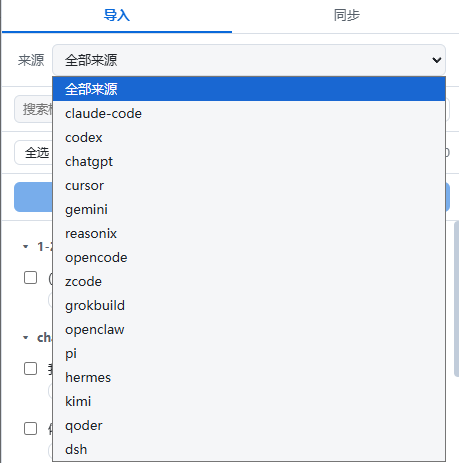
The dsh web sidebar shows an 导入会话 button in its footer, styled to match the sidebar's 设置 entry and carrying the plugin logo as its icon (a sidebar.footer.action slot entry: while the official Cordis plugin badge occupies the whole footer row the button renders as a fixed overlay just above the footer so it can never be squeezed out; when the badge is hidden or absent it sits in the footer row itself, right above 设置). It opens a panel listing discovered sessions grouped by workspace folder (each source's cwd/project when available, otherwise an "(未分组)" bucket), with a source filter — "全部来源" scans every format's default data root, a single source restricts the view — and a per-session import-status badge (已导入 / 部分 / 未导入). A search box filters by title / workspace / path, and the list is paginated (50 per page) with selections kept across pages for bulk operations. The panel closes on Escape.
Each row supports single import, and the checkboxes enable multi-select import ("导入所选 (N)"): the panel calls the same host import pipeline as the import_* tools, so idempotent skip / incremental append / force / context-budget semantics are identical, and the list refreshes with the new statuses after importing. A multi-session source (e.g. conversations.json, an opencode/zcode/hermes DB) is imported whole — opencode/zcode restrict to the selected sessionIds.
The data comes from the same read-only discovery as
scan_discover(30s TTL cache + persistent mtime bookmarks); the panel itself never writes anything except the imports you trigger.
/import slash command & /resume-* handoff
The plugin also registers a /import <source> <path> slash command (available where the dsh commands service is mounted): type it directly in a session to import without a model round-trip — the same pipeline and the same idempotent / incremental / force / context-budget semantics as the import_* tools. <source> accepts the short name (claude, codex, …), the client source id (claude-code), or the full tool name (import_claude); <path> is a transcript file or a session directory / data root (single-file import vs. directory batch as usual).
/import-all [source] [path] scans the default data roots (or one source / explicit path) and imports every not-yet-imported session in one shot — same pipeline, idempotent skip / incremental append, archived sessions skipped, failures reported individually.
/attach-workspaces re-attaches already-imported sessions to their cwd-matched workspaces from the imports registry — useful for fixing early imports that landed in “未分组” or whose workspace attach previously failed. It is idempotent and safe to re-run. Options: --mode auto|dedicated|per-project and --dir <path> (for dedicated).
/doctor runs the same read-only health check as the doctor tool and prints a concise report.
/mcp-status lists MCP servers discovered from Claude/Codex configs (read-only); use import_mcp to generate a DSH MCP client snippet.
/settings-suggest lists Claude/Codex config translation suggestions (read-only); use import_settings for the structured tool output.
/import-reset clears the scan cache (in-memory TTL + persistent scan-cache.json) when discovery results look stale; imported sessions are untouched.
/resume-claude [id:<sessionId> | keyword] and /resume-codex generate a handoff summary from an external transcript (goal + last request, involved files/artifacts, last tool call, exact stop point, safest next step) and inject it into the current session so you can continue the work in DSH — treating the transcript as untrusted static history (no system/developer/thinking content is reproduced; old tool output is flagged as stale evidence). Leave the argument empty for the most recent session, use id:<sessionId> for an exact one, or a title keyword — multiple matches list candidates without guessing:
/resume-claude id:282095ab-1111-4222-8333-444455556666
/resume-codex 修复登录
Session-start context enhancements
Two optional hooks run when a DSH session starts (the host agent/session-start event), both agent-scoped and never touching your transcripts:
- Migration hint (default on) — when the session's workspace has discoverable external history (already-imported or importable), a one-line
PromptContextis injected telling the model how to continue (/import <source> <path>or the sidebar panel). Per-project memory shows the hint only once per workspace; setDSH_IMPORT_SESSION_HINT=0to disable. - Claude context bridge (default off) — set
DSH_IMPORT_CONTEXT_BRIDGE=1to bridge Claude Code context assets into the session:~/.claude/memory/*.md(groupedfeedback>project>reference>user, 8 KiB cap, re-read via mtime cache), the project-rootCLAUDE.mdand global~/.claude/CLAUDE.md, and~/.claude/skills/*/SKILL.md(registered asclaude-<name>skills on this agent only).
🔑 Key behaviors
- Read-only import — source transcripts and databases are never rewritten; imported DSH history is append-only (existing events are never modified).
- Idempotent + incremental — unchanged sources are skipped without re-reading; growth appends only the new turns; truncation is detected and reported.
- Auto workspace grouping — sessions are grouped into the workspace of their source
cwd; the cwd is resolved through the authoritative~/.claude.jsonproject mapping (exact / basename / underscore variants, CJK-preserving) with an ASCII slug-decode fallback for Claude, greedy disk-existence decoding for Reasonix project slugs, and a home-directory sandbox guard (a cwd equal to the user's home is never used as a workspace — the sandbox ACL would reject it). When the resolvedcwddoes not exist on this machine (common when migrating transcripts from another machine), the session falls back to the workspace of the source file's directory so it never disappears into "未分组". - Imported sessions are fully tool-enabled — session creation prefers the host
agents.createpath with the default preset scope mounted (agentPresets.mount) and the default model bound (provider/model/maxTokens), so imported sessions expose the same tool surface as native ones and auto-compaction can engage; if theagentsservice is absent it falls back to plainsessionPersistencewithout breaking imports. - Context budget protection — imported sessions carry no provider configuration, so dsh never auto-compacts them; oversized sessions are trimmed to fit a context budget (per-message caps, then a compressed middle keeping the earliest prompts, a summary and the tail). The budget can be set per call or via the
DSH_IMPORT_CONTEXT_BUDGETenv var; the trim is always reported in the result. Claude sessions can instead be imported as their last compression summary + tail (compacted: true). - Fail loudly, never silently — malformed lines and suspected secrets are counted and reported by position (line numbers / kind — content is never output); anything a source format cannot preserve is explicitly flagged in the import report, and every export reports its
degradations. Every persisted session also runs a structural self-check (seq continuity, known event types,surfaceOpon surface events, validsourceEventSeqs) — violations surface in the import result as avalidationreport, andverify_sessionaudits any session on demand with repair hints. - Sandbox — reading source files or writing exports outside the workspace requires the session sandbox to allow the path.
🏗️ Tech Stack
| Layer | Technology |
|---|---|
| Runtime | Node.js ≥ 22.13 — pure ESM, zero build |
| Platform | DeepSeek Harness plugin — Cordis everything-is-a-plugin, consumes only public host services |
| Parsers | Claude/Codex/Cursor/Gemini/Reasonix/Pi/Kimi JSONL · ChatGPT JSON · opencode/ZCode/Hermes SQLite (node:sqlite) |
| Interop | Interchange v1 protocol (docs/INTERCHANGE.md) — shared turns IR + degradation rules + bundle format |
| UI | dsh web sidebar panel (hand-written CJS bundle) · i18n via @deepseek-ai/dsh-client-locale |
| CI | GitHub Actions — test / lint / check:linux cross-platform guard / headless smoke |
lib/
├── convert/          # pure per-source converters + interchange v1 core (zero DSH deps)
├── export/           # reverse serializers (claude / codex / kimi / bundle)
├── imports.mjs       # idempotent import registry
├── import-core.mjs   # shared import state machine (agents.create + cwdHint + home guard)
├── toolkit.mjs       # makeImportTool factory + IMPORT_SPECS
├── panel.mjs         # browser panel JSON routes
├── command.mjs       # /import + /import-all + /attach-workspaces + /doctor commands
├── resume-command.mjs # /resume-claude /resume-codex handoff (REQ-30)
├── handoff.mjs       # handoff summary pure functions (REQ-30)
├── cwd-map.mjs       # cwd authoritative mapping + slug decode + home guard (REQ-39)
├── restore.mjs       # restore_bundle orchestration (REQ-56/62)
├── verify.mjs        # verify_session structural audit (REQ-23)
├── doctor.mjs        # read-only migration health check (REQ-66)
├── mcp.mjs           # Claude/Codex MCP mirror plan (REQ-68)
├── settings.mjs      # Claude/Codex settings translation suggestions (REQ-71)
├── prompt-hint.mjs   # session-start migration hint (REQ-53)
└── context-bridge.mjs # Claude memory / CLAUDE.md / skills bridge (REQ-28)
⚙️ Compatibility
Targets the dsh 0.1.x line (dsh-tools ^0.1.0-rc.6, tested on dsh 0.1.0-rc.6) and requires Node.js >= 22.13 (the first release where node:sqlite is available without a flag). npm test — 484 cases.
🗺️ Roadmap
- 15 import sources + reverse export / sync back to Claude Code
- Browser import panel +
/import//import-allslash commands + session-start migration hint & context bridge - Interchange IR v1 + portable backup bundle + cross-machine restore (REQ-18 / REQ-56 / REQ-62)
- Matrix interop (Claude ↔ Codex ↔ Kimi ↔ DSH) +
verify_sessionaudit (REQ-23) +/resume-claude//resume-codexhandoff (REQ-30) - More sources: Reasonix desktop, Claude-3p (REQ-45) · Hermes lineage (REQ-51)
- Codex official App Server API source (REQ-52 — recon done, rollout route maintained)
⭐ Star History
🤝 Contributing
Contributions are welcome — fork the repo, create a feature/<name> branch, and open a PR. See CONTRIBUTING.md for the full guide (dev setup, conventions, security & privacy).
- Tests:
npm test· Cross-platform guard:npm run check:linux - Repo conventions live in AGENTS.md: conventional commits (Chinese), bilingual README must stay in sync, plugin consumes only public dsh host services, multi-session coordination via the file-claim protocol.
📄 License
MIT — see LICENSE.
查看使用指南 →
该插件的安装步骤、关键要点、FAQ 与兼容性说明(基于已收录字段派生)。
收录徽章

[](https://deepseek-plugin.org/plugins/Nwflower/dsh-chat-import)把这段 markdown 粘贴到你的 GitHub README,链接回本插件详情页。徽章只声明已被本站收录,不代表安全认证。