Package DSH into an Electron desktop app with native window, system tray, profile switching, standalone terminal, and update checking—no need to open the web version in a browser.

- Language
- TypeScript
- License
- MIT
- Branch
- master
Install
$ dsh plugin --profile web add dsh-plugin-desktopRun the command above in your terminal to install this plugin via the dsh CLI. You can switch Profile in the top-right corner. New to dsh? Read the beginner tutorial
Install via your agent
Install the DeepSeek Harness plugin anywhere-labs/deepseek-harness-desktop/dsh-plugin-desktop for me: review the repository at https://github.com/anywhere-labs/dsh-desktop first, then run the install command and verify the plugin loads successfully.
Paste this instruction to the DSH Web GUI assistant — it will install and verify for you.
One-Line Description
Wraps DeepSeek Harness in an Electron desktop application, using native windows and system tray to replace the "open local webpage in browser" approach. The installed app is named DSH Desktop, and the interface content remains the official DSH suite.
Core Features
- Launch DSH as a desktop app: start a service listening only on the local loopback address within the process, then load it in a native window with navigation restricted to this address
- Provide system tray menu: reopen window, switch profile, open dedicated terminal, check for updates, switch interface mode, exit app
- Switch profiles (plugin combinations) from the tray, with changes taking effect via "save first, then orderly restart"; failed starts automatically roll back once
- Provide two interface appearances: compatibility mode uses system native borders and the official interface; advanced mode uses frosted glass title bar on macOS and Mica material on Windows
- Open a system terminal on macOS/Windows with the current profile as working directory, where the
dshcommand defaults to the current profile - Check and download new version packages: periodic silent checks on timer; manual checks always show a result dialog
Technical Implementation
- Language: TypeScript
- Key Dependencies: electron (host runtime, peer dependency), @deepseek-ai/cordis (plugin orchestration), @deepseek-ai/dsh series 0.1.0-rc.6 (Host and Web client capabilities), koffi (Windows volume info diagnostics)
- Architecture Pattern: The packaged executable does minimal startup: acquire single-instance lock, parse current profile, set up native runtime capabilities, then start the Cordis root in the Electron main process. Features are inserted via
cordis.patch.ymlas multi-line plugins (desktop shell, terminal, package management, profile, updates); windows and tray are held by effects with cleanup logic; interface is loaded via loopback HTTP/WebSocket, no preload bridge used, renderer process has context isolation and sandbox enabled, Node integration disabled - Entry Files:
src/main.ts(Electron launcher),src/index.ts(desktop shell plugin),src/bin.ts(command-line entry for non-GUI environments)
Use Cases
Suitable for those already using DSH but not wanting to open a browser tab each time: after installation you have a standalone app that can sit in the Dock or taskbar, with the window hidden in the tray when closed. Also suitable for users who need to switch between multiple plugin combinations; the tray's profile menu is more convenient than manually editing config and restarting. If you only run DSH server-side without a UI, this plugin is not useful for you.
Prerequisites and Compatibility
| Dependency | Minimum Version | Description |
|---|---|---|
| Node.js | ^22.19.0 or >=24.0.0 | Declared by the package's engines field |
| DSH | 0.1.0-rc.6 | Fixed dependency on this version of the DSH package family; no loose range declared |
| Electron | 43.4.0 | peer dependency; npm global install will bring it automatically; installing in profile requires manual add |
| Platform | macOS / Windows / Linux | Runs on all three, but Linux only has compatibility mode, and no tray terminal or update download |
| Native Modules | koffi, node-pty | koffi for Windows volume diagnostics; packaged product includes node-pty precompiled binaries |
Installation
dsh plugin --profile web add github:anywhere-labs/deepseek-harness-desktop/dsh-plugin-desktop
Configuration Options
| Config | Type | Description | Default |
|---|---|---|---|
| Interface Mode | compatibility | advanced | Choose native appearance: compatibility mode loads official interface with system borders, advanced mode换成桌面专属外观; takes effect after restart, Linux doesn't accept advanced mode | compatibility |
| Window Width | Number (CSS pixels) | Window width on first open, minimum 800 | 1280 |
| Window Height | Number (CSS pixels) | Window height on first open, minimum 600 | 840 |
| Min Width | Number (CSS pixels) | Narrowest width allowed, minimum 640 | 900 |
| Min Height | Number (CSS pixels) | Shortest height allowed, minimum 480 | 640 |
| Background Update Check | Boolean | When disabled, packaged version no longer periodically checks for new versions; tray manual check still available | true |
| First Check Delay | Milliseconds | How long to wait after startup before first update check | 60000 |
| Check Interval | Milliseconds | Wait time between one check ending and the next check starting | 21600000 (6 hours) |
| Single Request Timeout | Milliseconds | Maximum wait time for one version query; timeout treated as silent failure | 15000 |
The interface mode can also be written directly in DSH home's settings.yaml (under dsh-desktop.mode); the tray selection modifies the same file.
FAQ
Q: After installing this plugin, can I double-click to open the desktop app directly?
A: Not necessarily. Starting requires electron to be present: using npm install -g dsh-plugin-desktop will automatically install electron, but installing via profile does not auto-install; you need to add dsh plugin --profile <name> add electron manually. When missing, the command only prints installation guidance, it won't throw a module error.
Q: Is the interface seen in the desktop version the same as the web version?
A: The default compatibility mode loads the official web interface, just wrapped in a native window with system borders; macOS hides the page title, Windows removes the menu bar. After switching to advanced mode, macOS gets a transparent title bar plus sidebar frosted glass, Windows gets a Mica background.
Q: How do I switch interface mode?
A: Choose from the tray menu, or manually edit DSH home's settings.yaml, setting dsh-desktop.mode to compatibility or advanced. Both methods modify the same file; after committing, the app will restart orderly, it won't hot-swap while running.
Q: Does it work on Linux?
A: It can start, but only supports compatibility mode; writing advanced mode will be rejected rather than downgraded; the "Open DSH Terminal" command in tray is not included on Linux, nor is update package download.
Q: Will switching profiles lose chat history?
A: No. The default official profile shares the same sessions, settings, and storage under the DSH home; switching just swaps to a different plugin combination and restarts, it won't copy or migrate data. Custom profiles can actively change a storage location elsewhere.
Q: I added a new plugin to the profile, why don't I see it in the desktop app?
A: The launcher doesn't listen for changes to the profile list; after adding/removing plugins you need to restart the desktop app for changes to take effect; switching a profile from the tray will also complete this restart.
Q: Are updates automatically installed?
A: No. Packaged version checks once after 60 seconds of startup, then checks again every 6 hours after each check completes; it prompts for download when an update is found. On macOS it opens the downloaded DMG, requiring you to manually replace the app; Windows requires confirmation before running the installer. Checks fail silently when there's no network or versions match.
Q: Does closing the window exit the program?
A: No. Closing the window only hides the window; the Cordis tree in the background continues running and can be reopened from the tray; to truly exit, choose the exit command from the tray, or send SIGINT/SIGTERM.
Getting Started Difficulty
Beginner — after installation, mode switching, profile switching, and update checking can all be done from the tray; default config works out of the box; only when installing in profile is an extra electron dependency needed.
Known Issues and Limitations
- After adding/removing plugins in a profile, the app must be restarted; the launcher doesn't listen for profile list changes
- Switching compatibility/advanced mode inevitably restarts the app; running windows won't hot-swap appearance or plugin lines
- Linux doesn't support advanced mode, nor tray terminal commands or update package downloads
- On Windows,
pnpmand Node helper commands exposed to the environment are.cmdscripts; third-party plugins that call them directly without going through shell will fail; should use managed services or shell-based launch methods - Update process only verifies downloaded file integrity, not publisher identity; locally built Windows installers are unsigned and may trigger unknown publisher or SmartScreen warnings
- Communication between interface and backend uses local loopback HTTP/WebSocket, not Electron IPC; replacing it requires upstream DSH to provide transport extension points
- Dependency is fixed to published DSH 0.1.0-rc.6 package family; no wider version range declared
- Third-party marketplace package
[email protected]is not pre-installed and is incompatible with this plugin's profile and package management capabilities; need to wait for its adapted version release
DeepSeek Harness Desktop(DSH Desktop)
面向 Windows 和 macOS 的开源 DeepSeek Harness 桌面客户端。
一键下载,开箱即用。
万物皆「插件」,桌面本身也是「插件」。
社区维护的开源项目,并非 DeepSeek 官方产品。中文 · English
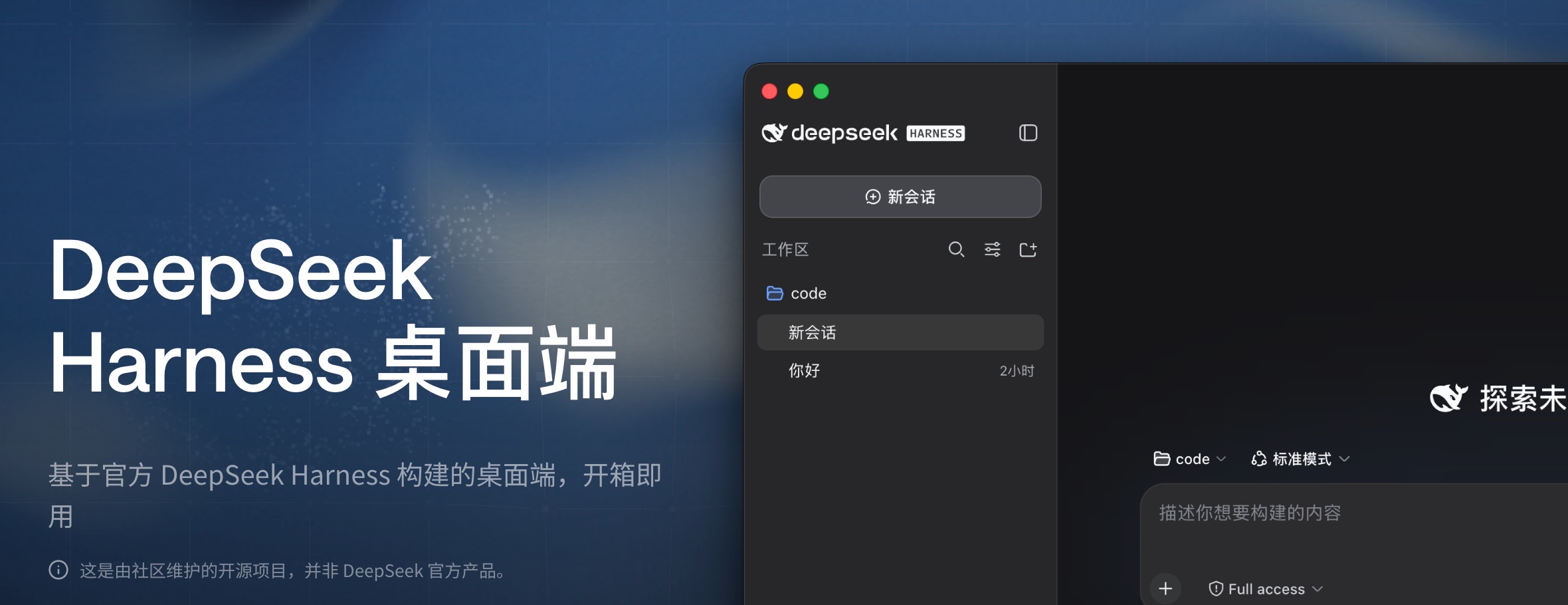



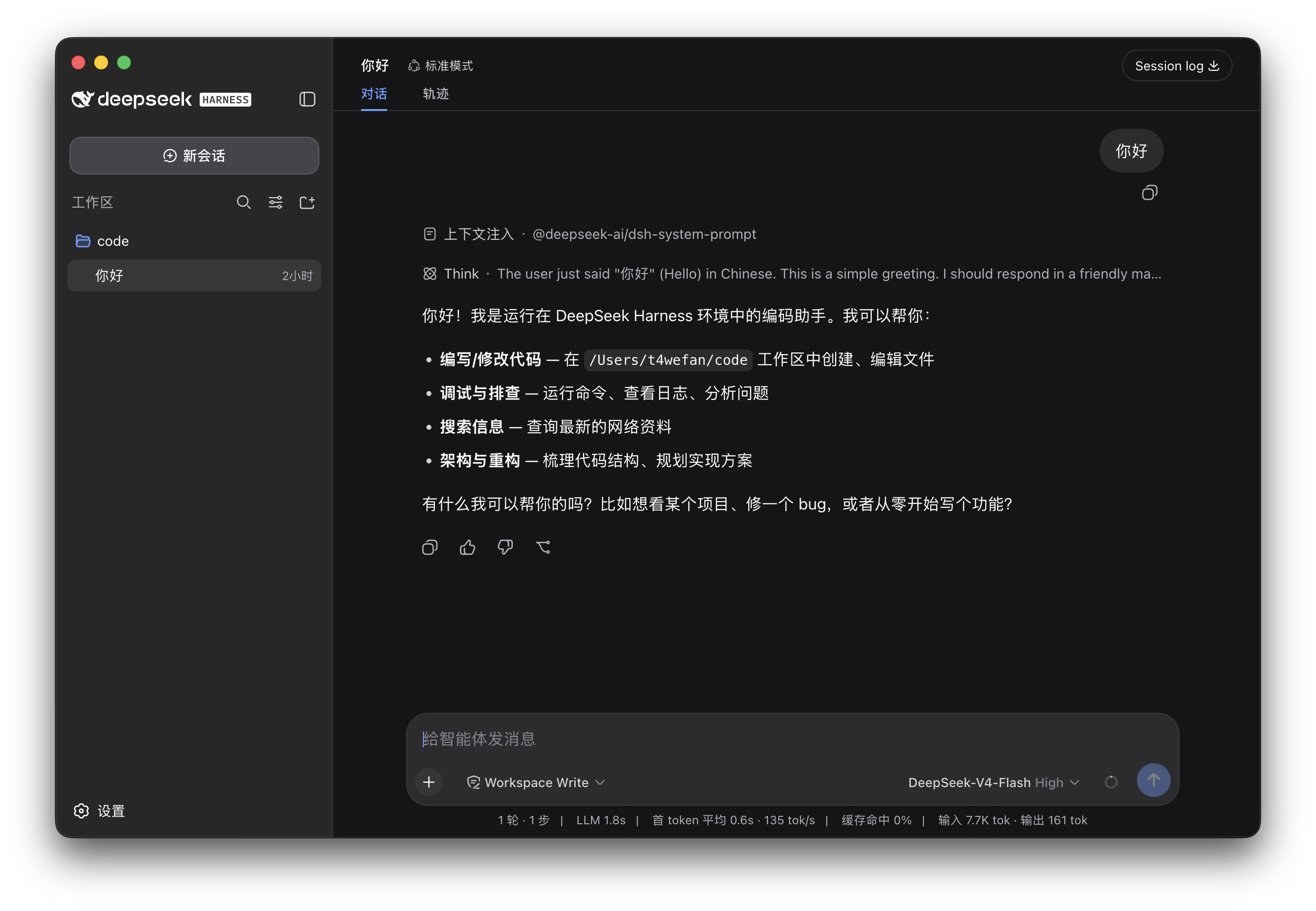
DSH Desktop 把 DeepSeek Harness 的本地 Web UI、Host 服务和插件系统装进原生桌面应用。官方 Harness 以固定版本原样运行;Desktop 负责窗口、托盘、终端、更新和工作配置,并通过官方插件机制与 Harness 组合。
下载与安装
当前正式安装包支持 Windows x64 和搭载 Apple 芯片的 macOS。普通用户不需要单独安装 Node.js、pnpm 或 DSH。
| 平台 | 下载 | 安装方式 |
|---|---|---|
| Windows x64 | 下载安装程序 | 运行 NSIS 安装程序并按提示完成安装 |
| macOS Apple Silicon | 下载 DMG | 打开 DMG,将 DSH Desktop 拖入 Applications |
也可以从 GitHub Releases 获取安装包和 SHA-256 摘要。首次启动会创建默认 desktop profile,并在本机启动官方 DSH Web 界面。详细步骤、插件命令和故障排查见用户指南与常见问题。
我们希望和所有插件作者一起,构建一个开放、可组合、可持续的 DSH 插件生态,让每个插件都能与其他插件共同进步:DSH 插件生态倡议书。
文档
普通用户从用户指南开始即可;开发者文档只在需要扩展或维护时才需要阅读。
用户文档
| 目标 | 入口 |
|---|---|
| 安装和日常使用 | 用户指南 |
| 快速确认平台、环境和使用边界 | 常见问题 |
| 了解项目为什么存在 | 为什么做 DSH Desktop |
| 查看全部文档与 README 分工 | 文档索引 |
开发者与维护者文档
| 目标 | 入口 |
|---|---|
| 阅读插件生态倡议书 | 插件生态倡议书 |
| 编写普通或 Desktop 插件 | 插件开发 |
| 参与统一插件 contract 讨论 | DSH Community Fabric Draft |
| 了解统一插件框架为什么这样设计 | 成熟框架与真实插件调研 |
| 查看插件市场的产品与安全设计 | DSH Community Market |
| 了解桌面插件可以使用的能力 | 桌面插件接口说明 |
| 了解桌面应用如何工作 | 架构说明 |
| 查阅包级构建与发布细节 | dsh-plugin-desktop/README.md |
主要功能
Desktop把官方 DeepSeek Harness 的本地 Web UI 带到原生桌面。应用自动启动和管理本地 Harness 服务,集成系统托盘与桌面窗口,无需安装 Node.js 或执行命令。 |
手机远程控制
通过 iOS 和 Android 远程连接 Desktop,在手机上发起任务、查看 Agent 进度,并在需要时继续跟进。 |
插件市场
我们正在通过 DSH Community Market 设计插件发现、详情和确认安装体验。当前只有产品与安全文档,尚未提供可用市场页面。 |
共建插件生态DSH 的插件生态由社区共同建设。官方、桌面和第三方插件遵循统一的约定,装在一起也能一起工作、互不干扰;欢迎加入共建,详见 DSH 插件生态倡议书。 |


插件生态
插件是给 DSH 添加能力的扩展包——模型、工具、界面、工作流都可以做成插件,像搭积木一样自由组合。
DSH Desktop 没有魔改上游源码,也不是一个固定写死的外壳。官方 DeepSeek Harness 以固定版本原样运行;桌面壳本身——窗口、托盘、终端、更新、工作配置——就是一个合法的 DSH 插件,通过官方插件机制与官方能力组合进同一个运行时。从核心 agent 到桌面外壳,整个产品遵守同一条"一切皆插件"的规则:官方生态里的插件可以直接用,桌面能力也按插件的方式组合、替换和演进。
我们希望插件生态像手机应用一样:每个插件按同一套规则开发,装在一起也能一起工作、互不干扰。
给开发者
与许多其他项目不同,这个项目本身就是一个 DSH 插件:桌面壳与第三方插件走同一条官方组合路径。Desktop 的插件能力已经可以使用。我们提供了 Desktop 服务,让插件开发者能够把插件与桌面能力集成起来:例如查看和切换工作配置,或在当前配置中安装、更新和移除插件。完整用法见桌面插件接口说明。为什么选择这样的边界、哪些能力不会暴露给第三方插件,见为什么做 DSH Desktop和插件开发指南。
与官方项目的关系
本项目基于 deepseek-ai/deepseek-harness 构建。
本项目是基于 DeepSeek Harness 和 Cordis 插件思想的实现,旨在成为 DSH 桌面体验的基础设施。
官方项目提供核心的智能体能力、插件系统和 Web UI。本项目主要负责:
- 桌面应用封装
- 本地服务的启动、停止与恢复
- 桌面窗口和系统托盘集成
- macOS、Windows 安装包构建与发布
- 更适合桌面使用的界面体验
如果你希望通过命令行运行 Harness,或者参与核心功能开发,请优先查看官方仓库。
特别感谢
特别感谢 DeepSeek Harness 原始仓库 和 DeepSeek AI 团队。DSH Desktop 基于固定版本的上游源码构建,核心的智能体、模型、工具、会话、Web UI 和插件生态都来自这个项目。
同时感谢 Cordis 项目提供的插件化基础。没有这些开源项目,就不会有 DSH Desktop。
也感谢 Koishi.js 项目和社区长期积累的插件化实践、工具与经验,以及所有参与讨论、测试、反馈和插件开发的社区成员。
以及每一个使用、支持和参与共建的你。
开发
桌面端代码位于 dsh-plugin-desktop/,外层仓库使用 Yarn,固定的 deepseek-harness/ 子模块继续使用自己的 pnpm workspace。从仓库根目录执行:
git submodule update --init --recursive
corepack yarn install --immutable
corepack yarn dev
headless 检查使用 corepack yarn check;完整的构建、测试和发布边界见架构说明和包级 README。如何参与贡献见 CONTRIBUTING.md。
社区交流
可选择常用的平台参与讨论,交流使用问题、插件开发和项目进展。
| 微信群 | QQ群 |
|---|---|
 |  |
Discord:加入 DeepSeek Harness Desktop 社区
如果您希望加入我们的技术团队,也欢迎通过 [email protected] 联系我们。
友情链接
这里收录 DeepSeek Harness 生态项目及开发者工具。
| 项目 | 简介 | 链接 |
|---|---|---|
| dshfind | DeepSeek Harness(DSH)学习与分享社区。 | GitHub |
| DSH 1024Store | 面向 DeepSeek Harness(dsh)生态的社区插件目录(收录 4120 个插件),并开源了在线插件市场、目录流水线与公开查询 API,可 fork 自建市场。 | GitHub |
| ModLens | 为 DeepSeek Harness 和纯文本 Coding Agent 提供 OCR、版面与语义识别能力。 | GitHub · 官网 |
| DeepSeek Harness 橙皮书 | DeepSeek Harness 社区实测手册。 | GitHub |
| dsh-web-ui | DeepSeek Harness Web UI 插件与皮肤合集。 | GitHub · 展示站 |
| dsh-TUI | DeepSeek Harness 全屏交互式终端界面。 | GitHub |
| dsh-tianshu-tui | DSH Web 端交互式终端极简风格 UI 插件,自研 ANSI 渲染核心、极致丝滑流畅;在官方基础上增加了 TDD、证据门、视觉图像模块等工作流。 | GitHub |
| Agents-Anywhere | 从手机远程控制电脑上的 Coding Agent。 | GitHub |
| DSH-better-sidebar | DeepSeek Harness 侧边栏工作台,集成文件、终端、Git 和子代理。 | GitHub |
| Awesome DeepSeek Harness | DeepSeek Harness 插件、工具与基础设施精选列表。 | GitHub · 官网 |
| MkSaaS · TanStarter(赞助商) | 面向独立开发者的商业 SaaS 启动模板。MkSaaS 基于 Next.js,TanStarter 基于 TanStack Start 与 Cloudflare,内置 AI、认证、支付和后台等常用能力。 | MkSaaS · TanStarter |
如果希望收录您的项目,欢迎加入微信群并私信 @王博升Benson,或联系 [email protected],或提出 issue。
License
本项目遵循 MIT License。
本项目是基于 DeepSeek Harness 构建的社区桌面版本,并非 DeepSeek 官方产品。
本项目完全开源免费。如果有人向您以任何形式出售此软件,请拒绝交易。
DeepSeek 是 DeepSeek AI 的商标。DSH Desktop 是独立的社区项目,与 DeepSeek 官方没有隶属关系,也未获得其背书。
Star History
Read the usage guide →
Install steps, key points, FAQ and compatibility for this plugin — auto-derived from indexed fields.
Listing badge

[](https://deepseek-plugin.org/plugins/anywhere-labs/deepseek-harness-desktop/dsh-plugin-desktop)Paste this markdown into your GitHub README to link back to this listing. The badge only states the listing — not a security endorsement.