Package 8 Sealos Cloud skills for DeepSeek Harness, covering deployment, cloud databases, object storage, and local read-only topology views.

- Language
- Python
- Branch
- main
Install
$ dsh plugin --profile web add github:labring/sealos-skillsRun the command above in your terminal to install this plugin via the dsh CLI. You can switch Profile in the top-right corner. New to dsh? Read the beginner tutorial
Install via your agent
Install the DeepSeek Harness plugin labring/sealos-skills for me: review the repository at https://github.com/labring/sealos-skills first, then run the install command and verify the plugin loads successfully.
Paste this instruction to the DSH Web GUI assistant — it will install and verify for you.
One-Sentence Pitch
Pack 8 Agent Skills maintained by the Sealos Cloud team into DeepSeek Harness's web profile in one go, enabling AI agents to directly complete operations like project deployment, cloud databases, S3 object storage, and Sealos Desktop app development within conversations.
Core Capabilities
- One-click deploy local or GitHub projects to Sealos Cloud, with automatic validation of actual URLs, login flows, logs, databases, and resource manifests after deployment
- Evaluate repository cloud-native readiness (0-12 points), and hand off to Dockerfile generation phase after passing
- Generate production-ready Dockerfiles for any project (including multi-stage builds, monorepo, and build-fix iterations)
- Convert Docker Compose or installation docs to Sealos templates with role-based resource quotas, official routing semantics, KubeBlocks databases, and Job gates
- Create managed databases such as Postgres, MySQL, MongoDB, and Redis on Sealos Cloud via sealos-cli, only writing required local environment variables
- Use sealos-cli s3 to create and manage S3-compatible object storage buckets, access credentials, and presigned URLs—private by default, public access requires confirmation
- Provide Sealos Desktop app development guidance, including SDK integration, iframe debugging, and beginner tutorials
- Start a read-only canvas UI locally at 127.0.0.1 that reads deployed project's .sealos/state.json and kubectl resources, displaying only without modification
Technical Implementation
- Language: JavaScript (ESM)
- Key Dependencies:
@deepseek-ai/cordis(peer, injected by host),yaml^2.4.2 (for parsing SKILL.md YAML frontmatter) - Architecture Pattern: Cordis plugin, uses
inject = ['skills']to depend on host ctx.skills, callsctx.skills.registerProvider()to register a provider namedsealoswith rank=600 (same level as host built-in provider). cordis.patch.yml appendssealos-skillsnode during bundle phase, depends on skill registry mounted by @deepseek-ai/dsh-base. - Entry File: index.js (sync reads skills/*/SKILL.md → registers provider → list/get returns skill list and details)
Use Cases
People using DeepSeek Harness who want AI agents to directly handle Sealos Cloud tasks. If you only want the agent to write Dockerfiles, understand docker-compose.yml, or view local resource topology from already-deployed projects, this bundle can be used standalone—but the most valuable feature is running the full "code→deploy→view results" chain.
Prerequisites & Compatibility
| Dependency | Minimum Version | Notes |
|---|---|---|
| DeepSeek Harness | Not declared | README example uses npx @deepseek-ai/dsh web, requires web profile to be installed and initialized |
| Node.js | Not declared | index.js uses node:fs/promises and top-level await; test.js uses node:test, recommends Node 18+ |
| pnpm | Not declared | README line 103 notes pnpm must be in PATH during bundle installation |
| Platform | Cross-platform | Pure JS implementation, no OS restrictions declared |
| Native modules | None | Only depends on yaml, no node-gyp / native extensions |
| Runtime external tools | As needed | sealos-deploy metadata.compatibility requires: Sealos account/workspace, docker, buildx, gh CLI (as needed), git (as needed), kubectl, Node 18+ (optional acceleration), Python 3.8+ and PyYAML (Phase 5), kompose/crane (for Compose conversion) |
Installation
dsh plugin --profile web add github:labring/sealos-skills
Configuration
This plugin requires no additional configuration. The bundle automatically scans skills/*/SKILL.md in the repository at startup and registers all 8 skills to ctx.skills.
FAQ
Q: How do I invoke it in DSH after installation?
A: DSH doesn't provide a /sealos slash command for this bundle. Simply tell the agent to "deploy to Sealos Cloud", "create a cloud database", "connect to S3", or ask to view resources from the last deployment—the agent will load the corresponding sealos-* skill via the skill tool and execute it.
Q: Must I install it to the web profile?
A: Yes. README line 103 explicitly states this repository is a web profile dsh bundle, and installing to other profiles won't take effect.
Q: What external tools should I prepare before using it?
A: To actually deploy projects to the cloud, you'll need docker, buildx, kubectl, gh CLI (as needed), and sealos-cli. Generating Dockerfiles or converting docker-compose to Sealos templates only requires Node.js and Python 3.8+. The full list is in sealos-deploy's metadata.compatibility field.
Q: Do I need a Sealos Cloud account to use it?
A: Not necessarily. Cloud databases, object storage, and actual deployments all require a Sealos account and workspace. Generating Dockerfiles, converting Compose templates, and viewing the canvas don't need a cloud account.
Q: Is DSH's default bash sandbox sufficient?
A: No. Logging into Sealos writes to ~/.sealos/kubeconfig, which the default sandbox blocks. You need to enable sandbox_permissions: danger-full-access in DSH configuration, otherwise the login step gets intercepted by the sandbox.
Q: How do I upgrade or uninstall?
A: Upgrade: Running dsh plugin --profile web add github:labring/sealos-skills again will overwrite and update skills/. Uninstall: Remove the bundle from the profile or directly delete the skills/ directory—DSH doesn't provide a dedicated uninstall command for it.
Q: How is priority determined for the 8 skills?
A: All use BUNDLED_SKILL_RANK=600 (index.js line 8), placing them at the same level as DSH's built-in skill providers, ordered by skill name in ascending order.
Learning Curve
Beginner — the bundle itself requires no configuration; install it and trigger it with natural language in sessions. However, actually completing cloud deployments requires a Sealos account, container registry, sealos-cli, and kubectl, so there's significant external preparation before running through the full process for the first time.
Known Issues & Limitations
- Installation and login depend on pnpm being in PATH (README:103)
- Bash sandbox blocks
~/.sealos/kubeconfigwrites by default, requiring explicit danger-full-access enablement (README:118) - Bundle is designed only for web profile; installing to other profiles won't take effect (README:103)
- Actual cloud operations (deployment, database/S3 creation) require Sealos account, workspace, and container registry; local-only generation capabilities are limited
- Canvas skill requires validated last_deploy evidence in .sealos/state.json, otherwise stops rather than degrading to read-only view (skills/sealos-canvas/SKILL.md:1-7)
- sealos-database/sealos-s3 default to private access; public access and deletion are gated and require explicit user confirmation (skills/sealos-database/SKILL.md, skills/sealos-s3/SKILL.md)
English | 简体中文 | 繁體中文 | 日本語 | 한국어 | Español | Français | Deutsch | Português (Brasil) | Русский | العربية | हिन्दी | Bahasa Indonesia
Deploy projects to Sealos Cloud from your AI agent.
Sealos Skills is a plugin-first skill pack centered on Sealos Cloud development and deployment. It helps an AI agent inspect a project, prepare missing deployment artifacts, connect Sealos Cloud databases and object storage for development, build or reuse a container image, ship the app to Sealos Cloud, and view deployed resources in a local read-only canvas.
The recommended Codex path is native Codex plugin installation. Cross-host plugin installs, skills.sh, and context-only extension hosts such as Gemini CLI and Qwen Code use the same root skills/** source.
Quick Start
Recommended: install in Codex
Add this repository as a Codex marketplace, then install the Sealos plugin:
codex plugin marketplace add labring/sealos-skills
codex plugin add sealos@sealos
One Sealos plugin installs the deploy, database, S3, canvas, app-builder, and supporting cloud-native skills from root skills/**: sealos-deploy, sealos-database, sealos-s3, sealos-canvas, sealos-app-builder, cloud-native-readiness, dockerfile-skill, and docker-to-sealos.
For compatibility and local Codex testing, install the same plugin with:
npx plugins add https://github.com/labring/sealos-skills --target codex
After installation in Codex, use the plugin from Codex:
- Codex CLI: type
$sealos - Codex App: click the + button in the lower-left corner of the chat input, choose Plugins, then choose Sealos
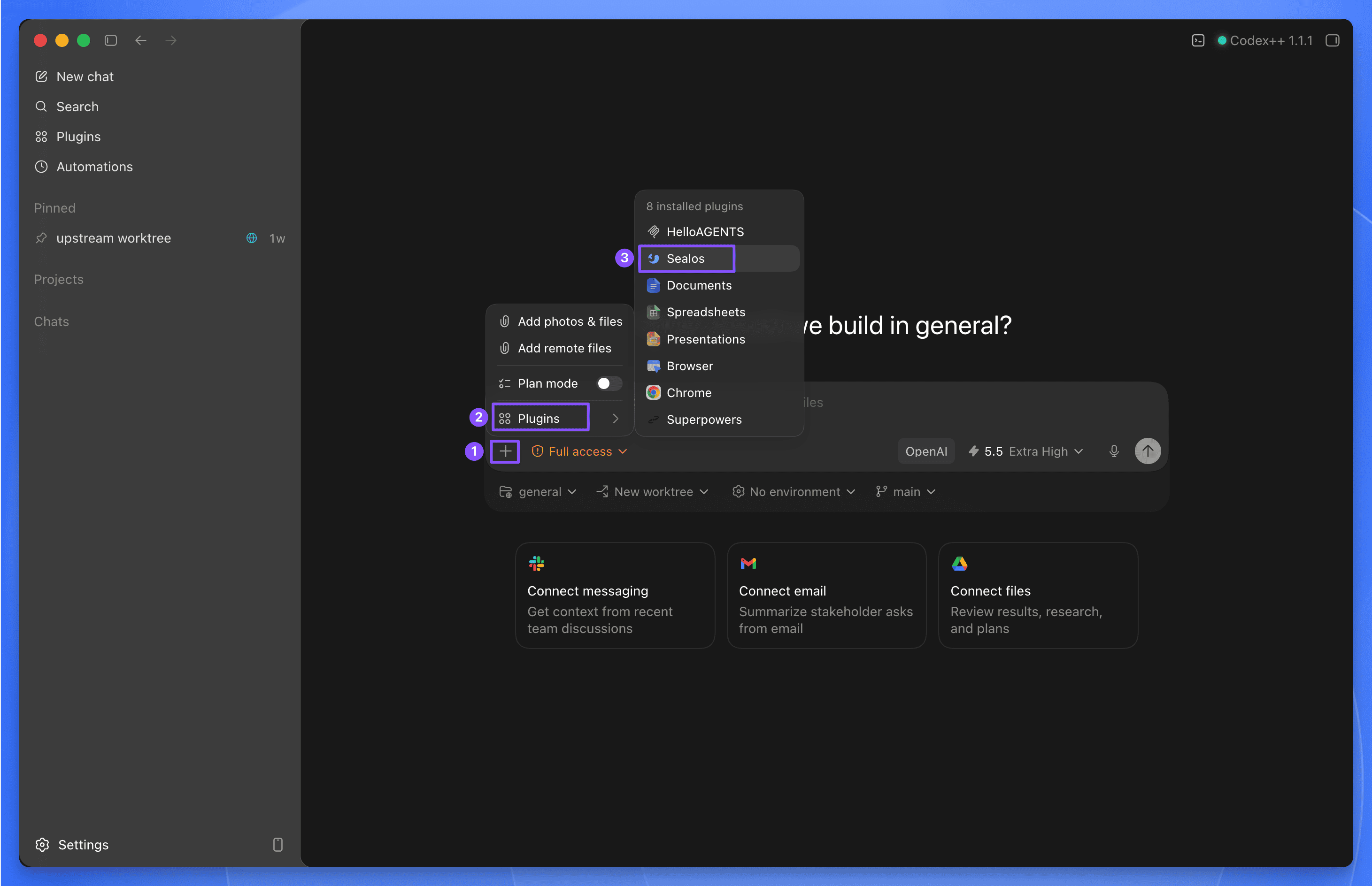
Codex examples:
$sealos deploy this repo to Sealos Cloud
$sealos deploy /path/to/project
$sealos deploy https://github.com/labring-sigs/kite
$sealos create a cloud Postgres database for this repo and wire DATABASE_URL
$sealos create private S3 object storage for uploads and wire env vars
Install in Claude Code
Add this repository as a Claude Code marketplace, then install the Sealos plugin:
claude plugin marketplace add labring/sealos-skills
claude plugin install sealos@sealos
For compatibility with cross-host plugin installers, install the same plugin with:
npx plugins add https://github.com/labring/sealos-skills --target claude-code
If you only use one detected agent tool on the machine, you can let plugins choose the target:
npx plugins add https://github.com/labring/sealos-skills
After installation in Claude Code, use /sealos:
/sealos deploy this repo to Sealos Cloud
/sealos deploy /path/to/project
/sealos deploy https://github.com/labring-sigs/kite
/sealos create a cloud Postgres database for this repo and wire DATABASE_URL
/sealos create private S3 object storage for uploads and wire env vars
Test in Qoder
Build the Qoder plugin package from the repository root:
python3 scripts/package-qoder-plugin.py
Import dist/sealos-1.2.5.zip into Qoder. The package exposes the same eight root-level skills as the Codex plugin and provides /sealos as its command entry point.
Qoder examples:
/sealos deploy this repo to Sealos Cloud
/sealos create a cloud Postgres database for this repo and wire DATABASE_URL
/sealos create private S3 object storage for uploads and wire env vars
/sealos show the resources created by the last deployment
Install in DeepSeek Harness
This repository is a dsh profile bundle over the same root skills/** source. After npx @deepseek-ai/dsh web works, install it into the same web profile (pnpm must be on PATH):
npx @deepseek-ai/dsh plugin --profile web add github:labring/sealos-skills
npx @deepseek-ai/dsh web
A local checkout:
npx @deepseek-ai/dsh plugin --profile web add /path/to/sealos-skills
The eight root skills appear in the session skill catalog. Ask the agent to deploy to Sealos Cloud; it loads sealos-deploy (and sibling skills as needed) through the skill tool, then runs kubectl / sealos-cli through bash.
The default bash sandbox blocks writes outside the workspace. Login writes ~/.sealos/kubeconfig, so those commands need sandbox_permissions: danger-full-access.
Other supported AI tools
| Tool | Install | Usage |
|---|---|---|
| Codex CLI / Codex App | codex plugin marketplace add labring/sealos-skills then codex plugin add sealos@sealos | $sealos in Codex CLI, or + → Plugins → Sealos in Codex App |
| Claude Code | claude plugin marketplace add labring/sealos-skills then claude plugin install sealos@sealos | /sealos |
| Claude Code compatibility path | npx plugins add https://github.com/labring/sealos-skills --target claude-code | /sealos |
| Qoder | Build with python3 scripts/package-qoder-plugin.py, then import the ZIP | /sealos or automatic skill selection |
| DeepSeek Harness | npx @deepseek-ai/dsh plugin --profile web add github:labring/sealos-skills | Ask the agent to use Sealos skills; there is no /sealos slash command |
| OpenClaw / ClawHub | clawhub install labring/sealos-skills | Host command exposure depends on the ClawHub runtime |
| CodeBuddy | /plugin marketplace add labring/sealos-skills | Host command exposure depends on the CodeBuddy runtime |
| Gemini CLI | gemini extensions install https://github.com/labring/sealos-skills | Context-only extension; ask Gemini to use Sealos Skills |
| Qwen Code | qwen extensions install https://github.com/labring/sealos-skills | Context-only extension; ask Qwen to use Sealos Skills |
| Amp / Kimi / generic repo importers | Import https://github.com/labring/sealos-skills.git | Host-dependent |
Gemini CLI and Qwen Code manifests provide repository context through CLAUDE.md; they do not claim slash-command support.
Alternative: install as a skills.sh skill pack
If your agent uses skills.sh directly, install the same skills pack with:
npx skills add labring/sealos-skills
Then run the deploy skill directly:
/sealos-deploy
/sealos-deploy /path/to/project
/sealos-deploy https://github.com/labring-sigs/kite
/sealos-database create a cloud Postgres database for this repo and wire DATABASE_URL
/sealos-s3 create private object storage for uploads and wire env vars
After a project has been deployed and .sealos/state.json contains verified last_deploy runtime evidence, use the sealos-canvas skill through your installed plugin entry point for a local read-only view. Canvas stays plugin-pack mediated because it consumes verified deployment state.
/sealos-deploy, /sealos-database, and /sealos-s3 are direct skills.sh skill entries. Plugin usage should go through $sealos in Codex or /sealos in Claude Code.
Why Use the Plugin
Prefer the plugin install for Codex, Claude Code, and Qoder because it:
- installs all Sealos skills as one managed package
- exposes the same skills across supported agent tools
- keeps the plugin metadata, logo, prompts, commands, and capabilities together
- avoids maintaining a separate packaged copy of the skills
Plugin Distribution
The Codex integration follows OpenAI's Codex plugin build guide:
.codex-plugin/plugin.jsoncontains plugin identity, discovery metadata, interface copy, default prompts, brand metadata, and asset paths relative to the repository root..agents/plugins/marketplace.jsonregisters this repo-local plugin for local Codex marketplace testing..claude-plugin/plugin.jsonand.claude-plugin/marketplace.jsondefine the Claude Code-compatible plugin surface..qoder-plugin/plugin.jsondefines the Qoder plugin surface and explicitly exposes all eight Codex skills.qoder.mdprovides Qoder-level routing and safety instructions without copying skill implementations.distribution/platforms.jsonrecords platform support claims and evidence.marketplaces/README.mdowns marketplace rules and prevents command-support overclaims.scripts/validate-codex-plugin.pyvalidates the Codex manifest, Claude Code metadata, repo marketplaces, platform registry, and asset paths.scripts/package-qoder-plugin.pybuilds a Qoder-compatible ZIP with the plugin manifest at the archive root.skills/**/SKILL.mdremains the only skill source; do not add a second packaged copy of the skills.package.json,cordis.patch.yml, andindex.jsregister that same root skill tree as a DeepSeek Harness profile bundle.
Validate plugin metadata before publishing or pushing manifest changes:
python3 scripts/validate-codex-plugin.py
python3 -m json.tool .codex-plugin/plugin.json >/dev/null
python3 -m json.tool plugin.json >/dev/null
python3 -m json.tool .agents/plugins/marketplace.json >/dev/null
python3 -m json.tool marketplace.json >/dev/null
python3 -m json.tool .claude-plugin/plugin.json >/dev/null
python3 -m json.tool .claude-plugin/marketplace.json >/dev/null
python3 -m json.tool .qoder-plugin/plugin.json >/dev/null
python3 -m json.tool distribution/platforms.json >/dev/null
How Setup Works
You only need a plugin-compatible or skills.sh compatible AI agent and a project to deploy.
During the deploy, database, and object-storage flows, Sealos Skills will:
- check whether tools such as Docker and
kubectlare available - guide the user through Sealos login when needed
- use
sealos-clifor Sealos Cloud database creation, connection details, and database operations - use
sealos-cli s3for Sealos object storage buckets, credentials, quota checks, object operations, and presigned URLs - use or help prepare a container registry path such as Docker Hub or GHCR
For an actual deployment, you will still need a Sealos Cloud account and access to a container registry, but these do not need to be fully set up before the skill starts. For database and object-storage work, you need a Sealos Cloud account and a workspace that can create the requested resources.
What Sealos Deploy Handles
On a typical deploy, the agent will:
- assess the project structure and runtime needs
- reuse an existing image or build one when needed
- generate a Sealos template
- deploy and verify rollout
- verify the actual Sealos App URL, logs, login/setup flow for web apps, and resource footprint before reporting the app as usable
Later runs can switch to an in-place update flow when an existing deployment is detected.
What Sealos Database Handles
For a local project or Devbox that needs a cloud database, the agent will:
- detect database signals such as
DATABASE_URL, Prisma, Drizzle, MongoDB, MySQL, or Redis - use
sealos-cli databaseto list, create, inspect, and connect Sealos Cloud databases - write only the required local env key without exposing secrets in chat
- verify the app's real database path through migrations, introspection, or startup checks
- manage public access only after confirmation
What Sealos S3 Handles
For a local project or Devbox that needs S3-compatible object storage, the agent will:
- detect object-storage signals such as S3 env keys, AWS SDK usage, MinIO, upload paths, or presigned URL code
- use
sealos-cli s3fromzjy365/sealos-cli#28to list, create, inspect, and update object storage buckets - initialize S3 credentials only when needed and keep access keys out of chat
- wire the smallest required local env keys for bucket, endpoint, access key, secret key, region, and path-style settings
- verify upload, list, download, delete, or presigned URL behavior with the project's real storage path
- make buckets public or rotate credentials only after confirmation
What Sealos Canvas Handles
For a repository already deployed by Sealos Deploy, the agent will:
- Read
.sealos/state.jsonto locate the deployed app. - Query the Sealos namespace with read-only
kubectl getcommands. - Start a temporary
127.0.0.1canvas UI. - Output and open the local UI address for inspection.
If the project has not been deployed yet, Sealos Canvas stops and directs the user to deploy the project first.
Included Skills
The plugin and skills.sh pack expose the same skill source:
sealos-deploy— deploy a local or GitHub project to Sealos Cloudsealos-database— create, connect, and operate Sealos Cloud databases for developmentsealos-s3— create buckets, connect credentials, check quota, and operate Sealos S3-compatible object storagesealos-canvas— view deployed Sealos resources in a local read-only canvas UIsealos-app-builder— build Sealos Desktop apps with SDK integrationcloud-native-readiness— assess deployment readinessdockerfile-skill— generate production-ready Dockerfilesdocker-to-sealos— convert Docker Compose services into Sealos templates
Repository
skills/ is the single source of truth for Sealos deploy, Sealos canvas, and the supporting skills used during the deploy flow. The same root-level skills directory serves skills.sh installs and every plugin or extension manifest in this repository.
Important distribution files:
.codex-plugin/plugin.json— Codex plugin manifest.agents/plugins/marketplace.json— local Codex marketplace entry.claude-plugin/plugin.json— Claude Code-compatible plugin manifest.qoder-plugin/plugin.json— Qoder plugin manifestqoder.md— Qoder plugin routing and safety instructionsmarketplace.jsonand.claude-plugin/marketplace.json— Claude-compatible marketplace entries.codebuddy-plugin/marketplace.json— CodeBuddy marketplace entrygemini-extension.json— Gemini CLI context extensionqwen-extension.json— Qwen Code context extensionopenclaw.plugin.json— OpenClaw / ClawHub bundle pointerpackage.json,cordis.patch.yml, andindex.js— DeepSeek Harness profile bundle; registers rootskills/**onctx.skillscommands/sealos.md—/sealosplugin command entry for compatible hostsdistribution/platforms.json— platform support registrymarketplaces/README.md— marketplace rules and support-claim ownershipscripts/validate-codex-plugin.py— Codex plugin validationscripts/package-qoder-plugin.py— Qoder ZIP packager
Do not add a second packaged copy of the skills. Root skills/** is the only skill source for all installation paths.
License
MIT
Read the usage guide →
Install steps, key points, FAQ and compatibility for this plugin — auto-derived from indexed fields.
Listing badge

[](https://deepseek-plugin.org/plugins/labring/sealos-skills)Paste this markdown into your GitHub README to link back to this listing. The badge only states the listing — not a security endorsement.