Adds a Codex-style `@` file selector to DSH Web: after selecting a path, only injects an existence reference to the model without reading file

- Language
- JavaScript
- License
- MIT
- Branch
- main
Install
$ dsh plugin --profile web add github:omdsh-dev/dsh-at-fileRun the command above in your terminal to install this plugin via the dsh CLI. You can switch Profile in the top-right corner. New to dsh? Read the beginner tutorial
Install via your agent
Install the DeepSeek Harness plugin omdsh-dev/dsh-at-file for me: review the repository at https://github.com/omdsh-dev/dsh-at-file first, then run the install command and verify the plugin loads successfully.
Paste this instruction to the DSH Web GUI assistant — it will install and verify for you.
One-Line Description
Adds a Codex-style @ file picker to the DeepSeek Harness web input box: after selecting or manually entering a path, the plugin only appends a single line of "path + type" reference message to the model input. File content is always read by the agent using its own tools, and never leaked to the model through this plugin.
Core Features
- Type
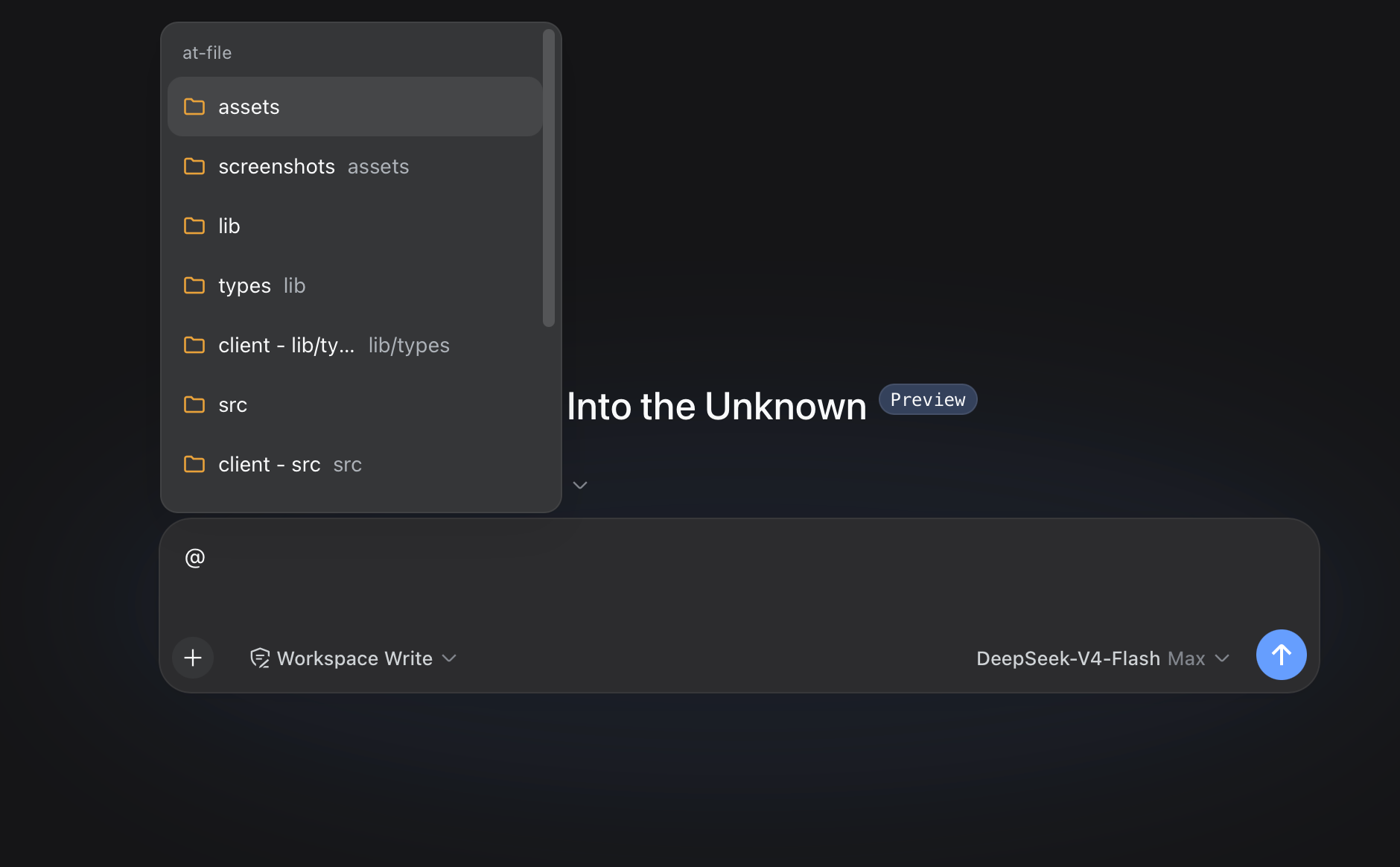
@in the web input box to pop up a workspace file/directory picker, supporting plain text keyword matching,/-segment prefix matching, and compact sorting - Validate the existence of selected or manually entered
@pathbefore each agent step; after validation, inject<workspace-reference path="..." kind="file|directory" />— a reference message containing only path and type - Settings → File mentions provides an enable switch, Global / Workspace two-layer filename filtering rules (Exact and Regex, with case-sensitivity support), and paste text strategy, all persisted through the plugin's own
atFile/updateSettingsendpoint - Selector supports ArrowRight to enter directories, cross-pane folder browsing; clicking a path in the reference bar opens it via Harness's
host.openPathendpoint using the system default application - Default indexing automatically skips
.git,node_modules,build,dist,__pycache__, Xcode/Unity/Unreal and 60+ other common build artifact directories, plusdesktop.ini,Thumbs.db,.DS_Storeand other system metadata files
Technical Implementation
- Language: TypeScript (ESM); both host half and client half are bundled within the same package, client half is delivered as a single file
/plugins/dsh-at-file/client.jsby DSH web server - Key Dependencies:
zod(runtime-only dependency, used for wire codec validation);@deepseek-ai/cordis(plugin container),@deepseek-ai/dsh-typert-protocol+@deepseek-ai/dsh-typert-registry(strongly-typed endpoint registration),@deepseek-ai/dsh-agent+@deepseek-ai/dsh-llm(pre-step hooks and UserMessage construction) - Architecture Pattern: Dual half-host plugin. Host half loads
AtFileRuntimewith Cordis (@Remotedecorated) +ctx.typert.register(TYPERT_MANIFEST)via strict registry to declare wire endpoints, and attachesmentionPreStephook to each agent scope viaagent/pre-stepevent; client half usesctx.remote.$mountto mount the same Remote,inputTriggers.registerSourceto register@trigger,ctx.slots.registerto register dock + folder navigation + settings panel section - Entry Files: Host
src/index.ts(exportsapply/Config), Clientsrc/client/index.ts(exportsapply/inject), mount declarations incordis.patch.yml+package.json#dsh.bundle.patch+package.json#dsh.client.inject
Use Cases
When you want the DSH agent to operate on specific files in the current workspace but don't want to stuff the entire file content into the prompt beforehand — for example, "rewrite around line 30 of src/runtime.ts" or "check if docs/spec.pdf covers exception flows" — just write a piece of text with @path in the input box, and the agent will see an existence reference line, then read as needed. Another typical scenario is using the plugin's settings page to uniformly manage "which filenames shouldn't appear in the @ menu", blocking interference items like *.lock / *.min.js once in Global.
Prerequisites & Compatibility
| Dependency | Minimum Version | Notes |
|---|---|---|
| DeepSeek Harness (DSH) | Not declared | All @deepseek-ai/dsh-* and @deepseek-ai/cordis in package.json:51-66 use peerDependencies: * / ^4.0.1-rc.1, no minimum DSH version given; recommend using current DSH mainline |
| Node.js | Not declared | Repository has no engines field, @types/node locked at ^24.0.0 (package.json:131), please choose according to DSH requirements |
| Platform | macOS / Windows / Linux | Only uses node:fs / node:fs/promises / node:path, no native modules |
| Native Modules | None | Runtime only depends on zod per package.json:115-117, no native binding |
Installation
dsh plugin --profile web add github:omdsh-dev/dsh-at-file
Configuration Options
Host-side Configuration (written in ~/.dsh/profiles/web/cordis.patch.yml)
| Config | Type | Description | Default |
|---|---|---|---|
maxIndexedFiles | number | Maximum number of file/directory entries indexed per workspace; exceeding this immediately stops and returns truncated=true | 5000 |
ignoreDirs | string[] | Directories to skip during indexing by basename; set to [] to index all directories | Built-in 60+ .git / node_modules / build etc. |
User Preferences (changed in DSH Settings → File mentions panel, persisted via atFile/updateSettings)
| Preference | Type | Description | Default |
|---|---|---|---|
| Enable at-file | boolean | When disabled, @ selector, reference bar, and pre-step injection are all stopped | true |
| Ignore @ in pasted text | boolean | When disabled, @path pasted from external sources will be recognized like manual input | true |
| Global file filter | Exact / Regex rule list | Basename filter shared across all workspaces; legacy string rules are treated as case-insensitive Exact rules | Built-in desktop.ini / Thumbs.db / .DS_Store |
| Workspace file filter | Exact / Regex rule list | Additional rules that only apply to the current workspace, saved independently per workspace | Empty |
FAQ
Q: Will pasted @path be recognized?
A: Not by default. The client marks @ with an invisible U+2060 character during paste, and the Host in scanMentions skips tokens with this mark; meanwhile, ignorePastedMentions is enabled by default in Settings, providing double protection. To have pasted @path from external sources go through the selector flow, just turn off "Ignore @ in pasted text" (src/paste.ts:7 / src/mention.ts:42-55).
Q: Will the plugin send file content to the model?
A: No. mentionPreStep does only two things: scan for @path in the user message, run stat on each token to confirm existence and determine file or directory, then append <workspace-reference path="..." kind="..." /> to the prompt. File bytes never enter the wire, never leave the Host; if the model needs to read files, it uses read / read_image and other tools attached to the current agent session (src/mention.ts:1-8).
Q: Can I reference files outside the workspace?
A: No. resolveMention uses path.relative(cwd, absolute) to detect out-of-bounds: results starting with .. or containing .. are discarded; isAbsolute(token) also directly rejects. Manually typing an absolute path like /etc/passwd results in seeing ordinary @/etc/passwd text in the prompt, not converted to a reference (src/mention.ts:64-81).
Q: How do I filter files in the selector?
A: Open Settings → File mentions: Global list is the shared base for all workspaces, Workspace list is additional rules for the current workspace; each rule independently selects Exact / Regex and whether to be case-sensitive, malformed Regex is rejected by the frontend before saving, and the Host's schema rejects again (src/contract.ts:66-79 / README.md:60-66).
Q: Will indexing large workspaces hang?
A: indexWorkspace uses opendir streaming reads (not一次性 readdir), doesn't follow symlinks, stops immediately when hitting maxIndexedFiles and sets the truncated flag. Default 5000 limit + 30-second session cache is enough for most projects; for超大 repositories, raise the limit in cordis.patch.yml to 10000+ (src/files.ts:99-158).
Q: What about PDFs?
A: The selector treats PDFs as regular path entries; whether the model can read PDFs depends on the agent tools in the current session — DSH provides read for UTF-8 text, read_image for supported images, PDF/Word etc. need corresponding tools attached to the session, the plugin itself doesn't read file content (README.md:98).
Q: How to upgrade?
A: Re-run the same dsh plugin --profile web add ... command, then restart dsh web; lib/ is committed to the repo, profile installation doesn't trigger build scripts (README.md:46-49).
Q: When is cache cleared?
A: Client caches for 30 seconds per session (INDEX_TTL_MS), Host caches by cwd; cache is immediately cleared on filter rule changes or connection reset (src/client/source.ts:34 / src/client/index.ts:157-161).
Learning Curve
Beginner — single dsh plugin add + hard refresh browser to use; advanced usage involves maintaining Global / Workspace filter rules in Settings per team habits, and adjusting maxIndexedFiles limit in cordis.patch.yml.
Known Issues & Limitations
- Hard limit on indexed entries:
maxIndexedFilesdefaults to 5000, exceeding immediately stops and returnstruncated=true; valid paths beyond the limit need manual input to be referenced (src/files.ts:124-128 / src/index.ts:52) - Symlinks skipped entirely: walker doesn't follow symlinked directories to avoid link loops; symlinked files themselves are also not indexed (src/files.ts:130-133)
- Default exclusion directories are extensive: 60+ built-in basenames include mainstream IDE, build tool, dependency cache output directories; to index
node_modulesetc., must explicitly setignoreDirsto[](src/defaults.ts:4-65) @pathtoken cannot contain whitespace or another@:/@[^\s@]+/gdetermines boundaries, overly long paths or Windows short names with spaces won't be automatically recognized (src/mention.ts:34)- Pasted text not recognized by default:
@pathcopied from other apps won't show in selector, need to turn off "Ignore @ in pasted text" in settings (src/paste.ts:7 / README.md:25) - File reading entirely depends on agent tools: plugin doesn't read files, doesn't guarantee PDF/Office formats have processing capability, session needs to bring its own corresponding tools (README.md:98)
- Node / DSH versions not declared in package.json: missing
enginesfield, all DSH@deepseek-ai/*peerDependencies use*, need to ensure DSH is compatible yourself (package.json:51-66)
Workspace path references for the DeepSeek Harness web interface. Type @ in the composer to search the current workspace and insert a file or directory path.
Usage
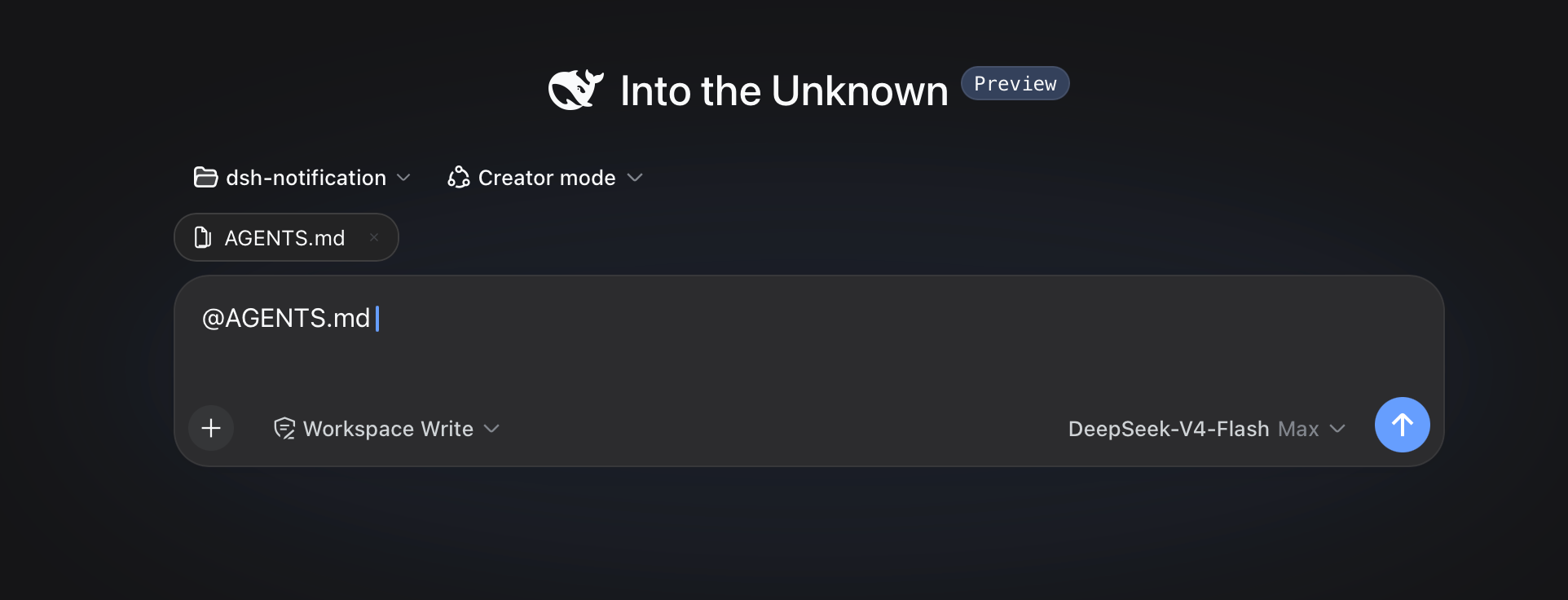
Choose a result from the @ menu. The selected path remains visible in the draft and can be opened or removed from the reference bar.
Review @docs/spec.pdf
Before the agent starts a step, the plugin confirms that the path exists inside the active workspace. It then adds a short reference message:
<workspace-reference path="docs/spec.pdf" kind="file" />
The reference contains the workspace-relative path and its kind. The plugin does not open the referenced file or list the contents of a referenced directory. The agent can inspect the path with the tools available in the current session when the task requires it.
Pasted text is treated as ordinary text by default. An @path copied from another application does not open the picker, appear in the reference bar, or create a workspace-reference marker. Turn off Ignore @ mentions in pasted text in Settings -> File mentions if you need the older behavior.
File format and file size do not change this behavior. A PDF follows the same path-reference flow as any other workspace file.
This mechanism applies to version 0.3.0 and later. Earlier releases read file content during submission and enforced file-size limits.
Path Picker
Plain queries match filenames. Exact names, prefixes, and compact matches rank ahead of looser results, without matching letters scattered across a long directory path.
A query containing / matches path segments in order. For example, src/view can find src/client/view.ts. A trailing slash such as src/ searches within that path.
When a directory is highlighted, press ArrowRight to enter it. The draft advances to @path/ without a trailing space, and the candidate menu stays open for the next selection. Enter and pointer selection keep the existing behavior and finish the directory reference.
Each result shows the filename first and its parent directory underneath. Duplicate filenames include the parent directory in the main label. Built-in SVG icons distinguish folders, source files, text, PDFs, images, data and configuration files, archives, and other files.
The default index skips common version-control directories, IDE metadata, dependency trees, caches, and build output. The list covers VS Code, Visual Studio, JetBrains IDEs, Fleet, Eclipse, Android and Gradle, Xcode, CMake, Flutter, .NET, Unity, Unreal, and common JavaScript and Python output directories. OS metadata files named desktop.ini, Thumbs.db, and .DS_Store are excluded by default.
Install or Update
dsh plugin --profile web add https://github.com/omdsh-dev/dsh-at-file/archive/refs/tags/v0.6.3.tar.gz
Use the same command to update an existing installation. Restart dsh web after installation so the Host and browser client load version 0.6.3.
File Filters
Open Settings -> File mentions to manage file-name filters.
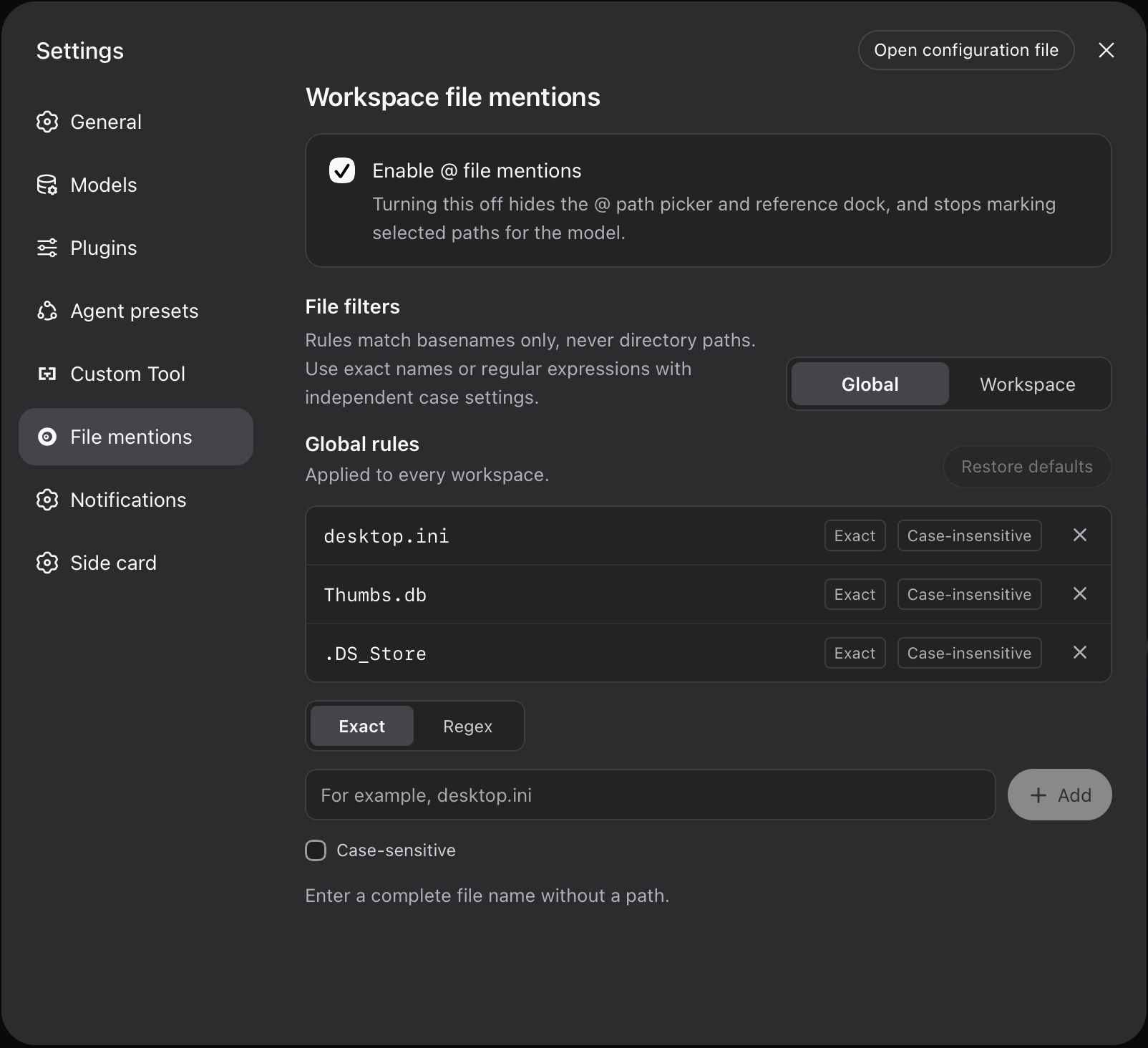
- Global contains rules shared by every workspace.
- Workspace contains additional rules for the selected workspace path. Each workspace keeps its own list, and the panel shows the global rules it inherits.
Each rule has its own matching mode and case setting:
- Exact matches one complete basename. Path separators are not accepted.
- Regex runs a JavaScript regular expression against the complete basename. It does not receive the parent directory or workspace path.
- Case-sensitive can be enabled independently for any Exact or Regex rule. It is off by default.
Rules are added and removed individually. An invalid regular expression is shown before saving and is also rejected by the Host. Restore defaults resets the global list to the built-in file names. Clear workspace rules removes only the selected workspace's additions.
Settings are saved in the DSH web profile through the plugin's own Host connection. Existing string values in ignoreFiles and workspace lists continue to work as case-insensitive Exact rules. A change clears the affected index cache, so the next @ search uses the saved rules.
Configuration
The available options apply to the path picker index:
maxIndexedFilessets the maximum number of indexed workspace entries.ignoreDirsreplaces the built-in list of directory names excluded from the picker. Set it to[]to index every directory.
Add the complete configuration to the selected profile's cordis.patch.yml. The usual path is ~/.dsh/profiles/web/cordis.patch.yml.
- id: dsh-at-file
  config:
    maxIndexedFiles: 10000
Omitting ignoreDirs keeps the built-in list. When you provide it, include every directory name you want excluded.
Path Handling
- The picker indexes regular files and directories in the active workspace. Configured directory names and symbolic links are skipped.
- Global and workspace file-name filters are combined during the Host index walk, before entries count toward
maxIndexedFilesor reach the browser. - The Host accepts workspace-relative paths. Absolute paths and paths that escape the workspace are ignored.
- Reference markers are created from typed text and picker selections. Pasted
@tokens are ignored when the default setting is enabled. - Clicking a referenced path uses the Harness
host.openPathendpoint. - The picker index is cached per session for 30 seconds.
- An
@pathtoken cannot contain whitespace or another@character. maxIndexedFileslimits picker results. A manually entered path can still be referenced when it exists inside the workspace.
The active agent may lack a tool for a particular file format. DSH provides read for UTF-8 text and read_image for supported images. PDF support depends on the tools available in the session.
Development
pnpm install
pnpm run check
pnpm run test
pnpm run build
The development setup expects the official deepseek-ai/deepseek-harness repository at ../deepseek-harness, its default clone directory. Built files under lib/ are committed so profile installation does not require package build scripts.
License
MIT
Read the usage guide →
Install steps, key points, FAQ and compatibility for this plugin — auto-derived from indexed fields.
Listing badge

[](https://deepseek-plugin.org/plugins/omdsh-dev/dsh-at-file)Paste this markdown into your GitHub README to link back to this listing. The badge only states the listing — not a security endorsement.