为 DSH 接入三层记忆控制面:每轮注入的运行时记忆、可检索的项目档案,以及可在 Mnemon/OpenViking/Honcho/Mem0 等 9 种 Provider 间切换的长期记忆体。

- 语言
- TypeScript
- License
- MIT
- 分支
- main
安装
$ dsh plugin --profile web add dsh-mnemon在终端中运行以上命令,通过 dsh CLI 安装此插件。可在右上角切换 Profile。 第一次用 dsh?看这篇新手教程
对话式安装
帮我安装 DeepSeek Harness 插件 omdsh-dev/dsh-mnemon:先查看仓库 https://github.com/omdsh-dev/dsh-mnemon 确认安全性,然后执行安装命令并验证插件加载成功。
把这段指令粘贴给 DSH Web GUI 里的助手,由它代你完成安装与验证。
一句话定位
dsh-mnemon 为 DeepSeek Harness 引入一套三层记忆控制面:每轮自动注入的运行时 USER.md / MEMORY.md、可全文检索的项目档案,以及在 9 种长期记忆 Provider 之间切换的 Memory Spaces,长记忆底层不需要绑定到 Mnemon。
核心能力
- 在每轮对话自动注入极简的 Runtime 记忆(USER.md 放用户偏好,MEMORY.md 放项目约定),容量满后由独立任务 Agent 自动压缩并归档
- 提供可全文检索的 Project Documents,保存设计、调查、复盘、交接等完整长文,通过专门工具创建、更新、归档
- 暴露 9 种长期记忆 Provider 的统一 Memory Space 接口(Mnemon Native、OpenViking、Honcho、Mem0、Hindsight、Holographic、RetainDB、ByteRover、Supermemory),按 Provider 实际能力展示
- 为 Agent 注册 12 个语义工具(mnemon_recall / mnemon_remember / mnemon_runtime_memory / mnemon_document_search / mnemon_document_manage / mnemon_link / mnemon_forget / mnemon_memory_body_create-update-merge / mnemon_status / mnemon_related / mnemon_memory_bodies),并提供
/mnemon status|recall|related|remember|forget命令 - 在 Sidebar / Buildin 工作台提供 Status、Runtime、Documents、Memory Spaces 四个一级页面,并在对话里接入 Turn memory 与 Save to memory 入口
- 支持 global / workspace / custom 三种存储作用域,提供 ZIP 备份/恢复、Provider 启停、远程访问权限分级、Recall 质量策略等可调节开关
技术实现
- 语言: TypeScript(ESM + 严格类型,配合
tsdown打包) - 关键依赖:
schemastery(配置 Schema 校验)、@deepseek-ai/dsh-client-runtime+dsh-client-ui-conversation+dsh-client-ui-settings+dsh-client-ui-primitives(DSH Host / Client 接入)、markdown-to-jsx+fflate(Markdown 渲染与包压缩) - 架构模式: 通过 Cordis 插件协议注入
tools / settings / commands / agents / subagents五个面;宿主以apply(ctx, config)装载运行时图,所有 Mnemon CLI 调用走runner.ts的spawn(command, args, { shell: false })并加入进程队列,长记忆写入由MnemonSubagentCoordinator派生独立任务 Agent 监督 - 入口文件:
src/index.ts(导出apply入口与name = 'dsh-mnemon'),Cordis 注入配置在cordis.patch.yml
适用场景
当用户希望 DSH Agent 跨会话记住偏好、项目约定、复盘结论和长期事实时,本插件可让 Agent 在新会话自动恢复上下文、检索历史项目档案,并按需从外部记忆服务召回证据。它适合需要长期协作的研究/工程 Agent、需要跨项目共享记忆的团队工作流,以及希望把记忆底层从单一 SQLite 迁移到 Mem0 / OpenViking 等外部服务的迁移场景。
前置依赖与兼容性
| 依赖 | 最低版本 | 说明 |
|---|---|---|
| DSH Host | 0.1.0-rc.6 | peerDependencies 锁定,rc.6 之前的 Host API 不兼容 |
| Node.js | >= 20 | package.json#engines.node 声明 |
| 平台 | 跨平台 | macOS / Windows / Linux 均支持;Windows 自动发现 mnemon.exe;第三方 Provider 走 HTTP 或本地 CLI |
| 外部 CLI | mnemon >= 0.2.3 | 推荐 Mnemon Native 作为默认长期记忆引擎;缺失时所有语义写入/读取会失败 |
provider named spawn | 必需 | 监督型任务 Agent 需要具备 toolFilter / persona / depthLimit;缺失则语义任务不可用 |
provider named fork | 可选 | inheritsParentContext=true 时启用后台打分复审;缺失只影响后台复审,UI 与手动流程仍可用 |
安装方式
dsh plugin --profile web add github:omdsh-dev/dsh-mnemon
配置项
| 配置 | 类型 | 说明 | 默认值 |
|---|---|---|---|
displayMode | sidebar / buildin | 工作台是挂 Sidebar 还是回到对话区 Tab | sidebar |
storageScope | global / workspace / custom | 控制 Runtime / Documents / Memory Spaces 的统一存储根 | global |
dataDir | 绝对路径或 ~ / ~/... | 当 storageScope: custom 时必填的持久化目录 | unset |
cliPath | 可执行文件路径 | 显式指定 mnemon 可执行文件位置;不填则按 MNEMON_CLI_PATH → PATH → 常见目录自动发现 | unset |
store | [A-Za-z0-9][A-Za-z0-9_-]* | 旧版本 Store 兼容发现提示,不再用于运行时路由 | unset |
timeoutMs | 100–120000 | 单次 Mnemon CLI 调用的硬超时(毫秒) | 10000 |
defaultRecallLimit | 1–50 | 默认召回条数;UI 与 /mnemon recall 命令共用 | 10 |
recallQuality.policy | 已注册策略 id | 召回结果送入 Agent 前的确定性筛选策略 | strict-v1 |
recallQuality.lowScoreThreshold | 0–1 | 严格策略下低于此分的归一化相关度被丢弃 | 0.25 |
recallQuality.highScoreThreshold | 0–1 | 高于此分被标记为高相关度,必须 > lowScoreThreshold | 0.6 |
recallQuality.candidateMultiplier | 1–5 | 召回前扩展倍数(上限 50 候选) | 3 |
recallQuality.maxMediumResults | 0–50 | 严格策略允许保留的中相关度条数上限 | 4 |
recallQuality.maxUnknownResults | 0–50 | 严格策略允许保留的未知尺度条数上限 | 2 |
routingGuidance | boolean | 是否注册额外的分层路由系统提示 | true |
lifecycleEnabled | boolean | 是否启用预步提示与空闲打分复审 | true |
recallMode | guided / off | 是否注入「按需召回」提示;显式 mnemon_recall 不受影响 | guided |
writebackMode | guided / off | 是否注入热记忆提示并启用空闲打分复审;显式写入仍可用 | guided |
idleReviewMs | 5000–600000 | 触发后台打分复审所需的连续空闲时长 | 30000 |
tabEnabled | boolean | 是否挂载当前 displayMode 选中的 Web 入口;关闭后 Host RPC、命令、Agent 工具仍注册 | true |
writeEnabled | boolean | 是否暴露语义写入工具、写入 RPC、`/mnemon remember | forget` |
taskAgentModel.mode | inherit / fixed | AI 元信息、Agent 查询、记忆蒸馏、归档等独立任务 Agent 的模型路由 | inherit |
taskAgentModel.provider | 字符串 | fixed 模式下必填的 Provider ID | unset |
taskAgentModel.model | 字符串 | fixed 模式下必填的模型 ID | unset |
remoteAccess | read-only / trusted-host | 远程 Web 页面能否调用特权 Mnemon RPC;启动时锁定,需重启 Host | read-only |
mnemon-ui.turnBar | boolean | 对话尾部本回合记忆活动条 | true |
mnemon-ui.saveAction | boolean | 助手回复下方的「保存到记忆」图标与确认 | true |
persistenceStrategy | 对象 | 监督写入时选择 Memory Space Provider 的硬规则 + 软偏好 | manual + 仅 mnemon-native |
customPackId / customPacks | 字符串 / 数组 | 显式指定多个自定义数据目录(最多 32 个),可视为「自定义作用域」的多包名册 | unset |
常见问题
Q: 安装后插件状态显示不可用,我该怎么排查?
A: 优先检查 mnemon CLI 是否在 PATH 中可执行(macOS/Linux 跑 command -v mnemon、Windows PowerShell 用 Get-Command mnemon),并确认 mnemon --version 至少 0.2.3。如果 CLI 在非标准位置,可在 user settings 中填写 mnemon.cliPath 或导出 MNEMON_CLI_PATH 环境变量后重启 Host。
Q: 我能从「所有 Agent 共享」切换到「只在当前项目里用」吗?数据会被搬走吗?
A: 可以,但插件不会自动迁移。storageScope 的 global / workspace / custom 是一次性选定的根,切换只让全新位置生效,旧根下的 Runtime、Documents、Memory Spaces 全部保留原状。建议在切换前先在原作用域做一次 ZIP 备份,切到新作用域并保存后再导入验证。
Q: 我想把所有记忆都存在 Mem0 / OpenViking / Holographic 等第三方服务里,可以吗?
A: 可以。第三方 Provider 默认关闭,启用后在 Provider 服务配置页填入 endpoint、API key 等参数即可注册一个或多个 Memory Space。Mnemon Native(本地 SQLite)作为默认后端仍可与第三方 Memory Space 同时存在,切换 DSH 工作区不会自动重写第三方服务的 URI、workspace、user、project、container 等命名空间。
Q: AI 写入记忆的权限边界在哪里?会不会自动删掉远端数据?
A: 不会删除远端数据。所有改动都先在 Host 这一侧做合法性与路径校验;持久化 Provider 写入由独立任务 Agent 经 MnemonSubagentCoordinator 监督执行,执行前的「Save to memory」对话框允许取消。Provider 关闭只会清理本地目录映射、激活态与本地元信息(标题、描述),不退订或删除远端服务真实数据。
Q: 卸载插件会清掉我的记忆数据库吗?
A: 不会。卸载只取消插件注册,存储在 ~/.mnemon / <workspace>/.mnemon / 自定义 dataDir 下的 Runtime、Documents、Mnemon Native 数据库与 state/ 配置都保留。重新安装后插件会重新发现这些数据。如果你希望彻底清理,可以手动删除相应目录。
Q: 我在 Web UI 看到的「Turn memory」和「Save to memory」分别是什么?
A: 「Turn memory」展示本回合 Agent 使用了哪些记忆工具(召回、写入、文档搜索等),每条都能跳转到对应 Memory Space 或 Document 页面;「Save to memory」把当前助手回复作为草稿打开一个可编辑的确认框,用户确认后才会启动监督写入流程,取消则不产生任何变更。
Q: 子 Agent / 任务 Agent 使用的模型能被改吗?会和我的对话模型冲突吗?
A: 不会冲突。在 mnemon.taskAgentModel 选择「fixed」并填写 Provider / Model 后,AI 元信息、归档、Agent 查询、记忆蒸馏等独立任务 Agent 都走该路由;默认 inherit 模式则会跟随 DSH 「新建会话」时默认的 Provider/Model 兜底。两种模式都不影响主对话 Agent 的模型选择。
上手难度
进阶 — 插件开箱即用,但同时引入运行时/档案/长期记忆三层与 9 种 Provider,再加上 12 个 Agent 工具与 6 套 Slash 命令;普通用户能在 5 分钟内跑通首次 Recall,但要发挥分层路由、Recall 质量策略与后台复审等高阶能力,需要理解「Memory Body / runtime store / Documents」三类概念与 storageScope 边界。
已知问题与限制
- 没有确定性密钥扫描器:请勿把 API key、token、私钥、原始敏感日志写入任何记忆层,文档与状态页都明确提示了这一点
- 后台打分复审的 activity score、最新 checkpoint、重试状态目前不持久化:Host 重启会清空未处理的活动,且失败回退、断路器、手动重试目前尚未实现
- 切换
storageScope不会自动迁移、合并或删除旧作用域的数据:迁移只能走「旧作用域导出 ZIP → 切换保存 → 新作用域导入」的路径 - Documents 在
global/custom下可能被多个工作区共享,但记录中不携带独立的工作区归属字段;sourcePaths只在写入时相对当前 cwd 校验 writeEnabled: false是功能级只读而非磁盘级只读:启动时 Runtime 投影初始化、文档最近访问时间更新、Mnemon 读取可能触发的数据库迁移仍会发生- 冷索引进档的写入不是跨 Mnemon SQLite 与文件系统的可回滚分布式事务:若归档后存在版本冲突,可能出现重复冷引用,但插件选择保留原数据而非自动覆盖
- 没有正式的 DSH / Mnemon 支持矩阵:主 Web UI 双语,但命令、工具卡片、兼容性元信息、部分错误提示仍存在未翻译条目
- 处理 Provider 能力差异时严格按 Provider 声明暴露:例如 OpenViking 写是异步提炼、可能跳过候选;Honcho/Mem0/RetainDB 不提供 graph/related/link;ByteRover 不支持 forget;外部 Provider 关闭时不会删除远端数据
dsh-mnemon
English · 简体中文




The three-tier, pluggable, Agent-driven memory system for DeepSeek Harness.
Three memory tiers · Nine long-term providers · One supervised workflow
Explore the capability map · Start in five minutes · Read the v0.2.9 notes · Watch the widescreen demo
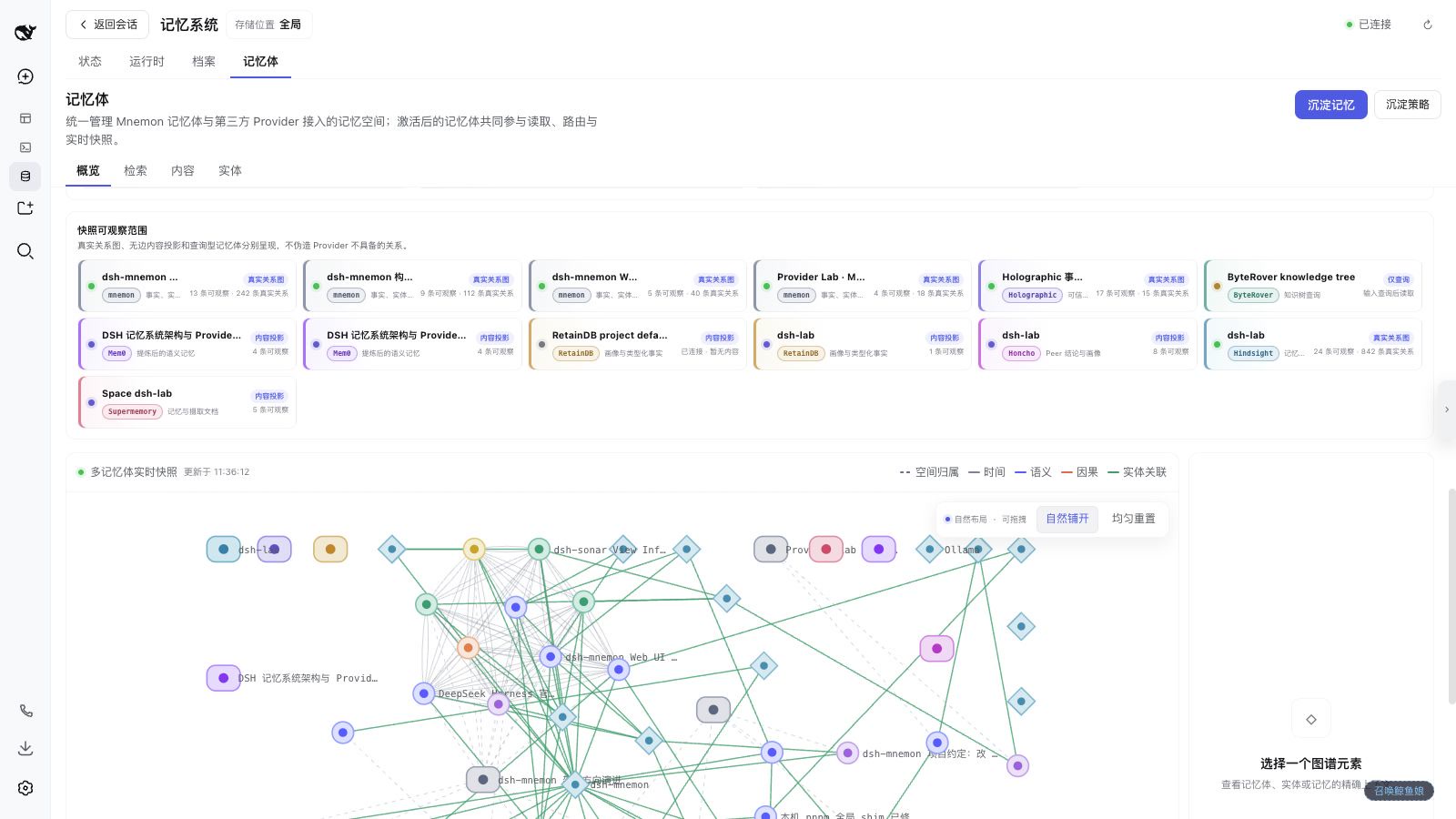
dsh-mnemon gives DSH one memory control plane without forcing every kind of knowledge into one database. Runtime Memory keeps compact context available every turn. Project Documents preserve complete narratives. Memory Spaces retrieve durable evidence on demand and can use Mnemon, OpenViking, Honcho, Mem0, Hindsight, Holographic, RetainDB, ByteRover, or Supermemory.
Mnemon remains the official, prioritized native engine. The third tier is replaceable; the first two keep the same storage, workspace, and interaction model regardless of provider.
Understand the scope in 30 seconds
| Tier | Keep here | How it reaches the Agent | Managed by |
|---|---|---|---|
| Runtime | Preferences, collaboration rules, project conventions, environment facts | Compact USER.md / MEMORY.md projection on every turn | Deterministic dsh-mnemon Host |
| Documents | Designs, investigations, procedures, postmortems, handoffs | Search first, full Markdown on demand | Deterministic dsh-mnemon Host |
| Memory Spaces | Cross-session facts, decisions, entities, relations | Bounded recall from active spaces | Mnemon Native or an external Provider |
The tiers are not copies. A useful rule is: every-turn context goes to Runtime, complete narratives go to Documents, and cross-task evidence goes to Memory Spaces. Current instructions, repository files, and live tool results always outrank historical memory.
Clicks that start real work
| User action | What actually runs | Data effect |
|---|---|---|
| Search | Concurrent provider-native recall | Read-only |
| Agent query | A clean top-level task Agent receives bounded evidence and writes an answer | Read-only |
| Remember / Save to memory | A clean task Agent qualifies, routes, deduplicates, distills, and writes behind Host controls | Writes only if accepted |
| Smart selection | Hard rules filter providers; a task Agent resolves only genuine ambiguity | Saves a routing receipt |
| AI metadata | One asynchronous task Agent per selected Memory Space, each using the provider's fastest sample path | Local title/description only |
| Archive Document | A task Agent creates a searchable cold reference before the Host moves the original | Supervised move |
| Turn memory | Expands exact recall, write, and Document-search activity; each item navigates to its source | Read-only |
These tasks do not reuse or consume the main conversation history. By default they follow DSH's new-session model route; Settings → Memory System → Background task Agent can select a dedicated Provider and model.
One Memory Space workflow, nine providers
| Provider | Shape | Best fit |
|---|---|---|
| Mnemon | Official native local CLI + SQLite | Exact writes, entities, typed relationships, local-first sharing |
| OpenViking | HTTP + viking:// | Resource trees and asynchronous extraction |
| Honcho | HTTP workspace / peers | Team and Agent-peer conclusions |
| Mem0 | Platform or self-hosted HTTP | Existing user / Agent memory |
| Hindsight | HTTP memory bank | Banks, entities, provider-native graph |
| Holographic | Local structured fact files | Auditable facts, trust scores, local entities |
| RetainDB | HTTP project / user | Project- and user-scoped profiles |
| ByteRover | Local brv CLI | Code knowledge trees and curate workflows |
| Supermemory | HTTP container | Document ingestion and container sharing |
Provider capability differences stay visible. dsh-mnemon never invents graph edges, deletion semantics, or enumerable content for an engine that does not provide them. Settings owns reusable Provider services; Memory Spaces owns concrete instances, activation, scope, and metadata. External Providers are off by default.
See the provider capability and deployment matrix.
Real WebUI walkthrough
The following roughly 55-second capture comes from a live 1600×900 DSH WebUI. It deliberately pauses on full-page scrolling, page transitions, Provider cards, dialogs, button-state changes, and a completed read-only Agent Query. Destructive confirmations are deliberately not submitted.

Watch the 1600×900 MP4 · Open the page-by-page UI guide
Start in five minutes
1. Install Mnemon Native
Mnemon is the default engine and the simplest local-first starting point:
# macOS
brew install --cask mnemon-dev/tap/mnemon

# macOS / Linux via Go
go install github.com/mnemon-dev/mnemon@latest

mnemon --version
Windows users can install the official v0.2.3-or-newer release ZIP. The expected installation path and checksum procedure are in Getting Started.
2. Install the DSH plugin
dsh plugin --profile web add dsh-mnemon
dsh --profile web
DSH profiles have independent plugin rosters. Install the same package separately for one-shot Headless tasks:
dsh plugin --profile headless add dsh-mnemon
dsh --profile headless "Check durable project context before answering this task."
For a local checkout, use an absolute path:
dsh plugin --profile web add "link:/absolute/path/to/dsh-mnemon"
dsh plugin --profile headless add "link:/absolute/path/to/dsh-mnemon"
3. Verify the first workflow
- Open Memory System → Status and verify dsh-mnemon, Mnemon Native, Runtime, Documents, and enabled Providers.
- Open Memory Spaces → Overview → Create Memory Space and choose an enabled Provider explicitly.
- Submit one stable, future-useful candidate through Remember.
- Open Recall, run a direct search, then run Agent query against the same question.
- Return to the conversation, expand Turn memory, and follow one exact tool link.
The primary tab order is intentionally stable: Status, Runtime, Documents, Memory Spaces.
Familiar controls, expanded capability
Agent-driven memory operations
| Supervised distillation | Bounded Agent query |
|---|---|
 |  |
The workbench makes the task boundary explicit before dispatch and keeps the returned answer beside its evidence scope. Conversation-native Turn memory and Save to memory remain enabled by default and can be changed independently under Settings → Memory System → Conversation interface.
Manual or policy-driven placement
| Create explicitly | Route future distillation intelligently |
|---|---|
 |  |
Manual creation always asks the user to choose. Smart selection is a distillation policy: hard rules define the eligible set, then an optional prompt guides the Agent only when several candidates remain.
Global, workspace, and custom scope
| Scope | Behavior |
|---|---|
global | Uses ~/.mnemon; ideal for a local control plane shared across workspaces and Agents |
workspace | Uses <workspace>/.mnemon; local Providers that support workspace following move with the effective workspace |
custom | An explicit path with global semantics, useful for team conventions or isolated environments |
Remote Provider workspaces, users, banks, projects, containers, and URIs remain their own namespaces; switching the DSH workspace never silently rewrites them. In workspace mode, the workbench may inspect one selected workspace while the current conversation continues to execute in its own cwd. Independent task Agents launched from the workbench use the inspected workspace even when no main session is selected.
Web, conversation, and Headless share one system
| Surface | What remains available |
|---|---|
| Sidebar WebUI | Status, Runtime, Documents, Memory Spaces, Provider services, visualization, and confirmation surfaces |
| Conversation UI | Turn memory, Save to memory, exact navigation to the corresponding page |
| Headless | Runtime injection, Document search, Memory Space tools, workspace routing, and supervised writes without a WebUI |
| Commands | /mnemon status, recall, related, remember, and forget |
Data and security boundaries
- Runtime and Documents are local deterministic stores. Mnemon Native is local by default; external Providers are explicit opt-ins.
- Provider credentials are mode
0600under<storageRoot>/state/memory-providers.json. They are never returned to the browser, smart-selection Agent, or Mnemon Pack. - Host calls use argument arrays with shell disabled, bounded output, timeouts, cancellation, schema validation, path boundaries, locks, and revisions.
- Disabling a Provider clears its local catalog metadata but never deletes remote data. Reconnecting rebuilds metadata from the Provider, using local defaults only when a field cannot be mapped.
- Changing scope never migrates, merges, or deletes an old root automatically.
- There is no deterministic secret scanner yet. Never store keys, tokens, private keys, or raw sensitive logs in any tier.
- Uninstalling the plugin does not remove local or remote memory data.
See Operations, security, and troubleshooting for backup, recovery, and diagnostics.
Documentation
| I want to… | Start here |
|---|---|
| See the complete product boundary | Capability map |
| Install and verify the first workflow | Getting Started |
| Follow every visible click and Agent action | Sidebar and conversation UI guide |
| Compare or deploy all nine Providers | Long-term memory providers |
| Understand tiering and lifecycle | Storage model · Workflows |
| Configure scope, routing, and model selection | Configuration |
| Back up, update, or troubleshoot | Operations |
| Integrate tools, commands, or RPC | Interface reference |
| Review the release | v0.2.9 release notes |
See the documentation hub for the full map.
Development
pnpm install
pnpm run verify
verify runs TypeScript checks, Vitest, a reproducible double build, an isolated real Headless-profile activation check, and published-package validation. lib/ is generated and intentionally not tracked.
License
MIT. Report security issues privately through SECURITY.md, not a public issue.
查看使用指南 →
该插件的安装步骤、关键要点、FAQ 与兼容性说明(基于已收录字段派生)。
收录徽章

[](https://deepseek-plugin.org/plugins/omdsh-dev/dsh-mnemon)把这段 markdown 粘贴到你的 GitHub README,链接回本插件详情页。徽章只声明已被本站收录,不代表安全认证。