Integrate Archify diagram Skill into DeepSeek Harness: dsh reads repositories in conversations to generate five interactive system diagrams (architecture, workflow, sequence, data flow, lifecycle), output as shareable HTML.

- Language
- HTML
- License
- MIT
- Branch
- main
Install
$ dsh plugin --profile web add github:tt-a1i/archifyRun the command above in your terminal to install this plugin via the dsh CLI. You can switch Profile in the top-right corner. New to dsh? Read the beginner tutorial
One-Line Positioning
Mount the Archify technical diagram Skill onto DeepSeek Harness, enabling dsh to read code within conversations and produce five types of validated interactive system maps (architecture/workflow/sequence/dataflow/lifecycle), ultimately generating shareable self-contained HTML files.
Core Capabilities
- Directly say a sentence in dsh conversation to have the agent load the Archify Skill, generating and validating diagrams from typed JSON descriptions
- Supports five diagram types: component architecture diagrams, CI/CD-style workflows, API call sequences, data flow and lifecycle/state machines
- Generates a single self-contained HTML file with built-in dark/light theme switching, node search, upstream/downstream reachability path exploration, comparison views, and limited animations
- Provides architecture Before/Delta/After comparison modes, capable of reading diff facts such as additions, deletions, changes, moves, and re-routing
- The validation process returns structured JSON remediation suggestions across multiple layers (schema, layout, HTML/SVG, connections, label-path spacing) rather than throwing errors directly
- No network requests, no telemetry, no native module dependencies; the adapter side only handles file system path resolution
Technical Implementation
- Language: TypeScript-free, pure ESM JavaScript (Node.js)
- Key Dependencies:
node:module(createRequire for package path resolution),node:path(Skill directory concatenation),@deepseek-ai/dsh-skill-filesystem(DSH built-in Skill provider) - Architecture Pattern: Through
cordis.patch.ymlinjects one Skill provider namedarchify-skill-filesysteminto the host DSH (includeDefaultRoots: false), with thebundledSkillDirJS expression anchoring the Skill root directory to the currently installed npm package - Entry Point:
integrations/deepseek-harness/lib/index.js(21 lines, exportsname,PACKAGE_NAME,resolveArchifySkillRoot); the actual Skill entry isarchify/bin/archify.mjs
Use Cases
When DSH users describe to the agent in conversation "I want to see what this repository looks like", "draw this CI/CD pipeline", or "give me a sequence diagram for a login request", the agent can load the Archify Skill to read the repository, generate typed JSON, run validation, and produce shareable HTML. It is particularly suitable for architecture reviews, pre/post-PR comparisons, documentation illustrations, and similar scenarios where verbal descriptions need to be solidified into visual materials.
Prerequisites & Compatibility
| Dependency | Minimum Version | Description |
|---|---|---|
| DeepSeek Harness | 0.1.0-rc.6 (Developer Preview) | Adapter is explicitly validated only on this DSH version; cross-version compatibility is not guaranteed |
| Node.js | ^22.19.0 or >=24.0.0 | Enforced by integrations/deepseek-harness/package.json#engines; Archify main tool itself requires minimum Node 18 |
| Platform | macOS / Windows / Linux | Cross-platform; lib/index.js on Windows does not depend on npm/cmd shim, but Archify main CLI on Windows has dedicated launcher compatibility logic (resolve-cli.mjs) |
| Native Modules | None | adapter-security.test.mjs enforces that lib contains no keywords like node:http/net/dgram/child_process; Archify main tool runs with zero dependencies |
Installation
dsh plugin --profile web add github:tt-a1i/archify
Configuration Options
| Config | Type | Description | Default |
|---|---|---|---|
providerName | String | Skill provider name displayed in DSH, the identifier seen when the agent invokes it | archify-plugin (hardcoded in cordis.patch.yml) |
includeDefaultRoots | Boolean | Whether to simultaneously enable DSH's built-in default Skill root directories | false (only loads this plugin's bundled Archify Skill to avoid pollution) |
bundledSkillDir | Path Expression | Absolute path pointing to the skills/ subdirectory within the installed npm package; resolved backwards via createRequire(baseUrl).resolve('@tt-a1i/archify-dsh/package.json') | Auto-calculated by JS expression at installation time |
These three are solidified in
integrations/deepseek-harness/cordis.patch.ymland cannot be modified by regular users; if adjustments are needed, the adapter must be forked and repackaged.
FAQ
Q: Is this plugin officially produced by DeepSeek?
A: No. Both the repository and the adapter README clearly state "Community integration" and "not an official DeepSeek product", only validated on the developer preview @deepseek-ai/dsh@0.1.0-rc.6, and does not represent a stable cross-version commitment.
Q: How do I invoke it after installation?
A: Simply say "Use the archify skill to map this repository's runtime architecture" (or its Chinese equivalent) in the dsh conversation. The agent will load the Skill and generate the diagram following the validation workflow. The Skill internally calls node bin/archify.mjs validate/deliver/preview, which requires dsh to grant shell permissions.
Q: Why don't the generated diagrams appear in dsh Web's Produced Files list?
A: Because Archify writes HTML/JSON files through shell execution and does not automatically enter the Produced Files channel. After the agent delivers the diagram, you need to have it return the "precise workspace absolute paths" of the generated specification JSON and HTML, so you can open these files directly from the workspace.
Q: Will this adapter secretly open ports, report data, or read my keys on my computer?
A: No. The entire integrations/deepseek-harness/lib/index.js file contains only one exported function resolveArchifySkillRoot; the repository test adapter-security.test.mjs enforces assertions that this directory contains no keywords like child_process, fetch, node:http/https/net/dgram, setInterval/setTimeout/Worker/cluster, telemetry/opentelemetry/otlp, process.env.*TOKEN, tools.register, etc. No telemetry, no network requests, no prepare/install/postinstall hooks.
Q: What is the uninstall command?
A: The upstream README states dsh plugin --profile web remove @tt-a1i/archify-dsh (remove by npm package name). This command only removes the adapter and Skill injection, not the HTML/JSON files you generated previously.
Q: Will it still work after upgrading dsh?
A: The adapter is currently validated only on the developer preview @deepseek-ai/dsh@0.1.0-rc.6, and the README clearly states "It is not a stable cross-version guarantee". After dsh reaches stable release, we need to check whether the adapter has released a new version synchronously.
Q: Is Archify suitable for real-time monitoring, PR risk assessment, or production deployment status display?
A: No. Archify emphasizes "authored facts only" — all connections, upstream/downstream reachability ranges, and architecture comparison results come from user-written typed JSON without probing runtime infrastructure; the generated diagrams explicitly do not declare risk, blast radius, merge safety, or runtime impact.
Learning Curve
Beginner — The invocation method is just adding "Use the archify skill ..." in a dsh conversation. Users don't need to write JSON or remember CLI commands; the Archify Skill internally guides the agent to read the repository, generate typed JSON, and run validation.
Known Issues & Limitations
- The adapter is at
v0.1.0, validated only on@deepseek-ai/dsh@0.1.0-rc.6(Developer Preview), not a stable cross-version guarantee - Generated HTML/JSON does not automatically appear in dsh Web's Produced Files list; the agent must return precise workspace paths for users to manually open
- The adapter upstream README recommends installation as
dsh plugin --profile web add @tt-a1i/archify-dsh@0.1.0(npm exact version), not from git source; whether the marketplace'sgithub:tt-a1i/archifyform works depends on dsh's own resolver, and the repository testdocs-contract.test.mjsactively prohibits thegithub:tt-a1i/archifynotation from appearing in documentation - The Archify Skill main tool itself is
v2.14.0and continues to evolve rapidly (CHANGELOG shows frequent fixes for wide desktop layout, label spacing, etc.), with the adapter version number being a separate independent system - The adapter does not register native render/validate/deliver tools, does not expose a Web client, does not connect to Web Produced Files channel, and makes no network requests or telemetry — meaning all Archify capabilities must be invoked through Skill + shell
English · 简体中文
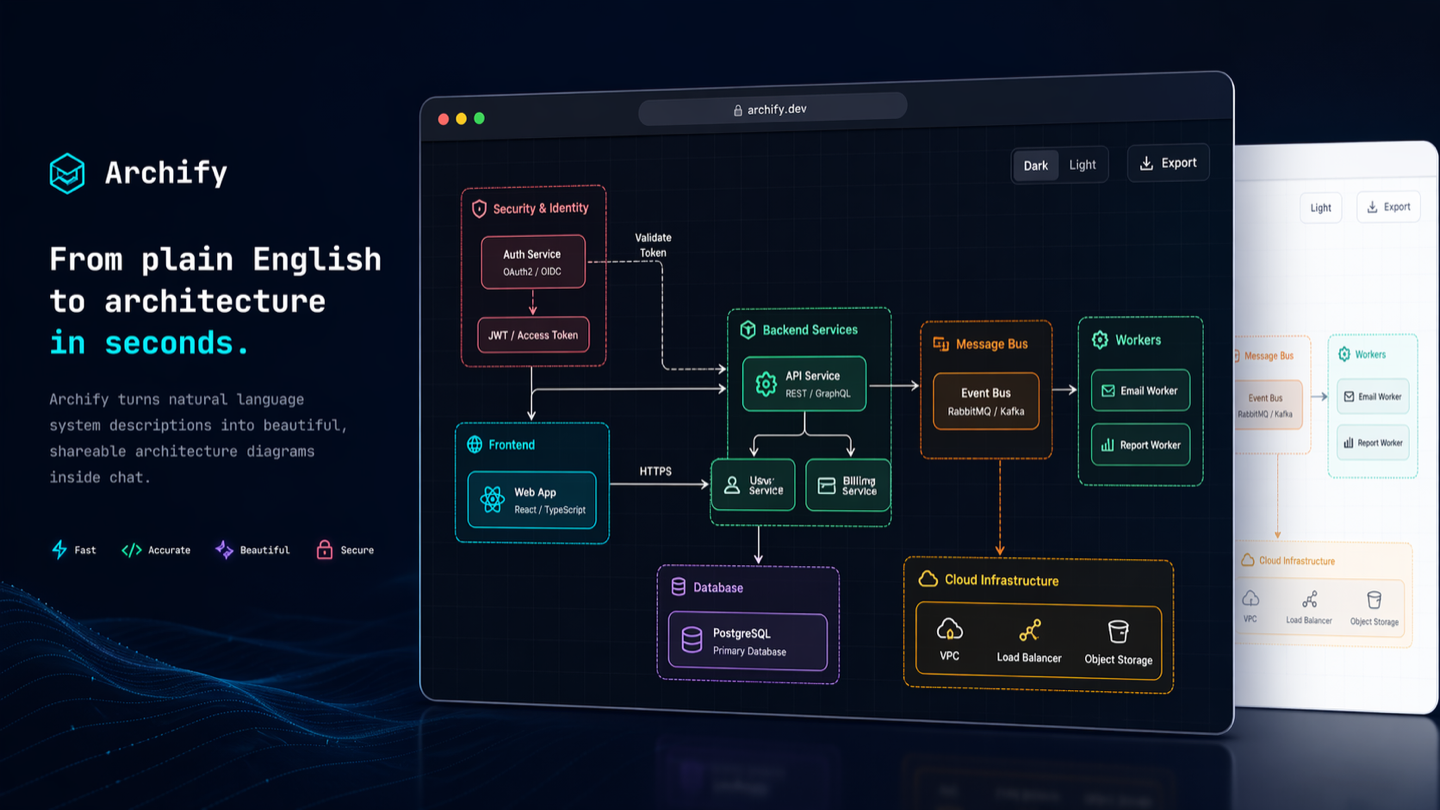
Archify
Turn a codebase or system description into a polished, interactive system map — directly in chat.
Archify is an agent skill for Raven, Cursor, Claude Code, Codex CLI, and OpenCode. Give it a system description or repository; get an interactive, shareable technical map.
- Open it and present — five diagram types, four presets, dark/light themes, built-in brand marks, and finite motion
- Review architecture changes before merge — compare two validated snapshots as Before / Delta / After, with exact added, removed, changed, moved, and rerouted facts
- Every interaction stays grounded — search nodes, optionally open revision-verified source, trace upstream/downstream authored reach and exact routes, compare roles, and play guided stories without inventing topology
- One file, ready to trust and share — typed JSON IR and deterministic checks produce self-contained HTML plus PNG, SVG, WebM, and 1200×630 share cards


Current stable version: v2.15.0. See Changelog.
Project page · Scenario guide · Proof Lab
npx skills add tt-a1i/archify -g
Using Cursor? Open the agent-aware quick start for exact global and project commands.
Then ask your agent: Use archify to map this repository's runtime architecture.
❤️ Sponsors
Thanks to APINEBULA for sponsoring Archify. APINEBULA offers unified access to Claude, GPT, Gemini, and more. Register through the Archify link and use Archify for a 10% discount.
Sponsored by EverMind, building memory infrastructure for agents. Its memory-first, self-evolving agent harness Raven supports Archify as a Skill, bringing verified, interactive system maps into Raven workflows.
See Archify in action
These are generated Archify artifacts, not product mockups. Click a frame to open its live, shareable state.
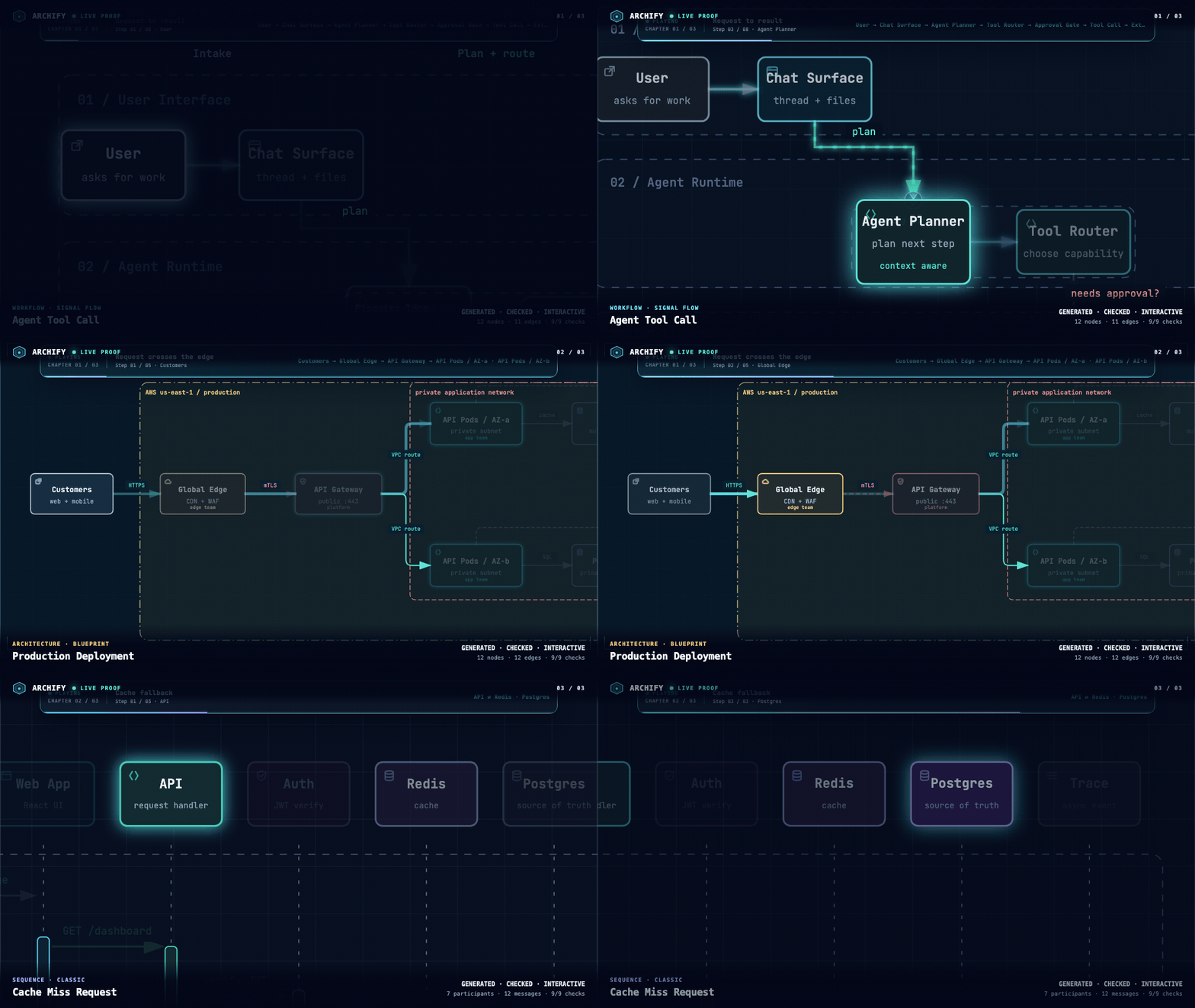
Three real generated artifacts. Signal Flow · Blueprint · Classic · open the interactive Proof Lab ↗
| Guided story | Route probe | Semantic lens |
|---|---|---|
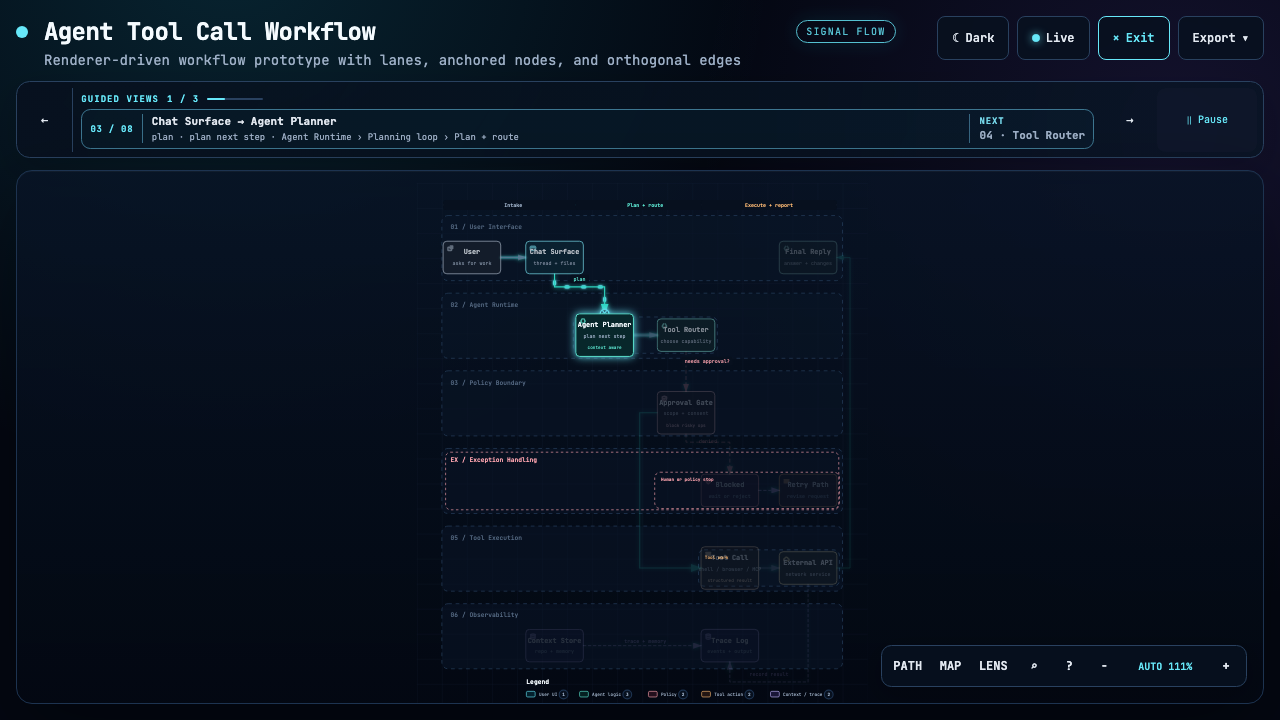 | 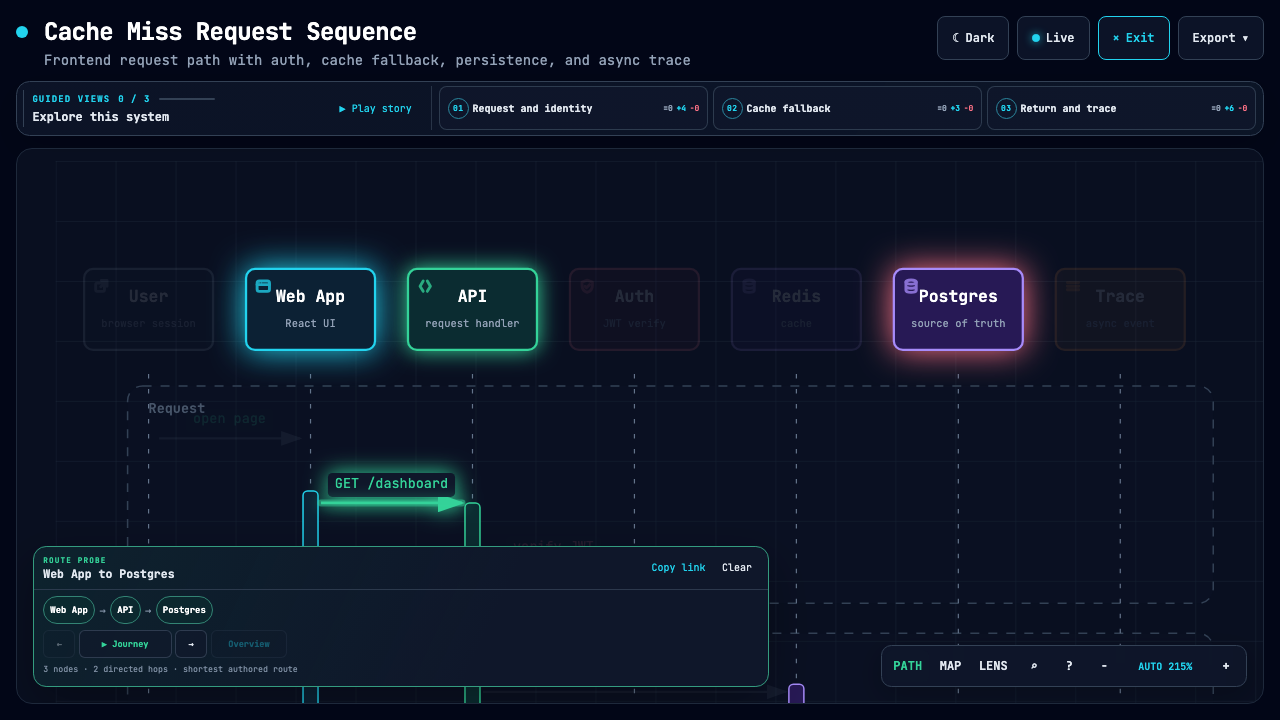 | 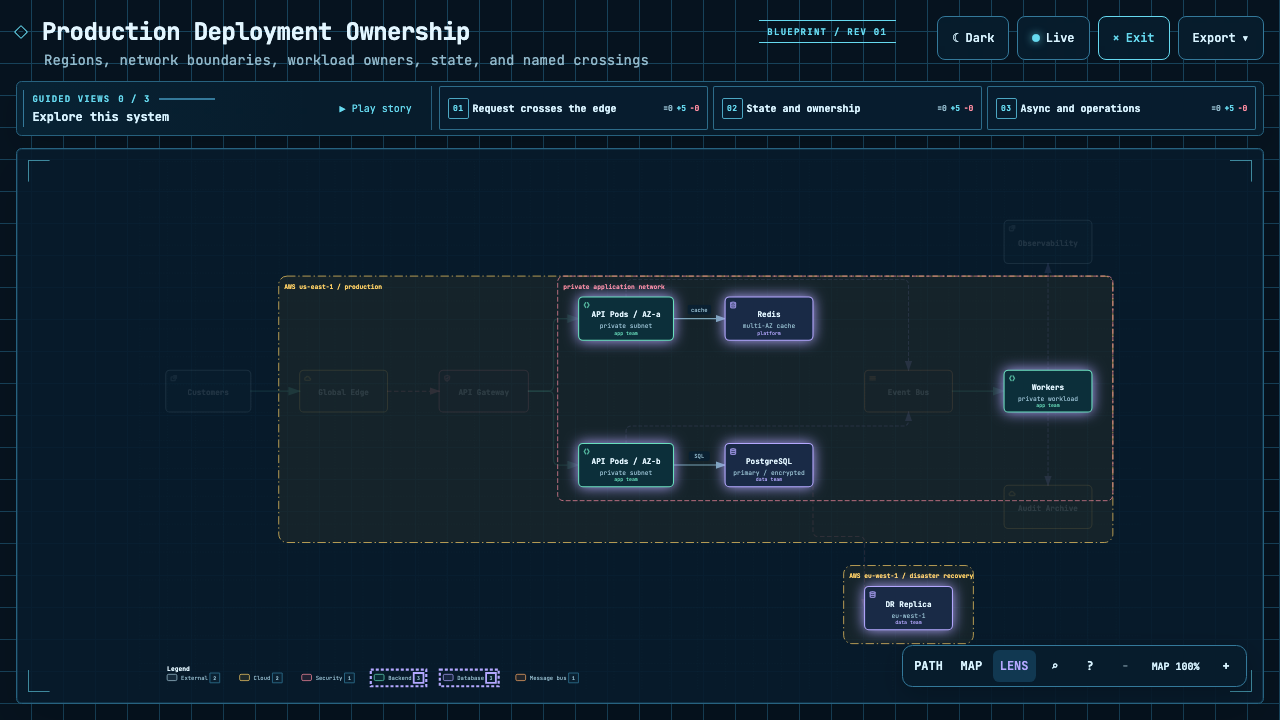 |
| Play one finite named chapter. | Inspect the shortest authored directed path. | Compare real traffic between semantic roles. |
The Proof Lab contains all 11 checked-in scenarios, their JSON sources, named views, and validation receipts.
A real repository, mapped from source
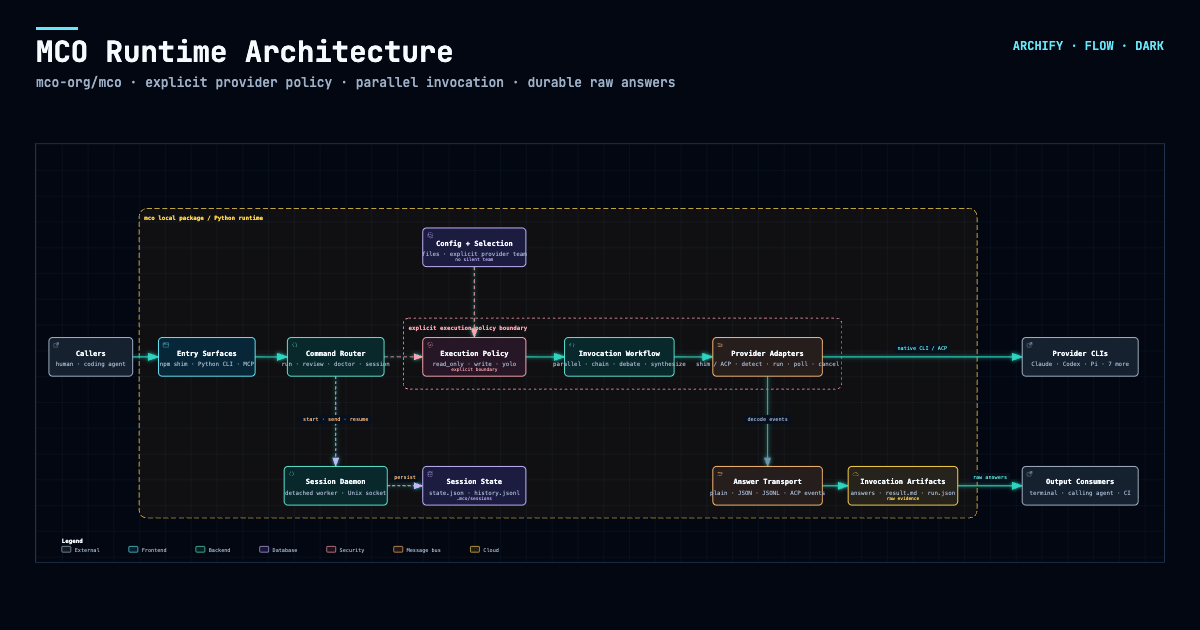
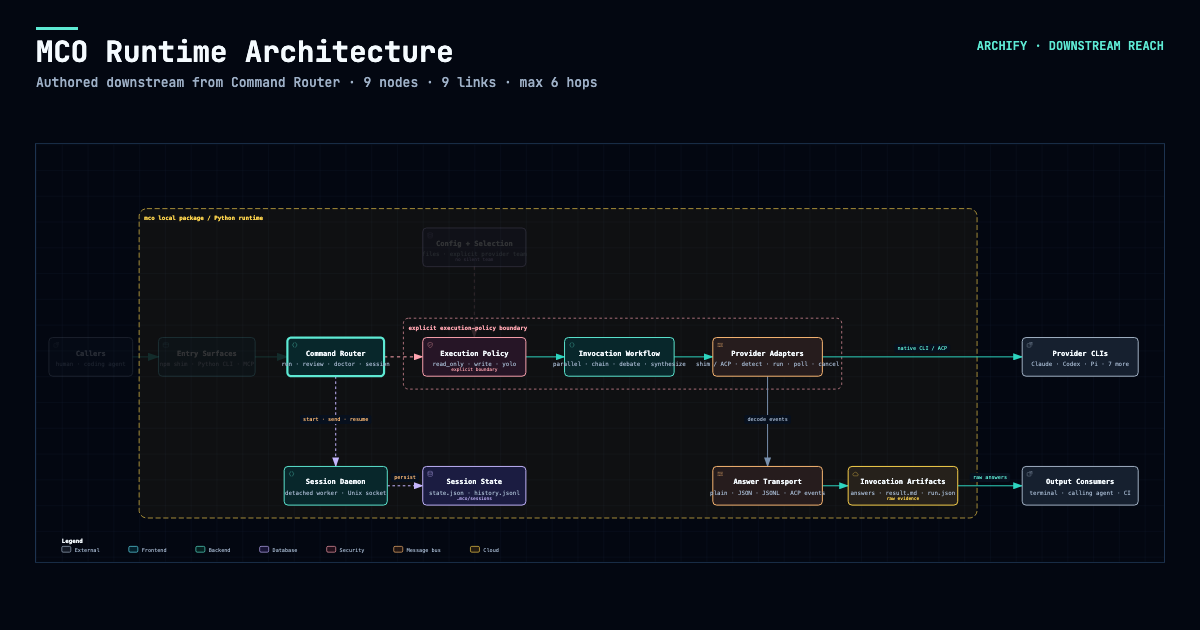
Archify traced mco-org/mco at 9f1a1cf and produced this checked map. Open it ↗ · trace reach ↗ · typed source
Preview
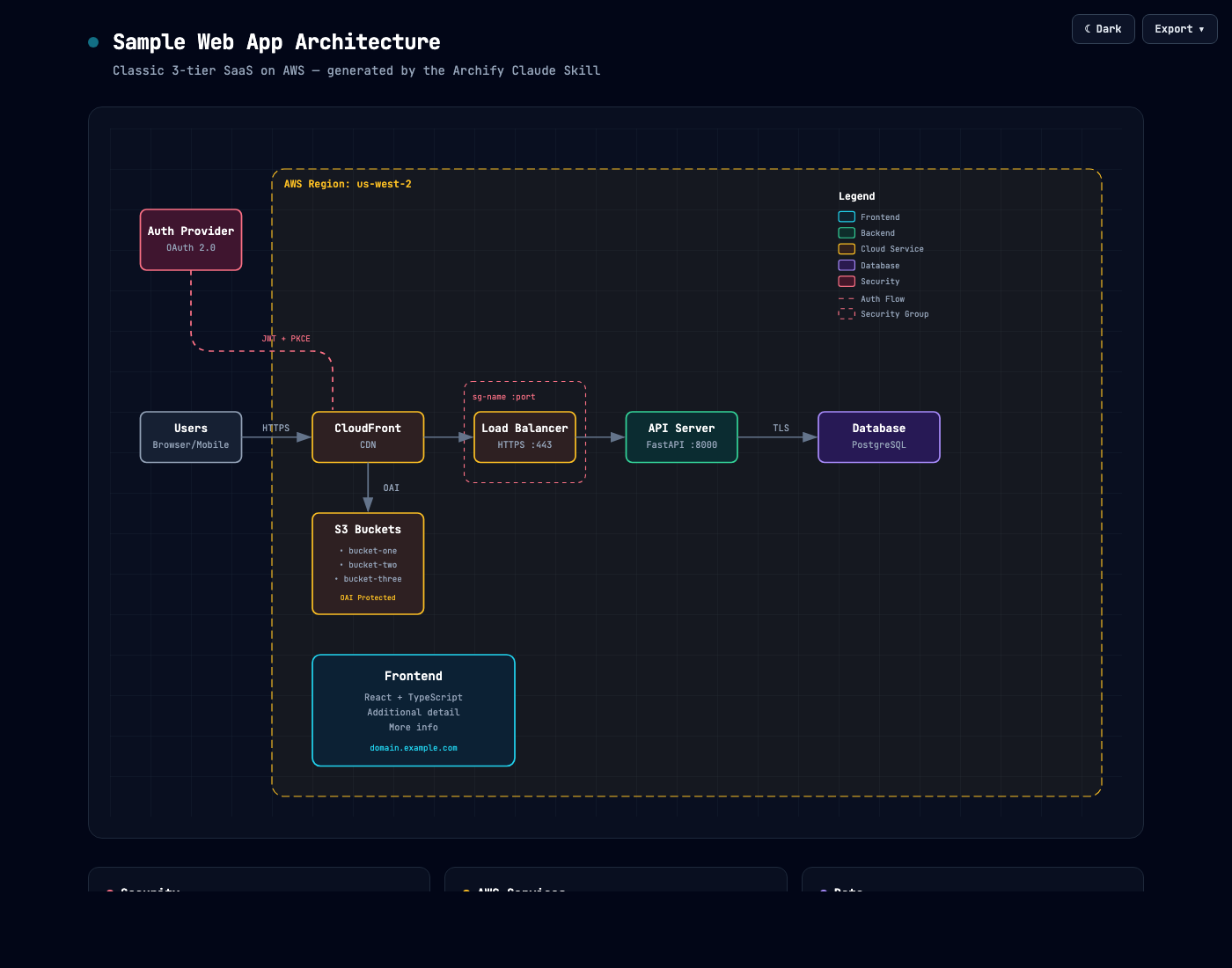
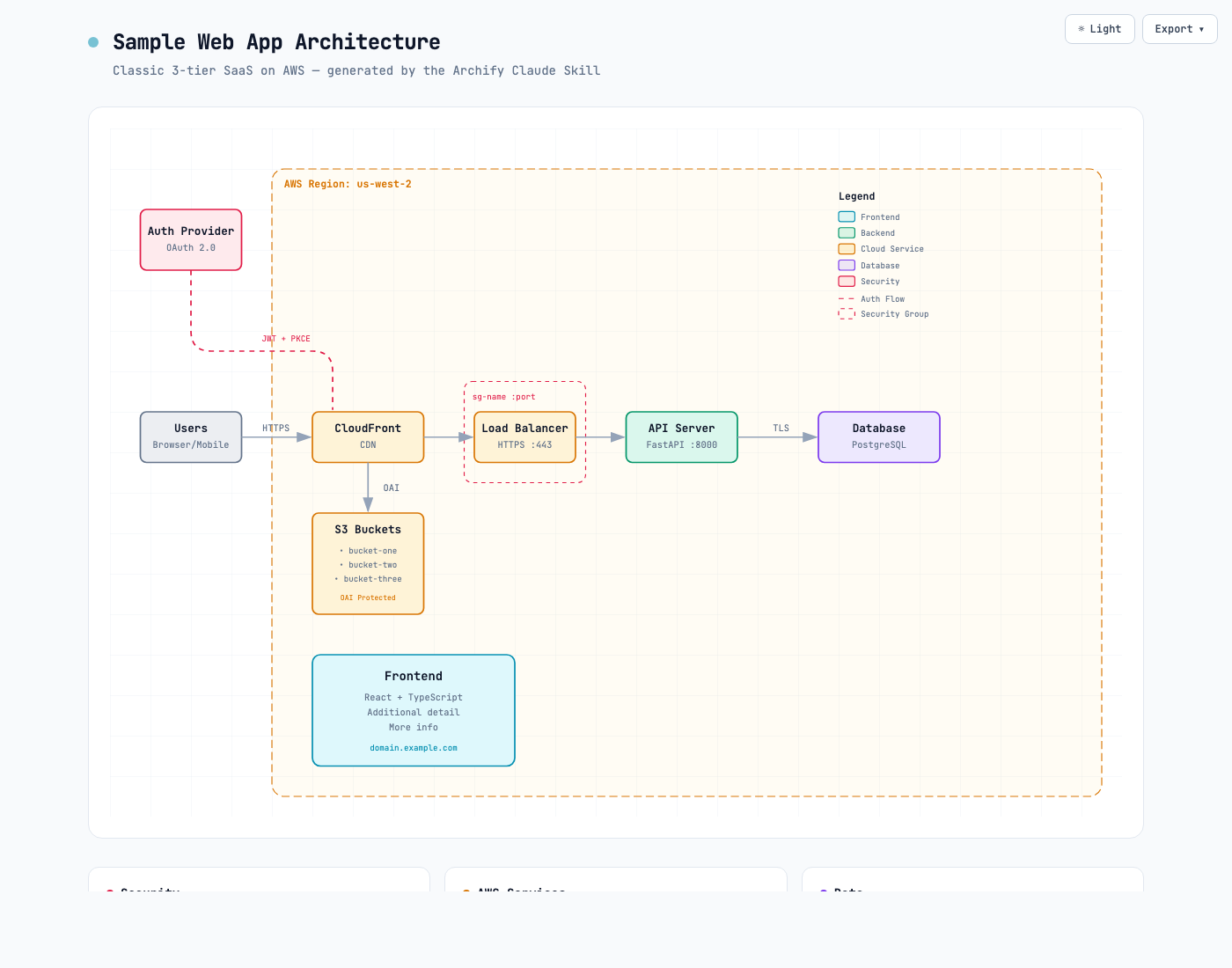
Same diagram, two themes, one click to switch:
| Dark | Light |
|---|---|
 |  |
The Export menu copies PNG to the clipboard and downloads static or motion formats:
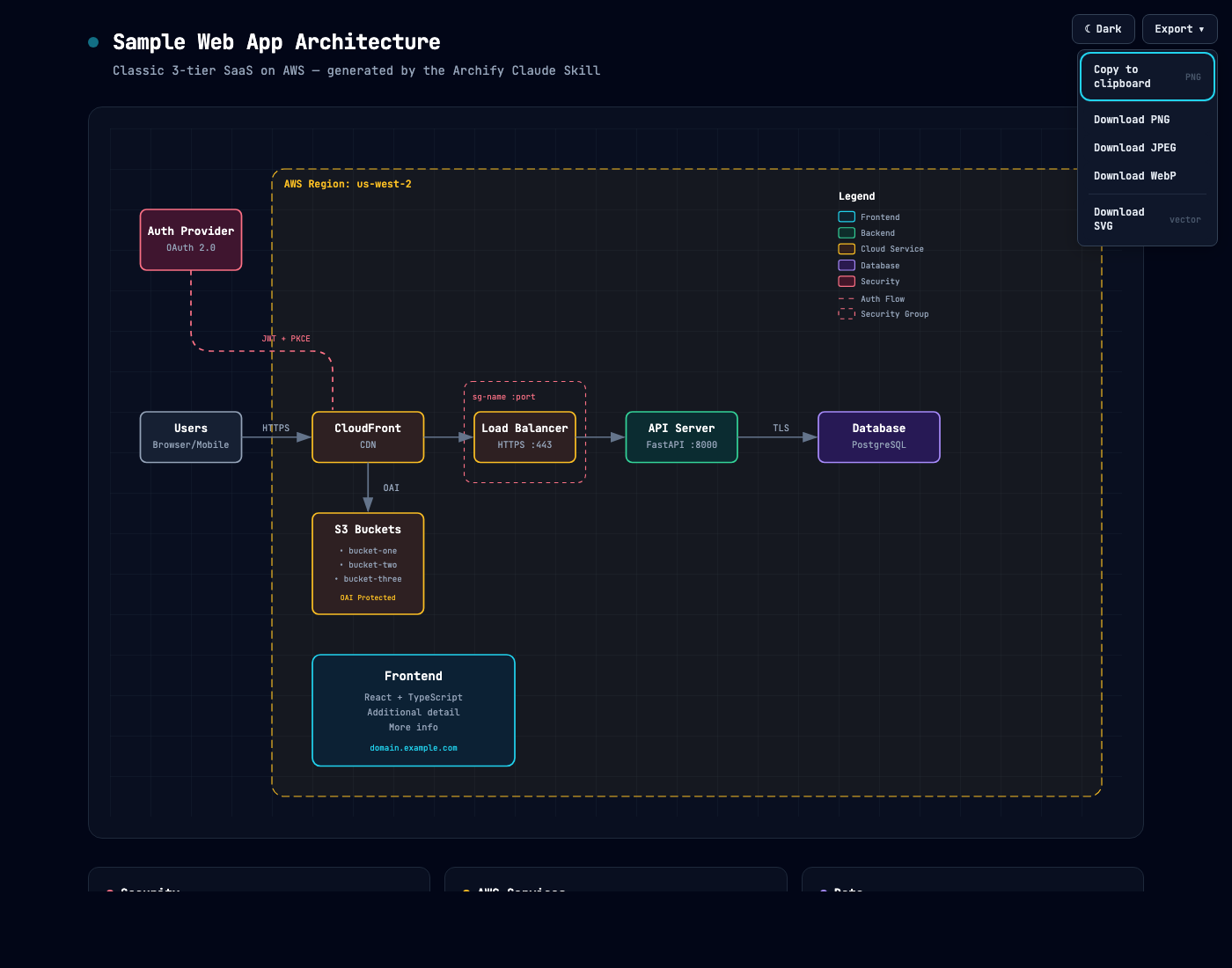
Use Copy Share Card when you want a canonical 1200×630 image for a README, release, or social post.
After tracing a route, Export → Route Share Card downloads that authored path as a 1200×630 PNG with the full diagram retained for context.
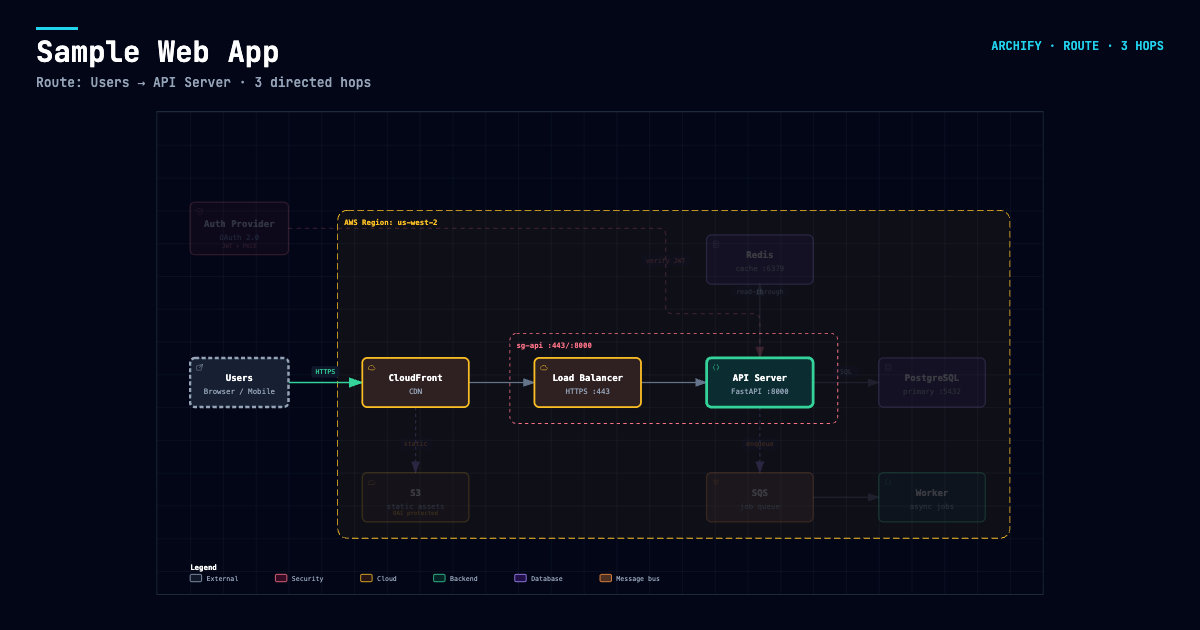
After tracing authored Upstream or Downstream reach, Export → Reach Share Card captures that exact reading without claiming runtime impact.
Open examples/web-app.html locally to try the complete viewer.
Quick start
1. Install
npx skills add tt-a1i/archify -g
For an explicit, non-interactive Cursor install:
npx -y skills add tt-a1i/archify --skill archify --agent cursor --global --copy --yes
To try without installing:
npx skills use tt-a1i/archify@archify --agent codex
DSH community opt-in: dsh plugin --profile web add @tt-a1i/archify-dsh@0.1.0
The agent switcher covers cursor, codex, claude-code, and opencode. For Raven's manual ZIP install, extract archify.zip into ~/.raven/workspace/skills; it yields ~/.raven/workspace/skills/archify. Raven is not a switcher target.
2. Ask for one bounded view
Analyze this repository, then use archify to create a high-level runtime architecture diagram.
Show 8–12 core components, one primary path, external dependencies, and trust boundaries.
Put supporting detail in cards instead of adding more edges.
For a focused flow:
Use archify to draw this login flow: Browser -> Web App -> API -> JWT validation ->
Redis session lookup -> PostgreSQL fallback. Keep the cache-miss path secondary.
3. Refine in chat
Continue with focused requests such as add Redis, move auth to the left, or highlight the rollback path. Archify keeps the typed source available for targeted iteration.
Choose the right diagram
| Type | Best for | Include in your prompt |
|---|---|---|
| Architecture | Components, services, storage, boundaries | Scope, core components, primary path |
| Workflow | CI/CD, approvals, tool calls, runbooks | Participants, order, branches, exceptions |
| Sequence | API calls, cache fallback, auth, async traces | Callers, callees, returns, timing |
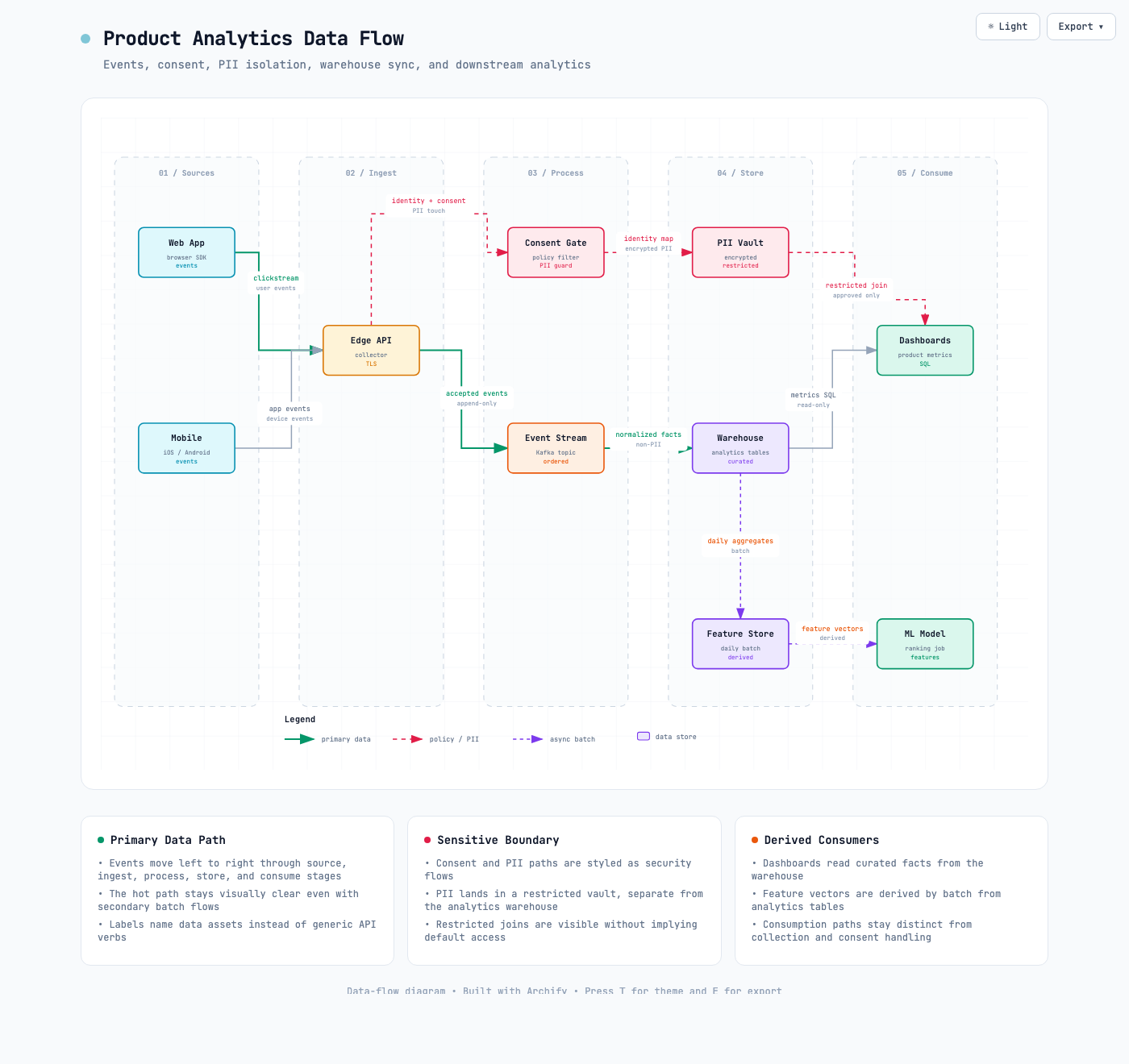
| Data Flow | Pipelines, lineage, PII, consumers | Sources, transforms, stores, boundaries |
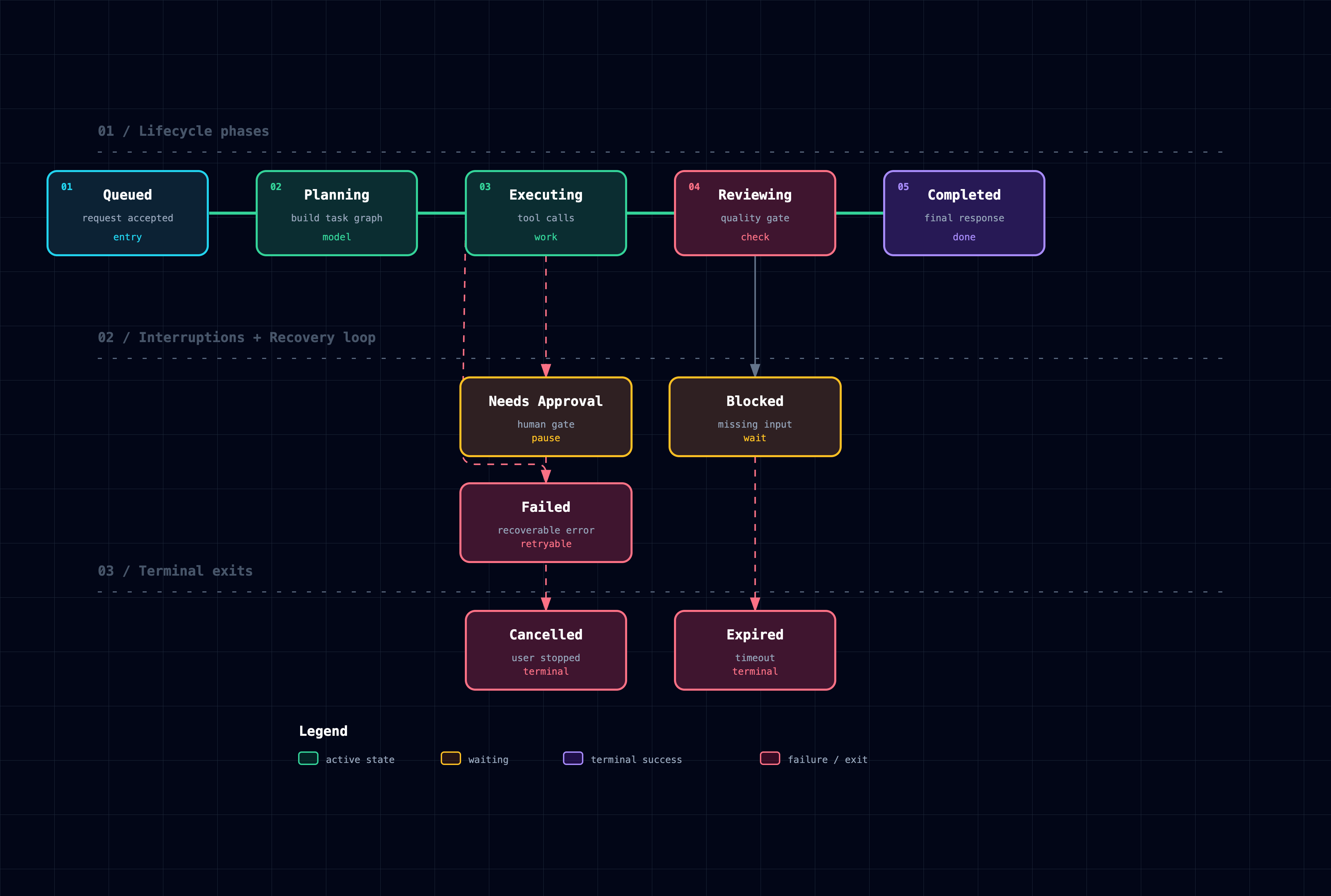
| Lifecycle | States, retries, waits, terminal outcomes | States, events, retry and cancellation paths |
For a production deployment review, Architecture can optionally enable the
deployment-ownership engineering profile. It fails closed when owners,
single-region placement, private database scope, or named boundary crossings
are missing. It is never enabled silently and validates authored facts—not live
infrastructure. See the checked deployment proof.
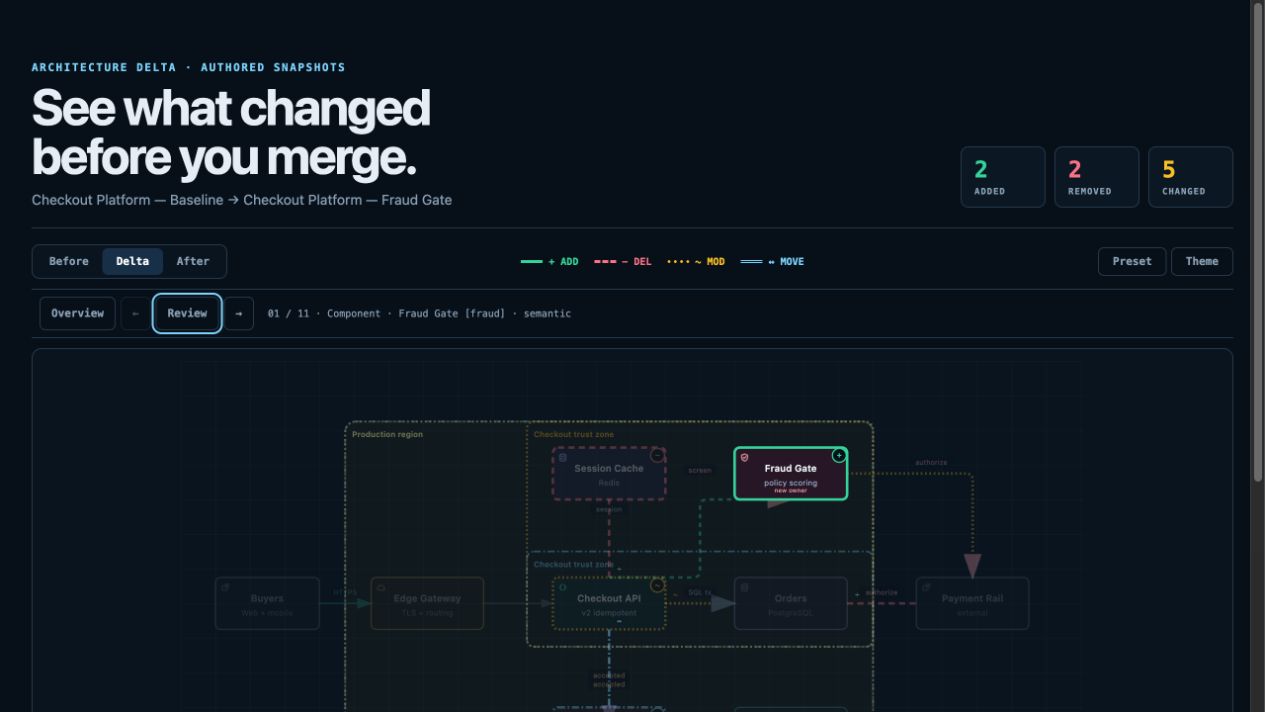
For design or PR review, Architecture Delta compares validated Before / Delta / After snapshots with a machine receipt. Select an exact authored change or play one finite Review—viewer-only, with no impact, risk, or merge-safety inference.
node archify/bin/archify.mjs compare architecture base.json head.json architecture-delta.html --json
Not sure which one fits? Use the interactive scenario guide, or ask the zero-dependency CLI:
node archify/bin/archify.mjs guide "Show an API request with Redis cache miss"
node archify/bin/archify.mjs guide "Map Kafka topics, consumer groups, replay, and DLQ" --json
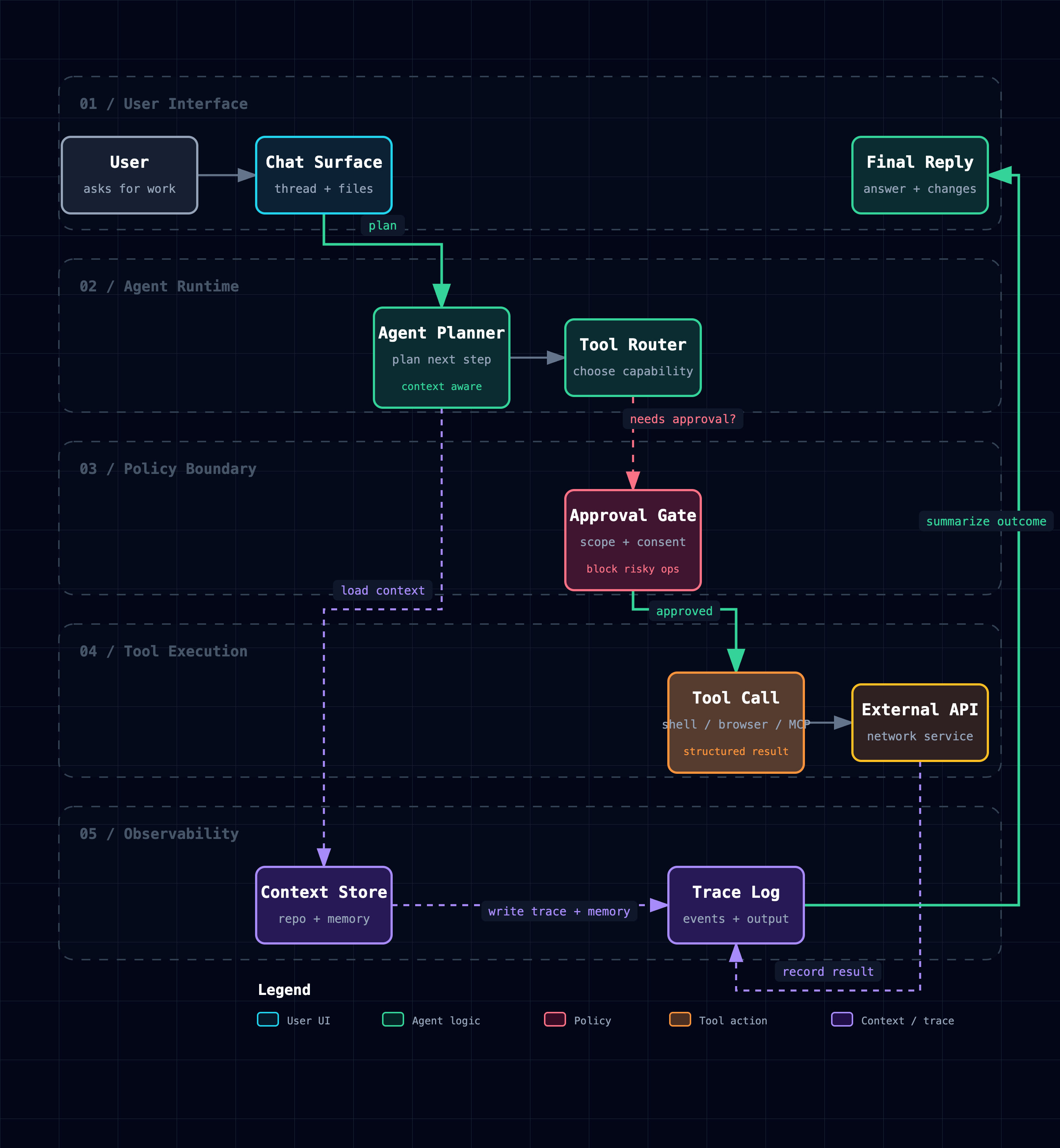
Workflow keeps the happy path clear across lanes:
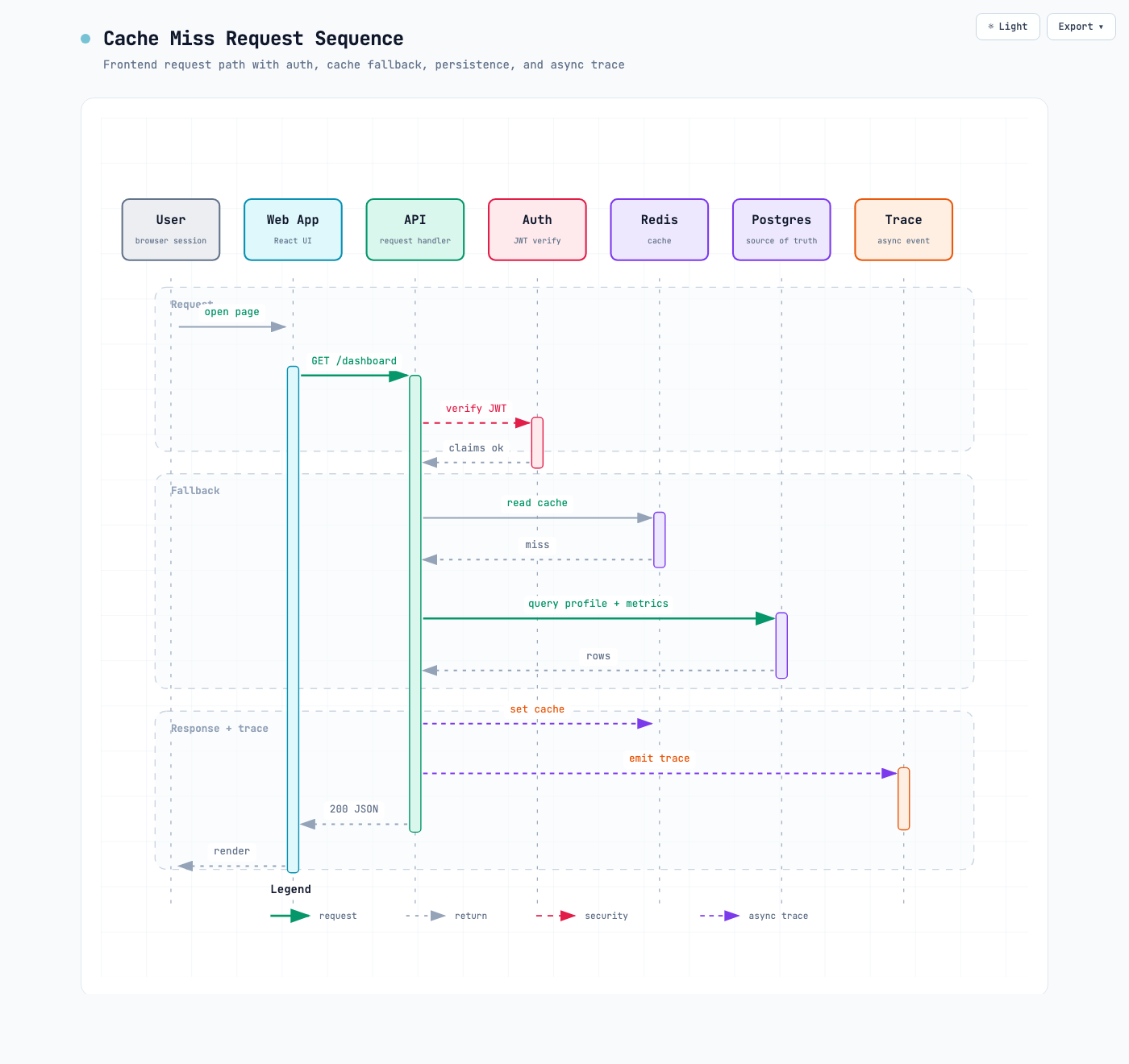
Sequence explains one interaction over time:
Data Flow makes movement and sensitivity boundaries explicit:
Lifecycle separates progress, waits, retries, and terminal outcomes:
Architecture examples: web-app · Archify pipeline · grid placement · desktop agent
Why Archify
- Layout judgment over generic auto-layout — the agent chooses hierarchy, spacing, routes, and emphasis; shared automatic endpoints spread deterministically instead of piling arrows on one midpoint.
- Typed JSON IR — every renderer-backed mode has a schema and reproducible source.
- Atomic validation before delivery — schema, layout, HTML/SVG, route, and label-to-route clearance checks must all pass before a showcase artifact replaces the last known good output.
- Failures come with a repair receipt —
validate --jsonanddeliver --jsonreturn stable rule codes, the exact subject, measured evidence, and only supported repair controls instead of a Node stack or an unstructured retry guess. - Last-good live preview — an optional desktop loop watches one JSON file, refreshes only after the latest candidate passes every gate, and keeps the previous verified diagram visible when a save is incomplete or invalid.
- Truthful interaction — focus, upstream/downstream reach, exact routes, role comparison, and stories reuse authored nodes and relationships instead of inventing topology or claiming runtime impact.
- Source evidence, only when requested — Evidence-backed Architecture nodes mark themselves
SRC nand open Git-verified files and line ranges pinned to one public commit; ordinary artifacts stay source-free. - Portable by default — the result is one HTML file; exports remain full-diagram and free of temporary viewer state.
Archify is not a general-purpose drawing editor or a Mermaid theme. It turns technical intent into a communication artifact.
How it works
| Step | What happens |
|---|---|
| Generate | The agent creates typed JSON IR from your description. |
| Validate | Bundled validators and layout rules check the source; failures identify the exact local repair in machine-readable JSON. |
| Preview (optional) | A loopback-only desktop session watches one source and reloads only verified revisions; failures keep the last-good artifact. |
| Deliver | A same-directory candidate is rendered and checked; only a passing artifact atomically replaces the target, then optional --open launches that exact file. |
| Iterate | The agent updates the source while unrelated structure stays stable. |
Useful repository commands:
cd archify
node bin/archify.mjs doctor
node bin/archify.mjs demo /tmp/archify-demo
node bin/archify.mjs guide "Show CI/CD checks, approval, deploy, and rollback"
node bin/archify.mjs validate workflow examples/agent-tool-call.workflow.json --quality showcase --json
node bin/archify.mjs preview workflow examples/agent-tool-call.workflow.json /tmp/workflow.html --quality showcase
node bin/archify.mjs deliver workflow examples/agent-tool-call.workflow.json /tmp/workflow.html --quality showcase --open --json
preview is an explicit desktop authoring mode, not a default background service: it binds only to 127.0.0.1 on a random port, watches the one named JSON file, preserves the last verified output through failures, and stops with Ctrl-C. Add --no-open for tests or when you will open the printed local URL yourself. It adds no runtime to the generated HTML.
Use deliver --open for a one-shot interactive local handoff. It is off by default, runs only after the verified artifact is committed, and never turns a successful delivery into a failure when the OS opener is unavailable; JSON stays on stdout and the absolute manual-open path goes to stderr.
On failure, validate --json and deliver --json still emit exactly one JSON object. Read diagnostics[] and change only the named subject using its supportedFixes; do not rewrite the whole diagram or exceed the Skill's two focused correction rounds. Deterministic diagnostics remain separate from visual review.
Optional motion and presentation styling are explicit:
{
  "meta": {
    "animation": "trace",
    "visual_preset": "signal-flow"
  }
}
Omit animation for a truly static diagram. classic remains default; editorial adds a warm publication look.
Explore and share the output
| Action | Control |
|---|---|
| Open the factual Diagram Guide | ? |
| Find and focus a semantic node | / |
| Trace upstream/downstream authored reach | Focus a node → Upstream / Downstream |
| Probe a directed route and inspect its journey | R or PATH |
| Compare one or two semantic roles | L or LENS |
| Open the live overview radar | M or MAP |
| Play a guided story / change chapter | P / [ ] |
| Enter Presentation Stage | F |
Choose visual style (S cycles) / toggle theme / open Export | S / T / E |
| Zoom or reset | + / - / 0 |
Stable links can restore #focus=<id>, #focus=<id>&reach=upstream|downstream, #relation=<id>, #route=<source>~<target>, #lens=<kind>~<kind>, and #view=<view-id>. Reader-driven motion is finite, respects prefers-reduced-motion, and never enters canonical exports.
The complete generation and viewer contract lives in archify/SKILL.md.
Installation options
| Surface | Install location or method | Capability |
|---|---|---|
| Raven | Manual ZIP into ~/.raven/workspace/skills → ~/.raven/workspace/skills/archify | Full renderer + validation workflow |
| Claude Code | ~/.claude/skills/ or .claude/skills/ | Full renderer + validation workflow |
| Codex CLI | ~/.agents/skills/ or .agents/skills/ | Full renderer + validation workflow |
| opencode | ~/.config/opencode/skills/, .opencode/skills/, or .agents/skills/ | Full renderer + validation workflow |
| Claude.ai | Upload archify.zip under Settings → Capabilities → Skills | Depends on Node.js access in the sandbox |
| Project Knowledge | Upload archify.zip to the project | Prompt-driven architecture fallback |
DeepSeek Harness: Community integration, not an official DeepSeek product; developer-preview @deepseek-ai/dsh@0.1.0-rc.6, Node `^22.19.0 | >=24.0.0. Install: dsh plugin --profile web add @tt-a1i/archify-dsh@0.1.0; invoke: Use the archify skill to map this repository's runtime architecture.; remove: dsh plugin --profile web remove @tt-a1i/archify-dsh`. No telemetry. Shell files need exact workspace paths, not Web Produced Files. Details. |
Reference and scope
Automatic Mermaid parsing, general-purpose auto-layout, hosted sharing, and WYSIWYG editing are intentionally outside the current scope.
License
MIT — free to use, modify, and distribute.
Contributing
Issues, pull requests, and real-world diagrams are welcome. Start with the contribution guide, use the reproducible bug form for failures, or submit a validated diagram through the community showcase form.