Add Hindsight long-term project memory to DeepSeek Harness: automatically recall knowledge pages and context each session, conversations auto-saved, shared memory bank per repository.

- Language
- Python
- License
- MIT
- Branch
- main
Install
$ dsh plugin --profile web add @vectorize-io/hindsight-coding-agentsRun the command above in your terminal to install this plugin via the dsh CLI. You can switch Profile in the top-right corner. New to dsh? Read the beginner tutorial
Install via your agent
Install the DeepSeek Harness plugin vectorize-io/hindsight/hindsight-integrations/coding-agents for me: review the repository at https://github.com/vectorize-io/hindsight first, then run the install command and verify the plugin loads successfully.
Paste this instruction to the DSH Web GUI assistant — it will install and verify for you.
One-Line Pitch
Injects Hindsight long-term project memory into DeepSeek Harness (DSH): recalls relevant context from the memory bank before each user turn and injects it into the model input; conversation content is automatically written back to repository-level memory bank at session end, with memories isolated by repository and shared across sessions.
Core Capabilities
- Before each user turn (
agent/pre-step), calls the memory service for semantic retrieval, appending hit knowledge pages and context askind: 'plugin'messages to the model input - Listens to
agent/session-startfor cold-start checks, automatically runs git history import and codebase structure analysis in the background, no manual commands needed - Automatically writes back the complete session (including tool calls and assistant replies) at
agent/turn-stopping, no need to "save" when conversation ends - Registers 8 native Cordis plugin tools (
hindsight_*) for direct DSH model invocation (search/read knowledge pages, deep reasoning, capture initiative, ingest document, sync status, diagnose) - Resolves working directory to independent "memory banks" (default naming
coding-agent::<repo-name>), multiple DSH sessions won't have data bleed-through, sub-agent sessions won't be duplicated - Three deployment modes available: Hindsight Cloud (default), self-hosted service, local daemon (
127.0.0.1:9077)
Technical Implementation
- Language: TypeScript (ESM)
- Key Dependencies:
@vectorize-io/hindsight-all(core client),@modelcontextprotocol/sdk(optional MCP tools path),zod(parameter validation); does not introduce DSH's own packages to avoid hard dependency on host version - Architecture Pattern: Cordis native plugin—exports
name,inject=["agents"]andapply(ctx);applybinds 4 lifecycle events viactx.on(agent/session-start/agent/pre-stepwithprepend:true/agent/turn-stopping/agent/disposed), and registers native tools in the host tool registry viactx.inject(["tools"], ...) - Entry Files:
src/dsh.ts(Cordis entry, directly loaded by DSH),src/index.ts(shared by opencode/Kilo and other plugin hosts for same core logic),cordis.patch.yml(profile load declaration)
Use Cases
Developers using DSH daily for cross-session projects—frequently modifying the same batch of files in the same repository, re-discussing already-decided values, or asking "why was this implemented this way last time?" After enabling, DSH sessions automatically recall relevant knowledge pages and historical decisions at start, and write this turn's Q&A and tool calls to the repository-level memory bank at end; next session directly inherits context without needing to restate background. Different sessions in the same repository share the same memory without interfering with each other.
Prerequisites & Compatibility
| Dependency | Min Version | Description |
|---|---|---|
| DeepSeek Harness | Not declared | This plugin mounts to host layer as Cordis native plugin; loads as long as DSH still uses event names agent/session-start, agent/pre-step, agent/turn-stopping, agent/disposed. |
| Node.js | Not declared | package.json doesn't declare engines; if need to import historical dsh sessions for bulk backfill, Zstandard decoding requires Node 22.15+. |
| Platform | Cross-platform | Cross-platform. In daemon mode, macOS needs self-provided Rust toolchain for litellm (no wheel); Linux/Windows install wheel directly. |
| Native Modules | None | package.json doesn't declare native module dependencies. daemon mode indirectly depends on hindsight-embed's own requirements. |
Installation
dsh plugin --profile web add github:vectorize-io/hindsight/hindsight-integrations/coding-agents
Configuration Options
Config file: ~/.hindsight/coding-agent.json. Environment variables (HINDSIGHT_*) as fallback, file takes priority.
| Config | Type | Description | Default |
|---|---|---|---|
serverMode | "cloud" | "self-hosted" | "daemon" | Where the memory service runs | cloud |
apiUrl | string | Hindsight API address (auto-changed to http://127.0.0.1:{apiPort} in daemon mode) | https://api.hindsight.vectorize.io |
apiToken | string | Bearer Token required for Cloud mode | — |
bankId | string | Explicitly specify memory bank id; if unset, resolves dynamically by repository | Resolved by directory |
bankIdTemplate | string | Dynamic bank id template, supports placeholders {gitProject} {project} {harness} {channel} {user} | coding-agent::{gitProject} |
mapPathToBank | object | Absolute path → bank id mapping, longest prefix first, can override default entirely | — |
optInOnly | boolean | Only enable memory in whitelisted directories, other directories silently skip writing | false |
optInPaths | string[] | Whitelisted directories (prefix matching, auto-expands ~), each repo still retains separate bank | [] |
disabled | boolean | Hard disable—plugin completely inactive, no banks created | false |
retainSessions | boolean | Whether plugin host (opencode/Kilo) writes back per turn asynchronously | true |
reflectTimeoutMs | number | Timeout for recall call at session start (milliseconds) | 120000 |
pageRefreshEveryTurns | number | Refresh knowledge pages every how many user turns | 10 |
autoSeed | boolean | Cold repositories automatically seed from git history | true |
seedLimit | number | Maximum recent commits for auto-seed | 300 |
codebaseSurvey | boolean | Whether cold repositories run a read-only codebase structure survey | true |
surveyModel | string | Model for survey (Claude recipe) | haiku |
surveyBudgetUsd | number | Survey budget cap (Claude recipe) | 2 |
gitIngest | "message" | "full" | "none" | Git history ingestion depth: message only commit messages; full includes diff; none disables | message |
maxParallelRetains | number | Max concurrent write requests (lower if hitting 429) | 10 |
retainTags | string[] | Auto-attached tags per write, supports above placeholders | [] |
retainMetadata | object | Auto-attached metadata per write, supports above placeholders | {} |
harnesses.<name> | object | Override any field by host name (e.g., disable memory for Claude Code alone) | — |
banks.<id> | object | Override any field by resolved bank id; can set bank to rename and merge into other bank | — |
logLevel | "debug" | "info" | "warn" | "error" | Log level | info |
Tools visible to model: hindsight_sync_status / hindsight_diagnose / hindsight_search_knowledge_pages / hindsight_list_knowledge_pages / hindsight_read_knowledge_page / hindsight_reflect / hindsight_capture_initiative / hindsight_ingest_document.
FAQ
Q: Do I need to run any commands to initialize memory after installation?
A: No. agent/session-start automatically performs cold-start checks, pulls git history and codebase structure in the background, memory continuously supplements in background; no manual commands needed, no ingest CLI either.
Q: Where is data stored? Is it uploaded to the cloud?
A: Defaults to Hindsight Cloud (needs a Bearer Token in apiToken). Can also switch to self-hosted service (set apiUrl to your server) or local daemon (set serverMode: "daemon", plugin starts hindsight-embed on demand and listens on 127.0.0.1:9077). The three modes only affect where the service runs; HTTP interface is consistent.
Q: Will multiple DSH sessions (different projects) bleed data?
A: No. DSH's web interface can create sessions in different directories; each session's session.header.cwd determines which workspace to use; plugin resolves each workspace root directory to separate "memory banks" (default naming coding-agent::<repo-name>). Sub-agent sessions (origin === "subagent") are identified and skipped, won't be duplicated.
Q: Which layer is it installed at? Will it affect all DSH profiles?
A: Mounts to host layer via cordis.patch.yml, takes effect for all profiles; if you want to disable just one profile, change that profile's own cordis.patch.yml line to disabled: true, no need to uninstall.
Q: How to disable memory for a specific repository?
A: In ~/.hindsight/coding-agent.json under banks section, write { "disabled": true } by the resolved bank id (e.g., coding-agent::secret-client); or use optInPaths to list allowed directories and set optInOnly to true, projects outside the list are completely silent with no writes.
Q: Where do retrieval results appear?
A: Retrieved content is appended as user message with source: { kind: 'plugin', plugin: 'hindsight', form: 'recall' }, DSH renders it as "recalled material" rather than user input; the model can also proactively query using tools like hindsight_search_knowledge_pages, hindsight_reflect, etc.
Q: How to debug when errors occur?
A: Check $TMPDIR/hindsight-coding-agent/plugin.log (human-readable, sorted by LEVEL [scope] message) or /tmp/hindsight-plugin.log (machine-readable, each line JSON, reflects each recall/write success/failure). Set logLevel to debug in config to see more detailed process. Model can also directly call hindsight_diagnose tool for self-service troubleshooting.
Learning Curve
Beginner-friendly — just run dsh plugin add to load, all config options optional; if you don't want to configure, just use Hindsight Cloud + default bank naming, memory recall and writing work immediately in the repo.
Known Issues & Limitations
- Local daemon mode on macOS requires self-provided Rust toolchain:
litellmas a transitive dependency ofhindsight-embedonly publishes Linux/Windows wheels; macOS needs to compile from source via maturin and maintain a relatively newrustc; otherwise startup fails due to missing toolchain. - Process-level host layer registration resolves bank by startup directory by default: Tools are registered when plugin loads, first gets a template via
process.cwd(); each time the model invokes, the bank is re-resolved using the caller's session workspace. If the startup directory happens to fall into somebanks.<id>blacklist, tools won't be exposed for any subsequent repositories served by that process (even if their banks are enabled). - DSH lacks toast/UI notification channel for plugins: Hosts like opencode/Kilo/Cline show "🧠 Memory Enabled" banner at startup; DSH has no corresponding channel, so no banner appears in DSH UI at startup, can only confirm from logs.
- Importing historical DSH sessions requires Node 22.15+: Older Node fails to parse Zstandard-framed JSONL under
$DSH_HOME/sessions, backfill skips by reason and doesn't silently pretend success. - No repository-level config file: Intentionally excluded local files like
.hindsightrc.jsonin repositories to prevent cloned repos from secretly enabling or redirecting memory; path mapping and host overrides are centralized in user-level~/.hindsight/coding-agent.json.







What is Hindsight?
Hindsight™ is an agent memory system built to create smarter agents that learn over time. Most agent memory systems focus on recalling conversation history. Hindsight is focused on making agents that learn, not just remember.
It eliminates the shortcomings of alternative techniques such as RAG and knowledge graph and delivers state-of-the-art performance on long term memory tasks.
Contents
- Memory Performance & Accuracy
- Quick Start — server · clients · platforms · embedded
- Adding Hindsight to Your Agent — LLM Wrapper · integrations · coding agents · MCP
- Core Concepts — memory types · retain / recall / reflect · observations · mental models & knowledge pages · banks
- Use Cases
- Running in Production
- Resources
Memory Performance & Accuracy
Hindsight is the most accurate agent memory system ever tested according to benchmark performance. It has achieved state-of-the-art performance on the LongMemEval benchmark, widely used to assess memory system performance across a variety of conversational AI scenarios. The current reported performance of Hindsight and other agent memory solutions as of January 2026 is shown here:
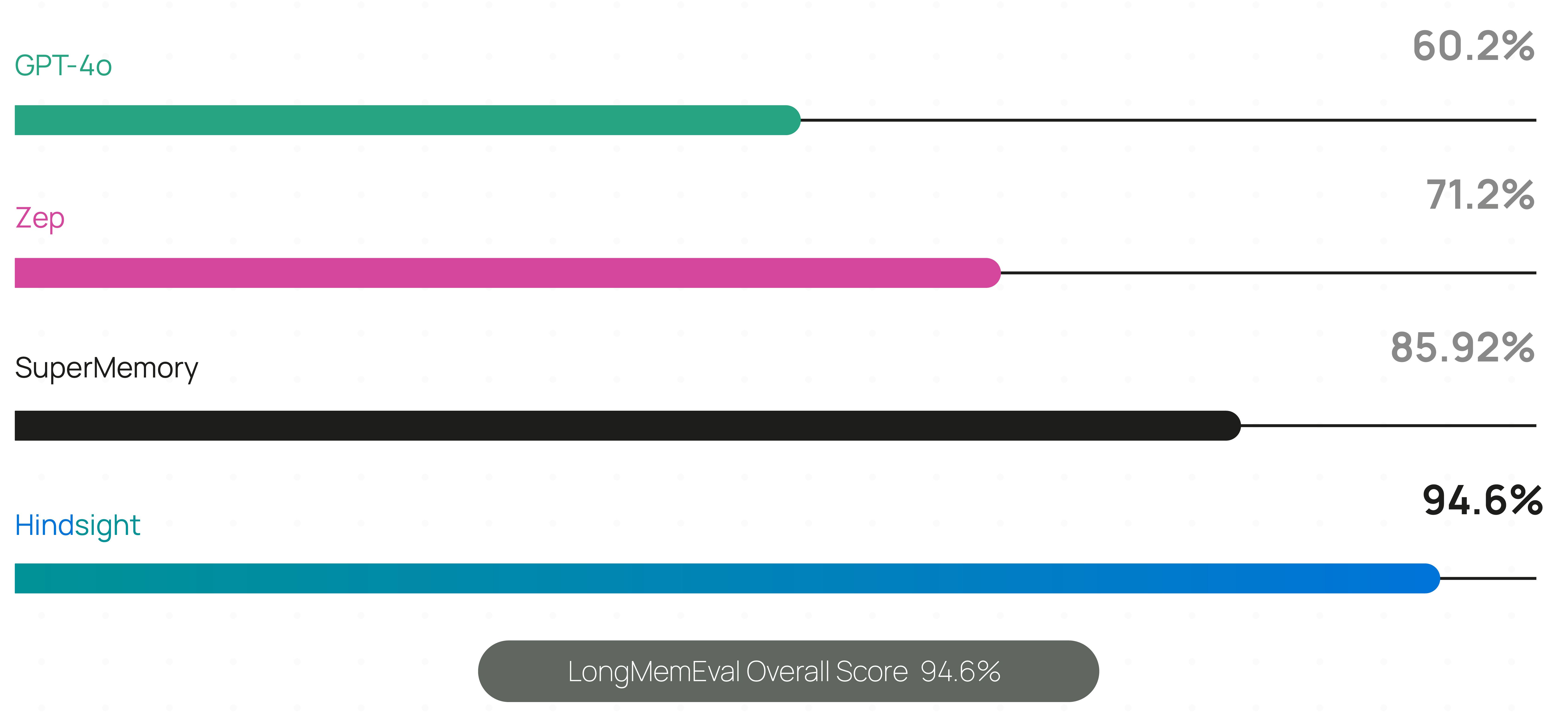
Live, continuously updated results — including per-model accuracy, latency and cost — are published at benchmarks.hindsight.vectorize.io.
The benchmark performance data for Hindsight has been independently reproduced by research collaborators at the Virginia Tech Sanghani Center for Artificial Intelligence and Data Analytics and The Washington Post. Other scores are self-reported by software vendors.
Hindsight is being used in production at Fortune 500 enterprises and by a growing number of AI startups.
🤖 Using a coding agent? Install the Hindsight documentation skill for instant access to docs while you code:
npx skills add https://github.com/vectorize-io/hindsight --skill hindsight-docsWorks with Claude Code, Cursor, and other AI coding assistants.
Quick Start
1. Start a server
Docker (recommended)
export OPENAI_API_KEY=sk-xxx

docker run -it --pull always --name hindsight --restart unless-stopped -p 8888:8888 -p 9999:9999 \
  -e HINDSIGHT_API_LLM_API_KEY=$OPENAI_API_KEY \
  -v hindsight-data:/home/hindsight/.pg0 \
  ghcr.io/vectorize-io/hindsight:latest
Hindsight works with 25+ LLM providers via HINDSIGHT_API_LLM_PROVIDER — hosted (openai, anthropic, gemini, groq, bedrock, vertexai, minimax, deepseek, atlas, …), fully local (ollama, lmstudio, llamacpp), any OpenAI-compatible endpoint, and gateways (litellm, litellmrouter) that reach the rest. Existing subscriptions work too: openai-codex (ChatGPT Plus/Pro), claude-code (Claude Pro/Max) and github-copilot (GitHub Copilot) need no API key. See supported models.
Docker (external PostgreSQL)
export OPENAI_API_KEY=sk-xxx
export HINDSIGHT_DB_PASSWORD=choose-a-password
cd docker/docker-compose
docker compose up
Oracle AI Database is also supported for enterprise deployments with full feature parity. See the storage documentation for details.
Bare metal (pip)
pip install hindsight-api
export HINDSIGHT_API_LLM_API_KEY=sk-xxx

hindsight-api
Kubernetes (Helm)
helm install hindsight oci://ghcr.io/vectorize-io/charts/hindsight \
  --set api.llm.provider=openai \
  --set api.llm.apiKey=sk-xxx \
  --set postgresql.enabled=true
Managed (no server)
Hindsight Cloud is the hosted option: managed infrastructure that scales automatically, plus a dashboard, backups, team collaboration and a 99.9% uptime SLA. Billing is usage-based with free credits to start — no fixed monthly or per-seat fee. Point any client at https://api.hindsight.vectorize.io with your API key and skip the deployment entirely.
Compare self-hosted, Cloud and Enterprise → · Sign up →
All options, including Windows and air-gapped setups, are covered in the installation guide.
2. Connect a client
pip install hindsight-client -U                                  # Python
npm install @vectorize-io/hindsight-client                        # Node.js / TypeScript
go get github.com/vectorize-io/hindsight/hindsight-clients/go     # Go
curl -fsSL https://hindsight.vectorize.io/get-cli | bash          # CLI
Python
from hindsight_client import Hindsight

client = Hindsight(base_url="http://localhost:8888")

# Retain: Store information
client.retain(bank_id="my-bank", content="Alice works at Google as a software engineer")

# Recall: Search memories
client.recall(bank_id="my-bank", query="What does Alice do?")

# Reflect: Generate disposition-aware response
client.reflect(bank_id="my-bank", query="Tell me about Alice")
Node.js / TypeScript
const { HindsightClient } = require('@vectorize-io/hindsight-client');

const main = async () => {
  const client = new HindsightClient({ baseUrl: 'http://localhost:8888' });

  await client.retain('my-bank', 'Alice loves hiking in Yosemite');

  const results = await client.recall('my-bank', 'What does Alice like?');
  console.log(results);
}

main();
Full reference: Python · Node.js · Go · CLI · REST API
Supported Platforms
| Platform | Docker | Bare Metal (pip) | Embedded DB (pg0) |
|---|---|---|---|
| Linux (x86_64, ARM64) | ✅ | ✅ | ✅ |
| macOS (Apple Silicon / arm64) | ✅ | ✅ | ✅ |
| macOS (Intel / x86_64) | ✅ | ⚠️ | ✅ |
| Windows (x86_64) | ✅ | ✅ | ✅ |
⚠️ Intel Macs: use hindsight-all-slim — see the installation guide for details.
Python Embedded (no server required)
pip install hindsight-all -U
On Intel (x86_64) Macs, install hindsight-all-slim instead — see Supported Platforms.
import os
from hindsight import HindsightServer, HindsightClient

with HindsightServer(
    llm_provider="openai",
    llm_model="gpt-5-mini",
    llm_api_key=os.environ["OPENAI_API_KEY"]
) as server:
    client = HindsightClient(base_url=server.url)
    client.retain(bank_id="my-bank", content="Alice works at Google")
    results = client.recall(bank_id="my-bank", query="Where does Alice work?")
A Node.js equivalent and a daemon CLI are also available.
Adding Hindsight to Your Agent
LLM Wrapper (2 lines of code)
The easiest way to add memory to an existing agent is the LLM Wrapper. Swap your LLM client for a wrapped one — memories are then stored and retrieved automatically on every call, with no other changes to your code.
pip install hindsight-litellm
from openai import OpenAI
from hindsight_litellm import wrap_openai

# Wrap your existing LLM client and you're done.
# Defaults to Hindsight Cloud; pass hindsight_api_url for a self-hosted server.
client = wrap_openai(
    OpenAI(),
    bank_id="user-123",
    hindsight_api_url="http://localhost:8888",
)

# Hindsight recalls relevant memories before the call
# and retains the conversation after it.
response = client.chat.completions.create(
    model="gpt-5-mini",
    messages=[{"role": "user", "content": "What do you know about me?"}],
)
wrap_anthropic() does the same for the Anthropic SDK, and every setting — bank, recall budget, fact types, reflect instead of recall — can be overridden per call with hindsight_* kwargs. LiteLLM sits underneath, so the same integration covers 100+ models. See the LiteLLM integration.
If you need explicit control over when memories are stored and recalled, use the SDKs or REST API directly instead.
Integrations
60+ integrations — most need no code changes.
| Coding agents | Claude Code · Codex · Cursor · GitHub Copilot · opencode · Cline · Aider · Zed · Continue · Roo Code · OpenHands |
| Agent frameworks | LangGraph / LangChain · LlamaIndex · CrewAI · Pydantic AI · OpenAI Agents SDK · Google ADK · Agno · Strands · AutoGen · Microsoft Agent Framework · Vercel AI SDK · Haystack |
| No-code / low-code | n8n · Zapier · Dify · Flowise |
| Apps & tools | ChatGPT · Perplexity · Obsidian · Pipecat · Vapi |
Coding Agents
One package gives CLI coding agents long-term project memory: a per-repo bank built automatically from git history and past sessions, injected into the agent as it starts working, plus curated knowledge pages covering architecture, conventions and in-flight work.
npx @vectorize-io/hindsight-coding-agents install all          # every detected agent, wired natively
npx @vectorize-io/hindsight-coding-agents install claude-code  # or just one
Supports Claude Code, Codex CLI, Cursor CLI, GitHub Copilot CLI, opencode, Kilo CLI, Cline CLI, Antigravity CLI, Devin CLI, Prime Agent, Grok Build and DeepSeek Harness. Ingestion is automatic — there is no setup command. See the coding agents integration.
MCP Server
Every server ships a built-in Model Context Protocol endpoint, one per bank, enabled by default:
http://localhost:8888/mcp/{bank_id}/
Point any MCP client at it to expose retain, recall and reflect as tools. See the MCP server docs.
Core Concepts
Memory Types
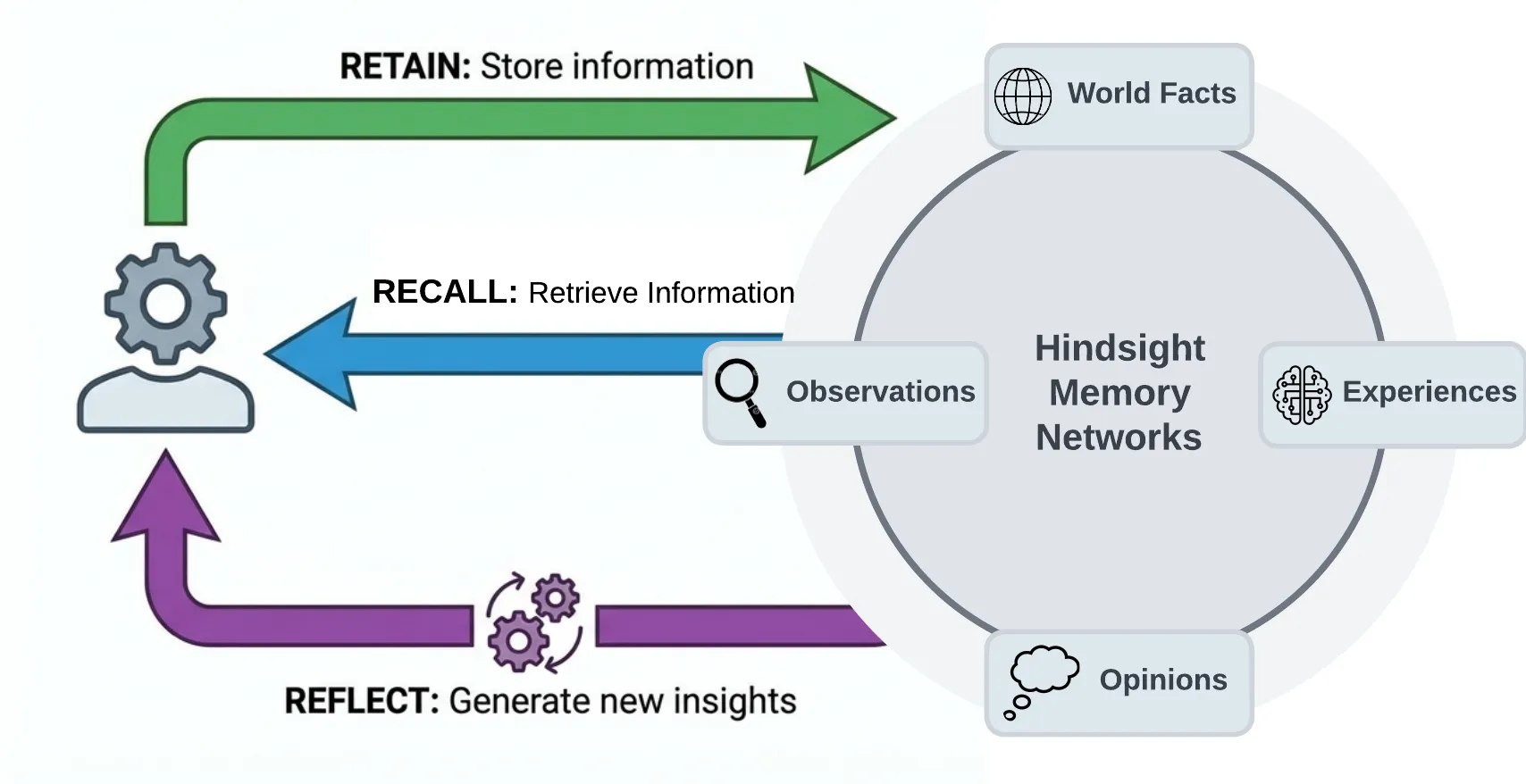
Most agent memory implementations rely on basic vector search or sometimes use a knowledge graph. Hindsight uses biomimetic data structures to organize agent memories in a way that is more like how human memory works:
- World facts: facts about the world ("The stove gets hot")
- Experiences: the agent's own experiences ("I touched the stove and it really hurt")
- Observations: consolidated, evidence-backed beliefs formed from many memories
- Mental models: learned understanding of the agent's world, synthesized from observations and facts
Memories live in banks. When memories are added, they are pushed into either the world facts or the experiences pathway, then represented as a combination of entities, relationships, and time series with sparse/dense vector representations to aid in later recall.
The Three Operations
Retain
The retain operation is used to push new memories into Hindsight. It tells Hindsight to retain the information you pass in as an input.
client.retain(
    bank_id="my-bank",
    content="Alice got promoted to senior engineer",
    context="career update",
    timestamp="2025-06-15T10:00:00Z",
)
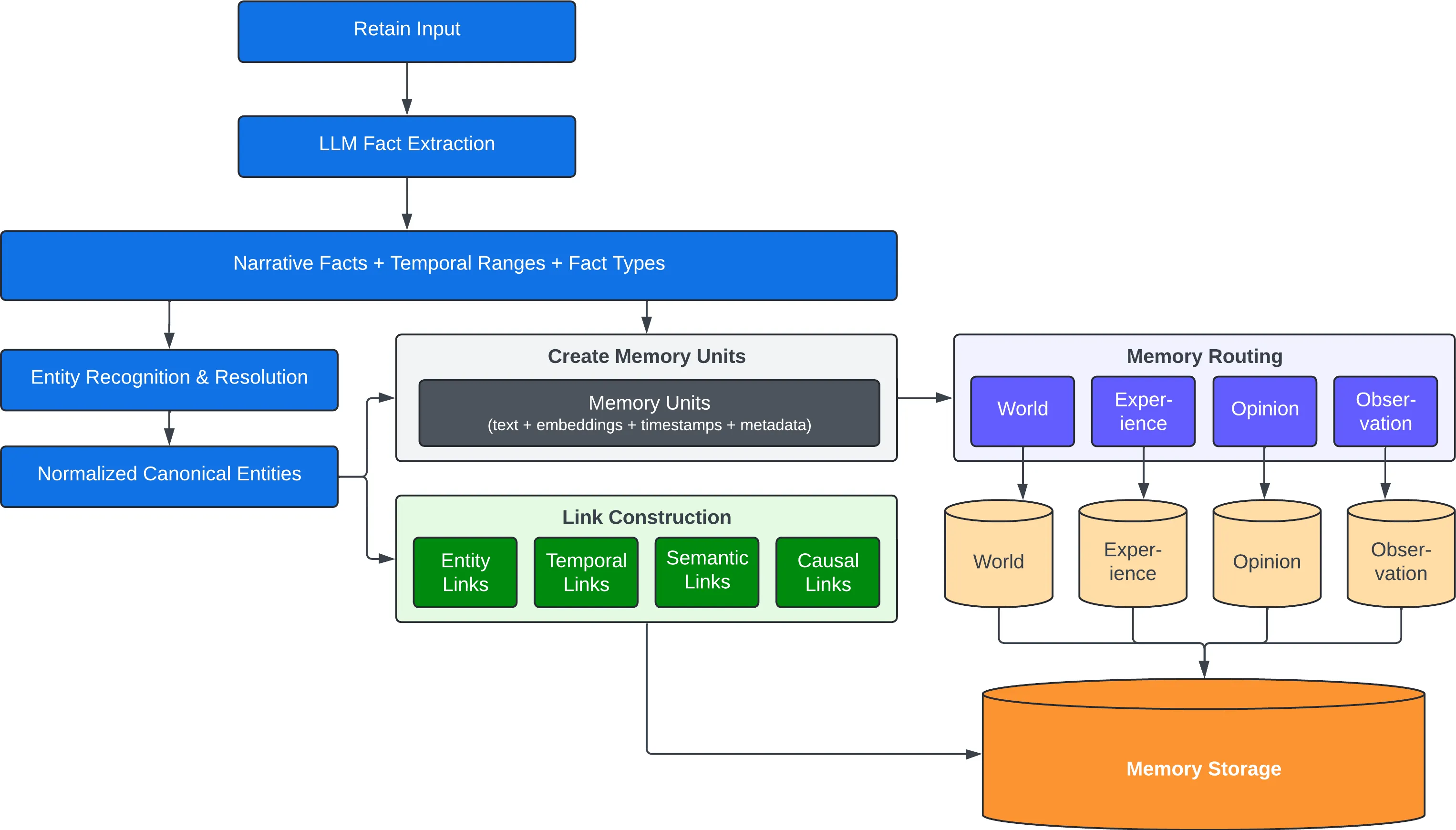
Behind the scenes, retain uses an LLM to extract key facts, temporal data, entities, and relationships. It passes these through a normalization process to transform extracted data into canonical entities, time series, and search indexes along with metadata. These representations create the pathways for accurate memory retrieval in the recall and reflect operations.
Recall
The recall operation is used to retrieve memories. These memories can come from any of the memory types (world, experiences, etc.)
client.recall(bank_id="my-bank", query="What does Alice do?")
client.recall(bank_id="my-bank", query="What happened in June?")   # temporal
Recall performs 4 retrieval strategies in parallel:
- Semantic: Vector similarity
- Keyword: BM25 exact matching
- Graph: Entity/temporal/causal links
- Temporal: Time range filtering
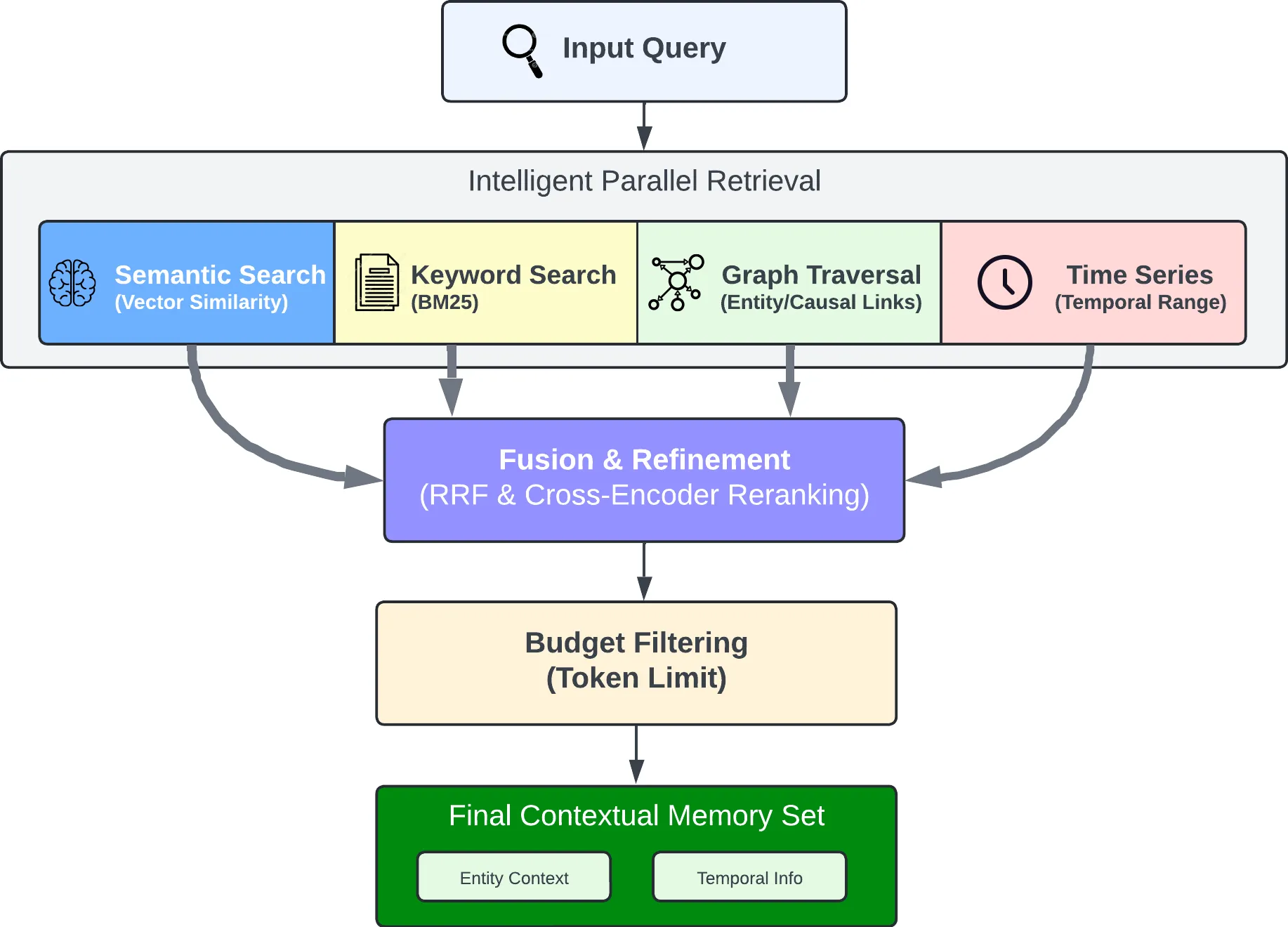
The individual results are merged, ordered by relevance using reciprocal rank fusion and a cross-encoder reranking model, then trimmed as needed to fit within the token limit.
Reflect
The reflect operation performs a more thorough analysis of existing memories. This allows the agent to form new connections between memories and build a more thorough understanding of its world — or to answer a question that needs deep thinking rather than lookup.
client.reflect(bank_id="my-bank", query="What should I know about Alice?")
For example, reflect supports use cases such as:
- An AI Project Manager reflecting on what risks need to be mitigated on a project.
- A Sales Agent reflecting on why certain outreach messages have gotten responses while others haven't.
- A Support Agent reflecting on opportunities where customers have questions not answered by current product documentation.
Observations
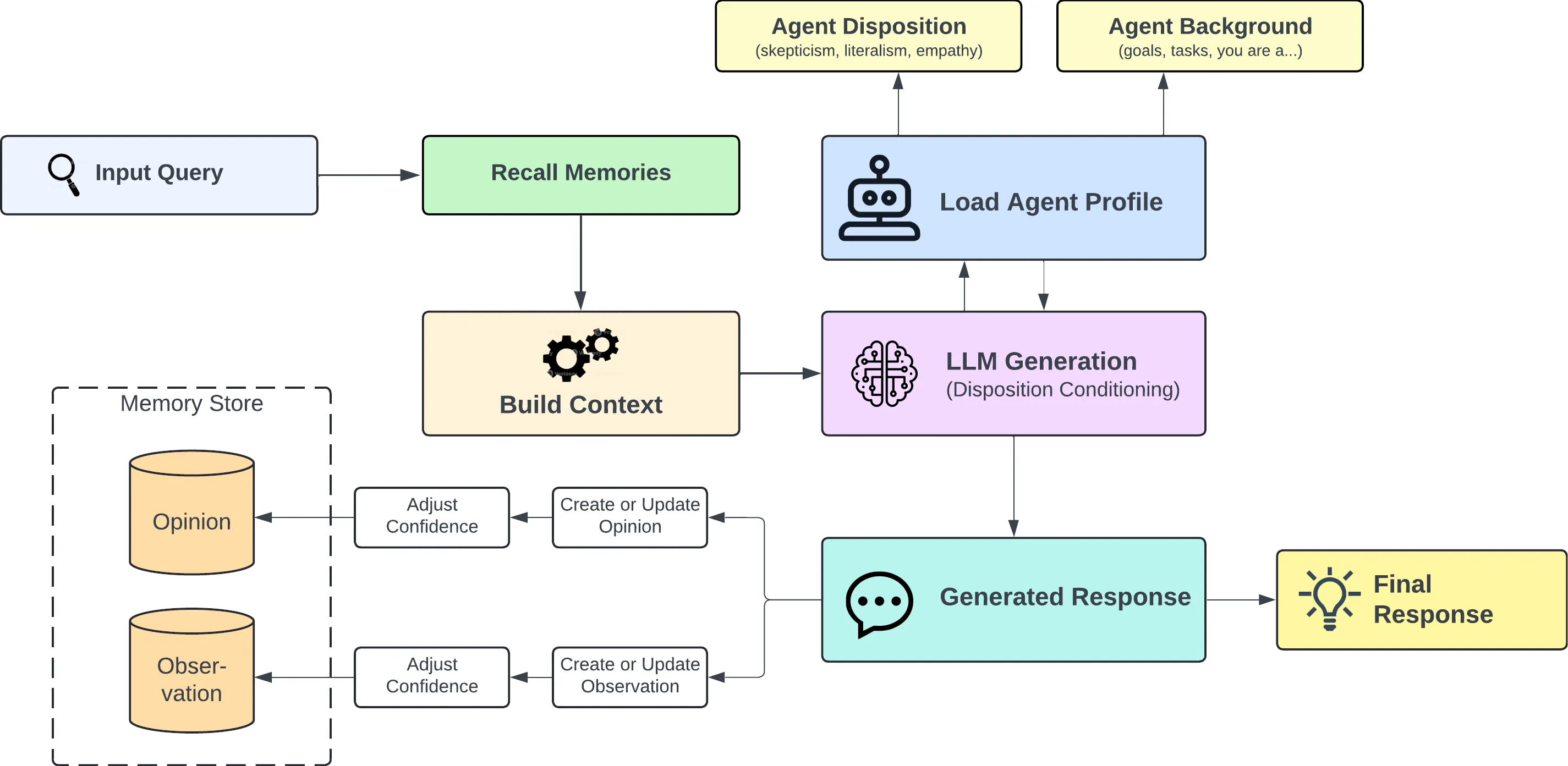
Retained facts don't stay a flat pile. In the background, Hindsight consolidates related facts into observations — deduplicated beliefs the bank has built up over time. Each observation keeps its supporting evidence with exact quotes and a proof count, and is refined rather than overwritten when new evidence arrives, so new information strengthens, weakens or extends an existing belief instead of silently replacing it.
Mental Models & Knowledge Pages
A mental model is a standing answer to a question about a bank ("What are this user's preferences?"). You define the question once; Hindsight writes the answer, stores it, and rewrites it in the background as the bank learns more. Reading one is a database read — no retrieval, no LLM call — so an agent can boot with a page of settled knowledge instead of rediscovering it every session.
Knowledge pages are mental models with the mechanics hidden: living documents a bank writes about itself, organized in folders like a wiki, searchable, and projectable onto disk as ordinary markdown. Supply a name and a question; every other decision is a default you can override.
Mental models → · Knowledge pages →
Memory Banks
A bank is an isolated memory store — one "brain" for one user, agent, or project. Isolation is strict: no cross-bank leakage. Banks carry background context and disposition traits (skepticism, literalism, empathy) that shape how reflect reasons over their memories, and can be created from declarative bank templates.
Two more things worth knowing:
- Multilingual by default. Input language is detected and preserved end to end — facts stay in their original language and entities keep their native script (张伟 stays 张伟, not "Zhang Wei"). Docs →
- Memory Defense. An opt-in, per-bank policy that scans every retain for secrets and PII against 45 patterns and either redacts the match (
[REDACTED:github_token]) or blocks the item before it reaches storage. Docs →
Use Cases
Hindsight is built to support conversational AI agents as well as agents that are intended to perform tasks autonomously. The ideal use case for Hindsight are agents that require a blend of these features such as AI employees that need to handle open-ended tasks, change behavior based on user feedback, and learn to perform complex tasks to automate work at a level that approximates a human work. Hindsight can be used with simple AI workflows like those built with n8n and other similar tools, but may be overkill for such applications.
Per-User Memories and Chat History
One of the simpler use cases you can use Hindsight for is to personalize AI chatbots and other conversational agents by storing and recalling memories associated with individual users.
The requirements for this use case usually look something like this:
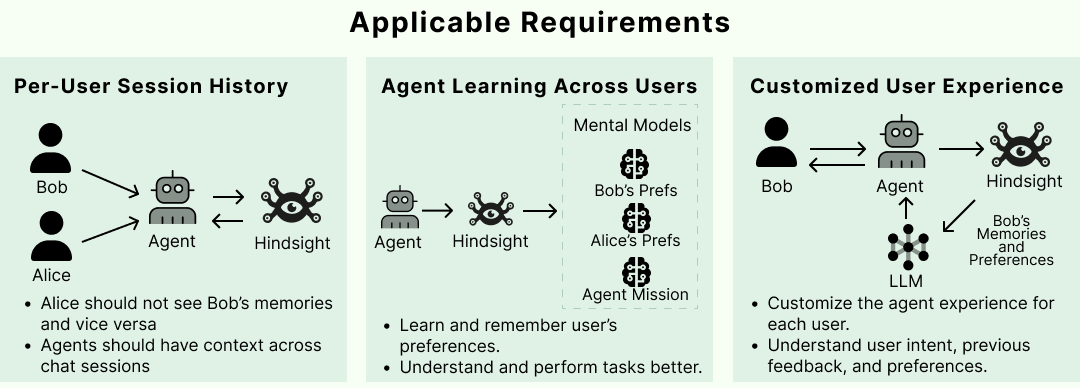
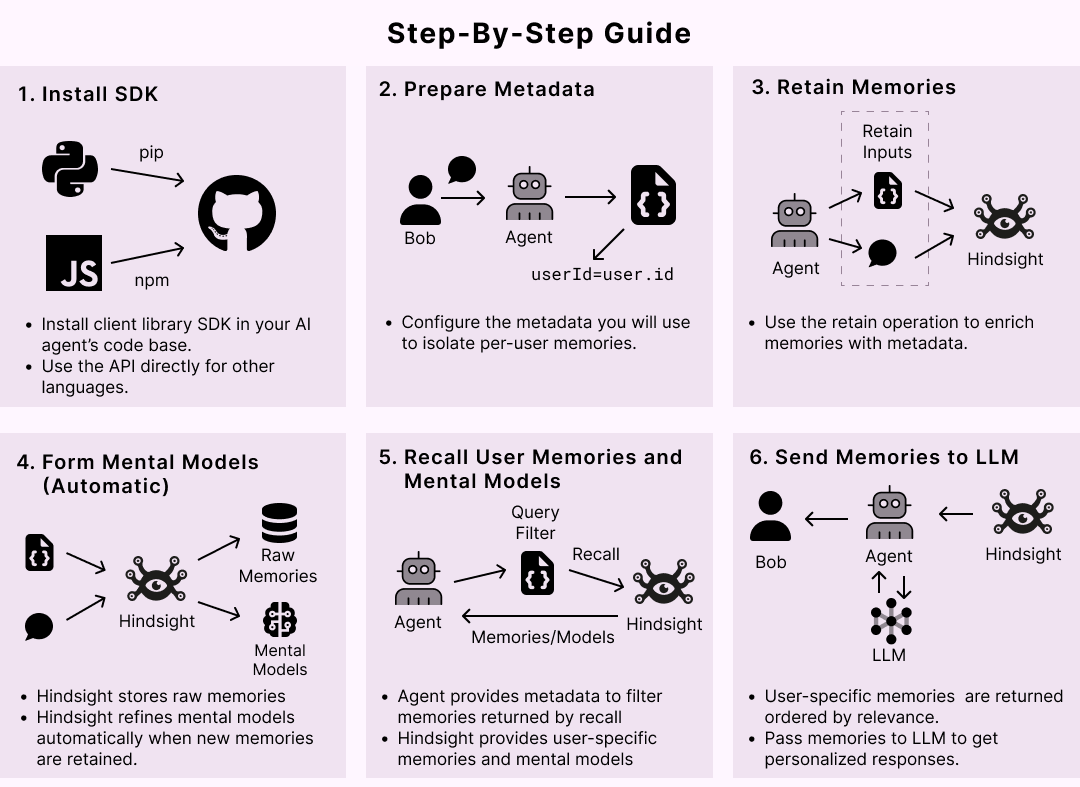
Satisfying these requirements in Hindsight is straightforward. When new user inputs and tool calls are ingested into Hindsight using the retain operation, custom metadata can be used to enrich the new memories. Metadata provides a convenient way to isolate memories that need to be restricted to a given user. Once these are fed into the retain operation, any raw memories and mental models that get created can be filtered when retrieving relevant memories.
More patterns in the Cookbook and Best Practices.
Running in Production
| Storage | PostgreSQL + pgvector, or Oracle AI Database 23ai with full feature parity — storage |
| Configuration | Hierarchical: global env vars → per-tenant → per-bank — configuration |
| Monitoring | Prometheus metrics and dashboards for LLM calls, tokens and latency — monitoring |
| Operations | Admin CLI for migrations, bank repair and stuck operations — admin CLI |
| Events | Webhooks for retain, consolidation and refresh lifecycle events — webhooks |
| Extensibility | Tenant, auth and storage extension points — extensions |
| Managed | Skip all of it with Hindsight Cloud — managed, usage-based, 99.9% uptime SLA |
Resources
Documentation:
- Docs · FAQ · Best Practices · Cookbook · Blog
- Paper · Benchmarks · RAG vs Memory
Clients:
Community:
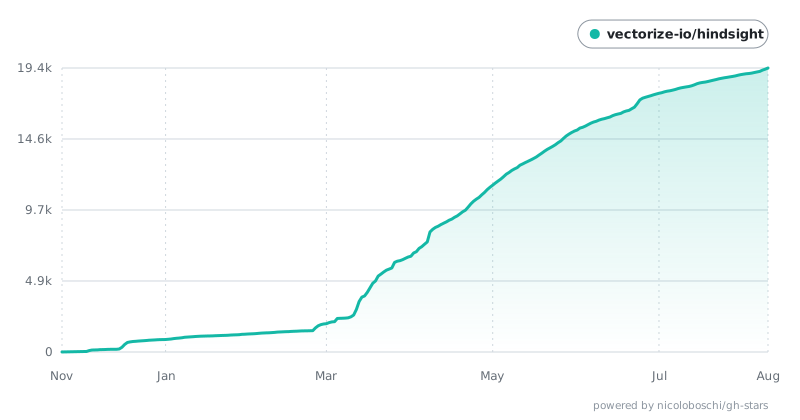
Star History
Contributing
See CONTRIBUTING.md.
License
MIT — see LICENSE
Built by Vectorize.io
Read the usage guide →
Install steps, key points, FAQ and compatibility for this plugin — auto-derived from indexed fields.
Listing badge

[](https://deepseek-plugin.org/plugins/vectorize-io/hindsight/hindsight-integrations/coding-agents)Paste this markdown into your GitHub README to link back to this listing. The badge only states the listing — not a security endorsement.