为 DSH 模型菜单替换官方档位列表,弹出仿 Claude Code 的 Effort 滑块面板;并为任何第三方模型自动补齐推理档位元数据,让思考强度真实生效。

- 语言
- TypeScript
- License
- BSD-3-Clause
- 分支
- main
安装
$ dsh plugin --profile web add dsh-effort-slider在终端中运行以上命令,通过 dsh CLI 安装此插件。可在右上角切换 Profile。 第一次用 dsh?看这篇新手教程
对话式安装
帮我安装 DeepSeek Harness 插件 2768651338/dsh-effort-slider:先查看仓库 https://github.com/2768651338/dsh-effort-slider 确认安全性,然后执行安装命令并验证插件加载成功。
把这段指令粘贴给 DSH Web GUI 里的助手,由它代你完成安装与验证。
一句话定位
为 DeepSeek Harness 的模型菜单替换官方档位选择器,弹出仿 Claude Code 的无极拖动 Effort 滑块面板;同时让任何第三方自定义模型自动获得真实生效的思考强度档位。
核心能力
- 拦截官方模型菜单的「推理等级」行,弹出仿 Claude Code 风格的 Effort 滑块面板(无极拖动、松手吸附、WebGL 火焰跟随)
- 为未声明 reasoning 元数据的第三方模型自动注入通用 5 档刻度(OFF / Low / Medium / High / Ultracode),让官方档位列表与本面板可选、请求校验通过
- 为 pi-ai 自定义模型自动补写线级字典与协议方言(compat),把档位翻译成 reasoning_effort / thinking 等真实线上字段,变更无需重启即可热生效
- 面板关闭后,菜单行的档位值与输入框上方的「模型 · 档位」入口按钮持续保留当前档位对应颜色与辉光
- 用户已有的 reasoningEfforts 声明(设为
false或自定义字典)一律尊重,绝不覆盖 - 提供 8 种线方言(OpenAI effort / DeepSeek / OpenRouter / Together / Z.AI / Qwen / string-thinking / ant-ling),并支持按路由覆盖默认方言
技术实现
- 语言: TypeScript + React 18(浏览器侧用 JSX/TSX),宿主侧纯 TS
- 关键依赖:
@deepseek-ai/cordis(宿主上下文)、@deepseek-ai/dsh-settings(设置段注册)、@deepseek-ai/schemastery(配置 Schema 校验)、react-dom/client(面板渲染) - 架构模式: DSH 双半区外部插件 — 宿主侧
lib/index.js监听llm/adapters-updated/settings/updated事件做元数据包装与 pi-ai 线级供给;浏览器侧lib/client.js在 model menu「推理等级」行上做点击拦截并用 React 18 渲染面板;样式由 lightningcss 把effort.module.csshash 内联为<style data-plugin>注入 - 入口文件:
src/index.ts(宿主) /src/client/index.ts(浏览器)
适用场景
- 给 DSH 配了多个第三方提供商的模型,但官方档位选择器在大部分模型上不可用或不会真实生效
- 习惯 Claude Code 那种带火焰特效的无级拖动面板,希望在 DSH 里也能用同样的交互调档位
- 想在不同 OpenAI-兼容端点(不同线方言)下让 reasoning_effort 字段真正到达请求体
前置依赖与兼容性
| 依赖 | 最低版本 | 说明 |
|---|---|---|
| DSH | 未声明 | 通过 dsh.bundle.patch 注入宿主,需使用 dsh plugin --profile web 安装通道;离线 local 安装后重启一次 DSH(README.md:96-104) |
| Node | 未声明 | 无显式 engines 字段 |
| 平台 | 跨平台 | 兼容性无 OS/CPU 限制;README 中 verification 仅在 Windows 注明(README.md:88-91) |
| 原生模块 | 无 | 仓库未声明任何原生依赖 |
安装方式
dsh plugin --profile web add dsh-effort-slider
配置项
配置写入 DSH 的 ~/.dsh/settings.yaml 下的 effort-slider 段,可热应用:
| 配置 | 类型 | 说明 | 默认值 |
|---|---|---|---|
enabled | 布尔 | 是否启用宿主侧的通用思考强度供给总开关;关闭后将不再为第三方模型补写元数据 | true |
defaultDialect | 枚举 | 没在路由覆盖时使用的线方言,8 种可选:effort(OpenAI 风格 reasoning_effort)/ deepseek / openrouter / together / zai / qwen / string-thinking / ant-ling | effort |
routes.<路由名> | 枚举 | 针对单个提供商路由覆盖线方言,值集同上;未指定时回落到 defaultDialect | {} |
常见问题
Q: 安装后需要重启 DSH 吗?
A: 需要。宿主侧补丁必须在重启时注入;安装后重启一次 DeepSeek Harness,并在 web 页面按一次 Ctrl+F5 让浏览器侧脚本重新加载。
Q: 模型菜单里没看到「推理等级」行怎么办?
A: 如果模型本身没有 reasoning 元数据且宿主侧的元数据供给没生效,「推理等级」行就不会出现。先确认 DSH 已重启,并检查 ~/.dsh/settings.yaml 里 effort-slider.enabled 是否为 true;如仍无效,可在 DevTools 控制台看 [effort-slider] intercept row: ... 是否打印,以判断拦截层是否生效。
Q: 面板里只写 reasoningEffort,会不会改我选的模型?
A: 不会。面板只调用 selectModel({ reasoningEffort }) 写入档位,模型选择保持不变;不支持多档推理的模型会显示「当前模型不提供多档推理等级」。
Q: 第三方模型真的能让思考强度真的生效吗?
A: 可以。宿主侧同时做两件事:给未声明 reasoning 的适配器模型注入通用 5 档元数据;给 pi-ai 自定义模型补写线级字典与 compat 方言,热生效后由 pi-ai 把档位翻译成 reasoning_effort / thinking / OpenRouter reasoning.effort 等真实线上字段。
Q: 能不能给不同提供商单独配线方言?
A: 可以。在 effort-slider.routes.<route> 里指定该路由的方言(如 deepseek / openrouter / qwen 等);没写时回落到 defaultDialect。
Q: 怎么卸载?
A: 执行 dsh plugin --profile web remove dsh-effort-slider,如果之前手动改过 cordis.patch.yml 则一并删掉 ui-effort-slider 那一行,最后重启 DSH。
Q: 这个插件会读取我的对话内容或发起网络请求吗?
A: 不会。宿主侧不读任何用户文件,仅写自身设置段;浏览器侧只与本机 DSH 的 /api RPC 端点交互,从不读取凭证或对话历史。
上手难度
入门 — 仅需一条安装命令 + 重启一次 DSH;如默认 5 档就能用则完全不用动配置,遇到特定 OpenAI-兼容端点字段不对时才需要按路由配 defaultDialect。
已知问题与限制
- 当前模型本身不提供多档推理时,面板会显示「当前模型不提供多档推理等级」,无法调节(README.md:60)
- 当宿主的
llm或settings服务未就绪时,整个供给会被关闭并在日志中打印effort-slider: llm/settings service unavailable,此时面板会拿到空目录/兜底刻度(src/index.ts:76-79) - 与同样拦截「推理等级」菜单的皮肤类插件(如
dsh-ui-web的 aurora skin)可能同时弹出两层面板,需要在另一皮肤里禁用对它的拦截以避免冲突(README.md:165) pi-ai设置段注册晚于其 adapter,且注册过程不触发settings/updated事件,宿主侧用最长 30 秒的就绪重试来兜底;早于此时间的极短冷启动可能需要等待数秒(src/index.ts:82-120)
dsh-effort-slider
A Claude Code–style reasoning-effort slider for DeepSeek Harness — click Effort in the model menu, drag without steps, snap on release, with a WebGL fire trail; any third-party model/provider gets real, working thinking-effort control.


Click the Effort row (second row of the official model menu) instead of the built-in level list: an Effort slider panel pops up — OFF/MAX scale ticks, Low/Medium/High/Ultracode status shown live, and after the panel closes the effort value stays color-coded on the menu row and on the model-seat trigger button.
Features · Compatibility · Install / Uninstall · Quick Start · Configuration · Permissions & Data · How It Works · Troubleshooting · Development
Demo screenshots (menu-row coloring / model-seat trigger / Effort panel — effort level is color-coded):
| Menu row | Model-seat trigger | Effort panel |
|---|---|---|
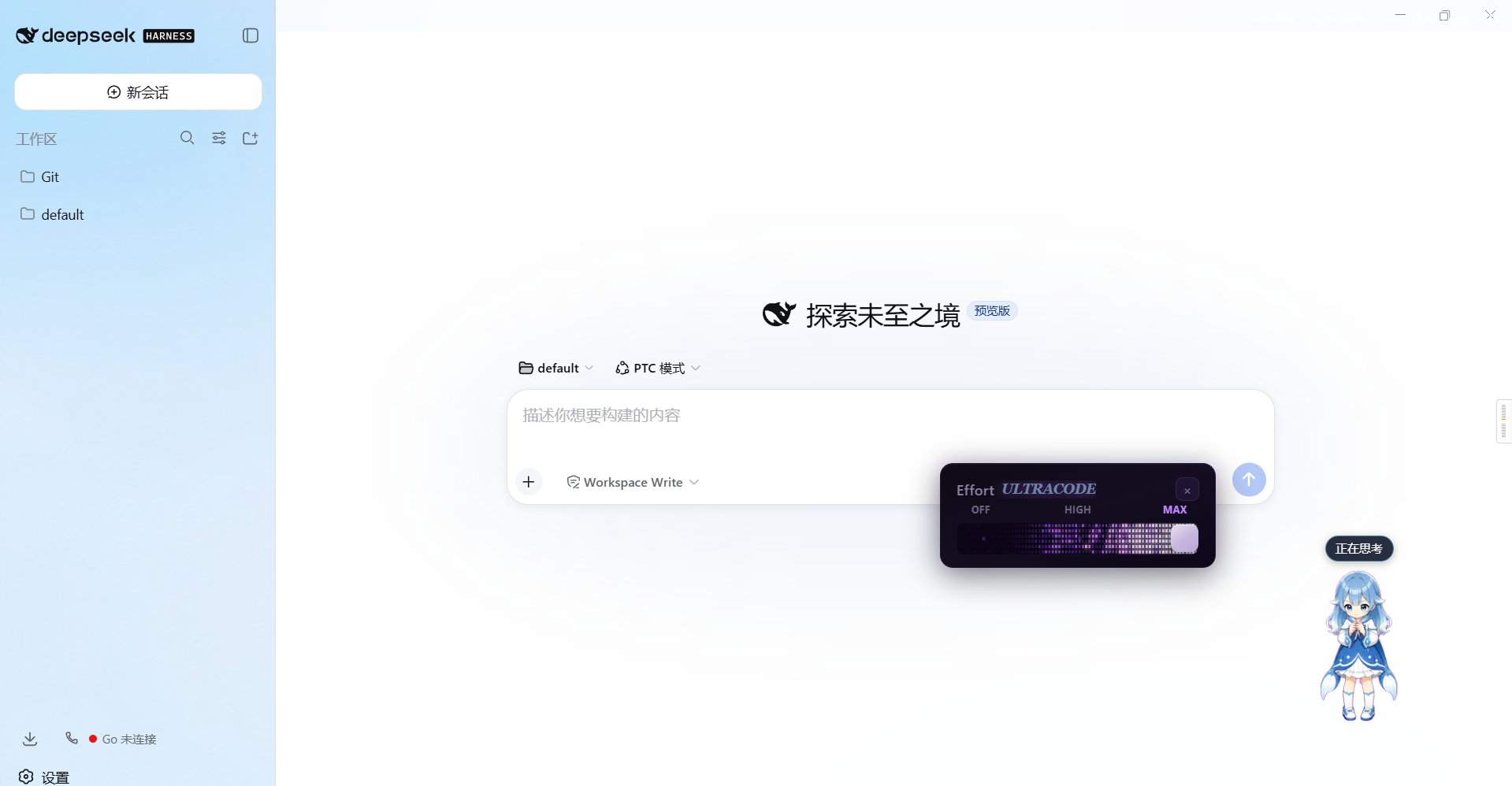 | 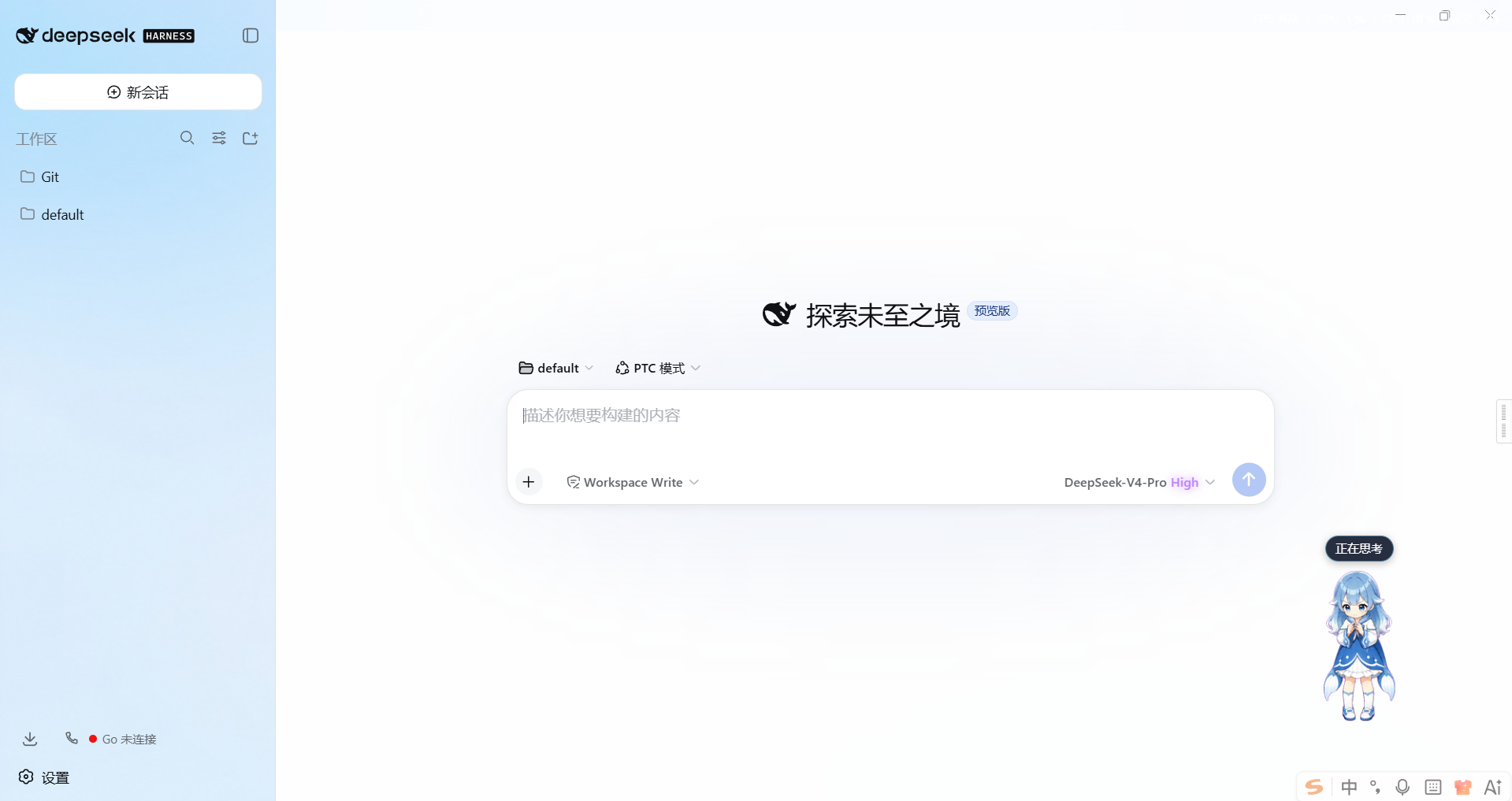 | 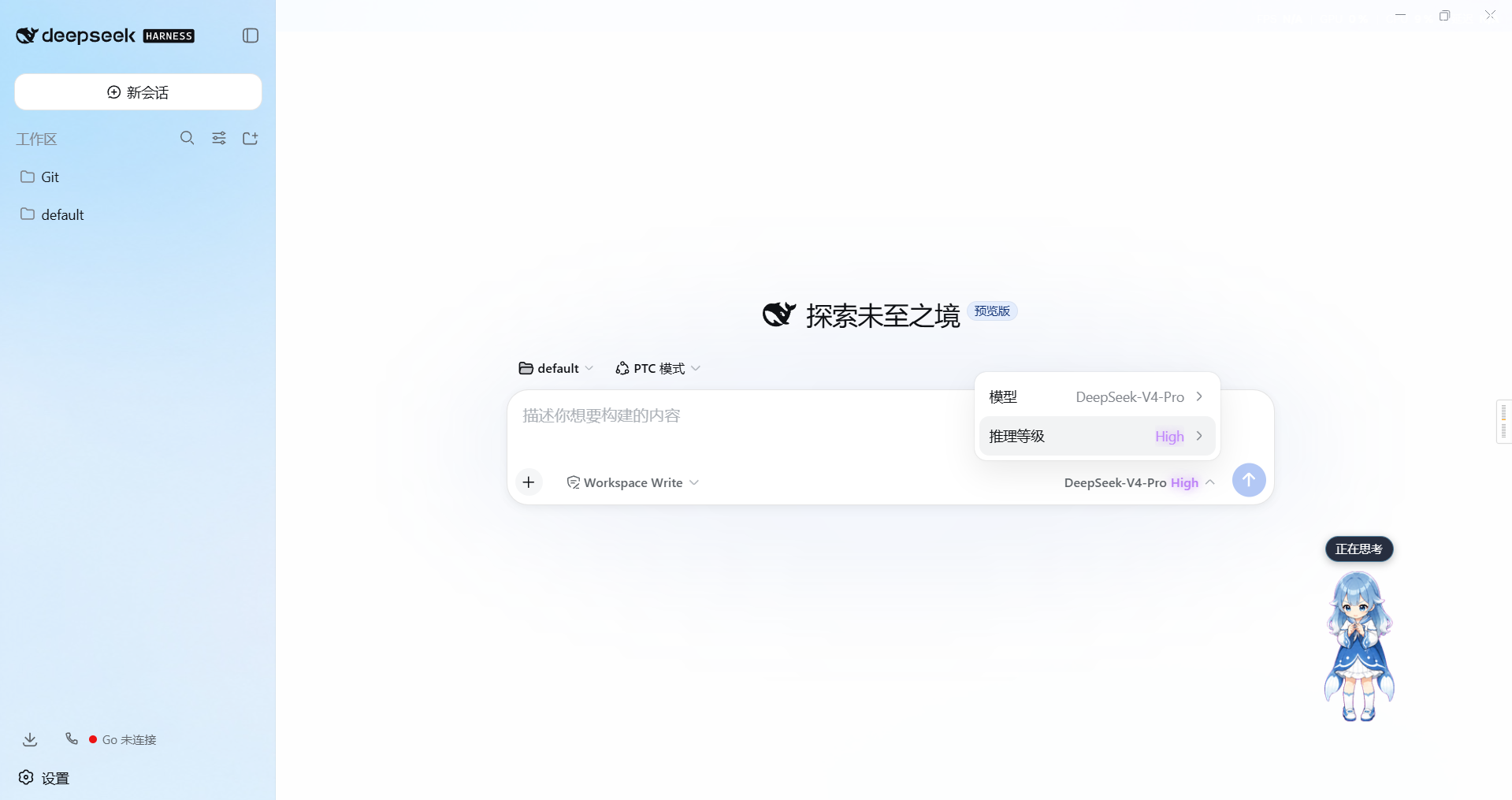 |
🔧 v0.2.5 — Fixed the real landing bug in universal effort provisioning: explicit
modelsarrays are now replaced as a whole (dsh-settings path ops cannot traverse array nodes, otherwisemodelsis corrupted, the schema rejects the write, and provisioning fails silently).🔧 v0.2.4 — Fixed universal effort provisioning never landing when the pi-ai settings section registers late: provisioning now retries until the section is ready (registration happens after the adapter and does not emit
settings/updated).🆕 v0.2.3 — The model-seat trigger button (「model · effort」 above the composer) also color-codes its effort name, persistent after the menu closes.
🔧 v0.2.2 — Fixed menu-row coloring breaking on whole-tree menu remounts: painting now does a full scan and re-paints on any DOM change (throttled), and infers the color from the effort text when the panel has not reported one yet.
🆕 v0.2.1 — After the panel closes, the effort value on the model menu's Effort row keeps its level color (OFF rose-gray / Low amber / Medium blue / High purple / Ultracode bright purple with glow).
✨ v0.2.0 — Any custom third-party model/provider gets working thinking-effort control (adapter metadata provisioning + pi-ai wire-level provisioning, hot-applied).
🎛️ v0.1.0 — Initial release: intercepts the official Effort menu and shows a Claude Code–style Effort slider panel.
Features
| Feature | Description |
|---|---|
| 🎚️ Stepless dragging | Continuous 0–100 dragging that writes reasoningEffort in real time (16 ms throttle, no request pile-up while dragging) |
| 🎯 Snap on release | Snaps to the nearest level on release / blur / keyboard end, with one confirmation write |
| 🔥 WebGL fire trail | Three-pass shaders (ignite → blur → composite); the fire front follows the thumb with spring damping |
| 🏁 OFF/MAX ticks | First/last levels always show OFF / MAX; middle levels show the API-returned name |
| 🎨 Level status | Effort name shown in the panel header, colored/glowing per level; menu row and model-seat trigger keep the same color after closing (v0.2.3) |
| 🌐 Universal effort | Third-party models without reasoning metadata automatically get the universal 5-level scale; pi-ai models get wire-level dictionaries patched in, hot-applied (v0.2.0) |
Only reasoningEffort is written — model selection is untouched. Models with no multi-level reasoning show 「当前模型不提供多档推理等级」 (no multi-level reasoning available).
Universal effort provisioning (v0.2.0)
Any custom third-party model/provider gets thinking-effort control that actually works on the wire:
- Adapter metadata provisioning (host): models without
reasoningmetadata get the universal 5-level scale injected (off/low/medium/high/max→ OFF/Low/Medium/High/Ultracode), so the official model menu and this panel are selectable and request validation passes; - Wire-level provisioning (host, pi-ai): for
llm-pi-aimodels missingreasoningEfforts, the dictionary andcompatwire dialect are patched in (hot-applied, no restart); pi-ai translates the level into real wire fields (reasoning_effort/thinking/ OpenRouterreasoning.effort, etc.); - Client fallback scale: if the directory returns no reasoning metadata, the panel still opens with the universal 5-level scale;
- Existing user declarations (
reasoningEfforts: falseor a custom dictionary) are always respected and never overwritten.
Supported wire dialects for custom endpoints (set effort-slider.defaultDialect or routes.<route>):
| Dialect | Wire effect |
|---|---|
effort (default) | OpenAI-style reasoning_effort: low/medium/high/max |
deepseek | thinking:{type} toggle + reasoning_effort |
openrouter | reasoning: { effort } (OpenRouter normalized) |
together / zai | reasoning.enabled / thinking:{type} + optional effort |
qwen | enable_thinking toggle |
string-thinking / ant-ling | thinking / reasoning.effort strings |
Compatibility
| Item | Value |
|---|---|
| DSH version | Official installer, web profile (verified on Windows) |
| Install mechanism | dsh plugin --profile web add (bundle patch + dual half) |
| Depends on | client runtime / connection / sessions channels of dsh-base / dsh-web-app |
Install / Uninstall
# Install (recommended, same bundle mechanism as dsh-navbar)
dsh plugin --profile web add github:2768651338/dsh-effort-slider#main

# Build locally and install (clone this repository)
pnpm build
dsh plugin --profile web add file:./dsh-effort-slider
After installing, restart DeepSeek Harness and press Ctrl+F5 once in the web page. The
lib/artifacts are committed, so GitHub installs need no local build.
| Action | Command |
|---|---|
| Upgrade | dsh plugin --profile web update dsh-effort-slider (or re-run add), then restart DSH |
| Uninstall | dsh plugin --profile web remove dsh-effort-slider, then remove its row from cordis.patch.yml if any |
Quick Start
- Install the plugin, restart DSH, press
Ctrl+F5. - Open the model menu above the composer → click Effort → the Effort slider panel appears.
- Drag to choose a level; it snaps on release. After the panel closes, the effort value keeps its color on the menu row.
- For custom models with no thinking effort, the panel opens with the universal 5-level scale; pi-ai models get their wire dictionaries patched on the host side (hot-applied).
A [effort-slider] intercept row: ... line in DevTools Console means interception is working.
Configuration
| Item | Details |
|---|---|
| Plugin options | effort-slider settings section (written to ~/.dsh/settings.yaml, hot-applied) |
| Defaults | enabled: true, defaultDialect: effort |
| Environment variables | None of its own; follows DSH's DSH_HOME resolution |
| Sensitive items | None — no keys, tokens, or credentials are read or stored |
effort-slider:
  enabled: true          # provisioning master switch
  defaultDialect: effort # global default wire dialect
  routes:
    my-gateway: deepseek # per-route override
Permissions & Data
| Scope | What it touches |
|---|---|
| Files (read) | None — no user files are read or written (settings go through DSH's settings service) |
| Network | None — the browser half only talks to the local DSH /api RPC endpoint |
| Credentials | Never read |
| User data | Not read (no access to conversation content/messages/prompts; only the current session's reasoningEffort via the sessions channel) |
How It Works
| Half | File | Role |
|---|---|---|
| Host | lib/index.js | Universal effort provisioning: adapter metadata wrapping (universalReasoning) + pi-ai wire patches (buildProvisionOps, idempotent, respects user declarations) + the effort-slider settings section; listens to llm/adapters-updated / settings/updated for hot application |
| Browser | lib/client.js | Captures clicks on the model menu's Effort row → shows the Effort panel; throttled selectModel({ reasoningEffort }) writes; a MutationObserver keeps the menu-row level color alive after the panel closes |
The browser half follows the official external-plugin convention: classic script +
window.__ModuleLoader__.loadfactory;react/react-dom/client/react/jsx-runtimeare platform externals;effort.module.cssis hashed and inlined by lightningcss, injected as<style data-plugin>when the factory runs.
Troubleshooting
| Symptom | Fix |
|---|---|
| No Effort row in the model menu | The model declares no reasoning metadata and host provisioning is not in effect — confirm DSH was restarted and check effort-slider.enabled in ~/.dsh/settings.yaml |
| Panel says 「当前模型不支持思考强度调节」 | Universal fallback not active — upgrade to v0.2.0+ and restart |
| Dragging has no effect | Check whether the target endpoint's wire dialect matches (see the dialect table) or set defaultDialect for that route |
| Conflicts with other skin plugins | If another skin that intercepts the Effort row is installed (e.g. the aurora skin of dsh-ui-web), disable its interception to avoid double panels |
| Version still shows old after restart | file: installs are snapshot copies — use the github: spec or re-run add before restarting |
| Where are the logs? | Host errors: DSH startup log; client errors: browser DevTools (F12) Console |
Project Structure
src/
  index.ts                  host half: universal effort provisioning (adapter metadata + pi-ai wire + settings section)
  effort-core.ts             pure logic: dialect → wire mapping, provisioning patches (unit-tested)
  client/
    index.ts                browser half: intercept the Effort row + panel anchor + menu-row coloring
    css-modules.d.ts
    effort/
      EffortPanel.tsx       Effort panel (levels / ticks / slider / glow)
      useWebglFire.ts       WebGL2 three-pass fire loop (spring follow + idle sleep)
      shaders.ts             vertex / ignite / blur / composite shaders
      effortColors.ts        level → color mapping (panel and menu row share it)
      effort.module.css      panel styles (inlined via lightningcss)
cordis.patch.yml           bundle patch (inserts the ui-effort-slider row)
lib/                        built artifacts (client.js ships with sourcemap)
test/                      host.spec.mjs unit tests + host-apply.spec.mjs + client.smoke.mjs
Development
pnpm install
pnpm build   # tsdown → lib/index.js (host half) + lib/client.js (browser half)
pnpm test    # host unit tests + apply integration test + jsdom smoke (intercept/render/snap/fallback/coloring/teardown)
Contributing. Fork → change → pnpm build → run pnpm test → open a PR against main. Small fixes (docs, tests) are welcome without prior discussion; report issues with the DSH version and the exact error.
License & Security
License: BSD-3-Clause — see LICENSE. The UI implementation references the aurora skin of the community dsh-ui-web project (BSD-3-Clause); full upstream notices and license texts are in THIRD_PARTY_NOTICES.md.
Security: this plugin reads no credentials and sends nothing over the network (only talks to the local DSH). To report a security issue privately, use GitHub's Report a vulnerability on the Security tab — do not open a public issue with exploit details.
BSD-3-Clause © 2768651338
查看使用指南 →
该插件的安装步骤、关键要点、FAQ 与兼容性说明(基于已收录字段派生)。
收录徽章

[](https://deepseek-plugin.org/plugins/2768651338/dsh-effort-slider)把这段 markdown 粘贴到你的 GitHub README,链接回本插件详情页。徽章只声明已被本站收录,不代表安全认证。