在 DSH Web 中添加 WSL 工作区,将 bash 与文件读写委托给本地 WSL 发行版,路径统一为 Linux 形式,WSL 内免装工具链。

- 语言
- TypeScript
- License
- MIT
- 分支
- main
安装
$ dsh plugin --profile web add dsh-wsl-workspace在终端中运行以上命令,通过 dsh CLI 安装此插件。可在右上角切换 Profile。 第一次用 dsh?看这篇新手教程
对话式安装
帮我安装 DeepSeek Harness 插件 6Mikao9/dsh-wsl-workspace:先查看仓库 https://github.com/6Mikao9/dsh-wsl-workspace 确认安全性,然后执行安装命令并验证插件加载成功。
把这段指令粘贴给 DSH Web GUI 里的助手,由它代你完成安装与验证。
一句话定位
本插件让 DeepSeek Harness Web 用户可以直接把 WSL 发行版作为 agent 工作区使用——会话里的 bash 命令在 WSL 发行版内执行,read/write/edit 文件工具通过 WSL 9P 共享读写 Linux 文件,所有路径以 Linux 形式呈现,WSL 内无需安装任何工具链。
核心能力
- 在 Web 侧栏 Settings 旁添加一个"W"按钮,弹出"添加 WSL 工作区"对话框,让用户从 Windows 主机挑选 WSL 发行版并创建工作区
- 让 agent 会话的 bash 命令以 wsl.exe -d
-u --cd -e bash -lc 形式原生运行在 WSL 发行版里 - 让 read/write/edit 文件工具通过 \wsl.localhost<distro>... 9P 共享直接读写 WSL 文件,模型看到的始终是 Linux 路径
- 自动为每个 agent 模式(标准/PTC/极简/创造/用户自定义)生成对应的 wsl-
变体,让 WSL 执行环境与任何模式自由组合,而不是单一模式 - 支持按工作区配置 Linux 用户名(等效于 wsl.exe -u
),并将用户名持久化到 /wsl-workspaces.json - Windows 文件在 WSL 会话内通过 /mnt/
路径透明访问,bridge 文件迁移
技术实现
- 语言: TypeScript(host + client 双侧)
- 关键依赖: @deepseek-ai/cordis(插件宿主框架)、@deepseek-ai/dsh-shell/bash-local(执行器机制参考)、@deepseek-ai/dsh-fs-local(FS 后端基类)、@deepseek-ai/dsh-subprocess(子进程能力)
- 架构模式: Function-plugin 双侧注入——host 侧(
src/index.ts)注册数据路由、生成 wsl-变体、贡献 per-session 环境变量;client 侧( src/client/index.ts)向官方 sidebar footer 槽位注入"添加 WSL 工作区"按钮,并监听会话快照自动绑定到 WSL 变体 - 入口文件:
src/index.ts:441-449(host 入口apply+Config)/src/client/index.ts:57-233(clientapply+ auto-binding effect)/src/shell.ts:157-171(bash 执行器WslShellExecutor配置)/src/fs.ts:53-58(WslFileSystem配置);构建产物lib/index.js、lib/shell.js、lib/fs.js、lib/client.js
适用场景
Windows 上跑 DSH、但日常开发主要在 WSL Linux 发行版里的开发者——他们不再需要为每个项目手动切到 WSL 终端或在 PowerShell/WSL bash 之间来回粘贴命令;agent 看到的路径就是 Linux 路径,bash 工具默认就在 WSL 里运行,偶尔需要 Windows 文件时也能通过 /mnt/
前置依赖与兼容性
| 依赖 | 最低版本 | 说明 |
|---|---|---|
| DSH | 未声明 | 包内 peerDependencies 列为 *,由宿主解析实际版本 |
| Node | 未声明 | 包内未声明 engines |
| 平台 | Windows | 依赖 wsl.exe、reg.exe 与 \\wsl.localhost\ 9P 共享;macOS / Linux 主机不可用 |
| 原生模块 | 无 | 仅使用 Node 内置模块(fs、fs/promises、child_process、http、os、path)与 Cordis/DSH 主线包 |
安装方式
dsh plugin --profile web add github:6Mikao9/dsh-wsl-workspace
配置项
| 配置 | 类型 | 说明 | 默认值 |
|---|---|---|---|
route | 字符串 | 浏览器对话框走后端拉数据的接口路径(默认 /wsl-workspace/api) | /wsl-workspace/api |
当前 DSH 用户在产品界面不需要手工填写该配置项;默认路径已可工作。仅当 Web 服务的反向代理把
/wsl-workspace/api占用了,才需要修改。后端执行器(shell 与 fs)另外接受
distro/username/wslPath/timeoutMs等字段,但这些字段由插件在生成 wsl-变体时按工作区动态注入,普通用户无需手动配置。
常见问题
Q: 我装好了,但侧栏底下没看到 W 按钮。
A: 确认两件事——一是这条命令加到了正确的 profile(--profile web),二是重启 dsh web 而不是热重载;plugin 的 client 注入发生在 Web 启动期。
Q: 路径要怎么写?
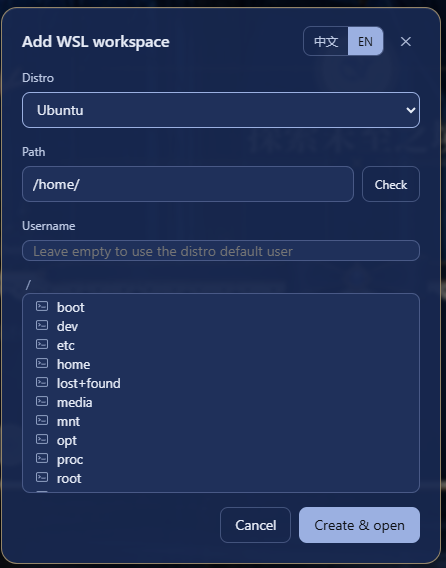
A: 选择 WSL 发行版后填 Linux 形式的绝对路径,例如 /home/me/proj;对话框里可以直接浏览 Linux 目录树,也可以点"检查"按钮确认路径是否真的存在;不要写 Windows 路径(C:\Users\...),Windows 文件请在 WSL 工作区内通过 /mnt/c/... 访问。
Q: bash 工具报 "wsl-shell: Linux workdir carries no distribution" 怎么办?
A: 这个错误意味着模型在调用 bash 时传入了一个 Linux 路径,但当前会话没有绑定到 WSL 变体。回到 DSH 模式选择器,把当前模式切到对应的 WSL 变体(WSL · Standard mode(标准模式) 之类),再重新发起会话。
Q: 我已经在 WSL 里装了 nvm / pyenv / conda,为什么 bash 工具找不到?
A: 默认以登录 shell(-lc)启动,会加载 ~/.bash_profile / ~/.bashrc;如果还是找不到,检查 WSL 用户的默认 shell 是不是 bash(wsl.exe -d <distro> -e echo $SHELL),以及环境变量是否在登录 shell 路径里 export。
Q: 编辑器工具(str-replace_editor)会影响 WSL 内的文件吗?
A: 是的。文件工具统一走 \\wsl.localhost\<distro>\... 9P 共享,编辑保存会原样写入 WSL 内对应路径;只是 model 看到的是 Linux 路径。
Q: 我能跨 WSL 发行版复制文件吗?
A: 这个插件只把你当前的工作区定向到一个发行版;跨发行版需要用 bash 工具在源发行版里跑命令(比如 wsl.exe -d <other> tar ... + /mnt/<drive> 落地),不属于本插件的范围。
Q: 怎么完全卸载?
A: 移除插件并清理工作区用户名记录:dsh plugin --profile web remove github:6Mikao9/dsh-wsl-workspace,再删除 <dshHome>/wsl-workspaces.json;DSH 工作区本身按 DSH 自身的清理方式删除。
Q: 它和 dsh-bash-terminal 有什么区别?
A: dsh-bash-terminal 提供一个能在浏览器里跑 bash 的终端面板;本插件不做"终端面板",而是把"每个会话的工作区"挂到 WSL 上,让模型在 WSL 里执行命令、读写文件。两个插件面向不同需求,可以并存。
上手难度
入门 — 装好 WSL → 添加插件 → 重启 dsh web → 点 W 按钮 → 选发行版 → 填路径 → 直接能用;只要本机 WSL 已经能用,30 秒内就能完成首次工作区创建。
已知问题与限制
- 只支持 Windows 主机:插件依赖
wsl.exe、reg.exe与\\wsl.localhost\9P UNC 共享,macOS / Linux 上无法工作 - 9P 不能挂载 drvfs:
/mnt/<drive>路径在 9P 共享上读会触发 Access Denied,对应的"以 Linux 路径访问 Windows 文件"工作区会自动改用 Windows 驱动器路径(C:\...)作为 key - bash 工具不受 DSH 文件策略限制:WSL bash 子进程跑在 Linux 内核侧,ACL 沙箱包不住 wsl.exe,bash 写入 WSL 内部任意路径不受
workspace-write约束 - DSH 的
tool-fs-search(基于 Windows 端 ripgrep)在 WSL 变体里被故意移除:Windows 版本的 ripgrep 无法打开 Linux 路径,WSSL 会话需要用 bash 工具(grep / find / rg via apt)替代 - 首次启动
wsl.exe时会向 stderr 打印乱码的 localhost 端口转发提示:这是 WSL 启动过程的正常提示,可忽略 - 老的独立
wslpreset 目录在插件启动时会被自动清理:如果你之前手动放过一个叫wsl的 preset 目录,新版本会把它删掉再生成 wsl-变体 - 用户名修改只影响 bash,不影响文件工具:所以同一个工作区里,文件工具看到的"创建者"是 DSH 进程身份,bash 看到的"运行者"才是你配置的用户
English · 中文 · 日本語 · 한국어 · Français · Deutsch · Español · Português · Русский
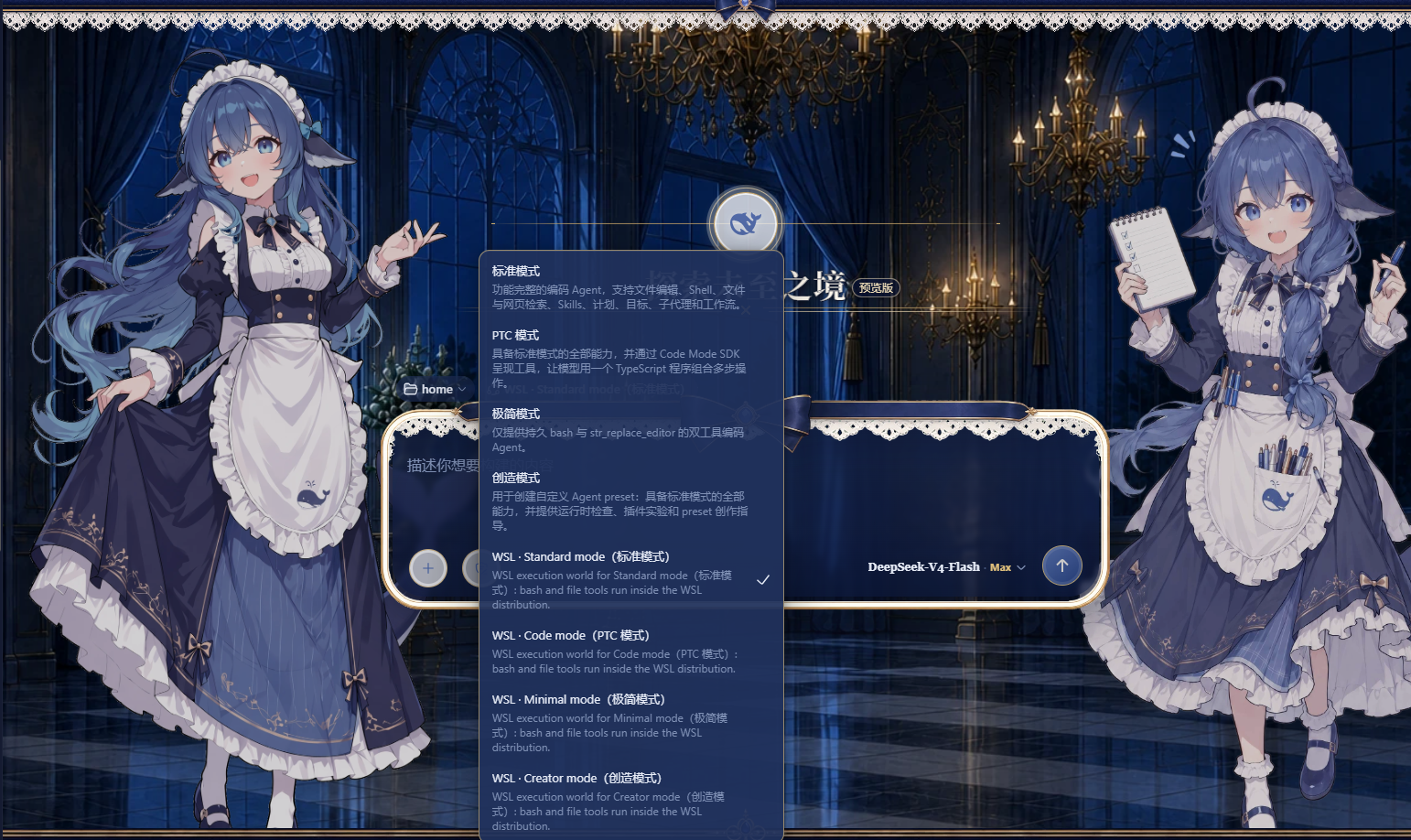 Add a WSL workspace from the DeepSeek Harness web GUI and run the whole agent session — bash commands and file reads/writes — inside a local WSL distribution with Linux paths. Nothing needs to be installed inside WSL. The session can reach both WSL and Windows at the same time: bash commands run inside the WSL distribution, while Windows files stay accessible via
 /mnt/<drive> (for example /mnt/c/Users/...).
Install
Pick one of the three ways below, then restart dsh web:
# 1) npm package
dsh plugin --profile web add dsh-wsl-workspace

# 2) GitHub repository (ships the prebuilt lib/, no local build required)
dsh plugin --profile web add https://github.com/6Mikao9/dsh-wsl-workspace

# 3) Local directory (development / self-hosted)
dsh plugin --profile web add D:\path\to\dsh-wsl-workspace
After restarting dsh web, a W button appears beside Settings at the sidebar foot.
Native build at install time
Installing this plugin pulls @deepseek-ai/dsh-fs-local (a peer dependency), which depends on koffi — a dynamic C FFI for Node.js. koffi runs an install script during npm install (node ./cnoke.cjs -P . -D src/koffi --prebuild --release):
- Prebuilt first: it tries to load a platform-specific prebuilt addon from koffi's
optionalDependencies(@koromix/koffi-<platform>), coveringwin32-x64/arm64/ia32,linux-x64/arm64/ia32/riscv64/loong64,darwin-x64/arm64,freebsd-*,openbsd-*. When a prebuild loads, no compilation happens. - Fallback compile: only if no prebuilt addon is available/loadable does it rebuild from source, which needs CMake and a C/C++ compiler (Windows prefers Clang, or MinGW under MSYSTEM). This is koffi's own standard behavior; this plugin builds and ships no native code itself.
This is expected and not malicious (koffi is MIT-licensed). Installing with --ignore-scripts skips koffi's addon selection/build, so @deepseek-ai/dsh-fs-local may fail to load on platforms without a cached prebuilt binary. The WSL session itself needs no toolchain: the bash tool runs inside the WSL distribution and the file tools go through the Windows-side WSL share.
Usage
Click the W button beside Settings at the sidebar foot to open the "Add WSL workspace" dialog. Pick a distribution from the list, then browse the directory tree or type an absolute Linux path (for example /home/me/proj) — use the Check button to verify the path exists before creating the workspace. The dialog follows the DeepSeek Harness UI language. The username field is optional: leave it empty to run commands as the distribution's default user, or name a Linux user of that distribution to run the session as that user instead (equivalent to wsl.exe -u <username>). The username only changes the bash tool's run identity — the file tools go through the Windows-side WSL share and are unaffected. Each workspace's username is kept in <dshHome>/wsl-workspaces.json; delete the entry (or recreate the workspace from the dialog) to return to the default user.
Click "Create & open" to start a new session in the workspace. In the new session the bash tool executes commands inside the chosen distribution and read/write/edit operate on WSL files, so every path the model sees is a Linux path. The mode picker keeps working as usual: Standard, PTC, Minimal and Creative each land on their WSL variant automatically (the WSL variant entries in the picker are bilingual, e.g. WSL · Standard mode(标准模式)), and Windows files stay reachable from inside the session under /mnt/<drive> (for example /mnt/c/Users/...).
Behavior notes
- bash tool: runs inside the WSL distribution as the configured username (empty = the distro default user, often
root), so it can read and write anywhere in the distro. The Windows ACL sandbox cannot wrapwsl.exe— its children run on the Linux kernel side — so WSL itself is the isolation boundary and the DSH file policy does not apply to bash. - File tools (
read/write/edit): go through the Windows-side WSL 9P share and run under the DSH file policy. Underworkspace-write, reads work anywhere but writes are restricted to the session workspace; switch the file policy todanger-full-accessto also allow writes outside it. The username field does not affect the file tools. - The garbled
localhostport-forwarding bannerwsl.exeprints to stderr when the distro was not running yet is harmless. - Mode variants: for every mode DSH ships — Standard, PTC, Minimal, Creative, and experimental ones like Anchored Standard — this plugin adds a matching
wsl-<mode>variant. The original modes stay available unchanged; the WSL variants simply run the same mode inside a WSL execution world.
Changelog
0.2.4
- Fixed #5 — WSL Minimal mode no longer breaks the first-request "we need/lets" thinking chain. The WSL variant of a minimal-like preset (one that only exposes
persistent-bash+str-replace-editor) previously also injected the one-shotbashtool plus theread/write/edit/read_imagefile tools; the duplicatedbashtool name and the extra schemas inflated the first-request tool catalog and derailed the chain of thought. Minimal-like variants now keep onlypersistent-bash,str-replace-editorand thefs-wslprovider; standard-like presets still receive the full shell + file-tool world.
License & attribution
MIT — see LICENSE and NOTICE. The NOTICE precisely lists:
- Adapted/inherited source code: DeepSeek Harness (MIT) —
dsh-bash-local(executor mechanics),dsh-fs-local(WslFileSystemsubclasses it), and the shipped agent presets (read and transformed by the variant generator); - Design references (no source copied): dsh-bash-terminal (MIT, wsl argv / WSLENV approach), dsh-side-panel (BSD-3-Clause, host-route pattern), vpshub (MIT, roadmap reference).
Keep LICENSE and NOTICE when redistributing.
Acknowledgments
Special thanks to dsh-deep-whale (DSH Web 鲸鱼娘 skin series · 深海女仆工坊 maid-atelier, CC BY-NC-SA 4.0): the whale girl skin plugin brings a full set of adorable skins to the DeepSeek Harness Web UI and makes daily use of DSH a warmer experience.
查看使用指南 →
该插件的安装步骤、关键要点、FAQ 与兼容性说明(基于已收录字段派生)。
收录徽章

[](https://deepseek-plugin.org/plugins/6Mikao9/dsh-wsl-workspace)把这段 markdown 粘贴到你的 GitHub README,链接回本插件详情页。徽章只声明已被本站收录,不代表安全认证。