把 DeepSeek Harness (dsh) Agent 接入飞书:聊天气泡 = dsh 会话,流式卡片实时呈现推理/工具/输出,扫码一键配齐飞书应用。

- 语言
- TypeScript
- License
- MIT
- 分支
- main
安装
$ dsh plugin --profile web add @dsh-feishu/dsh-feishu在终端中运行以上命令,通过 dsh CLI 安装此插件。可在右上角切换 Profile。 第一次用 dsh?看这篇新手教程
对话式安装
帮我安装 DeepSeek Harness 插件 PGZXB/dsh-feishu:先查看仓库 https://github.com/PGZXB/dsh-feishu 确认安全性,然后执行安装命令并验证插件加载成功。
把这段指令粘贴给 DSH Web GUI 里的助手,由它代你完成安装与验证。
一句话定位
把 DeepSeek Harness (dsh) Agent 接入飞书/Lark 的官方前端:飞书聊天 = 一个 dsh 会话,机器人就是 Agent 的头像,流式卡片实时把推理、工具调用、最终答案渲染在对话里,并随附一套扫码配齐飞书应用的快速安装向导。
核心能力
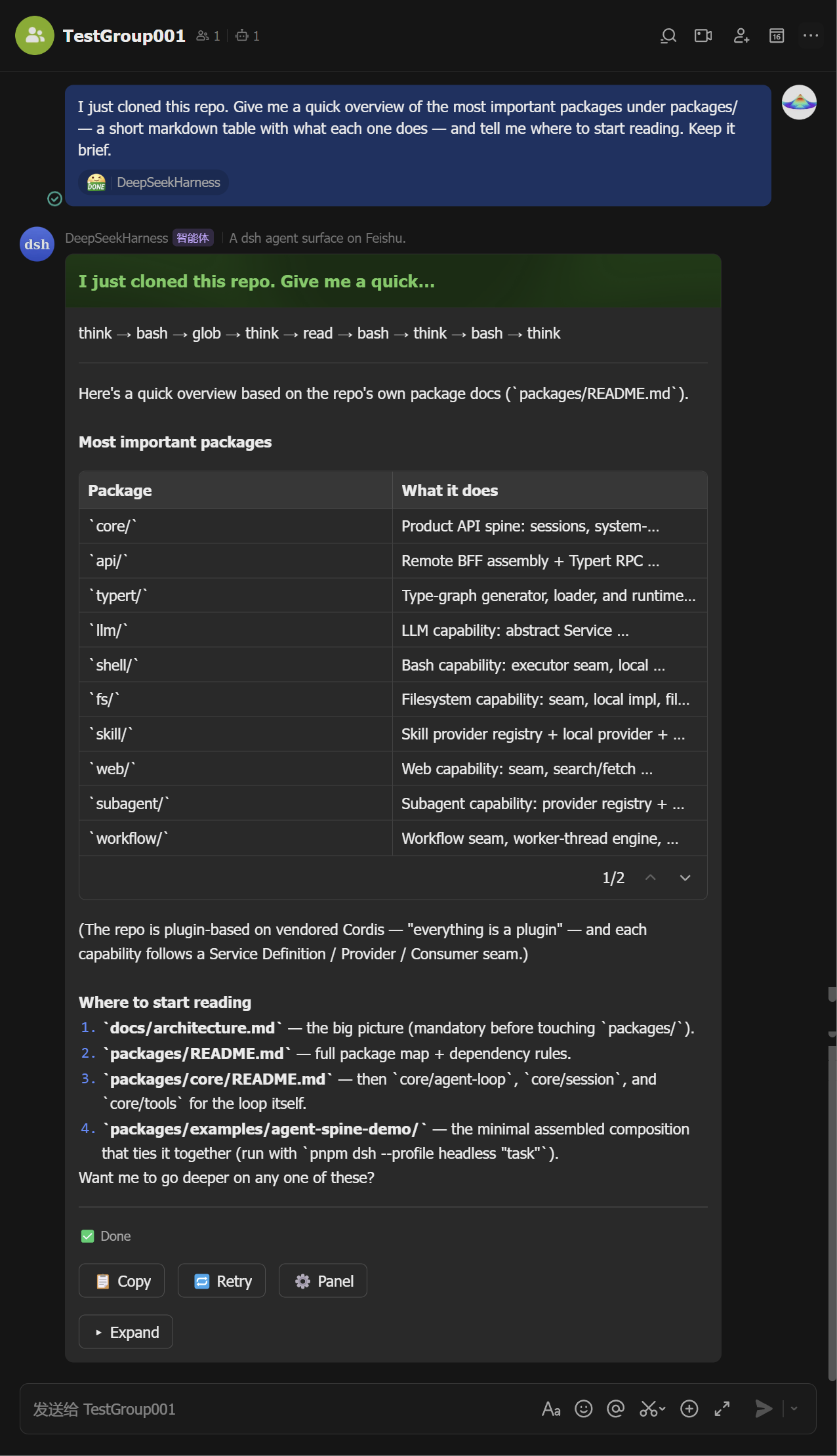
- 流式卡片渲染:每轮对话一张卡片就地更新,工具调用、思考、Markdown、表格在执行过程中实时追加,结束时收尾为绿色"完成"
- 控制面板(
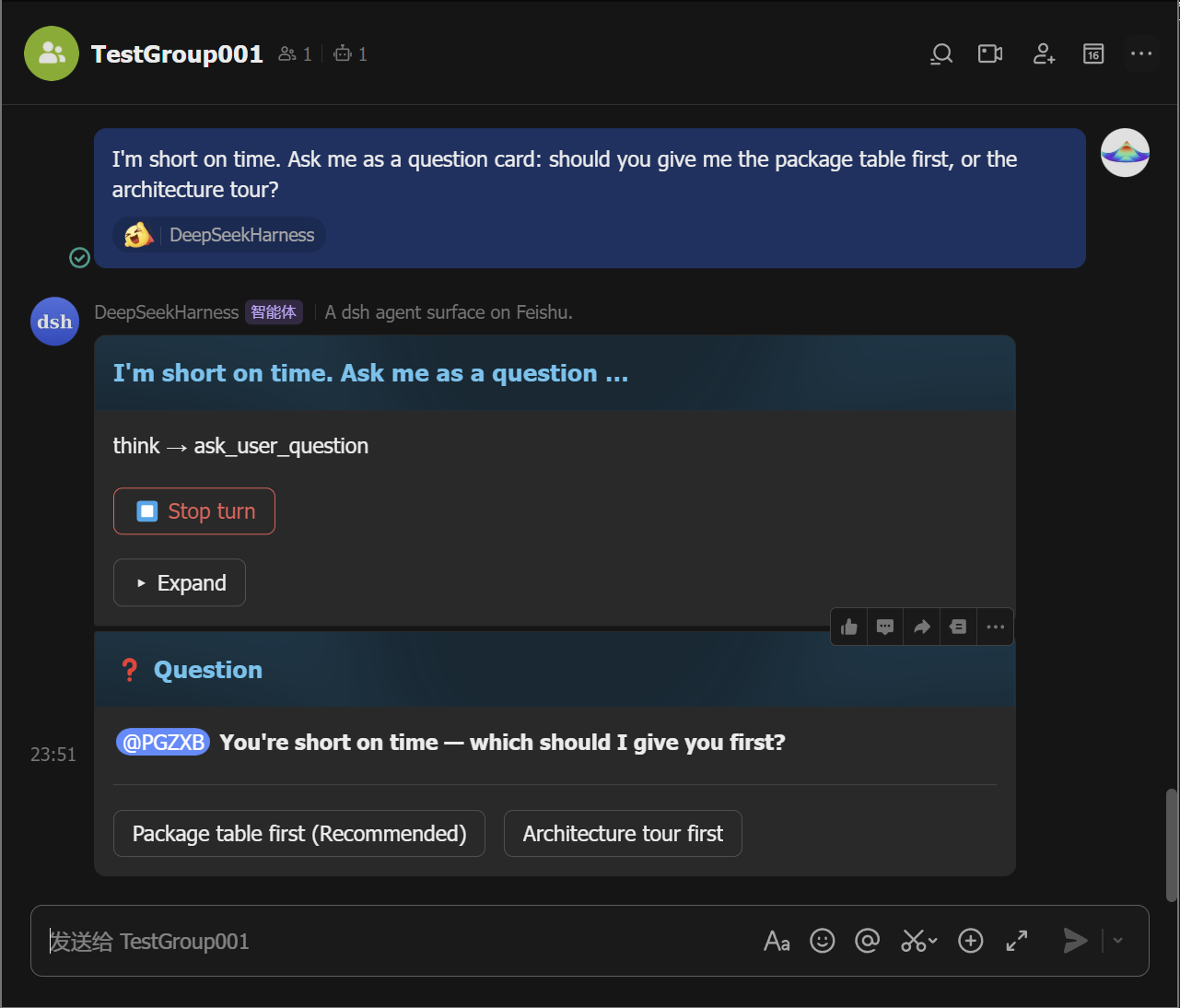
/panel):把所有斜杠命令以分页按钮的形式铺开,不需要记语法,每个按钮等价于一条命令行 - 卡片内审批与提问:权限升级请求变成"允许一次/拒绝"卡片,Agent 提问变成单选/多选/文本卡片,回复直接在聊天里点
- 会话持久化与跨端共享:会话、工作目录、归档都通过 storage×3 + workspace bundle 持久化,重启不丢,与 dsh 网页端共享同一份数据
- 一键扫码配齐:附带的
dsh-feishu-setupCLI 通过一次飞书二维码扫描,自动创建机器人应用、申请权限、写入凭据 - 群聊与会话管理:支持群聊 @ 触发、
/group建群、/sessions列表、/resume恢复、/clear换新会话(旧会话保留)
技术实现
- 语言: TypeScript(NodeNext ESM)
- 关键依赖:
@larksuiteoapi/node-sdk(飞书 WebSocket 长连接与卡片 API)、@deepseek-ai/dsh-agent/@deepseek-ai/dsh-session/@deepseek-ai/dsh-commands(注入宿主运行时)、@deepseek-ai/dsh-storage+dsh-storage-json+dsh-storage-domain+dsh-workspace(持久化与工作区) - 架构模式: dsh bundle(
package.json#dsh.bundle.patch+cordis.patch.yml),在 dsh-base 之上注入feishu/tool-ask-user/schedule/storage/storage-json/storage-domain/workspace共 7 个 cordis 行;核心是Bridge(src/bridge.ts)订阅session/event流并把事件渲染到卡片 - 入口文件:
src/index.ts(导出name = 'feishu'、Configschema、apply(ctx, config, deps)),附src/setup/cli.ts提供dsh-feishu-setup命令
适用场景
已经习惯在飞书里沟通、又想把 dsh Agent 装到团队内部协作流的用户——尤其是飞书企业部署下需要审批、提醒、文件、图片直接在 IM 里闭环的场景。装好之后把机器人拉进群或私聊,团队成员不用切换工具就能发任务、收结果、回审批。安装侧最痛点是飞书开放平台配置繁琐,本插件把创建应用、申请权限、发布版本、写入凭据压成一次扫码。
前置依赖与兼容性
| 依赖 | 最低版本 | 说明 |
|---|---|---|
| DeepSeek Harness | 0.1.1-rc.2+ | dsh-version.json 同时追踪 @latest 与 @next(目前同版本 0.1.1-rc.2);peerDependencies 中 @deepseek-ai/dsh-* 全部要求 ^0.1.1-rc.2 |
| Node.js | >=22.13 | package.json#engines.node;lark-oapi / dsh 运行时均需要现代 Node |
| 操作系统 | macOS / Windows / Linux | 跨平台,无 os / cpu 限制 |
| 原生模块 | 无 | lark-oapi 为纯 JS(WebSocket 长连接);不依赖 node-pty / sqlite / canvas 等原生扩展 |
| 飞书开放平台权限 | 见 feishu-manifest.json | 需 im:message 等消息权限、im:resource(/export 发送文件)、事件订阅 im.message.receive_v1、卡片回调 card.action.trigger、长连接接收模式 |
安装方式
dsh plugin --profile web add github:PGZXB/dsh-feishu
配置项
| 配置 | 类型 | 说明 | 默认值 |
|---|---|---|---|
appId | string | 飞书机器人 App ID;缺省时回退到环境变量 FEISHU_APP_ID | 未设置 |
appSecret | string | 飞书机器人 App Secret;缺省时回退到环境变量 FEISHU_APP_SECRET | 未设置 |
defaultCwd | string | 聊天尚未绑定工作目录时的兜底路径 | 当前进程工作目录 |
dataDir | string | 插件持久化目录(会话映射等) | $DSH_HOME/feishu |
provider | string | Agent 默认 LLM provider | 由 dsh 默认决定 |
model | string | Agent 默认 LLM 模型 | 由 provider 决定 |
cardThrottleMs | number | 流式卡片两次补丁推送之间的最小间隔(毫秒) | 400 |
apiKeyEnv | string | 启动时把该环境变量里的 API Key 自动搬进 dsh 凭据系统 | DEEPSEEK_API_KEY |
groupMentionMode | always | never | ambient | topic | 群聊消息是否需要 @ 机器人才响应;单人单机器人群聊里 always 自动放松 | always |
allowedChats | string[] | 只允许这些 chat id 发消息;空数组=不限制 | 不限制 |
allowedUsers | string[] | 只允许这些 sender open id 发消息(空数组=不限制);也可用环境变量 FEISHU_ALLOWED_USERS 逗号分隔 | 不限制 |
unknownCommand | error | passthrough | 收到未知斜杠命令时的策略:报错提示,还是当成普通对话发给 Agent | error |
repoRoots | string[] | /repo 命令扫描候选项目目录的根路径列表(一层深度) | 空(/repo 不列任何东西) |
requireWorkingDir | boolean | 是否拒绝在未选工作目录时启动对话 | true |
reactions.received | string | 收到消息时打的反应 emoji(飞书 emoji_type 值;设为空串关闭反应) | GoGoGo |
reactions.done | string | 本轮对话完成时的反应 emoji | DONE |
reactions.error | string | 出错时的反应 emoji | ERROR |
reactions.stopped | string | 被中止时的反应 emoji | ERROR |
常见问题
Q: 怎么安装?
A: 一行命令装上插件:dsh plugin --profile web add github:PGZXB/dsh-feishu。首次启动跑 dsh-feishu-setup --new 扫码配齐飞书应用,最后 dsh --profile web 启动即可;已有飞书机器人可直接配环境变量 FEISHU_APP_ID / FEISHU_APP_SECRET 跳过扫码。
Q: 飞书机器人必须自己开账号、去开发者后台配置吗?
A: 不必。dsh-feishu-setup 走开放平台内部接口自动创建/复用应用、自动开通机器人能力、申请权限、订阅事件、发布版本、写入 profile——整个过程只在终端扫一次码。已有现成应用可在 setup 过程中选择"使用现有应用"。
Q: 卡片太大发不出去怎么办?
A: 飞书单卡片上限约 109 KB,超长 Agent 输出会被插件尾部截断,并在卡片底部标注"已截断 N 字符"以保证不丢信息;如需完整记录,发 /export 把整段会话日志作为 markdown 文件发回聊天,文件消息不受卡片大小限制。
Q: 没指定工作目录时,Agent 会怎么处理?
A: 默认直接拒绝(requireWorkingDir: true),聊天先要 /repo 选项目或 /cd <path> 指定路径才会启动 Agent;只有把该开关改成 false 才会回退到配置的 defaultCwd。这是有意为之——defaultCwd 是兜底,绝不悄悄生效。
Q: 群聊里怎么让机器人只在我 @ 它时才动?
A: 默认就是这种行为(groupMentionMode: always),单人单机器人群聊会自动放宽到任意消息都回。多人群里若想机器人"盯着每条"改成 never,或只想它别去管"@ 别人的消息"用 ambient。
Q: 会话和工作目录会不会丢?
A: 不会。会话记录、工作目录、归档状态全部由 dsh 的 storage + workspace 写到 DSH_HOME 下的共享数据目录,飞书端与网页端共享同一份存储——重启、换端都能续上。/sessions 可看历史,/resume <id> 可把旧会话拉到当前聊天。
Q: 怎么回审批、回答 Agent 提问?
A: 不用打字。权限升级会出现在线卡片,列出"允许一次 / 拒绝"按钮;Agent 提问同样以卡片形式落到聊天,单选点选即可,多选勾完点提交,纯文本题则由你在卡片出现后发的下一条普通消息回答。
Q: 怎么换模型?
A: 直接 /model 弹出选模型卡片,或 /model <provider>/<model> 直接设定;缺省走 dsh 的 provider/model 选择。若环境里已设置 DEEPSEEK_API_KEY,插件启动时会自动把它搬进 dsh 凭据系统,无需额外配置。
Q: 出问题怎么排查?
A: 聊天里发 /feishu-status 看诊断卡片(连接状态、活跃会话、最近入站消息)。开发期可设 FEISHU_DEBUG=1 配合 logger levels: { default: 3 } 打开结构化日志,跟踪消息/卡片/会话的完整生命周期。注意:背后若有 HTTPS_PROXY/HTTP_PROXY 环境变量会让 lark-oapi 的 axios 失败 TLS 握手,需要 unset。
Q: 怎么卸载?
A: dsh plugin --profile web remove @dsh-feishu/dsh-feishu 把插件从 profile 摘掉;想要干净状态可追加删除 ~/.dsh/profiles/web 与 ~/.dsh/feishu。
上手难度
入门 — 装一行命令 + 扫一次码即可使用,常见操作(发任务、回审批、看会话)都封装成了卡片按钮,不需要写配置或读 API 文档;但要摸透群策略、工作目录守门、模型选择等可调参数需要翻一下文档。
已知问题与限制
- 飞书卡片体积上限约 109 KB;流式卡片渲染模块对长输出做尾部截断并明示截断长度(
src/cards/render.ts:89、src/cards/render.ts:365) - 飞书
select_static组件选项上限约 50(参考实现 botmux 实测 58 即失败);/sessions、/repo等列表型卡片在条目过多时会分页或切换到下一卡片(src/cards/render.ts:141-184、src/cards/session-list.ts:35) - 飞书原生
table组件单卡上限触发 ErrCode 11310;超过上限时插件自动降级为 fenced code 块以保留内容(src/cards/markdown.ts:142-207) - 卡片回调(按钮事件)必须与消息事件一起在飞书后台开启长连接接收模式,否则按钮点击会回"该应用尚未配置卡片回调"(
docs/pitfalls.md:21-32) - 飞书表情反应不识别
WARN,默认值采用ERROR表情;自定义reactions.error/reactions.stopped时必须选飞书表情表中存在的emoji_type(src/index.ts:120-122、docs/pitfalls.md) - 当 dsh-base 未挂载
sessionQuery服务时,/sessions走降级路径;未挂载workspaceRegistry时/sessions的"归档"按钮被隐藏;未挂载permissionPresets/planMode/agentDefaultModel时对应面板选择器降级(src/index.ts:550-560、src/commands/surface.ts:545-575) - 同一飞书应用下出现多个 dsh 进程会引发卡片状态互相覆盖;启动前需要确认只有一个 dsh 进程连到目标 App(
docs/pitfalls.md:62-80) - 部署在代理网络环境时,
HTTPS_PROXY/HTTP_PROXY环境变量会让 lark-oapi 的 axios 实例 TLS 握手失败,需在启动前 unset(docs/pitfalls.md:42-50)
English | 中文


The Feishu UI for DeepSeek Harness (dsh) — a dsh-native plugin with a panel-driven control console: every slash command is a button on the ⚙️ control-panel card, approvals and questions resolve inside the chat, and one QR scan sets the whole app up.
Note: DeepSeek Harness is still pre-release (
0.1.0-rc.x) and may break between releases. dsh-feishu tracks two dsh versions:
- the
mainbranch (installed from git) tracks dsh@next— currently0.1.0-rc.8;- the npm
@latestrelease tracks dsh@latest— currently0.1.0-rc.7.
https://github.com/user-attachments/assets/e9163793-52f2-4e2c-a08a-22b27372be61
2.5-min demo: control panel, streaming card, approval and question.
Quickstart
Install from npm
# 1. install Node.js ≥ 22.13
#    macOS / Linux: nvm (https://github.com/nvm-sh/nvm) → nvm install 22
#    Windows: https://nodejs.org  (or: winget install OpenJS.NodeJS.LTS)
node --version

# 2. install pnpm
npm install -g pnpm

# 3. install the plugin
#    (pnpm ≥ 11 blocks the protobufjs build script by default — if this
#     fails with ERR_PNPM_IGNORED_BUILDS, append --allow-build=protobufjs)
npx @deepseek-ai/dsh plugin --profile feishu add @dsh-feishu/dsh-feishu@latest

# 4. one QR scan — create + configure the Feishu app
npx --yes --package @dsh-feishu/dsh-feishu dsh-feishu-setup --new --profile feishu

# 5. run
npx @deepseek-ai/dsh --profile feishu
Install from source
# 1. install Node.js ≥ 22.13
#    macOS / Linux: nvm (https://github.com/nvm-sh/nvm) → nvm install 22
#    Windows: https://nodejs.org  (or: winget install OpenJS.NodeJS.LTS)
node --version

# 2. install pnpm
npm install -g pnpm

# 3. clone and build
git clone https://github.com/PGZXB/dsh-feishu.git
cd dsh-feishu
pnpm install
pnpm run build

# 4. install into a profile
npx @deepseek-ai/dsh plugin --profile feishu add link:.

# 5. one QR scan — create + configure the Feishu app
pnpm run setup:feishu -- --new --profile feishu

# 6. run
npx @deepseek-ai/dsh --profile feishu
Then message the bot in Feishu. The setup wizard handles the Feishu app end
to end — no web-console work and no manual credentials. Already have an app?
Set FEISHU_APP_ID / FEISHU_APP_SECRET (environment or profile config)
instead — see docs/feishu-setup.md.
Uninstall
# remove the plugin from the profile
npx @deepseek-ai/dsh plugin --profile feishu remove @dsh-feishu/dsh-feishu

# optional — full clean slate: delete the profile and its surface data
# (paths shown for the default dsh home, ~/.dsh)
rm -rf ~/.dsh/profiles/feishu ~/.dsh/feishu
Usage
A Feishu chat is a dsh session — the bot is the agent's avatar. A typical session goes like this:
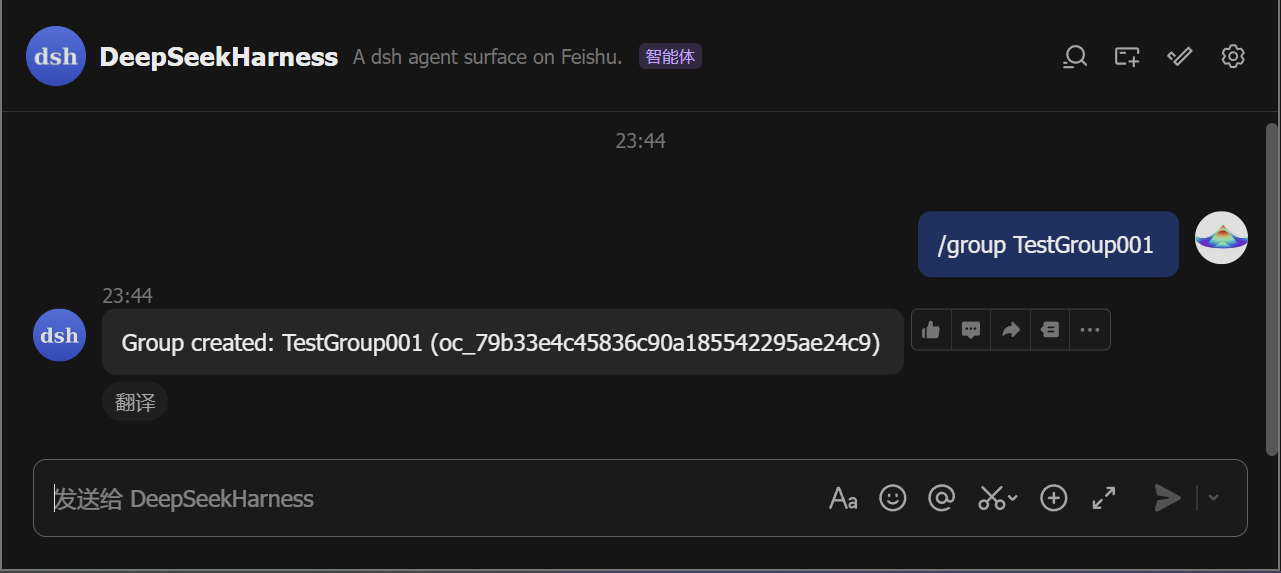
- Start a chat. Direct-message the bot, or run
/group <name>to create a group the bot joins. In a group, @-mention the bot (the default policy; a group with just you and the bot also answers plain messages, and the policy is configurable).
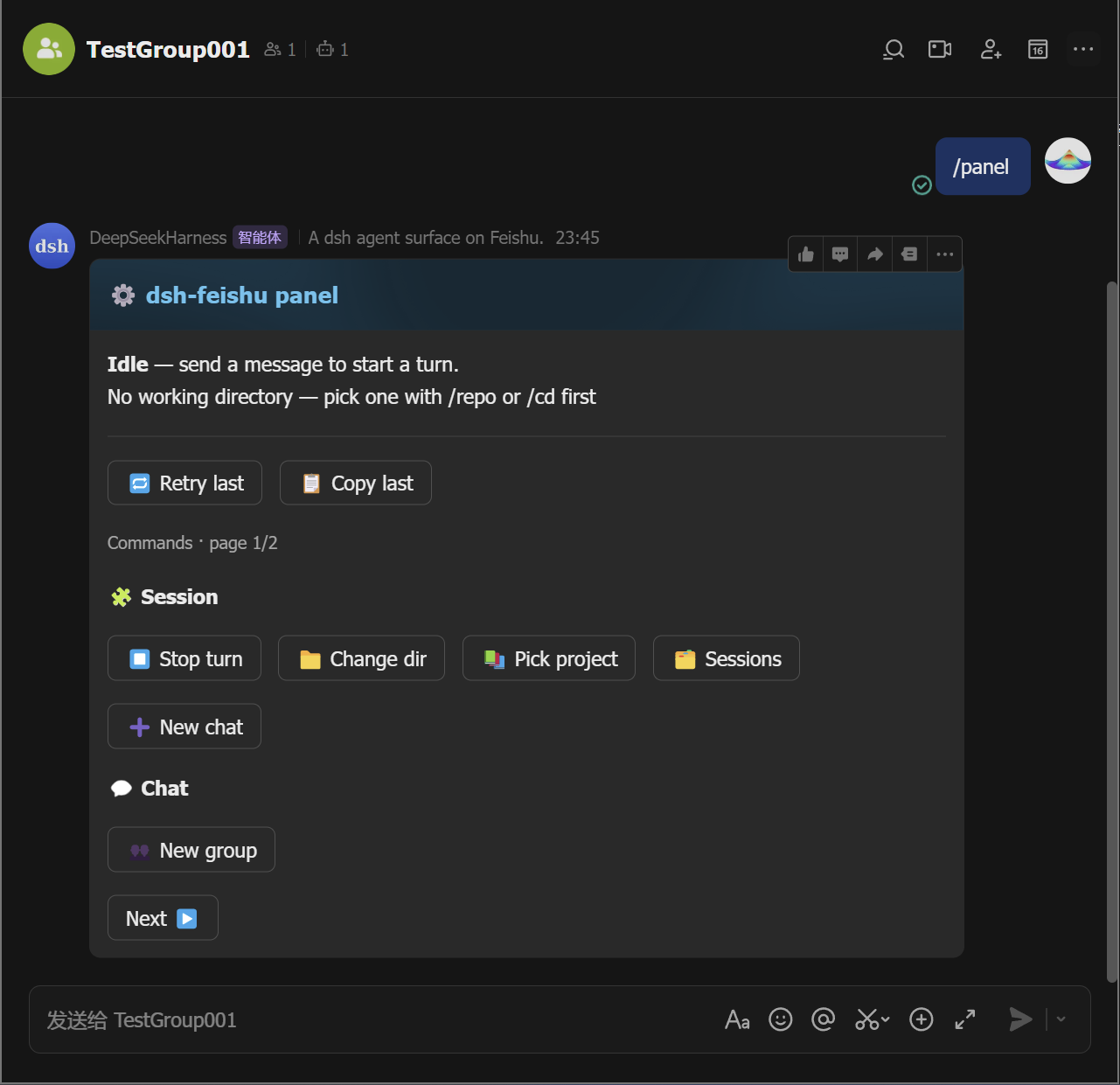
- Open the control panel. Send
/panelto pop up the panel card.
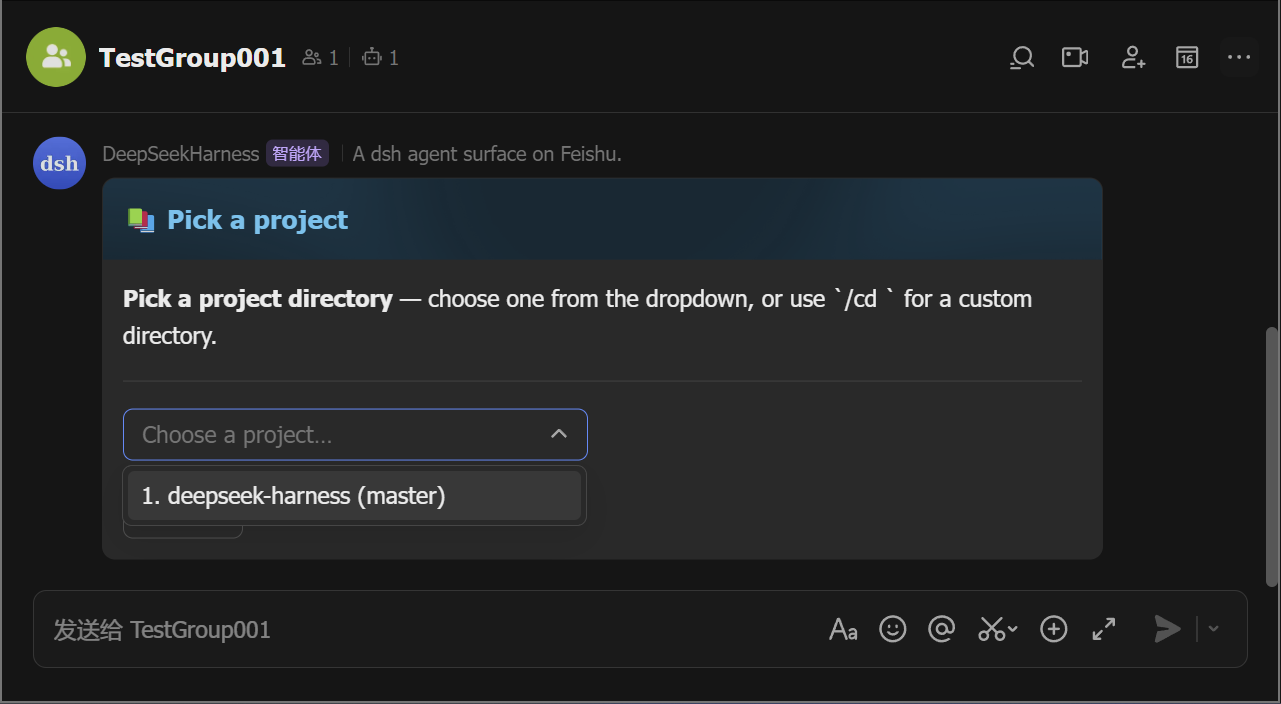
- Pick a working directory. The bot refuses work until the chat has
one: tap 📚 Pick project to choose from a list (the
/repoequivalent), or 📁 Change dir to type a path (the/cd <path>equivalent).
-
Ask. Send a message — the agent runs and its output streams into a live card (tool calls, reasoning, markdown, tables). The card ends green with the full answer inside; Stop, copy, retry, and the ⚙️ panel button sit on it.
Mid-stream Finalized 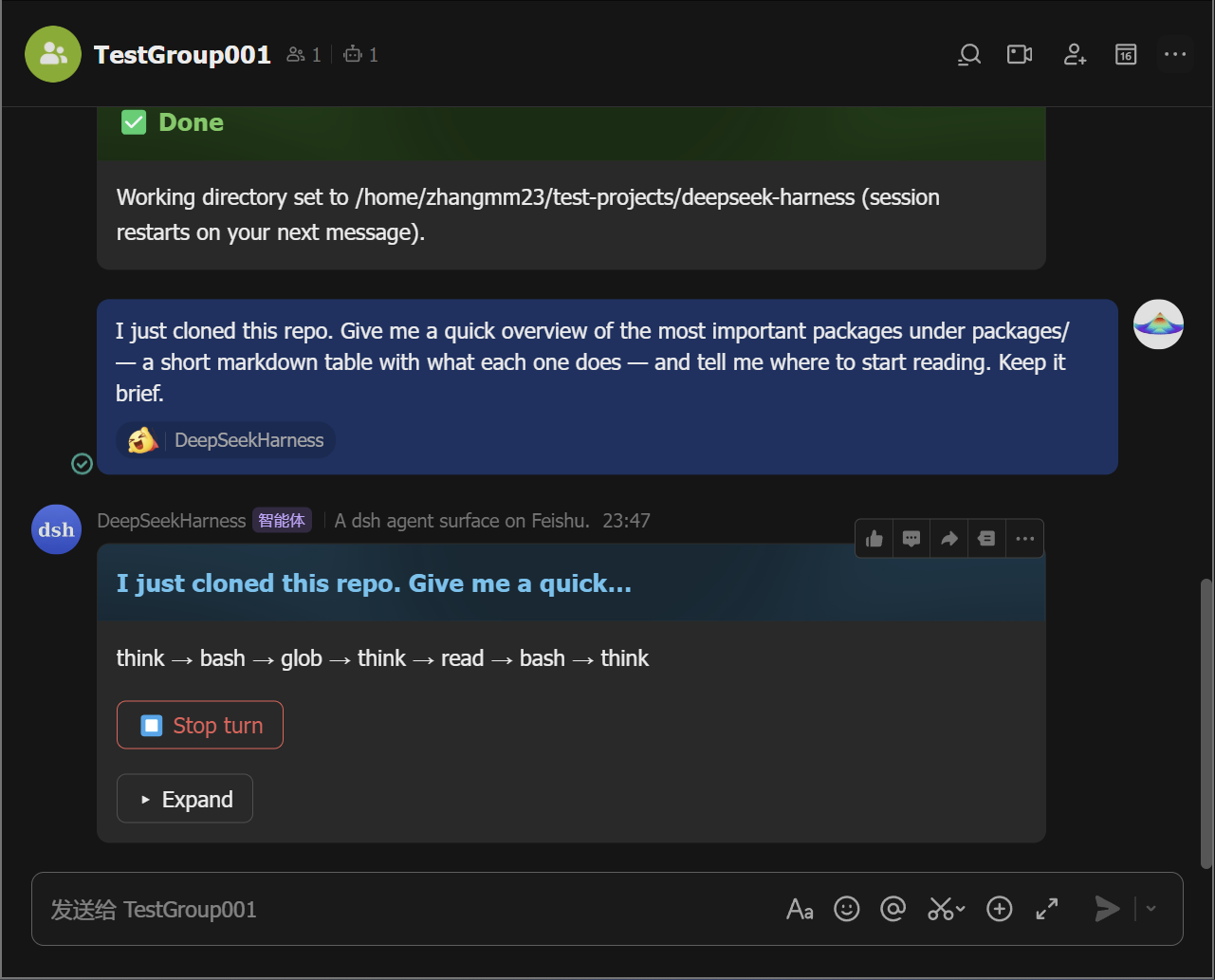
-
Approve or answer when asked. A permission escalation posts an approval card — tap Allow once (or Reject). A question posts a card you answer with a tap (or a reply).
Approval Question 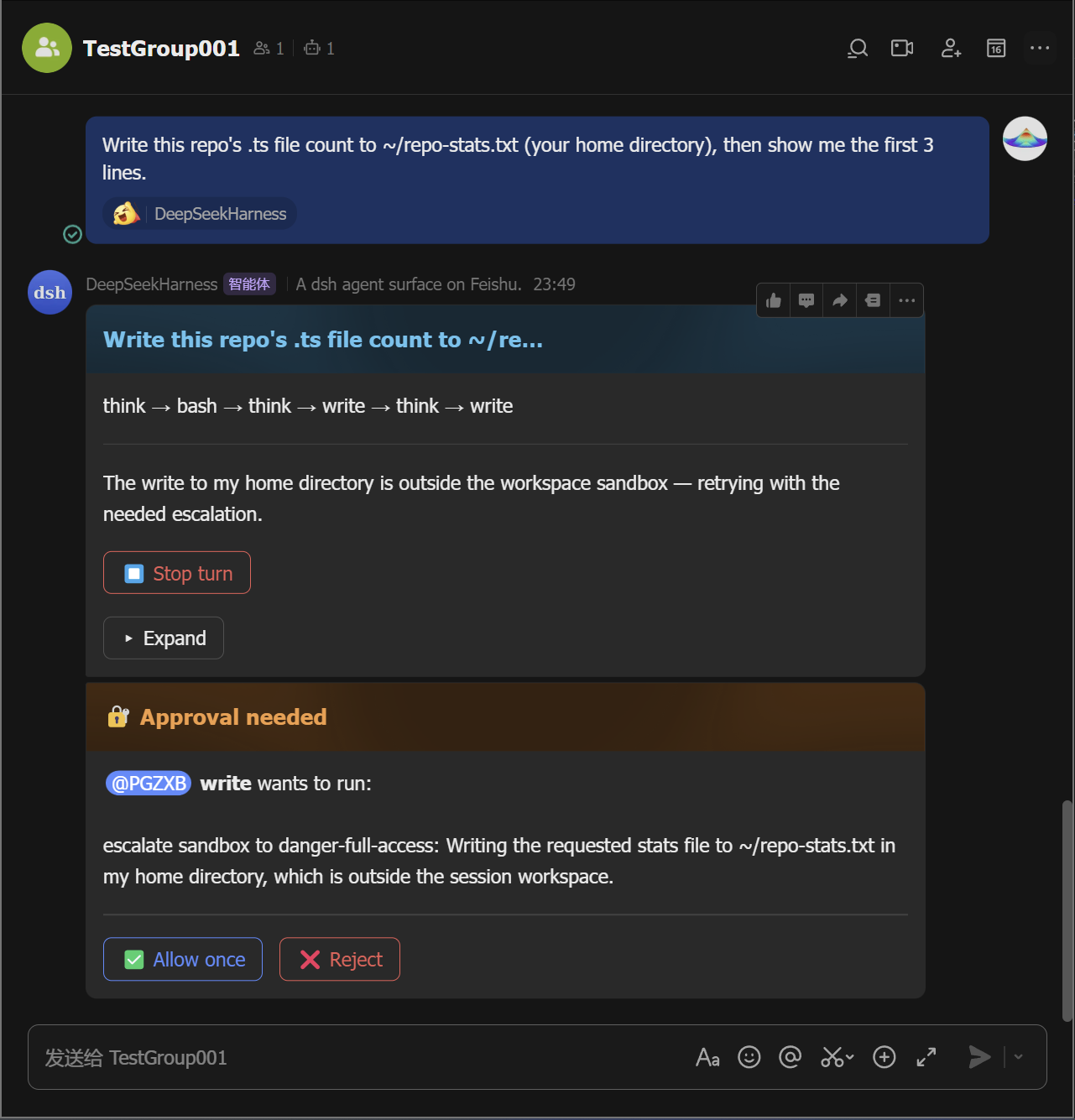
-
Manage sessions. Tap 🗂️ Sessions to list saved sessions and resume any of them from the card (the
/sessionsequivalent;/resume <id>moves one into this chat), and tap ➕ New chat (the/clearequivalent) to start fresh without deleting the old one.
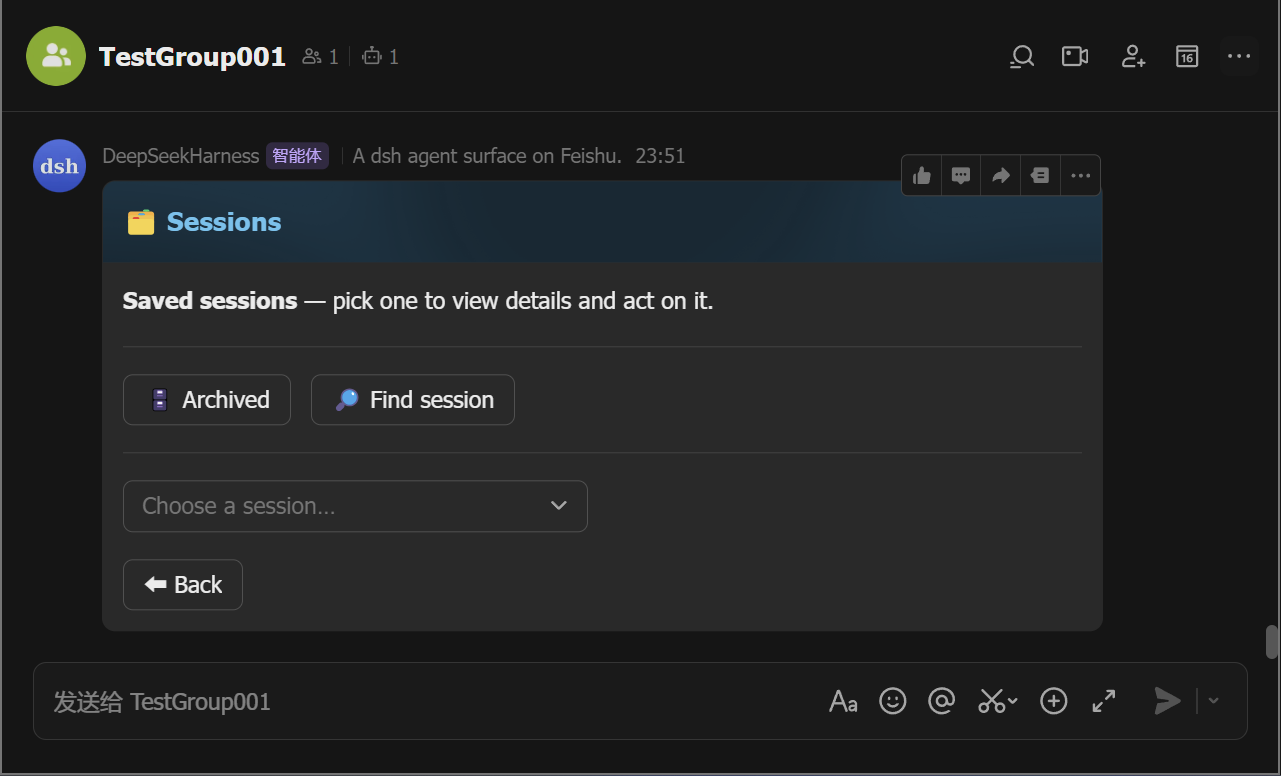
Every button on the panel card maps to a slash command — pick whichever
feels faster; /help lists them all.
Commands
| Command | What it does |
|---|---|
/cd <path> | set this chat's working directory |
/repo | list candidate project directories to pick from |
/sessions | list saved sessions (resume any of them from the card) |
/resume [id] | resume a saved session in this chat |
/clear /new | start a fresh conversation (the old session stays saved) |
/cancel | stop the running turn |
/status | show this chat's session status |
/model | pick or set the model |
/export | send this chat's session log as a file |
/schedule | list active reminders |
/feishu-status | show the surface diagnostic card |
/group | create a group with the bot |
/panel | open the control-panel card (all commands as buttons) |
/help | list all commands |
/plan /permission /goal /compact /feedback | dsh's own commands, same as the web UI |
Features
- Live streaming cards — tool calls, reasoning, markdown, and tables stream in as the agent works.
- One-tap control panel —
/panelrenders the full command palette as buttons; no command syntax to remember, and each button is the exact equivalent of typing the command. - In-card approvals & questions — approve a permission escalation or answer the agent's questions in the chat.
- Sessions survive restarts — a chat's session (and its working directory) is persisted across daemon restarts.
- Groups & mentions — @-mention the bot; error notices, approvals, and questions @ the requester.
- Reactions, allowlists, reminders, export, diagnostics — reaction ack,
allowedChats/allowedUsers, scheduled reminders, session-log files, and a status card.
Contributing
See CONTRIBUTING.md and SECURITY.md. Development, tests, and release: docs/development.md.
Credits
- botmux — the reference for the group-chat interaction patterns: streaming cards, approvals, and the QR-driven Open Platform quick-setup flow. dsh-feishu borrows botmux's interaction and onboarding patterns, not its architecture — botmux bridges external CLIs, while this surface is dsh-native and in-process.
- DeepSeek Harness — the platform this surface is built for.
- Lark Open Platform SDK — the WebSocket long connection and card APIs the transport builds on.
License
MIT — see LICENSE.
查看使用指南 →
该插件的安装步骤、关键要点、FAQ 与兼容性说明(基于已收录字段派生)。
收录徽章

[](https://deepseek-plugin.org/plugins/PGZXB/dsh-feishu)把这段 markdown 粘贴到你的 GitHub README,链接回本插件详情页。徽章只声明已被本站收录,不代表安全认证。