在 DSH 中接入 Google Antigravity (agy) 模型:OAuth 登录、多账号池与 429 自动轮换、CLI/Web 双管理面。

- 语言
- TypeScript
- License
- MIT
- 分支
- main
安装
$ dsh plugin --profile web add dsh-agy在终端中运行以上命令,通过 dsh CLI 安装此插件。可在右上角切换 Profile。 第一次用 dsh?看这篇新手教程
对话式安装
帮我安装 DeepSeek Harness 插件 chaos-03x/dsh-agy:先查看仓库 https://github.com/chaos-03x/dsh-agy 确认安全性,然后执行安装命令并验证插件加载成功。
把这段指令粘贴给 DSH Web GUI 里的助手,由它代你完成安装与验证。
一句话定位
把 Google Antigravity (agy) 的 Gemini / Claude / GPT-OSS 模型接入 DeepSeek Harness:完成 Google OAuth 登录、加密保存多个 Google 账号,遇到 429 限流或配额用尽时自动切号,并提供一个本机 /agy 仪表盘管理账号、配额、模型测试和代理设置。
核心能力
- 提供 Google OAuth 授权登录:浏览器跳转模式、本机粘贴 redirect URL 模式、以及
--blob凭证串模式三种入号方式 - 维护一个最多 10 个 Google 账号的加密池,按账号粒度选择路由,并提供 OAuth refresh、health 巡检、导出/导入
- 对 429 自动分类(软限流/按分钟限流/quota exhausted/未知)执行不同冷却与轮换策略,到点自动切到下一个可用账号
- 在 DSH Web 上以
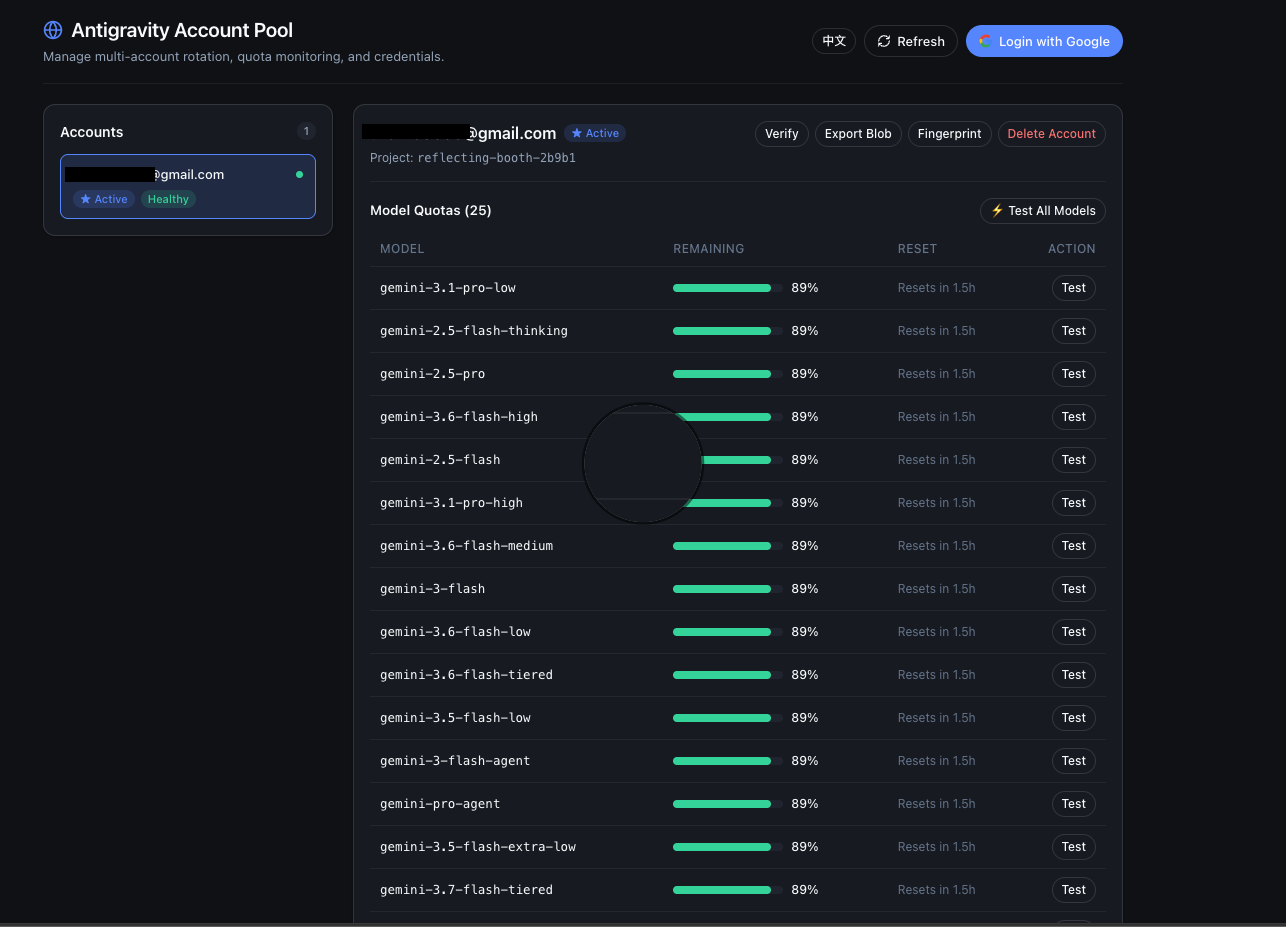
/agy路径提供账户卡片、模型配额条、单次模型测试、凭证导入导出与指纹管理(仅当 DSH Web 绑定到本机环回地址时启用) - 独立 CLI
dsh-agy:login / status / import / export / verify / health / logout / proxy 子命令,无需启动 Harness 也可使用 - 支持 BYO OAuth 应用(环境变量
AGY_CLIENT_ID/AGY_CLIENT_SECRET覆盖)和 per-account 代理(http/https/socks5,账号卡片里可设、CLI 里可测)
技术实现
- 语言: TypeScript(ESM,
tsdown构建) - 关键依赖:
@deepseek-ai/cordis(插件运行时)、commander(CLI 解析)、proper-lockfile(账号存储文件锁)、undici(HTTP,可选socks-proxy-agent) - 架构模式: Cordis 插件双入口:主插件
dsh-agy(注入llm)注册agyLLM provider;副插件dsh-agy/web(注入llm+webServer)注册/agy路由;CLIbin/dsh-agy.js是独立入口,通过cordis.patch.yml把两条插件和 CLI 一起挂到 DSH profile - 入口文件:
src/index.ts(主插件)、src/web/plugin.ts(/agy 仪表盘)、src/cli/index.ts(CLI)、src/plugin-common.ts(共享 store/session/adapter 装配)
适用场景
已经持有 Google 账号并希望把它当成 LLM provider 接入 DSH 来跑 Gemini、Claude Sonnet/Opus、GPT-OSS 等模型的用户;同时支持多账号场景,让单账号触发限流后由插件自动切换,减少人工干预;也覆盖 SSH 远程机、VPS 这类没有浏览器的环境——通过 --headless 粘贴 URL 或 --blob 凭证串完成离线登录。
前置依赖与兼容性
| 依赖 | 最低版本 | 说明 |
|---|---|---|
| Node.js | >=20.18.1 | package.json#engines.node 要求;README Quickstart 中路径 C 推荐 Node >= 22 |
| @deepseek-ai/cordis | ^4.0.1 | peerDependency,标记为 optional |
| @deepseek-ai/dsh-llm | ^0.0.1-rc.1 | peerDependency,标记为 optional |
| 平台 | 跨平台 | 无 os / cpu 限制;README 提到 Linux VPS、macOS、Windows 都能跑 |
| 原生模块 | 无 | 仅依赖 node:crypto / node:fs 等内置能力;socks-proxy-agent 是 optional |
DSH 版本约束 package.json 未声明;通过 cordis.patch.yml 把插件挂到任意 DSH profile。
安装方式
dsh plugin --profile web add github:chaos-03x/dsh-agy
配置项
本插件无独立的 dsh Config;产品参数全部通过环境变量控制。
| 配置 | 类型 | 说明 | 默认值 |
|---|---|---|---|
DSH_AGY_DISABLE | 布尔(1/true/yes/on) | 全局开关:开启后插件不注册 provider 也不注册 /agy 路由,CLI 直接拒绝执行 | 未设置(启用) |
DSH_AGY_FINGERPRINT_MODE | 枚举 stable/dynamic | 指纹策略。stable 表示一个账号绑定一个固定身份、不做请求级随机化;其他值走默认 dynamic,每次请求随机 UA/SDK Client/ideType | dynamic |
DSH_AGY_HEALTH_INTERVAL_MS | 整数(毫秒) | Harness 内的后台批量健康巡探间隔(refresh + userinfo);<=0 或非有限值都关闭 | 关闭(0) |
AGY_CLIENT_ID | 字符串 | 覆盖内嵌的 Antigravity OAuth 客户端 ID(BYO 应用逃生口) | 内嵌的公开凭证 |
AGY_CLIENT_SECRET | 字符串 | 覆盖内嵌的 OAuth 客户端密钥;和 AGY_CLIENT_ID 配对使用 | 内嵌的公开凭证 |
DSH_HOME | 路径 | 改写所有 DSH 文件存储位置(账号库、凭据文件、指纹覆盖文件都会跟随) | ~/.dsh |
HTTP_PROXY / HTTPS_PROXY / NO_PROXY | 标准环境变量 | 没有给账号配置专属代理时,请求会走 EnvHttpProxyAgent,并尊重 NO_PROXY | 未设置 |
| 账号专属代理 | URL(http/https/socks5) | 通过 dsh-agy proxy set 或 Web /agy 卡片内嵌的输入框为单个账号设置;代理不可达时该账号被跳过(fail-closed) | 未设置 |
常见问题
Q: 安装后怎么开始用?
A: 在 DSH Web profile 装好插件,启动 dsh web,浏览器访问 http://127.0.0.1:3080/agy,点击 Login with Google 完成 OAuth 即可走 Web GUI 路径;如果没有浏览器或人在远程 SSH 上,用 npx dsh-agy login(默认打开浏览器)或 npx dsh-agy login --headless(打印 URL 后等待粘贴 redirect URL)走 CLI 路径。
Q: 装好插件但 /agy 页面没出来?
A: /agy 路由只会在 DSH Web 绑定到本机环回地址(127.0.0.1/localhost/::1)时注册;如果 Web 服务绑定到 0.0.0.0 或其它非环回接口,插件会主动跳过 /agy 注册并打 warning,因为它管理的都是账号凭证、不能暴露给网络。需要本机启动 dsh web,或者访问 127.0.0.1:3080/agy。
Q: 多个 Google 账号怎么切换?
A: 账号信息以 AES-256-GCM 加密形式写到 ~/.dsh/agy-accounts.json,加密密钥(AGY_MASTER_KEY)放在 ~/.dsh/.credentials.yaml 里(0600 权限),主密钥也会优先尝试通过 DSH 的 ctx.credentials 服务读写,避免两份文件不一致;最多支持 10 个账号,CLI 的 dsh-agy status 可以查看每个账号的 active / cooling / verification-required 状态,dsh-agy verify 会刷新 token 并把状态正常的账号重新启用。
Q: 遇到 429 限流会怎么样?
A: 插件按四个子类处理:软限流(Retry-After<3s)立刻重试同一账号;按分钟限流走服务端真实 reset time(封顶 30 分钟,缺失则 5 分钟),并在账号上记一个 family 维度的 reset time,让该 family 暂时绕开但其它 family 仍可用;quota exhausted(包含 RESOURCE_EXHAUSTED 等关键词)冷却到服务端 reset time(封顶 24 小时),同一账号当天不再发请求;其它未知情况走 5/10/20/30/60 秒的指数退避;只要还有可用账号就会自动切换,401/403 才会被认作认证失败并标记需要重新登录。
Q: 我想换自己的 OAuth 应用怎么办?
A: 设置环境变量 AGY_CLIENT_ID(必要时再设置 AGY_CLIENT_SECRET),插件在发起 OAuth 时会优先读取环境变量作为 client_id;不设置时使用内嵌在 Antigravity 桌面客户端里的公开凭证(README 中明确这些凭证是公开的、非本项目秘密)。
Q: 我不想用指纹混淆怎么办?
A: 设置 DSH_AGY_FINGERPRINT_MODE=stable,账号就会绑定一个固定身份、不再生成请求级随机 UA 和 ideType、也不在容量看起来被压满时自动重新生成;这与默认 dynamic 模式(每次请求随机)行为不同。除此之外还能把 $DSH_HOME/agy-fingerprint-data.json 替换成自己的版本号/SDK Client 池,插件会优先读这个文件、不用发版就能更新。
Q: 想彻底关掉这个插件?
A: 设置 DSH_AGY_DISABLE=1(任何含 1/true/yes/on 的值都算开),主插件跳过 provider 注册、Web 插件跳过 /agy 注册、CLI 也直接拒绝执行;之后用 dsh plugin --profile web remove dsh-agy 卸载插件,再 npm uninstall -g dsh-agy 卸掉 CLI;本地 agy-accounts.json 是加密的,不主动删也行;Google 端的授权需要在 Google 账号安全设置里手动 revoke(删本地文件不会撤销 refresh token)。
Q: 配额条为什么有时不显示?
A: 配额数据来自上游 v1internal:fetchAvailableModels 端点,端点不可达或返回中没有 quotaInfo 字段时,配额条会缺失;插件会以本地 catalog 模型清单作为 fallback(保证有模型可选,但配额数据可能不显示)。
上手难度
入门 — 普通用户按 README 走 Web GUI 三步(dsh plugin --profile web add → dsh web → 浏览器点 Login with Google)即可,CLI 路径也只有 login / status / verify 三条常用命令;遇到多账号、代理、指纹策略时再查文档。
已知问题与限制
- 灰产风险:插件复用 Antigravity 桌面客户端里附带的 consumer OAuth 凭证访问 Cloud Code API,可能违反 Antigravity 服务条款;多账号轮换、设备指纹和签名绕过默认开启,账号可能被限流、降速或封禁(README 自带 Disclaimer)
- 端点策略:
daily → prod → daily-sandbox → autopush的 fallback 顺序是 load-bearing 的,把daily放第一位是因为cloudcode-pa.googleapis.com对 consumer OAuth 账号直接返回 RESOURCE_EXHAUSTED(实证过);改动顺序会导致大量账号被误判为已耗尽 - 用户端 403 含义:消费账号访问
autopush-cloudcode-pa.sandbox.googleapis.com收到 403 表示"无授权许可",不是凭证失效,分类器必须能区分这种情况才不会把健康账号误标成 verification-required Client-Metadata只能携带ideType,后端 enum 校验拒绝platform/pluginType等自由扩展字段——任意加字段会直接 400/agy路由没有鉴权:仅当 DSH Web 绑定到本机环回地址时才会注册,非环回绑定直接拒绝注册(这是设计而非 bug)- 没有 DSH Config UI:所有行为参数都是环境变量,没有用户态配置入口


Google Antigravity (agy) access for DeepSeek Harness: OAuth authentication, a multi-account pool with automatic 429 rotation, device fingerprinting, and both CLI and web management.
中文文档:docs/README_zh.md
Features
- OAuth login: one-click sign-in via browser OAuth callback, with headless paste-URL mode and a remote paste-credential blob channel.
- Two management surfaces: web and CLI, either one works, core features are the same.
- Multi-account pool: encrypted account store, usage-aware account selection (family-scoped quotas, OMP-aligned ranking), automatic rotation on rate limits, per-account cooldown to the real reset time, per-account device fingerprints.
- Quota dashboard: only active when DSH Web is running; append
/agyto your dsh web address: login, account management, per-model quota bars, model testing, credential export/import, fingerprint management. - CLI:
dsh-agy login|status|import|verify|logoutworks standalone, with or without a harness.
Screenshots
The /agy dashboard inside DSH Web — account cards, per-model quota bars, and
one-shot model tests:
Quickstart
Path A: DSH Web GUI Users (Recommended — 100% Web UI, zero CLI commands)
For users using DeepSeek Harness browser workspace / Web GUI:
# 1. Install plugin into DSH web profile (via dsh CLI, or pnpx/npx if dsh is not in PATH)
dsh plugin --profile web add dsh-agy
# or: npx @deepseek-ai/dsh plugin --profile web add dsh-agy

# 2. Launch DSH Web
dsh web

# 3. Open dashboard at http://127.0.0.1:3080/agy
# Click "Login with Google", complete OAuth authorization, and start using the agy provider
Path B: Headless / Terminal Only (Standalone CLI)
For Linux VPS, SSH remote servers, or headless CI environments:
# Run directly without global install (npx / pnpx)
npx dsh-agy login
npx dsh-agy status

# Or install globally
npm install -g dsh-agy
dsh-agy login          # interactive OAuth (browser, --headless paste, or --blob)
dsh-agy status         # list accounts + quota summary
dsh-agy verify         # refresh + health check
dsh-agy health         # batch health check (optionally on an interval)
dsh-agy import <file>  # import agy auth.json or credential blob (--blob)
dsh-agy logout         # remove account
CLI reference
| Command | Options | Description |
|---|---|---|
dsh-agy login | --headless — print the auth URL and wait for a pasted redirect URL--blob — print a paste-credential blob instead of storing the account--port <n> — loopback callback port (default 51121)--project <id> — bind the login to a specific project--timeout <ms> — callback timeout (default 300000) | Interactive Google OAuth |
dsh-agy status | — | List accounts + per-model quota summary |
dsh-agy import <files...> | --blob — the pasted value is a credential blob--email <email> — set the account email (skips userinfo verification)--overwrite — replace an existing account with the same email | Import agy auth.json files or credential blobs (multiple files / multi-line paste = batch import) |
dsh-agy export | --index <n> — export one account by index (default: all)--out <dir> — write one dsh-agy-<index>.blob per account (default: print to stdout, one blob per line) | Export account credentials as paste blobs |
dsh-agy verify | --index <n> — verify one account by index (default: all) | Refresh + health check |
dsh-agy health | --index <n...> — check only these accounts (default: all enabled)--interval <ms> — repeat on an interval instead of once | Batch health check (refresh + userinfo), re-enables accounts whose credentials are live again |
dsh-agy logout | --index <n> — account index (default: active)--email <email> — account email | Remove an account |
Path C: Local Development & Link
git clone https://github.com/chaos-03x/dsh-agy.git
cd dsh-agy && pnpm install && pnpm run build
dsh plugin --profile web link .
Requires Node >= 22.
Uninstall
# 1. Remove the DSH plugin from a profile
dsh plugin --profile web remove dsh-agy

# 2. Uninstall the CLI
npm uninstall -g dsh-agy

# 3. Optional: delete local account data (accounts + master key + fingerprint override)
dsh-agy logout              # remove accounts first (or skip)
rm -f ~/.dsh/agy-accounts.json
# remove only the AGY_MASTER_KEY line from ~/.dsh/.credentials.yaml — keep other keys!
rm -f ~/.dsh/agy-fingerprint-data.json   # only if you created an override

# 4. Optional: revoke the Google-side authorization
#    Google account security → Third-party access → revoke "Antigravity"
Deleting local files does not revoke Google-side tokens; the refresh token stays valid until it expires or you revoke it in your Google account security settings.
Other things you may care about
Rotation mechanics
Usage-aware selection: when several accounts are available, requests rank them
by the requested model's backend counter family (gemini-* → Google,
claude-* → Anthropic, gpt-* → OpenAI): accounts whose quota is about to
reset with headroom left are used first ("use it or lose it"), near-exhausted
families are avoided, and exhausted families block the account until the real
reset time.
429 (Too Many Requests) responses:
| Category | Behavior |
|---|---|
soft_rate_limit (Retry-After < 3s) | immediate retry on the same account, no cooldown |
rate_limited | cooldown until the server-reported reset time (capped 30min, 5min fallback) + switch to the next account (same account when single) |
quota_exhausted ("quota reached", "individual quota", RESOURCE_EXHAUSTED…) | cooldown until the server-reported reset time (capped 24h) — no further calls to that account until then |
unknown | exponential backoff |
401/403 → account revoked (marked for re-authentication). Success resets the failure counter.
Risk controls (environment switches)
| Env | Effect |
|---|---|
DSH_AGY_DISABLE=1 | Kill switch: the plugin registers nothing (provider + /agy routes) and the CLI refuses to run. |
DSH_AGY_FINGERPRINT_MODE=stable | One fixed client identity per account — no per-request header randomization, no fingerprint regeneration (OMP-style fixed-client posture). Default dynamic keeps per-request randomization. |
DSH_AGY_HEALTH_INTERVAL_MS=<ms> | Background batch health probe inside the harness (refresh + userinfo on the configured interval); off by default. |
AGY_CLIENT_ID / AGY_CLIENT_SECRET | BYO OAuth app escape hatch: override the embedded public Antigravity client credentials. |
About cache hits: why not 99% like DeepSeek V4?
Bottom line: the cache hit strategy is decided by the model provider's cache mechanics (for us, Antigravity's); agy's mechanics differ from DeepSeek's in two ways, so its hit rate is naturally a notch below DeepSeek's.
First, the entry threshold. DeepSeek's caching is on by default with no threshold — its very first request already hits a previously cached system prompt. agy's Gemini-tiered models only start caching once the request prefix reaches roughly 16k tokens, while DSH's default bare system prompt is only about 13k — below the line. So every new conversation's first 1-2 requests are 0%, until the accumulated messages pass 16k.
Second, how fast the cache updates. DeepSeek refreshes its cache at the end of every request — only the newest message misses each round, giving near-100%. agy's cache updates lag: this round's additions are not hit in the next round — they enter the cache roughly two rounds later, and requests for the same content in between all count as misses. Every round wastes about 1.5-2× its additions; the long-conversation hit rate keeps rising as the context grows, bounded by the model's context window.
Practical tips
- Don't expect 99% from agy: the gap comes from upstream mechanics, with no room to optimize.
- If you have a weird number obsession, stuff some custom content into the System Prompt (MCP / tool definitions / roleplay ...).
Storage & secrets
- Accounts:
~/.dsh/agy-accounts.json— AES-256-GCM encrypted; the master key lives in~/.dsh/.credentials.yaml(AGY_MASTER_KEY, 0600).$DSH_HOMErelocates both. - Fingerprint pools (version strings, SDK clients) are user-overridable via
~/.dsh/agy-fingerprint-data.json— no code release needed to keep them current.
⚠️ Disclaimer
This plugin authenticates with Google's consumer OAuth client that ships with the Antigravity desktop product and uses the Antigravity Cloud Code API outside of that product. This may violate Antigravity's terms of service. Use at your own risk — accounts can be rate-limited, throttled, or banned. Multi-account rotation, device fingerprinting, and the signature-bypass sentinel are enabled by default and are designed to work around upstream limits; you are responsible for how you use them and for any account consequences.
Credits
This project references logic and data from the following MIT-licensed sources:
| Source | Content |
|---|---|
| opencode-antigravity-auth (archived) | OAuth flow shape, account-store schema & versioned migration, 429/backoff concepts, fingerprint design |
| antigravity-claude-proxy PR #170 | Device fingerprint generation (via opencode-antigravity-auth) |
| OmniRoute | Wire format (envelope, headers, SSE), endpoint order, agy token-file parsing, paste-credential blob codec, thoughtSignature replay, 429 category engine |
| DeepSeek Harness | Plugin shell, LlmAdapter seam, DSH conventions |
Development
pnpm install
pnpm test                      # vitest, fixture-driven, no network
pnpm run record:fixtures       # re-record real-API fixtures (needs a real account)
pnpm run e2e                   # real-account end-to-end (needs AGY_REFRESH_TOKEN)
pnpm run debug:request         # endpoint/header bisection probe
pnpm run verify:tools          # live two-turn tool-signature check
npm pack --dry-run             # verify the publishable artifact
查看使用指南 →
该插件的安装步骤、关键要点、FAQ 与兼容性说明(基于已收录字段派生)。
收录徽章

[](https://deepseek-plugin.org/plugins/chaos-03x/dsh-agy)把这段 markdown 粘贴到你的 GitHub README,链接回本插件详情页。徽章只声明已被本站收录,不代表安全认证。