让 DeepSeek Harness 直接读写表格、文档、幻灯片、多维表格与画布,所有改动先放在隔离 worktree 中预览,确认后再合入或丢弃。

- 语言
- TypeScript
- License
- Apache-2.0
- 分支
- main
安装
$ dsh plugin --profile web add github:dream-num/dsh-univer-plugin在终端中运行以上命令,通过 dsh CLI 安装此插件。可在右上角切换 Profile。 第一次用 dsh?看这篇新手教程
一句话定位
这是一个给 DeepSeek Harness 用的办公套件插件,让 AI 在对话中直接帮你创建、修改、检查和导出 Excel 表格、Word 文档、PowerPoint 幻灯片、多维表格和画板。所有改动先放进独立的"草稿副本",你可以在会话里实时预览,满意后再合入或丢弃。
核心能力
- 创建和编辑 Excel 兼容的电子表格,支持单元格、公式、样式、图表、透视表、筛选器和迷你图,导出为
.xlsx、.csv、.tsv - 创建和排版 Word 兼容文档,支持段落、列表、表格、图片、图表、页眉页脚、分页和页面布局,导出为
.docx - 从大纲生成 PPT 兼容的演示文稿,支持重设计指定页、编辑形状和图表、检查文字越界/溢出/重叠,导出为
.pptx - 搭建多维表格数据库和可编辑画板,支持公式字段、筛选、排序、分组、连接线和原生图表
- 处理常见 Office 文件,导入
.xlsx、.csv、.tsv、.docx、.pptx,修改后按对应格式导出 - 所有写入操作走隔离的 worktree 流程,支持草稿编辑、提交审阅、重新打开、合入主线和丢弃
技术实现
- 语言: TypeScript (ESM)
- 关键依赖:
@univerjs/core与@univerjs-pro/*系列 Univer SDK、@deepseek-ai/cordis4.0+、libsql(SQLite) 作为.univer文件持久层,以及puppeteer-core+@puppeteer/browsers驱动 Slide 布局渲染 - 架构模式: 标准 DSH Cordis bundle —— Host 组合一个 Service Provider (把 Univer 操作挂到
ctx.univer)、一个 Tools Consumer (注册univer_*工具)、一个 webServer Consumer (暴露/univer-api/*HTTP 路由) 和一个 Skill Provider (挂载分单元技能);自带独立的 Gateway 子进程、无头 Unit Content Worker、Viewer 前端应用和 Slide render machine - 入口文件:
src/host/index.ts(Host 主入口)、src/client/index.tsx(浏览器侧入口)、cordis.patch.yml(Cordis 挂载点声明)
适用场景
希望让 DSH 在对话里直接产出可用的表格、文档、PPT、数据库或画板,而不是只能在终端跑命令的用户。比如告诉 Agent "做一个班级成绩表,自动汇总平均分和不及格人数",或者"做一份冒泡排序课件,6 页,每页完成布局检查",或者"把这份 Excel 整理成周报并导出 docx"。
前置依赖与兼容性
| 依赖 | 最低版本 | 说明 |
|---|---|---|
| Node.js | >=22.19.0 | 由 package.json#engines 强制,Worker 与 Gateway 子进程都基于 Node 运行 |
| DeepSeek Harness | 0.1.0-rc.6 | 通过 peerDependencies 固定,需要 DSH Web/Desktop 宿主 |
| Chrome / Chromium | 本机可执行 | 仅 Slide 布局检查和 SVG 真实文字度量需要;可执行文件缺失会导致相关工具报错,可用 UNIVER_RENDER_BROWSER 指定路径 |
| 原生模块 | libsql、@univerjs-pro/exchange-node-binding、@univerjs-pro/engine-formula-rust-binding | 由本插件自己的 node_modules 提供平台二进制,需要安装时拉取对应平台产物 |
安装方式
dsh plugin --profile web add github:dream-num/dsh-univer-plugin
安装后需重启 DSH (dsh web),并在浏览器里刷新已有页面,新插件才会被加载。
配置项
| 配置 | 类型 | 说明 | 默认值 |
|---|---|---|---|
| gatewayPort | 数字 | 内置 Gateway 子进程占用的起始本地端口;被占用时依次尝试加一 | 9080 |
| autoStartGateway | 布尔 | 首次访问文件状态时是否自动拉起 Gateway 子进程 | true |
| gatewayStartupTimeoutMs | 数字 | Gateway 启动健康检查的超时时间(毫秒) | 10000 |
| gatewayRequestTimeoutMs | 数字 | 读取文件状态等只读请求的超时时间(毫秒) | 3000 |
| gatewayMutationTimeoutMs | 数字 | 写操作的 Gateway 调用超时时间(毫秒) | 60000 |
| unitContentOperationTimeoutMs | 数字 | 导入、导出、结构和执行操作的 Worker 调用超时时间(毫秒) | 120000 |
| unitContentCommitTimeoutMs | 数字 | 协作提交确认时,等待服务端应答的最大时间(毫秒) | 5000 |
| stateCacheTtlMs | 数字 | 文件状态读取结果的本地缓存时长(毫秒) | 1000 |
| unitCacheTtlMs | 数字 | 单元变更读取结果的本地缓存时长(毫秒) | 5000 |
| tools | 布尔 | 是否注册 univer_* 模型工具 | true |
| skills | 布尔 | 是否注册随插件发布的 8 个 Univer 技能 | true |
merge和discard是终态操作,会触发 DSH 显式审批;ready只是把改动标记为待确认,不会修改主线文件。
常见问题
Q: 安装后还需要做什么?
A: 必须重启 DSH (dsh web),并在已有的浏览器页面里按 Cmd+R / Ctrl+R 刷新。运行中安装不会让当前 DSH 进程自动加载新插件。
Q: 这套插件能在哪些系统上运行?
A: 需要 Node.js 22.19 及以上版本和 DeepSeek Harness。Slide 布局检查和 SVG 文字度量依赖本机 Chrome/Chromium,可用环境变量 UNIVER_RENDER_BROWSER 指定浏览器可执行文件路径。
Q: 改坏了当前文件怎么办?
A: Agent 的每次写入都先进入独立的 worktree,主线文件不会被覆盖。worktree 处于 draft 或 ready 状态时你可以直接丢弃;一旦 merged 或 discarded 就进入终态,不能再 reopen,只能通过历史卡片回看。
Q: 为什么要走 worktree 流程,而不是直接改文件?
A: 这是为了让你在会话里实时预览 Agent 的改动并决定是否合入。ready 只是把改动标记为待确认;只有你显式发起 merge 或 discard 并经 DSH 审批,改动才会落地或被丢弃。
Q: 哪些 Univer 内容类型暂不支持?
A: Slide 的母版、版式页和演讲者备注不在当前编辑范围内;Board 的思维导图、表格、墨迹和高级编辑以及文件导出暂未开放。多维表格和 Board 当前通过 Facade 回读完成结构校验。
Q: 它能直接给我一份 Excel / Word / PPT 吗?
A: 可以。让 Agent 用 univer_import 把 Office 文件导入为新 Unit,改完后用 univer_export 导出 .xlsx、.docx 或 .pptx,可在 Excel、WPS Office、PowerPoint 等常见办公软件继续打开和编辑。
Q: 我没有装 Chrome 会影响哪些功能?
A: 仅影响 Slide 布局检查 (univer_lint) 和 SVG 真实文字度量 (univer_compile_svg)。表格、文档、多维表格与画板的导入、编辑、导出、回读都不依赖浏览器。
Q: 这个插件会自动截图给模型吗?
A: 不会。当前插件不向模型提供截图,结构和布局检查不能替代逐像素视觉验收;你仍然可以在实时 Viewer 里人工检查结果。
上手难度
进阶 — 需要理解 worktree 生命周期 (ready / merge / discard)、会浏览浏览器侧实时浮窗和回合卡片,并在需要时按本机环境补齐 Chrome 才能用上 Slide 布局检查。
已知问题与限制
- Slide 的母版、版式页和演讲者备注不在当前编辑范围内 (来源: README.md:185)
- Board 的思维导图、表格、墨迹、高级编辑以及文件导出暂未开放 (来源: README.md:186)
- 当前插件不向模型提供截图,结构回读和 Slide lint 不能替代逐像素视觉验收,需要人工在 Viewer 里看 (来源: README.md:184)
- Slide 布局检查和 SVG 真实文字度量依赖本机 Chrome/Chromium 可执行文件,缺失会让相关工具失败 (来源: README.md:183)
- 多维表格和 Board 的结构校验当前依赖 Facade 回读,不是结构化 inspect (来源: README.md:96)
libsql 0.5.29在 Windows 上关闭数据库时不会 finalize prepared statement,可能触发子进程退出码异常 (来源: src/gateway-app/univerfile-sqlite/connection.ts:50)
Give DeepSeek Harness the ability to create, edit, inspect, and deliver spreadsheets, documents, presentations, databases, and canvases.
English · 简体中文



dsh-univer-office is the Univer office plugin for DeepSeek Harness (DSH). Tell the agent what you need and it can create or edit spreadsheets, documents, presentations, multidimensional tables, and canvases, or work with existing Excel, Word, and PowerPoint files. Every change is verified and stays in the conversation for you to preview, approve, or discard.
After installation, describe the result you want in natural language. The agent handles creation, editing, and verification while you follow the work live and review the result in the conversation. Deliver spreadsheets as Excel (.xlsx), documents as Word (.docx), and presentations as PowerPoint (.pptx) files when needed.
See it in action
The agent created this spreadsheet from a natural-language request, then added conditional formatting and a chart in the same conversation. The result can be previewed, revised, merged into the current version, or discarded in place.
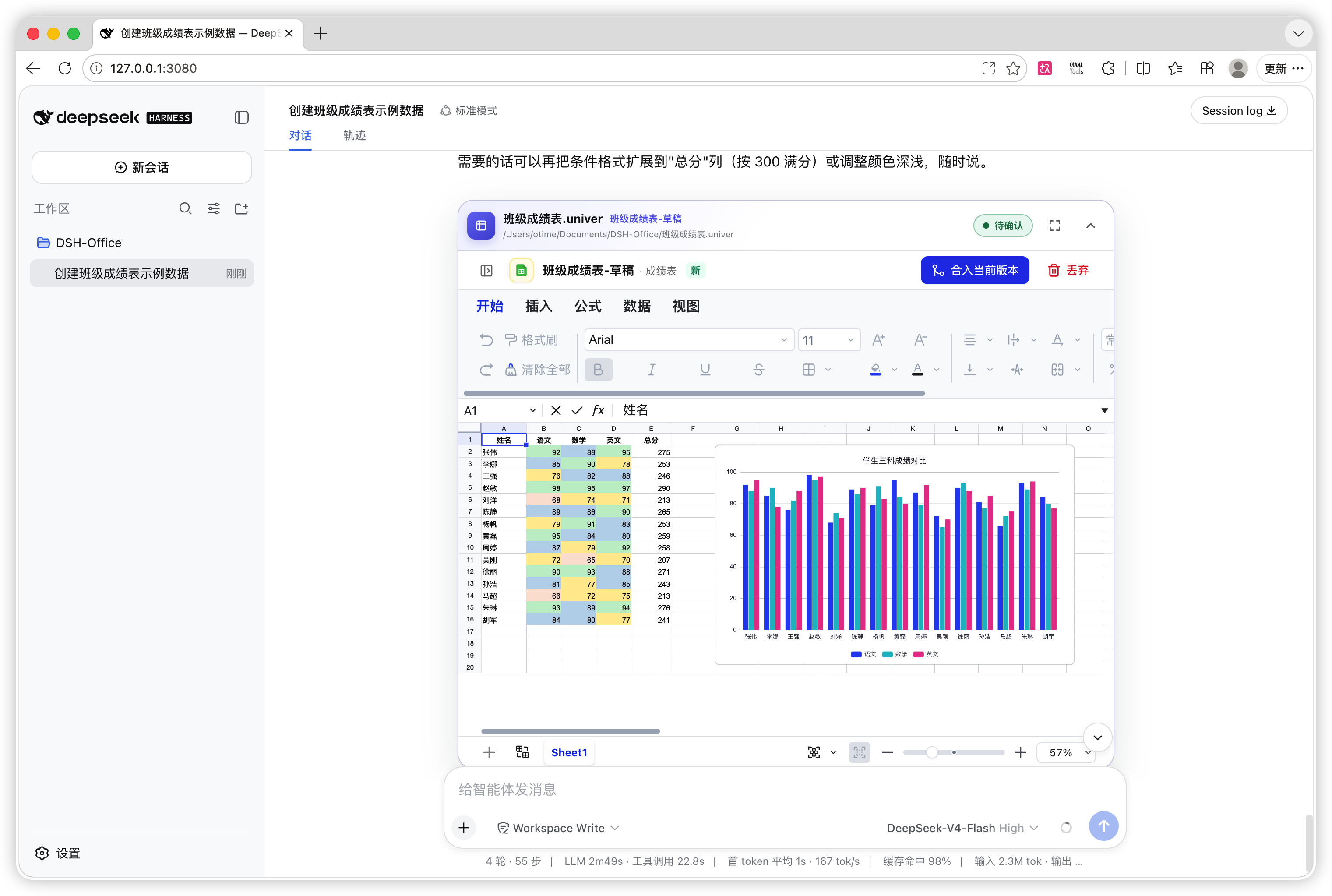
Deliver a standard Excel file: after review, ask the agent to export the spreadsheet as
.xlsxso it can be opened and edited in Excel, WPS Office, and other compatible office applications.
See the complete workflow from request to review
1. Describe the task in natural language
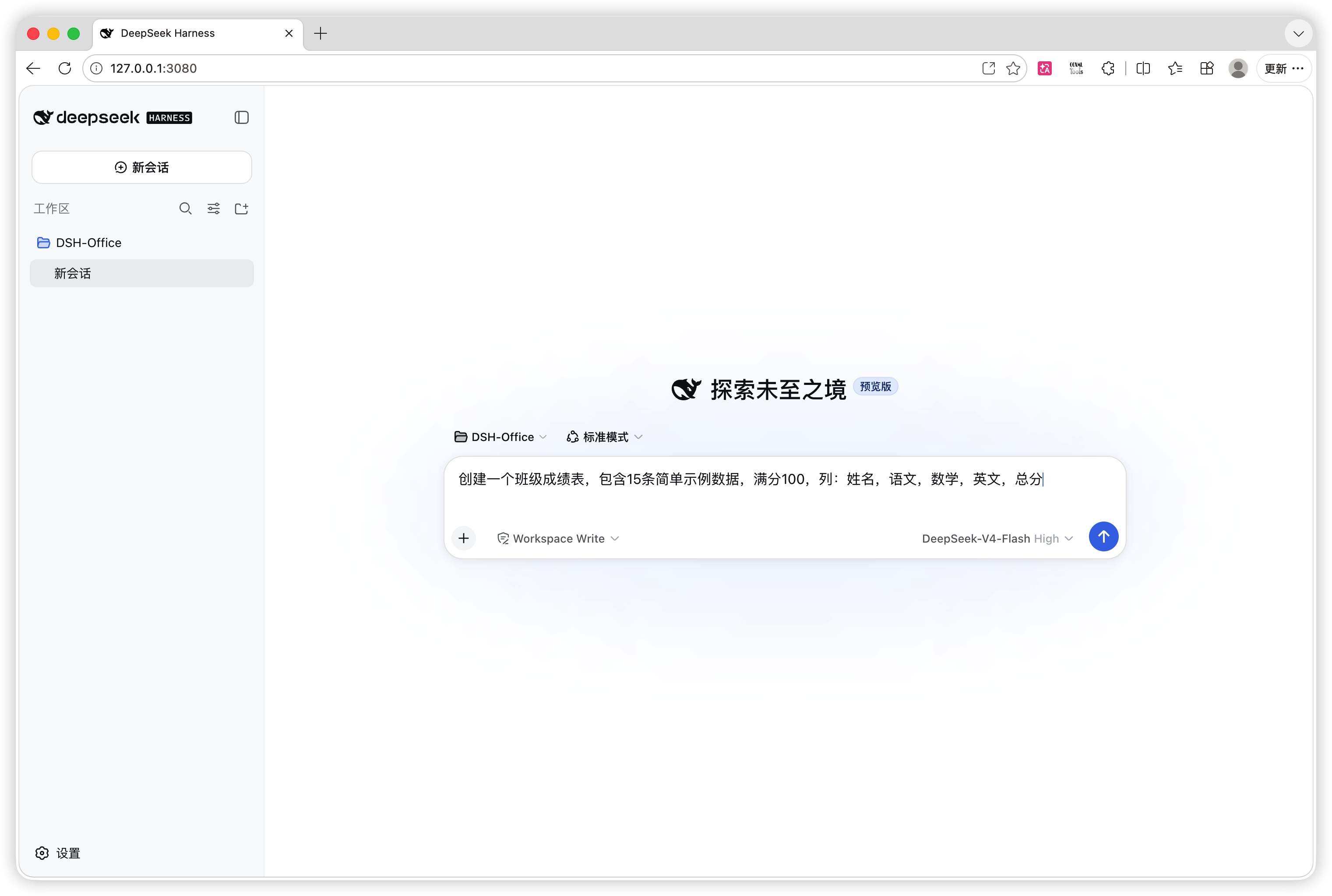
2. Follow the result live while the agent works
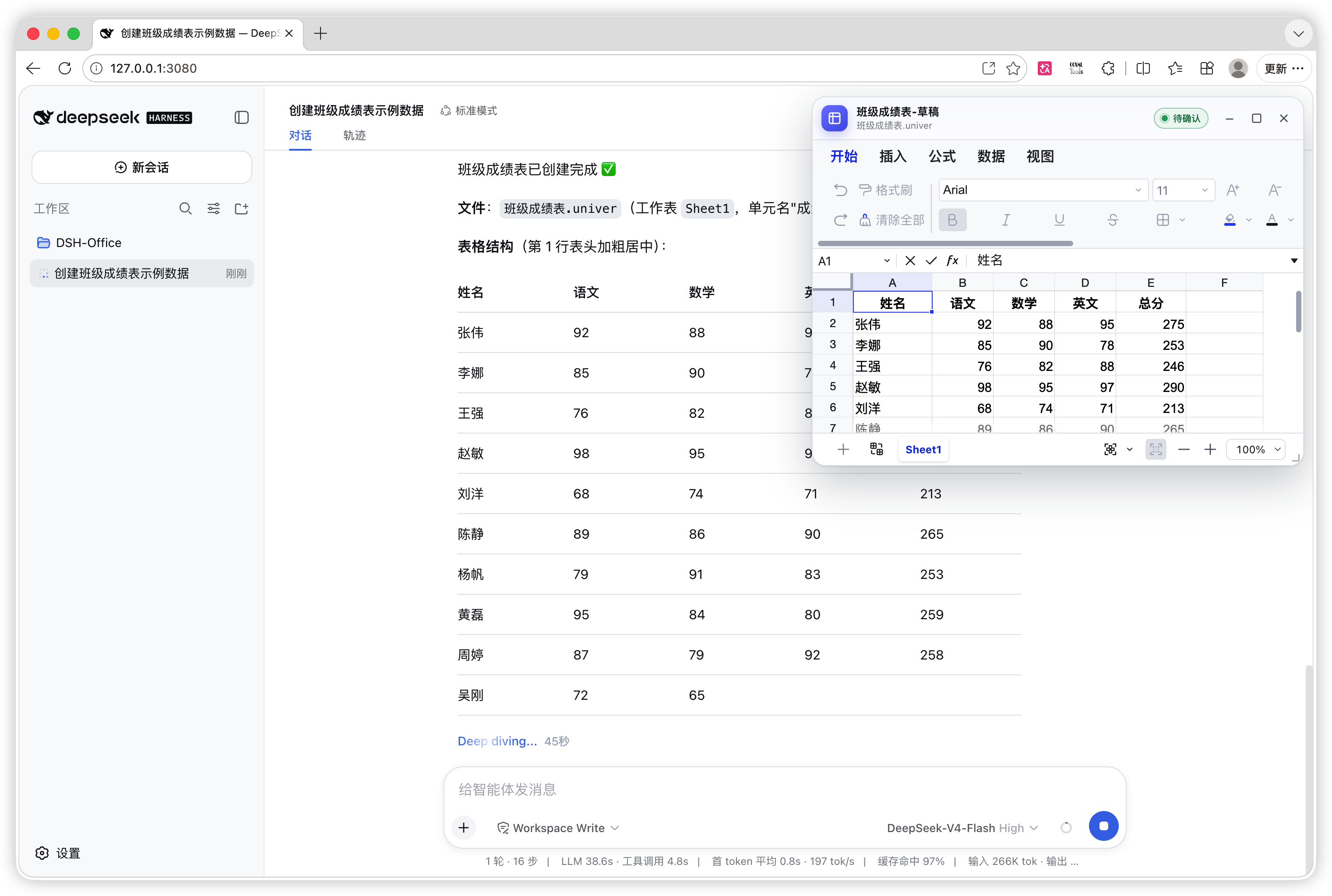
3. Approve or discard the changes in the conversation
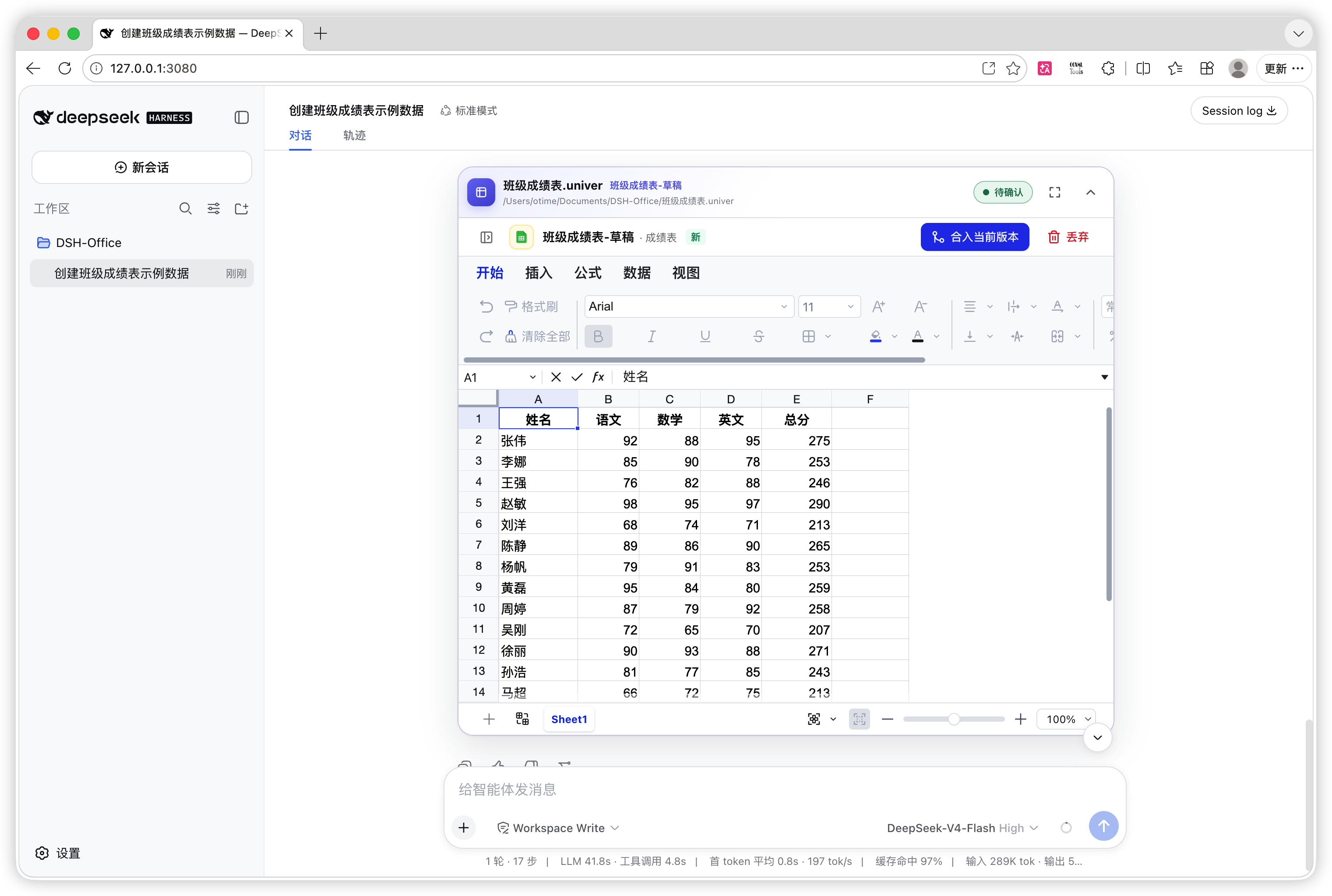
Generate a presentation from one request
Give the agent a topic, audience, page count, content outline, and visual direction. It can build the complete presentation, verify content and layout page by page, and leave the result in the conversation for review.
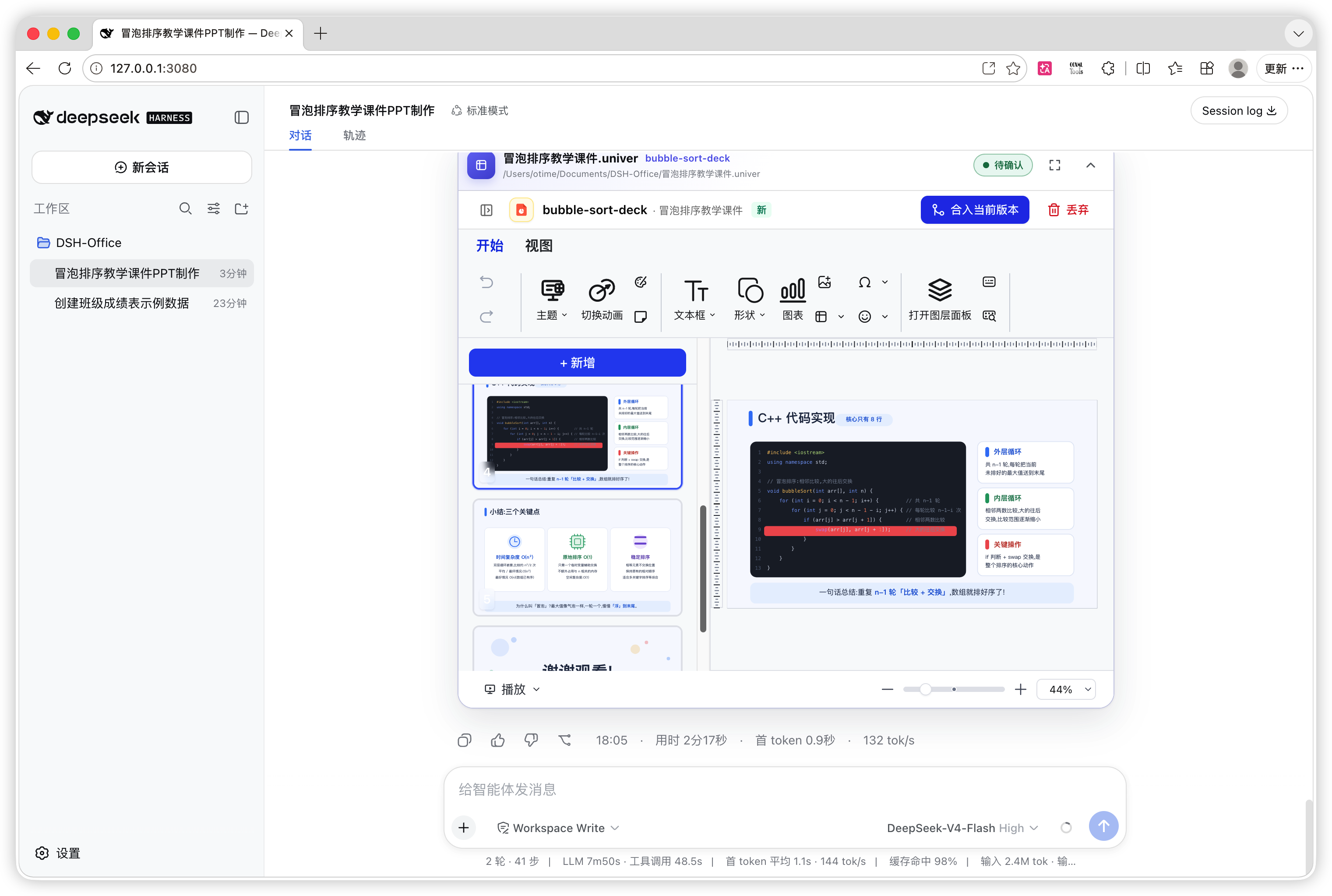
Deliver a standard PowerPoint file: after review, ask the agent to export the presentation as
.pptxso it can be presented and edited in PowerPoint, WPS Office, and other compatible office applications.
See the presentation workflow from request to finished deck
1. Specify the topic, audience, and page requirements
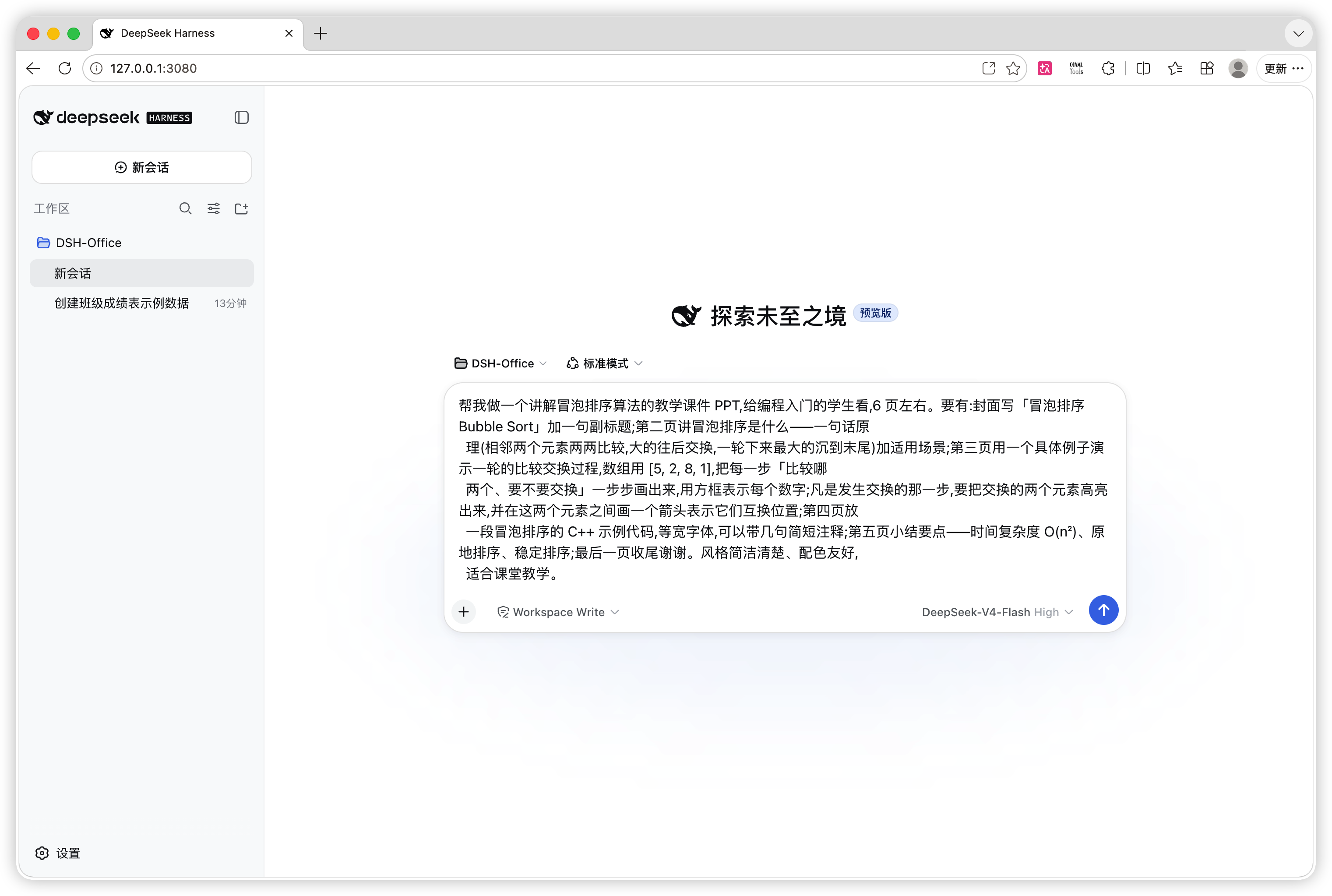
2. Follow and verify the pages while the agent works

What can it do?
- Analyze and build spreadsheets — read or create Excel data, clean fields, write formulas, apply formatting and validation, create tables, charts, pivots, filters, sparklines, conditional formatting, and images, then export the result as
.xlsx,.csv, or.tsv. - Write and lay out documents — create paragraphs, rich text, lists, tasks, tables, images, charts, headers, footers, pagination, and page layouts.
- Create and revise presentations — generate a deck from an outline, redesign selected pages, edit text, shapes, images, tables, charts, and transitions, then detect off-page, overflowing, and overlapping text.
- Build lightweight databases — create Base tables, fields, records, and views with formula fields, filters, sorting, grouping, and Sheet-backed references.
- Draw editable canvases — create shapes, text, connectors, images, native charts, and diagrams, with connector and layout analysis.
- Compose several content types — one
.univerfile can contain Sheet, Doc, Slide, Base, and Board Units. Formulas and embedded content can reference other Units in the same file. - Work with Office files — import
.xlsx,.csv,.tsv,.docx, and.pptx, then export the edited content in the matching format. - Review agent changes safely — every write starts in an isolated worktree. Watch changes live, then merge or discard them from the conversation instead of letting the agent overwrite the current version.
Example requests
Create a simple payroll spreadsheet with employee, base salary, bonus, deduction, gross pay, and net pay columns. Calculate the totals automatically.

Create a six-slide lesson deck about bubble sort. Explain the concept, each comparison pass, pseudocode, and complexity, and check every page for layout problems.

Create a formal weekly project report with an executive summary, this week's progress, a risk table, next week's plan, headers, and footers, then export it as docx.

Create a customer-tracking Base with company, contact, stage, expected value, and next action fields, plus a view grouped by stage.

Create a sales Sheet and a summary Slide in the same .univer file, with the Slide chart reading the Sheet data.
Capabilities
| Content | Create and edit | Verify and review | Import | Export |
|---|---|---|---|---|
| Sheet | Cells, formulas, styles, tables, charts, pivots, filters, validation, images, and more | Structured range inspection, recalculation, live preview | .xlsx .csv .tsv | .xlsx .csv .tsv |
| Doc | Paragraphs, rich text, lists, tasks, tables, images, charts, headers, footers, pagination | Document readback, live preview | .docx | .docx |
| Slide | Pages, text, shapes, images, tables, charts, SVG layouts, transitions | Structure inspection, text bounds/overflow/overlap lint, live preview | .pptx | .pptx |
| Base | Tables, fields, records, views, formulas, filters, sorting, grouping | Facade readback, live preview | .xlsx .csv .tsv | .xlsx .csv .tsv |
| Board | Shapes, text, connectors, images, native charts, routing | Element and connector analysis, live preview | mermaid | .png .jpeg .pptx |
Every content type supports isolated worktree editing, review submission, reopening, merging, and discarding. Base and Board currently use exact Facade readback for structural verification. Board file export is not yet supported.
Get started in 3 minutes
1. Install the plugin
If DSH is running, first press Ctrl+C in the terminal that started it. You can run the installation command while DSH is running, but the current DSH process will not load the new plugin automatically.
Install the plugin from npm:
dsh plugin --profile web add dsh-univer-office
Restart DSH after installation:
dsh web
After DSH starts successfully, refresh the existing DeepSeek Harness browser page with Cmd+R / Ctrl+R.
2. Describe the result you want
Create reports/q2-review.univer. Read data/q2-sales.xlsx and build a management dashboard with summary metrics, monthly trends, and regional rankings.
The agent automatically loads the relevant skills and selects the univer_* tools. A typical task creates the file and a worktree, imports or creates a Unit, edits it, reads the result back for verification, and submits the worktree for review.
3. Review it in the conversation
- Creating a
.univerfile, creating or reopening a worktree, writing content, and submitting for review opens a live window in the top-right. A non-terminal worktree left open in one turn stays open in the next. - Every touched
.univerfile that still exists at the end of the Turn uses the same foldable, fullscreen-capable Turn card; historical Turns keep the same card collapsed by default. Temporary files created and then removed during the Turn do not leave cards behind. - Submit, merge, and discard through the full Univer page embedded in the card instead of duplicate controls outside the Viewer.
How it works
A .univer file is a composable office container that can hold several Units of different types. The plugin puts each agent task in an isolated worktree:
Your request
   ↓
Load the matching Univer skill
   ↓
Create / import / edit in a draft worktree
   ↓
Readback + recalculation + Slide layout lint
   ↓
Live preview and in-conversation review
   ↓
Revise / merge / discard
Only merge and discard end a worktree, and both require an explicit user request plus DSH approval. ready only submits the worktree for review; it does not change the trunk.
Built-in tools
You do not need to call tools manually in normal use; DSH selects them from your request. This list shows what the plugin exposes to the agent.
| Tool | Purpose |
|---|---|
univer_new | Create an empty .univer file without overwriting an existing file |
univer_status | List Units and worktrees in trunk or a selected worktree |
univer_worktree | Create, submit, reopen, merge, or discard an isolated worktree |
univer_unit | Create or remove a Sheet, Doc, Slide, Base, or Board Unit |
univer_import | Import an Office file as a new Unit |
univer_inspect | Read document structure or a selected Sheet range |
univer_execute | Read or modify content with the exact Univer Facade API |
univer_export | Export a Sheet, Doc, Slide, or Base Unit |
univer_lint | Detect off-page, overflowing, and overlapping Slide text |
univer_compile_svg | Compile SVG into an explicit Slide page with real font metrics |
univer_api | Search the exact Univer Facade API bundled with this plugin |
The plugin also ships eight version-matched, lazily loaded skills: core orchestration, Sheet, Doc, Slide, Base, Board, Embed, and cross-Unit formulas.
Preview and review experience
- Live Univer window — file creation plus worktree creation, reopening, writing, and submission open it automatically. Drag, resize, fold, or maximize it; non-terminal windows left open carry into the next Turn.
- Unified Turn cards — every touched
.univerfile that still exists has its own full Univer card, later reads do not erase a lifecycle result already produced in that Turn, and deleted temporary files do not leave loading cards behind. - Historical review — draft, ready, merged, and discarded results all remain in the same card layout at their original Turn, with historical cards collapsed by default.
- Session isolation — each DSH session shows only its own windows, cards, and review state.
- English and Chinese UI — the plugin shell and every open Viewer follow the DSH locale.
Requirements and current limits
- DeepSeek Harness and Node.js
>=22.19.0. - Slide layout lint and real SVG text measurement require a local Chrome/Chromium executable. Set
UNIVER_RENDER_BROWSERto use a specific browser path. - The plugin does not currently expose screenshots to the model. Structural and layout checks are not a substitute for pixel-level visual approval; you can still inspect the result in the live Viewer.
- Slide master pages, layout pages, and speaker notes are outside the current editing scope.
- Board mind maps, tables, ink, advanced editing, and file export are not yet supported.
Configuration
The defaults are designed for local use: the Gateway starts on the first file-state request at 9080. If that port is occupied, it tries 9081, then continues upward one port at a time. Configure the bundle's Cordis layer when you need different values:
| Field | Default | Purpose |
|---|---|---|
gatewayPort | 9080 | Initial loopback port for the bundled Gateway; occupied ports advance by one |
autoStartGateway | true | Start the Gateway on first use |
gatewayStartupTimeoutMs | 10000 | Gateway startup timeout |
gatewayRequestTimeoutMs | 3000 | State-read timeout |
gatewayMutationTimeoutMs | 60000 | Gateway mutation timeout |
unitContentOperationTimeoutMs | 120000 | Import, export, inspection, and execution timeout |
tools | true | Register the univer_* tools |
skills | true | Register the bundled Univer skills |
See src/host/config.ts for the remaining cache and commit-confirmation options.
Uninstall
dsh plugin --profile web remove dsh-univer-office
Development
This project is a standard DSH bundle. Its Host composes the Univer Service Provider, Tools Consumer, webServer Consumer, and Skill Provider. The bundle includes its Gateway, Viewer, headless Unit Content Worker, and Slide render machine. See the architecture document for dependency directions and runtime boundaries.
pnpm install
pnpm run build
pnpm run test
Build the npm tarball and zip distribution:
bash scripts/build-dist.sh
lib/, artifacts/, dist/, *.tgz, and univer-dsh-plugin.zip are generated and are not committed.
Official package name
Install only dsh-univer-office. The following similar names are deprecated npm placeholders reserved by this project to prevent impersonation; they contain no plugin code:
dsh-univer-plugindsh-univer-office-suitedsh-univer-suiteuniver-office-suiteuniver-office