通过官方 MCP 协议把 ChatGPT Web 桥接到本地 DSH,让 ChatGPT 直接创建、查看并继续 DSH 代理会话与受监督目标。

- 语言
- JavaScript
- License
- MIT
- 分支
- main
安装
$ dsh plugin --profile web add dsh-chatgpt-bridge在终端中运行以上命令,通过 dsh CLI 安装此插件。可在右上角切换 Profile。 第一次用 dsh?看这篇新手教程
对话式安装
帮我安装 DeepSeek Harness 插件 jiezeng2004-design/dsh-chatgpt-bridge:先查看仓库 https://github.com/jiezeng2004-design/dsh-chatgpt-bridge 确认安全性,然后执行安装命令并验证插件加载成功。
把这段指令粘贴给 DSH Web GUI 里的助手,由它代你完成安装与验证。
一句话定位
这是一个 DSH(DeepSeek Harness)的官方插件,给 ChatGPT Web 和本地 DSH 之间架一座 MCP 桥,让 ChatGPT 通过标准协议直接创建、查看、继续并监督 DSH 的代理会话与多步目标。插件只负责连接,不重写 DSH 的会话、代理、工具、审批、沙箱与工作区安全模型。
核心能力
- 让 ChatGPT 通过 15 个
dsh_*工具调用 DSH(健康检查、工作区列表、会话创建/查看/继续、任务状态与结果、审批与提问决策) - 支持长任务监督(Goal Supervision):用
dsh_start_goal发起多步目标,dsh_wait_goal长轮询,dsh_update_goal修订/挂起/恢复,dsh_stop_goal幂等停止 - 提供两种 MCP 传输:默认 Streamable HTTP(
127.0.0.1:3456/mcp)和 stdio;首启动自动生成并持久化鉴权 token - 在 DSH Web 设置里新增「ChatGPT Bridge」面板,托管并监控一个 plugin-owned 的
tunnel-client子进程(含 Start/Stop/Restart、分层诊断、日志查看) - 复用 DSH 自身的会话日志(
$DSH_HOME/sessions/<workspace>/<session-id>/session.jsonl.zstd)作为会话身份权威,桥接、ChatGPT、DSH 重启都不丢失会话 - 严格继承 DSH 的工作区边界、审批一次性许可、沙箱路径限制,不暴露任意 shell 工具
技术实现
- 语言: TypeScript(Node.js ESM,源码含
type: "module") - 关键依赖:
@modelcontextprotocol/sdk(MCP 协议)、@deepseek-ai/cordis(DSH 插件容器)、@deepseek-ai/dsh-agent/dsh-session/dsh-llm(代理与模型接入)、zod+@deepseek-ai/schemastery(配置/入参校验) - 架构模式: 作为一条 DSH(Cordis)plugin row 通过
dsh.bundle.patch(cordis.patch.yml)注入宿主;插件启动时apply(ctx, config)拉起Bridge,由McpServer注册 15 个工具并经Streamable HTTP或StdioServerTransport对外;HTTP 服务支持 Bearer token 鉴权 - 入口文件:
src/index.ts(apply启动入口) +src/bridge.ts(DSH 接缝适配核心) +src/mcp.ts(15 个dsh_*工具声明) +src/client/index.js(DSH Web 设置面板)
适用场景
当你已经在本地或自托管环境跑 DSH,想用 ChatGPT 来直接给它派活、看进度、续聊,而不是把内容复制粘贴到 Web UI 里时,这个插件把 DSH 暴露成 ChatGPT 可识别的 MCP 应用。同时它也适合需要长任务监督(执行计划、目标修订、2FA 卡住时挂起 npm 发布等分支)的场景,因为 Goal Supervision 协议让 ChatGPT 在同一回合里持续轮询。
前置依赖与兼容性
| 依赖 | 最低版本 | 说明 |
|---|---|---|
| DeepSeek Harness (DSH) | 0.1.0-rc.6 | 插件声明的 @deepseek-ai/dsh-* peer/dev 依赖全部锁到 0.1.0-rc.6;需要在同一 profile 下启用 web(推荐)或自定义 headless profile(参考 cordis.headless.patch.yml) |
| Node.js | >= 22 | package.json#engines.node 写 "node": ">=22";npm run typecheck / npm test 脚本使用 Node 22+ 的测试隔离 flag |
| 平台 | macOS / Windows / Linux | 源码使用 process.platform 区分 win32(taskkill /T /F)与 POSIX(SIGTERM/SIGKILL)流程;process-tunnel-runtime.ts 显式支持 platform: NodeJS.Platform 注入做跨平台测试 |
| 原生模块 | 无 | 依赖列表(@deepseek-ai/cordis、@modelcontextprotocol/sdk、zod、@deepseek-ai/schemastery 等)全部为纯 JS;无 node-gyp / node-pty / node:sqlite 等原生绑定 |
安装方式
dsh plugin --profile web add dsh-chatgpt-bridge
配置项
| 配置 | 类型 | 说明 | 默认值 |
|---|---|---|---|
transport | 枚举 (http / stdio) | MCP 传输方式;HTTP 走 127.0.0.1:3456/mcp 给 ChatGPT Web 用,stdio 留给本机 MCP 客户端 | http |
host | 字符串 | HTTP 服务绑定地址 | 127.0.0.1(仅本地环回) |
port | 数字 (1–65535) | HTTP 服务绑定端口 | 3456 |
authMode | 枚举 (token / none) | 鉴权模式;选 none 时不要求 Bearer token(仅环回时可用) | token |
authToken | 字符串 | 静态 token;留空则回退到 authTokenEnv 环境变量,再回退到自动生成并写入 tokenFile 的随机 token | 空 |
authTokenEnv | 字符串 | 当 authToken 为空时读取的 token 环境变量名 | DSH_CHATGPT_BRIDGE_TOKEN |
tokenFile | 字符串 | 自动生成 token 的落盘路径;留空则写入 $DSH_HOME/chatgpt-bridge.token | 空 |
resultMaxChars | 数字 | dsh_get_result 返回的助手文本最大字符数 | 8000 |
resultMaxItems | 数字 | dsh_get_result 返回的工具调用条数上限 | 50 |
sessionMaxItems | 数字 | dsh_get_session 返回的消息条数上限 | 20 |
sessionMaxChars | 数字 | dsh_get_session 中每条消息的字符上限 | 4000 |
logLevel | 枚举 (debug / info / warn / error) | 桥接日志级别;日志写到 $DSH_HOME/chatgpt-bridge.log 并脱敏,stdio 模式下不会污染 stdout | info |
常见问题
Q: 安装后还需要额外配置吗?
A: 不需要。默认监听 127.0.0.1:3456、启用 token 鉴权,首次启动会自动生成一个随机 token 并持久化到 ~/.dsh/chatgpt-bridge.token。如果想用固定 token,可设置环境变量 DSH_CHATGPT_BRIDGE_TOKEN 或在配置里填 authToken。
Q: ChatGPT 怎么访问到我本机的 MCP 端点?
A: ChatGPT Web 是远程 MCP 客户端,无法直接打到 127.0.0.1。需要走 OpenAI 当前支持的 Secure MCP Tunnel 或自定义连接器,把请求转发到 http://127.0.0.1:3456/mcp,并把生成的 token 作为 Authorization: Bearer <token> 带上。桥接自身不暴露公网接口,也不自带隧道。
Q: 这个插件会改动 DSH 核心吗?
A: 不会。插件仅通过 DSH 公开的接缝(ctx.agents、ctx.sessions、ctx.sessionPersistence、ctx.workspaceRegistry、ctx.approval、ctx.userQuestions 等)驱动 DSH,DSH 的会话、代理、工具、审批、沙箱与工作区安全模型保持原样;不修改任何 DSH 核心文件。
Q: 会话保存在哪里?会跨重启丢失吗?
A: 由 DSH 自己落盘到 $DSH_HOME/sessions/<workspace>/<session-id>/session.jsonl.zstd。桥接、ChatGPT、DSH 任意一方重启后,dsh_send_message 仍能命中同一个 session_id,并通过 ctx.agents.resume() 把日志重放进模型上下文。
Q: 报 401 Unauthorized 怎么办?
A: token 是与运行时绑定的。切换过 $DSH_HOME、token 重新生成、或 DSH_CHATGPT_BRIDGE_TOKEN 与已落盘 token 不一致都会触发。读取当前 runtime 实际生成的 token(在 $HOME/.dsh/chatgpt-bridge.token)后让 ChatGPT 重新连接即可。
Q: 端口 3456 被占用怎么解决?
A: 先用 lsof -iTCP:3456 -sTCP:LISTEN(macOS/Linux)或 Get-NetTCPConnection -LocalPort 3456(Windows)查占用进程,不要直接 kill 陌生进程。如果是旧的 DSH/桥接进程就正常停止;否则修改 profile 配置里的 port 字段,或者释放该端口。
Q: 怎么彻底卸载?
A: 执行 dsh plugin --profile chatgpt-bridge remove dsh-chatgpt-bridge,或在 profile 配置文件里把 chatgpt-bridge 行加 disabled: true 重启。桥接创建的会话日志会保留在 DSH 中,可被任何共享 $DSH_HOME 的 profile 继续恢复。
Q: stdio 传输能给 ChatGPT 用吗?
A: 不能。ChatGPT Web 不会在本地拉起进程。stdio 只适合与同机运行的 MCP 客户端对接;ChatGPT 必须走 HTTP + 安全隧道。切到 stdio 后还要保证引导进程不向 stdout 输出任何内容,否则会污染 MCP 协议帧。
上手难度
进阶 — 需要先把 DSH 装好、跑通一个 web profile,再让 ChatGPT 通过 MCP tunnel 连到 127.0.0.1:3456/mcp;只要 token 流程和端口/防火墙没卡住,剩下 15 个工具的语义都比较直观。
已知问题与限制
- ChatGPT 是远程 MCP 客户端,桥接只能监听
127.0.0.1;必须配合 OpenAI 当前支持的 Secure MCP Tunnel 才能连通,桥接本身不提供公网入口 - 挂在桥接进程里的
waiting_for_approval/waiting_for_user决策是进程内对象,桥接在它们仍处于挂起状态时重启会被判为cancelled(fail-closed) dsh_get_result.changed_files是从会话日志里编辑类工具的参数里解析出来的,不是文件 diff 查看器waiting_for_user提供方槽位是单例;当 Web UI 已经占用时,问题会走 Web UI 而不是桥接- 单 profile 部署才会看到冷启动会话的标题;并发 profile 共享 projection cache 会出现互相覆盖的标题
- v0.4.0 未实现:原生运行时(
NativeManagedTunnelRuntime)、运行时热切换、进程崩溃后的 PID 接管恢复;当前由ProcessTunnelRuntime负责子进程托管 - 销毁性 kill(SIGKILL /
taskkill /T /F)每次都重新校验 PID + 规范化可执行路径 + 进程启动时间;任一不一致或读取失败都拒绝强杀,避免误杀 PID 被复用的进程
An MCP bridge that lets ChatGPT Web create, view, continue and supervise DeepSeek Harness (DSH) agent sessions through the official Model Context Protocol. v0.4.0 — Native Settings & Process Runtime Manager. The v0.3.0 Goal Control Plane is unchanged. The bridge only connects — DSH keeps its own session log, agent loop, tools, skills, subagents, workflows, approvals, sandbox and workspace security model. It is a standalone DSH plugin: zero DSH core modifications.
Direction of control: ChatGPT Web → secure MCP tunnel → this bridge → DSH. This project lets the ChatGPT web app call and supervise your local or self-hosted DSH. It does not make DSH call ChatGPT, and it does not route DSH model requests through ChatGPT.
Self-hosted / dogfooding development: implemented against the installed DeepSeek Harness source (
0.1.0-rc.6) and verified end-to-end against a live local DSH runtime with the official MCP SDK client.
Real-world setup
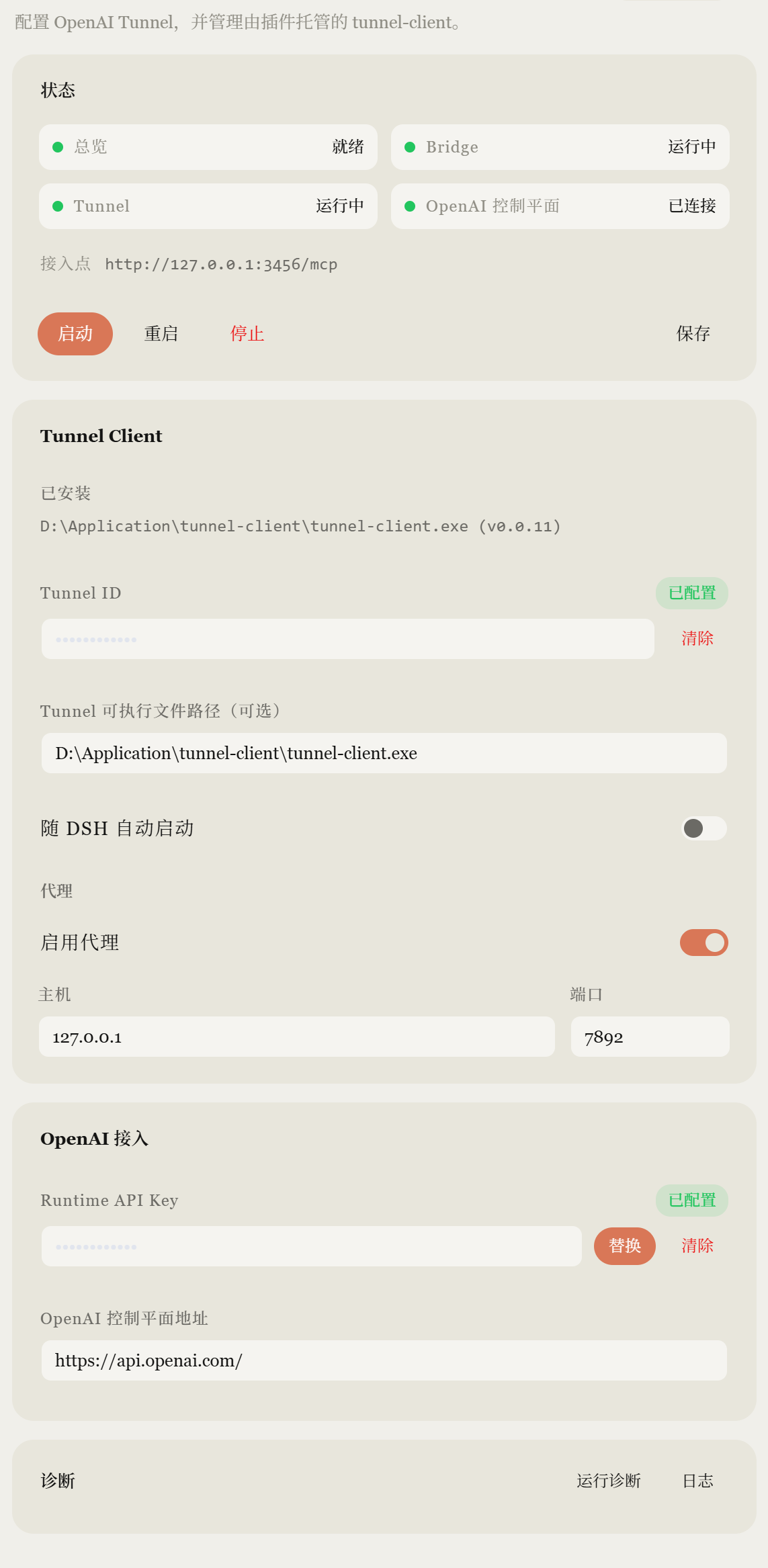
The screenshot below is from a real DSH Web installation with the bridge and OpenAI tunnel connected. Sensitive values are masked.
Quick Start
This gets a new user from zero to a verified ChatGPT ↔ DSH connection. Deep architecture and configuration details follow below — you do not need them to install and verify.
Requirements
- Node.js >= 22 installed and on your
PATH. - A working DeepSeek Harness (DSH) installation —
dshon yourPATH(or usepnpm dlx @deepseek-ai/[email protected]in place ofdshin every command below). - A web profile is recommended. The Web UI and the Bridge should run in the same web profile/runtime so that ChatGPT-created sessions appear live in DSH Web.
- ChatGPT-side MCP and write-action availability depends on your current plan/workspace. Check OpenAI's current official documentation before setup.
- This plugin includes write/action tools (
dsh_send_message,dsh_start_goal,dsh_approve, ...), not just read-only MCP. It drives a real DSH agent that can modify files inside registered workspaces under DSH's approval/sandbox policy. Treat it accordingly.
1. Install
Recommended — install the plugin into the web profile (from the published npm package):
dsh plugin --profile web add dsh-chatgpt-bridge
npm install dsh-chatgpt-bridge alone is not enough: the plugin must be
added to a DSH profile bundle, which dsh plugin ... add does for you. See
Detailed install for source, headless, and manual
variants.
2. Start one shared DSH runtime
dsh web
Run the DSH Web UI and the Bridge in the same web profile/runtime. ChatGPT-created sessions are native DSH sessions; they only stream live in DSH Web when both share one runtime.
| Endpoint | URL |
|---|---|
| DSH Web | http://127.0.0.1:3080 |
| Bridge MCP | http://127.0.0.1:3456/mcp |
3. Read the authentication token
On first boot the bridge generates a token and persists it to
$DSH_HOME/chatgpt-bridge.token. Read it with:
Windows (PowerShell):
Get-Content "$HOME\.dsh\chatgpt-bridge.token"
macOS / Linux:
cat ~/.dsh/chatgpt-bridge.token
Never commit this token to GitHub or paste it into a public chat. It authorizes MCP access to your DSH runtime. Alternatively, set
DSH_CHATGPT_BRIDGE_TOKENyourself and the bridge uses it instead of the generated file.
4. Connect ChatGPT
ChatGPT Web cannot open a plain localhost MCP endpoint. A URL like
http://127.0.0.1:3456/mcp exists only on your machine; ChatGPT Web is a
remote MCP client and cannot reach it directly.
- If the Bridge runs on your machine, connect ChatGPT through the Secure MCP Tunnel / secure tunneling mechanism that OpenAI currently supports for MCP/custom apps. The tunnel forwards ChatGPT's requests to the loopback endpoint.
- Use the token from step 3 as the MCP Authorization Bearer token for the connector/tunnel.
- The Bridge keeps its localhost-first design: it binds
127.0.0.1, never exposes a public interface, and never self-hosts a tunnel. - The stdio transport is not the ChatGPT Web quick path — ChatGPT Web does not launch local processes. See Advanced / other MCP clients for stdio and non-ChatGPT MCP clients.
5. Scan / refresh tools
After the MCP connection is established, scan / refresh the MCP tools in
ChatGPT. The bridge exposes 15 tools, and dsh_update_goal must be present
(it is the 15th). If the tool list looks stale, refresh/rescan the connector
(see Tool count is stale).
6. First verification
Give ChatGPT this read-only acceptance prompt:
请使用已连接的 DSH App,只做只读检查:
1. 调用 dsh_health
2. 调用 dsh_list_workspaces
3. 不修改任何文件
4. 返回 bridge version、health 和 workspace 名称
Expected:
health = ok
bridge version = 0.4.0
Then a minimal Goal Supervision example (still read-only):
使用 dsh_start_goal 创建一个只读检查目标(workspace 用 dsh_list_workspaces
查到的名称),goal 描述为“只读检查项目”,plan 为列出项目结构并总结
README,constraints 使用 {"read_only": true}。然后反复调用 dsh_wait_goal
直到 terminal,最后只汇报 health、goal revision 和总结,不修改任何文件。
Native Settings & Tunnel Runtime (v0.4.0)
The DSH Web Settings → ChatGPT Bridge page manages the whole Tunnel story
in the GUI: configure the OpenAI tunnel, save the Runtime API key, start /
stop / restart a plugin-owned tunnel-client, read live status, run layered
diagnostics and inspect redacted logs. No hand-written PowerShell required.
- Runtime config lives in
$DSH_HOME/chatgpt-bridge/runtime-config.json(separate from the Bridge ConfigSchema). Secrets live in$DSH_HOME/chatgpt-bridge/secrets/and are referenced by the generated profile only asfile:references. - Management API: loopback-only
/_dsh/chatgpt-bridge/*on the DSH web server, with Host/Origin/Content-Type/custom-header CSRF checks. No CORS wildcard. - Runtime ownership:
tunnel-client runis spawned withshell:false, tracked by ProcessIdentity. Every destructive termination — including the graceful SIGTERM and the subsequent Windowstaskkill /T /For POSIXSIGKILL— runs only after a fresh identity verification (PID + normalized executable path + process start time). A mismatch, unreadable probe, thrown probe, or missing process fails closed: the plugin never hard-kills a PID that may have been reused. Startup health / ready timeout cleanup uses the same path; there is no “just spawned” bypass. The per-launchruntimeInstanceIdis manager metadata, not an OS-verified marker. DSH unload stops the plugin-owned runtime. The Bridge bearer auth is preserved end-to-end throughmcp.extra_headerswith afile:secret ref. Persistent runtime recovery (PID adoption after crash), Native Runtime, and runtime hot-switching are not in v0.4.0. - Lifecycle latch: lifecycle/ownership failures
(
stale-process-identity,start-time-mismatch,unknown-start-time,tunnel-stop-timeout) remain latched until shutdown ownership is explicitly resolved (confirmed stop, confirmed cleanup, successful fresh start); health/readiness polling alone cannot restoreoveralltoready. - Status probe provenance: runtime status probe failures (including
RuntimeManager.diagnostics()andrefresh()) are treated as unknown state, not confirmed process exit; ownership is retained (owned=true) and surfaced asstatus-faileduntil the runtime is successfully observed as stopped/exited or explicitly stopped. A failed probe never starts a second tunnel. - Diagnostics: the page's Run diagnostics invokes the real
tunnel-client doctor --profile-file ... --jsonthrough the runtime'sdoctor()alongside the layered bridge / process / key / proxy checks. Steps are normalized and redacted; a doctor failure or a thrown status probe is a structured failed step and never crashes the management API. - Backend: v0.4.0 defaults to
ProcessTunnelRuntime(plugin-owned process supervision, DSH-native Settings, Auto Start, ownership-safe lifecycle, status/health/diagnostics). TheTunnelRuntimeinterface is the future Native Runtime abstraction seam; v0.4.0 does not implementNativeManagedTunnelRuntimeor process↔native hot switching. Settings changes take effect on the next user Restart. - tunnel-client: detected from the configured executable path, then
PATH, then a short list of well-known install directories (includingD:\Application\tunnel-client\on Windows), then the image path of an already-runningtunnel-client(as a hint only — the plugin never takes over that process). Official tunnel-client profiles (%APPDATA%\tunnel-client\*.yaml/~/.config/tunnel-client/*.yaml) supply Tunnel ID and control-plane URL when our own config is empty. Secret values are never imported or returned. If nothing is found, the page shows Not installed. No automatic download/install is performed.
Client bundle build
npm run build          # server (tsc) + client (scripts/build-client.mjs)
npm run typecheck
npm test
The client bundle (lib/client.js) is produced in the DSH module-loader
format (window.__ModuleLoader__.load({ id, factory })) and declared via the
dsh.client manifest in package.json. The factory acquires React with
require('react') from the DSH ModuleLoader; it does not depend on a
browser-global React object.
Troubleshooting
ChatGPT cannot connect
http://127.0.0.1:3456/mcp is a loopback address on your machine — ChatGPT
Web cannot reach it as a remote MCP server. Check the Secure MCP Tunnel /
currently supported secure connection method for MCP/custom apps: the
tunnel must forward to the loopback endpoint with the bearer token.
401 Unauthorized
- Read the token:
Get-Content "$HOME\.dsh\chatgpt-bridge.token"(PowerShell) orcat ~/.dsh/chatgpt-bridge.token(macOS/Linux). - The connector must send it as the
Authorization: Bearer <token>header. - The token belongs to the runtime that generated it. A different
$DSH_HOME, a regenerated token, or a mismatchedDSH_CHATGPT_BRIDGE_TOKENall cause 401 — make sure the token matches the currently running runtime.
dsh_health works but no workspace appears
dsh_list_workspaces only lists workspaces already registered in DSH.
The bridge never auto-registers arbitrary paths; dsh_create_session with an
unregistered path fails with WORKSPACE_NOT_FOUND on purpose. Register the
workspace in DSH (Web profile workspace settings / DSH configuration) first.
Session exists but does not appear live in DSH Web
The Bridge and DSH Web must run in the same web profile/runtime. Do not
run a separate chatgpt-bridge runtime and a separate web runtime and
expect live parity — sessions persist and can be resumed, but they will not
stream in real time.
Tool count is stale / dsh_update_goal missing after upgrade
Re-scan / refresh the MCP tools on the ChatGPT side after upgrading the
plugin and restarting the profile. The bridge exposes 15 tools;
dsh_update_goal is the 15th.
Port 3456 already in use
Identify the process first — never auto-kill an unknown process. On Windows (PowerShell):
Get-NetTCPConnection -LocalPort 3456 | Select-Object LocalAddress, LocalPort, OwningProcess
Get-Process -Id <OwningProcess> | Select-Object Id, ProcessName, Path
On macOS/Linux:
lsof -iTCP:3456 -sTCP:LISTEN # or: ss -ltnp 'sport = :3456'
If it is an old dsh/bridge process, stop it cleanly. Otherwise change the
bridge port in the profile config (see
DSH configuration) or free the port.
Bridge error codes
| Symptom | Cause / fix |
|---|---|
WORKSPACE_NOT_FOUND | The workspace is not registered in DSH; dsh_list_workspaces shows what is allowed. |
SESSION_NOT_FOUND | Unknown session id (never created, or persistence not mounted). |
SESSION_NOT_LIVE on cancel | The session is not loaded in this process; only live sessions can be cancelled. |
APPROVAL_NOT_FOUND / QUESTION_NOT_FOUND | The decision was already taken or the bridge restarted (parked decisions are in-memory). |
| question provider slot taken (log) | A web UI is attached and owns user questions; answer them in the UI. |
Cold sessions show no title in dsh_list_sessions | Cold titles come from the projection cache; concurrent DSH profiles sharing the cache can clobber rows. Single-profile deployments get titles. |
60-second smoke test
After completing Quick Start steps 1–3:
dsh web— one shared runtime.- Establish the MCP tunnel to
http://127.0.0.1:3456/mcp. - In ChatGPT: Scan Tools.
- Ask ChatGPT to call
dsh_health. - Confirm:
health = okbridge version = 0.4.0- tool count = 15
dsh_update_goalexists in the tool list
- Optionally call
dsh_list_workspacesto confirm your workspace is visible.
Architecture
ChatGPT Web
      |
      | MCP (Streamable HTTP / stdio)
      v
dsh-chatgpt-bridge        <- a DSH (Cordis) plugin row
      |
      v
DeepSeek Harness          <- sessions, agents, tools, approvals, sandbox, workspace
      |
 +----+--------------+
 |    |              |
Session   Agent     Workflow
 |    |              |
 +----+------+-------+
             v
       Local Workspace
The bridge uses DSH's public plugin seams — it never re-implements DSH:
| DSH capability seam | Usage in the bridge |
|---|---|
ctx.agents (AgentRegistry) | create() / resume() / get() — live agent lookup, session creation, and resume of persisted sessions after restarts |
ctx.sessions (SessionStore) | live session listing, flush() durability |
ctx.sessionPersistence | list() / inspect() — the DSH session log is the authority for session identity across ChatGPT conversations |
ctx.sessionTitle | title read/write (plus the session/title log fold) |
ctx.workspaceRegistry | list + resolve — only registered workspaces can host sessions |
ctx.approval (approval/request waterfall) | the bridge is an answerer: approvals park as waiting_for_approval and are decided one-by-one |
ctx.userQuestions (registerProvider) | the bridge is the question provider: questions park as waiting_for_user |
ctx.agentDefaultModel | default provider/model selection for created sessions |
ctx.agentPresets (mount) | same per-session preset composition the Web UI uses, when a roster exists |
installModelSelection (dsh-agent) | per-agent model selection with log-derived fallback on resume |
createUserMessage + agent.followup() | the canonical way to continue a session's durable log |
MCP facts
| Item | Value |
|---|---|
| Transport | Streamable HTTP (default, http://127.0.0.1:3456/mcp) or stdio |
| Protocol version | negotiated by @modelcontextprotocol/sdk 1.30.0 (official MCP SDK) |
| Authentication | Bearer token (default): config token → DSH_CHATGPT_BRIDGE_TOKEN env → generated token persisted to $DSH_HOME/chatgpt-bridge.token |
| Local endpoint | http://127.0.0.1:3456/mcp (loopback only by default) |
| ChatGPT connection | any official MCP client: a local connector at the endpoint with the token, or a remote connector tunneled to the loopback endpoint (e.g. OpenAI's supported Secure MCP Tunnel). The bridge never exposes anything public by itself. |
Detailed install
The plugin is a standard DSH profile bundle. It currently targets DSH
0.1.0-rc.6.
Recommended: one DSH runtime for both Web :3080 and the MCP bridge :3456.
ChatGPT-created sessions are native DSH sessions. The Web UI only sees them
live if it shares ctx.agents / ctx.sessions with the bridge. Do not run a
headless chatgpt-bridge profile and a separate web profile at the same
time — that is two runtimes and live Web parity will fail.
Install into the Web profile (recommended)
The Quick Start uses dsh plugin --profile web add dsh-chatgpt-bridge. If
dsh is not on your PATH, the equivalent is:
pnpm dlx @deepseek-ai/[email protected] plugin --profile web add dsh-chatgpt-bridge
# published: ... add [email protected]

# boot ONE process — Web :3080 and MCP :3456
pnpm dlx @deepseek-ai/[email protected] --profile web
dsh_health.capabilities.webSurface is true when the Web gateway is in this
process.
Headless-only (optional)
A dedicated chatgpt-bridge profile (no Web) still works. Sessions persist
and can be resumed later, but DSH Web :3080 will not stream them in real
time.
pnpm dlx @deepseek-ai/[email protected] plugin --profile chatgpt-bridge add [email protected]
pnpm dlx @deepseek-ai/[email protected] --profile chatgpt-bridge
The published npm package is available at
dsh-chatgpt-bridge.
Install from source
git clone https://github.com/jiezeng2004-design/dsh-chatgpt-bridge.git
cd dsh-chatgpt-bridge
npm ci
npm run build
pnpm dlx @deepseek-ai/[email protected] plugin --profile web add "file:$PWD"
pnpm dlx @deepseek-ai/[email protected] --profile web
For either installation method, dsh plugin installs the package into the
profile and, because the package declares dsh.bundle.patch, appends it to the
profile's bundle list. The bundle patch inserts only the chatgpt-bridge row
so it can sit on top of dsh-web-app without duplicating storage /
workspace ids.
A headless profile (no web-app) still needs those host rows. Copy
cordis.headless.patch.yml into that profile's
own cordis.patch.yml.
If pnpm cannot run in your environment (e.g. symlinks blocked), install
manually: create $DSH_HOME/profiles/chatgpt-bridge/ with package.json
(dsh.profile.bundles: ["@deepseek-ai/dsh-base", "dsh-chatgpt-bridge"]),
empty cordis.yml / cordis.patch.yml, and a
node_modules/dsh-chatgpt-bridge link to this checkout. The checkout's own
node_modules may be a junction to the DSH installation's hoisted
node_modules so both sides share one module instance.
DSH configuration
Only the plugin's own row config (defaults shown):
- id: chatgpt-bridge
  name: dsh-chatgpt-bridge
  config:
    transport: http        # http | stdio
    host: 127.0.0.1        # loopback only by default
    port: 3456
    authMode: token        # token | none (loopback only, not recommended)
    authToken: ''          # static token; empty falls back to env, then generated file
    authTokenEnv: DSH_CHATGPT_BRIDGE_TOKEN
    tokenFile: ''          # default $DSH_HOME/chatgpt-bridge.token
    resultMaxChars: 8000
    resultMaxItems: 50
    sessionMaxItems: 20
    sessionMaxChars: 4000
    logLevel: info
Logs go to $DSH_HOME/chatgpt-bridge.log (redacted) and never to stdout, so
the stdio transport stays clean.
Advanced / other MCP clients
The Bridge supports two MCP transports:
| Transport | When to use |
|---|---|
| Streamable HTTP (default) | ChatGPT Web via a secure tunnel, and any HTTP-capable MCP client that can reach the loopback endpoint. |
| stdio | Local MCP clients that launch a child process on the same machine as the bridge. |
The stdio transport is not the ChatGPT Web quick path: ChatGPT Web does not launch local processes, so it cannot use a stdio connector. Use stdio only with clients that run on the same machine as the bridge.
To use stdio, set transport: stdio in the profile config (see
DSH configuration) and point the client at the command
that boots the bridge profile (dsh --profile chatgpt-bridge). The boot
process must not print to stdout; bridge logs go to
$DSH_HOME/chatgpt-bridge.log only.
No ChatGPT cookies, logins, or web sessions are ever touched: ChatGPT is strictly an MCP client of the bridge.
MCP tool catalog
| Tool | Purpose |
|---|---|
dsh_health | Bridge/DSH status, versions, session counts, capabilities. Never contains tokens/keys/cookies. |
dsh_list_workspaces | Workspaces DSH already registered (id, title, path, counts). |
dsh_create_session | Create a real DSH session bound to a registered workspace (id/path/title). Optional title and initial_message. |
dsh_list_sessions | Live + persisted sessions, newest first, paged (limit/offset), optional workspace filter. |
dsh_get_session | Status, workspace, bounded recent-message summary (max_items/max_chars), pending work, waiting approvals/questions, todos. |
dsh_send_message | Continue an existing DSH session (live agent, or resume from persistence). Returns immediately; long tasks run in the background. |
dsh_get_task_status | idle, queued, running, waiting_for_user, waiting_for_approval, completed, failed, cancelled, blocked, max-tokens, interrupted (DSH-native turn-end reasons). |
dsh_get_result | Last turn's assistant text, status, tool calls, changed files (from the session log), structured error. |
dsh_cancel_task | Cancel through DSH's own agent.cancel() — no PID killing. |
dsh_answer_question | Answer a parked user question (waiting_for_user). |
dsh_approve | Decide one parked approval (waiting_for_approval) — requires the exact approval_id and an explicit approve/reject. No approve-all. |
dsh_start_goal | Hand DSH a multi-step goal/plan (new or existing session). Existing session_id revises the Goal (revision +1). Optional execution_mode / constraints. |
dsh_update_goal | Revise / defer / resume an existing Goal. session_id required; never creates a session. |
dsh_wait_goal | Bounded long-poll (default 25s). If continuation_required is true, call again immediately. |
dsh_stop_goal | Idempotent stop/cancel/interrupt of the supervised goal. Fails closed pending approvals/questions. |
Goal Supervision (recommended for plans)
ChatGPT plans the work
      |
      v
dsh_start_goal(workspace, goal, plan?)
      |
      |  continuation_required=true
      v
dsh_wait_goal(session_id)   ---- still running ----+
      |                                            |
      |  continuation_required=true                |
      +--------------------------------------------+
      |
      +-- waiting_for_approval --> ask user --> dsh_approve --> wait again
      +-- waiting_for_user     --> ask user --> dsh_answer_question --> wait again
      +-- completed / failed / cancelled --> done (result is in the wait payload)
continuation_requiredis an MCP client contract: ChatGPT should calldsh_wait_goalagain in the same assistant turn until the loop stops. Do not reply "the task is running in the background" and end the turn.- One MCP call waits internally (≈500ms polls, up to 25s). Do not spam
dsh_get_task_statusevery few hundred milliseconds. waiting_for_approval/waiting_for_usersetneeds_user_actionand do not continue. Never auto-approve; never guess the answer.dsh_stop_goalis the user-facing "stop DSH" tool. It is idempotent (already_stopped=trueif the session is already terminal).- Optional
request_idondsh_start_goalmakes connector retries in the same process idempotent. It is an in-memory map (cap 256), not a Goal DB. After a process restart, continue withsession_id. dsh_health.capabilities.goalSupervisionis always true in v0.2+.- The stabilization work originally tracked as "0.2.1" (never released) is
folded into v0.3.0: reconciled todos (from tool/result facts, not assistant
text),
progress_deltaondsh_wait_goal, structuredblocked+remaining_runnable_steps, and fail-safe cleanup of goal-owned temps. - v0.3.0 adds
dsh_update_goal(15 tools) and a Goal Control Plane: revisions, execution modes, structured constraints, deferred/resume, bounded history.
Low-level tools remain for inspection and one-shot messages.
Goal lifecycle
create   dsh_start_goal(workspace, goal, plan?, execution_mode?, constraints?)
           -> revision 1, session_id
run      DSH agent works; ChatGPT calls dsh_wait_goal
wait     continuation_required → wait again
         waiting_for_user / waiting_for_approval → ask human, then continue
revise   dsh_update_goal(action=revise)  or  dsh_start_goal(..., session_id)
           -> revision +1, previous snapshot kept
defer    dsh_update_goal(action=defer, defer_steps=["npm_publish"])
           -> step is deferred (not failed); independent branches stay runnable
resume   dsh_update_goal(action=resume, resume_steps=["npm_publish"])
           -> same session_id + goal_id; completed steps are not replayed
complete wait returns terminal + result; deferred_steps may still be listed
stop     dsh_stop_goal  (no revision bump; goal_cancelled event)
Approval and question answers do not increment revision.
Execution modes
| Mode | When | Behaviour |
|---|---|---|
standard | default, omitted | Current v0.2 agent instructions. Reasonable analysis/tests allowed. |
minimal | "only wait 35s", smoke, no extra work | Only actions strictly required. Default constraints: no workspace scan, max_changed_files=0. |
strict | user-supplied plan/constraints | Follow the plan/constraints; do not expand scope. |
Constraints (examples)
{
  "read_only": true,
  "allow_workspace_scan": false,
  "max_changed_files": 0,
  "forbidden_actions": ["filesystem.scan", "filesystem.write"]
}
Constraints can only tighten DSH sandbox/approval. read_only=false does not grant write. Runtime enforcement uses the approval waterfall (toolName + optional callId lookup of the logged tool/call) plus post-hoc fact checks. A bash command that never asks approval can only be caught after the fact.
Action classes: filesystem.read, filesystem.write, filesystem.scan, process.exec, git.mutate, npm.publish, github.release, network.
Dependency-aware Goal (npm + GitHub Release)
commit → verify → push → tag
                         ├─ npm publish      (may defer on 2FA)
                         └─ GitHub Release   (still runnable)
When npm hits 2FA: dsh_update_goal({ action: "defer", defer_steps: ["npm_publish"] }). GitHub Release continues on the same session. Later action: "resume" reactivates npm without retagging or repushing.
Deliberately NOT exposed (first version)
execute_shell, run_command, read_any_file, write_any_file,
delete_file, git_push, install_package, run_arbitrary_tool.
ChatGPT never gets a direct shell: it talks to the DSH agent, and the DSH
agent uses DSH tools under DSH's approval/sandbox/workspace policy.
Session lifecycle
Preferred (v0.2 Goal Supervision):
ChatGPT: dsh_start_goal(workspace, goal, plan)
         -> { session_id, continuation_required, next_tool_call: dsh_wait_goal }
ChatGPT: dsh_wait_goal(session_id)  (repeat while continuation_required)
         -> { terminal: true, result: { summary, changed_files, todos } }
Low-level Session API (still supported):
ChatGPT: dsh_create_session(workspace)
         -> session_id (e.g. session-034daf61-...)
ChatGPT: dsh_send_message(session_id, "帮我分析这个项目,不修改文件。")
         -> {accepted: true}            # returns immediately
DSH:     agent.followup() -> turn runs in the background
ChatGPT: dsh_get_task_status(session_id) -> running -> completed
ChatGPT: dsh_get_result(session_id)      -> analysis text
ChatGPT: dsh_send_message(session_id, "刚才第 2 项不错,现在实现它。")
         -> same session, same agent loop, same durable log
DSH is the authority for session identity. Sessions persist as
$DSH_HOME/sessions/<workspace>/<session-id>/session.jsonl.zstd (event log)
and survive bridge restarts, ChatGPT conversations, and DSH restarts:
dsh_send_message on a cold session resumes it through ctx.agents.resume(),
which replays the log into the model context (verified: a marker learned
before a process restart was still remembered afterwards).
Security model
- No arbitrary shell tool — see the tool catalog.
- Workspace boundary — sessions can only be created in workspaces DSH
already registered (
ctx.workspaceRegistry). Arbitrary paths are never opened or auto-registered;dsh_create_sessionwithC:\Users\...,/,~, etc. is rejected withWORKSPACE_NOT_FOUND. - Approval is never bypassed — if DSH asks for approval, the bridge parks
the request (
waiting_for_approval) and onlydsh_approvewith the exact approval id can grant it, once, for that exact tool call (allowed-once). No auto-approve, no approve-all. If the bridge unloads while requests are parked, they resolvecancelled(fail closed). - Sandbox is inherited, not weakened — created sessions get
meta.cwd = workspace.path, so DSH's per-session sandbox confines the agent's file effects to that workspace. - Localhost-first — the HTTP server binds
127.0.0.1by default. - Secret redaction — all bridge logs and tool outputs pass through a redactor (sk-... keys, bearer tokens, key=value secrets, OTP, secret-shaped keys). Goal history never stores OTP, tokens, cookies, or Authorization headers. The generated token is never logged.
- Goal constraints tighten only — they never raise sandbox or approval rights. OTP supplied for one exact operation is not persisted.
- No ChatGPT credentials — the bridge never reads cookies, never drives a browser, never stores OpenAI session tokens.
Approval behavior (concrete)
- The DSH agent requests a permission. DSH emits
approval/request. - The bridge (an answerer for its own sessions) parks the request; the
session shows
waiting_for_approvalwith{approval_id, tool_name, call_id?, reason?}. - ChatGPT calls
dsh_approve(session_id, approval_id, "approve")→allowed-once; or"reject"→rejectedand the call fails closed. - The agent's turn continues.
Sessions created by the web UI keep being answered by the web UI answerer;
the bridge only answers approvals for sessions it created. In a profile
where the web UI already owns the single user-questions provider slot,
questions flow through that provider instead (reported in dsh_health
capabilities).
User question behavior
When the agent calls the ask-user tool, the bridge (as the registered
provider) parks the question; the session shows waiting_for_user with the
question text/options, and dsh_answer_question resolves it. Answers are
validated against the offered options.
Long task behavior
dsh_send_message returns immediately with {accepted: true}. The agent
loop runs in the background; dsh_get_task_status polls
queued -> running -> completed|failed|cancelled. Cancellation goes through
DSH's own agent.cancel({kind:'user'}), which aborts the active turn
(turn-end reason aborted) or discards still-queued messages — DSH's
semantics, not a second task system.
Tests
npm run typecheck     # tsc --noEmit
npm test              # node scripts/test.mjs — unit suite in one process;
                      #   selects the test-isolation flag for the current
                      #   Node (Node 22: experimental name; Node 23+: stable)
npm run dogfood       # full MCP client flow against a running bridge
npm run dogfood:goal  # v0.3.0 Goal Control Plane: minimal 35s + defer/resume DAG
npm run resume-test   # create marker session -> restart the DSH profile ->
                      #   continue the same session -> marker survives
npm run demo-flow     # two-step demo (analyze, then implement + test)
The dogfood/resume/demo scripts use the official @modelcontextprotocol/sdk
client over Streamable HTTP against the booted profile — the same
protocol ChatGPT speaks.
Uninstall / disable
- Disable: in the profile's
cordis.patch.ymladd- id: chatgpt-bridge+disabled: true, then restart the profile. The MCP endpoint disappears; DSH keeps running untouched (verified). - Uninstall:
dsh plugin --profile chatgpt-bridge remove dsh-chatgpt-bridge(or delete the profile directory). Bridge-created agents are disposed with the plugin; their session logs remain persisted and can be resumed later from any profile sharing$DSH_HOME. - Sessions created by the bridge continue to exist and can be continued by the Web UI or any other entry point — DSH's session log is shared.
DSH core modifications: 0.
Current limitations
- First version is ChatGPT -> DSH only: it drives DSH sessions; it does not expose a full remote control plane (no file browsing, no arbitrary tool passthrough).
- Parked approvals/questions live in the bridge process; a bridge restart
while something is parked resolves them
cancelled(fail closed). dsh_get_result.changed_filesis derived from the session log's tool calls (arguments of known editing tools) — data-driven, not a diff viewer.- The
waiting_for_userprovider slot is single-slot; in a profile where the Web UI already owns it, questions flow through the UI. - Stdio mode is supported, but the boot process must not print to stdout; prefer the HTTP transport unless a client requires stdio.
- Live ChatGPT validation was completed on 2026-08-14 through a tunneled MCP
connection: ChatGPT discovered and invoked
dsh_healthanddsh_list_workspaces. The automated dogfood/resume flows additionally use the official MCP SDK client against the same Streamable HTTP endpoint.
DSH compatibility
- Developed and verified against DeepSeek Harness
0.1.0-rc.6(profile bundle@deepseek-ai/dsh-base), Node >= 22. - Uses only public plugin seams; no DSH core files are modified.
License
MIT
查看使用指南 →
该插件的安装步骤、关键要点、FAQ 与兼容性说明(基于已收录字段派生)。
收录徽章

[](https://deepseek-plugin.org/plugins/jiezeng2004-design/dsh-chatgpt-bridge)把这段 markdown 粘贴到你的 GitHub README,链接回本插件详情页。徽章只声明已被本站收录,不代表安全认证。