在 DSH Web 聊天界面为 Agent 本轮修改的每个文件提供行号统一差异审查抽屉,支持逐行评论、撤销重做与中英文。

- 语言
- TypeScript
- License
- MIT
- 分支
- main
安装
$ dsh plugin --profile web add dsh-file-review在终端中运行以上命令,通过 dsh CLI 安装此插件。可在右上角切换 Profile。 第一次用 dsh?看这篇新手教程
对话式安装
帮我安装 DeepSeek Harness 插件 left0ver/dsh-file-review:先查看仓库 https://github.com/left0ver/dsh-file-review 确认安全性,然后执行安装命令并验证插件加载成功。
把这段指令粘贴给 DSH Web GUI 里的助手,由它代你完成安装与验证。
一句话定位
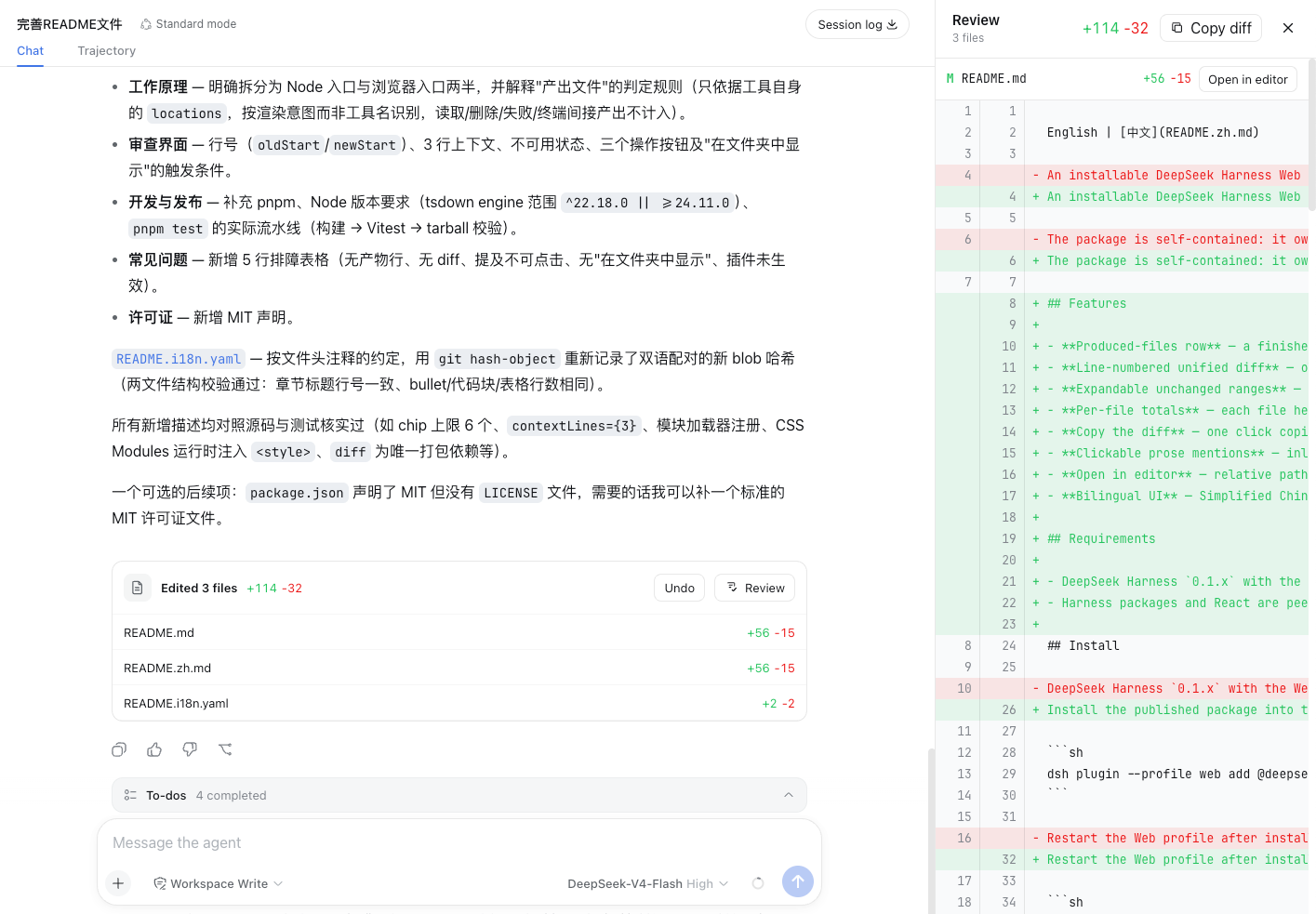
在 DSH Web 聊天界面为 Agent 刚刚修改的每个文件提供行号统一的差异审查抽屉,可逐行评论、对本轮整体撤销或重新应用,并支持中英文界面。
核心能力
- 审查每轮文件改动:Agent 完成一轮工作后,聊天尾部出现"已编辑 N 个文件"的卡片,点开进入统一差异面板
- 撤销与重新应用本轮改动:在差异面板上一键回退 Agent 刚刚做的所有可逆改动,或重新应用已撤销的内容
- 对修改行添加审查评论:在差异的左侧(删除行)或右侧(新增行)任意行加评论,发送消息时聚合为引用一起提交给 Agent
- 正文中的文件路径变成可点链接:Agent 最终回复中用 inline code 提到的文件路径,会变成可点击的"打开文件"链接
- 抽屉大小可调:审查抽屉的宽度支持拖动调整,双击恢复默认,断点为 760px(移动端自适应)
- 中英文界面切换:跟随 DSH Web 的语言设置自动切换审查面板的所有文案
技术实现
- 语言: TypeScript + React 18
- 关键依赖:
diff(行级差异计算)、zod(Typert 请求/响应严格 schema 校验)、@deepseek-ai/dsh-typert-protocol与dsh-typert-registry(Host/Client 双端的类型安全 RPC)、@deepseek-ai/cordis(插件上下文) - 架构模式: Cordis Host/Client 双端插件;Host 端在
src/index.ts注册一段 system prompt,让模型在最终回复中提及主要产出文件,并在fileReview命名空间下挂载FileReviewService,通过 Typert 暴露status和apply两个远程方法;Client 端在src/client/index.ts注册三条 slot:conversation.chat.node(用户消息中的审查评论胶囊)、conversation.input.dock(输入框旁的评论草稿区)、conversation.chat.turnTail(回合尾部的"已编辑文件"卡片 + 抽屉);通过chatFileMentions服务让正文里的文件引用可点击 - 入口文件:
src/index.ts(Host 端)、src/client/index.ts(Client 端)
适用场景
当你在 DSH Web 上让 Agent 完成编码任务(写新文件、改老文件)后,想在不离开聊天界面的情况下快速看清"到底改了哪些行、改得对不对"。对每行加评论让 Agent 继续修改,或对整轮不满意时一键撤销/重新应用,比跳到外部 Git diff 工具更顺手。
前置依赖与兼容性
| 依赖 | 最低版本 | 说明 |
|---|---|---|
| DSH | >= 0.1.0-rc.5 (<0.2.0) | peerDependencies 限定所有 @deepseek-ai/dsh-* 包在 rc.5 到 rc.x 区间,devDependencies 实际锁在 0.1.0-rc.6 |
| pnpm 冷静期 | 新版本 pnpm 需白名单 | README 提示在 ~/.dsh/profiles/web/pnpm-workspace.yaml 的 minimumReleaseAgeExclude 中加入 dsh-file-review,否则新版本可能装不上 |
| 平台 | macOS / Windows / Linux | 通过 node:fs/promises 读取普通文件,使用 node:path 处理路径分隔符,未声明平台限制 |
| 原生模块 | 无 | 仅使用 Node 内置 fs/promises 与 path,无 node-gyp 依赖 |
| Node | 未声明 | package.json 未声明 engines 字段 |
安装方式
dsh plugin --profile web add github:left0ver/dsh-file-review
配置项
本插件无需额外配置。
审查抽屉的宽度等显示偏好是浏览器本地状态(localStorage 键 dsh-file-review:drawer-ratio,默认占主区域 36%),无需在插件层设置。
常见问题
Q: 安装后需要做什么额外配置吗?
A: 较新版本的 pnpm 强制新发布包度过冷静期才允许安装,建议先把 dsh-file-review 加入 ~/.dsh/profiles/web/pnpm-workspace.yaml 的 minimumReleaseAgeExclude 白名单,否则可能装不到最新版本。
Q: 它会改动我没让它动的文件吗?
A: 不会。Host 端在执行撤销或重新应用前会校验路径必须在会话工作目录内、不能是符号链接、必须是合法 UTF-8 文本;同时在写入前再做一次内容比对,发现外部编辑器同时改动会判定为冲突并中止。
Q: 可以评论某一行让 Agent 改吗?
A: 可以。审查面板支持对差异左侧(删除行)或右侧(新增行)的任意行添加评论,发送消息时会自动把当前会话的所有评论聚合为 @review-comments 引用附在输入框开头一起提交,无需手写路径。
Q: 撤销后还能恢复吗?
A: 可以,在原轮次内可以重新应用已被撤销的内容;如果 Agent 又产生了新的修改,原轮的撤销/重做状态会被新轮次取代。
Q: 只支持 DSH Web 吗?
A: 是的。package.json 的 dsh.client.platform 字段显式声明仅 web profile,浏览器端的 React 渲染与 slots 注册决定了它无法在 CLI profile 下工作。
Q: 二进制文件能审查吗?
A: 不能。Host 端读取文件后会校验是否为合法 UTF-8 文本,否则返回 error 状态;只有具有完整可逆差异(同时包含 oldText/newText 与起始行号)的文本文件才能撤销/重做,否则显示为 unsupported。
Q: 怎么卸载?
A: 运行 dsh plugin --profile web remove dsh-file-review 即可,无需手动清理本地数据。
Q: 不修改任何文件可以只"看"差异吗?
A: 可以。点开文件审查面板即可只查看差异,不触发撤销或重新应用;任何撤销/重做都需要显式点击对应按钮。
上手难度
入门 — 无需配置项,会用 DSH Web 聊天即可使用;点开文件、看差异、加评论、撤销重做都是 GUI 操作。
已知问题与限制
- 不支持符号链接文件:Host 端在
resolveFile中检测到符号链接会直接报错(src/file-review-service.ts:40) - 仅支持合法 UTF-8 文本文件:二进制或非 UTF-8 文件被读取时会判定为 error(
src/file-review-service.ts:46) - 路径必须落在会话工作目录内:通过
realpath与relative做边界校验,防止越权访问(src/file-review-service.ts:30-43) - 仅可逆差异可被撤销/重做:缺少 oldText/newText 或起始行号的差异会显示为 unsupported,无法切换(
src/file-review-service.ts:81-86) - 并发改动会被判定为冲突:写入前会重读文件做 CAS 比对,外部编辑器同时改动会中止本次操作(
src/file-review-service.ts:178-187) - 移动端布局断点为 760px:抽屉在更窄屏幕上会切换为自适应布局(
src/client/ProducedFiles.tsx:33) - pnpm 冷静期可能影响安装:较新版本 pnpm 默认不允许安装刚发布的包,需手动加入
minimumReleaseAgeExclude白名单(README.md:36-45)
DSH File Review
Review every file an agent just changed—without leaving DeepSeek Harness Web.





English · 简体中文
How to use
💬 Chat → ✨ Generate → 📄 Click a changed file → 🔍 Review
Preview
Features
- A diff panel for instantly reviewing every file the agent just changed.
- Undo support for reverting the agent's changes from the current turn.
- Comment on changed lines and ask the agent to update the code based on the feedback.
- Multilingual support, including Chinese and English.
Quick start
0. Add dsh-file-review in pnpm's minimum release age withlist
Open ~/.dsh/profiles/web/pnpm-workspace.yaml and add:
minimumReleaseAgeExclude:
  - dsh-file-review
Recent versions of pnpm enforce a minimum release age, so newly published packages are not installed until that waiting period has passed. To install the latest version, add dsh-file-review to the exclusion list.
1. Install the plugin
dsh plugin --profile web add dsh-file-review
2. Start DSH Web
dsh web
3. Enjoy it
Install from source
git clone https://github.com/left0ver/dsh-file-review.git
cd dsh-file-review
pnpm install
pnpm run build
dsh plugin --profile web add ${PWD}
Install from GitHub repository
dsh plugin --profile web add github:left0ver/dsh-file-review
Update the plugin
dsh plugin --profile web update dsh-file-review
Uninstall the plugin
dsh plugin --profile web remove dsh-file-review
Friendly Links
LINUX DO — A new ideal community
License
查看使用指南 →
该插件的安装步骤、关键要点、FAQ 与兼容性说明(基于已收录字段派生)。
收录徽章

[](https://deepseek-plugin.org/plugins/left0ver/dsh-file-review)把这段 markdown 粘贴到你的 GitHub README,链接回本插件详情页。徽章只声明已被本站收录,不代表安全认证。