把 DeepSeek Harness 工作区带到手机、浏览器和另一台电脑上,跨设备端到端加密复用同一份会话与工具。

- 语言
- TypeScript
- 分支
- main
安装
$ dsh plugin --profile web add ds-harness-remote在终端中运行以上命令,通过 dsh CLI 安装此插件。可在右上角切换 Profile。 第一次用 dsh?看这篇新手教程
对话式安装
帮我安装 DeepSeek Harness 插件 liguobao/deepseek-harness-remote:先查看仓库 https://github.com/liguobao/ds-harness-remote 确认安全性,然后执行安装命令并验证插件加载成功。
把这段指令粘贴给 DSH Web GUI 里的助手,由它代你完成安装与验证。
一句话定位
让 DeepSeek Harness 的工作区不再被绑在一台电脑上:在某台机器上启用"被远端控制"后,你可以在手机、浏览器或另一台电脑继续同一个会话、复用原有的 Workspace 与工具链。
核心能力
- 把本机 Harness 注册为 Host,让其它已登录同一账号的设备"接管"远端 Workspace
- 继续进行中的会话并查看最新进展,发送新指令、调整方向或在 rc.2 中发送图片 Prompt
- 在客户端回答 Harness 的提问、处理权限请求
- 浏览远端目录并打开只读 Workspace 列表,原生 UI 自动切到本地继续工作
- 通过自适应传输(LAN / P2P / TURN / Relay)连接,自动选择最稳的链路;Header 上显示当前连接方式
- 配合 dsh-file-viewer 实现受限的远端只读文件预览,每块最大 512 KiB,由 File Viewer 自身的权限把关
技术实现
- 语言: TypeScript(Node 22 工具链)
- 关键依赖:
@deepseek-ai/cordis、@deepseek-ai/dsh-host-apiproxy、@dsh-remote/crypto(Noise IK)、werift(纯 TS WebRTC)、zod、qrcode - 架构模式: 通过 Cordis 注入 Host 生命周期,使用
cordis.patch.yml启用dsh-remote插件;Runtime 拆分为HostPluginRuntime(Host 侧)和ClientModeRuntime(同账号下的远端控制),Host 与 Client 都基于ApiProxySwitch在本地与远端 ApiProxy 之间无缝切换;安全层使用 X25519 + Noise IK,端到端加密后再交给 Relay 转发;前端 React 组件通过dsh-client-ui-slots注入侧边栏与设置面板 - 入口文件:
packages/plugin/src/index.ts(Host 入口apply(ctx, input)),UI 入口packages/plugin/src/client.ts
适用场景
办公电脑跑 Harness 主会话,出门用手机或另一台笔记本继续推进同一份 Workspace;或在不同机器之间灵活切换,不想每次都在新机器上重新克隆项目、登录账号、加载历史。适合重度使用 Harness 又不愿意把所有数据同步到云端的人。
前置依赖与兼容性
| 依赖 | 最低版本 | 说明 |
|---|---|---|
| DeepSeek Harness | 0.1.0-rc.6 – <0.2.0 | 来自 peerDependencies;README 注明实测适配 dsh-v0.1.1-rc.2 |
| @deepseek-ai/cordis | >=4.0.1 <5 | 插件容器与生命周期 |
| Node.js | 未声明 | 开发依赖 @types/node 22.10.7,建议使用 Node 22 工具链 |
| 平台 | macOS / Windows / Linux | werift 是纯 TypeScript WebRTC,无需原生模块;identity-store 对 Unix 文件权限做 0600 校验 |
| 原生模块 | 无 | 所有依赖均为纯 JS |
安装方式
dsh plugin --profile web add github:liguobao/deepseek-harness-remote
配置项
| 配置 | 类型 | 说明 | 默认值 |
|---|---|---|---|
enabled | 布尔 | 是否启用 Remote 功能 | true |
role | host / client / both | 这台机器是只当 Host、只当 Client,还是两者皆可 | host |
serverUrl | 字符串(HTTPS 链接) | 远端中继 / 注册服务器地址;本地测试时 http://localhost 也可 | 默认 https://dsh.r2049.cn(见 cordis.patch.yml) |
deviceName | 字符串 | 在其它设备列表里显示的名字 | 当前系统 hostname |
forceRelay | 布尔 | 是否强制走 Relay(关闭自适应) | false |
logLevel | debug / info / warn / error | 日志详细程度;会同步输出到 DSH Desktop 的 desktop.log | info |
reconnect | 布尔或对象 | 断线重连策略,可分别配置初始/最大重试间隔与抖动 | enabled=true,初始 1 秒,最大 30 秒,抖动 0.2 |
常见问题
Q: 我只有一台电脑也能用这个插件吗?
A: 可以装。装好之后默认以 Host 角色运行,在其它已登录同一账号的设备上就能看到这台电脑并继续工作;如果只想用本地功能也可以在配置里把 role 设成 client。
Q: 安装之后还需要做什么?
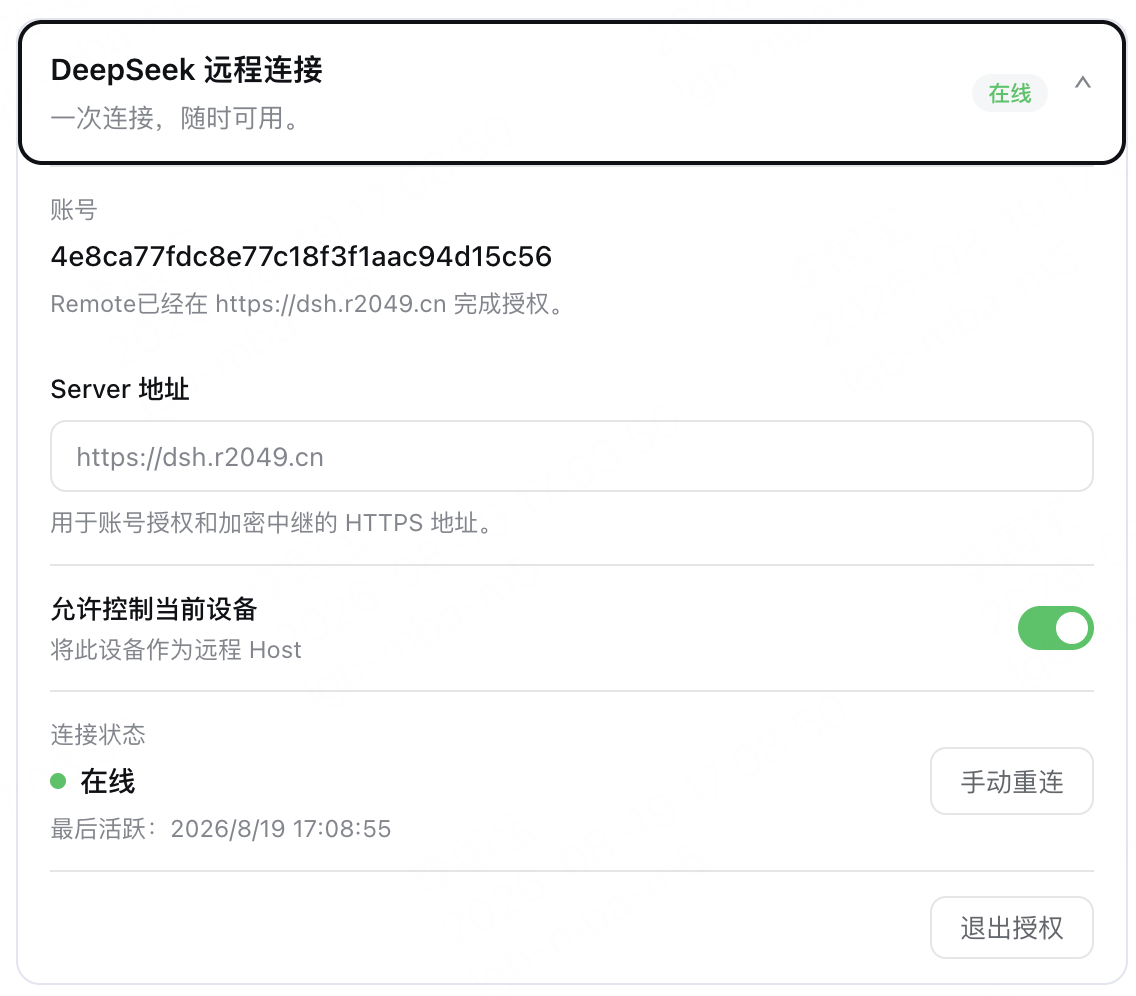
A: 安装并重启 Harness,从侧边栏打开 Remote 入口,使用账号密码或 GitHub / 知乎扫码登录,再勾选"允许控制此设备"即可上线。新账号需要先在 Remote Web 注册页完成注册。
Q: 会不会泄露我的代码或会话内容?
A: Host 与 Client 之间使用 X25519 + Noise IK 端到端加密,Relay 服务器只转发密文,不存储会话明文或设备私钥;远端文件预览只支持只读块读,写入、删除、上传、执行都被网关白名单拒绝。
Q: 必须要装 dsh-file-viewer 才能用远端文件功能吗?
A: 是的。文件预览依赖可选的 dsh-file-viewer;插件本身只桥接 Host 侧的 fileviewer 服务,未安装时会返回 FILE_VIEWER_UNAVAILABLE。
Q: 切换到远端 Workspace 之后,本地任务还能继续吗?
A: 一旦切到远端,UI 上看到的是远端 Harness 的会话和工具;可以通过 Remote 弹窗里的"退出"按钮随时切回本地,断线时也会自动回落,整个过程不需要重启 Harness。
Q: 在手机上能用吗?
A: 可以。仓库 apps/android 提供独立的 Android APK,登录同一账号后选择在线 Host 即可继续会话;图片 Prompt 走 session.prompt,图片回显走 session.attachment。
Q: VS Code 里也能用吗?
A: apps/vscode 是开发者预览版的 VS Code 扩展,源码已包含;安装方式需要自行打包,与 Host 共享账号授权和加密通道,但目前还未作为正式版发布。
Q: 怎么把设备从账号里彻底移除?
A: 在设置里点"退出"会清除本地凭证;也可以在 Server 端"删除设备",本地的 trusted-peers.json 和凭证会自动失效,下一次连接会被拒绝。
上手难度
进阶 — 需要理解账号授权、Host/Client 角色与 Relay 网络模型的基本概念,否则第一次登录时的"主机匹配码/扫码/账号密码"区别容易搞混。
已知问题与限制
- 仅托管 Relay 可用,受支持的自建 Relay 方案尚未发布(README.md:67-68)
- 真实 dsh-desktop 双角色端到端、与外部 Server 跨机联调、Host / Harness rc.2 图片大文件传输、LAN / P2P / TURN 路径真机验证仍在 TODO 列表中(TODO.md:28-39)
serverUrl必须使用 HTTPS(localhost例外),且不能带路径、查询串、用户名密码,否则会在normalizeServerUrl中抛错(packages/plugin/src/config.ts:97-112)- 仅暴露官方 ApiProxy 白名单内的方法(约 33 个:会话、子智能体、Workspace、目标描述、命令注册表等),其它方法一律
METHOD_NOT_FOUND(packages/plugin/src/harness-api-bridge.ts:100-140) - 不提供 Shell、PTY、远程桌面、任意文件写入或通用 Harness 工具 RPC;Harness 自身允许的工具仍会按 Host 的权限流程执行(README.md:122-130)
English | 中文
Connect once. Ready whenever you are.
Continue a DeepSeek Harness session from your phone, tablet, or any browser.
Return to the same Harness session from whichever device is with you. Harness keeps running on your work computer, with the same workspaces, tools, and project setup. Remote is simply another window into that environment.
Developer preview — pin an explicit version when installing.
What you can do
- Follow an active session and review its latest progress
- Send new instructions or change direction
- Answer questions and respond to permission requests
- Open workspaces from any connected computer
- Preview files from a remote workspace with the optional
dsh-file-viewerplugin - Move between devices without moving your work
Remote is available in a browser and through the Remote workspace entry in Harness on another computer.
A developer-preview VS Code client also lives in apps/vscode. It can sign in,
pin and connect to an authorized Host, browse Host workspaces/sessions, and open conversations beside the Activity Bar.
Build it with pnpm --filter deepseek-harness-remote-vscode build; see its README.
Install the Host plugin
Install the plugin on the computer where Harness and your projects run.
In DSH Desktop, open Extensions → Manage plugins… and install:
ds-harness-remote
Or install it for the web profile:
dsh plugin --profile web add ds-harness-remote
To pin a GitHub release instead, install github:liguobao/deepseek-harness-remote#v0.3.22.
Restart Harness after installation.
The 0.3.22 Client remains compatible with 0.3.15 Hosts for Remote
workspaces and sessions. Features introduced later, such as the remote command
catalog and file viewing, are enabled only when the selected Host supports
them.
Sign in and connect
- Open Remote from the Harness sidebar.
- Sign in by scanning a GitHub or Zhihu QR code, or use your account and password. New password accounts can register with invitation code NRAE-NUUM-C9UY.
- Enable remote control for the current computer to make it available from your other devices, or select another online computer to control it directly.
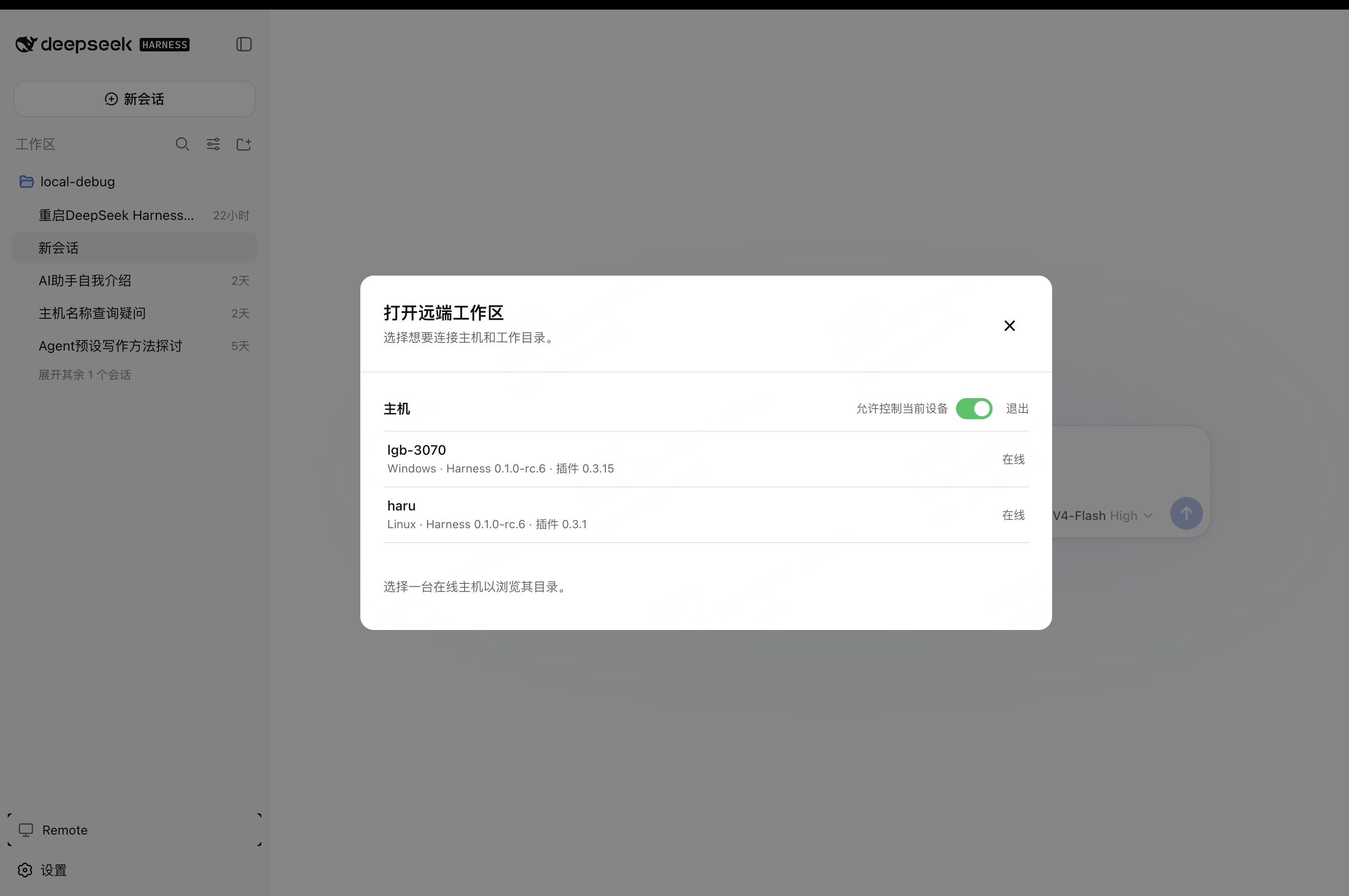
- Choose an existing workspace or browse remote directories to open one.
Note: A self-hosted relay node option will be provided later.
A quick tour
Enable Allow control of this device in Remote settings to make the current computer available as a Host.
Open Remote on another computer, select an online Host, then choose or browse for a workspace.
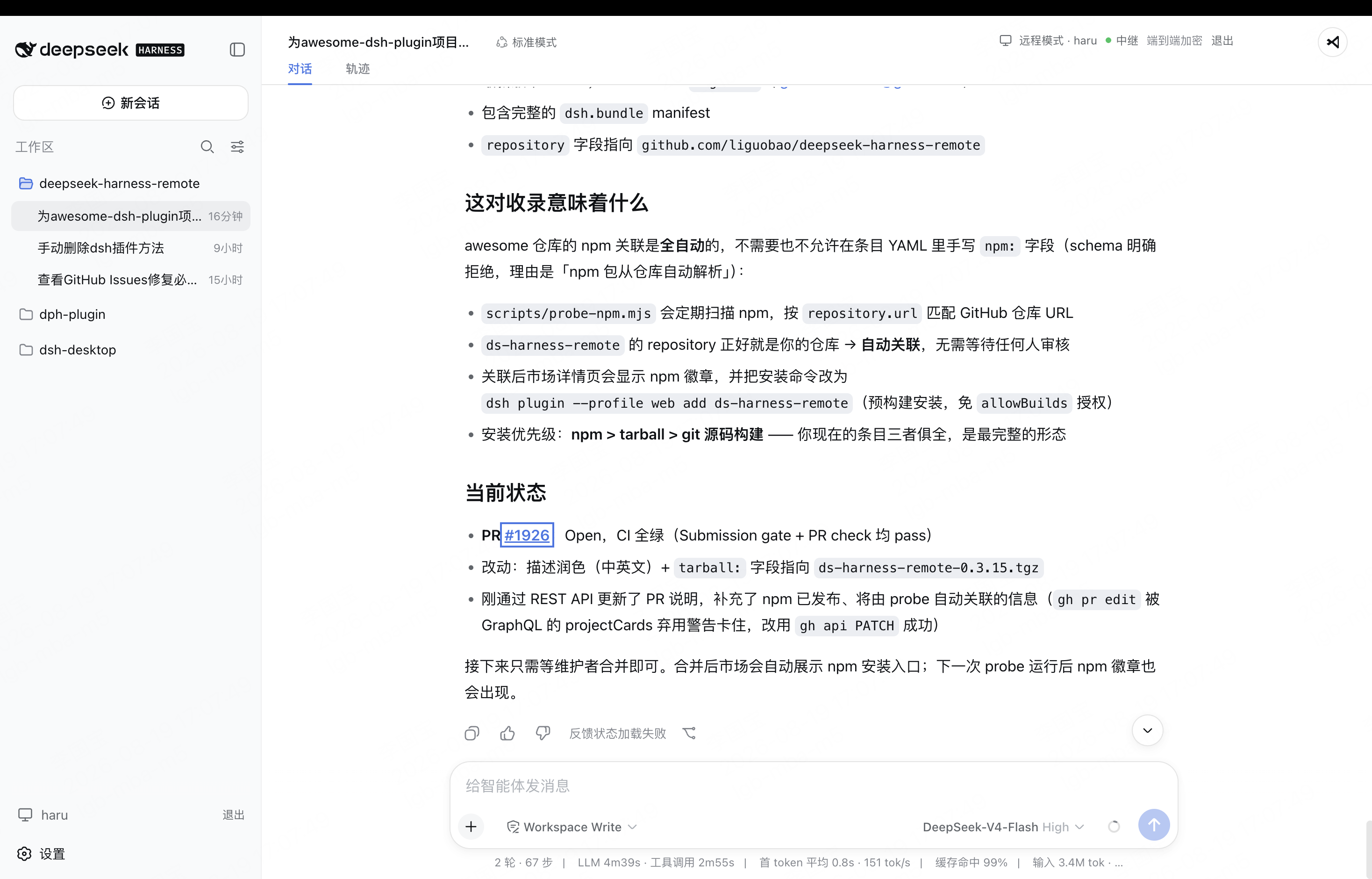
The workspace opens in the native Harness interface, with the active Host and encrypted connection status shown in the header.
Secure by design
- The Host makes outbound connections only. No public port is opened.
- Session traffic is end-to-end encrypted. The service relays ciphertext without storing session plaintext or device private keys.
- Remote exposes only the Harness capabilities required by the interface. It does not provide a shell or remote desktop.
- The workspace picker lists folders only. When
dsh-file-vieweris installed on both devices, its existing read-only viewer can additionally preview files through bounded, encrypted range reads. - Remote file preview cannot write, delete, upload, execute, or open a path in an external application. File Viewer providers continue to enforce their own allowed roots and locator authorization.
- Removing a device immediately revokes its Remote access.
For implementation details, see the Plugin guide, documentation index, and Remote Protocol.
License
查看使用指南 →
该插件的安装步骤、关键要点、FAQ 与兼容性说明(基于已收录字段派生)。
收录徽章

[](https://deepseek-plugin.org/plugins/liguobao/deepseek-harness-remote)把这段 markdown 粘贴到你的 GitHub README,链接回本插件详情页。徽章只声明已被本站收录,不代表安全认证。