为 DeepSeek Harness 纯文本模型补上视觉能力的官方插件:注册 modlens_read_image 工具并自动包装 DeepSeek/GLM 模型,直接粘贴图片即可识别。

- 语言
- TypeScript
- License
- MIT
- 分支
- main
安装
$ dsh plugin --profile web add @liustack/modlens在终端中运行以上命令,通过 dsh CLI 安装此插件。可在右上角切换 Profile。 第一次用 dsh?看这篇新手教程
对话式安装
帮我安装 DeepSeek Harness 插件 liustack/modlens:先查看仓库 https://github.com/liustack/modlens 确认安全性,然后执行安装命令并验证插件加载成功。
把这段指令粘贴给 DSH Web GUI 里的助手,由它代你完成安装与验证。
一句话定位
modlens 是 DeepSeek Harness 的官方视觉插件,给原生不支持图片的 DeepSeek/GLM 文本模型补上一双眼睛:装好之后 dsh 里直接粘贴截图、丢个图片路径或加一张拖拽的图片,模型就能"看到"内容并据此回答。
核心能力
- 给文本模型注册
modlens_read_image工具,传入本地路径或 http(s) URL 即可转成结构化 JSON 证据(全文转录、版面区块、实体关系、不确定项) - 自动包装所有承载 DeepSeek/GLM 纯文本模型的 provider 路由,每条路由各生成一组带
(modlens vision)后缀的模型变体;两家自带的视觉型号自动排除 - 浏览器侧拦截粘贴的截图,先 POST 到本地路由、再把图片作为路径插进输入框(与 OpenCode、Pi 相同的"路径触发"交互)
- 内置六个视觉引擎(Gemini API、Anthropic API、任意 OpenAI 兼容端点、Antigravity CLI、Claude Code CLI、Kimi Code CLI),未指定时组成故障转移链
recover-paste子命令从 Claude Code / Pi / OpenCode 的本地会话存储里捞出粘贴过的图片字节,落到一个 0700 私有目录doctor子命令纯本地体检:Node 版本、引擎就绪情况、当前选择、宿主、guard 判定,不消耗额度不发网络请求
技术实现
- 语言: TypeScript(Node.js ESM),少量用于浏览器侧的 hand-written CJS(
dsh/client.js) - 关键依赖:
commander(CLI 路由)、undici(远程图片下载 + DNS 钉死)、@biomejs/biome(lint,仅 devDep);宿主侧只用 Node 内建模块 - 架构模式: 双形态包 —— 同一个 npm 包既是 CLI(
bin: modlens→dist/main.js),也是 dsh cordis 插件(dsh.bundle.patch→cordis.patch.yml把@liustack/modlens注入 dsh cordis 注册表,由dsh/index.js导出apply(ctx, config))。DSH 内 browser 侧另有一个零依赖 lazy-CJS 客户端(dsh/client.js)拦截粘贴 - 入口文件: CLI 入口
src/main.ts;DSH 插件入口dsh/index.js;浏览器客户端dsh/client.js
适用场景
日常用 dsh Web/桌面 App 跟 DeepSeek 或 GLM 文本模型对话、经常需要贴截图或丢图片路径来问问题的用户 —— 安装后不用记任何命令,正常聊天粘贴即可。也适合想压榨单一文本模型但不想换模型、又不想自己写 OCR/视觉脚本的开发者。
前置依赖与兼容性
| 依赖 | 最低版本 | 说明 |
|---|---|---|
| Node.js | >=22.19 | package.json engines.node 声明;OpenCode 粘贴恢复进一步依赖 node:sqlite(Node 22.13+ 起 unflagged) |
| dsh | 未声明具体版本 | 通过 dsh.bundle.patch(cordis.patch.yml)注入;按 dsh plugin --profile web add github:liustack/modlens 安装;package.json 未声明 peerDependencies |
| 平台 | macOS / Windows / Linux | src/util/winExec.ts 处理 Windows .cmd shim;src/auto/discover.ts 跨平台探测 PATH 上的 harness CLI |
| 原生模块 | 无 | 未引入任何 node-gyp 依赖;远程图片下载用 undici 自带的 Agent;OpenCode 恢复用 Node 内建 node:sqlite |
| 外部账号 | 至少一个视觉源 | 默认走 Antigravity CLI(免 key);也可配置 Gemini / Anthropic API key 或任意 OpenAI 兼容端点;可借用本机其他 harness CLI 的登录 |
安装方式
dsh plugin --profile web add github:liustack/modlens
配置项
配置文件在 ~/.modlens/config.json(0600 权限,modlens config show 渲染时 key 自动打码)。常见可写键:
| 配置 | 类型 | 说明 | 默认值 |
|---|---|---|---|
provider | 字符串 | 视觉引擎偏好名(不指定时所有就绪引擎组故障转移链) | antigravity-cli(Antigravity CLI) |
providers.<name>.apiKey | 字符串 | 该引擎的 API key;<name> ∈ gemini-api / openai / anthropic。modlens config set <name>.apiKey 无值时进入隐藏输入 | 无 |
providers.<name>.baseUrl | 字符串 | 自定义 API 端点;openai 必须显式配置(无默认以免误投到 OpenAI 官方) | 引擎各自默认 |
providers.<name>.model | 字符串 | 该引擎默认使用的模型名 | 引擎各自默认 |
providers.<name>.proxy | 字符串 | 该引擎专用代理 URL,回退到顶层 proxy,再回退到 HTTPS_PROXY / HTTP_PROXY | 无 |
providers.<name>.extraBody | 对象 | 合并进 API 请求体的 JSON(常用于关闭 thinking,例如 {"thinking":{"type":"disabled"}});保留字段:contents / messages / model / schema 等不可覆盖 | 无 |
providers.<name>.structuredOutput | 布尔 | 让 OpenAI 兼容端点自己用 response_format: json_schema 强约束输出;默认 false(部分网关会 400) | false |
proxy | 字符串 | 所有 API provider 的兜底代理 URL;远程图片下载(SSRF-guarded)不受其影响 | 无 |
guards.denyModels | 字符串数组 | glob 模式列表;当前模型命中则拒绝启动视觉引擎(给原生视觉模型让路) | [] |
guards.allowModels | 字符串数组 | 非空时进入"白名单模式":只有命中的模型才会调引擎,其他都被拒 | [] |
guards.denyWhenUnknown | 布尔 | 当前模型无法识别时是否拒读(默认放行,避免误锁文本模型) | false |
reuse.claude / codex / opencode / pi / grok | 布尔 | 是否允许借用本机对应 harness 的登录做读图;claude 缺省视为 true(向后兼容) | claude=true / 其他未询问 |
MODLENS_MODEL / MODLENS_HARNESS / MODLENS_DSH_CLI | 环境变量 | 直接告诉 modlens 当前模型 / 宿主 / CLI 路径,覆盖探测 | 无 |
常见问题
Q: modlens 是给谁用的?为什么普通 DeepSeek/GLM 模型也需要它?
A: dsh 默认宿主下的 DeepSeek-V4、GLM 等主力对话模型是纯文本的,无法直接读取粘贴的图片。modlens 通过一个外部视觉引擎帮你把这些图片转成结构化的文字证据再喂回文本模型,让"截图 + 提问"变成一次完整的对话。
Q: 安装后默认能用吗,还需要自己配 API key 吗?
A: 默认走 Antigravity CLI(免 key、浏览器登录一次即可),零配置就能用。若想更快,配一个免费 Gemini key 通常 5-10 秒一次;其他 OpenAI 兼容端点(DashScope、SiliconFlow、OpenRouter、自建 vLLM/Ollama 等)也可直接对接。
Q: 安装后会看到什么变化?需要选哪个模型?
A: 模型选择器会多出若干 "(modlens vision)" 后缀的条目,比如 DeepSeek-V4-Flash (modlens vision)、DeepSeek-V4-Pro (modlens vision)。切到这些条目粘贴图片即可,缩略图直接可见,体验接近 Codex App;不切也能用,图片会作为路径进输入框。
Q: 一张图片会被哪个引擎处理?会扣哪个账号的额度?
A: 未指定时,所有已配引擎组成一条故障转移链:API 类快车道先试,agent CLI 兜底;每次结果里 meta.attempts 列出尝试顺序,meta.warnings 标明复用了哪个 harness 的登录、扣的是谁的额度,永远不会无声扣费。
Q: modlens recover-paste 是做什么的?
A: Claude Code、Pi、OpenCode 这些终端默认把粘贴的图片直接存进会话存储而不会落到普通临时文件。recover-paste 会从这些 harness 的本地存储里把粘贴的字节读出来另存到安全目录(0700)。从 OpenCode 恢复需要 Node 22.13+ 提供 node:sqlite。
Q: 出错了怎么排查?
A: 跑 modlens doctor,它会汇报 Node 版本、哪个 provider 已就绪、当前会选哪个、检测到了哪个 harness,全在本地查,不消耗额度也不联网。报错信息通常会自带修复命令,例如缺 key 时直接告诉你 modlens config set <provider>.apiKey。
Q: 卸载会留下什么?
A: 删除本插件包即可卸载。会留在机器上的只有 ~/.modlens/config.json(你显式配置过的 key、端点、复用授权等)和 ~/.modlens/ 下的回收目录;不放进 dsh 的 hook 也不动任何 harness 配置,宿主本身可以无痕回退到原状。
上手难度
入门 — 一条 dsh 安装命令加一个默认引擎(Antigravity CLI 免 key 浏览器登录)即可跑通;想做"高级配置"(代理、自定义 OpenAI 端点、借用其它 harness 凭据)才需要读配置手册。
已知问题与限制
- Kimi Code CLI 没有
--json-schema等服务端强约束手段,只能靠 prompt 模板 + 容错解析;并且因为 kimi 会扫共享 skill 目录,存在被 modlens 自身递归触发的可能(已用MODLENS_INSIDE_KIMI_CLI与--skills-dir指向空目录缓解,但模型是否走那条路是模型自己决定的,偶发难复现) openai引擎默认不开启response_format: json_schema,因为部分兼容网关不认识这个字段会 400;需要服务端约束时显式modlens config set openai.structuredOutput true- 远端图片下载有 25 MB 上限(
src/imageInput.tsMAX_REMOTE_IMAGE_BYTES),覆盖一张密集截图或高分辨率照片,但大体积原图会被拒绝 - 粘贴文件支持 png/jpeg/gif/webp/heic/heif(其它如 bmp / svg / raw 不收);通过文件 magic bytes 校验,不信任扩展名
- Kimi / Codex / OpenCode / Claude CLI 路由只能读本地路径文件;远程 URL 必须用 API 类引擎(gemini-api / openai / anthropic)
- Antigravity CLI 的免费额度是按周共享的桶(桌面 App / CLI / SDK 共用),并发子代理会很快耗尽(issue 文档明确说明,需等重置或换
gemini-api)
ModLens
Give a text-only model sight, and just paste the image.
🥇 The most capable vision plugin for DeepSeek Harness (dsh) 🥇
简体中文 · Troubleshooting · Configuration · Output contract · Security · 🔎 ModSearch (web search)





The flagship DeepSeek and GLM chat models are text-only and cannot read images. ModLens is a plug-in vision engine that gives a text-only model sight. ModLens reads images pasted straight into the chat, no saving to a file and passing a path first.
Talk to us
Issues are welcome any time: open one. And come find me on X: @liustack. What you built with it, which harness you are on, what should come next. New releases land there first, and a proper community space is on the way.
Highlights
🥇 The most capable vision plugin for DeepSeek Harness (dsh): one command, npx -y @deepseek-ai/dsh plugin --profile web add @liustack/[email protected], and the text-only DeepSeek model behind dsh reads images through a native modlens_read_image tool. Updating is the same command again. The version is named rather than @latest on purpose: pnpm 11 holds back releases published in the last 24 hours and resolves the tag against what survives, so @latest would install whatever shipped a day ago (details).
Pasting an image works two ways. ① Just paste. On a text-only model the pasted image lands as a private temp file and its path enters the composer — the same interaction OpenCode and Pi ship — and the modlens_read_image tool takes it from there. ② Pick a (modlens vision) entry in the model selector (it remembers your choice, so once is enough), then paste: the thumbnail stays visible in your message, closer to the Codex app feel, and the image is converted to structured evidence at request time, answered by the same underlying route. The plugin auto-discovers every provider route carrying text-only DeepSeek or GLM models and adds a wrapped entry per route (a stock install gets DeepSeek-V4-Flash (modlens vision) and DeepSeek-V4-Pro (modlens vision); extra routes like opencode-go or zai get their own); the two families' own vision models are excluded automatically. Which paste route applies is the host's per-model call: only a model its metadata positively confirms text-only is taken over, anything unconfirmed is left alone, so vision models keep their native paste (details).
Paste an image and it reads it. No saving to a file and passing a path first.
- The lightest touch on the market. No hooks, no wrappers, no local proxy daemon, not a single line changed in any harness config: on the skill harnesses it is exactly one skill folder, on dsh exactly one plugin. Uninstalling is deleting a folder, and your agents are back to stock.
- Zero-config start. Reuses what Claude Code, Codex, OpenCode, or Pi already have set up: the multimodal models on your machine go straight to work. Nothing at all? Antigravity CLI is a free no-key channel, and a free Gemini key brings a read down to 5-10 seconds.
- Evidence, not imagination. Full transcription, reading-order layout regions, entity and relation lists. The model quotes specifics.
- Install once, use everywhere. Verified on real machines in Claude Code, Codex, Pi, and OpenCode.
Installation
Step 1, hand it to your AI. Send it this line:
Install and configure the modlens skill following https://github.com/liustack/modlens/blob/main/INSTALL.md, then run the health check and tell me the result.
The install starts by checking what your machine already has. An existing login in Claude Code, Codex, OpenCode, or Pi can be enough: modlens asks before reusing any of them, and the health check tells you where things stand.
Step 2, only if the health check comes back empty, set up a free engine. The recommended choice is a free Gemini API key (about three minutes at Google AI Studio, no credit card), which also makes every read 5-10 seconds. A free OpenAI-compatible key from another platform works too. To avoid any sign-up, install Antigravity CLI instead, then sign in:
curl -fsSL https://antigravity.google/cli/install.sh | bash
agy                                                           # sign in, then exit
The install also inventories vision reachable through your other local harness CLIs (Codex, OpenCode, Pi) and asks, per harness, whether modlens may reuse it. Granted logins join the engine pool as equals, and every reused read is labeled with whose quota it spent.
Usage
Once installed, just chat. Paste an image or drop a path, ask anything, and the skill triggers on its own: the image goes to a vision engine and the answer comes back grounded in what it read.
Vision engines: six built-in providers, four reusable CLIs, one failover chain
ModLens does not depend on any single vision service. Ten sources of vision in total: six built-in providers, any one of which is enough, plus four local agent CLIs whose logins can be reused. The built-ins:
| Provider | What it needs | Speed per read | Good for |
|---|---|---|---|
gemini-api | a free Gemini API key (3 minutes, no card) | 5-10s | the recommended default |
openai | any OpenAI-compatible endpoint (key + baseUrl + model) | 5-10s | qwen-vl, GLM, self-hosted gateways |
anthropic | an Anthropic API key | 5-10s | machines already holding one |
antigravity-cli | the free agy CLI, one browser sign-in, no key | 15-45s | zero-signup starts |
claude-cli | a signed-in Claude Code | 20-45s | riding your existing Claude subscription |
kimi-cli | a signed-in Kimi Code | 20-45s | riding your existing Kimi subscription, named explicitly |
Without a pinned provider, every configured engine forms one failover chain: the fast API providers try first, the agent CLIs back them up, the first good result wins, and meta.attempts records every attempt so a fallback is never silent.
openai is a universal socket, not just OpenAI
Any endpoint speaking the OpenAI chat-completions protocol with image input plugs straight in — that covers most of the vision-model world:
modlens config set openai.baseUrl https://dashscope.aliyuncs.com/compatible-mode/v1   # qwen-vl
modlens config set openai.apiKey  <key>
modlens config set openai.model   qwen3-vl-plus
The same three keys work for GLM's open platform, SiliconFlow, OpenRouter, a self-hosted vLLM/Ollama, or any gateway of your own. If your favorite vision model has an OpenAI-compatible API, ModLens can drive it.
Reusing what your machine already has
Two more sources of vision need zero new keys, each behind one explicit consent recorded in config:
- The harness you are talking in right now. Running inside Claude Code with a subscription signed in?
claude-clireads images through it out of the box. The install flow asks the same question for whichever harness you install into. - Every other agent CLI on the machine.
modlens doctordiscovers them, you grant per harness, and they join the same failover chain with no priority over your own keys. Every reused read is labeled inmeta.warningswith whose quota it spent, so nothing is ever silently billed:
| Reused CLI | What it needs | Grant with | Rides as |
|---|---|---|---|
| Codex | a signed-in Codex CLI with a vision model | config set reuse.codex true | agent lane, 15-45s |
| OpenCode | a vision model configured in OpenCode | config set reuse.opencode true | agent lane, 15-45s |
| Pi | model credentials held by Pi | config set reuse.pi true | an API key upgrades to the 5-10s inline lane, OAuth drives Pi itself |
| Grok | a signed-in Grok CLI (SuperGrok) | config set reuse.grok true | agent lane, 15-45s |
Picking and routing
Two knobs: modlens config set provider <name> states a preference (the chain still backs it up), -p <name> pins exactly one with no fallback. Machines behind a proxy set HTTPS_PROXY or modlens config set proxy <url> and the API providers route through it. Details: the CLI manual for defaults and flags, Configuration for every key, and Security for who fetches what on remote URLs.
See it work
Unedited runs, all driving a text-only DeepSeek-V4-Flash.
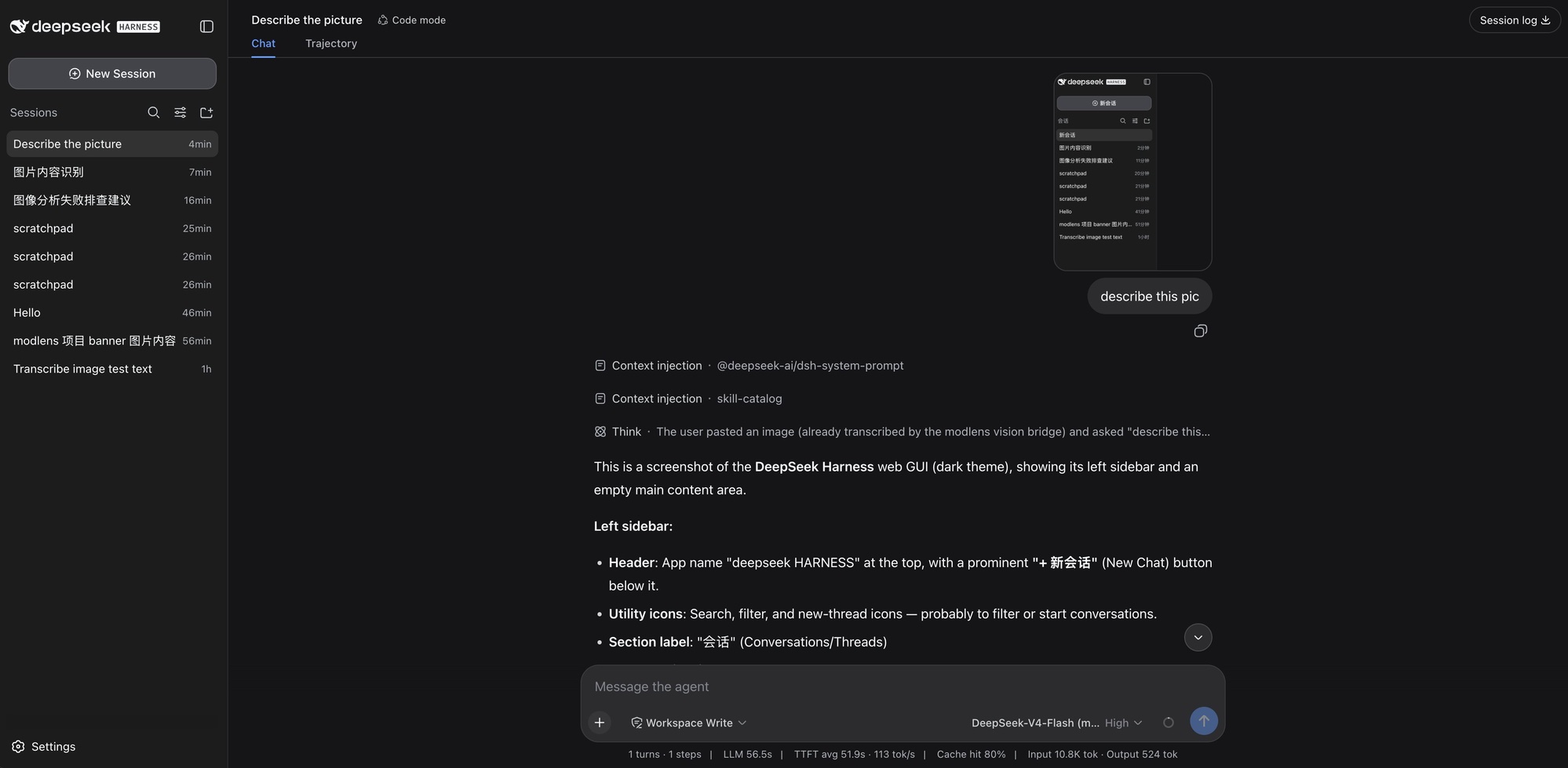
The newest one first: pasting a screenshot straight into DeepSeek Harness on the DeepSeek-V4-Flash (modlens vision) variant. The paste keeps its native thumbnail, the trajectory shows the image arriving "already transcribed by the modlens vision bridge", and the answer walks the UI element by element.
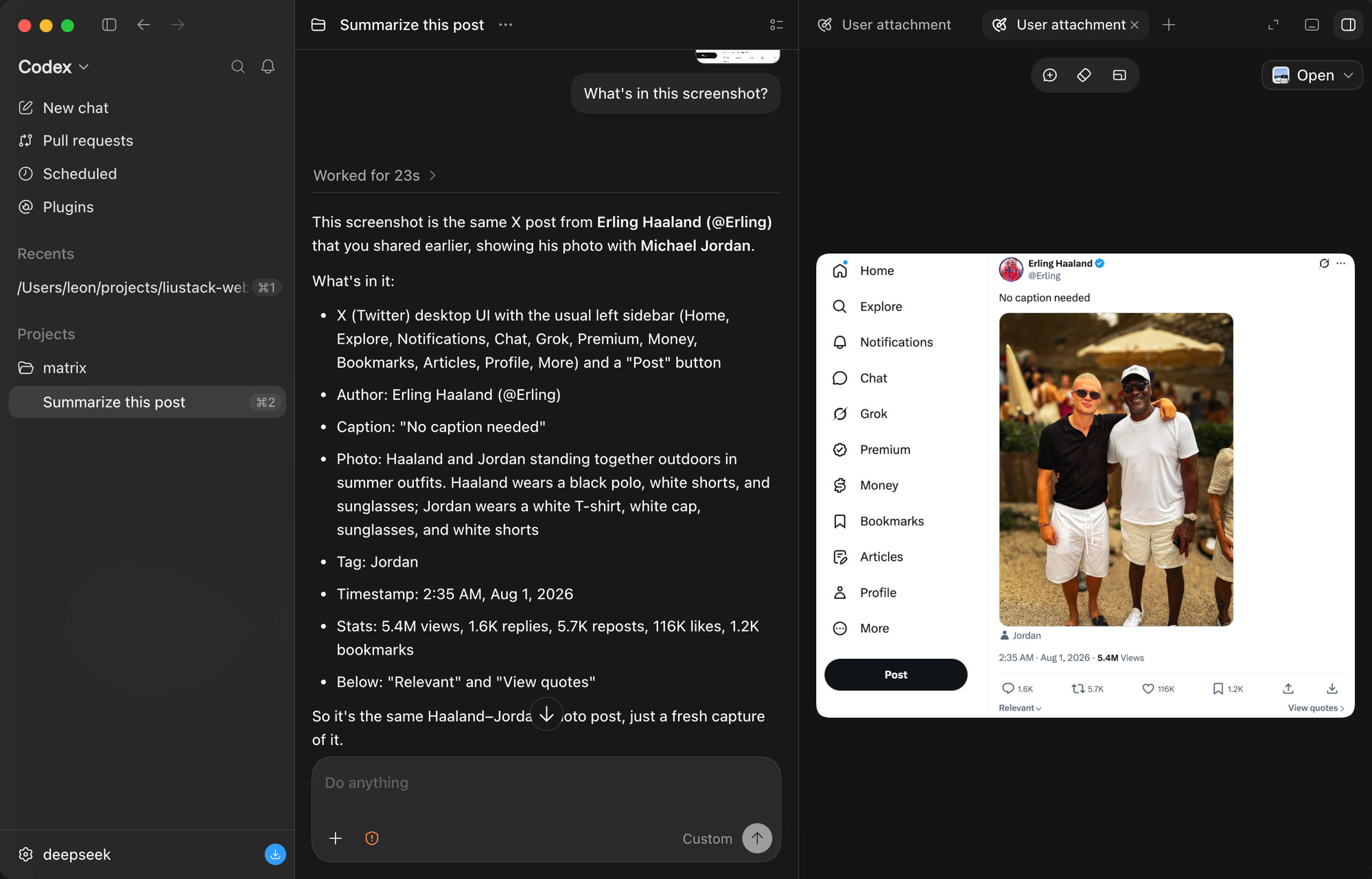
A tweet screenshot in the Codex desktop app. It reads the author, the caption, the photo itself (down to what both people are wearing), the timestamp, and every engagement number: 5.4M views, 1.6K replies, 5.7K reposts, 116K likes.
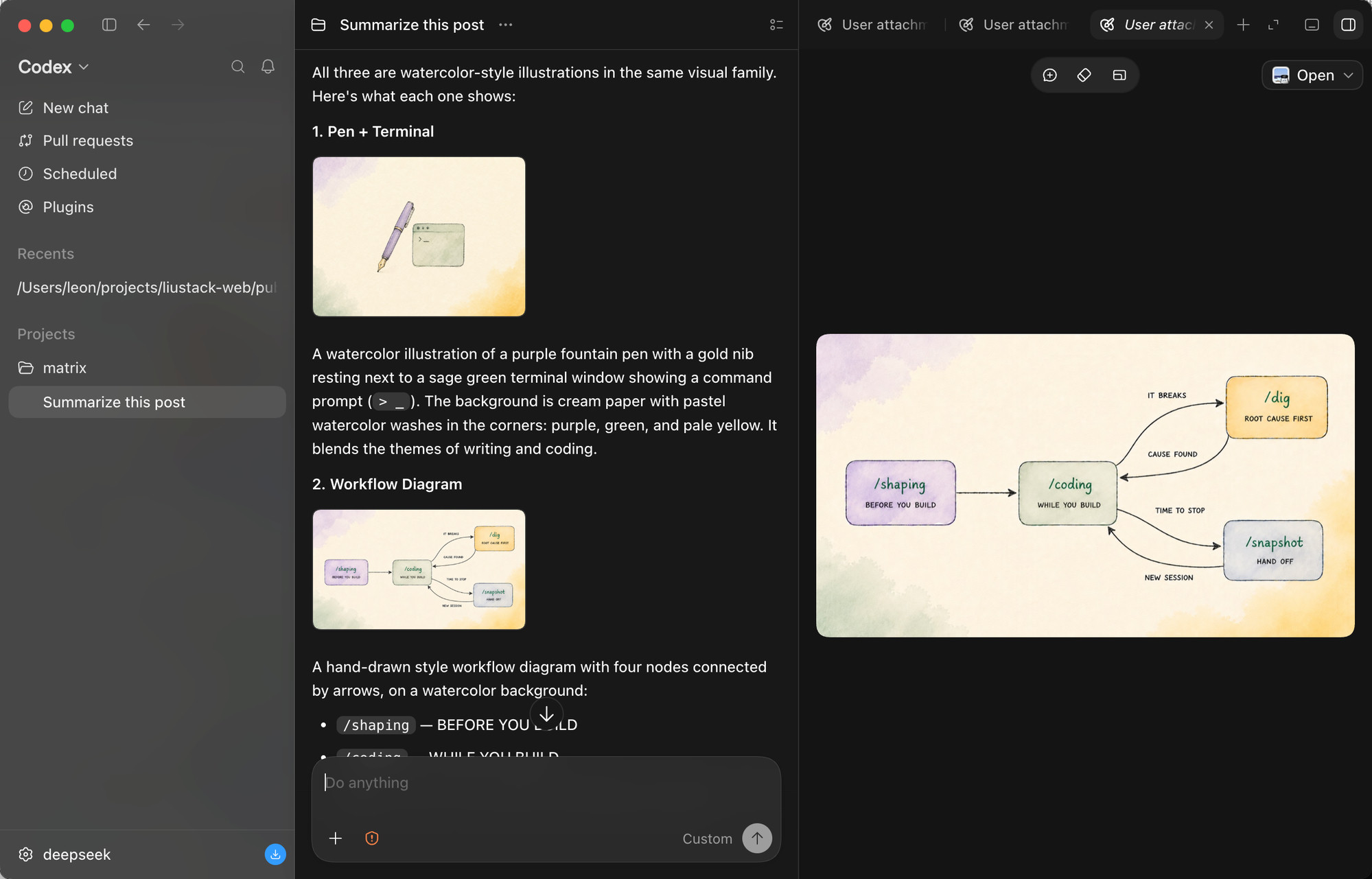
Three images pasted at once. The model reads them one by one, spots that they belong to one visual family, and describes each illustration's content and style.
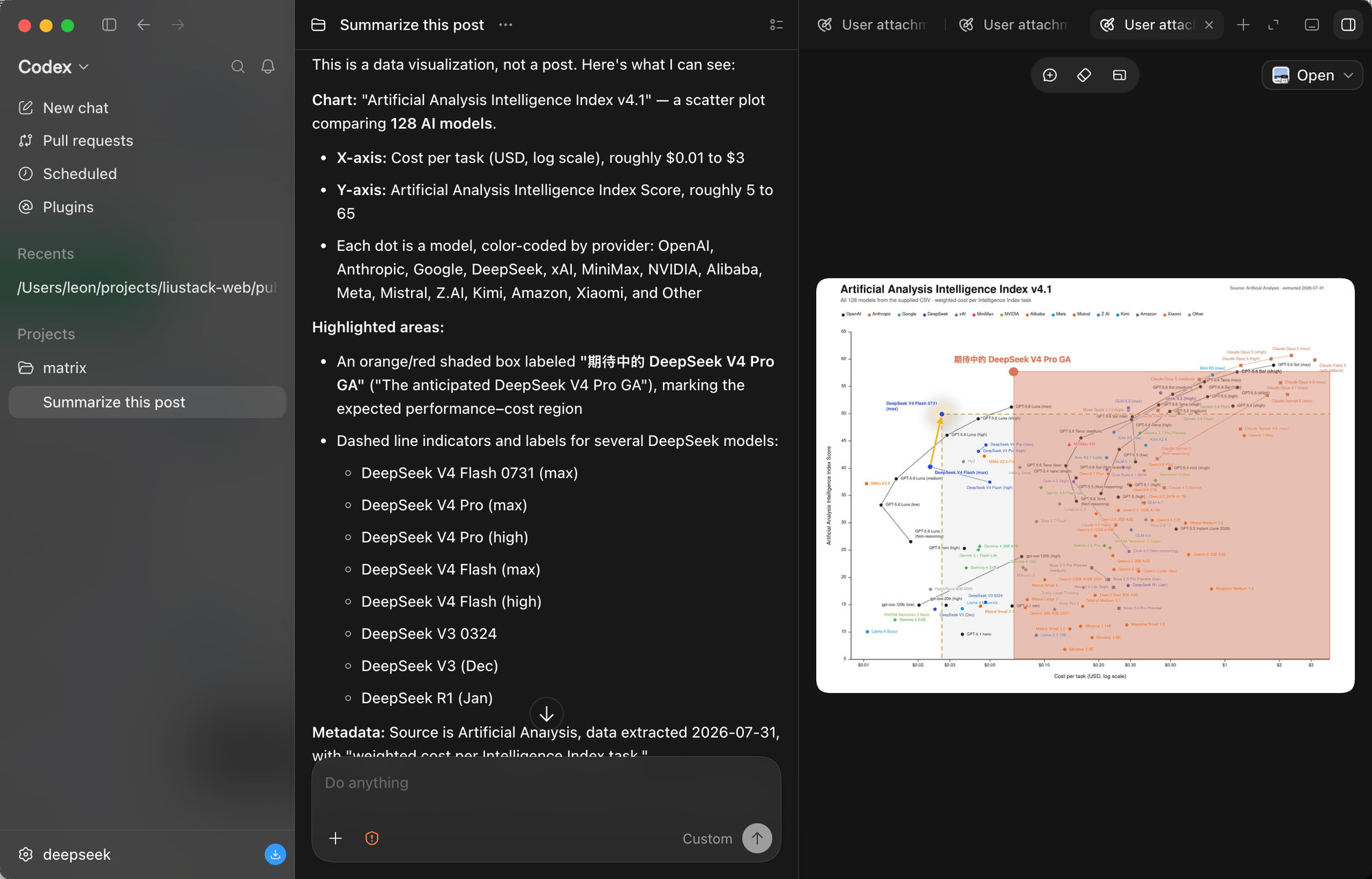
The stress test: a scatter plot comparing 128 AI models. It reads both axes, the log scale, the per-provider color coding, the highlighted region, and every DeepSeek model called out with dashed markers. Dense charts are where vision bridges most often fail.
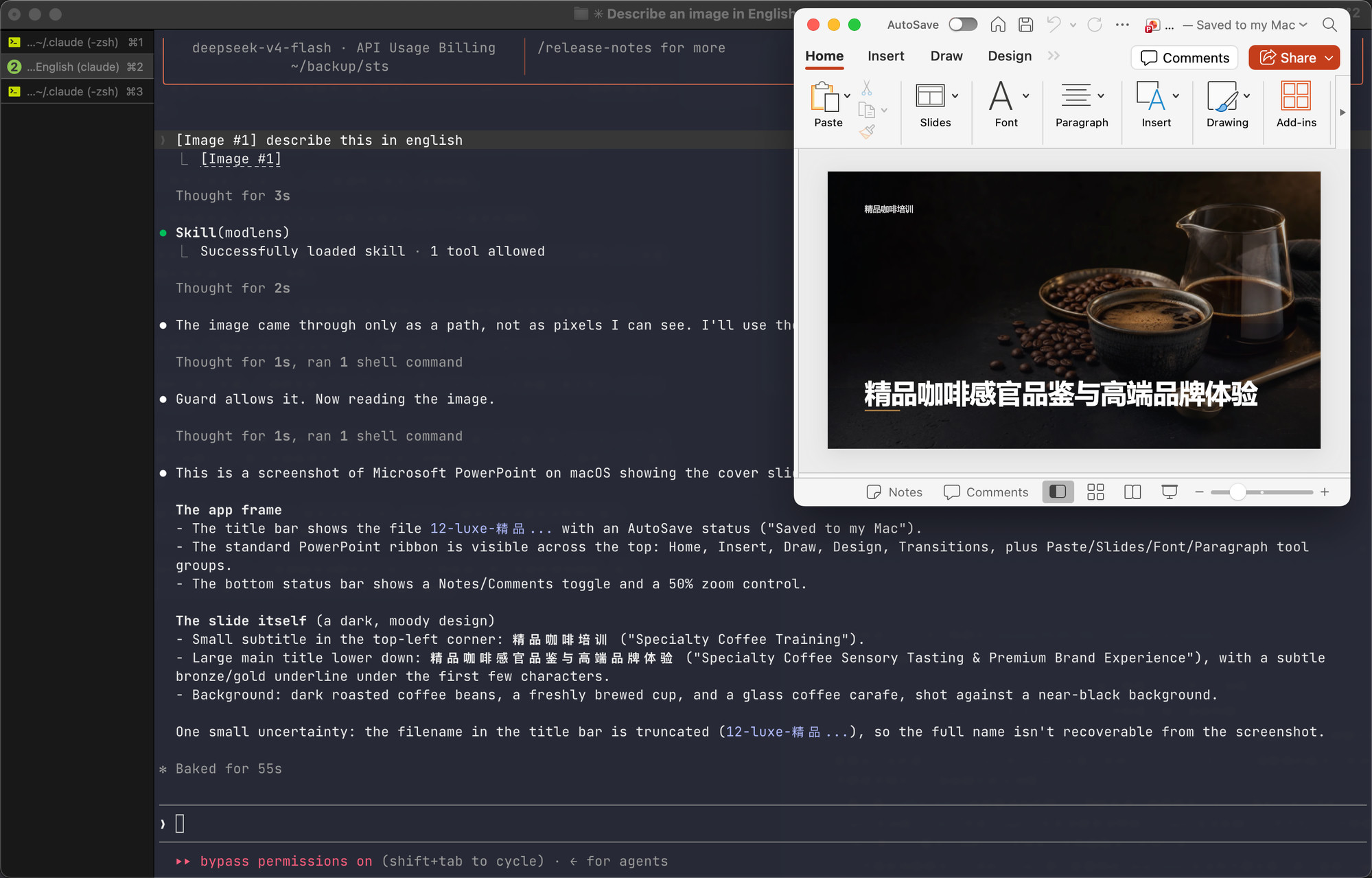
And the paste path, end to end, in a Claude Code terminal on DeepSeek. The pasted image arrives as a path rather than pixels, the skill triggers on its own, the guard confirms the model truly has no vision, and the slide's full content comes back: titles, layout, background, plus an honestly stated uncertainty about the truncated filename.
Documentation
| Doc | Read it when |
|---|---|
| Install guide | Installing the skill step by step (written for an agent) |
| CLI manual | The CLI the skill drives: flags, config, doctor |
| Troubleshooting | A command failed and the message needs decoding |
| Configuration | Setting a key, switching providers, fixing config |
| Output contract | Parsing the JSON or building on it |
| Harness setup | Wiring it into Codex, Claude Code, Pi, or OpenCode |
| Security | File permissions, image content as untrusted input |
| CHANGELOG | Finding what changed in a version |
Contributing
ModLens does not accept pull requests. The project is maintained by a single author who reviews every line, which is a deliberate choice for reliability. Two effective ways to contribute:
- Open an issue. Bugs, suggestions, confusing errors, unclear docs. Issues are read and shape what gets built next.
- Fork it. Under MIT your copy is fully yours to modify and publish.
Shameless plug
This project runs on LIUSTACK Skills: shaping before you build, coding while you build, dig when it breaks, snapshot when you hand off. Lighter than Superpowers, and stronger.
npx -y skills add liustack/vibemaster -g
⭐ If it helps, star ModLens and VibeMaster. Stars are how the next developer finds them.
Key ecosystem partners
The projects worth recommending in the DeepSeek Harness ecosystem.
- 🖥️ DeepSeek Harness Desktop — A desktop front end for DeepSeek Harness. Start and manage the Harness service on your own machine without installing Node.js or running a command. A plugin market, remote control from a phone, and IM channels are on its roadmap. Site 为 DeepSeek Harness 生态打造的现代化桌面端。不用配置 Node.js,也不用敲命令,就能启动和管理本机的 Harness 服务。后续还会支持插件市场、移动端远程控制和 IM Channels。官网
- 🛒 dsh-market — The plugin market inside DeepSeek Harness. Browse 800+ community plugins with category filters and screenshot previews, one-click install and update, and live theme switching. Most need no restart. DeepSeek Harness 的可视化插件市场。设置页里直接逛社区全部 800+ 插件:分类筛选、截图预览、一键安装与更新、主题即点即换,装完多数免重启。
Star History
Disclaimer
Provided as-is under the MIT License below. The author makes no warranty and gives no endorsement for any particular use, commercial use included. Your use of upstream engines (Antigravity CLI, the Gemini, OpenAI, and Anthropic APIs, and any OpenAI-compatible endpoint) is governed by their own terms and quotas, which you are responsible for.
License
MIT
查看使用指南 →
该插件的安装步骤、关键要点、FAQ 与兼容性说明(基于已收录字段派生)。
收录徽章

[](https://deepseek-plugin.org/plugins/liustack/modlens)把这段 markdown 粘贴到你的 GitHub README,链接回本插件详情页。徽章只声明已被本站收录,不代表安全认证。