DSH 独立可观测插件,把 Agent 对话、LLM 调用与工具执行转为 OpenTelemetry GenAI trace 与 metric,通过标准 OTLP/HTTP protobuf 上报到任意兼容后端。

- 语言
- TypeScript
- License
- Apache-2.0
- 分支
- main
安装
$ dsh plugin --profile web add @loongsuite/dsh-plugin在终端中运行以上命令,通过 dsh CLI 安装此插件。可在右上角切换 Profile。 第一次用 dsh?看这篇新手教程
对话式安装
帮我安装 DeepSeek Harness 插件 loongsuite/dsh-plugin:先查看仓库 https://github.com/loongsuite/dsh-plugin 确认安全性,然后执行安装命令并验证插件加载成功。
把这段指令粘贴给 DSH Web GUI 里的助手,由它代你完成安装与验证。
一句话定位
这是 LoongSuite 出品的 DSH 独立可观测插件。它在 DSH 进程内监听原生会话、Agent 循环、LLM 流和工具调用,把每一次对话转换成符合 OpenTelemetry GenAI 语义约定的 trace 与 metric,再通过标准 OTLP/HTTP protobuf 发往任意兼容后端(Jaeger、Langfuse、自建 Collector 等)。
核心能力
- 把每一次 DSH 对话转换为一条 OpenTelemetry trace,结构为
ENTRY → AGENT → STEP → LLM/TOOL,重试会以多个 LLM span 形式保留在同一 STEP 下 - 上报 OpenTelemetry 标准的 GenAI 时延与 token 用量指标,覆盖输入、输出、缓存命中、缓存写入与推理 token
- 通过 DSH 原生的
session/created、session/event、session/disposed、llm/stream钩子接入,错误、中止、不完整流和插件卸载都会以错误状态正确关闭 span - 支持多 Profile 同时安装(web、headless 等),并通过 DSH 事件时间戳构造结构性 span、用单调时钟计量首字延迟
- 启用正文采集时把提示词、回复、工具定义与参数、工具结果写入 span 属性,并自动按字符上限截断;默认关闭以保护隐私
- Subagent 会话生成独立 trace 并携带父会话与委派层级属性,便于在 trace 后端区分嵌套调用
技术实现
- 语言: TypeScript(ESM,编译到 ES2022)
- 关键依赖:
@opentelemetry/api、@opentelemetry/sdk-trace-base、@opentelemetry/sdk-metrics、@loongsuite/otel-util-genai、@deepseek-ai/schemastery - 架构模式: Cordis 插件 + 私有 OTLP Pipeline —— 通过
cordis.patch.yml注册 bundle 行,由apply(ctx)监听 DSH 生命周期事件,内部创建独立的 TracerProvider 与 MeterProvider(不注册全局)并通过 BatchSpanProcessor 批量上报 - 入口文件:
src/index.ts
适用场景
当用户希望把 DSH 的对话过程接入现有的 OpenTelemetry 后端做链路追踪、性能分析或成本核算时安装此插件。典型用户是已经在用 Jaeger、Langfuse、Datadog APM 或自建 OTel Collector 的运维/平台团队,需要把每次 DSH 对话的耗时、模型、token、工具调用可视化而无需改造 DSH 本身。
前置依赖与兼容性
| 依赖 | 最低版本 | 说明 |
|---|---|---|
| DeepSeek Harness | >=0.1.0-rc.6 <0.2.0 | 通过 DSH 扩展点注入;仅在 0.1.0-rc.6 的 headless 与 web profile 完成完整运行时验证 |
| Node.js | >=22.19.0 | 通过 engines 字段声明;已在 22.19 / 24.19 / 25.9 上验证 |
| 操作系统 | 跨平台 | 源码为纯 TypeScript,无原生模块;macOS / Windows / Linux 都可运行 |
| 原生模块 | 无 | 仅依赖标准 OpenTelemetry HTTP 客户端,无 node-pty / sqlite 等本地扩展 |
安装方式
dsh plugin --profile web add github:loongsuite/dsh-plugin
配置项
| 配置 | 类型 | 说明 | 默认值 |
|---|---|---|---|
enabled | 布尔 | 不卸载 bundle,直接停止采集 | true |
endpoint | 字符串 | OTLP/HTTP 公共基地址,插件自动追加 trace/metric 路径 | 未设置 |
traceEndpoint | 字符串 | 完整的 trace 上报地址(通常以 /v1/traces 结尾),优先于 endpoint | 未设置 |
metricEndpoint | 字符串 | 完整的 metric 上报地址(通常以 /v1/metrics 结尾),优先于 endpoint | 未设置 |
headers | 对象 | 同时附加到两个 OTLP 导出器的请求头 | {} |
serviceName | 字符串 | OpenTelemetry service.name | OTEL_SERVICE_NAME 或 deepseek-harness |
resourceAttributes | 对象 | 附加到 Resource 的字符串键值对 | {} |
captureContent | 布尔 | 把提示词、回复、工具定义、参数与结果写入 span | 环境变量或 false |
contentMaxChars | 整数 | 单个正文属性序列化后保留的最大字符数,超出会返回截断标记 | 128000 |
exportMetrics | 布尔 | 同时上报 LLM 时延与 token 指标 | 环境变量或 true |
maxExportBatchSize | 整数 | 每批上报的 span 上限,不能大于队列上限 | 512 |
maxQueueSize | 整数 | SDK 内部允许排队的 span 上限 | 2048 |
traceExportIntervalMs | 整数 | trace 批量上报间隔(毫秒) | 5000 |
metricExportIntervalMs | 整数 | metric 上报间隔(毫秒) | 60000 |
exportTimeoutMs | 整数 | 单次 OTLP 导出超时(毫秒) | 30000 |
debug | 布尔 | 通过 DSH logger 输出额外的插件生命周期诊断 | false |
支持的 OpenTelemetry 标准环境变量:OTEL_EXPORTER_OTLP_ENDPOINT、OTEL_EXPORTER_OTLP_TRACES_ENDPOINT、OTEL_EXPORTER_OTLP_METRICS_ENDPOINT、OTEL_EXPORTER_OTLP_HEADERS、OTEL_EXPORTER_OTLP_TRACES_HEADERS、OTEL_EXPORTER_OTLP_METRICS_HEADERS、OTEL_SERVICE_NAME、OTEL_RESOURCE_ATTRIBUTES、OTEL_INSTRUMENTATION_GENAI_CAPTURE_MESSAGE_CONTENT(SPAN_ONLY / SPAN_AND_EVENT)、OTEL_METRICS_EXPORTER(设为 none 可关掉指标)。Header 与 Resource 值使用标准的 key=value 逗号分隔、百分号编码格式。
常见问题
Q: 安装后还需要额外配置吗?
A: 不需要。装上即用,未配置 OTLP endpoint 时使用 OpenTelemetry 默认地址;不设置 OTEL_SERVICE_NAME 时上报的服务名默认为 deepseek-harness。
Q: 需要额外安装 LoongSuite Pilot 或本地 sidecar 吗?
A: 不需要。插件自带私有 OTLP pipeline,直接把数据发到任意兼容后端,不依赖 Pilot、不读取本地 JSONL 日志。
Q: 默认会采集提示词、回复和工具参数吗?
A: 不会。默认 captureContent=false,仅上报结构化元数据与 token 用量;需要采集正文时显式设置 captureContent: true 或把环境变量 OTEL_INSTRUMENTATION_GENAI_CAPTURE_MESSAGE_CONTENT 设为 SPAN_ONLY / SPAN_AND_EVENT。启用前请先确认后端的留存与访问控制策略。
Q: 会替换 DSH 或其他库的全局 OTel Provider 吗?
A: 不会。插件创建的是私有 TracerProvider 与 MeterProvider,不会干扰宿主或其他依赖的全局 Provider;卸载插件时会自动 flush 并 shutdown 内部管道。
Q: 能不卸载就临时关掉吗?
A: 能。把插件配置中的 enabled 设为 false,bundle 仍在但不再采集任何 span 与 metric,DSH 与其他依赖不受影响。
Q: 怎样禁用指标上报以适配只支持 trace 的后端?
A: 设置 exportMetrics: false,或在环境变量里把 OTEL_METRICS_EXPORTER 设为 none;后者是 OpenTelemetry 标准写法,跨实现通用。
Q: HMR 重载或热重启会产生重复 trace 吗?
A: 不会。插件只接管已存在 session 的身份,并从下一次原生 turn/start 开始采集,不会重放历史事件,HMR 后不会出现重复 span。
Q: 能直接对接 Langfuse 吗?
A: 能。把 endpoint 设为 https://cloud.langfuse.com/api/public/otel(自建版用 http://localhost:3000/api/public/otel),并在 headers 里加入 Authorization: Basic <base64(pk:sk)> 与 x-langfuse-ingestion-version: 4,同时把 OTEL_METRICS_EXPORTER 设为 none(Langfuse 的 OTLP 入口只接受 trace)。
上手难度
入门 — 安装命令一行即可开启;常用场景只需设置 OTEL_EXPORTER_OTLP_ENDPOINT 与 OTEL_SERVICE_NAME 两个环境变量,不涉及 DSH 内部概念。
已知问题与限制
- 启用正文采集时,提示词、回复、工具定义、参数与结果会原样进入 span;当
contentMaxChars触顶时被替换为截断标记对象(包含原始字符数与上限),下游后端需识别此结构 - 仅支持标准 OTLP/HTTP protobuf 上报,不导出 OpenTelemetry Log;如需日志请与独立的 DSH 日志导出插件搭配使用
- 仅在 DSH
0.1.0-rc.6的 headless 与 web profile 上完成完整运行时验证;早于0.1.0-rc.6的 RC 版本不在支持范围内 - 依赖上游 SDK
@loongsuite/otel-util-genai对 OpenTelemetry 2.x 的支持;曾出现过unmet peer @opentelemetry/sdk-trace-base警告,已在 SDK 0.1.1 中将 peer 范围拓宽为^1.30.0 || ^2.10.0 maxExportBatchSize必须不大于maxQueueSize,否则启动时直接抛出错误- 隐私敏感场景应在 profile 中显式配置
captureContent: false,确保不会被进程级环境变量覆盖
English | 简体中文
@loongsuite/dsh-plugin is a standalone, open-source observability plugin for
DeepSeek Harness (dsh). It observes DSH's native
session, agent loop, LLM stream, and tool lifecycle, converts them into OpenTelemetry GenAI traces
and metrics, and exports standard OTLP/HTTP protobuf to any compatible backend.
LoongSuite is an open-source observability collection ecosystem built on OpenTelemetry. This repository is its native DSH integration. The plugin does not depend on or require LoongSuite Pilot, a sidecar, a local JSONL tap, or any particular vendor's backend.
Status: stable
0.1.xrelease. Install@loongsuite/dsh-pluginfrom npm or the DSH plugin market.
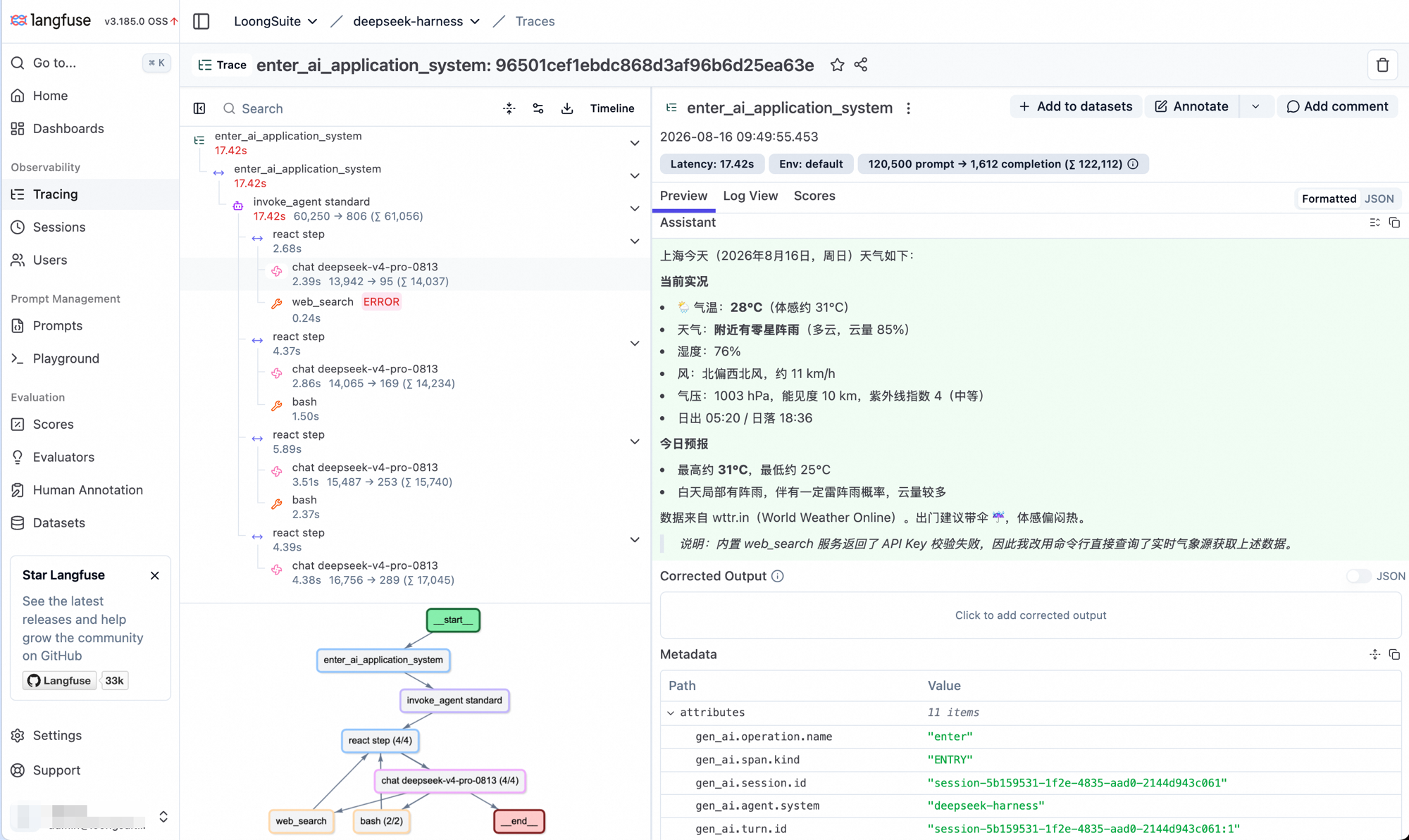
One DSH turn exported over OTLP into self-hosted Langfuse: four react steps, per-call latency
and token counts, a failed web_search followed by bash fallbacks, and the
ENTRY span's GenAI attributes. Content capture was enabled for this capture; it is off by
default.
Data model
DSH session/event + llm/stream
                │
                ▼
      lifecycle coordinator
                │
                ▼
   LoongSuite GenAI OTel utility
                │
                ▼
 private TracerProvider + MeterProvider
                │  OTLP/HTTP protobuf
                ▼
  any OpenTelemetry-compatible backend
One DSH turn produces a single trace with this shape:
ENTRY
└── AGENT
    └── STEP
        ├── LLM
        └── TOOL
Each real LLM attempt gets its own LLM span, so retries remain visible under the same step. Tool
calls are correlated with their results by DSH call ID. Errors, aborts, incomplete streams, and
plugin shutdown close live spans with an error status instead of leaving them open. Subagent
sessions create their own trace and carry DSH parent-session and delegation attributes.
When content capture is enabled, ENTRY and AGENT input messages contain only the turn's direct
source.kind=user input. Synthetic DSH context such as runtime snapshots, agent instructions,
skill catalogs, goals, and coordinator relays remains visible on the LLM span as part of the
complete request actually sent to the model, but is not presented as the user's original input.
The plugin also exports the standard gen_ai.client.operation.duration and
gen_ai.client.token.usage metrics. It does not export OpenTelemetry logs; it can coexist with a
separate DSH log exporter.
GenAI invocation construction and semantic attributes are powered by the
@loongsuite/otel-util-genai SDK.
Compatibility
| Component | Supported range | Fully verified version(s) |
|---|---|---|
| DeepSeek Harness | >=0.1.0-rc.6 <0.2.0 | 0.1.0-rc.6 headless and Web profiles |
| Node.js | >=22.19.0 | 22.19, 24.19, and 25.9 on macOS |
DSH release candidates older than 0.1.0-rc.6 are not supported. Each plugin release is tested
against the latest published DSH version rather than treating successful bundle composition alone
as full runtime compatibility.
Install and run
If you have no OTLP backend yet, examples/quickstart starts a
local Jaeger backend and gets you a trace in three commands.
Add the plugin to every DSH profile you want to observe:
dsh plugin --profile web add @loongsuite/dsh-plugin
dsh plugin --profile headless add @loongsuite/dsh-plugin
For local development, replace the package name with the checkout path:
dsh plugin --profile web add /absolute/path/to/dsh-plugin
Set a service name and an OTLP/HTTP collector endpoint, then start that profile normally:
export OTEL_SERVICE_NAME=dsh-agent
export OTEL_EXPORTER_OTLP_ENDPOINT=http://localhost:4318
export OTEL_EXPORTER_OTLP_HEADERS='authorization=Bearer%20your-token'

dsh --profile web
# or: dsh --profile headless "summarize this workspace"
The shared endpoint is expanded to /v1/traces and /v1/metrics. The exporter uses the standard
OpenTelemetry default when no endpoint is configured.
Configure the plugin
Environment variables are enough for most deployments. You can also edit the plugin row in
$DSH_HOME/profiles/<profile>/cordis.patch.yml (by default under ~/.dsh):
- id: loongsuite-observability
  config:
    endpoint: http://localhost:4318
    serviceName: dsh-agent
    headers:
      authorization: Bearer your-token
    resourceAttributes:
      deployment.environment.name: development
    captureContent: false
    exportMetrics: true
Explicit plugin settings take precedence over environment variables.
To enable content capture without editing the profile, set the GenAI content mode before starting DSH:
export OTEL_INSTRUMENTATION_GENAI_CAPTURE_MESSAGE_CONTENT=SPAN_ONLY
dsh --profile web
| Setting | Default | Meaning |
|---|---|---|
enabled | true | Disable collection without uninstalling the bundle. |
endpoint | unset | Shared OTLP/HTTP base URL; the plugin appends each signal path. |
traceEndpoint / metricEndpoint | unset | Complete signal-specific URL; takes precedence over endpoint. |
headers | {} | Headers added to both exporters. |
serviceName | OTEL_SERVICE_NAME or deepseek-harness | OpenTelemetry service.name. |
resourceAttributes | {} | Additional string-valued resource attributes. |
captureContent | environment setting or false | Export prompts, responses, tool definitions, arguments, and results. |
contentMaxChars | 128000 | Maximum serialized characters per captured content attribute. |
exportMetrics | environment setting or true | Export LLM duration and token metrics. |
maxExportBatchSize | 512 | Maximum spans per export batch. |
maxQueueSize | 2048 | Maximum queued spans. Must not be smaller than the batch size. |
traceExportIntervalMs | 5000 | Trace batch delay. |
metricExportIntervalMs | 60000 | Metric export interval. |
exportTimeoutMs | 30000 | OTLP export timeout. |
debug | false | Emit additional plugin lifecycle diagnostics through the DSH logger. |
Supported standard OpenTelemetry variables are:
OTEL_EXPORTER_OTLP_ENDPOINTOTEL_EXPORTER_OTLP_TRACES_ENDPOINTandOTEL_EXPORTER_OTLP_METRICS_ENDPOINTOTEL_EXPORTER_OTLP_HEADERSOTEL_EXPORTER_OTLP_TRACES_HEADERSandOTEL_EXPORTER_OTLP_METRICS_HEADERSOTEL_SERVICE_NAMEOTEL_RESOURCE_ATTRIBUTESOTEL_INSTRUMENTATION_GENAI_CAPTURE_MESSAGE_CONTENT(SPAN_ONLYorSPAN_AND_EVENTenables span content whencaptureContentis omitted)OTEL_METRICS_EXPORTER(nonedisables metrics whenexportMetricsis omitted)
Header and resource values use the standard comma-separated, percent-encoded key=value syntax.
Privacy and runtime behavior
Content capture is off by default. With that default, prompts, responses, tool schemas, arguments,
and results are not attached to spans; structural metadata and token counts are still exported.
Enabling captureContent or setting the content-capture environment variable to SPAN_ONLY or
SPAN_AND_EVENT can send source code, credentials, personal data, or other sensitive content to
the configured backend. Review backend retention and access controls before enabling it. Set
captureContent: false explicitly when a profile must remain content-free regardless of the
process environment.
The plugin owns private OpenTelemetry providers and never replaces DSH's or another library's
global provider. It also disposes listeners and flushes providers with the DSH plugin lifecycle.
When attached to an already-running/HMR-reloaded profile, it adopts existing session identities but
starts collection at the next native turn/start; historical events are not replayed or duplicated.
Development
Node.js 22.19 or newer and pnpm are required.
pnpm install
pnpm run check
pnpm test
pnpm run build
pnpm pack
See CONTRIBUTING.md for the implementation invariants and release checklist.
License
查看使用指南 →
该插件的安装步骤、关键要点、FAQ 与兼容性说明(基于已收录字段派生)。
收录徽章

[](https://deepseek-plugin.org/plugins/loongsuite/dsh-plugin)把这段 markdown 粘贴到你的 GitHub README,链接回本插件详情页。徽章只声明已被本站收录,不代表安全认证。