让 DSH 模型在回复中直接生成可交互的图表、表单、统计卡片等界面,无需跳出对话即可查看数据、调整参数、让模型重算。

- 语言
- TypeScript
- License
- MIT
- 分支
- main
安装
$ dsh plugin --profile web add @changfenhuang/dsh-genui在终端中运行以上命令,通过 dsh CLI 安装此插件。可在右上角切换 Profile。 第一次用 dsh?看这篇新手教程
对话式安装
帮我安装 DeepSeek Harness 插件 omdsh-dev/dsh-genui:先查看仓库 https://github.com/omdsh-dev/dsh-genui 确认安全性,然后执行安装命令并验证插件加载成功。
把这段指令粘贴给 DSH Web GUI 里的助手,由它代你完成安装与验证。
一句话定位
让 DSH 模型在聊天回复中直接生成可交互的界面组件(统计卡、图表、表单、面板),用户不用离开对话就能浏览数据、操作组件、并把操作回传给模型让它继续计算或更新界面。
核心能力
- 在模型回答中流式渲染 JSON 描述的组件:模型边写边渲染,首个完成的组件立即出现,不用等整段回复写完
- 提供 30+ 白名单组件:文本、卡片、表格、图表(柱/线/环)、表单(输入/选择/复选/开关/滑块/单选/提交)、进度条、步骤条、时间线、文件树、Mermaid 图表、3D 场景、数学函数绘图、对话式问答等
- 注册
render_ui工具:模型也可通过工具调用把同一份组件规格渲染成工具行卡片(适合"交付物型"界面) - 注册
validate_dsh_ui工具:模型在发出复杂围栏前自检,坏节点会被自动修复并附上修复后的 JSON - 支持组件动作事件回流:带
action的按钮/输入/开关等被点击后,触发一个[genui-action]消息回传模型,模型据此更新界面(300 ms 尾部防抖) - 提供会话顶部面板:模型可在面板里持续叠加/替换组件(
/panel命令唤起),上拉边框可拖拽改变高度
技术实现
- 语言: TypeScript
- 关键依赖:
@deepseek-ai/cordis(Cordis 注入宿主)、@deepseek-ai/dsh-client-runtime与@deepseek-ai/dsh-client-ui-primitives(浏览器渲染原语)、@deepseek-ai/dsh-tools(注册 render_ui/validate_dsh_ui 工具)、react(UI 框架) - 架构模式: 插件由"服务端半 + 浏览器半"两部分组成。服务端半(
src/plugin/index.ts)通过 Cordis 注入宿主,往系统提示词中插入一段dsh-ui围栏语言说明、注册两个工具、并在宿主 WebServer 上挂一条按需加载 mermaid/three 的资源路由;浏览器半(src/client/index.tsx)启动时探测宿主是否提供 fence-registry 扩展点,选择"注册通道"或"DOM 通道"渲染围栏 - 入口文件:
src/index.ts(包入口)→src/plugin/index.ts(服务端逻辑);客户端逻辑在src/client/index.tsx
适用场景
让模型的回答从纯文本升级为可交互面板:业务监控、订单/收入趋势展示、教学题卡与自判打分、流程图与架构图、函数曲线实时调参、轻量表单收集等。最适合"用户问一句、模型回一段带可点组件的回答"的场景,省去打开外部 BI/工具页面的来回跳转。
前置依赖与兼容性
| 依赖 | 最低版本 | 说明 |
|---|---|---|
| DSH(@deepseek-ai/dsh-client-runtime / dsh-client-ui-primitives / dsh-client-ui-slots / dsh-client-ui-tool / dsh-invariants / dsh-llm / dsh-system-prompt / dsh-tools / cordis) | ^0.1.0-rc.6 | 宿主需具备 fence-registry 或 DOM 通道的渲染能力(DOM 通道覆盖任意 0.1.0-rc.6+ 构建) |
| Node.js | ^22.19.0 或 >=24.0.0 | 安装脚本与构建脚本需要 |
| pnpm | >=11.7.0 且 <12 | dsh plugin 命令依赖;可用 corepack 启用 |
| React | ^18.0.0 或 ^19.0.0 | 通过 peerDependencies 注入,宿主自带 |
| 平台 | 跨平台 | 无 os/cpu 限制;mermaid 与 three 以 IIFE 资源按需加载 |
安装方式
dsh plugin --profile web add github:omdsh-dev/dsh-genui
配置项
本插件无需额外配置。安装后宿主自动注入 dsh-ui 围栏语言段、注册 render_ui 与 validate_dsh_ui 工具,并在宿主 WebServer 上挂 /plugins/@omdsh-dev/dsh-genui/assets/* 静态资源路由用于按需加载 mermaid 与 three 引擎。模型输出的围栏规格有内置硬性资源上限(200 节点 / 嵌套 8 层 / 各类字段长度上限),超出部分会被静默丢弃,不会让界面崩溃。
常见问题
Q: 围栏渲染成了普通代码块,怎么办?
A: 依次检查三件事:宿主 dsh 是否具备 fence-registry 扩展点(不具备会自动回退到 DOM 通道)、dsh plugin --profile web list 是否能看到本插件、最后重启 dsh web 并硬刷新(Cmd/Ctrl+Shift+R)。
Q: 安装时报 pnpm not found on PATH,怎么解决?
A: dsh 的 plugin 子命令依赖 pnpm。运行 corepack enable 或 npm i -g pnpm 安装后,必须新开一个终端让 PATH 生效,确认 pnpm -v 有输出再重试。
Q: 装好了但 mermaid 或 3D 场景渲染不出来?
A: 这两个引擎按需加载,首次使用时会从 /plugins/@omdsh-dev/dsh-genui/assets/*.js 拉取。先硬刷新一次浏览器;若仍失败,移除后重新安装即可(dsh plugin --profile web remove @omdsh-dev/dsh-genui 再 add)。
Q: 模型不输出 dsh-ui 围栏,只回文字怎么办?
A: 新会话需要重启 dsh web 才生效;或者在提问时直接说"用 dsh-ui 画一个统计面板"提醒模型。
Q: 刚 clone 下来没有 lib/ 目录,能直接用吗?
A: 不能直接用。lib/ 是构建产物,需要先 pnpm install 再 pnpm run check(会自动构建)。
Q: 围栏节点太多会被截断吗?
A: 会的。插件有硬性资源上限:单条围栏最多 200 个节点、嵌套深度 8 层;超出部分会被静默丢弃,不会让界面崩溃。
Q: 怎么卸载这个插件?
A: 运行 dsh plugin --profile web remove @omdsh-dev/dsh-genui,然后重启 dsh web;围栏会自然降级回普通代码块,不会污染已有会话。
上手难度
入门 — 普通用户无需任何配置;模型侧的语法通过 SKILL.md 与系统提示词自动教给模型,用户只需在 prompt 中描述"用 dsh-ui 画一个 XX 面板"即可。开发者要二次开发的话需要熟悉 React、Cordis 与 DSH 客户端运行时。
已知问题与限制
- 资源上限硬编码:单条围栏上限 200 节点 / 嵌套 8 层;面板上限 200 节点 / 200 次追加,达到上限后模型需发
replace重建(src/client/guard.ts:25-65、src/client/panel-store.ts:29-34) - mermaid / three 引擎按需从
/plugins/@omdsh-dev/dsh-genui/assets/*.js加载;极老的不带该资源路由的宿主构建会降级为源码/加载失败提示,需更新 dsh(README.md:136) - 工具注册依赖可选的
tools服务:没有工具通道的宿主仍保留围栏通道,但失去render_ui/validate_dsh_ui工具(src/plugin/index.ts:157-197) - DOM 通道在宿主 React 重渲染时可能擦掉插件挂载的根:插件用 MutationObserver + 1 秒扫描双保险修复,但极端情况下仍有视觉抖动(
src/client/dom-fence.tsx:25-28) - 围栏内容中密码、API Key、访问令牌等"秘密"被协议层禁用:模型被提示拒绝索取,但本插件无运行时强制遮罩,依赖模型遵循提示词
English · 简体中文
Give the model's answers a face — the text is still there, and an interactive UI is already live.
🔌 Ecosystem: the repo carries the
#dsh·#dsh-plugintopics — welcome to be listed by @dsh-plugin.
The model no longer just answers in text. Install this plugin, ask "how are this month's orders doing", and it renders a clickable data panel right inside the answer as it analyzes: watch trends, drag sliders, hit refresh — and the model actually responds.
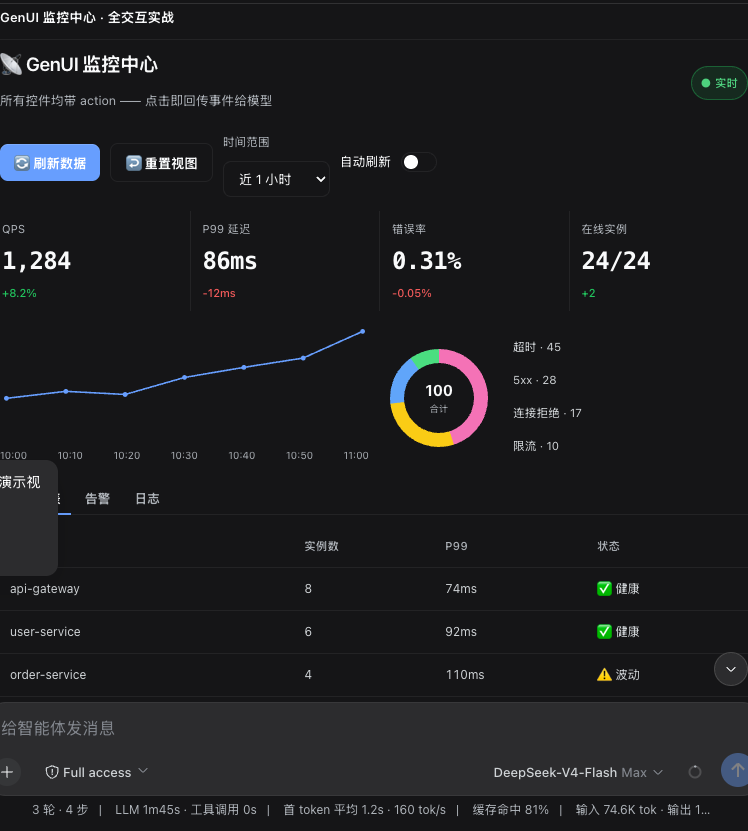
Real output: an interactive monitoring panel rendered by the model (click "refresh" and it regenerates the data)
Player won't load? Download the mp4. Four-act demo script: demo-prompts.md.
⚠️ Read this first: dual-channel rendering (works with any dsh build)
The plugin ships two rendering channels and picks one automatically at startup — no dependency on a specific host version:
- Registry channel: when the host exposes the
fence-registryextension point (newer dsh builds), fences register through the host's streaming render pipeline and behave seamlessly with the host; - DOM channel: when the host lacks that extension point (including stock DSH and older builds), the plugin observes the session DOM and mounts its own render tree. Since 0.7.2 it supports streaming rendering: components appear as the model writes them — the first finished component shows up immediately, no need to wait for the whole reply. Since 0.8.3 fence discovery is multi-surface: it matches the stock
md-code-blocksurface, the deepsuite-style.code-block/.code-block-smallsurfaces some host builds render instead, and — as a structural backstop — any element whose banner labels itdsh-uiand contains a<pre>body. If your dsh build renders fences with a different class name, they still render (and a one-time console warning tells you the host DOM drifted).
Whichever channel is active, components, interactions, panels, and persistence behave identically.
✨ Before vs. after
| Plain answer | With dsh-genui |
|---|---|
| "Revenue this month: ¥128,430, +12.4% MoM — watch the conversion rate." | One line of analysis + three stat cards (revenue / orders / conversion), a trend chart, and a progress bar rendered right beside it |
| Want to see more? Type another question. | The panel already has "Refresh" / "Switch view" buttons — click, and the model updates the data |
🚀 Quick start
Prerequisites — all required:
- dsh installed (any open-source build works — the plugin picks its rendering channel at startup, see "dual-channel rendering" above)
pnpmon your PATH: thedsh plugincommand depends on it. If missing:corepack enable(ornpm i -g pnpm), then open a new terminal and confirmpnpm -vprints a version
Install (one command, all dependencies included):
# Public GitHub install (works without an npm account)
dsh plugin --profile web add git+https://github.com/omdsh-dev/dsh-genui.git
⚠️ Don't use
link:on a freshly cloned directory —link:does not install the plugin's dependencies (mermaid / three / react), so the renderer will break. Use the git URL form above; reservelink:for local development iteration (see below).
Restart dsh web + hard refresh, then in a new session say "use dsh-ui to draw a stats dashboard" to verify.
One-click script (recommended)
After cloning, just run it — the script checks the prerequisites above, performs the install, and prompts you to restart:
git clone https://github.com/omdsh-dev/dsh-genui.git
cd dsh-genui
./scripts/install.sh
Developer iteration (link mode)
cd dsh-genui
pnpm install
dsh plugin --profile web add link:$PWD
🧩 What it can do
- Answer-as-UI: components are embedded in the reply and appear as they stream — no waiting for the whole message
- 30+ components: cards, tables, charts, forms, tabs, accordions, file trees, timelines, diffs…
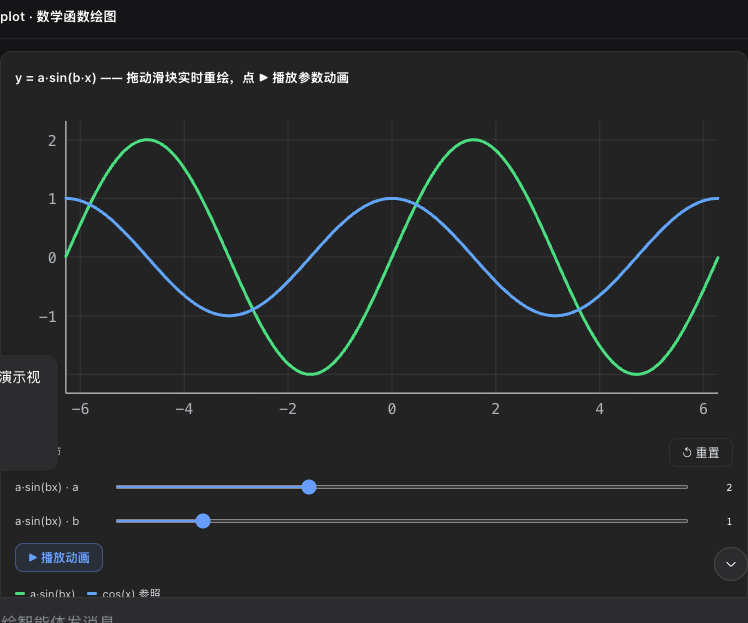
- Function plots:
plotdraws curves; parameter sliders redraw in real time, with optional auto-animation
- Quiz:
quizgrades on click with explanation and retry; withaction, the answer is also sent back to the model (grading stays local and instant) - Local grading (submit): a multiple-choice set = one
radioper question withgroup+answer(correct answer) +explanation, plus onesubmitbutton — after the user answers everything and clicks once, the score, per-question right/wrong, and explanations appear right in the UI with zero model round-trips; the quiz then locks, and "retake" resets locally (optionalresetActionnotifies the model). Questions without an answer fall back to an aggregated action (fieldscollects every input with anid) - State persistence: answers, submission locks, and input values are saved per "session + content fingerprint" — refresh or reopen restores everything; re-rendering identical content keeps user state; new content starts fresh; LRU cap of 200 blocks
- Form semantics:
inputEnter /textareaCtrl+Enter submits immediately (submit:true), no blur needed; fields with anidare collected into the submit'sfields - Secrets ban: GenUI must never ask for passwords, API keys, access tokens, recovery codes, or other secrets; even if a password input appears, it stays masked, is never persisted, and never enters form collection
- Local-first principle: state changes the UI can do itself (grading, quiz checking, resets, expand/collapse, selection) always happen locally and instantly; actions are reserved for things that genuinely need the model (generating new content, running tools, next-step suggestions)
- Honest interactions: interactive components must carry
action; buttons without one render disabled (kills the "looks clickable, does nothing" fake button); buttons withactionshow instant "triggered" local feedback (proof the local event fired, not that the model received it) - Event loop: buttons/switches/inputs/dropdowns/checkboxes/radios/textareas/quizzes carry
action; click or blur sends back to the model, which updates the UI; same-name actions are debounced with a 300 ms trailing edge — rapid clicks merge into one (last value wins) - Tool channel: the
render_uitool renders the same spec as a card in the tool row (deliverable-style UI goes through the tool, answer-style UI through the fence) - Session panel: a persistent dock above the composer;
render_ui/panel: truefences update the same surface in place;/panelopens it from the client (/panel <instruction>customizes via the model,/panel clearclears); the top border is draggable to resize;append: truemerges incrementally — same-named tabs append content, new tabs get added; the whole panel caps at 200 nodes / 200 appends, after which the model should sendreplaceto rebuild - Self-healing & limits: every fence passes a spec guard — bad nodes are silently dropped, numbers clamped, strings truncated; the whole tree is capped at 200 nodes / 8 nesting levels; pathological specs never crash the UI
- Chart error self-healing: mermaid failures auto-retry with repairs (strip backticks, quote Chinese/space labels, remove
<br/>) before degrading to source; a broken chart never hits the screen - Accessibility: tabs/accordions/switches/progress bars carry full ARIA and keyboard navigation (arrow keys switch tabs, Home/End jump)
- Zero intrusion: without the plugin, fences are just code blocks — no errors, no session pollution
Component JSON syntax: SKILL.md (also copyable to ~/.dsh/skills/genui/ to boost the model).
📄 Example
The model outputs this fence (written for the browser — you don't need to read it):
{"title":"Order overview","items":[
  {"type":"stat","label":"Total revenue","value":"¥128,430","delta":"+12.4%"},
  {"type":"stat","label":"Orders","value":"1,024","delta":"-3.1%"}
]}
What you see: two stat cards.
🔧 How it works
The model writes the interface description as JSON inside a dsh-ui fence; the browser-side renderer (src/client) claims this language through the main repo's fence-registry interface and renders it. Components are whitelisted — the model can't smuggle in HTML/scripts; function expressions go through a standalone parser, never eval.
The core render package stays light (≈110 KB min / 28 KB gzip); the mermaid and three.js engines are bundled separately as on-demand assets (loaded through the plugin's self-registered HTTP routes the first time they're used), so startup only downloads the rendering core.
❓ FAQ
- Rendering as a code block? Check three things: your dsh build has fence-registry (see "dual-channel rendering" at the top — builds without the extension point fall back to the DOM channel),
dsh plugin --profile web listshows this plugin, restart + hard refresh. - Chat UI goes blank when rendering a dsh-ui fence? Your dsh is too old — update dsh first, then reinstall the plugin.
dsh: pnpm not found on PATH? Install pnpm, then open a new terminal and retry (corepack enableornpm i -g pnpm).- Stuck on git credentials / 404 during install? The repo is public (
omdsh-dev/dsh-genui) — the git URL above needs no login; a 404 for@omdsh-dev/dsh-genuimeans the npm package has not been published yet. - Installed but scene3d/mermaid don't render? The engines (mermaid / three) are no longer inlined in client.js — they load on demand the first time they're used (
/plugins/@omdsh-dev/dsh-genui/assets/*.js, hosted by the plugin's own HTTP routes). First restart dsh web + hard refresh (Cmd+Shift+R); still broken, remove and reinstall (dsh plugin --profile web remove @omdsh-dev/dsh-genui, then add again). Hosts without the asset routes degrade to source/load-error hints — update dsh. - Model not outputting fences? New sessions pick it up after a restart; or just say "output it with dsh-ui".
- No lib/ after cloning? Build it yourself:
pnpm install && pnpm run check.
🧑💻 Development
pnpm install
pnpm run check   # type check + full tests + build
Real-device e2e
The real chain end to end: start a temporary dsh web → install the plugin → send a message in a browser so the model outputs a dsh-ui fence → assert the rendering → click an action button → assert the model responds (event-loop closure):
DEEPSEEK_API_KEY=sk-... node scripts/e2e.mjs          # link-installs the current workspace
DEEPSEEK_API_KEY=sk-... node scripts/e2e.mjs --install git   # friend path (git URL)
Prereqs: dsh/pnpm on PATH, DEEPSEEK_API_KEY, and the main repo's web build output (playwright resolves it from the main repo). On PASS it saves an e2e-final.png screenshot.
🗺️ Roadmap (evaluated)
| Direction | Verdict | Rationale |
|---|---|---|
| Incremental patching (model sends diffs, not full specs) | Not doing | A fence costs 200–800 tokens; resending is nearly free; a patch protocol's teaching cost and error rate aren't worth it. Revisit if sub-second auto-refreshing panels ever appear |
| Action debounce/dedup | ✅ Done (300 ms trailing edge, per action name) | Rapid-click spam is real friction; one choke point |
| Cross-session state persistence (replay restores tabs/switches) | Not doing | Replay-reset is the more correct default (the model has already updated the UI with a new fence); state survives naturally during streaming |
| MCP adapter / standalone gallery page / i18n | Not doing | No cross-tool demand signal; gallery material is covered by gallery.ts + demo-prompts + README screenshots; only 6 built-in strings |
Tests parse the dsh source (vitest.config.ts's DSH_ROOT, default ~/.dsh/source/current).
🔗 Friendly links
📄 License: MIT
查看使用指南 →
该插件的安装步骤、关键要点、FAQ 与兼容性说明(基于已收录字段派生)。
收录徽章

[](https://deepseek-plugin.org/plugins/omdsh-dev/dsh-genui)把这段 markdown 粘贴到你的 GitHub README,链接回本插件详情页。徽章只声明已被本站收录,不代表安全认证。