dsh 网页侧边栏的 DeepSeek 余额与 token 用量监控:今日/累计切换,并按 provider 过滤其他厂商。

- 语言
- JavaScript
- License
- MIT
- 分支
- main
安装
$ dsh plugin --profile web add dsh-balance-plugin在终端中运行以上命令,通过 dsh CLI 安装此插件。可在右上角切换 Profile。 第一次用 dsh?看这篇新手教程
对话式安装
帮我安装 DeepSeek Harness 插件 stevenx65/dsh-balance-plugin:先查看仓库 https://github.com/stevenx65/dsh-balance-plugin 确认安全性,然后执行安装命令并验证插件加载成功。
把这段指令粘贴给 DSH Web GUI 里的助手,由它代你完成安装与验证。

A DeepSeek Harness (dsh) web plugin: shows DeepSeek API balance and token usage at the bottom of the web sidebar (port 3080), with a Today / All-time toggle, filtered by provider (only deepseek-official, ignoring other vendors).
Features
- 💰 Balance: calls DeepSeek's official
GET /user/balance, reusing dsh's credentials (~/.dsh/.credentials.yaml) — no manual key entry - 📊 Token usage: reads dsh session logs (
session.jsonl.zstd), aggregates by provider- Uncached input / cache read / output / model call count
- 🔄 Today / All-time toggle: today (Beijing time) or full history
- 🎨 Auto-adapts to light/dark theme
Screenshot
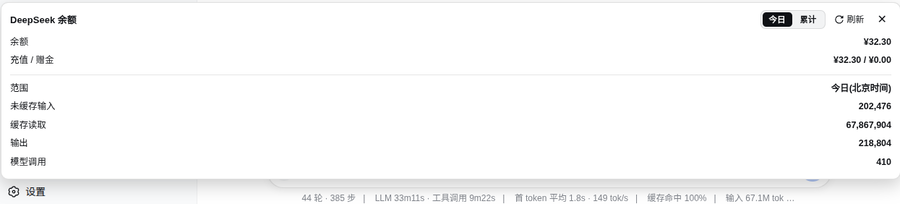
Install (from the plugin market)
dsh plugin --profile web add dsh-balance-plugin
Restart dsh web, then refresh the page — a balance button appears at the bottom of the sidebar.
Architecture
Browser (3080 page)
  client.js ──fetch──▶ /dsh-balance/data?scope=today|all
                              │
node side (index.js, inside the dsh process)
  ├── credentials.resolve("DEEPSEEK_API_KEY")  ← reuses dsh's key
  ├── fetch(https://api.deepseek.com/user/balance)
  └── decompress ~/.dsh/sessions/*/*/session.jsonl.zstd
      filter assistant/message rows + provider=deepseek-official
index.js: node-side cordis plugin, registers HTTP route/dsh-balance/dataclient.js: browser-side plugin, injects intosidebar.footer.action(sidebar bottom button + floating panel)package.json:dsh.bundle+dsh.client.platform: "web"+exports["./client"]cordis.patch.yml: bundle patch registering the node entry
Manual install
mkdir -p ~/.dsh/profiles/web/node_modules/dsh-balance-plugin
cp index.js client.js cordis.patch.yml package.json ~/.dsh/profiles/web/node_modules/dsh-balance-plugin/
Then add to ~/.dsh/profiles/web/cordis.patch.yml:
- insert:
    - id: dsh-balance
      name: dsh-balance-plugin
Restart dsh web and refresh the browser.
Dependencies
- node side: Node built-ins only (
node:fs,node:child_process,node:path); requires thezstdCLI for decompressing session logs - browser side:
@deepseek-ai/dsh-client-ui-primitives(peer dep, ships with dsh 0.1.0-rc.6)
Data source
Session logs at ~/.dsh/sessions/<scope>/<session-id>/session.jsonl.zstd. Each assistant/message row:
{
  "type": "assistant/message",
  "time": 1786635270943,
  "data": {
    "message": { "source": { "kind": "model", "provider": "deepseek-official", "model": "deepseek-v4-pro" } },
    "usage": { "inputTokens": 8702, "outputTokens": 298, "cacheReadTokens": 0 }
  }
}
Pack
npm pack # produces dsh-balance-plugin-0.1.0.tgz
License
MIT
查看使用指南 →
该插件的安装步骤、关键要点、FAQ 与兼容性说明(基于已收录字段派生)。
收录徽章

[](https://deepseek-plugin.org/plugins/stevenx65/dsh-balance-plugin)把这段 markdown 粘贴到你的 GitHub README,链接回本插件详情页。徽章只声明已被本站收录,不代表安全认证。