为 DeepSeek Harness 提供 OpenViking 长期语义记忆、自动会话采集与 viking:// 上下文工具,让 DSH 会话自动召回并写入持久记忆。

- 语言
- Python
- License
- AGPL-3.0
- 分支
- main
安装
$ dsh plugin --profile web add github:volcengine/OpenViking在终端中运行以上命令,通过 dsh CLI 安装此插件。可在右上角切换 Profile。 第一次用 dsh?看这篇新手教程
一句话定位
为 DeepSeek Harness(DSH)注入 OpenViking 上下文数据库:在每个 agent 步骤前自动召回相关记忆与用户画像,把用户/助手/工具消息实时落盘到 viking:// 虚拟文件系统,并把 viking:// URI 拦在 DSH 本地工具之外。
核心能力
- 在
agent/pre-step钩子里用当前步骤输入做语义检索,把命中的 L0/L1/L2 记忆追加为带source: { kind: 'plugin' }的 user message - 监听
session/event自动采集 user/assistant/工具结果消息并写入 OpenViking session,达到commitTokenThreshold时自动 commit - 注册 7 个模型可调用的工具:
viking_search/viking_read/viking_browse/viking_remember/viking_forget/viking_add_resource/viking_archive_expand - 在
tools/pre-execute拦截 read/glob/grep/bash/edit/write 等本地工具对viking://URI 的错误使用,强制改走 OpenViking 工具 - 通过
viking_add_resource异步摄取 HTTP(S)/git 远程资源,自动派生 L0/L1/L2 分层 - 服务不可达或写失败时进入
OPENVIKING_PENDING_DIR待写队列,下个会话启动自动 replay - 每个 DSH 会话映射为 OpenViking 端的
dsh-<session-id>;默认从工作目录派生 actor peer,可强制覆盖
技术实现
- 语言: JavaScript (Node.js, ESM
*.mjs) - 关键依赖:
@deepseek-ai/dsh-llm(createUserMessage)、@deepseek-ai/dsh-tools(defineTool);运行时无第三方 npm 依赖 - 架构模式: Cordis 插件组(
@deepseek-ai/cordis-plugin-group)——apply(ctx, input)注册服务openvikingMemory,通过ctx.on订阅agent/session-start、agent/pre-step、session/event、session/flush、tools/pre-execute等生命周期事件;运行时使用setup-wizard/profile-inject/recall-core/capture-utils/pending-queue等共享子模块 - 入口文件:
examples/dsh-memory-plugin/index.mjs(导出name/inject/apply),cordis.patch.yml声明 Cordis 装载入口
适用场景
需要让 DSH 长期保留项目知识、用户偏好与历史经验的开发者或团队:在多会话、多工作区协作时,让 agent 自动从过去的决策、代码风格与项目文档中检索上下文,避免重复交代;同时把每轮对话异步落入 viking://user/<peer>/memories/,作为后续步骤的 recall 源。
安装方式
dsh plugin --profile web add github:volcengine/OpenViking
配置项
| 配置 | 类型 | 说明 | 默认值 |
|---|---|---|---|
endpoint | string | OpenViking 服务地址 | http://127.0.0.1:1933 |
apiKey | string | Bearer 凭证(也可走 OPENVIKING_API_KEY/OPENVIKING_BEARER_TOKEN 或 ~/.openviking/ovcli.conf) | "" |
account | string | trusted-mode 账号(X-OpenViking-Account) | "" |
user | string | trusted-mode 用户(X-OpenViking-User) | "" |
peerId | string | 显式 actor peer(覆盖工作区派生) | "" |
workspacePeer | boolean | 是否按 DSH 工作区派生 actor peer | true |
recallPeerScope | "all" | "actor" | 召回时是否跨工作区 | all |
recallQueryExpansion | "auto" | "off" | 是否做查询改写 | auto |
recallTokenBudget | number (200–50000) | 召回上下文 token 上限 | 2000 |
recallMaxContentChars | number (100–5000) | 召回条目 abstract 截断长度 | 500 |
recallLimit | number (1–50) | 召回条数 | 10 |
scoreThreshold | number (0–1) | 召回分数阈值 | 0.35 |
minQueryLength | number (1–64) | 触发召回的最短 query | 3 |
profileTokenBudget | number (500–50000) | 启动注入 profile 的 token 上限 | 10000 |
commitTokenThreshold | number (1000–1000000) | 触发 session commit 的 pending token | 20000 |
commitKeepRecentCount | number (0–1000) | commit 时保留的最近消息数 | 10 |
captureMode | "semantic" | "keyword" | 捕获模式 | semantic |
captureAssistantTurns | boolean | 是否采集 assistant 消息 | true |
captureToolResults | boolean | 是否采集工具结果 | false |
captureMaxLength | number (200–100000) | 单条捕获最大长度 | 24000 |
captureToolMaxChars | number (200–1000000) | 工具结果最大字符 | 1000000 |
requestTimeoutMs | number (1000–120000) | HTTP 请求超时 | 10000 |
环境变量(除上表外):OPENVIKING_URL / OPENVIKING_BASE_URL / OPENVIKING_MCP_URL / OPENVIKING_CREDENTIAL_SOURCE / OPENVIKING_CONFIG_FILE / OPENVIKING_CLI_CONFIG_FILE / OPENVIKING_PENDING_DIR / OPENVIKING_PENDING_MAX_RETRIES / OPENVIKING_PENDING_TTL_DAYS / OPENVIKING_PENDING_REPLAY_LIMIT / OPENVIKING_RECALL_QUERY_EXPANSION / OPENVIKING_RECALL_LIMIT / OPENVIKING_RECALL_PEER_SCOPE / OPENVIKING_WORKSPACE_PEER。
上手难度
进阶 — 需要先在本机或远端跑一个可访问的 OpenViking 服务(openviking-server),再理解 viking:// URI、L0/L1/L2 分层、actor peer 等概念;DSH 安装本身是单条命令,但调优召回预算、commit 阈值、peer 隔离等行为需要阅读 config.mjs 和 README 中的配置章节。
已知问题与限制
- 强绑定 DSH 版本:peerDependencies 锁死
@deepseek-ai/dsh-llm与@deepseek-ai/dsh-tools均为0.1.0-rc.6,pre-release dist-tag 不同步会导致装载失败 - 强绑定 Node 引擎:
^22.19.0 || >=24,更早的 Node 会直接拒绝 - 若 DSH preset 把 persona 标为
complete: true,pre-step 注入的 recall/profile 仍按 user message 追加,能避开 system prompt 覆盖;但若 DSH 在agent/pre-step之后还有 strip-plugin-source 的过滤器,召回上下文会被一并剥掉 - OpenViking 服务不可达时,所有写操作回落到
OPENVIKING_PENDING_DIR(默认~/.openviking/dsh-pending/)排队;如果队列被反复重放失败并超过OPENVIKING_PENDING_MAX_RETRIES(默认 3)或OPENVIKING_PENDING_TTL_DAYS,条目会被清理 live-recall.test.mjs端到端用例默认跳过,仅在OPENVIKING_E2E=1且有真实服务凭证时才会跑,CI 中未覆盖viking_forget是不可逆的硬删除(README 明确提示),需模型仅在用户明确请求删除时调用

OpenViking: The Context Database for AI Agents
Website · Live Demo · GitHub · Issues · Docs






👋 Join our Community
📱 Lark Group · WeChat · Discord · X
What is OpenViking
OpenViking is an open-source context database for AI agents. It stores memories, resources, and skills as one virtual filesystem under the viking:// protocol, so an agent browses its own context with ls, tree, and find instead of querying a black-box vector store. Content is processed into three tiers — L0 abstract, L1 overview, L2 details — and loaded on demand. Every retrieval leaves a trajectory you can watch and debug. Full introduction: Getting started.
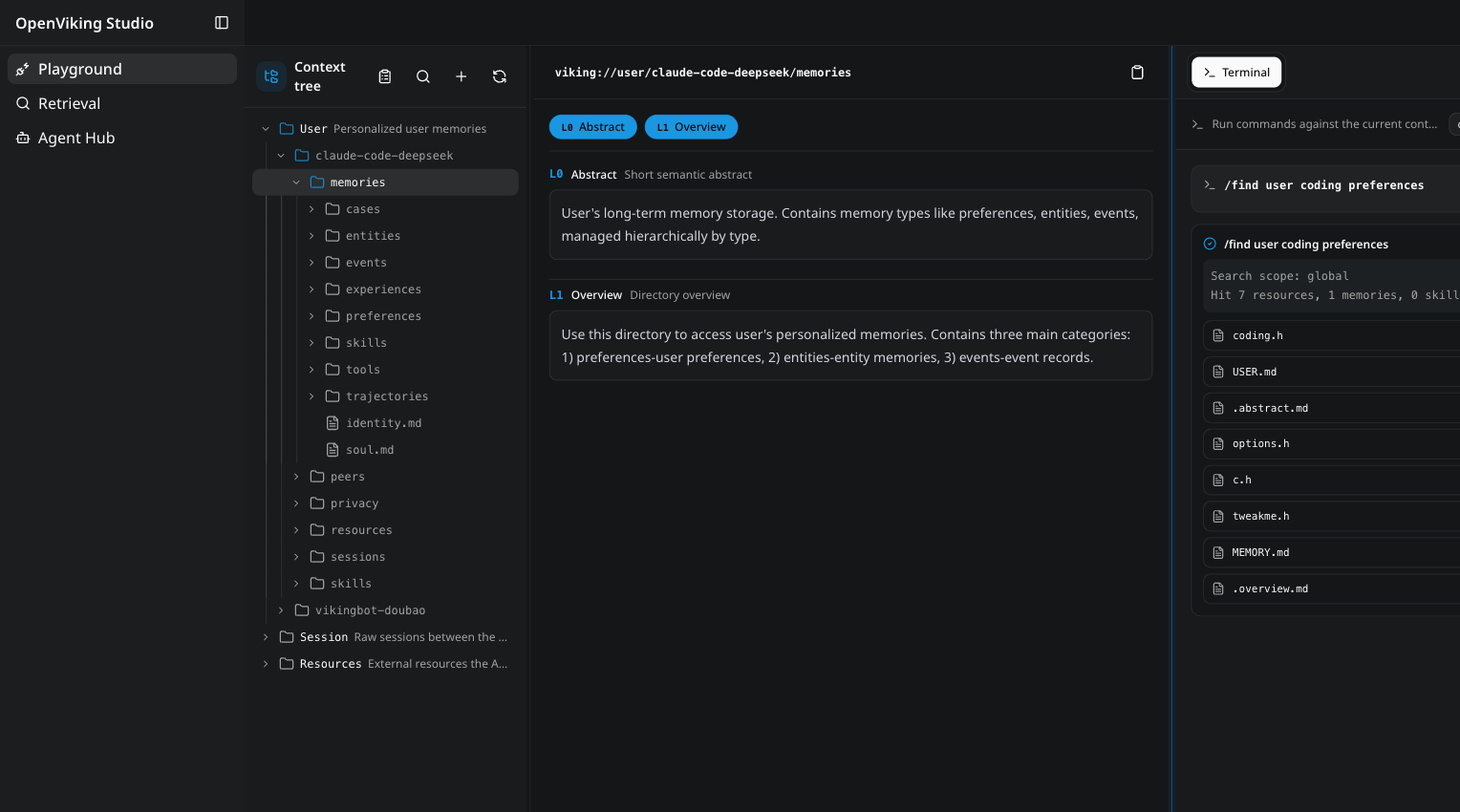
The OpenViking Studio playground — a live demo you can open in the browser, no installation required.
Why OpenViking
- One filesystem for all context. Memories, resources, and skills each get a
viking://URI. Agents locate and manipulate context deterministically, like a developer working with files. → Viking URI · Context types - Tiered loading cuts token spend. Every entry is processed into L0 (abstract), L1 (overview), and L2 (details) on write, then loaded only as deep as the task requires. → Context layers
- Directory recursive retrieval. Vector search first locates the highest-scoring directory, then drills down layer by layer, so results arrive with their surrounding context intact. → Retrieval
- Observable retrieval. Each query preserves its directory-browsing trajectory. When a result looks wrong, you can see exactly which path produced it. → Retrieval
- Sessions become memory. After a session commits, OpenViking asynchronously extracts user preferences and agent experience into long-term memory. → Session
How the pieces fit together: Architecture. The thinking behind the design: The Database Paradigm for Context Engineering.
viking://
├── resources/              # Resources: project docs, repos, web pages, etc.
│   └── my_project/
│       ├── docs/
│       │   ├── api/
│       │   └── tutorials/
│       └── src/
└── user/
    └── {user_id}/
        ├── memories/
        │   └── preferences/
        │       ├── writing_style
        │       └── coding_habits
        ├── resources/
        │   └── private_project/
        ├── skills/
        │   ├── search_code
        │   └── analyze_data
        └── peers/
            └── web-visitor-alice/
The three loading tiers:
- L0 (Abstract): a one-sentence summary for quick relevance checks.
- L1 (Overview): core information and usage scenarios for planning.
- L2 (Details): the full original data, read only when needed.
Each directory carries its own L0/L1 layers, so relevance can be judged before any full file is read:
viking://resources/my_project/
├── .abstract               # L0: ~100 tokens - quick relevance check
├── .overview               # L1: ~2k tokens - structure and key points
└── docs/
    ├── .abstract
    ├── .overview
    └── api/
        ├── auth.md         # L2: full content, loaded on demand
        └── endpoints.md
Proof it works
OpenViking 0.3.22 has been evaluated on long-conversation user memory (LoCoMo) and multi-turn agent tasks (tau2-bench). Full results and setup details, including knowledge-base QA, are in the benchmark report; reproduction scripts live in ./benchmark.

- User memory (LoCoMo): with OpenViking, all three agent integrations land at 80–83% accuracy — up from 24–57% on their native memory — while input tokens drop by 34.3–91.0% and query latency by 58.45–66.10%.
- Agent experience (tau2-bench): experience memory lifts task success by +6.87pp (retail) and +11.87pp (airline) over the same LLM without memory.
Quick start
💡 Want to see it in action first? Try OpenViking Studio — a live hosted instance with a context playground, semantic search, and a multi-agent hub. No installation required.
Requires Python 3.10 or higher.
pip install openviking --upgrade
openviking-server init      # interactive wizard: providers, models, ov.conf
openviking-server doctor    # validate setup
openviking-server           # start (background: nohup openviking-server > openviking.log 2>&1 &)
init walks you through provider setup and writes ~/.openviking/ov.conf. It supports Volcengine, OpenAI, Codex OAuth, Kimi, GLM, and local Ollama — for Ollama it can detect and install the runtime and pull models suited to your hardware. doctor checks the config file, Python version, provider connectivity, and disk space without a running server. Manual ov.conf templates, per-provider examples, environment variables, and Windows setup: Configuration guide · Quick start docs.
The install already includes the ov client CLI. With the server running:
ov status
ov add-resource https://github.com/volcengine/OpenViking # --wait
ov ls viking://resources/
ov tree viking://resources/volcengine -L 2
# wait some time for semantic processing if not --wait
ov find "what is openviking"
ov grep "openviking" --uri viking://resources/volcengine/OpenViking/docs/en
Next steps:
- Client configuration (
ov config), standalone CLI installs (npm / cargo), and advanced usage such as index rebuilding: CLI setup - Docker and production deployment: Deployment guide
Use it with your agent
Integrations inject OpenViking recall into your agent's context and auto-commit session memory:
- Claude Code
- Codex
- OpenClaw
- Hermes
- Cursor
- TRAE / TRAE CN / TRAE CLI
- OpenCode
- pi
- Agent Plugins 1.0
- MCP clients
- LangChain / LangGraph
Setup instructions for each agent: Agent integrations overview.
OpenViking Helper (Beta)
OpenViking Helper is a desktop console, currently in beta for macOS and Windows x64:
- Visual local agent setup: detects OpenViking CLI, Claude Code, Codex, Cursor, Trae, and OpenCode, then configures supported plugin, MCP, Hook, and CLI integrations.
- Session trace inspection: parses Claude Code, Codex, and Trae sessions to show OpenViking recall, prompt injection, MCP calls, capture, and commit events.
- Local memory and skill management: views local memory / rule files and
SKILL.mdskills, then syncs them to OpenViking.
Download:
VikingBot
VikingBot is an AI agent framework built on top of OpenViking:
pip install "openviking[bot]"
openviking-server --with-bot
ov chat   # in another terminal
The official Docker image bundles VikingBot and starts it by default alongside the server and console UI. Details: VikingBot guide.
Deploy in production
For production, run OpenViking as a standalone HTTP service — see Server deployment and the Deployment guide.
Commercial editions
The open-source edition is not crippled. OpenViking in this repo is fully open source under AGPLv3: no feature gates, no account required, no activation key. Follow Deploy in production above and run it in production yourself — and that will stay true.
The two editions below answer "who operates it and where it runs", not "can I use it".

☁️ Managed SaaSOfficially hosted on Volcano Engine. Nothing to set up, nothing to operate.
Existing open-source users can move over with the migration tool. → Volcano Engine product page · Documentation Global hosting for regions outside China is coming to BytePlus. |
🏢 Self-ManagedRuns inside your own environment. Data never leaves it.
Adds distributed deployment and official support on top of the open-source edition, activated by license key. |
Just want to run the open-source edition? Go ahead — you don't need to contact anyone. Head to Quick start.
Research
OpenViking open-sources a subset of the core capabilities described in the VikingMem paper:
VikingMem: A Memory Base Management System for Stateful LLM-based Applications Jiajie Fu, Junwen Chen, Mengzhao Wang, Aoxiang He, Maojia Sheng, Xiangyu Ke, Yifan Zhu, and Yunjun Gao. arXiv:2605.29640, 2026. Accepted by VLDB 2026. 📄 Read the paper on arXiv
Partner Projects
OpenViking welcomes collaboration with other open-source projects to build the context data ecosystem. Our confirmed partners include:
- deer-flow - Open-source long-horizon SuperAgent harness
- NoKV - AI native distributed file system
- loopx - Lightweight loop engineering state kernel
- Hermes Agent - The agent that grows with you
Interested in joining our partner list? Please submit an issue to our community to apply.
Community & contributing
OpenViking is still in its early stages, and there is plenty left to build.
- Docs: docs.openviking.ai · FAQ
- Blog: blog.openviking.ai
- Team: About us
- Chat: 📱 Lark Group · 💬 WeChat · 🎮 Discord · 🐦 X
- Contribute: bug fixes and new features are both welcome — see CONTRIBUTING.md
Security and privacy
This project takes security seriously. For vulnerability reporting and supported versions, see SECURITY.md
License
The OpenViking project uses different licenses for different components: