把 All in Luna 多 Agent 协调能力接到 DeepSeek Harness,提供 4 个 Cordis 工具,把目标拆成可并行的顶层任务交给 subagent 执行并记录回执。

- 语言
- Python
- License
- Apache-2.0
- 分支
- main
安装
$ dsh plugin --profile web add github:zenx0x/allinluna在终端中运行以上命令,通过 dsh CLI 安装此插件。可在右上角切换 Profile。 第一次用 dsh?看这篇新手教程
一句话定位
All in Luna 是面向复杂项目的多 Agent 协调框架;这个 DSH 插件是它的入口(npm @zenx0x/allinflash,bundle 名 allinflash),把 Python CLI 的能力暴露成 4 个 Cordis 工具,让模型在 DSH 内直接启动顶层任务、把可并行的子任务交给 subagent,并按严格的契约做回执持久化。
核心能力
- 注册
allinflash_start工具:用一个具体目标调用外部 All in Luna CLI,创建持久化的多 Agent 运行;这是入口点,模型给出goal(必要时附model),插件负责拼start --goal … [--model …]命令行 - 注册
allinflash_status工具:读取某个 run 的持久化状态,返回 CLI 给出的 JSON 回执;状态由 All in Luna 端维护,DSH 进程不持有任何额外状态 - 注册
allinflash_next_actions工具:拉回该 run 下一步需要宿主执行的动作列表;动作是"冻结"的,意味着宿主在转发前不能改任何字段 - 注册
allinflash_relay_action工具:把一条 top-level 任务动作转交给 DSH 的可续接 subagent(ctx.subagents.startContinuable),并把观察到的子身份作为精确回执(包含actual_tool/actual_capability/action_contract_hash)写回 All in Luna 持久层 - 强校验的动作合同:relay-action 会逐项验证
kind/execution_class/tool/host_capability_required/tool_policy.exact_tool/tool_policy.substitutions/action_contract_hash,任何不匹配直接抛错,绝不会下发到 subagent - 内置 CLI
allinflash:init子命令生成独立 DSH profile(默认名allinflash,不覆盖已有预设)、doctor子命令一次性检查 profile/依赖/bundle/patch/DSH/All in Luna CLI 六项
技术实现
- 语言: JavaScript(Node.js,ESM)
- 关键依赖:
@deepseek-ai/dsh-tools(defineTool注册工具)、@deepseek-ai/cordis(^4.0.1,宿主服务容器与ctx.tools/ctx.subagents)、node:child_process.execFile(异步调用外部 Python CLI)、node:cryptoSHA256(算动作合同哈希) - 架构模式: DSH Cordis bundle,通过
package.json#dsh.bundle.patch指向cordis.patch.yml注入;index.js#apply(ctx, config)用ctx.tools.register(defineTool(...))注册 4 个工具,inject = ['tools', 'subagents']声明依赖。CLI 子进程调用是单点:invoke(config, args)把数组参数透传给allinluna,所有工具共用这条路径,回执统一为{ ok, exitCode, resultJson, stderr }的 JSON - 入口文件:
plugins/deepseek-harness/index.js(Cordis 入口与 4 个工具),plugins/deepseek-harness/cli.js(allinflash init/doctor子命令),plugins/deepseek-harness/cordis.patch.yml(bundle 配置默认值)
适用场景
需要把"一个跨越前后端/迁移/测试的大型任务"在 DSH 里同时推进多条工作时使用:模型先用 allinflash_start 发起 run,再循环调 allinflash_next_actions 拿动作、用 allinflash_relay_action 把可并行的顶层任务交给 subagent,并把每个 subagent 的真实身份写回持久层作回执。如果只是改一个 typo、做一个单文件修改、或串行调试一个函数,直接用默认 DSH agent 就够,不必走这个入口。
前置依赖与兼容性
| 依赖 | 最低版本 | 说明 |
|---|---|---|
| DeepSeek Harness 宿主 | 未声明(dsh 字段仅有 bundle.patch) | peerDependencies 列 @deepseek-ai/cordis ^4.0.1、@deepseek-ai/dsh-tools ^0.1.0-rc.6 |
| Python 运行时 | >= 3.11 | pyproject.toml#requires-python;要先 pip install allinluna==2.0.0-rc.3,否则 relay-action 会 ENOENT |
| Node.js | >= 20 | plugins/deepseek-harness/package.json#engines.node |
| 平台 | 跨平台 | 同一份 cordis.patch.yml 与 cli.js 在 macOS / Windows / Linux 都跑;Windows 上 dsh 命令走 ComSpec /d /s /c dsh … 调度 |
| 原生模块 | 无 | 仅依赖 Node 内置 node:child_process、node:crypto、node:fs、node:os、node:path、node:url |
安装方式
dsh plugin --profile web add github:zenx0x/allinluna
安装这条 npm bundle 只解决了 DSH 端的依赖;要真正用起来还要先在系统里装好 All in Luna 的 Python CLI(
python -m pip install "allinluna==2.0.0rc3"),并通过npx @zenx0x/allinflash@0.2.0 init --profile allinflash让插件生成独立的 DSH profile、写入 cordis 配置,再dsh --profile allinflash启动。
配置项
| 配置 | 类型 | 说明 | 默认值 |
|---|---|---|---|
command | 字符串 | 用来调用 All in Luna 运行时 的可执行文件;可换 python / uv 等 | allinluna |
commandArgs | 字符串数组 | 透传给上面命令的固定前置参数;init 总会加上 --adapter deepseek-harness,让 scheduler 只发 top-level 任务动作 | ['--adapter', 'deepseek-harness'] |
db | 字符串 | 持久化数据库路径;同一 run 的 status/next-actions/ingest-receipt 都基于这个 db | (未设置,使用 CLI 默认 runtime.db) |
cwd | 字符串 | 调子进程时的工作目录;非 worktree 场景下通常与 db 同目录 | (未设置,使用 CLI 默认) |
timeoutMs | 整数(毫秒) | 单次调用 All in Luna CLI 的超时;超时会返回 ok:false 和对应 stderr | 30000 |
model | 字符串 | allinflash_start 默认带上的模型 ID;DSH 路由协商后冻结到动作合同里 | deepseek-v4-flash |
subagentProvider | 字符串 | relay-action 用来启动可续接 subagent 的 provider;影响子任务怎么落地 | spawn |
hostId | 字符串 | 回执里的宿主标识,便于服务端区分回执来自哪个 DSH 实例 | allinflash-dsh |
常见问题
Q: 模型调 relay-action 一直报错 "action does not require the exact All in Flash top-level capability",怎么办?
A: 让模型先用 next-actions 重新拿一次动作并把返回的 JSON 原样传给 relay-action,不要做任何字段改写(删/加字段、改 prompt、改 title 都会导致 action_contract_hash 不匹配)。如果 next-actions 返回的不是 kind=create-top-level-task,说明这个动作本来就不是 top-level 任务(例如是项目解析、模型解析等),应当走 All in Luna 自带的其它流程,而不是 relay。
Q: 提示 All in Luna CLI was not found 怎么处理?
A: 这是子进程 spawn 返回 ENOENT 时插件给出的提示。先 allinluna --version 自己手测一下能不能跑;如果系统 PATH 里找不到,用 npx @zenx0x/allinflash init --profile allinflash --runtime-command "uv --directory <仓库路径> run allinluna" 重生成 profile,或在已经写好的 cordis.patch.yml 里把 command 字段改成绝对路径。
Q: 想换默认模型 deepseek-v4-flash,但 init 完之后才想起来,能热改吗?
A: 可以。DSH 会监视 profile 的 cordis.patch.yml,直接编辑 config.model 这一行(改成 DSH 能路由到的模型 ID)保存即可,不需要重新跑 init;模型路由解析在动作合同冻结之前完成,新模型会作用于下一个 run。
Q: 想让两个独立的 run 并行跑怎么办?
A: 一个 profile 默认只有一个 allinflash row;要并行多个独立 run,用 npx @zenx0x/allinflash init --profile allinflash-a / --profile allinflash-b 建多个 profile,每个 profile 启动各自的 dsh --profile <name> 进程。它们各自持有独立的 db/cwd,互不干扰;模型在同一时刻只会看到当前 profile 注册的 4 个工具。
Q: 怎么判断 CLI 真的把动作下发到 subagent 了?
A: relay-action 成功执行后会向 All in Luna 端写一条 ingest-receipt,回执里 thread_id 等于 childId、source: deepseek-harness、actual: true、且 actual_tool / actual_capability 都是 allinflash__create_top_level_task、并且 action_contract_hash 与原动作一致。模型侧的返回文案是 "All in Flash lane child
Q: 与 DSH 自带的 subagent 有什么区别?
A: DSH 自带的 subagent 是模型内部临时分支,没有独立任务身份、没有持久化回执。All in Flash 的 top-level 任务在 Python CLI 那边有独立 task_id / dispatch_id / action_id / task_envelope_ref 等身份字段,回执必须携带 action_contract_hash 才能被接受,目的是让"任务授权"和"实际下发"在持久层一一对应、避免模型幻觉出虚构的回执。
上手难度
进阶 — 需要理解 DSH profile / cordis.patch.yml 的分层概念、Python CLI 与 npm bundle 的双 runtime 关系、以及"动作合同"这个相对冷门的概念;插件自身给了 schema 默认值和 doctor 命令,多数情况下跑一遍 init 就能用,但想要换模型/换 db/换 subagent provider 时要知道 CLI 那一侧的实际行为才不会踩坑。
已知问题与限制
- 插件本身不校验
model字符串是否在当前 DSH 部署中真实存在:默认deepseek-v4-flash只是 bundle 的初值,真实可用取决于宿主路由;路由协商失败由 All in Luna scheduler 通过next-actions返回route-resolution动作来表达,模型需要遵循而不是改 model 字段 relay-action强校验substitutions: [],意味着无法在转发时让 DSH 侧用其它工具名替代;如果某个动作的tool_policy.on_unavailable不是block,插件仍然按 exact_tool 走,不会切换到备选工具cordis.patch.yml默认的cwd: 'D:/AgentSkills/allinluna'是仓库开发用的占位路径;公共安装走npx @zenx0x/allinflash init会按部署实际位置覆盖它,但如果你直接复制默认 patch 不走 init,这个 Windows 路径在 macOS / Linux 上会立刻失败- 插件不知道 All in Luna CLI 的具体启动命令细节;用
uv/python -m/pipx/ 系统 PATH 调用哪种,要在使用 init 时显式指明--runtime-command,否则按allinluna默认名找 cordis.patch.yml里的subagentProvider: spawn是 bundle 的开发默认值;生产部署如果用其它 provider(如云端容器 provider),同样需要在 init 或 patch 里覆盖- 没有"列出当前所有 All in Luna run"或"取消 run"的工具:run 的生命周期由 All in Luna CLI 的
status/pause/resume/cancel/reconcile子命令管理,DSH 这边只暴露start/status/next-actions/relay-action四个 - 同一 profile 里只能挂一份 allinflash bundle;DSH 不允许同名 bundle 在同一 profile 的 patch 里重复 row,第二次声明会被 Cordis 忽略
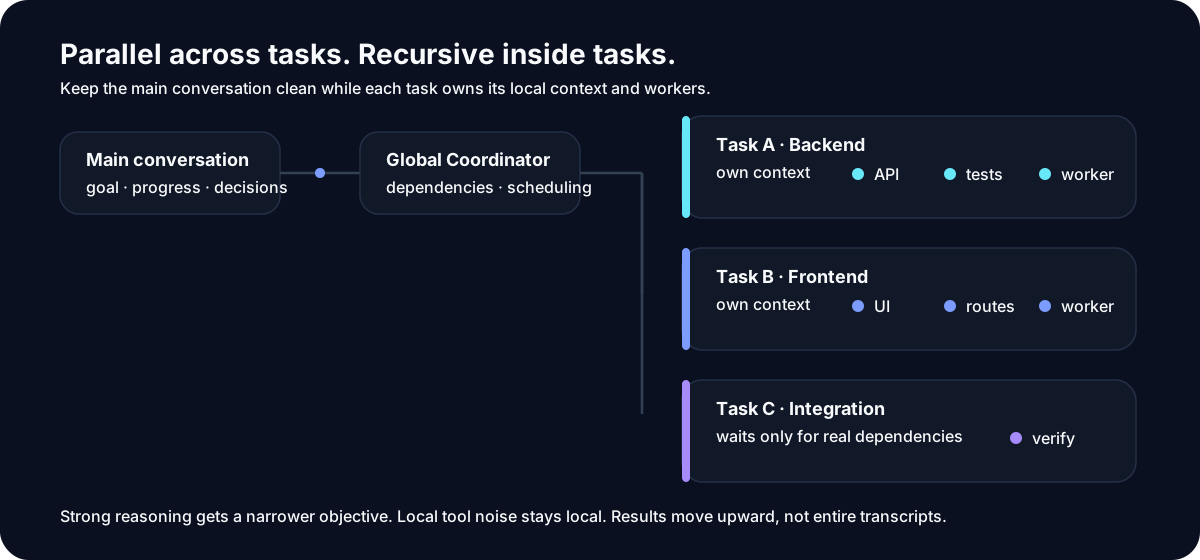
Stop running an entire project inside one AI conversation.
Give All in Luna one big goal.
It turns the work into independent top-level tasks: run what can run in parallel, wait only on real dependencies, keep each task's context separate, and bring the results back together.
Each task can still use its own subagents, tools, Skills, or MCPs.
Parallel across tasks. Recursive inside tasks.
Why does this exist?
Small AI coding tasks are easy.
The hard part looks more like this:
“Refactor authentication end to end, including the backend, frontend, migration, tests, and documentation.”
At first, everything is fine.
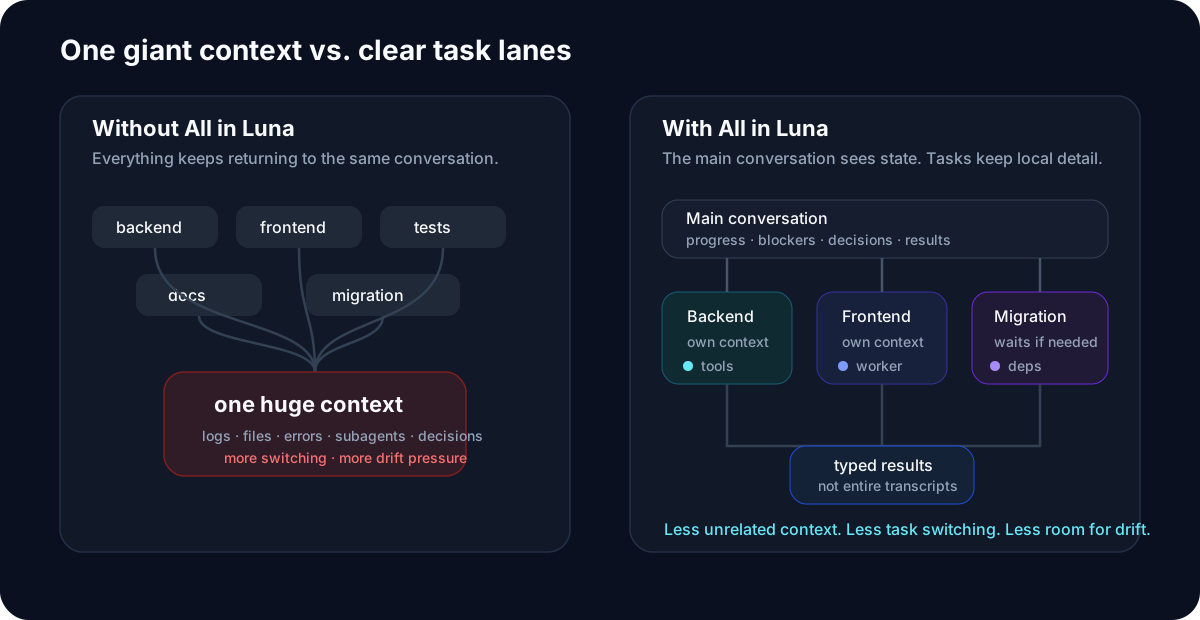
Then the agent reads files, edits code, runs tests, starts subagents, handles failures, reads more files, and keeps pushing more execution detail back into the same conversation.
After enough turns, familiar problems appear:
- the context keeps growing;
- unrelated work starts contaminating other work;
- earlier constraints become easier to forget;
- one local blocker stalls the whole flow;
- subagent results become harder to manage;
- a new conversation has to reconstruct what really happened;
- the agent says “done,” but the outcome may not actually be complete.
All in Luna starts from one simple idea: one conversation should not have to carry an entire project.
One more layer above subagents
A typical agent workflow looks like this:
You
 │
 ▼
Main Agent
 ├─ subagent
 ├─ subagent
 └─ subagent
All in Luna adds a real Top-level Task layer above local workers:
You
 │
 ▼
All in Luna
 │
 ├─ Top-level Task A
 │    ├─ local work
 │    └─ subagents / tools / Skills
 │
 ├─ Top-level Task B
 │    ├─ local work
 │    └─ subagents / tools / MCPs
 │
 └─ Top-level Task C
      └─ waits only when it actually depends on A
A Top-level Task is not just another subagent.
It is an independent work domain with its own goal, context, dependencies, working state, local execution process, and result boundary.
A subagent is a local worker a Task may use when that Task needs to split its own work further.
All in Luna does not replace subagents. It gives them a better place to live.
What you get
1. Real top-level tasks
A large goal can become independent work domains instead of temporary chat branches.
For example:
Add billing to this app

├─ Billing backend
├─ Checkout UI
├─ Database migration
├─ Integration tests
└─ Documentation
Each task can move independently, wait on dependencies, produce results, and keep its own working context.
2. Parallel when possible
Independent work does not need to queue behind unrelated work.
Billing backend       ● running
Checkout UI           ● running
Documentation         ● running
Database migration    ○ waiting for schema
Integration tests     ○ waiting for backend
One blocked task doesn't freeze unrelated work.
3. Separate working contexts
Backend debugging does not need to share one giant context with frontend changes, test logs, documentation, and release work.
Your main conversation should mostly see:
✓ what is done
● what is running
○ what is waiting
! what needs your decision
File reads, terminal output, test logs, diffs, and implementation detail can stay with the Task that produced them.
Your main conversation does not need to become the project's log file.
4. Recursive local workers
A Top-level Task can still split into WorkUnits or use local subagents when it is complex on its own.
Backend Task
 ├─ API
 ├─ database changes
 ├─ tests
 └─ migration checks
Local complexity stays local.
Parallel across tasks. Recursive inside tasks.
5. Resume instead of restarting
All in Luna persists run state, task state, dependencies, and results.
Long-running work does not have to remain attached to one ever-growing conversation.
start
→ work
→ stop
→ come back
→ resume
Completed work does not have to be rediscovered from chat history.
6. Verify before “done”
An agent saying:
“Done.”
is not the same as the task actually being complete.
All in Luna can check tests, builds, changed files, artifacts, and declared outputs before accepting a task as complete.
7. Bring your own workflow
All in Luna is not one fixed workflow.
Use the default delivery path for ordinary software work.
Use GSD inside a Task when you want a more explicit development workflow.
Connect Research Routes for research-oriented work.
Tasks can also use other Skills, MCPs, tools, and host capabilities.
The Core runs complex work. It does not dictate how every task must think.
Example
Suppose you say:
“Refactor this application's authentication system, including backend, frontend, migration, and tests.”
All in Luna can organize it as:
Authentication refactor

├─ Task 1 — Auth backend
│    ├─ session/token logic
│    ├─ API
│    └─ backend tests
│
├─ Task 2 — Frontend auth flow
│    ├─ login
│    ├─ logout
│    └─ protected routes
│
├─ Task 3 — Migration
│    └─ waits for auth contract
│
└─ Task 4 — Integration
     └─ waits for backend + frontend
Task 1 and Task 2 can move at the same time.
Task 1 can still use its own subagents if needed.
Task 3 waits only for the result it actually depends on.
You do not have to follow the complete implementation history of all four tasks in one conversation.
When should I use it?
All in Luna is a good fit for:
- large features;
- work spanning frontend / backend / tests / docs;
- major refactors;
- migrations;
- several outcomes that can move independently;
- long-running coding sessions;
- work where one blocker should not stop the whole project;
- tasks that need different tools, models, or workflows;
- work you want to resume instead of reconstructing from chat history.
If you are fixing one typo, explaining one function, changing one CSS rule, or doing another tiny linear task, using the current agent directly is usually faster.
All in Luna solves the organization problem of complex work. It does not make simple work complicated.
Models & performance
You do not have to configure anything
Most users do not need to choose a model policy first.
If you do not specify one, All in Luna uses resources available through the current environment, host, or deployment policy.
It does not require every user to use one fixed model or provider.
You can take control when you want
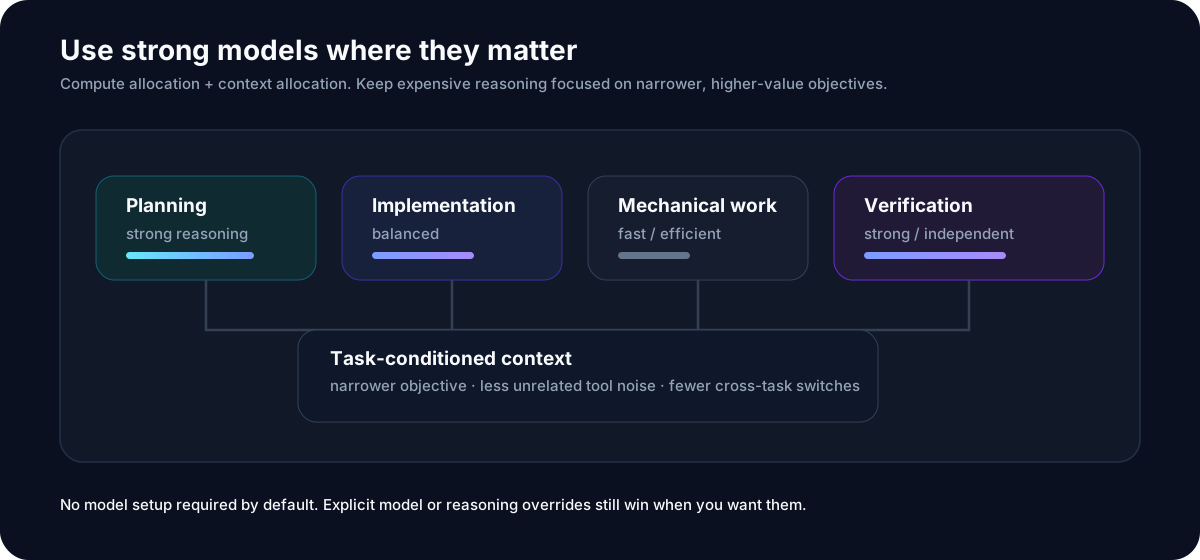
Different kinds of work do not always deserve the same amount of expensive reasoning.
For example:
Planning        → stronger reasoning
Implementation  → balanced
Mechanical work → fast / efficient
Verification    → strong / independent
Spend strong reasoning where it matters, not everywhere.
All in Luna also separates the problem itself. Strong models can work on narrower, more stable objectives with less unrelated context and fewer cross-task switches.
Less unrelated context. Less task switching. Less room for drift.
Common ways to use the resource system include:
- Balanced — sensible defaults for most projects;
- Quality first — stronger reasoning for architecture, difficult debugging, risky refactors, and research;
- Efficient — reserve stronger reasoning for decomposition, hard blockers, synthesis, and final verification;
- Single model — keep the run on one explicitly selected model where possible.
These are usage patterns, not model names hard-coded into the Core. Advanced users can still override concrete models and reasoning at Task or WorkUnit scope.
See Models & performance.
Workflow Packs
The All in Luna Core is responsible for:
top-level tasks
dependencies
scheduling
context
results
recovery
A Workflow Pack can define how an individual Task should work.
Delivery
The default software-delivery path for features, bug fixes, refactors, migrations, and integrations.
GSD
Use GSD when you want a more explicit development workflow:
clarify
→ specify
→ decompose
→ implement
→ verify
→ integrate
GSD and All in Luna operate at different layers.
GSD can run inside an All in Luna Top-level Task.
Research Routes
Preserves Claims, Evidence, unknowns, contradictions, experiments, and research route changes.
Research judgment does not automatically become implementation authorization.
How is it different?
| Subagents | GSD | All in Luna | |
|---|---|---|---|
| Split local work | ✓ | ✓ | ✓ |
| Detailed development workflow | — | ✓ | Optional |
| Independent top-level tasks | — | — | ✓ |
| Top-level dependency scheduling | — | — | ✓ |
| Separate context per top-level task | Limited | Phase-oriented | ✓ |
| Local workers inside each task | ✓ | ✓ | ✓ |
| Pluggable workflows | — | — | ✓ |
| Persistent run / recovery | Depends | Depends | ✓ |
The key difference is not who can create more agents.
All in Luna makes the Top-level Task itself a first-class runtime object.
What about Sol Advisor?
Sol Advisor-style systems are closer to:
Strong Primary Architect
→ bounded implementation / review workers
All in Luna moves the orchestration boundary one level higher:
Global Coordinator
→ multiple persistent Top-level Tasks
→ each Task has its own workflow and workers
They focus on different abstraction layers rather than being simple substitutes.
Quickstart
Vibe coding
After installing All in Luna, the simplest way to use it is just to say:
Use All in Luna to finish the authentication refactor.
Keep independent parts moving in parallel where possible.
That's it.
You do not need to design a TaskGraph, choose a scheduler, create an agent hierarchy, or fill in a resource questionnaire first.
CLI
When you want explicit control over a run:
python -m pip install "allinluna==2.0.0rc3"

allinluna start --goal "Finish the authentication refactor"
allinluna status RUN_ID
allinluna drive RUN_ID
See all commands:
allinluna --help
Lane, direct-work, recovery, and diagnostic commands live in the advanced CLI documentation.
For repository development, replace the release install with python -m pip install -e ..
DeepSeek Harness / All in Flash
All in Flash is the DeepSeek Harness (DSH) bundle for All in Luna. It turns frozen All in Luna top-level task actions into durable DSH lane children, while preserving the exact action and receipt contract.
- npm package:
@zenx0x/allinflash - Integration guide:
plugins/deepseek-harness/README.md
After installing the All in Luna CLI, initialize a dedicated DSH profile in one command:
npx @zenx0x/allinflash@0.2.0 init --profile allinflash
dsh --profile allinflash
GitHub search terms: deepseek-harness, dsh, dsh-plugin, allinflash,
multi-agent-orchestration.
Permissions
Starting a run does not grant All in Luna every external permission.
Permissions matter only when the corresponding action is actually reached, including:
- push;
- merge;
- deploy;
- publish;
- credentials;
- destructive operations;
- live external mutations.
Ordinary local exploration and task organization do not require a giant permission questionnaire up front.
Design philosophy
Keep the Core small.
Top-level scheduling, context, protocols, and recovery belong in the Core. Specific workflows belong in Packs.
Protocols instead of management theater.
Correctness should come from runtime contracts where possible, not from adding another layer of Reviewer / Auditor / Manager agents.
Keep local complexity local.
A Task's tool noise and local workers should not pollute the whole project.
Stay model-neutral.
The Core describes the capability it needs instead of forcing every user onto one model.
Leave room for the user.
All in Luna runs complex work without silently expanding the user's goal.
Documentation
Start here
Go deeper
Release
See GitHub Releases and the Changelog for the current version, upgrade notes, and known limitations.
License
Apache License 2.0 — see LICENSE.