按时间窗口自动暂停/恢复 DSH 模型请求,应对 DeepSeek 峰谷分时计价并可按模型档位豁免。

- 语言
- JavaScript
- License
- MIT
- 分支
- main
安装
$ dsh plugin --profile web add github:zhu168/dsh-save-money在终端中运行以上命令,通过 dsh CLI 安装此插件。可在右上角切换 Profile。 第一次用 dsh?看这篇新手教程
对话式安装
帮我安装 DeepSeek Harness 插件 zhu168/dsh-save-money:先查看仓库 https://github.com/zhu168/dsh-save-money.git 确认安全性,然后执行安装命令并验证插件加载成功。
把这段指令粘贴给 DSH Web GUI 里的助手,由它代你完成安装与验证。
一句话定位
按自定义时间窗自动暂停/恢复 DSH 的模型请求,应对 DeepSeek 等大模型 API 的峰谷分时计价;窗口内 AI 不会发出任何请求、不产生费用,窗口结束自动接着跑,配置按模型档位生效。
核心能力
- 按时间窗口自动暂停:到达暂停时刻后正在运行的活跃任务会被冻住(进度原样保留),窗口结束自动恢复;没有活跃任务则不创建暂停记录
- 暂停窗口内完全静默:在窗口期间拦截模型流(llm/stream),所有匹配档位的请求挂起等待,窗口结束再放行,不产生任何 API 费用
- 按模型档位豁免:默认只对官方 DeepSeek 的 flash / pro 两档生效;opencode go·zen flash / pro 与其他任何无法识别的第三方模型一律豁免,不会阻塞请求
- 配置持久化:所有设置自动落盘到工作区文件
save-money.config.json,重启 / 浏览器刷新后保留;余额采样历史持久化到~/.dsh/dsh-save-money-balance.json(按 API key 指纹标识,换 key 自动作废旧历史) - 可选的 DeepSeek 余额与消费图:开启「显示余额」后头部状态文字旁显示官方账户余额;后端每 5 分钟采样一次,悬停余额可见最近 1 小时 / 10 分钟 / 24 小时消费金额,点击余额弹出最近 8 小时、每 10 分钟一根的消费柱形图
- 一键 DeepSeek 分时计价策略:自动补上
08:58–12:02、13:58–18:02北京时间高峰窗口(暂停提前 2 分钟、继续延后 2 分钟留余量),不自动启用,由你决定是否勾选
技术实现
- 语言: TypeScript(
tsconfig.json严格模式;src/下 17 个.ts+ 6 个.tsx) - 关键依赖: 无运行时第三方依赖;构建期仅 devDependencies 包含
typescript ^5.9.3(package.json:17),不引入任何 npm 库 - 架构模式: 官方 dual-half 插件。Host half 通过
cordis.patch.yml注入id: save-money行;在ctx.on('llm/stream', ..., { global: true })处包裹模型流作为请求级闸门,配合ctx.get('goals').pause/resume在暂停/恢复时冻结与还原活跃任务。Client half 通过plugin/package.json#dsh.client挂到 web profile,会话头部右上角常驻状态文字、浮动横幅与设置页自动加载。10 种语言文案在src/i18n/*,构建时内联;React UI 走 DSH 主题变量--dsw-*跟随机亮 / 暗主题 - 入口文件: Host 入口
src/host.ts(apply),构建后产出plugin/index.js;Client 入口src/client.ts,构建后产出plugin/client.js;挂载声明plugin/cordis.patch.yml(bundle 安装插入 1 行 Loader)
适用场景
当 DSH 用户希望压低 DeepSeek 等大模型 API 的高峰期账单,又不想错失自动化长任务时:把白天高峰时段设为暂停窗口,让插件在窗口开始时冻住正在跑的任务、挂起新请求,窗口结束再无缝继续——尤其适合需要长时间无人值守、批量处理任务的场景;同时想要可视化消费走势、设置按模型档位豁免 OpenCode 订阅或第三方中转、不再担心临时忘记重启用开关。
前置依赖与兼容性
| 依赖 | 最低版本 | 说明 |
|---|---|---|
| DeepSeek Harness (DSH) | 未声明 | package.json 未声明 engines / peerDependencies;以官方 dsh plugin 形态安装,依赖宿主提供 timer / agents / goals / fs / sessions / webServer / credentials / subprocess 等服务 |
| Node.js | 未声明 | 仓库未声明 engines;构建脚本使用 node:fs / node:path / node:url / node:test 等内置模块,运行 DSH Web profile 的 Node 版本即可 |
| 平台 | 跨平台 | tsconfig.json#compilerOptions.target = ES2022;源码使用 Intl.DateTimeFormat + IANA 时区(含 DST ±12/±13 边界如 Pacific/Auckland),无平台特定代码 |
| 原生模块 | 无 | 第三方依赖全部为零;不引入 node-pty / node:sqlite 等原生模块 |
| 时区 | 任意 IANA 名 | 设置面板提供 24 个代表时区下拉 + 24 个 IANA 时区候选,Asia/Shanghai 为默认;窗口可单独覆盖时区 |
安装方式
dsh plugin --profile web add github:zhu168/dsh-save-money
配置项
所有配置通过 设置 → 省钱插件(侧栏) 或 会话头部右上角 "省钱 · 🟢 工作中" 浮层可视化编辑;下方为可调字段一览(节选自 src/config.ts:26-58,所有字段均在 applyConfig 中按 schema 校验后即时自动保存)。语言跟随浏览器或手动选择(auto / zh / zh-TW / en / de / fr / es / it / pt / ja / ko 共 10 种)。
| 配置 | 类型 | 说明 | 默认值 |
|---|---|---|---|
| 启用 | boolean | 总开关:勾选后插件才会按窗口暂停 / 恢复请求;取消勾选立即释放闸门等待者 | false(未启用) |
| 时区 | IANA 名 | 窗口与状态时钟所参照的时区;切换时区会自动换算窗口时间(夏令时感知,例 北京 08:58 夏季对应伦敦 01:58、冬季 00:58) | Asia/Shanghai |
| 提前提醒(分钟) | number(>=0) | 距下次暂停还有多少分钟时进入「即将暂停」状态并在顶部显示黄色提醒横幅 | 5 |
| 启动时尝试恢复暂停中的任务 | boolean | 启动时如果发现之前因崩溃残留的 paused 目标,自动 resume —— 任何任务都不应跨重启被永久冻结 | true |
| 显示余额 | boolean | 头部状态文字旁显示 DeepSeek 官方账户余额 + 悬停卡 + 8 小时消费柱形图;关闭后采样也停止、不再访问 /user/balance | false(不显示) |
| 模型档位:官方 flash | boolean | 勾选 = 窗口内暂停官方 DeepSeek flash 模型的请求;不勾选 = 豁免(即使在窗口内也放行) | true |
| 模型档位:官方 pro | boolean | 勾选 = 窗口内暂停官方 DeepSeek pro 模型的请求;不勾选 = 豁免 | true |
| 模型档位:opencode flash | boolean | 勾选 = 窗口内暂停 opencode go/zen flash 模型请求;不勾选 = 豁免 | false |
| 模型档位:opencode pro | boolean | 勾选 = 窗口内暂停 opencode go/zen pro 模型请求;不勾选 = 豁免 | false |
| 暂停窗口 | array<{时间, 星期, 时区}> | 自定义一组暂停 / 继续时间(HH:mm,支持跨午夜如 23:00–08:00);同组星期(1=周一…7=周日)筛选;单窗口可选独立时区。默认留空时设置面板预填 DeepSeek 高峰 08:58–12:02、13:58–18:02 北京时间 | [] |
| 一键 DeepSeek 分时计价策略 | button | 不修改启用开关;按当前所选窗口视图去重追加 08:58–12:02、13:58–18:02 北京时间高峰窗口 | — |
| 结束本次省钱模式 | button | 一次性跳过当前这一个暂停窗口:已暂停则立即恢复、即将暂停则取消本次;持久化的「启用」开关不会被关掉 | — |
常见问题
Q: 安装后状态文字 / 浮动横幅 / 设置页都没出现,怎么办?
A: 必须完全重启 DSH(Ctrl+C 停掉再启动)并强制刷新浏览器(Ctrl+Shift+R),插件界面在启动时挂载。仍不出现说明用的是 v1.2.4 之前的旧构建——升级即可(README.zh.md:304)。
Q: 「启用」勾选不上、设置项点不动,是 bug 吗?
A: 不是。早期版本(v1.2.5 之前)在部分机器上插件会比 Web 服务先就绪,界面请求到不了插件。当前 1.4.3 已修复——等待 webServer 就绪后再注册 HTTP 端点(README.zh.md:305 / src/host-http.ts:23-63)。
Q: 这个插件会暂停所有模型调用吗?第三方模型会被暂停吗?
A: 默认只暂停官方 DeepSeek 的 flash / pro 两档;opencode go·zen flash / pro 与其他任何无法识别为官方 flash/pro 或 opencode flash/pro 的模型一律豁免,绝不阻塞请求。识别不到的 provider(如其他第三方中转、旧名 deepseek-chat / deepseek-reasoner)永远不会卡住你的请求(src/balance-bars.ts:53-63)。
Q: 数据存放在哪里?删除后会发生什么?
A: 设置文件落在工作区的 save-money.config.json(gitignored);余额采样历史存于 ~/.dsh/dsh-save-money-balance.json(按 API key 指纹标识,换 key 自动作废旧历史)。删除前者即恢复默认;删除后者清空消费统计(src/config.ts:57-58 / src/balance-tracker.ts:81-100)。
Q: 暂停窗口开始后,正在跑的任务会不会丢失?
A: 不会。正在执行的活跃任务会被安全「冻住」(进度原样保留),窗口结束自动恢复接着跑;如果此刻没有活跃任务,插件不会创建暂停记录(src/host-goals.ts:63-90 / src/host.ts:151-155)。
Q: 「结束本次省钱模式」按钮会把整个插件关掉吗?
A: 不会。该按钮是只跳过当前这一个暂停窗口(已暂停则立即恢复、即将暂停则取消本次),下一次窗口(今天或以后)照常生效,且不会改动持久化的「启用」开关(src/state.ts:50-79 / src/host.ts:348-366)。
Q: 余额数字显示很怪——切了模型就消失了?
A: 余额只对官方 DeepSeek(provider 为 deepseek-official)生效;当你切到 OpenCode / 第三方模型时余额会自动隐藏,但已采样的消费统计不会被清除,切回 DeepSeek 后余额立即恢复(src/balance-tracker.ts:178)。
Q: 如何卸载?卸载后设置还在吗?
A: dsh plugin --profile web remove dsh-save-money,重启 DSH。配置文件 save-money.config.json 留在原目录里——卸载 / 重装不会动它,想恢复默认就手动删除该文件(README.zh.md:238 / README.zh.md:306)。
上手难度
入门 — 安装后只需重启 DSH 并强制刷新浏览器,会话头部右上角即出现「省钱」状态文字;点击进入设置后,按一键 DeepSeek 分时计价策略 + 勾选「启用」即可生效,不必关心内部闸门 / 目标冻结 / 时区换算等机制。
已知问题与限制
- 暂停生效范围仅限能识别为官方 flash/pro 或 opencode flash/pro 的模型:其他第三方中转、旧名
deepseek-chat/deepseek-reasoner、未声明模型名一律豁免,不会被暂停(src/balance-bars.ts:53-63) - 余额显示依赖最近的真实请求跑在官方 DeepSeek:切到 OpenCode 或第三方中转时余额会自动隐藏(已采样的消费统计不会被清除),只有把 baseURL 改成非官方端点(中转无
/user/balance)时才会禁用(src/balance-tracker.ts:178/CHANGELOG.zh.md:67-68) - 「提前提醒」按配置的全局时区计算分钟差:跨午夜窗口或跨时区窗口的提醒时间可能与直觉略有偏差(
src/state.ts:62-78) - 配置文件查找走「指针 → 工作区 → 仓库目录 → DSH 启动目录 → 同级
dsh-save-money目录 → sandboxPolicy.workspaceRoot」6 级候选:若有多份配置散落在不同目录,最终胜出的是第一个存在配置文件的目录,与启动位置强相关(src/config.ts:210-240) - 余额历史绑定 API key 指纹:更换 DeepSeek API key 后旧历史自动作废,不会把旧账户的余额轨迹带到新账户(
src/balance-tracker.ts:81-100) - 暂停窗口内的请求会无限挂起等待闸门打开:客户端取消请求(abort 信号)或 DSH 关停会让闸门立即放行以避免悬挂;但若长时间挂起且无任何唤醒事件触发,请求最多延迟到下一次 60 秒定时 tick 才被唤醒(
src/host.ts:218-238/src/gate.ts:55-72) - 安装 / 更新插件后必须重启 DSH 生效:bundle 行的解析与客户端 bundle 均在启动时扫描,只刷新浏览器不会重新装载服务端插件(
README.zh.md:93)
Save-money plugin for DSH (DeepSeek Harness) — define your own "pause / resume" time windows; at pause time running long tasks are paused (not stopped) automatically, and they resume when the window ends. Built for LLM API peak/off-peak pricing (e.g. DeepSeek peak hours 9:00–12:00, 14:00–18:00 Beijing time, off-peak at half price), and equally useful for time-of-use electricity rates, bandwidth off-peak shifting, or any "I don't want the machine working during this period" scenario.
Status: ✅ Implemented, continuously maintained. 中文版
Interface
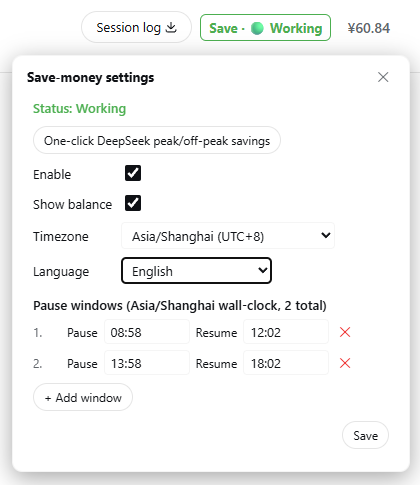
The colored status text in the top-right of the session header (Save · ⚪/🟢/🟡/🔴, color follows the state) is the single persistent entry — click it to open the settings popover. When a pause is upcoming or active, a reminder banner appears at the top of the page (with the End this save mode button).
With "Show balance" enabled, your official DeepSeek account balance appears next to the status text; clicking the balance opens the last-8-hours spend bar chart:
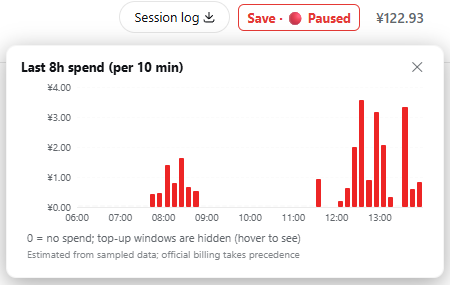
Each bar is a 10-minute window: the X axis shows whole-hour ticks, the Y axis key-point amount ticks (≤5, with gridlines), and hovering shows each window's exact time range and amount. Windows where the balance dropped without any local activity are marked in warning color (changes may come from another device).
Features
- Multiple time windows: add / remove pause-resume windows freely; supports midnight-crossing windows (23:00–08:00) and per-weekday filtering;
- Automatic pause on schedule: when the pause time arrives, running tasks are safely "frozen" (their progress is preserved exactly — nothing is interrupted or lost) and resume automatically when the window ends; if nothing is running, nothing is paused;
- No requests during the window (the saving core): inside a pause window the AI sends no new requests to the model service, so no cost is incurred; after the window ends (or on disable / end-this-window) everything resumes, with conversation context and in-flight tasks unaffected. The AI not replying inside a window (including new conversations) is expected — to resume right away, click the End this save mode button (takes effect directly, no AI involved);
- Per-model-tier save mode: decide per model tier which ones pause during windows. The settings panel shows two compact rows — Official API: flash / pro and opencode go·zen API: flash / pro — four toggles total. Checked = paused (saving money); unchecked = exempt (requests flow even during a window). Defaults: official flash + pro checked, opencode exempt; your changes are persisted and never reset. Any unrecognized model (legacy
chat/reasonernames, other third parties, anything else) is always exempt — it can never block your requests; - End this save mode (one-shot, current window only): the banner and settings-popover button end the currently active pause window only — if paused, tasks resume immediately and the gate opens; if a pause is upcoming, it is cancelled. The window is skipped until its resume time, then the state clears automatically. The next window (today or later) still takes effect, and the persistent Enable flag is never touched, so you cannot accidentally leave the feature disabled;
- UI reminders: top floating banner (light yellow for upcoming pause / light red for paused, with the End this save mode button) + the single persistent session-header entry (next to the Session log, "Save · 🟢 Working" colored status text; click to expand settings), colors follow the state in real time;
- Timezone support: IANA timezone dropdown, browser auto-detection with Beijing time (+8) fallback; UTC projection checked (Beijing 09:00 == UTC 01:00);
- One-click DeepSeek preset: dedupe-append the peak windows (08:58–12:02, 13:58–18:02, with a 2-minute boundary margin — pause 2 min early, resume 2 min late); it does not auto-enable — your call; legacy no-margin windows are upgraded automatically on one-click;
- Persistent config: all settings are saved automatically to the workspace file
save-money.config.json(gitignored); configuration survives browser refresh and plugin disable/re-activate, and is loaded on startup with optional reconciliation of paused goals; - Account balance display (optional): tick "Show balance" in settings and your official DeepSeek account balance appears next to the status text in the header (automatic currency symbol, theme-adaptive color). Off by default. With several model sources configured (official DeepSeek + SiliconFlow, relays, …) the balance follows the model actually in use: it is shown while the latest real request runs on the official provider and hidden otherwise (the sampled spend history is kept, so switching back to DeepSeek re-shows the balance immediately);
- Spend statistics: with the balance display enabled, the backend samples the balance every 5 minutes (288 points covering the last 24 hours). Hover the balance to see how much was spent in the last 1 hour / 10 minutes / 24 hours (balance increases from top-ups or refunds show as "+amount");
- Spend bar chart (last 8 hours, per 10 minutes): click the balance to open a chart of the last 48 ten-minute windows. External-spend attribution — a window where the balance dropped without any local model activity is marked with a warning color (hover: "no local activity in this window; change may come from elsewhere") instead of being reported as local consumption, so using the same API key from another machine never looks like a one-second spend explosion. Balance top-ups (recharges / refunds) are never drawn as bars and never stretch the Y axis — the axis stays spend-only; a hidden top-up window shows a "balance recovered (recharge / refund), not counted in spend analysis" note on hover;
- Persistent balance history: sampled history is saved to
~/.dsh/dsh-save-money-balance.json(account-level, shared across projects) and survives plugin updates/restarts. The file is keyed by a fingerprint of the API key — changing the key discards the old history automatically; - Non-intrusive by design: no screen lock, no overlay blocking, no user action prevented — only the automatic continuation of goals is paused; manual interaction always flows.
How it works
stateDiagram-v2
    direction TB
    [*] --> Disabled

    Disabled : Disabled ⚪ — nothing pauses, no money saved
    Working : Working 🟢 — normal use, requests flow
    Pausing : Pausing soon 🟡 — yellow banner reminder
    Paused : Paused 🔴 — requests suspended, no cost

    Disabled --> Working : check "Enable"
    Working --> Pausing : a window starts within 5 minutes
    Pausing --> Paused : pause time reached
    Paused --> Working : window ends, auto-resumes
    Paused --> Working : "End this save mode" — resume now
    Pausing --> Working : "End this save mode" — cancel this pause
    Working --> Disabled : uncheck "Enable"
    Pausing --> Disabled : uncheck "Enable"
    Paused --> Disabled : uncheck "Enable"
- When a pause window starts, running tasks are frozen (progress preserved) and the AI stops replying — that is normal: the machine is saving you money. Everything resumes automatically when the window ends;
- See the yellow "pause in X min" banner but don't want to pause right now? Click End this save mode to cancel this window only;
- Paused and want to continue immediately? Click End this save mode (red button) — it resumes right away, skips only the current window, and never turns off Enable: the next window (today or later) still saves money as usual. If you ever want every window to take effect again, uncheck and re-check Enable.
Install
The official DSH plugin form is a module exporting apply + cordis.yml mounting (see the DSH official tutorial). You can install from npm (one command, recommended) or build from this repository (three options below: --patch quick try, distributable bundle, or the link + HMR development workflow). Every official form ships the full plugin: Host logic (scheduling, gate, goal freeze, tools, HTTP endpoints) and the browser UI (status text, banner, settings page), which loads automatically — no AI-assisted setup needed.
Install from npm (recommended)
The plugin is published to npm — one command installs it into your Web profile:
First-time install
npx @deepseek-ai/dsh plugin --profile web add dsh-save-money
Remove
npx @deepseek-ai/dsh plugin --profile web remove dsh-save-money
After installing, fully restart DSH (Ctrl+C, start again) and hard-refresh the browser (Ctrl+Shift+R) — the "Save" status text appears top-right in the session header.
Source install (build from this repo)
Using ~/app/ as an example directory (each step assumes the previous one succeeded):
cd ~/app/

git clone https://github.com/zhu168/dsh-save-money.git

cd dsh-save-money
npm install

cd plugin
npm pack                    # runs the build automatically; produces the plugin tarball

ls                          # check the tarball name, e.g. dsh-save-money-1.4.3.tgz

cd ~/app/deepseek-harness   # change to your harness directory (clone it first if missing — see "0." below)

pnpm dsh plugin --profile web remove dsh-save-money   # only if you installed it before; skip if you haven't

pnpm dsh plugin --profile web add ../dsh-save-money/plugin/dsh-save-money-1.4.3.tgz   # use the name from `ls` above

pnpm dsh --profile web      # starts DeepSeek Harness — the plugin appears top-right in the session header
Two notes: ① the tarball name on the
addline must match whatlsprinted (1.4.0is just an example); ② if your harness runs via npx, replace everypnpm dshabove withnpx @deepseek-ai/dsh(install commands too).
0. Run DSH itself first
The plugin runs inside DSH, so DSH must run before anything below. Two ways:
A. Installed CLI (easiest, needs Node.js):
npx @deepseek-ai/dsh web # starts the Web UI at http://127.0.0.1:3080
B. From source (e.g. on a Raspberry Pi; dsh is NOT a global command — you must run pnpm dsh inside the checked-out deepseek-harness directory):
git clone https://github.com/deepseek-ai/deepseek-harness.git
cd deepseek-harness
pnpm install
pnpm run build
pnpm dsh web                    # inside this directory only
In source mode, never type bare
dsh ...— it is not on PATH (command not found: dsh). Usepnpm dsh ...from thedeepseek-harnessdirectory, or./node_modules/.bin/dsh ....
Path 1: --patch quick try (official, loads local source)
Good for trying the plugin on the same machine where you keep this repository.
-
(Optional) Rebuild the latest plugin module — a fresh clone needs the build deps first:
npm install # first clone: installs typescript and friends npm run prepare # one step: src/*.ts -> dist/*.js -> plugin/index.js + plugin/client.js -
Edit
cordis.patch.yml, replacing<REPO_ROOT>with the repository's absolute path (it is the only placeholder in the file — use your editor's "replace all"):- insert: - id: save-money name: '<REPO_ROOT>/plugin/index.js'Examples — Windows:
name: 'D:/git/github/dsh-save-money/plugin/index.js'; Linux / macOS / Pi:name: '/home/pi/dsh-save-money/plugin/index.js'.If your profile already has the plugin installed via bundle / link, skip Path 1 (stacking
--patchwould register the plugin twice). -
Start with the overlay:
dsh web --patch ./cordis.patch.yml # globally installed dsh npx @deepseek-ai/dsh web --patch ./cordis.patch.yml # npx-launched (Step 0, option A) # from source: pnpm dsh web --patch ./cordis.patch.yml -
Open the browser at the printed URL (default http://127.0.0.1:3080) — the "Save" status text appears in the session header top-right. No extra step needed.
Path 2: bundle + dsh plugin add (official, distributable — recommended for another machine / the Pi)
The bundle is a small .tgz that you build once and install anywhere. You do not clone this repository on the target machine — DSH installs the plugin into its own profile (~/.dsh/profiles/web/node_modules/).
Step 1 — build & pack the bundle (on any machine with this repository):
cd dsh-save-money
npm install             # first clone only (typescript dev dependency)
cd plugin
npm pack                # runs the prepare build automatically; produces dsh-save-money-1.4.3.tgz
plugin/ is the standard bundle layout: package.json declares dsh.bundle.patch + dsh.client, cordis.patch.yml inserts the plugin row, index.js is the Host module and client.js the browser UI bundle.
Step 2 — copy the tgz to the target machine (scp / USB stick / however you move files; run this on the build machine, one directory above the repository, adjusting the path to yours):
scp dsh-save-money/plugin/dsh-save-money-1.4.3.tgz pi@<pi-ip>:~/
Step 3 — install into a profile (on the target machine; first run initializes the profile with @deepseek-ai/dsh-base):
# DSH run from source (inside the deepseek-harness directory):
pnpm dsh plugin --profile web add ~/dsh-save-money-1.4.3.tgz
# npx-launched (Step 0, option A) or globally installed dsh: works from any directory
npx @deepseek-ai/dsh plugin --profile web add ~/dsh-save-money-1.4.3.tgz
Both commands do the same thing: install the tgz into
~/.dsh/profiles/web/node_modules/. Use whichever matches how you start DSH.
Git install also works: dsh plugin --profile web add github:you/dsh-save-money#<sha> (git install requires prepare builds and allowBuilds, see the DSH publish tutorial).
Step 4 — verify the layer mounted, then start (fully restart DSH, don't just refresh the page):
pnpm dsh --profile web --dump-config   # the output should show a dsh-save-money layer (its plugin rows)
pnpm dsh --profile web                 # Ctrl+C to stop an already-running instance first
Step 5 — open the browser at http://127.0.0.1:3080 and hard-refresh (Ctrl+Shift+R). The "Save" status text appears in the session header; click it for the settings. You can also confirm the plugin is live from a conversation (save_money_status).
Upgrading to a newer version (e.g. 1.3.0 → 1.4.0):
The commands below use
pnpm dsh; if you launched DSH via npx, replacepnpm dshwithnpx @deepseek-ai/dsh.
# on the build machine:
cd dsh-save-money && git pull && cd plugin && npm pack    # fresh dsh-save-money-<new>.tgz
scp dsh-save-money/plugin/dsh-save-money-1.4.3.tgz pi@<pi-ip>:~/

# on the target:
pnpm dsh plugin --profile web remove dsh-save-money
pnpm dsh plugin --profile web add ~/dsh-save-money-1.4.3.tgz
pnpm dsh --profile web                # restart, then hard-refresh the browser
Your settings survive upgrades (they live in save-money.config.json, untouched by remove/re-add).
Uninstalling:
pnpm dsh plugin --profile web remove dsh-save-money
Path 3: development workflow (what this repository actually uses: link install + HMR hot reload)
Changes take effect immediately — no DSH restart and no tgz needed. This is the form used while developing the plugin: dsh plugin add link: links the plugin/ directory straight into the profile, and a cordis-plugin-hmr hot-reload plugin watches the build output. Save the source → npm run prepare → the running DSH hot-swaps the new plugin; hard-refresh the browser to see the client UI.
One-time setup (on the development machine):
-
Build and link-install:
cd dsh-save-money npm run prepare # src/*.ts -> plugin/index.js + plugin/client.js pnpm dsh plugin --profile web add link:D:/git/github/dsh-save-money/plugin # use your repository's absolute path -
Configure hot reload: edit
~/.dsh/profiles/web/cordis.patch.yml(create it if missing) and replacerootwith your repository'splugindirectory absolute path:- insert: - id: save-money-hmr name: '@deepseek-ai/cordis-plugin-hmr' config: root: ['D:/git/github/dsh-save-money/plugin'] ignored: ['**/node_modules', '**/.*'] debounce: 100 -
Start DSH (
pnpm dsh web/npx @deepseek-ai/dsh web) and open the browser (default http://127.0.0.1:3080).
Daily dev loop:
# after editing src/*.ts, run once:
npm run prepare        # rebuild -> writes plugin/index.js + plugin/client.js
DSH hot-replaces the plugin within ~0.1s (look for [hmr] logs in the terminal) — no restart; hard-refresh the browser (Ctrl+Shift+R) to see client-side changes.
Note:
link:and the Path 2 bundle install are mutually exclusive — if you installed the bundle before, runpnpm dsh plugin --profile web remove dsh-save-moneyfirst, thenadd link:.
Config persistence (all forms)
The plugin writes its settings to save-money.config.json (excluded by .gitignore, never committed): loaded automatically at startup, persisted immediately on every change. The config file location is resolved at runtime by walking a candidate list — the first directory that actually contains a config file wins:
- the directory recorded by the pointer file
~/.dsh/save-money-config-path.json(the last real location, so a restart resolves the same file even when no session matches); - the current session's workspace directory;
- every session workspace whose path ends in
dsh-save-money(the newest one wins when several exist); - the DSH startup directory itself (
process.cwd(), official install form); - a
dsh-save-moneydirectory sibling to the DSH startup directory (the README quick-install layout:~/app/deepseek-harnessnext to~/app/dsh-save-money); - final fallback:
sandboxPolicy.workspaceRoot(the DSH install dir).
On a fresh install (no config anywhere) the plugin prefers to write the config into the repo directory (the dsh-save-money dir matched by step 4/5) instead of polluting the DSH install dir, and records a pointer in ~/.dsh/ so every later restart loads the same file. Deleting the config file resets all settings.
Troubleshooting
| Symptom | Cause & fix |
|---|---|
zsh: command not found: dsh / dsh: command not found | You are running DSH from source — dsh is only available inside the deepseek-harness directory as pnpm dsh ... (or ./node_modules/.bin/dsh). Never use bare dsh outside it. |
Plugin fails to load with ReferenceError: harness is not defined | You are running a build older than v1.2.2 — the official form was fixed in v1.2.2. Rebuild (npm run prepare), re-pack, reinstall, and restart. |
| Installed but no status text / banner / settings page | Fully restart DSH (Ctrl+C, start again) and hard-refresh the browser (Ctrl+Shift+R) — the Client half is discovered at startup. If it still does not appear, you are running a build older than v1.2.4 — upgrade. |
| UI shows but the Enable checkbox (and other settings) do nothing | You are running a build older than v1.2.5 — the plugin used to start before the Web server was ready, so UI requests could not reach it. Upgrade to ≥ v1.2.5 and restart. |
| Where is my config file? | Resolved automatically from the 6-step candidate list above (session workspace / repo dir preferred; ~/.dsh/save-money-config-path.json records the last location). Deleting it resets all settings. |
Quick start
The steps below apply to every install form — Path 1 / Path 2 / Path 3 all ship the same settings UI. You can also configure through the tools in a conversation (
save_money_configure,save_money_status).
- After install and activation, click the "Save · 🟢 Working" status text in the top-right of the session header (next to the Session log) to open settings (the single persistent entry); or use the system settings page (sidebar → Settings → Save-money);
- Click One-click DeepSeek peak/off-peak savings → the peak windows are added automatically (08:58–12:02, 13:58–18:02 Beijing time, with the 2-minute boundary margin);
- Check "Enable" (the one-click does not auto-enable);
- Save the window settings — the plugin starts watching: tasks pause automatically at the window start and resume when it ends.
Entries
| Entry | Where |
|---|---|
| Status text (single persistent entry) | Session header top-right (next to the Session log) "Save · 🟢 Working", click to open the settings popover |
| System settings page | Sidebar → Settings → Save-money |
| Floating banner | Top capsule when a pause is upcoming / active + End this save mode button (one-shot: ends only the current window, future windows unaffected) |
Dynamic tools (Host)
| Tool | Purpose |
|---|---|
save_money_status | Query state / gate state (gate: open|closed) / window / pause record / UTC projection |
save_money_configure | Configure (enabled / timezone / warnMinutes / windows) |
save_money_end_window | End save mode for the currently active window only (one-shot, in-memory): resume now / cancel the upcoming pause; next windows still take effect |
save_money_debug_tick | Dev tool: manually advance the state machine |
Docs & License
- Repository layout:
src/holds the TypeScript plugin sources (single source of truth, every file ≤ 400 lines):core.ts/state.ts/config.ts(pure logic: time helpers, state machine, config controller),balance-history.ts/balance-bars.ts/balance-host.ts/balance-client.ts(balance history, model classification + spend bars, balance transport, balance UI helpers),host-goals.ts/gate.ts/balance-tracker.ts/host-http.ts/host-tools.ts(host sub-modules wired byhost.ts),i18n/*(10 locale dictionaries + aggregator),ui/*(client components wired byclient.ts).tests/(unit tests,npm test),scripts/build.js(TS → JS plugin bodies),scripts/typecheck.js(type check),scripts/make-plugin.js(official bundle generator),plugin/(bundle:package.json+cordis.patch.yml+index.js+client.js),cordis.patch.yml(quick-try overlay),package.json/tsconfig.json(build & type config),dist/(build output, gitignored),save-money.config.json(runtime config, gitignored) - i18n: UI strings live in
src/i18n/*— one dictionary per language (zh.ts,zh-TW.ts,en.ts,de.ts,fr.ts,es.ts,it.ts,pt.ts,ja.ts,ko.ts); the language is auto-detected from the browser locale, manually selectable (Auto + 10), and the choice persists in the config - License: MIT (see
LICENSE)
收录徽章

[](https://deepseek-plugin.org/plugins/zhu168/dsh-save-money)把这段 markdown 粘贴到你的 GitHub README,链接回本插件详情页。徽章只声明已被本站收录,不代表安全认证。