DSH Sidebar Plugin: Injects a Plugin Market entry and 6-tab panel into the DSH sidebar, enabling browsing, search, personalized recommendations, one-click installation, installed plugin management, and GitHub starring.

- Language
- TypeScript
- License
- NOASSERTION
- Branch
- master
Install
$ dsh plugin --profile web add @dsh-market/pluginRun the command above in your terminal to install this plugin via the dsh CLI. You can switch Profile in the top-right corner. New to dsh? Read the beginner tutorial
Install via your agent
Install the DeepSeek Harness plugin 2BingLing/dsh-market/plugin/ui for me: review the repository at https://github.com/2BingLing/dsh-market first, then run the install command and verify the plugin loads successfully.
Paste this instruction to the DSH Web GUI assistant — it will install and verify for you.
One-Line Description
DSH ecosystem's "Plugin Market" cordis plugin version: brings the entire market into the DSH sidebar—browse, search, personalized recommendations, one-click install/uninstall, GitHub starring, 6-Tab panel on demand, zero token constant residence.
Core Features
- Sidebar Entry & Fullscreen Panel: Register
sidebar.footer.actionslot to show "Plugin Market" button, mount 6-Tab fullscreen floating panel atshell.overlayslot; button and panel toggle state shared across slots via store (plugin/ui/src/client/index.ts:13-61) - Browse & Search: Pull all indexed plugins from
plugins.json, local Fuse.js keyword search, Chinese tag filtering, type/no-config filtering; 200+ results paginated in panel - Personalized Recommendations (5 Channels): Cold-start questionnaire / installed plugins / GitHub stars / local favorites / scenario recommendations (read session title + recent messages + tool names, zero token) form the profile together, each recommendation includes "why recommended" reason
- One-Click Install & Uninstall: skill type
git cloneto skills directory, cordis typedsh plugin --profile X add <pkg>; each step with snapshot, failure retry (max 2 times), automatic rollback on failure; uninstall precisely removes by dependency key name (pnpm case-sensitive) - Installed Management & Self-Update: Auto-scan
~/.agents/skillsand profilepackage.jsonto identify installed items; give update hints via npm registry (cordis type) and GitHub pushedAt (skill type); panel allows self-update of plugins themselves - GitHub Integration: Settings page supports device flow (GitHub App) or PAT two binding methods; PAT mode can directly star/unstar plugin repositories in panel, sync starred repositories into profile
Technical Implementation
- Language: TypeScript (ESM, Node half + browser half dual entry; browser side uses React 18 +
React.createElementwithout JSX) - Key Dependencies:
@dsh-market/core(pure Node logic layer: search/profile/install/update/GitHub),@dsh-market/schema(shared types),fuse.js(local fuzzy search),react^18 (browser-side panel) - Architecture Pattern: cordis dual-half plugin — Node half (
apply(ctx)) registers POST JSON-RPC route for/market/apiand getsagents/subagents/sessionQuery/llmservices from harness; Browser half usesctx.slots.injectto put trigger intosidebar.footer.action, put panel intoshell.overlay; package-level declarationdsh.bundle.patch: ./cordis.patch.yml+dsh.client.injectthree platform seed modules let host load and service-ify - Entry Files:
plugin/ui/src/index.ts(Node half, exportsname = 'dsh-market'andinject = ['webServer']) /plugin/ui/src/client/index.ts(browser half, exportsinject = ['slots']) /plugin/ui/cordis.patch.yml(bundle injection declaration)
Use Cases
People just installed DSH not sure what to install—the plugin version uses "cold-start questionnaire + curated + scenario recommendations" so beginners can pick suitable plugins in 3 minutes; people who want to avoid remembering commands—one-click install avoids manually typing dsh plugin add or git clone; people with more and more plugins needing unified management—Installed Tab auto-detects skill directory and profile dependencies, gives update and uninstall entries; people who want recommendations based on their preferences—profile auto-updates with usage, gets smarter over time.
Prerequisites & Compatibility
| Dependency | Min Version | Description |
|---|---|---|
| DeepSeek Harness (cordis web profile) | Not declared | plugin/ui/package.json doesn't declare peerDependencies; injected via dsh.bundle.patch + dsh.client.inject; host web profile must enable three platform seed modules: @deepseek-ai/dsh-client-runtime / -locale / -ui-slots |
| Node | >=20 | engines field in root package.json (plugin/ui and plugin/core themselves don't declare engines) |
| Platform | macOS / Windows / Linux | Node half command executor on Windows uses ComSpec ?? cmd.exe, directory deletion has built-in 5 retries + rmdir /s /q fallback; other platforms use default shell |
| Native Modules | None | Only depends on Node built-in modules (node:fs / node:child_process / node:http / node:path) and browser fetch, no native binding introduced |
Installation
dsh plugin --profile web add github:2BingLing/dsh-market/plugin/ui
After installation, restart harness, "Plugin Market" icon button appears at bottom of DSH sidebar; click to open 6-Tab panel: Recommendations / Search / Bundles / Favorites / Installed / Settings.
Configuration Options
| Config | Type | Description | Default |
|---|---|---|---|
| DSH_HOME | path env var | Override DSH home directory (skills / profiles / data subdirectories all derived from it) | ~/.dsh |
| DSH_SKILLS_DIR | path env var | Installation directory for skill-type plugins | Priority: $DSH_HOME/skills, else ~/.agents/skills |
| DSH_PROFILES_DIR | path env var | Directory where profile dependency lists are located | $DSH_HOME/profiles |
| DSH_MARKET_DATA_DIR | path env var | This plugin's data directory (profile / settings / GitHub binding / install snapshots) | $DSH_HOME/plugins/dsh-market |
| Recommendation Mode (modeOverride) | auto / novice / veteran | novice prefers curated general items, veteran increases personalization weight, auto uses profile auto-mode | auto |
| Target Profile | string | Where one-click install / uninstall / self-update takes effect | web |
| GitHub Binding | device flow token or PAT | Used to sync star list and star repositories in panel (PAT required for direct starring) | Not bound |
Local config files land under
$DSH_MARKET_DATA_DIR/:profile.json(profile) /settings.json(mode + profile override) /binding.json(GitHub credentials) /snapshots/(snapshots of each install, used for rollback on failure).
FAQ
Q: What's the relationship between this sub-package and the dsh-market root repo? Which one should I install?
A: Root repository is a monorepo (collector data pipeline + web static site + plugin/core logic layer + plugin/ui plugin version). Installing plugin/ui gets you the sidebar panel; plugin/core is a dependency of plugin/ui, the host will automatically bring it when installing ui. Web version (dsh.market) and plugin version only share the same plugins.json data, they're independent—installing the plugin doesn't affect the website, and vice versa.
Q: Will failed installation leave half-finished products?
A: No. The installer takes snapshots before execution (old skill directory backed up to .bak-<timestamp>, old profile package.json content), automatically rolls back on failure; clone and dsh plugin add each step retries up to 2 times before giving up; UI echoes each step's status in real-time (pending/running/done/failed/skipped).
Q: Is this plugin's data still there after uninstalling plugins?
A: This plugin's own local data (profile, settings, GitHub binding, favorites, install snapshots) all stay in ~/.dsh/plugins/dsh-market/, profile can continue after reinstall; it only removes third-party plugins you installed from the market (delete skill directory or remove package from profile dependencies).
Q: How to handle "EPERM" in self-update?
A: Because harness is running, pnpm replacing files in plugin directory may get blocked. UI gives executable fix instructions: first stop harness, then run npx @deepseek-ai/dsh plugin --profile <profile> add @dsh-market/plugin@latest, then restart harness.
Q: Which features need internet, which work offline?
A: Browse/search/recommendations/one-click install/uninstall/self-update/GitHub starring all need internet; local profile, favorites, settings, Fuse index can reuse last cached data offline. Device flow token doesn't support starring (GitHub API doesn't allow), PAT required.
Q: What are the prerequisites for AI semantic search, AI agent install, and scenario recommendations?
A: These three call harness internal services—"scenario recommendation" needs sessionQuery, "AI semantic search" needs llm, "AI agent install" needs subagents and agents. When host version is older or corresponding services aren't registered, UI will degrade or return clear errors, doesn't affect basic browse/search/local install.
Q: What's the principle of one-click install? Can it rollback on failure?
A: skill type = git clone --depth 1 <repo> <skillsDir>/<name>-latest, skip if already installed; cordis type = dsh plugin --profile <target> add <pkg>, skip if already installed. Each step takes "pre-install snapshot" before execution, any failure immediately rolls back (delete new directory / restore old package.json), max 2 retries.
Learning Curve
Beginner — works out of box with zero config, advanced features (GitHub binding, self-update, AI agent install) hidden in "Settings" to enable as needed; no commands to memorize.
Known Issues & Limitations
- Self-update EPERM: When harness process holds plugin directory files, pnpm overwrite is rejected, UI must prompt user to stop harness first, then install @latest, then restart (plugin/ui/src/index.ts:179-202)
- cordis plugin uninstall depends on case-sensitive key names: Market plugin.name is original GitHub repo case (e.g., DSH-better-sidebar), direct inference will fail to uninstall, must use
localName(actual dependency key name / directory name of installed item) to correctly remove (plugin/ui/src/index.ts:366-374 / plugin/core/src/installer.ts:329-333) - Deleting skill directory on Windows may be occupied: Built-in 5 retries +
rmdir /s /qsystem command fallback, but may still need to close occupying process to fully delete (plugin/core/src/installer.ts:289-310) - AI semantic search fixed recall of 60 candidates: When plugin count grows, recall depth doesn't increase proportionally, avoids token runaway, but limits long-tail recall (plugin/ui/src/index.ts:286-337)
- AI agent install and AI semantic search need host services: Depends on harness exposing
subagents/llm/sessionQueryservices, older host versions may be missing, UI returns clear error (plugin/ui/src/index.ts:286-414) - GitHub device flow token cannot star: Device flow is GitHub App OAuth, API doesn't expose user/starred endpoint, starring must use PAT in "Settings" (plugin/ui/src/client/panel.tsx:175-179)
- Bundles Tab is browse entry, doesn't directly install: v0.1 implementation is "click to open package author's repo page, package author provides installation method", doesn't directly take over bundle installation (plugin/ui/src/client/panel.tsx:1571-1574)
中文 · English






两种形态

DSH 生态增长极快,插件与技能散落在 GitHub 各处 —— 不知道哪个好用、怎么装、怎么组合成一套能干活的环境。DSH Market 用一个平台收齐它们,并提供两种消费入口:
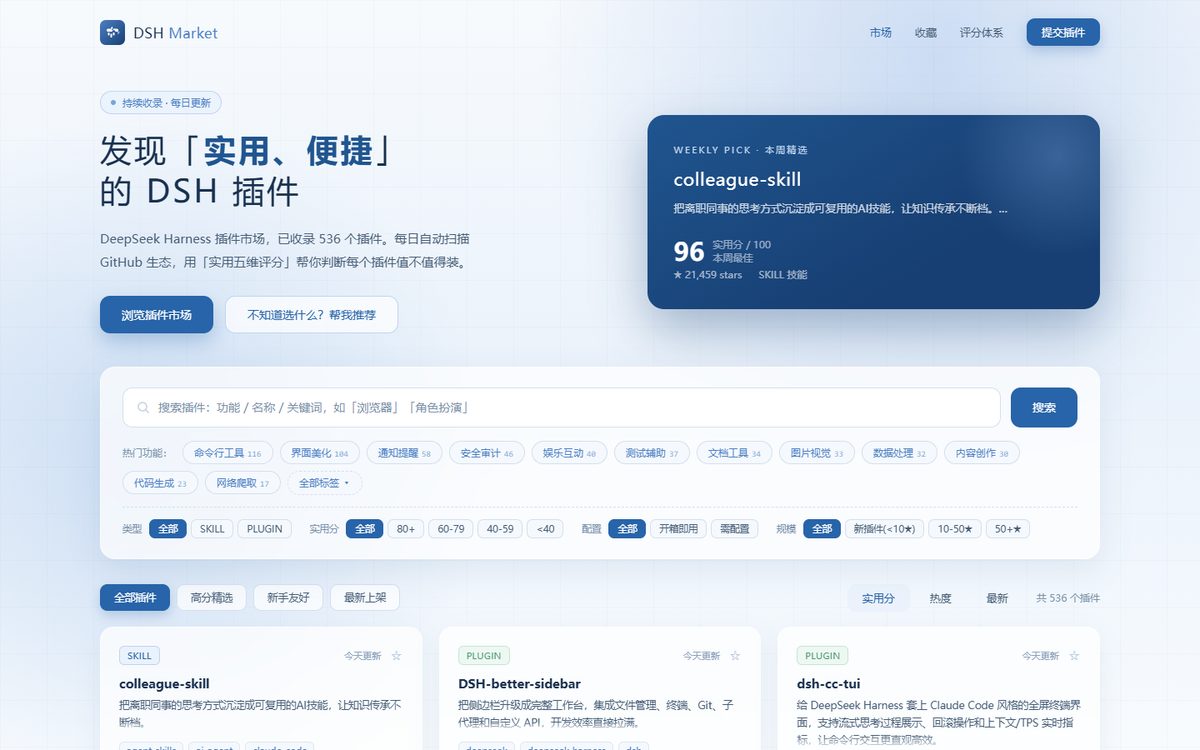
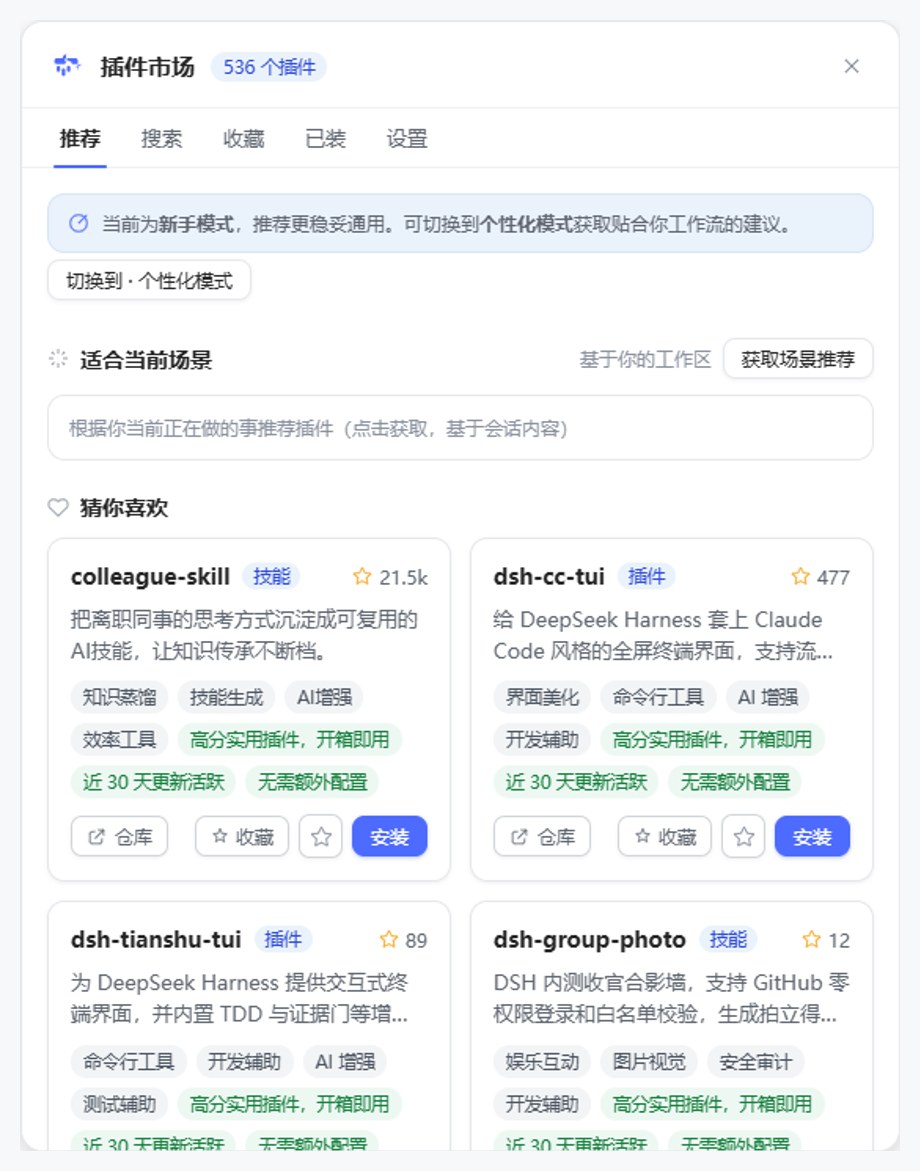
 Web 版(已上线) |  DSH 插件版(开发完成) | |
|---|---|---|
| 位置 | 浏览器 · GitHub Pages 纯静态站 | DSH 侧边栏 · cordis 插件 |
| 定位 | 发现与评估 | 安装与管理 |
| 内容 | 插件(cordis/skill)+ 整合包分区(生态内容市场) | 5-Tab 面板 · 一键安装 · 新手推荐 · 个性化推荐 · 场景推荐 · AI 代理安装(详见 DSH 插件版)+ 整合包 Tab |
| 安装 | 零安装,浏览器打开即用 | npx @deepseek-ai/dsh plugin --profile web add @dsh-market/plugin |
| 资源消耗 | — | 零 token 被动运行,不参与日常对话 |
两者的关系:仅共享同一份
plugins.json数据(每日 06:00 自动刷新星星与描述),除此之外没有直接关联——Web 版是独立的浏览站,插件版是独立的 cordis 插件,可分别使用、互不依赖:用 Web 版不一定要装插件,装插件也不影响 Web 站。
演示
| Web 版 | DSH 插件版 |
|---|---|
 |  |
快速开始
Web 版
无需安装,直接访问:
安装插件版
npx @deepseek-ai/dsh plugin --profile web add @dsh-market/plugin
装完重启 harness,侧边栏底部出现「插件市场」入口。
DSH 插件版
装进 DSH 侧边栏的插件市场:新手 3 分钟上手,越用越懂你。
新手友好 · 零门槛
- 首次打开有冷启动问卷:选你常用的场景与插件类型,立即得到精选 + 猜你喜欢
- 不用记任何命令——卡片上一键安装(skill / cordis 自动路由,失败自动重试、可回滚)
- 零 token 被动运行:不打开面板不消耗任何资源,不参与日常对话
个性化推荐 · 越用越懂你
- 画像来自问卷 / 收藏 / GitHub 加星 / 已装插件,全部保存在本机
- 「猜你喜欢」随使用动态更新(EMA 衰减),每个推荐附一句「为什么推荐」
场景推荐 · 读当前会话
- 手动触发,读取当前会话标题与消息(零 token)→ 推荐"现在这个场景该装什么"
AI 语义搜索 · 即将上线
- 本地召回 60 候选 → LLM 精排 20 并附理由;候选池固定不随插件量增长,默认关闭省 token
AI 代理安装
- 拿不准装不装?交给 DSH 子代理:读 README → 验证 → 安装,需要配置时先向你确认
特性
- 持续收录 — 每天自动扫描
dsh-plugin/dsh等 GitHub topic、社区精选列表,全量收录(当前 4276 个插件 + 整合包通道) - 实用五维评分 — 维护活跃 / 实用度 / 生态热度 / 便捷度 / 信号质量,加权几何平均融合,每个插件附「为什么推荐」解释
- 中文体验 — 所有插件自动生成中文简介与中文功能标签,中文搜索、中文筛选
- 一键安装 — 插件版确定性脚本路由:skill 型
git clone,cordis 型dsh plugin add;失败可重试、可回滚 - AI 安装 — 插件版可交给 DSH 子代理读 README 验证后安装,需要配置时先向你确认
- 推荐体系 — 冷启动问卷 / 新手友好 / 猜你喜欢(个性化画像)/ 场景推荐(读会话上下文,详见 DSH 插件版)
- 整合包生态 — Web「整合包」分区 + 插件端整合包 Tab(浏览 / 条目解析率校验 / 装包入口);配套
dsh.pack.json整合包协议(详见 dsh-bundler) - 零 token 常驻 — 插件版纯被动运行,不打开面板不消耗任何资源
使用
Web 版
| 场景 | 怎么用 |
|---|---|
| 找插件 | 搜索框中文关键词 / 标签多选 / 类型与评分筛选 |
| 看质量 | 卡片五边形雷达图 + 五维明细 + 推荐理由 |
| 装插件 | 详情页复制真实安装命令,或复制「AI 安装提示词」 |
插件版(5-Tab 面板)
| Tab | 做什么 |
|---|---|
| 推荐 | 猜你喜欢 / 精选 / 场景推荐(手动触发,读会话上下文) |
| 搜索 | 本地 Fuse 搜索 · 热门标签 · 200+ 结果分页 |
| 收藏 | 星标收藏的插件,稍后安装 |
| 已装 | 检测本机已装(skill 目录 + profile),一键卸载 |
| 设置 | GitHub 绑定(PAT 加星 / 设备流只读)· 推荐模式 · 目标 profile |
评分体系
实用五维(权重加权几何平均,借鉴 StarRadar 融合机制、理念转向「实用、便捷」):
| 维度 | 权重 | 含义 |
|---|---|---|
| 维护活跃 | 30% | 近 90 天提交 + issue 健康度(DSH 迭代快,易坏的插件权重最高) |
| 实用度 | 25% | README / 文档 / 示例完备度 |
| 生态热度 | 20% | stars 对数归一化(p99 动态基准)+ fork 参与率(Wilson 小样本稳健) |
| 便捷度 | 15% | 安装步骤清晰 + 无需额外配置 |
| 信号质量 | 10% | license / topics / description / README 完备度 |
每个插件附 explanation(一句话解释评分理由)。详见 评分体系说明。
收录机制
定位:DSH Market 是 DeepSeek Harness 生态的插件收录与发现平台——只收 DSH 专属生态的插件,不做通用项目收录。
每日 06:00 自动管道扫描以下数据源:
GitHub Actions(每日 06:00 自动收录 + 部署)
  └─ collector(Node,并发 10,24h 缓存)
       ├─ 扫描数据源:
       │    ├─ topic 扫描:dsh-plugin / dsh / deepseek-harness-plugin / dsh-bundle / dsh-skill
       │    │    └─ 多路排序并集(stars + updated + created 各取前 1000,去重合并)
       │    │    └─ GitHub Search API 单查询硬上限 1000 条,多路并集覆盖长尾(~72%+)
       │    │    └─ 限流:Search API 30 次/分钟 → 每页间隔 2.3s,防 403
       │    ├─ awesome 列表 ×2(人工策展社区列表)
       │    ├─ dsh-external 组织
       │    └─ 本仓库提交插件 issue(label: submission / 标题「[提交插件]」)
       ├─ 收录条件(全部满足才收录):
       │    1. 不是 fork / archived / 官方本体(deepseek-ai/deepseek-harness)
       │    2. 特征检测通过:根目录有 SKILL.md(skill 型)
       │       或 skills/ 目录含 SKILL.md(技能集合)
       │       或 dsh.profile / cordis.patch.yml 等 cordis 标记
       │       或 package.json 依赖含 cordis 关键字(二次确认)
       │    3. 无 stars / 评分门槛——检测通过即收录
       ├─ 元数据 + README:GitHub API(stars / 描述 / 安装命令解析)
       ├─ 实用五维评分 + 解释层
       └─ DeepSeek 增量中文化(只翻译新插件,省 API 费用)
            → data/plugins.json
                 ├─ 同步到 web/public/plugins.json(Web 站 + 插件版共用)
                 └─ 提交 → 构建 → 部署 GitHub Pages
说明:打了 dsh-plugin topic 只是进入候选池的入场券——收录还需要仓库确实是 DSH 插件(有 SKILL.md 或 cordis 标记)。topic 2000+ 仓库中大量并非 DSH 插件(随手打 tag / fork),特征检测会自动过滤。
目录结构
├─ collector/   # 数据管道(Node + tsx):扫描 → 检测 → 评分 → 中文化
├─ web/         # Web 站(Vite + React + TS + Fuse.js)
├─ plugin/
│  ├─ core/     # 插件核心层(纯 Node,零 DSH 依赖,可独立测试)
│  └─ ui/       # 插件 UI 层(cordis Host RPC + 浏览器 Client 面板)
├─ schema/      # 共享类型(DshPlugin / MarketData / PracticalScore)
└─ scripts/     # 工具脚本(截图 / 数据注入 / 视觉评审)
本地开发
# 克隆与安装
git clone https://github.com/2BingLing/dsh-market.git
cd dsh-market
npm install
cp .env.example .env        # 填入 GITHUB_TOKEN(必需)、DEEPSEEK_API_KEY(可选)

# 数据管道(扫描 → 检测 → 评分 → 中文化 → data/plugins.json)
npm run collect

# Web 站
npm run dev -w web          # http://localhost:5173
npm run build -w web        # 生产构建

# 插件端
npm run build -w @dsh-market/core    # 核心层
npm run build -w @dsh-market/plugin  # 插件包(lib/index.js + lib/client.js)
贡献
提交插件(两种方式均可)
- 给仓库打
dsh-plugintopic —— 最快,每日管道扫描直接命中 - 通过 提交插件 issue 模板 提交 —— 填写仓库地址 / 插件类型 / 一句话简介即可
提交后会发生什么:
提交 issue → 次日 06:00 自动管道提取仓库 → 特征检测
  ├─ 通过(是 DSH 插件)→ 收录进市场 → 自动回复 issue:
  │     ✅ 已收录确认 + 次日更新说明 + 徽章指引 → 自动关闭 issue
  └─ 未通过(非插件)→ 不收录(可重新打开 issue 询问原因)
-
修正数据:评分 / 描述 / 安装命令有误,提 issue 或 PR
-
作者自述:提交时附上「作者自述简介」,会展示在市场详情页的「作者自述」专区(带作者标识)——用你自己的话介绍插件,比自动简介更有温度。已收录插件可提交
[数据修正]issue 补写 -
挂收录徽章:被收录的插件作者可在 README 顶部挂 DSH Market 收录徽章,让用户一眼认出:


用法见 PLUGIN-BADGE.md(高分精选需实用评分 ≥ 80)
License
Read the usage guide →
Install steps, key points, FAQ and compatibility for this plugin — auto-derived from indexed fields.
Listing badge

[](https://deepseek-plugin.org/plugins/2BingLing/dsh-market/plugin/ui)Paste this markdown into your GitHub README to link back to this listing. The badge only states the listing — not a security endorsement.