Chat-driven native DeepSeek Harness for Feishu/Lark: create bots via QR code, private chats/groups/topics maintain separate conversations, streaming card responses support images, text, and group policies.

- Language
- TypeScript
- Branch
- main
Install
$ dsh plugin --profile web add ax-feishu-bridgeRun the command above in your terminal to install this plugin via the dsh CLI. You can switch Profile in the top-right corner. New to dsh? Read the beginner tutorial
Install via your agent
Install the DeepSeek Harness plugin AX1202/ax-feishu-bridge for me: review the repository at https://github.com/AX1202/ax-feishu-bridge first, then run the install command and verify the plugin loads successfully.
Paste this instruction to the DSH Web GUI assistant — it will install and verify for you.
One-Line Description
Chat directly in Feishu/Lark to drive your local DeepSeek Harness: scan to create a bot, private chats/groups/group topics each maintain independent sessions, the bot replies with streaming cards, supporting images, code files, and group policy configuration.
Core Features
- Create Feishu/Lark self-built bots via terminal QR code scan, no manual App ID/Secret entry needed
- Private chats, group chats, and group topics each bind to independent DSH sessions without interference
- Group chats support two trigger strategies:
open(replies without @) andmention(triggers only on @ / keywords / replies) - Supports image (png/jpg/webp/gif) and common code/text attachment input; recognition capability depends on the selected model
- Immediately shows "Replying..." card upon receiving messages, with streaming typing in the same card, can be stopped mid-way
- Switch sessions/models/thinking intensity/workspace via
/new/resume/model/thinking/workspace/status/stop/configin Feishu - Parse Feishu interactive alert cards, bring the original message to the model when replying/quoting
Technical Implementation
- Language: TypeScript
- Key Dependencies: @larksuiteoapi/node-sdk (Feishu official SDK), @deepseek-ai/dsh-attachment-local (local image storage), @deepseek-ai/cordis (DSH host framework)
- Architecture Pattern: Cordis plugin injection; DSH end registers
feishu-harnessplugin viacordis.patch.yml, host callsapply(ctx)on startup, usesctx.effectto start/stop WebSocket transport; injects into Pi end via extension mechanism of@earendil-works/pi-coding-agent(same npm package, two adapters, completely independent configuration) - Entry Files: DSH entry
src/adapters/harness/index.ts, Pi entrysrc/adapters/pi/index.ts, public logic insrc/feishu/
Use Cases
You frequently use Feishu/Lark for work and want your local DSH to help with code, documents, and debugging tasks anytime. This plugin lets you collaborate with DSH without leaving the chat window: private one-on-one continuous conversations, having the bot take tasks in groups according to strategy, throwing alert cards to the bot in alert groups for model analysis. More natural than opening a separate terminal interaction, and easier to share the same session context with colleagues.
Prerequisites & Compatibility
| Dependency | Min Version | Description |
|---|---|---|
| DeepSeek Harness | 0.1.0-rc.6+ | peerDependencies declares dsh-agent/dsh-agent-presets/dsh-llm/dsh-session/dsh-session-query all as ^0.1.0-rc.6 |
| Cordis | ^4.0.1 | peerDependencies declares @deepseek-ai/cordis ^4.0.1 |
| Node | ^22.19.0 or >=24.0.0 | engines.node field |
| Platform | Cross-platform | No os/cpu restrictions in source code; only Pi adapter requires separate Git Bash configuration on Windows (DSH adapter unaffected) |
| Native Modules | None | All pure JS/TS dependencies |
Installation
dsh plugin --profile web add github:AX1202/ax-feishu-bridge
Configuration Options
DSH default config is stored in ~/.dsh/feishu/config.harness.json. If no config is detected on first startup, it automatically enters terminal config wizard (QR code scan recommended, can also manually fill). All config items can also be set via environment variables with HARNESS_ prefix (environment variable > config.json > default value).
| Config | Type | Description | Default |
|---|---|---|---|
appId / appSecret | string | Feishu/Lark app credentials | Generated by config wizard |
domain | feishu / lark | App region (China Feishu / International Lark) | feishu |
groupPolicy | open / mention | Group chat trigger strategy | open |
groupKeywords | string array | Group keyword triggers (comma/semicolon separated), no @ needed when matched | [] |
groupAlsoOnReply | boolean | Also trigger when replying to bot messages, no @ needed | false |
ignoreBotMessages | boolean | Whether to ignore other bot messages | true |
cardActionMode | webhook / ws | Card button callback channel | webhook |
cardActionWebhookHost | string | Card callback listening address | 0.0.0.0 |
cardActionWebhookPort | integer | Card callback port (DSH default 3002) | 3002 |
cardActionWebhookPath | string | Card callback path | /webhook/card |
language | zh / en | Prompt language | zh |
reactEmoji | string | Emoji response on message receipt | Get |
autoStart | boolean | Whether to automatically connect to Feishu on DSH startup | true |
parseInteractiveCards | boolean | Whether to convert Feishu alert cards to readable text for the model | true |
includeQuotedMessage | boolean | Whether to include original message content when replying/quoting | true |
quotedMessageMaxChars | integer | Max characters to include from quoted message | 8000 |
promptNotifySec | integer | Send "still processing" reminder in Feishu after this many seconds for long tasks; 0 to disable | 180 |
promptTimeoutSec | integer | Task hard timeout in seconds; 0 means never timeout | 0 |
sendMaxRetries | integer | Retry count when Feishu API has temporary failures | 2 |
streamingReply | boolean | Enable CardKit single-card streaming reply | true |
streamPrintFrequencyMs | integer | Refresh interval for streaming character-by-character display (ms) | 50 |
streamPrintStep | integer | Characters to display per update | 1 |
streamPushIntervalMs | integer | Interval to push latest content to Feishu (ms) | 120 |
Hot-reload whitelist (takes effect immediately when sending /config in private chat with the bot): groupPolicy / groupKeywords / groupAlsoOnReply / ignoreBotMessages / reactEmoji / language / streamingReply / streamPrintFrequencyMs / streamPrintStep / streamPushIntervalMs.
FAQ
Q: Why isn't the bot replying?
A: Check three things in order: 1) Is the Feishu bot created and configured? (/feishu status shows App ID and connection status); 2) Is the plugin loaded with DSH (default autoStart=true, changes take effect after next startup if disabled); 3) Does the group strategy require @ the bot (with mention strategy, no @ means no reply).
Q: I sent a message in a group but the bot ignored me, how to fix?
A: Check the strategy: mention requires @-ing the bot to reply (can combine with keyword triggers or reply to bot messages for follow-up); with open strategy, direct replies in group/topic work, but ensure "Get all messages in group" or "Get messages from users and bots in group" permission is enabled in Feishu developer后台.
Q: Can I install Feishu plugins for both DSH and Pi together?
A: Yes. Configs are stored separately at ~/.dsh/feishu/config.harness.json and ~/.pi/agent/feishu/config.pi.json, they don't affect each other; connection locks are distinguished by appId, multiple processes with the same appId only have one holder; card callback ports use 3001 for Pi and 3002 for DSH, out-of-the-box separation.
Q: Can the bot recognize images I send?
A: Depends on two things: 1) Whether the model selected in the current session supports image input; 2) Whether the Harness host provides image attachment service. This plugin registers local storage to ~/.dsh/attachments when host doesn't mount (degrades to text-only on mount failure). Only supports png/jpg/webp/gif.
Q: Can /workspace use relative paths?
A: No. Source code explicitly validates: only accepts absolute paths or paths starting with ~/, relative paths directly error out.
Q: Will long-running tests/builds be marked as failed?
A: Not by default. With promptNotifySec=180, after 180 seconds it only sends one "still processing" reminder in Feishu, the reply card stays "replying", and completes with normal result delivery; only when explicitly setting promptTimeoutSec>0 will it hard timeout and report failure.
Q: How to reset config but keep session history?
A: Run /feishu reset confirm in DSH — it deletes config like config.harness.json and session mappings, but does not delete any session history content; next startup will re-enter config wizard.
Ease of Use
Beginner — After installation, first launch enters config wizard, complete via QR code scan; no required parameters or command-line operations needed to start chatting in Feishu.
Known Issues & Limitations
- DSH platform limitation: In a blank brand new session, commands like
/feishu setupdon't render command history; need to send a normal message in that session first before executing commands; thesetupwizard itself is unaffected (Q&A and QR code still work in terminal). - Image input depends on host attachment service: When host doesn't mount, plugin mounts its own local storage (stored in
~/.dsh/attachments), if mount fails image input will be unavailable and prompt for text-only downgrade. - Image formats only support png/jpg/webp/gif, other formats are rejected with prompt.
/workspaceonly supports absolute paths or paths starting with~/, relative paths directly error out.- When multiple processes start concurrently with the same appId Feishu bot, only one process can get the connection lock (
/feishu statusshowsowned by another process), other processes don't start connection.
支持 Deepseek Harness/Pi 接入 飞书/Lark 的消息桥接扩展:在熟悉的聊天界面里与本机 DSH/Pi 持续协作。
中文 · English
DSH、Pi飞书交流反馈群:https://applink.feishu.cn/client/chat/chatter/add_by_link?link_token=57dvecbb-95d3-4d01-b689-6ebc3d17c867
扩展有什么问题可以加群反馈。
我的媒体平台 关注我第一时间了解最新AI工具
全平台账号名称:AX阿煊
B站:https://space.bilibili.com/4489397
主要能力
- 通过扫码快速创建飞书/Lark 机器人,减少手动配置
- 支持私聊、群聊、群话题分别维护独立的 Pi 会话
- 支持群聊策略:
open:群里和话题里可直接回复,不需要 @,还需手动在飞书开发者后台开启机器人“获取群组中所有消息”的权限mention:只有@机器人、命中关键词或回复机器人消息时才会回复(后两项可选开启)
- 支持图片、代码文件和文本文件等附件输入;图片识别取决于当前模型是否支持图片
- 支持解析飞书 interactive 告警卡片;回复一条消息或卡片时,可把原内容一并带给 Pi
- 支持群聊关键词触发、回复机器人消息继续追问
- 支持在飞书内切换当前会话的模型、工作区、历史会话和思考强度
- 收到消息后立即显示“正在回复…”,后续答案在同一张卡片中流式输出;可停止,并会显示完成或失败状态
- 支持渲染显示 Markdown 格式内容
- Pi agent 关闭后,仍有后台常驻服务可以对话,pi agent无需前台运行。
快速开始
下面的快速开始先介绍 DeepSeek Harness(DSH),Pi 用户可直接跳到 Pi 快速开始。
DeepSeek Harness(DSH)
本扩展同时以 DeepSeek Harness 组合包(bundle)形式分发,飞书机器人的配置和聊天体验与 Pi 一致。
1. 安装
前提:本机已安装 dsh
从 npm 安装
dsh plugin --profile web add ax-feishu-bridge --ignore-scripts
2. 启动与首次配置
安装后重启dsh,如果没有检测到飞书机器人配置,会自动进入终端配置向导:推荐选择“扫码自动创建飞书助手”,按提示扫描终端里的二维码即可;如果你已经有现成的飞书/Lark 应用,也可以选择手动填写 App ID 和 App Secret。
配置完成后桥接会自动启动并连上飞书/Lark,之后每次启动 dsh 也会自动连接。
DSH 使用独立的配置文件
~/.dsh/feishu/config.harness.json(存放在 dsh 自己的家目录下),与 Pi 的配置互不干扰,两边可以同时安装、共存。
3. 在飞书里互动
- 私聊:直接发消息
- 群聊:根据群聊策略决定是否需要
@机器人 - 话题:每个话题会独立对应一个会话
群聊策略设为open后,想要不@机器人就能回复任何群内消息,还需要到飞书开发者后台 - 对应机器人事件与回调 - 打开“获取群组中所有消息”或“获取群组中用户和机器人发送的消息”这两个任意一个权限。
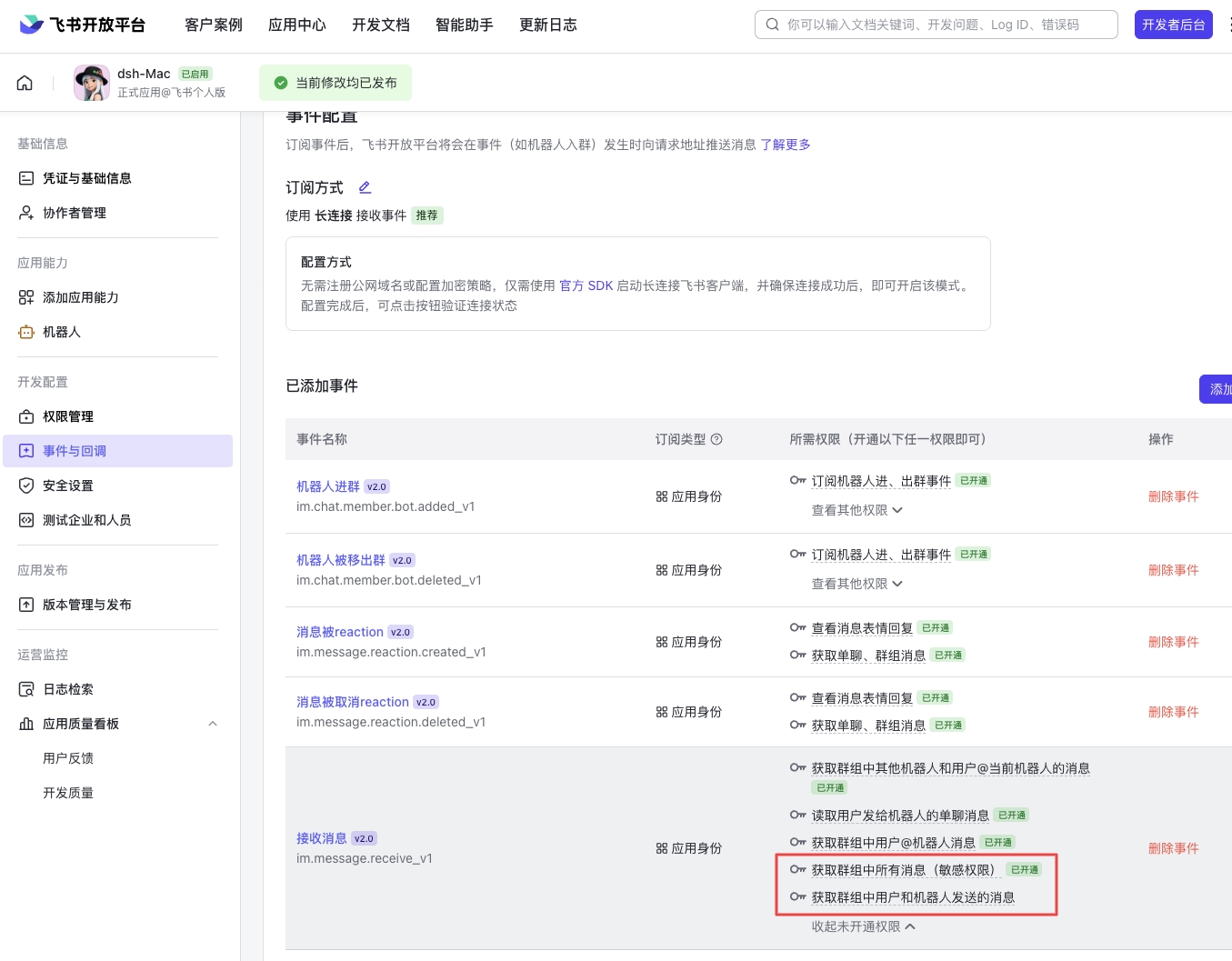
/new、/resume、/model、/thinking、/stop、/workspace、/status、/config 等聊天内命令同样可用,完整列表见下文“飞书里怎么用”。
两点区别需要注意:
- DSH 的
/feishu管理命令是精简版:提供setup / status / autostart / debug / reset,没有start / stop / restart——桥接随 dsh 自动启停,由配置里的autoStart控制。 - DSH 的环境变量前缀是
HARNESS_(例如HARNESS_APP_ID),而不是 Pi 的FEISHU_;卡片回调端口默认也不同——Pi 默认3001,DSH 默认3002,两边同时启用也不会冲突。
Pi
1. 安装
pi install npm:ax-feishu-bridge
也可以从 Git 安装:
pi install git:github.com/AX1202/ax-feishu-bridge
2. 初始化配置
在 Pi 里运行:
/feishu setup
推荐选择“扫码自动创建飞书助手”,按提示扫描终端里的二维码即可。
如果你已经有现成的飞书/Lark 应用,也可以选择手动填写 App ID 和 App Secret。
3. 启动桥接
/feishu start
如果开启了自动启动,Pi 会话启动时会自动连上飞书/Lark。
4. 开始聊天
在飞书/Lark 里打开机器人,直接发消息即可。
- 私聊:直接发消息
- 群聊:根据群聊策略决定是否需要
@机器人 - 话题:每个话题会独立对应一个 Pi 会话
群聊策略设为open后,想要不@机器人就能回复任何群内消息,还需要到飞书开发者后台 - 对应机器人事件与回调 - 打开“获取群组中所有消息”或“获取群组中用户和机器人发送的消息”这两个任意一个权限。
Windows 上运行 Pi Agent 飞书插件配置方法
解决方法
1. 先安装 Git for Windows
安装后一般会有这个文件:
C:\Program Files\Git\bin\bash.exe
这个就是 Windows 上给 Pi 使用的 Bash 环境。
2. 配置 Pi 的 settings.json
打开:
C:\Users\你的用户名\.pi\agent\settings.json
在大括号里加这一行:
"shellPath": "C:\\Program Files\\Git\\bin\\bash.exe"
注意:如果你原来文件里还有其他配置,不要删掉,只加这一行即可。
这个配置主要是告诉 Pi 主程序 使用哪个 Bash。
3. 把 Git Bash 加到 Windows PATH
有些插件会直接调用:
bash
它不一定读取 Pi 的 shellPath 配置,所以还需要把 Git Bash 加到系统 PATH。
在 PowerShell 里执行:
[Environment]::SetEnvironmentVariable(
  "Path",
  [Environment]::GetEnvironmentVariable("Path", "User") + ";C:\Program Files\Git\bin",
  "User"
)
4. 重启 PowerShell
执行完上面的命令后,要关闭 PowerShell,再重新打开。
然后验证:
where.exe bash
如果输出:
C:\Program Files\Git\bin\bash.exe
说明修复成功。
5. 再运行 Pi
pi
总结
最稳的配置是两个都做:
settings.json 配置 shellPath
+
Windows PATH 加入 C:\Program Files\Git\bin
前者给 Pi 主程序用,后者给插件或子进程直接调用 bash 用。
飞书里怎么用
发送给机器人的常用命令:
| 命令 | 作用 |
|---|---|
/new | 为当前会话新建一个 Pi 会话 |
/resume | 打开当前工作区的历史会话列表;可在卡片中切到全部会话 |
/model | 打开模型选择卡片,切换当前会话使用的模型 |
/thinking | 打开思考强度选择卡片,切换当前模型实际支持的档位 |
/stop | 停止当前这条回复的处理 |
/workspace | 查看当前会话绑定的工作区 |
/workspace /path/to/project | 把当前会话切换到指定工作区,下一条消息生效 |
/status | 查看当前会话的工作状态、模型、思考强度和上下文占用 |
/commands | 查看机器人支持的全部命令 |
/config | 查看运行时配置(仅限与机器人的私聊) |
/config groupKeywords 关键词1,关键词2 | 设置群聊关键词触发并立即生效 |
/config streamingReply false | 关闭流式展示,改用普通回复卡片 |
/config clear groupKeywords | 清除某项运行时配置覆盖 |
Pi 里怎么管理
| 命令 | 作用 |
|---|---|
/feishu setup | 打开初始化配置 |
/feishu start | 启动飞书桥接 |
/feishu stop | 停止飞书桥接 |
/feishu restart | 重启桥接,并重新加载最新代码和配置 |
/feishu status | 查看连接状态、当前 owner 和配置 |
/feishu autostart | 开关自动启动 |
/feishu debug | 查看最近 20 条调试日志 |
/feishu reset | 清除配置和映射,但保留会话历史 |
DSH 里怎么管理
在 DSH 的 web 输入框或终端里输入(依赖宿主 DSH 的命令能力;宿主未提供时会静默跳过,不影响桥接本身):
| 命令 | 作用 |
|---|---|
/feishu setup | 重新配置机器人;问答与二维码在 DSH 进程所在终端进行,已有配置时先确认覆盖 |
/feishu status | 查看连接状态、当前 owner 和配置 |
/feishu autostart | 开关自动启动 |
/feishu debug | 查看最近 20 条调试日志 |
/feishu reset confirm | 清除配置和映射,但保留会话历史 |
与 Pi 的区别:DSH 不提供 /feishu start | stop | restart——桥接随 dsh 自动启停,setup / reset 之后把插件重启 dsh,新配置即可生效。
注意(DSH 平台限制):命令结果以可折叠的命令节点显示在对话流里,但空白的全新会话不渲染命令记录——如果敲了命令没看到任何反应,先在该会话里发一条普通消息,再执行命令即可。
setup不受影响(问答与二维码在终端)。
配置
配置默认保存在:
~/.pi/agent/feishu/config.json
也可以通过环境变量配置:
| 变量 | 说明 |
|---|---|
FEISHU_APP_ID | 飞书/Lark 应用 ID |
FEISHU_APP_SECRET | 飞书/Lark 应用密钥 |
FEISHU_DOMAIN | feishu 或 lark,默认 feishu |
FEISHU_GROUP_POLICY | open 或 mention,默认 open |
FEISHU_GROUP_KEYWORDS | 群聊关键词,逗号或分号分隔;命中后无需 @ |
FEISHU_GROUP_ALSO_ON_REPLY | 1 时回复机器人消息可继续追问,无需再次 @ |
FEISHU_IGNORE_BOT_MESSAGES | 是否忽略其他机器人消息,默认 true |
FEISHU_LANGUAGE | zh 或 en |
FEISHU_REACT_EMOJI | 收到消息时的表情回应,默认 Get |
FEISHU_AUTO_START | 1 或 0 |
FEISHU_CARD_ACTION_MODE | webhook 或 ws,默认 webhook |
FEISHU_CARD_ACTION_WEBHOOK_HOST | 卡片回调监听地址,默认 0.0.0.0 |
FEISHU_CARD_ACTION_WEBHOOK_PORT | 卡片回调端口,默认 3001(DSH 用 HARNESS_CARD_ACTION_WEBHOOK_PORT,默认 3002) |
FEISHU_CARD_ACTION_WEBHOOK_PATH | 卡片回调路径,默认 /webhook/card |
FEISHU_PROMPT_NOTIFY_SEC | 长任务超过多少秒后在飞书发一条“仍在处理中”提示,默认 180,0 关闭 |
FEISHU_PROMPT_TIMEOUT_SEC | 任务硬超时秒数,超时后中止任务并报失败,默认 0(不设硬超时,长期运行也不会被报失败) |
FEISHU_PARSE_INTERACTIVE_CARDS | 是否把 interactive 卡片转为 Pi 可读文字,默认 true |
FEISHU_INCLUDE_QUOTED_MESSAGE | 回复/引用消息时是否带入原消息内容,默认 true |
FEISHU_QUOTED_MESSAGE_MAX_CHARS | 引用消息最多带入的字符数,默认 8000 |
FEISHU_SEND_MAX_RETRIES | 飞书接口临时失败时的重试次数,默认 2 |
FEISHU_STREAMING_REPLY | 是否启用 CardKit 单卡流式回复,默认 true |
FEISHU_STREAM_PRINT_FREQUENCY_MS | 流式逐字显示的刷新间隔,默认 50 |
FEISHU_STREAM_PRINT_STEP | 每次显示的字符数,默认 1 |
FEISHU_STREAM_PUSH_INTERVAL_MS | 向飞书推送最新正文的间隔,默认 120 毫秒 |
FEISHU_EXT_DEV | 1 时显示本地开发标识 DEV |
config.json 字段
除了上面的环境变量,也可以在 config.json 里设置(优先级:环境变量 > config.json > 默认值):
| 字段 | 说明 |
|---|---|
promptNotifySec | 长任务超过多少秒后在飞书发一条“仍在处理中”提示,默认 180,0 关闭 |
promptTimeoutSec | 任务硬超时秒数,超时后中止任务并报失败,默认 0(不设硬超时,长期运行也不会被报失败) |
注意:长时间任务(例如跑测试、构建、批量处理)默认不会再被报为“任务失败”——到达
promptNotifySec后只会在飞书里提示“任务仍在处理中”,回复卡片保持“回复中”,完成后正常送达结果。只有显式设置promptTimeoutSec后才会硬超时。修改后请执行/feishu restart生效。
运行时配置
以下桥接设置可以在与机器人的私聊里用 /config 立即修改,无需重启,并保存到各自平台数据目录下的 runtime-overrides.json(Pi 为 ~/.pi/agent/feishu/,DSH 为 ~/.dsh/feishu/):
/config
/config groupKeywords 报警,告警
/config groupAlsoOnReply true
/config streamingReply false
/config clear groupKeywords
/config clear all
可热更新的范围仅包括 groupPolicy、groupKeywords、groupAlsoOnReply、ignoreBotMessages、reactEmoji、language 以及流式展示参数;应用凭证、引用消息展开和连接方式不能通过聊天修改。
会保存哪些文件
| 路径 | 内容 |
|---|---|
~/.pi/agent/feishu/config.json | 机器人凭证和基础配置 |
~/.pi/agent/feishu/runtime-overrides.json | 通过私聊 /config 保存的运行时配置覆盖 |
~/.pi/agent/feishu/state.json | 飞书会话和 Pi 会话的映射 |
~/.pi/agent/feishu/bridge.json | 从飞书发起的 Pi 任务路由信息 |
~/.pi/agent/feishu/debug.log | 调试日志 |
~/.pi/agent/locks.json | 当前飞书连接的 owner 锁 |
~/.pi/agent/sessions/ | 每个飞书会话对应的 Pi 会话文件 |
~/.dsh/feishu/ | DSH 侧的配置、状态与日志(仅安装 DSH 时产生;未装 Pi 的机器不会创建 ~/.pi) |
连接锁选址:机器上装有 Pi(存在
~/.pi/agent目录)时沿用~/.pi/agent/locks.json,保证两边能协商同一个机器人的连接;纯 DSH 环境则使用~/.dsh/locks.json。
常见说明
- 图片能不能被识别,取决于当前选中的模型是否支持图片输入。
- 图片、文本/代码文件输入是已有能力;interactive 卡片解析和回复消息上下文展开是新版补充的能力。
- 对一条消息或卡片点“回复”后,Pi 会看到原消息内容和你的新问题;这不是把原消息再次发送到群里。
/feishu reset只会清掉配置和映射,不会删除会话历史。- 从 TUI、CLI 或其他渠道创建的任务,不会主动发到飞书。
/workspace当前只支持绝对路径,或~/开头的路径。/resume默认先显示当前项目的最近历史会话,也可以在卡片里切到“全部会话”并翻页浏览。- 卡片按钮现在优先走 webhook 回包模式;如果你还想临时沿用旧的 WS 更新方式,可以把
FEISHU_CARD_ACTION_MODE设成ws。 - 卡片回调默认监听
0.0.0.0:3001/webhook/card(Pi)/0.0.0.0:3002/webhook/card(DSH),需要在飞书开发者后台把交互卡片回调地址指到一个外部可访问的 URL。
常见问题
为什么机器人没回复?
先看三件事:
- 飞书机器人是否已经创建并配置好
/feishu start是否已经运行- 群聊策略是否要求
@机器人
为什么我在群里发了消息,机器人没有理我?
如果你把群聊策略设成了 mention,就需要 @ 机器人后它才会回复。
open模式下:群里和话题里可直接回复,不需要 @,但还需手动在飞书开发者后台开启机器人“获取群组中所有消息”权限才能生效。
还没有实现后台服务开机自启动功能,目前需要电脑开机后手动启动一次 Pi agent 才能正常工作。启动后,Pi agent 无需前台运行,关闭后,仍可以在飞书/Lark 里对话。
Read the usage guide →
Install steps, key points, FAQ and compatibility for this plugin — auto-derived from indexed fields.
Listing badge

[](https://deepseek-plugin.org/plugins/AX1202/ax-feishu-bridge)Paste this markdown into your GitHub README to link back to this listing. The badge only states the listing — not a security endorsement.