Provides a three-layer automatic memory engine for DSH Web GUI: automatic logging of each conversation turn, keyword retrieval, and cross-tool memory inheritance, with visualization panel and calendar view.

- Language
- JavaScript
- License
- BSD-3-Clause
- Branch
- main
Install
$ dsh plugin --profile web add @a9i5k4/dsh-auto-memoryRun the command above in your terminal to install this plugin via the dsh CLI. You can switch Profile in the top-right corner. New to dsh? Read the beginner tutorial
Install via your agent
Install the DeepSeek Harness plugin Aik358/dsh-auto-memory for me: review the repository at https://github.com/Aik358/dsh-auto-memory first, then run the install command and verify the plugin loads successfully.
Paste this instruction to the DSH Web GUI assistant — it will install and verify for you.
One-Line Pitch
Provides centralized three-layer auto-memory for DeepSeek Harness (DSH) Web GUI: user-level rules, project notes, and daily logs are automatically written, injected, and retrieved by the plugin, while also inheriting memories left by other AI tools like CodeBuddy / Claude Code / Codex.
Core Features
- Auto-inject memory context: When assembling system prompts each time, append user rules, project notes, recent one-day logs, reflection highlights, and incomplete calendar items as needed, so the model reads the memory discipline last before responding
- Auto-precipitate per conversation: After each conversation round, a sub-agent judges the round's value and writes to today's log (marked
[auto-precipitated]); long-term decisions escalate to project notes, cross-project rules escalate to user-level memory, and casual chit-chat rounds are automatically skipped - Proactive calendar & reminders: AI automatically extracts deadlines, appointments, and task nodes from conversations and writes them to the calendar, distinguishing important/urgent four-quadrant colors, and reminds in subsequent sessions before the time arrives
- Cross-tool memory inheritance: Automatically detects and connects to memories from other AI tools like WorkBuddy / CodeBuddy / Claude Code / Codex (only records paths, doesn't copy content, reads on demand)
- Visualization & settings: Sidebar "Memory" entry provides seven panels: Overview / Logs / Notes / Reflections / Connect / Calendar / Search; AI writes period greetings, three-level drawer summaries, liquid glass visuals, memory map (v0.1.24)
- Sanitization gate & one-click upgrade: Write-end intercepts garbled text/repetitive reading/external AI profile raw JSON pollution; settings page provides version check, npm registry comparison, one-click upgrade command
Technical Implementation
- Language: JavaScript (ESM,
type: module, source is compiled fromlib/index.jsandlib/client.js, no.tssource provided) - Key dependencies: Zero runtime third-party dependencies (only Node built-ins
node:fs/promises,node:fs,node:child_process,node:zlib,node:os,node:path,node:url); host peer dependency@deepseek-ai/cordis ^4.0.1; frontend shares React with DSH client runtime viarequire('react') - Architecture pattern: Dual-face cordis plugin—
lib/index.js(host half) registers routes, tools, system prompt injection, lifecycle hooks;lib/client.js(browser half) injects into DSH Web GUI viacordis.patch.ymlandpackage.json#dsh.client.inject; platform fixed toweb - Entry file:
lib/index.js(exportsapply(ctx, config)to mount in host process; exportsname = 'auto-memory'as stable cordis plugin identifier), corresponding tolib/client.jsinjecting browser sidebar panel
Use Cases
Developers who continuously work on projects in DSH, switch across workspaces, and revisit across sessions. The pain point is that DSH doesn't persist project memories by default, the model starts from scratch each time, and previous decisions need to be actively restated by the user—this plugin lets the model remember what was done before, and沉淀 deadlines, appointments, and user preferences into searchable local notes. Also suitable for users who simultaneously use CodeBuddy / Claude Code / Codex, reusing historical memories across tools without manual migration.
Prerequisites & Compatibility
| Dependency | Minimum Version | Notes |
|---|---|---|
| DeepSeek Harness (DSH) | Not declared | Listed in plugin marketplace, no minimum DSH version declared; requires DSH web GUI to be launchable (web profile exists) |
| Node.js | >= 22.19.0 (recommended) | zstd decompression requires node:zlib.zstdDecompressSync; with Node <22, session index falls back to plaintext read, still runnable but workspace overview may miss compressed session frames |
@deepseek-ai/cordis | ^4.0.1 | peer dependency, provided by host DSH |
| Platform | Cross-platform | Host is Node.js process, runs only under DSH web profile; client panel is browser-side React |
| Native modules | No third-party native dependencies | All use Node built-in modules (fs/child_process/zlib/os/path/url), no node-gyp build artifacts |
| pnpm | v9 or v10 (v11 needs extra config) | pnpm v11 defaults to restricting installation of versions released less than 1 day ago; same-day releases need minimumReleaseAge: 0 in pnpm-workspace.yaml or explicit version number |
Installation
dsh plugin --profile web add @a9i5k4/dsh-auto-memory
Actual equivalent steps: Install the package under DSH's web profile directory
~/.dsh/profiles/web, append@a9i5k4/dsh-auto-memoryto that directory'spackage.jsondsh.profile.bundlesarray, then restartdsh webto see the sidebar "Memory" entry.
Configuration Options
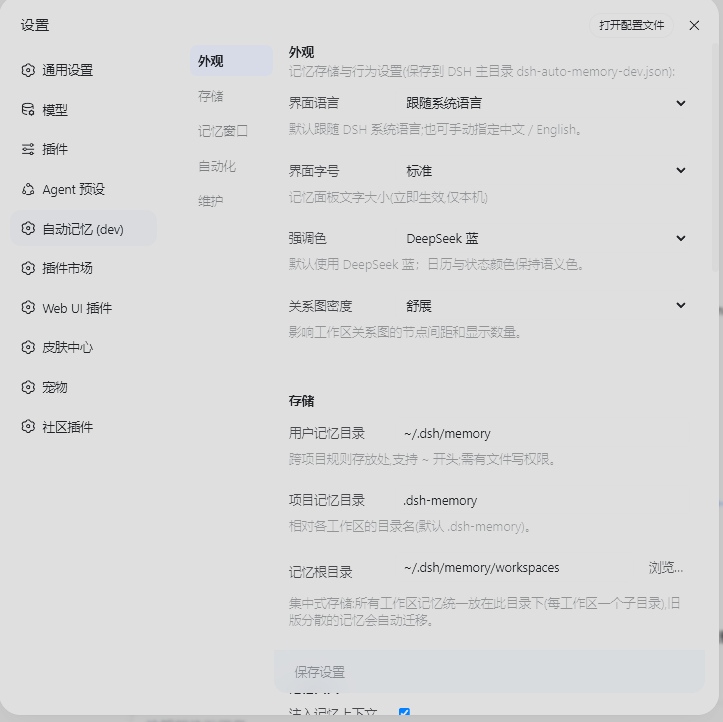
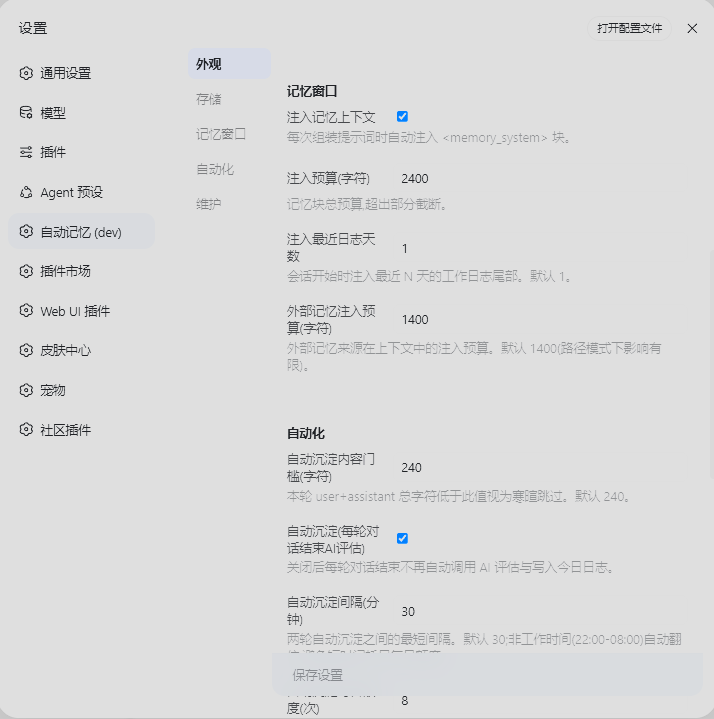
Config file located at ~/.dsh/dsh-auto-memory.json (auto-created on first launch), complete defaults determined by DEFAULT_CONFIG in source lib/index.js:
| Config | Type | Notes | Default |
|---|---|---|---|
userMemoryDir | path | User-level memory directory (absolute path or starting with ~) | ~/.dsh/memory |
projectMemoryDir | string | Project-level memory directory name (relative to workspace) | .dsh-memory |
memoryRoot | path | Centralized memory root directory, one subdirectory per workspace | ~/.dsh/memory/workspaces |
injectEnabled | boolean | Whether to inject memory context into system prompts | true |
injectBudgetChars | number | Total character budget for injection (dynamic part cap) | 2400 |
recentDaysInjected | number | Recent log days to inject | 1 |
autoConsolidate | boolean | Whether to auto-evaluate and write to today's log after each conversation round | true |
autoConsolidateMinChars | number | Minimum character count for this round to trigger auto-precipitation (below = casual chit-chat, skip) | 240 |
autoConsolidateCooldownMinutes | number | Auto-precipitation cooldown minutes (automatically doubled during non-working hours 22:00–08:00) | 30 |
autoConsolidateDailyMax | number | Maximum daily auto-precipitation calls (rate limit) | 8 |
awayMinutes | number | How many minutes away counts as "stepped out", show memory window and greeting on return | 60 |
autoPopupEnabled | boolean | Whether to auto-popup memory window on return from stepped out | true |
autoSummaryTimes | string array | Schedule for auto-generating period summaries (24h HH:MM), empty array = off | [] |
dayBoundaryMinutes | number | Day boundary (minutes from midnight), work before this goes to previous day's log | 450 (7:30 AM) |
reflectEnabled | boolean | Whether to enable daily reflection | true |
reflectStyle | enum | Reflection style: auto / life / professional | auto |
locale | enum | UI language: system (follows DSH system language) / zh / en | system |
externalInjectionChars | number | External memory injection budget (characters) | 1400 |
externalSources | object | External memory source toggles (WorkBuddy/CodeBuddy/Claude Code/Codex/Project conventions) | all true |
No restart needed after modification: Settings → Auto Memory page takes effect on save; panel font size (small/normal/large/extra-large) switches in real-time without saving.
FAQ
Q: Didn't see the "Memory" sidebar entry after installation. What to do?
A: All three steps must be complete: install the package under ~/.dsh/profiles/web, append @a9i5k4/dsh-auto-memory to that directory's package.json dsh.profile.bundles array, then restart dsh web. Just installing without restart or not adding the bundle line won't show it.
Q: Where are memory files stored? Will they be lost when reinstalling DSH?
A: Memory is stored as plain text Markdown in the user home directory, isolated from DSH installation: user-level at ~/.dsh/memory/MEMORY.md, project memories consolidated at ~/.dsh/memory/workspaces/{workspace}/. Reinstalling DSH doesn't affect them; the old dispersed .dsh-memory in workspaces will auto-migrate to the centralized root directory on first run, old files kept without deletion.
Q: Will auto-precipitation consume a lot of tokens?
A: Enabled by default with max 8 calls per day, 30-minute cooldown (automatically doubled during non-working hours), adjustable in settings. Static rules are attached to system prompt for byte-level stability; dynamic memory goes through runtime snapshot, allowing DeepSeek prefix cache to hit throughout to reduce redundant encoding overhead.
Q: Can it inherit memories from CodeBuddy / Claude Code / Codex?
A: Yes. The plugin scans directories like ~/.workbuddy, ~/.codebuddy, ~/.claude, ~/.codex. The memory_external import action uses "pure link mode", only recording source file path pointers in local memory, not copying content, reading on demand when needed—this lets you use external history without being polluted by other AI tools' profile raw JSON/garbled text.
Q: Will secrets leak into memory?
A: Content injected into prompts filters out suspected tokens/secrets/credentials paragraphs; files themselves remain intact; external session retrieval is keyword-level (not semantic). But secrets themselves are still sensitive—it's recommended not to actively write or paste them into conversations.
Q: How to upgrade this plugin?
A: Run pnpm up @a9i5k4/dsh-auto-memory (or npm install @a9i5k4/dsh-auto-memory@latest) in ~/.dsh/profiles/web directory, then restart dsh web; the Settings → Auto Memory page provides a "Check for Updates" button that compares your current version with npm registry latest and displays the upgrade command. Note pnpm v11 defaults to restricting installation of versions released less than 1 day: same-day releases wanting immediate new version need minimumReleaseAge: 0 in pnpm-workspace.yaml or use explicit version like pnpm add @a9i5k4/dsh-auto-memory@<version>.
Q: Will memory remain after uninstall?
A: Memory files are stored in user home directory (~/.dsh/memory/), not in DSH installation directory; removing bundle from web profile and uninstalling the package won't delete these Markdown files, they can continue to be used on reinstall.
Learning Curve
Beginner — no configuration needed after installation to get default three-layer memory + auto-precipitation + proactive calendar capabilities; all preferences can be adjusted in GUI's Settings → Auto Memory page and take effect in real-time, no need to touch JSON.
Known Issues & Limitations
- Memory retrieval is keyword-level (not semantic):
memory_recalldoes OR matching after tokenizing by whitespace/Chinese punctuation, sorted by hit count; source provides no vector retrieval or semantic matching memory_recallcross-historical DSH session retrieval depends on host-deployed session-query index; when that index isn't enabled, only local memory files can be searched (README original limitation)- Plugin add/remove requires restart
dsh webto take effect (README original limitation) - Node.js < 22.19.0 lacks
zstdDecompressSync, DSH new version session persistencesession.jsonl.zstdcompressed frames can't be decompressed, workspace overview will miss compressed sessions (v0.1.16 fixed read logic, but old Node still only falls back to plaintext read) - pnpm v11 defaults to disallowing installation of versions released less than 1 day ago: same-day release wanting immediate new version needs
minimumReleaseAge: 0inpnpm-workspace.yamlor usepnpm add @a9i5k4/dsh-auto-memory@<version>explicit version - System folder picker depends on DSH host's directory-picker-auto native backend; when unavailable, settings page auto-fallbacks to embedded folder browser
- Versions 0.1.14 and below will pierce DeepSeek prefix cache (old version injects second-level timestamps into system prompt), consuming massive tokens; if still running old version, recommend upgrading to 0.1.16+ to fix
- External memory import (
memory_external) only records path pointers, doesn't copy content: benefit is pollution resistance, cost is content from other AI tools needs on-demand reading when needed, not immediately full-text searchable after import

A cache-friendly three-layer memory engine for the DeepSeek Harness Web GUI — lean auto injection, per-turn AI consolidation, on-demand reads and cross-tool memory inheritance — wrapped in human touches: proactive calendar reminders, warm AI greetings, and a daily journal that writes itself.
DSH Web GUI 的记忆与人性化交互插件:三层记忆自动注入与检索、每日反思、AI 时段问候与三级抽屉、每轮自动沉淀、智能检索、日历视图与设置页,支持继承其他 AI 工具的历史记忆。
Quick install:
cd ~/.dsh/profiles/web→pnpm add @a9i5k4/dsh-auto-memory→ append"@a9i5k4/dsh-auto-memory"todsh.profile.bundlesin that directory'spackage.json→ restart dsh web (the 「Memory」entry appears in the sidebar). Full instructions in Installation; no-pnpm alternative:npm install @a9i5k4/dsh-auto-memory.
Installation (one command)
Prerequisite: install DeepSeek Harness (dsh) and start
dsh webat least once.
Run in the profile directory (~/.dsh/profiles/web):
cd ~/.dsh/profiles/web
pnpm add @a9i5k4/dsh-auto-memory
pnpm v11 默认限制安装发布不足 1 天的版本。当天发布想立即拿到新版,在 profile 目录的 pnpm-workspace.yaml 加
minimumReleaseAge: 0,或用显式版本pnpm add @a9i5k4/[email protected]。(pnpm v11 blocks packages published <1 day ago; setminimumReleaseAge: 0in pnpm-workspace.yaml or use an explicit version for same-day releases.)
Then edit package.json in that directory and append to the dsh.profile.bundles array:
"@a9i5k4/dsh-auto-memory"
Restart dsh web to activate (the 「Memory」entry appears in the sidebar).
No pnpm? Use npm:
npm install @a9i5k4/dsh-auto-memory
Updating (check & upgrade)
The plugin is a normal npm package, so updating is one command in the same profile directory:
cd ~/.dsh/profiles/web
pnpm up @a9i5k4/dsh-auto-memory   # or: npm install @a9i5k4/dsh-auto-memory@latest
Then restart dsh web.
The Settings → Auto Memory page has a Check for updates button that compares your installed version with the latest one on the npm registry (it shows the update command when a newer version exists).
AI-Era Installation (copy-paste for your AI)
It's the AI era — just copy the sentence below to your AI assistant (DeepSeek / Claude / Codex etc.) and it will do the installation for you.
Install the npm package @a9i5k4/dsh-auto-memory in the DeepSeek Harness web profile
directory ~/.dsh/profiles/web (run "pnpm add @a9i5k4/dsh-auto-memory" or "npm install @a9i5k4/dsh-auto-memory"),
append "@a9i5k4/dsh-auto-memory" to the dsh.profile.bundles array in package.json,
then restart dsh web to activate the plugin.
A companion that takes initiative
Auto Memory is designed to feel less like a database and more like an assistant who knows you:
- Proactive reminders — when the AI notices a deadline, appointment or promise in your conversation, it files it into the calendar automatically and reminds you in later sessions before the time arrives (
calendar_add/calendar_done/calendar_remove). - Warm greetings — an AI-written greeting for the current period (morning / afternoon / evening) that mentions your most important work of the day; come back after an hour away and it says "welcome back" and catches you up.
- It writes its own journal — after every conversation turn, a small subagent quietly decides what's worth keeping and appends topic-grouped entries to today's log; long-term decisions are promoted to project notes and cross-project rules to user-level memory. You never have to remember to log anything.
- Daily reflections — structured results / lessons / next steps are kept in the background, so you can review how a day really went.
- Calendar with human touches — semantic colors for urgency, a day timeline (07:00–22:00), location and reminder fields; the AI maintains it from context instead of you filling forms.
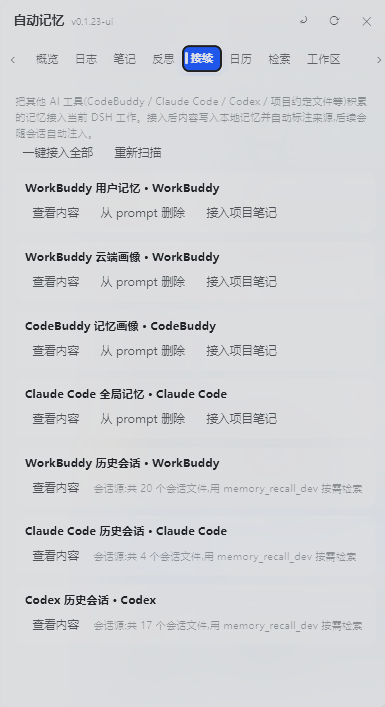
- Inherited memory — memories accumulated in WorkBuddy / CodeBuddy / Claude Code / Codex are discoverable and importable, so the plugin picks up where your other AI tools left off.
Under the hood — engineering that stays out of your way
- Prefix-cache friendly — static rules live in the system prompt, dynamic memory in runtime snapshots; the prompt stays byte-stable so DeepSeek's prefix cache keeps hitting (no repeated re-encoding of your whole history).
- Lean injection, low token cost — only the last day of logs + a reflection digest are injected; everything else is fetched on demand via
memory_read/memory_recall. - Rate-limited AI — auto-consolidation runs at most 8×/day with a configurable cooldown (doubled outside work hours), so memory stays useful without burning your budget.
- Credentials never enter the prompt — sensitive sections (tokens / secrets / credentials) are filtered out of injection while staying safe in the files.
- Cross-workspace & cross-tool — centralized storage readable from any session; memories from WorkBuddy / CodeBuddy / Claude Code / Codex are discoverable and importable.
Features
Three-layer Memory
| Layer | Location | Description |
|---|---|---|
| User-level memory | ~/.dsh/memory/MEMORY.md | Cross-project rules & preferences |
| Project notes | ~/.dsh/memory/workspaces/{workspace}/MEMORY.md | Project conventions & decisions (centralized) |
| Daily logs | ~/.dsh/memory/workspaces/{workspace}/YYYY-MM-DD.md | Append-only work log (centralized) |
| Reflections | ~/.dsh/memory/workspaces/{workspace}/reflections/YYYY-MM-DD.md | Daily reflection (structured, kept in background) |
Centralized storage (WorkBuddy-style): all workspace memories live under one root —
~/.dsh/memory/workspaces/, one subdirectory per workspace (readable by any model in any session via injection + cross-workspacememory_recall). Legacy per-workspace.dsh-memory/folders are auto-migrated on first run after upgrade (the old copies are kept, not deleted).
- Auto injection (at the end of the system prompt): every prompt gets a
<memory_system>block (user rules + project notes + reflection digest + recent 1 day of log tails + external memory paths + pending calendar items + writing discipline); it is placed at the very end of the system prompt so the model reads the memory discipline right before replying - Lean by default, details on demand (v0.1.24): injection stays small — the last 1 day of logs, a reflection digest (achievements section only), and paths for external memory instead of full text.
memory_readfetches full log/reflection/user/notes/calendar files when needed; sensitive sections (credentials/tokens/secrets) are filtered out of the prompt but kept in the files - Visible memory ops: when the AI updates or searches memory, it says so in plain text in the chat reply (e.g. "Logged X to today's journal", "I checked memory and found..."), not hidden inside tool calls
Auto-Consolidation — memory writes itself after every turn (v0.1.9)
Every finished conversation turn is automatically evaluated (via a small subagent) and anything worth keeping is written for you — no reliance on the model remembering to log:
- Today's log gets entries like
- 21:03 [自动沉淀] …— no manualmemory_logneeded for routine work - Long-term value is promoted: project decisions/architecture → project notes (with a
## YYYY-MM-DDheading); cross-project rules → user-level memory - Small talk is skipped (content threshold
autoConsolidateMinChars), each turn is deduplicated by turn number, subagent turns are ignored - Agent traces in the GUI: the overview shows "Auto-consolidated N points today (latest HH:MM)"; the panel refreshes on open, every 30s while open, and via the ⟳ button
memory_consolidatetool: read recent logs and distill long-term decisions / architecture / user preferences into MEMORY.md on demand ("dream-like" consolidation)- Configurable in
~/.dsh/dsh-auto-memory.json:autoConsolidate(default true),autoConsolidateMinChars(default 240),autoConsolidateCooldownMinutes(default 30, doubled 22:00–08:00),autoConsolidateDailyMax(default 8) — all adjustable in the Settings → Automation section
AI Greetings & Three-level Drawers (Overview page, v0.1.9)
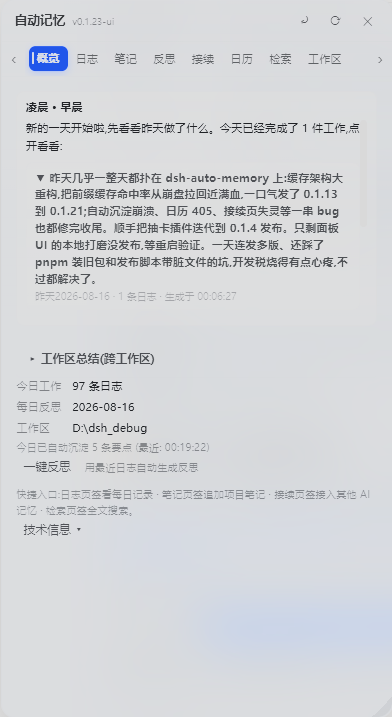
The first thing you see when opening the memory panel is an AI-generated period greeting, not a template and not technical info:
- AI-written greeting: a subagent writes a warm, casual greeting for the current period (morning / forenoon / noon / afternoon / evening), mentioning your most important work of the day; generated once per period per day and cached in
.dsh-memory/greetings/— no repeated API cost - Drawer titles are the AI summaries: the "Today afternoon / Today evening" window titles are replaced with the AI's casual summary text itself
- Three-level drawer structure:
- Level 1: period drawer, titled with the AI summary
- Level 2: inside it, small drawers — one per work item the AI distilled (with a point count)
- Level 3: expand a work item to read its detail points
- Summaries are cached: structured results live in
.dsh-memory/summaries/; opening the panel reads the cache (offline-friendly, no regeneration); the ⟳ refresh button or returning after >1h away forces a fresh generation; every summary shows its generation time - Smart timing: if you were away for more than 1 hour and come back, the greeting says "Welcome back" with what was finished meanwhile
- Daily reflection stays in background: structured reflections (results / lessons / next steps) are kept, while the front page only shows a light greeting
Smart Search (Search tab, v0.1.9)
The Search tab adds a Smart search button next to the keyword search:
- The AI expands your natural-language query into 3-6 keywords (e.g. "last time publishing npm hit a snag" → 发布 / 踩坑 / GitHub / npm / 推送)
- Scans all three memory layers plus reflections with those keywords
- The AI then composes a conversational answer in natural language, citing where each fact came from (log date / project note / user-level memory) — it never fabricates facts not present in memory
- Raw keyword hits with their sources are listed under the answer
Calendar View (Four Quadrants)
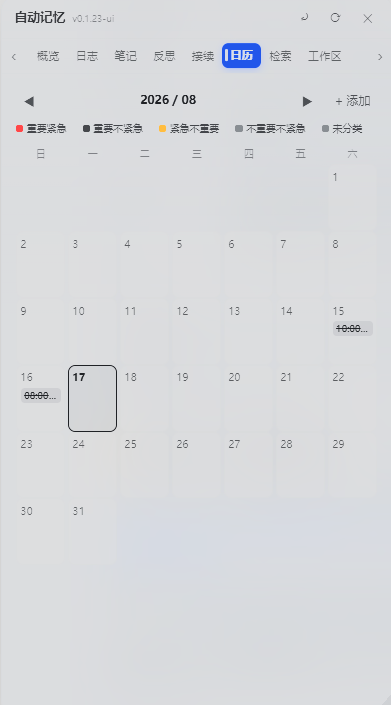
「Calendar」tab (liquid-glass monthly view):
- Monthly grid, today highlighted, click any date to add an item
- Four-quadrant colors: Urgent & Important (red) / Important (blue) / Urgent (orange) / Neither (gray)
- Click an item to toggle done, click again to delete; legend + weekday header
- Cross-conversation persistence: data lives at user level
~/.dsh/memory/CALENDAR.md, shared across workspaces, survives DSH reinstall - AI-maintained: the AI extracts deadlines and appointments from conversations and writes them to the calendar automatically (
calendar_add/calendar_list/calendar_done/calendar_remove), restating it in plain text; pending items are injected into every session's system prompt
Agent Tools
memory_log / memory_note / memory_user / memory_recall / memory_external / memory_maintain / memory_status / memory_reflect / memory_consolidate / calendar_add / calendar_list / calendar_done / calendar_remove
UI
- Sidebar 「Memory」entry → floating panel (Overview / Logs / Notes / Reflections / Connect / Calendar / Search)
- Settings page (Settings → Auto Memory): storage paths, injection budget, reflection style, UI language (中文 / English), panel font size (Small / Normal / Large / Extra large, default Large) — applies immediately, no save needed
- External memory inheritance: import memories accumulated by other AI tools (CodeBuddy / Claude Code / Codex / project convention files)
Screenshots
All screenshots below are real captures of the plugin running inside the DSH Web GUI (Chinese UI for now; English UI captures will be added later).
Memory panel overview — away greeting & AI period summaries
Connect — inherit global memory & history sessions from other AI agents
Calendar — AI adds items, toggles status and marks completion from context
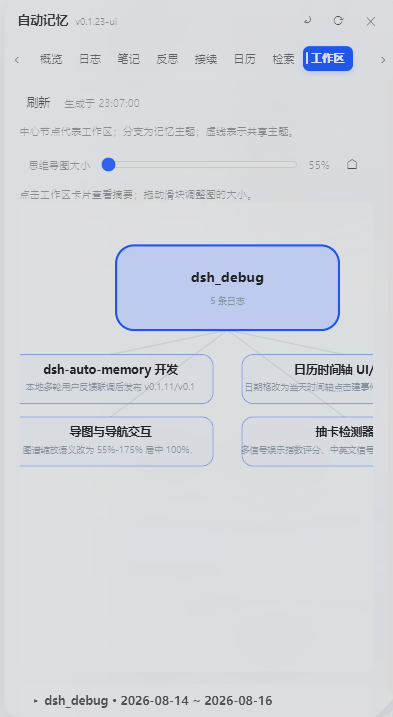
Workspace mind map — auto-generated, workspace-centered cross-workspace overview
Settings — highly customizable, covers most technical details
Beyond the screenshots
- Auto-consolidation: every finished turn is evaluated by a small subagent and topic-grouped entries are written to today's log automatically (
## 主题(HH:MM)+ bullet points) — nomemory_logneeded for routine work. Long-term value is promoted to project notes / user-level memory, small talk is skipped, failures are queued and retried every 5 minutes (a 15-second heartbeat file proves the loop is alive). - Smart search: ask in natural language — the AI expands your query into keywords, scans every memory layer, then answers conversationally with sources cited.
- Calendar with day timeline (v0.1.24): click a date to open a 07:00–22:00 timeline with events placed on their time slots; add events with location/reminder/details; the AI proactively files deadlines via
calendar_addand marks them done viacalendar_done/calendar_remove. - Workspace mind map (v0.1.24): an AI-generated graph of workspaces, topics and cross-workspace links; pan by dragging, resize with the slider, click a card for details.
- Memory panel UI (v0.1.24): liquid-glass panel with smooth animations everywhere — tab strip with arrow scrolling, expanding sections (greeting drawers, workspace summaries), floating save bar in Settings that highlights when there are unsaved changes.
- External memory management (v0.1.24): per-source view/import/remove — imported sources show "✓" and become "Delete" buttons per target (notes vs user-level); full content is read on demand and never injected in bulk.
- Calendar reminders: pending items are injected into future sessions' system prompts until completed — the AI reminds you without being asked.
- One-click update: the settings page shows your installed version vs. the npm registry latest; registry installs get a one-click update button (pnpm/npm runs under the hood), then restart to apply.
Configuration
Defaults (JSON file ~/.dsh/dsh-auto-memory.json):
{
  "userMemoryDir": "~/.dsh/memory",
  "projectMemoryDir": ".dsh-memory",
  "injectEnabled": true,
  "injectBudgetChars": 2400,
  "recentDaysInjected": 1,
  "reflectEnabled": true,
  "reflectStyle": "auto",
  "locale": "zh",
  "autoConsolidate": true,
  "autoConsolidateMinChars": 240,
  "autoConsolidateCooldownMinutes": 30,
  "autoConsolidateDailyMax": 8,
  "externalInjectionChars": 1400,
  "memoryRoot": "~/.dsh/memory/workspaces",
  "dayBoundaryMinutes": 450
}
Adjustable in the GUI (Settings → Auto Memory), including the UI language (zh / en), the panel font size and the day boundary.
v0.1.27 hardening (memory hygiene gate — keeps external dirt out)
- Write gate on the three write tools:
memory_log_dev/memory_note_dev/memory_user_devnow run content throughsanitizeForWritebefore writing — suspected mojibake (GBK round-trip artifacts), stutter degeneration (word/char loops, punctuation-separated included) and consecutive duplicate lines (≥3) are rejected with a reason; append entries cap at 8,000 chars, full rewrites (replace) at 200,000; appends are also deduped against the file's last ~60 lines (the- HH:MMlog prefix does not affect matching). - Hygiene family fixes: removed the
进行中false positive from the mojibake pattern (added the real artifact杩涜涓), switched mojibake counting to global matching (it previously counted at most 1 hit, letting dirty long texts slip past the threshold), stutter detection now works across punctuation, and the duplicate-line check is reset by blank lines (no more false positives on short lines repeated across paragraphs). - External memory import is link-only:
memory_external_devimport now records only source file path pointers instead of copying content — keeping dirty content from other AI tools (WorkBuddy/CodeBuddy/Claude Code/Codex) out of local memory. - Injection-side scrub + voice discipline: mojibake lines, code blocks and stutter lines are scrubbed before injection; the injected block adds a "how to read memory" note and voice discipline — write all memory entries as third-person objective statements, no first-person thinking narration.
v0.1.28 dirty-token checker (prion-scan integrated — stops the "model silently degrades" class)
- Write gate now rejects raw JSON envelopes & base64 residue: besides mojibake / stutter / duplicate lines, the write gate also rejects lines matching external-AI-profile JSON signatures (
memoryBlock/"uid":/updatedAt/"role":"... ") and base64 residue lines — so an external tool profile can never be pasted into memory wholesale again. - Full mojibake table (34 features, verbatim from prion-scan.mjs): the GBK round-trip residue list is completed, catching the exact artifacts this class of "garbage token" shows up as.
- New "Scan dirty tokens" in Settings → Debug Center: one-click prion-style scan of user-level memory / project notes / today's log / reflections — returns a per-file report by line range (mojibake / raw JSON envelope / long lines >500 / base64 / duplicate lines, duplicate ## headings) with locations only, no content, so you can spot residual dirt without reading it.
v0.1.9 hardening (budget / boundary / picker)
- Daily write budget with auto-compaction: user memory ≤ 4000 chars/day, project notes ≤ 3000 chars/day (shared across sessions, reset at the day boundary). Going over the budget never rejects the write — the framework compacts the pre-today sections with an AI pass (merge duplicates, drop stale entries, keep hard facts) and then writes; if AI is unavailable, the oldest sections are archived to
archived-user.md/archive/notes-archived.md(nothing is lost). Compaction is throttled to once per 10 minutes. - Day boundary (late-night belongs to yesterday):
dayBoundaryMinutes(default 450 = 07:30). Work logged before the boundary is appended to the previous day's log, and the daily reflection for the previous day starts only after the boundary — no more "it's 00:30, tell me what you did yesterday" right after midnight. - Native OS folder picker: the "Browse…" button next to the memory root opens the real system folder picker (via the DSH directory-picker native backend); falls back to the in-app browser when no native picker is available. Changing the root auto-migrates existing workspace memory folders to the new location (old files are kept) and all path variables follow the new config on the next refresh.
- 30-day distillation:
memory_maintaindistills logs older than 30 days with an AI pass into the project notes, archives the originals underarchive/, and removes them from the active log list. - First-turn injection guarantee: a
pre-stephook awaits the memory state refresh before the first step, so the model sees memory from the very first token (previously the async load could leave the first turn empty). - Per-step reminder with timestamp: the injected discipline block carries a live
HH:MM:SStimestamp that refreshes on every prompt assembly, and a 15-second heartbeat file proves the background loop is alive.
Structure
lib/index.js— Host half: engine, injection, tools, routes (zero runtime deps, Node built-ins only)lib/client.js— Browser half: memory panel (with calendar view) + settings page (built-in zh/en i18n)cordis.patch.yml— Plugin row (auto-memory)
Limitations
- Memory files are plain-text Markdown; no secrets stored unless explicitly requested.
memory_recallsession search depends on the deployed session-query index; without it, only local search works.- Plugin-set changes require a dsh restart.
Release Info
- GitHub: https://github.com/Aik358/dsh-auto-memory
- npm:
@a9i5k4/dsh-auto-memory - License: BSD-3-Clause
Read the usage guide →
Install steps, key points, FAQ and compatibility for this plugin — auto-derived from indexed fields.
Listing badge

[](https://deepseek-plugin.org/plugins/Aik358/dsh-auto-memory)Paste this markdown into your GitHub README to link back to this listing. The badge only states the listing — not a security endorsement.