🌊 Persistent dock & fully-customizable balance/usage panel for DeepSeek Harness — activity heatmap, dual-channel comparison, local-only & privacy-first

- Language
- JavaScript
- License
- MIT
- Branch
- main
Install
$ dsh plugin --profile web add dsh-usageRun the command above in your terminal to install this plugin via the dsh CLI. You can switch Profile in the top-right corner. New to dsh? Read the beginner tutorial
Install via your agent
Install the DeepSeek Harness plugin Aisland-SJL/dsh-usage for me: review the repository at https://github.com/Aisland-SJL/dsh-usage first, then run the install command and verify the plugin loads successfully.
Paste this instruction to the DSH Web GUI assistant — it will install and verify for you.
一句话定位
为 DeepSeek Harness 网页端补充一组可固定到悬浮窗的余额 / 用量小部件,把余额、Token 用量、缓存命中、活跃热力图和 DSH vs Claude Code 通道占比集中显示,让普通用户在 dsh web 里就能直观看到"还剩多少钱、今天烧了多少 Token、什么时候最活跃",不必切到各供应商控制台。
核心能力
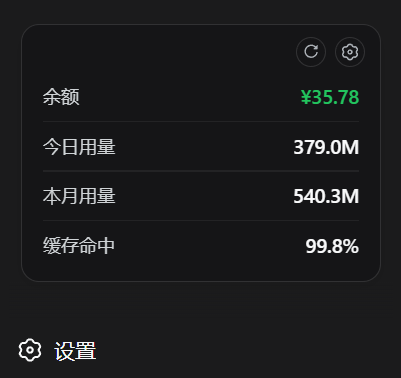
- 常驻悬浮窗:左下角固定一个圆角面板,已 pin 的 widget 一行一项平铺显示,行间细线分隔,右上角齿轮打开详情面板,刷新按钮一键重新拉数据;侧边栏折叠时自动缩成一枚小巧的余额胶囊按钮
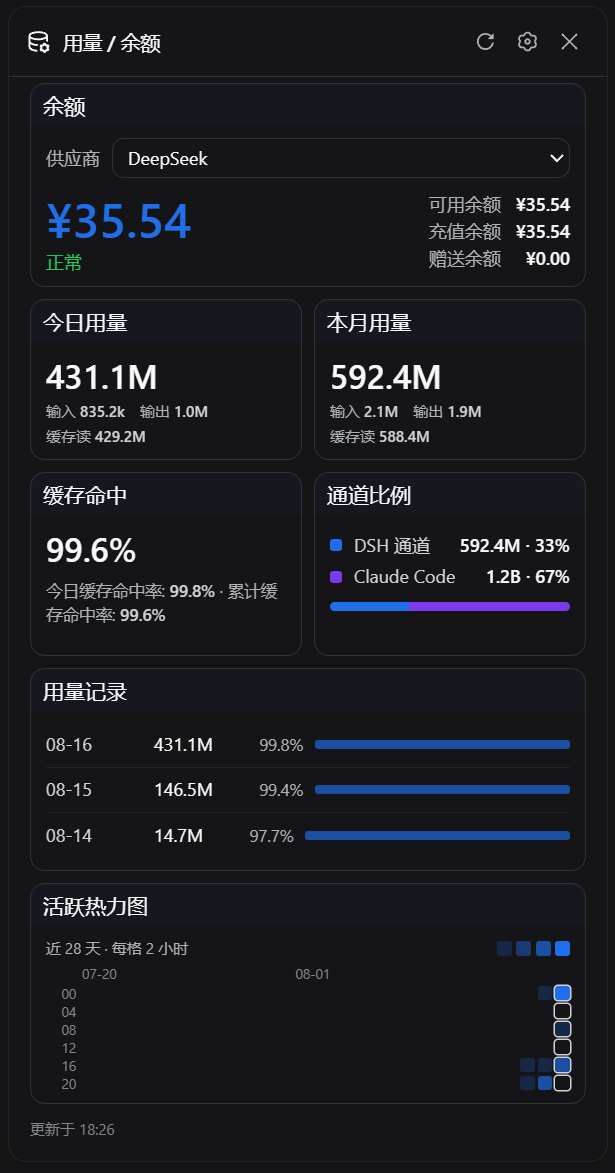
- 详情面板含 7 个 widget:余额、今日用量、本月用量、缓存命中、活跃热力图、通道占比、用量记录,两列卡片排布,每个 widget 都有详情(详细数字 + 控件)和悬浮(仅关键数字)两种形态
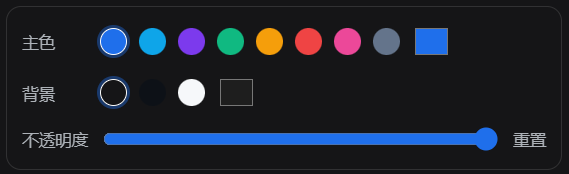
- 主题自定义:主色(8 套预设 + 自由取色器)、背景色(跟随主题 / 深色 / 浅色)、面板不透明度(0.3–1.0),修改即时生效并写回 localStorage
- 拖拽排序与固定:所有 widget 可长按拖动重排、可固定 / 取消固定到悬浮窗、可折叠(只显示标题)/ 隐藏(移到底部"已隐藏 N 项"),固定动作使用虚线占位 + 平滑让位动画
- 多供应商余额:内置 DeepSeek、OpenRouter、Moonshot/Kimi、Z.ai 四套余额解析;通过 Harness 凭据 seam 在请求时拉取,凭据值永不进入浏览器响应、缓存或日志
- 通道对比:把 DSH 会话聚合的 Token 数与扫描
~/.claude/projects/**/*.jsonl算出的 Claude Code Token 数并排展示,支持今日 / 本月两个时间窗 - 增量聚合缓存:用量折叠状态持久化到磁盘,每次只追加新事件,不重新扫历史日志;服务启动即刷新一次,之后每 5 分钟刷新所有余额和聚合
技术实现
- 语言: JavaScript(ESM;
lib/下 6 个.js文件,客户端 bundle 单文件 1788 行手写react_jsx_runtime调用,无构建步骤) - 关键依赖: 纯 Node.js 内置模块——
node:fs/promises(缓存原子写)、node:http/node:https/node:dns/node:net(上游余额请求 + DNS 解析 + IP 过滤)、node:os/node:path($DSH_HOME与~/.claude解析)。客户端用宿主 bundle 提供的 React 18、react/jsx-runtime、@deepseek-ai/dsh-client-ui-primitives图标库;运行时无第三方 npm 依赖 - 架构模式: dual-half 宿主插件。
cordis.patch.yml在 web profile 注入 1 行 Loader(id: usage, name: dsh-usage),package.json#dsh.bundle.patch指向 patch,package.json#dsh.client.inject声明 locale/runtime/ui-primitives 三个客户端依赖;服务端apply(ctx, rawConfig)注册 3 个 exact GET 路由并启动 5 分钟后台刷新定时器;客户端通过__ModuleLoader__注入sidebar.footer.action插槽并在底部常驻一个 React 组件 - 入口文件: 服务端
lib/index.js(apply/name = "usage"/Config = { ~standard: ... });客户端lib/client.js;余额方案lib/balance.js;Token 聚合lib/usage.js;Claude Code 聚合lib/claude.js;上游安全请求lib/safe-fetch.js
适用场景
DSH 用户希望把账户余额、今日 / 本月烧了多少 Token、缓存命中比例、什么时候最活跃、以及 DSH 通道与 Claude Code 通道各占多少,集中在一处随时看到,而不是打开多个供应商控制台逐个翻查。本插件把数据展示完全留在网页侧,对话工作流零侵入;如果你同时跑 DeepSeek 官方 + OpenRouter + Kimi / Z.ai 等多家账户,或者同时使用 dsh web 和 Claude Code,悬浮窗就是天然的"用量驾驶舱"。
前置依赖与兼容性
| 依赖 | 最低版本 | 说明 |
|---|---|---|
| DeepSeek Harness (DSH) | >=0.1.0-rc.6 | README 明确要求 @deepseek-ai/dsh >= 0.1.0-rc.6,并要求启用 web profile;其他 profile 不会被该插件挂载 |
| Node.js | 未声明 | package.json 无 engines 字段;脚本使用 node:fs/promises、node:dns/promises、node:http、node:https、node:os、node:path 等内置模块,AbortSignal.timeout 需 Node 17.3+,DSH 0.1.0-rc.6 已内置 Node 22.x |
| 平台 | 跨平台 | 全部为纯 JS,无原生模块;缓存走 node:fs 原子写,DNS 解析与 HTTP 请求使用内置模块 |
| 原生模块 | 无 | 运行时无任何 *.node;react/react-dom/jsdom 仅 devDependency 用于离线测试 |
| 网络 | 需访问上游余额接口(可选) | 余额端点按 provider 配置:DeepSeek api.deepseek.com、OpenRouter openrouter.ai、Moonshot/Kimi api.moonshot.cn 或 pi-ai profile 配置的 baseURL、Z.ai api.z.ai;本地 Token 与 Claude Code 聚合无需外网 |
| Claude Code 日志(可选) | ~/.claude/projects/**/*.jsonl | 通道对比 widget 读取 Claude Code 的会话日志聚合数字,可通过环境变量 CLAUDE_CONFIG_DIR 改路径;不存在时该 widget 显示"未检测到"而非报错 |
安装方式
dsh plugin --profile web add github:Aisland-SJL/dsh-usage
安装或更新后必须重启已运行的 dsh web,并在浏览器硬刷新(Ctrl/Cmd+Shift+R)。更新:dsh plugin --profile web update dsh-usage;卸载:dsh plugin --profile web remove dsh-usage。
配置项
本插件的 Config schema 接受任意对象且全部字段为可选,没有强制配置项。所有可调参数都在浏览器面板里通过 UI 直接调整,落地到 localStorage dsh-usage:settings:v1。
| 配置 | 类型 | 说明 | 默认值 |
|---|---|---|---|
| 主题 / 主色 | 颜色(hex) | 悬浮窗和面板里所有强调色(数字、按钮高亮、固定状态指示),支持 8 套预设 + 取色器;非 #RRGGBB 格式会被忽略 | #1f6feb(DSH 蓝) |
| 主题 / 背景色 | 颜色(hex) | 面板与悬浮窗的背景色;设为 null 表示"跟随主题",否则必须是 #RRGGBB 格式 | null(跟随主题) |
| 主题 / 不透明度 | 数字(0.3–1.0) | 面板与悬浮窗的整体不透明度,低于 0.3 会被截到 0.3 | 1.0 |
| 停靠偏移 | 数字(0–800 px) | 悬浮窗距离视口底部的距离,可用悬浮窗左上角拖拽手柄直接拖动 | 72 |
| widget 顺序 | 数组 | 7 个 widget 的展示顺序,缺失项会自动追加到末尾 | ["balance","today","month","hit","dual","recent","heatmap"] |
| widget 可见 / 折叠 / 固定 | boolean × 3 | 每个 widget 独立的 visible / collapsed / pinned 三态;仅前 4 个(balance/today/month/hit)允许 pin | 全部 visible: true、collapsed: false;前 5 个默认 pinned: true,dual 与 recent 默认不 pin |
服务端可选配置仅凭据引用,全部写在 ~/.dsh/.credentials.yaml(与本插件无关,由 Harness 统一解析):
| 凭据引用 | 用途 | 缺失时表现 |
|---|---|---|
DEEPSEEK_API_KEY | DeepSeek 官方余额 | 余额卡片显示"未配置 DEEPSEEK_API_KEY" |
OPENROUTER_MANAGEMENT_KEY | OpenRouter 账户 credits | 注意必须是 Management Key,不能用推理 Key 试探 |
ZAI_API_KEY | Z.ai / 智谱 GLM 余额 | 余额卡片显示"未配置 ZAI_API_KEY" |
Moonshot / Kimi 的 apiKeyEnv | pi-ai provider profile 里写的环境变量名 | 余额卡片显示"未配置 <env 名>" |
常见问题
Q: 安装后看不到悬浮窗怎么办?
A: 安装或更新本插件后必须重启已运行的 dsh web,并在浏览器硬刷新(Ctrl/Cmd+Shift+R)。三个服务端路由和客户端 bundle 都在 dsh web 启动时挂载,仅刷新浏览器不会重新装载。cordis.patch.yml 只往 web profile 追加 1 行 Loader(id: usage, name: dsh-usage),重复运行 dsh plugin --profile web add 是幂等的,不会重复挂载。
Q: 不配置任何 Key 能用吗?能看到什么?
A: 可以。Token 用量、缓存命中率、活跃热力图、用量记录与 DSH 通道占比完全无需凭据,会自动从所有会话的事件流聚合;Claude Code 通道占比也无需 DSH 凭据,只要 ~/.claude/projects 存在。没有公开余额接口的 provider 在余额卡片显示"该供应商无公开余额接口",插件不会乱猜;缺 Key 的 provider 显示"未配置",提示里直接写出对应的凭据引用名(如 DEEPSEEK_API_KEY),引导你补齐 ~/.dsh/.credentials.yaml。
Q: 余额走哪些供应商接口?需要哪种 Key?
A: 内置 4 套余额 scheme:DeepSeek 官方走 GET {origin}/user/balance 用 DEEPSEEK_API_KEY;OpenRouter 走 GET {origin}/api/v1/credits 用独立的 OPENROUTER_MANAGEMENT_KEY(注意:不能用推理 Key 试探);Moonshot / Kimi 走 GET {origin}/v1/users/me/balance,自动复用 pi-ai provider profile 里的 apiKeyEnv;Z.ai / GLM 走 GET {origin}/api/paas/v4/balance 用 ZAI_API_KEY。所有 Key 通过 Harness 的 credentials seam 在请求时实时解析,Key 值从不进入缓存、日志或浏览器响应。
Q: 数据存在哪里?会不会上传?
A: 服务端两份缓存文件:$DSH_HOME/storages/usage-cache.json(DSH 用量聚合,版本 v2)和 $DSH_HOME/storages/usage-cache-claude.json(Claude Code 聚合,版本 v1),都采用临时文件 + 原子 rename 写入,只保存 Token 数、provider/model 折叠结果与文件读游标。客户端设置(主题、widget 顺序、显隐、pin 状态、停靠偏移)持久化在浏览器 localStorage 的 dsh-usage:settings:v1。Claude Code 日志逐行解析即弃,只有数字进入缓存,对话文本永不落盘;插件无任何对外上报通道。
Q: "通道占比"是怎么算出来的?
A: 通道占比 widget(dual)对比两组 Token 数:DSH 通道来自 Harness 当前活跃会话 + 持久化会话的事件折叠(增量聚合,只追加新事件);Claude Code 通道来自扫描 $CLAUDE_CONFIG_DIR/projects/**/*.jsonl(默认 ~/.claude/projects),每条 assistant 消息里的 usage 字段聚合进同样的按天 / 按小时桶。环境变量 CLAUDE_CONFIG_DIR 可改路径;如果目录不存在,widget 显示"未检测到 Claude Code 日志"而不是数字。两侧按今日 / 本月两个时间窗独立展示。
Q: 悬浮窗里能 pin 哪些 widget?
A: 7 个 widget 中只有 4 个可以固定到底栏:余额、今日用量、本月用量、缓存命中。活跃热力图、通道占比、用量记录按设计就是大尺寸展示型,pin 按钮会被隐藏(代码常量 WIDGET_PINABLE = { heatmap: false, dual: false, recent: false })。默认 5 个 widget 已开启可见,其中前 4 个默认 pin、热力图默认可见但不 pin、通道占比和用量记录默认可见且不 pin;全部可在面板顶部按"上移 / 下移 / 固定 / 隐藏"逐项调整。
Q: 反向代理能否把端点暴露到公网?
A: 不建议。三个端点(/api/usage/providers、/api/usage/balance、/api/usage/usage)只校验 peer socket 是否回环(127.0.0.0/8 或 ::1,含 IPv4-mapped IPv6)+ Host header 是否 localhost 或 127.0.0.1,不做身份认证;如果挂在反代后面,插件看到的 peer 会是代理自己的回环地址,安全边界就被绕过。README 明确"不要把端点经反向代理暴露到局域网或公网;确需代理时必须在代理层增加可靠认证与访问控制"。上游余额请求走 safe-fetch.js:强制 HTTPS、DNS 预解析并拒绝回环 / 私网 / 链路本地 / 组播等非公网地址、连接固定到校验过的地址(防 DNS rebinding)、响应上限 1 MiB、超时 15 秒。
Q: 如何卸载?
A: dsh plugin --profile web remove dsh-usage 重启 dsh web 即可。两份缓存文件(usage-cache.json 与 usage-cache-claude.json)留在磁盘上,需要时手动删除;浏览器 localStorage 里的 dsh-usage:settings:v1 不会自动清理,需要在浏览器开发者工具的 Application → Local Storage 里清掉。
上手难度
入门 — 一条 dsh plugin --profile web add + 重启 dsh web + 硬刷新浏览器即可在左下角看到悬浮窗,所有 widget 默认可见。进阶处在于阅读 ~/.dsh/.credentials.yaml 配置文档并补齐 DeepSeek / OpenRouter / Z.ai 等账户 Key,让余额卡片从"未配置"变成实时数字;以及用面板右上角的"自定义外观"按钮调整主色 / 背景 / 不透明度。
已知问题与限制
- 三个端点仅校验回环 socket 与 Host header,不做身份认证;如果挂在反向代理后面,插件看到的 peer 会是代理自身的回环地址,等同绕过安全边界——README 与源码注释都明确"不要把端点经反向代理暴露到局域网或公网;确需代理时必须在代理层增加可靠认证与访问控制"
- 上游余额请求强制 HTTPS + DNS 预解析 + 私网 / 回环 / 链路本地 / 组播拒绝 + 连接地址固定 + 1 MiB body 上限 + 15 秒超时:
safe-fetch.js严格遵循node:dns的verbatim: true与node:net的isIP;不允许 URL 内嵌 username / password,不支持 HTTP,配置allowInsecure这类开关在本插件不存在 - Claude Code JSONL 解析的"未完成行"(文件尾被截断的最后一行 JSON)只缓存在内存
pendingTailsMap 里,进程重启后会丢弃这一行(lib/claude.js:161 的注释明确写了"dropped on process restart, which merely skips one line"),但因为下一次刷新会重新读到完整行,所以不会丢数据 - 7 个 widget 中只有 4 个(balance / today / month / hit)允许 pin 到悬浮窗,活跃热力图 / 通道占比 / 用量记录 pin 按钮会主动隐藏——
WIDGET_PINABLE在lib/client.js:319写死,不支持扩展 - 客户端 bundle 是手写
__ModuleLoader__+react_jsx-runtime单文件,无构建步骤;新增依赖或拆分文件需要同时改lib/client.js内的require与 CSS 字符串 - 安装 / 更新插件后必须重启
dsh web:服务端 exact 路由、5 分钟定时器与客户端 bundle 均在dsh web启动时挂载,仅刷新浏览器不会重新装载 - 缓存版本升级时旧缓存自动失效重算(
usage-cache.json当前为 v2,usage-cache-claude.json为 v1);缓存版本变更后第一次拉取接口会重新跑一次历史折叠,可能短暂慢一点 - DSH 客户端主题变量(
--dsw-alias-*)是 CSS 自定义属性:插件样式用var(--u-accent, #1f6feb)这种带兜底值的写法,跟随宿主主题切换;如果宿主未注入某个变量,对应部分会回落到代码里的兜底色
A persistent floating dock, a fully customizable balance / token-usage panel, an activity heatmap, and a dual-channel usage comparison for the DeepSeek Harness Web GUI (dsh web).


✨ Feature tour
🌊 Persistent dock
Your key numbers stay visible at all times — balance glows green (red only when out of credit), rows are separated by hairlines, and a settings gear plus one-click refresh sit in the corner. When the sidebar collapses, the dock folds into a tiny balance pill.
 |
|
🎛️ Detail panel — all seven widgets
A two-column card layout; every widget has a detail and a compact form, and can be drag-reordered, collapsed, hidden, or pinned.
|  |
🎨 Everything customizable
Accent (presets + color picker), background, and panel opacity are adjustable live. Drag-reorder, pin, collapse, hide — every number presents your way, echoing DeepSeek Harness's "everything is a plugin" spirit.
At a glance
| Feature | Notes | |
|---|---|---|
| 💳 | Persistent dock | Pinned compacts always visible; collapses into a balance pill when the sidebar folds |
| 🎨 | Everything customizable | Widgets: pin / collapse / hide / drag-reorder with a dashed placeholder and glide animation; accent, background, opacity; persisted in localStorage |
| 📊 | Balance & usage panel | Provider picker, balance breakdown, today/month totals in k/M/B units, cache hit, usage log with per-model drilldown |
| 🔥 | Activity heatmap | GitHub-style dots: 28 days × 6 four-hour bands with date labels |
| ↔️ | Channel share | DSH channel vs Claude Code channel (incremental JSONL aggregation of ~/.claude/projects) |
| 🔄 | Background refresh | Refresh at startup, then every 5 minutes: balances, DSH tokens, Claude Code aggregation |
| 🔒 | Local-only security | Three loopback-only GET endpoints; credentials resolved server-side; upstream forced HTTPS with DNS pinning; Claude logs aggregate numbers only — message text never leaves the machine |
UI supports Chinese and English. Credentials come from Harness's ~/.dsh/.credentials.yaml; the plugin never reads, caches, or echoes secrets.
Quick start
Requires a DeepSeek Harness web profile (@deepseek-ai/dsh >= 0.1.0-rc.6).
dsh plugin --profile web add "github:Aisland-SJL/dsh-usage"
Restart dsh web, hard-refresh the browser, and the dock appears at the bottom-left. Update / remove:
dsh plugin --profile web update dsh-usage
dsh plugin --profile web remove dsh-usage
Credentials
Balance providers read credential references from ~/.dsh/.credentials.yaml:
DEEPSEEK_API_KEY: sk-your-key-here            # official DeepSeek route
OPENROUTER_MANAGEMENT_KEY: sk-or-v1-...       # OpenRouter account (Management Key, not the inference key)
ZAI_API_KEY: your-zai-key                     # Z.ai open platform
Moonshot / Kimi profiles under llm-pi-ai are discovered automatically and reuse their apiKeyEnv. Providers without a public balance API show an explicit "no public balance interface" state — never a guess.
Supported providers
| Provider | Upstream endpoint | Default credential ref |
|---|---|---|
| DeepSeek | GET {origin}/user/balance | DEEPSEEK_API_KEY |
| OpenRouter | GET {origin}/api/v1/credits | OPENROUTER_MANAGEMENT_KEY |
| Moonshot / Kimi | GET {origin}/v1/users/me/balance | pi-ai provider apiKeyEnv |
| Z.ai / GLM | GET {origin}/api/paas/v4/balance | ZAI_API_KEY |
API
| Method | Path | Response |
|---|---|---|
GET | /api/usage/providers | Provider list, balance scheme, and status summary |
GET | /api/usage/balance?provider=<id> | Unified balance snapshot; refresh=1 forces an upstream query |
GET | /api/usage/usage | Per-day/per-model token aggregates, cache hit rates, 24-hour buckets (days[].hours), and the Claude Code channel (claude) |
Non-GET requests get 405, non-loopback callers get 403; every response is JSON with Cache-Control: no-cache.
Development & testing
npm install           # react/react-dom/jsdom for offline tests only
npm run check         # syntax checks for every module and script
npm test              # 81 offline tests: balance schemes, token folding, server boundary, client, e2e flows, Claude aggregation
Tests are fully offline — no network, and the real ~/.dsh is never touched (server tests redirect DSH_HOME to a temp dir). Dry-run the real Claude data: node scripts/validate-claude.mjs.
Privacy & security
- API keys never enter browser responses, plugin caches, or logs; they are resolved at request time through Harness's credentials seam.
- Upstream balance queries: HTTPS enforced, DNS pre-resolved and private/loopback ranges rejected, connections pinned to the checked address (DNS-rebinding defense), 1 MiB response cap, 15 s timeout.
- Usage caches under
~/.dsh/storages/hold only aggregated token numbers and fold cursors — no prompts, no replies. - Claude Code logs are parsed line-by-line and discarded; only aggregated numbers reach the cache.
- Do not expose these endpoints through a reverse proxy to LAN or the public internet.
Credits
- Ychris12138/dsh-usage-stats (MIT): reference for balance schemes, token folding semantics, bundle plugin structure, and the security boundary.
License
Read the usage guide →
Install steps, key points, FAQ and compatibility for this plugin — auto-derived from indexed fields.
Listing badge

[](https://deepseek-plugin.org/plugins/Aisland-SJL/dsh-usage)Paste this markdown into your GitHub README to link back to this listing. The badge only states the listing — not a security endorsement.