Provides per-turn project file rollback for DSH:

- Language
- JavaScript
- License
- BSD-3-Clause
- Branch
- main
Install
$ dsh plugin --profile web add @anionex/dsh-turn-rewindRun the command above in your terminal to install this plugin via the dsh CLI. You can switch Profile in the top-right corner. New to dsh? Read the beginner tutorial
Install via your agent
Install the DeepSeek Harness plugin Anionex/dsh-turn-rewind for me: review the repository at https://github.com/Anionex/dsh-turn-rewind first, then run the install command and verify the plugin loads successfully.
Paste this instruction to the DSH Web GUI assistant — it will install and verify for you.
One-line Summary
Adds a "Restore to state before sending this message" button to each user message in DeepSeek Harness: clicking shows a list of affected files, confirming precisely restores project files, and optionally opens a new conversation continuing from that message.
Core Capabilities
- In Web Profile, add an icon-style "Rewind" button after the timestamp and native copy button for each direct user message, with tooltip "Restore to state before sending this message"
- At startup, via
agent/pre-stephook, automatically capture a project file snapshot before the Agent starts processing each round of user messages, serving as a hidden restore point for that turn; capture failure only prevents that message from being restored, won't block the current user request - Popup supports two restore modes: default "Restore files and continue from here" (auto-create new session and fill original message text into input box) or "Restore files only" (current conversation remains unchanged)
- Before each execution, first create a rescue snapshot, then do hash verification after execution; failure automatically rolls back via rescue snapshot; when DSH crashes mid-operation, on startup automatically mark unfinished operation logs as "interrupted" and retain corresponding rescue points for manual recovery
- Through
ctx.changeLedgerpublic service, allow other Cordis plugins to inject and reuse the same set of snapshot, planning, restoration, and reconciliation APIs - Git operations, HEAD/branch state, and selected files are double-validated between restoration plan generation and execution; any related changes invalidate the plan, no silent overwrites
Technical Implementation
- Language: TypeScript (ESM, strict mode)
- Key Dependencies:
@deepseek-ai/cordis(host plugin framework),react+@deepseek-ai/dsh-client-ui-primitives(Web UI),node:fs+node:crypto(snapshots and content-addressed storage),gitCLI (read repository facts via subprocess) - Architecture Pattern: Standalone DSH Profile Bundle —
package.json#dsh.bundle.patchpoints tocordis.patch.yml, mountsturn-rewindprofile layer at host startup; server registers Cordis service viactx.provide('changeLedger', ...), client registers to runtime + conversation UI viadsh.client.inject - Entry Files:
src/index.ts(server Cordis service registration),src/rewind-host.ts(HTTP interface + turn checkpoint coordinator),src/client/index.tsx(Web popup and button)
Use Cases
- User has Agent or external tools modify project files, then realizes the direction is wrong and wants to undo, keeping only the workspace state before a certain message
- Want to revert project state to before a certain conversation turn, while opening another branch to continue discussion, and fully preserve the original conversation
- Team runs long sessions on DSH, concerned about Agent accidentally modifying files, tool execution crashing, or accidentally modifying code themselves, needing ability to precisely revert workspace at any time without losing conversation
Prerequisites & Compatibility
| Dependency | Minimum Version | Description |
|---|---|---|
| DSH Host (Cordis) | @deepseek-ai/cordis ^4.0.1 | package.json only declares Cordis peer dependency, specific DSH version not specified |
| Node.js | `^22.19.0 | |
git command | Any mainstream version | Read repository facts via subprocess like git ls-files / rev-parse / config |
| Platform | Cross-platform (macOS / Windows / Linux) | Uses Node node:fs, node:os, git CLI; no platform-specific code |
| Native Modules | None | Only depends on Node built-in modules |
Package declares
dsh.bundle.patch, automatically loads as profile layer after installation; this plugin has no native module dependencies.
Installation
dsh plugin --profile web add github:Anionex/dsh-turn-rewind
Configuration Options
| Config | Type | Description | Default |
|---|---|---|---|
storageDir | string | Directory for persistent restore points, logs, blobs; must not overlap with managed worktree | $DSH_HOME/change-ledger/v1, falls back to ~/.dsh/change-ledger/v1 if DSH_HOME not set |
maxRestorePoints | positive integer | Maximum number of user + rescue restore points per workspace | 50 |
maxTurnCheckpointsPerSession | positive integer | Maximum number of auto turn checkpoints per session; only cleans up its own oldest, user/rescue points are never silently deleted | 30 |
maxFiles | positive integer | Maximum files covered by a single restore point, fails directly if exceeded | 20000 |
maxFileBytes | byte count | Maximum allowed size for single file, fails directly if exceeded | 16777216 (16 MiB) |
maxSnapshotBytes | byte count | Total cumulative byte limit for all regular files in a restore point | 536870912 (512 MiB) |
planTtlMs | millisecond | Validity period after popup generates restore plan; expires and becomes invalid | 900000 (15 minutes) |
staleLockMs | millisecond | Threshold for "owner process dead but lock file still exists" determination for locks, exceeded before takeover allowed | 30000 (30 seconds) |
All capacity and user restore point limits use fail loud strategy, exceeding limits throws error instead of auto-cleanup.
Override in profile's patch layer byid: turn-rewind, e.g.:config: { storageDir: "~/.dsh/change-ledger/v1", maxRestorePoints: 50, ... }.
FAQ
Q: Does it need additional configuration after installation?
A: No. Package already declares dsh.bundle.patch, cordis.patch.yml mounts directly, takes effect after installation; storage directory has default value, after installation restart profile to see rewind icon under each user message.
Q: Will restore affect Git's branches, HEAD, index, stash, commit?
A: No. Security contract explicitly states only restore workspace files, do not modify Git index, branches, HEAD, stash, and commit. Reviewed HEAD/branch changes won't block restore either, restored content will appear as uncommitted modifications of current HEAD.
Q: Can it restore when other Agents are running in the same project directory?
A: No, it will be blocked. Restore scans other Agents' workspaces, if any running Session shares the same worktree, this restore fails with WORKSPACE_IN_USE; idle Sessions don't block restore.
Q: Does restore automatically rollback on failure?
A: Yes. Before each execution, a rescue snapshot is created; execution failure immediately rolls back via rescue snapshot; if rollback also fails, operation status is marked as recovery-required, rescue point can be found via listRecovery for manual processing.
Q: Which Git repositories are supported? Which are not?
A: Only regular Git worktrees supported. Sparse checkout, submodule gitlinks, ignored files, socket/device/FIFO and other special files, extended attributes/ACL/ownership/timestamp/hard-link topology, Git index and repository metadata are not in snapshot scope, creating restore points fails directly when encountering these.
Q: Can other Cordis plugins call this capability?
A: Yes. Plugins get ctx.changeLedger via inject: ['changeLedger'], then can call the complete lifecycle API: create / list / inspect / planRestore / applyRestore / delete / listRecovery; full types exported from @anionex/dsh-turn-rewind/format, engine itself can be used separately from @anionex/dsh-turn-rewind/core.
Q: DSH crashes mid-operation, what happens to unfinished restore operations?
A: Automatic reconciliation at startup: mark those non-final operation logs with unheld workspace locks as interrupted; if another surviving DSH process holds the workspace lock, won't be misidentified. Rescue points are always retained as regular inspectable restore points until explicitly deleted.
Q: Does restore rewrite Git history?
A: No. Repository metadata (index, branches, HEAD, stash, commit) remains unchanged throughout, plugin only reads factual information from commands like git ls-files / rev-parse for validation, never initiates any write operations like commit / stash / reset / checkout / branch.
Learning Curve
Beginner — from user perspective, just install and restart profile, no configuration or commands needed; Agent developers need to read Service API only to call ctx.changeLedger.
Known Issues & Limitations
- Does not support sparse checkout worktrees, creating restore points fails directly (sparse paths cannot be defined in snapshots)
- Does not support submodule: when any gitlink is encountered, entire worktree is rejected, requires entering each submodule to create restore points separately
- Does not track ignored files, special file types (socket/device/FIFO), extended attributes/ACL/ownership/timestamp/hard-link topology, restoration of these objects fails rather than silently discarded
- If target path has ignored or unmanaged files occupying space during restore, will directly refuse to overwrite (avoid recursively deleting worktree content)
- Refuses to cross symlink parent directories, also refuses to overwrite non-empty directories
- When any running state Agent exists in same worktree, this restore is blocked by
WORKSPACE_IN_USE; idle Sessions don't block - During ongoing Git operations like merge / rebase / cherry-pick / revert / bisect, this restore is blocked
- Default capacity limits (
maxFiles=20000,maxFileBytes=16 MiB,maxSnapshotBytes=512 MiB) are conservative, need to actively increase if workspace exceeds limits - If new conversation creation fails during same turn "Restore files and continue from here", plugin automatically rolls back files from rescue point; but if rollback also fails, need manual processing via
listRecovery

Message-anchored project-file recovery for DeepSeek Harness, with an option to restart from the restored request.
Turn Rewind is the user-facing feature, repository, and Profile Bundle name. Change Ledger is the durable restore engine underneath it: the ctx.changeLedger service, on-disk format, and storage path keep that name because they describe the reusable snapshot and recovery layer rather than the Web action alone.
Change Ledger gives a DSH session an explicit safety boundary around workspace mutations:
create restore point
        ↓
agent / user / external tools modify the worktree
        ↓
preview exact path-level drift
        ↓
review a full or selective restore plan
        ↓
press the final restore button in the rewind dialog
        ↓
create rescue point → restore → verify
It never commits, stashes, resets, switches branches, edits the Git index, or decides automatically that a change should be reverted.
Preview
Rewind appears as an icon-only third action under each user message, after its timestamp and native Copy action:

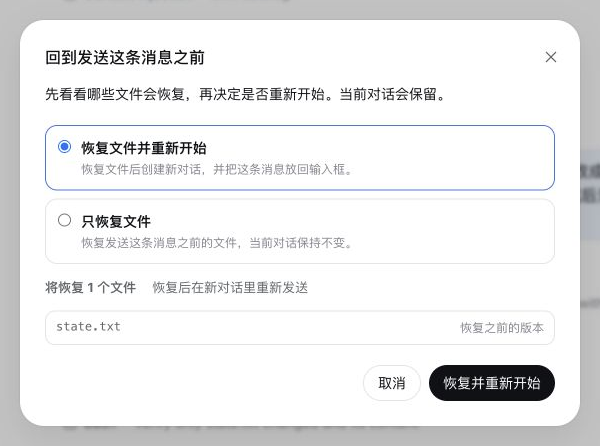
Opening it shows the affected files and offers two choices: restore the files and restart from before that message, or restore only the files:
Why it has a Change Ledger engine
A diff button can show current changes, but it does not own a durable restore lifecycle. Change Ledger owns:
- content-addressed restore-point manifests;
- Git worktree, HEAD, branch, and in-progress-operation fences;
- stale-plan detection between review and mutation;
- exact two-step confirmation plus DSH human approval;
- automatic pre-restore rescue points;
- post-restore hash verification;
- rollback after a failed restore;
- startup reconciliation of interrupted restore journals;
- a public
ctx.changeLedgerservice that other plugins can consume.
The durable format is documented in docs/FORMAT.md. The security and failure model is documented in SECURITY.md.
Safety contract
- Explicit only: nothing is restored automatically — every restore starts from the user pressing the final button in the Web dialog, or from an explicit call through the service API.
- Read before write: the dialog preview generates an expiring, session-bound plan from the current tree and changes no files.
- Human gate: the dialog's reviewed impact plus the final restore button is the human decision; direct mutation requests without a live session-bound plan pair fail closed.
- Rescue before mutation: every restore captures the current eligible tree as a durable rescue point before changing a path.
- No silent omission: unsupported submodules, sparse checkouts, oversized files, aggregate limits, and unsupported file types fail point creation.
- No path escape: every durable path is canonical and workspace-relative; restore refuses symlink parents and non-empty directory replacement.
- No stale overwrite: selected paths and the reviewed HEAD/branch/operation fence are checked again at apply time. Any relevant post-review change invalidates the plan.
- No Git control-plane mutation: the index, branch, HEAD, stash, and commits remain untouched.
Scope
Version 0.1 intentionally supports normal Git worktrees only:
- tracked files, including currently missing tracked paths;
- untracked files not excluded by
.gitignoreor other standard Git excludes; - regular files, binary or text;
- symbolic links;
- executable and other portable permission bits.
The following are rejected or deliberately outside the snapshot:
- sparse checkouts;
- submodule gitlinks (create a restore point inside each submodule instead);
- ignored files;
- special files, sockets, devices, and named pipes;
- extended attributes, ACLs, ownership, timestamps, and hard-link topology;
- the Git index and repository metadata;
- non-Git directories.
If an ignored or otherwise unmanaged file occupies a path that restoration would replace, the restore fails rather than deleting it.
Install
Build the checked-out plugin, then add it to each DSH profile that should expose the service:
pnpm install --frozen-lockfile
pnpm run check

dsh plugin --profile web add @anionex/dsh-turn-rewind
dsh plugin --profile headless add @anionex/dsh-turn-rewind

dsh --profile web --dump-config | grep turn-rewind
Restart a running profile after changing its bundle list.
The package is a DSH Profile Bundle. package.json declares dsh.bundle.patch, and cordis.patch.yml mounts @anionex/dsh-turn-rewind without a DSH core patch.
When the profile also provides the DSH Agent service, the plugin captures a hidden checkpoint in the first agent/pre-step waterfall before the Agent processes the opening user message. Capture failures are reported but do not reject the user's turn; the corresponding message simply has no usable rewind point. In Web profiles, the same-origin /turn-rewind endpoint resolves the selected user/message sequence, exposes a paged file preview, mints a short-lived session-bound restore plan, and delegates child creation to DSH's official Host create/fork lifecycle. It never restores files automatically.
User flow
In the Web profile, each direct user message gains a compact, icon-only Rewind action after its timestamp and native Copy control. The tooltip reads “Return to before sending this message.” Opening Rewind checks the saved file state, shows a concise preview with a “view all files” action, and offers two modes:
| Mode | Code | Conversation |
|---|---|---|
| Restore files and restart (default) | Restores the project files after automatically backing up their current state. | Creates and opens a Session ending before the selected message, then puts that message's text back in the composer. |
| Restore files only | Restores the project files after automatically backing up their current state. | Leaves the current Session open and unchanged. |
The dialog itself is the confirmation: there is no duplicate checkbox. It describes each file as restoring an earlier version, finding a deleted file, removing a later-added file, or restoring permissions/type. If the project files already match the state before the selected message, Turn Rewind performs no action and directs the user to the native Branch button for conversation-only branching.
Before mutation, Turn Rewind rechecks the selected files and repository state, then creates an automatic backup. Changes made after preview invalidate the operation. Any running Agent using the same worktree, including the source Session, blocks restoration; idle Sessions do not block. A reviewed HEAD or branch difference does not block restoration: commits, refs, branch, and index remain unchanged, so restored content may appear as ordinary uncommitted changes against the current HEAD. An in-progress Git operation still blocks. If child creation fails after “restore and restart,” Change Ledger automatically restores the pre-operation files from the backup.
DSH Session logs are append-only, so “restart” creates a new Session instead of truncating the original. For the first message, the Host creates a blank Session in the same working directory; for later messages, it forks at the previous completed turn/end. A child may reuse an ancestor's prompt checkpoint only while both the selected user/message and its exact turn/start remain inside every durable seedLength fence. Direct child checkpoints take priority and sibling checkpoints never mix. Branch creates only a conversation branch and keeps project files unchanged; Turn Rewind always restores project files, optionally followed by a new conversation with the selected prompt restored to the composer. The original Session is always retained.
Configuration
Override configuration in the profile patch layer:
- id: turn-rewind
  config:
    storageDir: ~/.dsh/change-ledger/v1
    maxRestorePoints: 50
    maxTurnCheckpointsPerSession: 30
    maxFiles: 20000
    maxFileBytes: 16777216
    maxSnapshotBytes: 536870912
    planTtlMs: 900000
    staleLockMs: 30000
All size and user-point retention limits fail loudly. Automatic turn checkpoints have a separate per-session retention window and prune only their own oldest checkpoints; user and rescue restore points are never silently pruned. When omitted, storageDir resolves to $DSH_HOME/change-ledger/v1 and falls back to ~/.dsh/change-ledger/v1; it must not overlap the managed worktree.
Recovery
Before writing any path, a restore creates a rescue point and a durable operation journal. If DSH stops with a non-terminal journal, the next plugin startup marks it interrupted unless another live DSH process still owns that workspace lock.
Recovery uses the public ctx.changeLedger service API: listRecovery finds the operation's rescuePointId, inspect reviews that rescue point, then planRestore/applyRestore handle the affected paths. Rescue points remain ordinary, inspectable restore points until explicitly deleted.
Public service
Other Cordis plugins can inject changeLedger and call the same lifecycle through the structured service API:
export const inject = ['changeLedger']

export async function apply(ctx: Context) {
  const point = await ctx.changeLedger.create({
    cwd: '/absolute/git/worktree',
    sessionId: 'session-id',
    label: 'before refactor',
  })
  // point.id is a durable restore-point id.
}
The complete exported types are available from @anionex/dsh-turn-rewind/format; the engine is available from @anionex/dsh-turn-rewind/core for non-Cordis tests and trusted integrations.
Development
pnpm install --frozen-lockfile
pnpm run check
The test suite creates real temporary Git repositories and covers full/selective restore, stale plans, ignored-path collision refusal, HEAD drift, rescue rollback, crash reconciliation, active-lock preservation, durable-state integrity, symlinks, size limits, sparse checkouts, submodules, deletion, and blob garbage collection.
About
DSH Turn Rewind is maintained by anionex. If you would like to follow my future work, follow me on X or GitHub.
License
BSD-3-Clause. See LICENSE.
Read the usage guide →
Install steps, key points, FAQ and compatibility for this plugin — auto-derived from indexed fields.
Listing badge

[](https://deepseek-plugin.org/plugins/Anionex/dsh-turn-rewind)Paste this markdown into your GitHub README to link back to this listing. The badge only states the listing — not a security endorsement.