Add an A-stock watchlist monitoring popup to the top right corner of DSH Web, featuring real-time quotes, time-sharing/K-line charts, and buy/sell target price alerts, with an integrated fan-shaped AI entry for one-click generation of research and review conversations.

- Language
- JavaScript
- License
- MIT
- Branch
- main
Install
$ dsh plugin --profile web add dsh-stock-watchRun the command above in your terminal to install this plugin via the dsh CLI. You can switch Profile in the top-right corner. New to dsh? Read the beginner tutorial
Install via your agent
Install the DeepSeek Harness plugin Awu12277/dsh-stock-watch for me: review the repository at https://github.com/Awu12277/dsh-stock-watch first, then run the install command and verify the plugin loads successfully.
Paste this instruction to the DSH Web GUI assistant — it will install and verify for you.
One-Line Pitch
Provides a collapsible, draggable A-share watchlist popup in the top-right corner of the DSH Web interface, displaying real-time stock price changes, target price triggers, intraday and daily/weekly/monthly K-lines, and integrating AI entry points like "One-Click Investment Research" and "Daily Review/Market Analysis/Limit-Up Analysis" directly into DSH conversations.
Core Capabilities
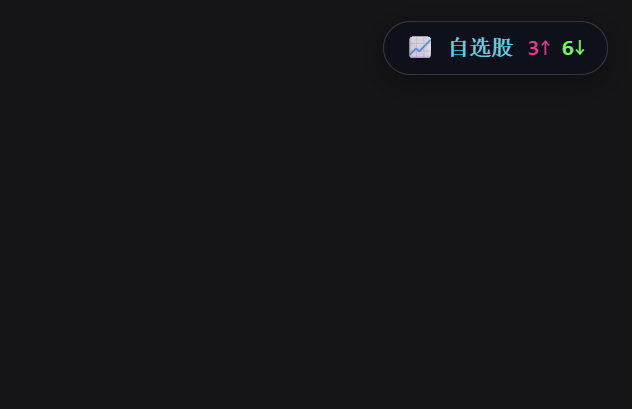
- Provides a collapsible, draggable 📈 stock watchlist pill and expanded panel in DSH Web's top-right corner: the collapsed state shows the number of rising/falling stocks in the current group (
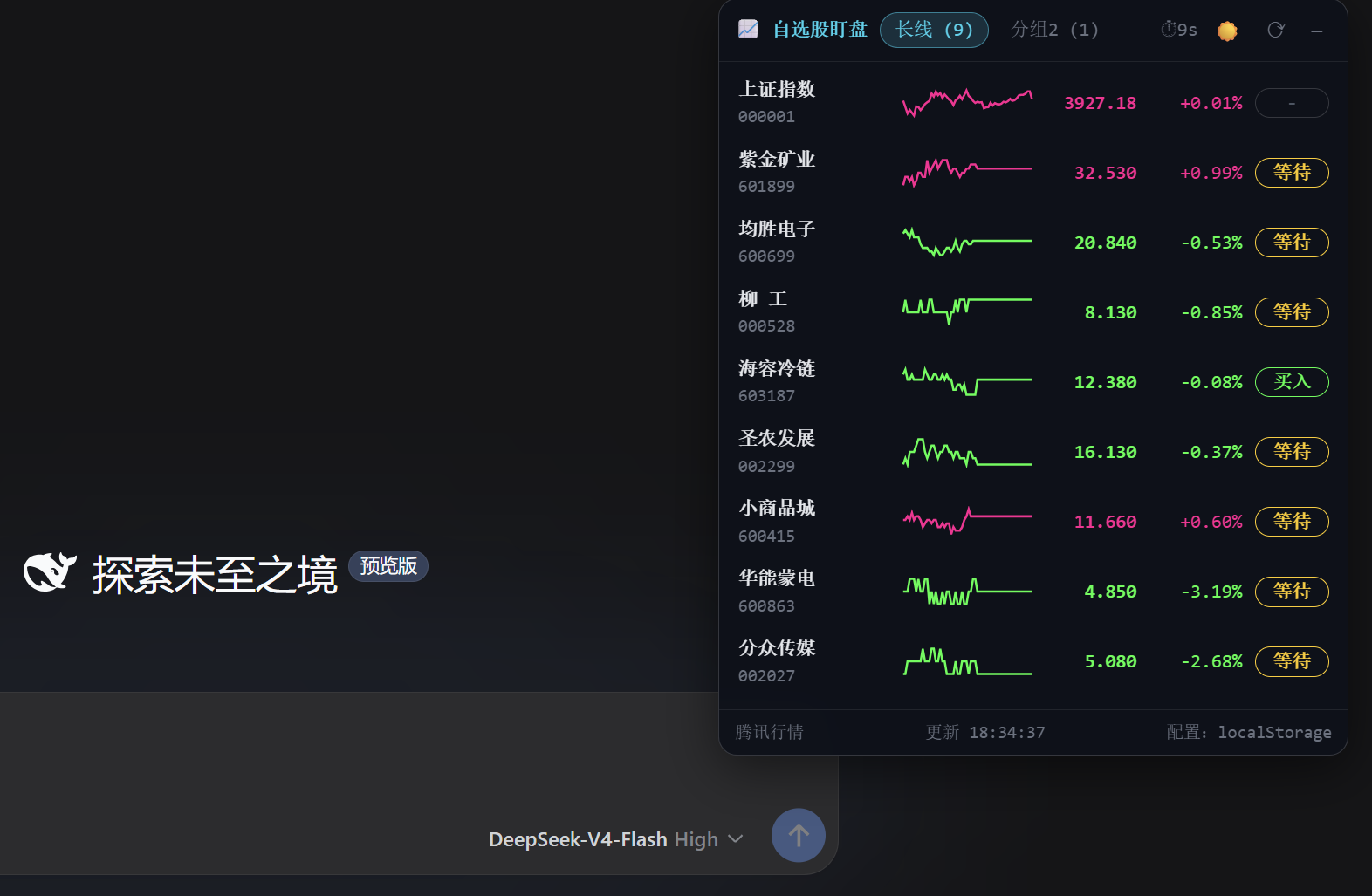
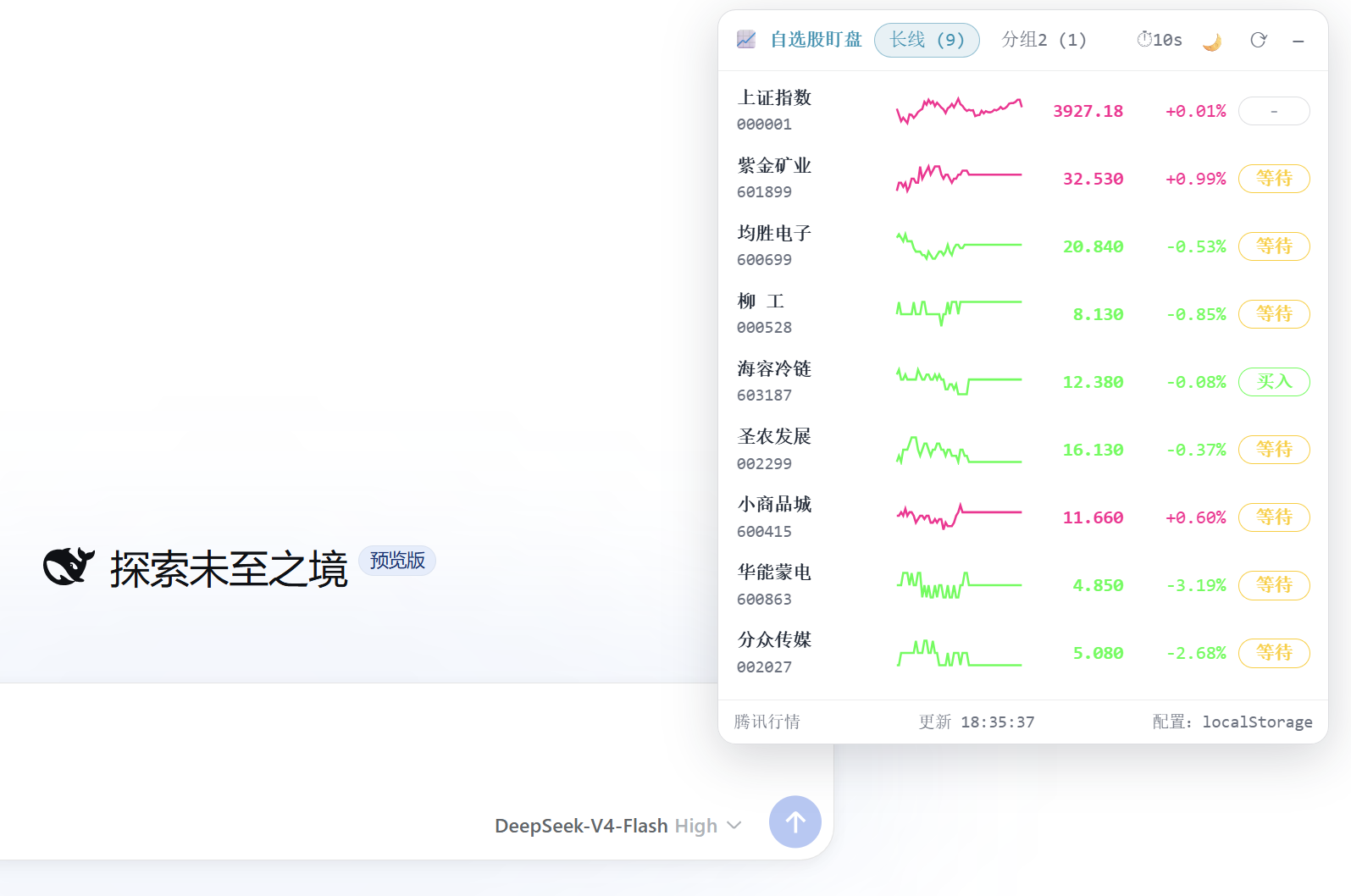
3↑0↓), while the expanded view lists name/code, current price, change percentage, mini intraday line chart, and target price trigger markers (Buy/Sell/Wait) - Supports multiple watchlist groups (group name, code, buy/sell target prices); the panel's
+button allows searching the entire A-share pool (~5,549 stocks) by name or code; group configuration persists in browserlocalStorage, with one-time migration from~/.stocking/settings.jsonon first launch - Provides intraday view (with yellow VWAP average price line and previous close reference line, marked by A-share trading hours 09:30–11:30 / 13:00–15:00, with lunch break blank) and daily/weekly/monthly forward-adjusted K-lines (candlestick + volume bars + MA5/10/20/60 moving averages); K-lines support
+/-/resetzooming, MA visibility toggles - Buy/Sell target prices displayed in real-time on list and detail pages; detail page click enters number input (two decimal places, empty to clear, Enter to confirm, Esc to cancel), saved immediately to localStorage with trigger marker recalculation
- Pill automatically snaps to screen edges as a hemisphere (only showing rising/falling count); hovering over the pill triggers GSAP radial animation menu with three options:「📊 Market Analysis / 📅 Daily Review / 🚀 Limit-Up Analysis」, layout auto-adjusts based on the pill's quadrant, menu stays open when mouse is inside
- Detail page "📈 Investment Research Report" button and radial menu click both open new DSH conversations with short keywords, with conditional system prompts injected by host side ensuring automatic execution according to predefined frameworks (A-share short-term review / 4-item market analysis / 4-item limit-up analysis / investment research + frontend design)
Technical Implementation
- Language: JavaScript (ESM, TypeScript not enabled;
index.js+client.jstwo source files) - Key Dependencies: Host side zero external dependencies (only uses
node:os,node:fs/promises,node:fs,node:urlbuilt-in modules and Node nativefetch); Client side reuses host React via__ModuleLoader__.require("react"); chart layer lazy-loads from CDN:[email protected](unpkg / jsdelivr dual sources) and[email protected], automatically degrades to self-drawn SVG candles and lines when CDN unavailable - Architecture Pattern: dual-half host plugin. Host half registers 5
/dsh-stock-watch/*routes viactx.inject(['webServer'])(config/stocks/quotes/kline/minute), and onapplystartup copies bundled skillsinvestment-researchandfrontend-designto~/.agents/skills/viaensureUserSkills()(skips if target exists), then injects two conditional system prompt sections withorder=200 / 201 viactx.get('systemPrompt'); Client half injects a draggable React popup in DSH Web top-right corner viactx.slots.inject("shell.overlay", ...), relying on host'sslots,connection,sessionsservices - Entry Files: Host entry
index.js(apply/name = 'dsh-stock-watch',inject = ['webServer']); Client entryclient.js(inject = ['slots']); mount declarationcordis.patch.yml(inserts 1 line Loader in web profile) +package.json#dsh.bundle.patch+package.json#dsh.client.platform = 'web'
Use Cases
A-share investors writing or conversing within DSH Web workflow who want to see watchlist price changes and target price alerts at any time without leaving the chat interface, and can instantly hand over ad-hoc questions like "Which stock looks good today and why", "After-market review", or "Limit-up analysis" to DSH conversations for investment research answers or post-market reviews.
Prerequisites & Compatibility
| Dependency | Min Version | Notes |
|---|---|---|
| DeepSeek Harness (DSH) | Not declared | package.json doesn't declare engines or dshhub.compatibility.dsh; installed via dsh plugin --profile web add, depends on host services webServer / slots |
| Node.js | Not declared | package.json doesn't declare engines; source uses Node native fetch, AbortSignal.timeout(12000), node:fs/promises, fileURLToPath, recommended Node ≥18 (stable fetch and timeout versions) |
| Platform | Cross-platform | Pure JS + built-in Node modules, no native dependencies; Host side connects to Tencent Finance web.ifzq.gtimg.cn on startup, Client side optionally accesses unpkg.com / cdn.jsdelivr.net |
| Native Modules | None | No node-gyp modules introduced, all dependencies are JS or pure browser scripts |
Installation
dsh plugin --profile web add github:Awu12277/dsh-stock-watch
Configuration Options
This plugin has no host-side Schema configuration; watchlist, buy/sell target prices, panel position, panel size, and MA visibility are all managed through the panel UI in browser localStorage. The Host side provides two optional environment variables:
| Config | Type | Description | Default |
|---|---|---|---|
DSH_STOCK_WATCH_NO_SKILLS | Environment Variable | When set to 1, disables the logic that copies bundled skills to user skills directory on first startup | Not set (injection enabled) |
DSH_STOCK_WATCH_SKILLS_DIR | Environment Variable | Customizes skill injection target directory, overriding default ~/.agents/skills | ~/.agents/skills |
FAQ
Q: The 📈 stock watchlist pill doesn't appear in the top-right corner after installation. What should I do?
A: Confirm the installation command includes --profile web and that dsh web was restarted after installation. package.json#dsh.client.platform is fixed to web, only the web profile scans this bundle on startup; just refreshing the browser won't reload the host page and client modules.
Q: Where does the market data come from? Is it the same as the official API?
A: Host side uses Node native fetch to directly connect to Tencent Finance public endpoints web.ifzq.gtimg.cn (minute/query and fqkline/get), sourced from the same upstream CLI project stocking's market.ts. Even if DSH deployment doesn't mount web fetch provider or sandbox blocks some networks, this plugin can still retrieve market data.
Q: How to add stocks? Where is the data stored? How to completely clear it?
A: Press + at the panel top to enter add view, search the entire A-share pool (~5,549 stocks) by name or code, press Enter to add to current group. All user configuration (groups, codes, buy/sell target prices, panel position, panel size, MA visibility) persists in browser localStorage, with keys stocking.config.v1 / stocking.pos.v1 / stocking.size.v1 / stocking.ma.v1. On first install, if ~/.stocking/settings.json is detected it auto-migrates, after which localStorage is the sole source; execute localStorage.removeItem('stocking.config.v1') in browser console then refresh to restore default groups (SSE Composite, CSI 300, Zijin Mining).
Q: How do the "One-Click Investment Research" in the top-right corner and the radial menu work? Will they leak my settings?
A: Neither exposes prompt content in messages. "Investment Research" button sends a short message 分析{公司名}(代码), radial menu sends one of three keywords: "每日复盘 / 行情分析 / 涨停分析". Full prompts are injected by host side via ctx.get('systemPrompt').section() as two conditional system prompt sections, which only expand according to the framework when user messages match "analyze a listed company" or corresponding keywords, avoiding polluting daily conversation. Note that「每日复盘」is only clickable between 15:00 and 09:00 next day; it's grayed out during trading hours with prompt "Market not closed yet".
Q: How does the target price trigger notification work? Do I need to keep the page open?
A: In detail page, click "Buy Target" / "Sell Target" to enter number input (two decimal places, empty to clear, Enter to confirm, Esc to cancel), after saving it writes back to localStorage and immediately recalculates triggers. Current price ≥ sell price marks Sell, ≤ buy price marks Buy, otherwise Wait, displayed as pill colors in list and detail. The plugin doesn't send system-level push notifications; DSH Web page must remain open.
Q: Do K-lines and radial animation require network? What happens with poor connection?
A: K-lines load [email protected] from unpkg.com and cdn.jsdelivr.net by default, radial menu loads [email protected], both CDNs tried sequentially. When CDN is unreachable it automatically degrades to self-drawn SVG (candles and lines still visible), but details like zoom interaction animation and GSAP radial expansion may be incomplete.
Q: What needs to be cleaned up after uninstall?
A: After executing dsh plugin --profile web remove dsh-stock-watch and restarting dsh web, client popup and host routes are removed together. The ~/.agents/skills/investment-research and ~/.agents/skills/frontend-design copied on first plugin startup are file-level copies and remain as ordinary files (can manually rm -rf if no longer needed); existing user skills with the same names won't be overwritten.
Q: What time periods show real-time quotes? Is non-trading hour data from yesterday?
A: Data comes from Tencent Finance minute-level API. A-share trading hours (Beijing time 09:30–11:30 / 13:00–15:00) provide minute-level lines; non-trading hours return post-close snapshots, list refreshes every 10 seconds. Intraday view timeline marks trading session periods, with lunch break 11:30–13:00 left blank.
Ease of Use
Beginner — one dsh plugin --profile web add + restart dsh web, refresh page to see the pill in top-right corner, initial watchlist configuration done entirely through panel's + and group tabs, no config file editing needed.
Known Issues & Limitations
- Must restart
dsh webafter installation or update: client bundle and cordis plugin lines are scanned at startup, only refreshing browser won't reload (README.md:26) - Market data comes from Tencent Finance public endpoint
web.ifzq.gtimg.cn: on connection failure list rows show "行情获取失败,请稍后重试", plugin doesn't cache last price, refresh retries (client.js:1660 / index.js:387) - Tencent Finance K-line return column order is based on
[date, open, close, high, low, volume]: plugin applies self-calibration "current price vs latest price" for the last K-line, if interface column order changes again needs corresponding adjustment (index.js:329-342) - 「每日复盘」radial menu option only clickable between 15:00 and 09:00 next day: grayed out during trading hours with prompt "还未收盘", avoids requesting review before market closes (README.md:54)
- Client charts and radial animation default to
unpkg.com/cdn.jsdelivr.net: auto-degrade to self-drawn SVG when unreachable, K-line zooming (+/-/reset) and GSAP radial animation details may be incomplete (client.js:225-300) - Watchlist persistence tied to browser
localStorage: not synced across browsers, devices, or incognito mode; multi-device sharing requires manual export/import ofstocking.config.v1(client.js:810-837)
dsh-stock-watch



A 股自选股实时行情盯盘插件:在 DeepSeek Harness(DSH)Web 界面的右上角显示一个可折叠弹窗,实时监控自选股行情、切换分组、查看分时与 K 线、设置买卖目标价。
数据源与原终端 CLI 项目 stocking 同源(腾讯财经),配色沿用 A 股红涨绿跌惯例。
安装
已发布到 npm,一条命令安装到你的 web profile:
dsh plugin --profile web add dsh-stock-watch
- 本地开发安装:
dsh plugin --profile web add file:D:\projects\github\dsh-stock-watch - 或直接通过 git:
dsh plugin --profile web add github:Awu12277/dsh-stock-watch - 安装后重启
dsh web生效;卸载:dsh plugin --profile web remove dsh-stock-watch
安装完成后,刷新页面,右上角出现「📈 自选股」药丸。
截图
| 折叠药丸(右上角实时涨跌家数) | 暗色列表(分组 + 分时迷你折线 + 目标价触发) |
|---|---|
 |  |
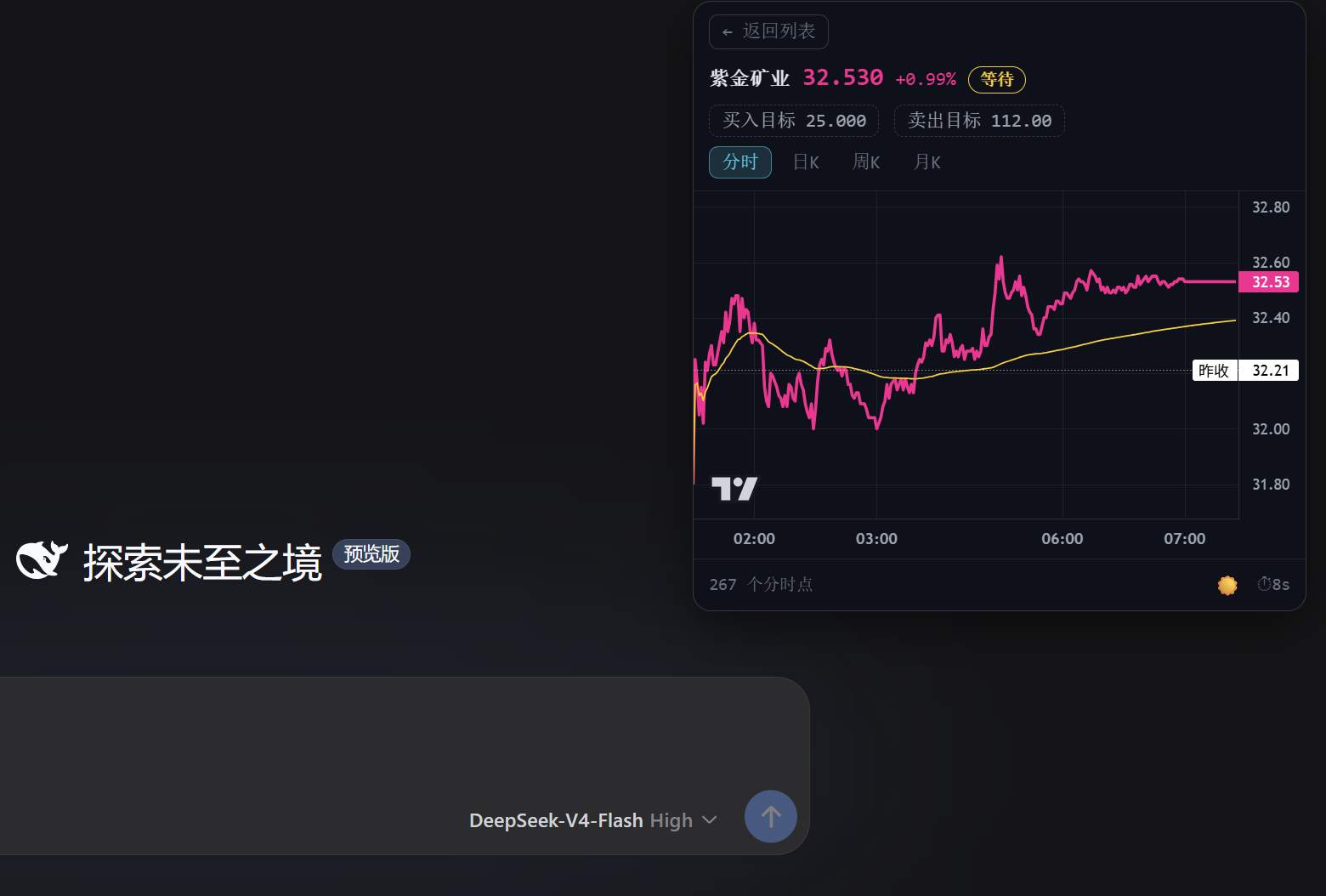
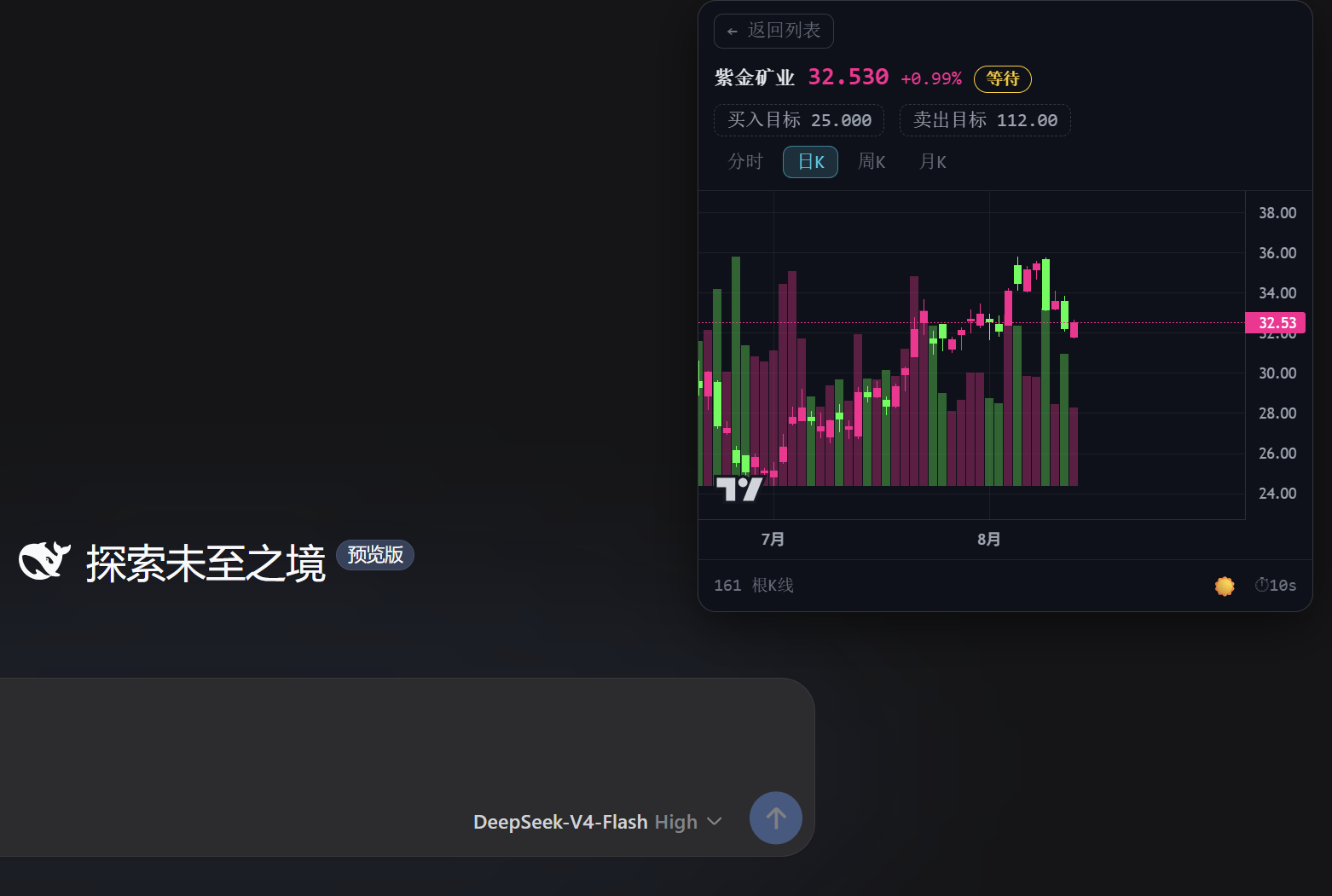
| 暗色·分时(价格线 / 均价线 / 昨收基准) | 暗色·日 K(TradingView Lightweight Charts) |
|---|---|
 |  |
| 浅色主题 |
|---|
 |
功能特性
- 右上角可折叠弹窗:折叠时显示自选股实时涨跌家数药丸;展开为完整列表,点击任意行进入详情
- 胶囊可拖动:按住「📈 自选股」药丸可拖到屏幕任意位置,面板随之跟随(右边缘对齐);展开后按住面板头部也可拖动;位置持久化到 localStorage。拖到屏幕四边自动吸附,贴边后胶囊变为半球(屏幕边缘显示涨/跌家数,如
3↑0↓),点击仍可展开面板 - 多分组自选股:分组 tab 切换(分组名 + 股票数),配置存浏览器
localStorage(首次自动从~/.stocking/settings.json迁移) - 实时行情列表:名称 / 代码、现价、涨跌幅、分时迷你折线、目标价触发标记(买入 / 卖出 / 等待 / -),每 10s 自动刷新(带倒计时)
- 分时视图:全天分钟价格线(红涨绿跌)+ 黄色均价线(VWAP)+ 昨收虚线基准,时间轴按 A 股交易时段(北京时间 09:30–11:30 / 13:00–15:00) 标注,午间休市留白
- K 线视图:日 K / 周 K / 月 K 前复权蜡烛图 + 成交量柱 + MA 均线(MA5 白 / MA10 黄 / MA20 紫 / MA60 绿,A 股配色,右上角可自定义隐藏/显示,配置存 localStorage),支持
+ / − / 重置按钮缩放 K 线(位于 MA 均线配置左侧),基于 TradingView Lightweight Charts(CDN 懒加载,失败自动降级为自绘 SVG) - 目标价可编辑:详情页点击「买入目标 / 卖出目标」进入输入框(数字 + 两位小数、留空清除、回车确认 / Esc 取消),即时重算触发标记并持久化
- 一键投资研究报告:详情页「📈 投资研究报告」按钮——新建一个 DSH 对话并发送简短消息
分析{公司名}(代码),由会话中的 agent 自动使用investment-research完成投资研究、frontend-design生成介绍网站(技能指令由 host 端条件式系统提示注入,仅对「分析某家上市公司」类请求生效);按钮带防抖(进行中禁用,防连点重复建会话) - 胶囊悬浮扇形菜单:鼠标移到胶囊(含贴边吸附态)触发 GSAP 扇形动画,展开 📊 行情分析 / 📅 每日复盘 / 🚀 涨停分析 三个选项(方向按胶囊位置自动选择象限、不越出屏幕;鼠标在扇形区域内不收起,移出才收回)。点击选项同样新开一个 DSH 对话并发送简短关键词(如
每日复盘),完整提示词(A股短线复盘框架 / 行情分析 4 项 / 涨停分析 4 项)由 host 端条件式系统提示注入、不暴露在消息里;「每日复盘」仅在 15:00–次日 9:00 可点击,交易时段置灰并提示"还未收盘";拖动/吸附后扇形自动归位重开 - 安装时自动注入技能:插件首次启动时把自带的
investment-research、frontend-design两个技能复制到用户技能目录~/.agents/skills/(已存在则跳过、不覆盖用户版本;DSH_STOCK_WATCH_NO_SKILLS=1可禁用,DSH_STOCK_WATCH_SKILLS_DIR可改目标目录) - 暗色 / 浅色主题:CSS 变量两套配色,默认暗色,☀️/🌙 一键切换(图表配色联动)
架构
┌─────────────── Web 浏览器 ───────────────┐
│  client.js(客户端插件模块)              │
│  · shell.overlay 槽位 → 右上角弹窗        │
│  · React + Lightweight Charts + SVG 降级  │
│  · 配置存 localStorage(stocking.config.v1)│
│          │ fetch(同源 /dsh-stock-watch/*)│
└──────────┼────────────────────────────────┘
           ▼
┌─────────────── DSH Host(index.js)───────┐
│  cordis 插件:webServer 注册 5 个路由      │
│  · /config   读取 ~/.stocking/settings.json│
│  · /stocks   全 A 股搜索(本地池检索)     │
│  · /quotes   实时行情(腾讯分钟接口)      │
│  · /kline    日/周/月 K 线(fqkline)      │
│  · /minute   分时详情(分钟点 + 昨收)     │
└───────────────────────────────────────────┘
数据源
- 行情快照 + 分时:
https://web.ifzq.gtimg.cn/appstock/app/minute/query?code={code}&r=0.1 - 日/周/月 K 线:
https://web.ifzq.gtimg.cn/appstock/app/fqkline/get?param={code},{period},,,{count},qfq
解析逻辑(字段索引、K 线 [date, open, close, high, low, volume] 列序、昨收由 现价/(1+涨跌幅%) 反推)与 stocking 的 market.ts 保持一致。Host 端使用 Node 原生 fetch 直连(部署即使未挂载 web fetch provider 或沙箱封锁网络,本插件也不受影响)。
目录结构
dsh-stock-watch/
├── index.js           # node 端 cordis 插件(webServer 路由 + 技能注入 + 系统提示指令)
├── client.js          # 浏览器端客户端模块(__ModuleLoader__ + shell.overlay 槽位)
├── cordis.patch.yml   # 组合补丁:插入 host 插件行(dsh.bundle.patch)
├── package.json       # dsh.bundle + dsh.client 声明
├── data/              # 全 A 股股票池(a_stocks.json,5549 只)
├── skills/            # 随包技能(investment-research / frontend-design,启动时注入用户技能目录)
├── scripts/           # 本地测试脚本(smoke / probe / skills 注入验证)
├── screenshots/       # 运行截图
└── README.md
dsh plugin add 即 profile 目录内的 pnpm add:安装后按 package.json 的 dsh.bundle.patch 自动并入 profile 层栈,dsh.client 声明自动挂载浏览器端模块。
交互说明
| 状态 | 操作 |
|---|---|
| 药丸 | 点击展开 · 按住拖动(拖到屏幕边缘自动吸附为半球,显示涨/跌家数)· 悬停弹出扇形菜单(行情分析/每日复盘/涨停分析,新开对话执行) |
| 列表 | 分组 tab 切换 · 点击行进详情 · ⟳ 手动刷新 · — 折叠 · ☀️/🌙 切主题 |
| 详情 | ← 返回 · 分时 / 日K / 周K / 月K 切换 · 📈 投资研究报告(新建对话一键分析)· 点击买入/卖出目标编辑 · K线 +/−/重置 缩放 |
配置与持久化
- 自选股配置(分组、代码、买卖目标价)存浏览器
localStorage(key:stocking.config.v1) - 首次打开自动从
~/.stocking/settings.json一次性迁移(失败则用默认分组),之后 localStorage 为唯一数据源 - 重置:
localStorage.removeItem('stocking.config.v1')后刷新页面
License
MIT
Read the usage guide →
Install steps, key points, FAQ and compatibility for this plugin — auto-derived from indexed fields.
Listing badge

[](https://deepseek-plugin.org/plugins/Awu12277/dsh-stock-watch)Paste this markdown into your GitHub README to link back to this listing. The badge only states the listing — not a security endorsement.