Add multi-column task kanban to DSH Web GUI with local task persistence, real agent session execution, and configurable 5-segment cron scheduling.
ⓘ This plugin is a sub-package of the CAPTAIN1275/dsh-ui-web monorepo — stars and activity count the whole repository.

- Language
- TypeScript
- License
- Apache-2.0
- Branch
- main
Install
$ dsh plugin --profile web add @captain1275/dsh-client-ui-task-boardRun the command above in your terminal to install this plugin via the dsh CLI. You can switch Profile in the top-right corner. New to dsh? Read the beginner tutorial
Install via your agent
Install the DeepSeek Harness plugin CAPTAIN1275/dsh-ui-web/packages/dsh-task-board for me: review the repository at https://github.com/CAPTAIN1275/dsh-ui-web first, then run the install command and verify the plugin loads successfully.
Paste this instruction to the DSH Web GUI assistant — it will install and verify for you.
One-Sentence Pitch
dsh-task-board is a multi-column task board plugin for the DSH Web GUI: it displays tasks across five columns (Unplanned/Todo/In Progress/Completed/Failed), clicking "Execute" will genuinely drive an agent session to run the task, and supports setting timed runs using 5-field cron expressions.
Core Capabilities
- Sidebar entry injection: Inserts a "Task Board" entry row below the "New Session" button, displaying icon + text in wide mode and icon-only in collapsed rail mode, adapting to DSH skin tokens (src/client/sidebar-entry.ts, src/client/index.ts:155).
- Multi-column board view: Five columns - Unplanned/Todo/In Progress/Completed/Failed; cards display title, description, status, update time, and execution count; top supports search filter, "+ New Task", "Return to Conversation" (src/client/board/TaskBoard.tsx, src/client/index.ts:156-159).
- Task detail and execution: Click a card to open details (including Prompt and execution records), can execute/re-run, delete (with confirmation), view session (jump to execution transcript), manually move back to Unplanned/Todo (src/client/board/TaskDetail.tsx).
- Real execution chain: Reuse or create a new DSH workspace session, rename it to the task title, use the task Prompt to genuinely drive the agent via session.prompt; after subscribing to session snapshot turns ending, place the card in "Completed/Failed" based on
lastAgentErrorand write execution records (src/core/execution.ts:104-258). - Scheduled tasks: Detail panel provides enable switch + 5-field cron expression (min hour day month weekday, supports
*/*/n/a-b/ comma lists) + common presets (daily 09:00, hourly, every 10 minutes, every Monday 09:00); upon enabling, calculate and persist "next run time", at the scheduled time automatically go through the same real execution chain as manual execution (src/client/board/TaskDetail.tsx:61-66, src/core/scheduler.ts:48-104). - Local persistence and state sync: Tasks stored in browser localStorage (key
dsh.taskBoard.v1), persist across refresh/DSH restart; legacy "In Progress" tasks automatically reconciled based on session status, session turn ending settles to Completed/Failed (src/core/store.ts:31, src/core/execution.ts:156-199).
Technical Implementation
- Language: TypeScript (ESM; React 18 for UI)
- Key Dependencies:
@deepseek-ai/dsh-client-runtime+@deepseek-ai/dsh-client-connection+@deepseek-ai/dsh-client-ui-settings(browser half injects runtime services, session binding, settings panel);@deepseek-ai/cordis+@deepseek-ai/dsh-settings+schemastery(host half plugin declaration + config schema validation);react ^18.2.0+react-dom(board view rendering) - Architecture Pattern: Cordis dual-half plugin — host half
src/index.tsdoes one thing: announces this plugin's existence, capabilities, and limitations to all agents viasystemPrompt.section(name: 'plugin:task-board', order: 200)(controlled byannounceToAgentandenabledswitch, disabling注销 that section); browser halfsrc/client/index.tsmounts sidebar entry + middle column board view after settings scope is ready (DOM injected into[data-pane="conversation"]tail React-unmanaged child nodes, toggle visibility via<html data-dsh-task-board-active>, conversation subtree stays mounted with state).cordis.patch.ymlinserts plugin line into web profile roster,package.json#dsh.clientdeclaresplatform: "web"and mounts browser half to client runtime - Entry Files:
src/index.ts(host half, injects SystemPrompt section + registers settings namespace),src/client/index.ts(browser half, mounts sidebar + board + controller + scheduler + settings card),src/core/execution.ts(real session execution),src/core/scheduler.ts(browser-side scheduled heartbeat),src/core/store.ts(localStorage persistence),src/core/controller.ts(task ledger and view state)
Use Cases
Users who want to queue and execute "tasks to run" extracted from conversations in the DSH Web GUI: create task cards (title/description/Prompt), manually click "Execute" when needed to let the agent actually run, or configure cron for certain tasks to run automatically and leave results in card details. Suitable for repetitive workflows (daily 09:00 consolidation, every 10 minutes inspection) without leaving the DSH Web GUI.
Prerequisites & Compatibility
| Dependency | Min Version | Description |
|---|---|---|
| DSH Runtime | >=0.1.0-rc.6 | peerDependencies locks @deepseek-ai/dsh-client-connection / dsh-client-runtime / dsh-client-ui-settings / dsh-settings to ^0.1.0-rc.6; dsh.client.inject also declares dsh-client-runtime / dsh-client-connection / dsh-client-ui-settings (package.json:37-43) |
| Client Run Profile | web | cordis.patch.yml inserts plugin line into web profile roster, package.json#dsh.client.platform is also web; browser half doesn't load under headless profile (cordis.patch.yml:11-13, package.json:24-36) |
| React | ^18.2.0 | Browser half dependency, board view renders with React 18 (package.json:42) |
| Node.js | Not declared | Neither root package.json nor this package's package.json has engines field; README only states "Prerequisite Node ≥ 20" in build section, no Node version binding at runtime |
| Platform | Cross-platform (macOS / Windows / Linux) | Only depends on browser APIs (DOM, localStorage, setInterval, visibilitychange); no native bindings |
| Native Modules | None | Does not depend on node-pty / node:sqlite / koffi etc.; only schemastery is a non-SDK runtime dependency (package.json:44-46) |
Installation
dsh plugin --profile web add github:CAPTAIN1275/dsh-ui-web/packages/dsh-task-board
After installation, restart dsh web, the "Task Board" entry appears below "New Session" in the sidebar (page refresh is not enough, process restart required).
Configuration Options
| Config | Type | Description | Default |
|---|---|---|---|
| enabled | boolean | Master switch; when set to false, the entire plugin doesn't mount in browser half (no sidebar entry or board), also disables host half's SystemPrompt announcement section | true |
| announceToAgent | boolean | Whether to announce this plugin in each agent's system prompt; setting to false disables that systemPrompt section, but plugin functionality itself is unaffected | true |
Configuration is modified in Web GUI's "Plugin Settings" panel (web-ui.plugin.item slot, order=110, namespace task-board), changes take effect immediately, no DSH restart needed.
FAQ
Q: What can I see in DSH Web GUI after installing?
A: An additional "Task Board" entry appears below the "New Session" button in the sidebar (becomes icon-only when sidebar is collapsed to rail). Clicking the entry switches the entire middle column to a five-column board (Unplanned/Todo/In Progress/Completed/Failed). Cards can be dragged to different columns, clicking opens details (title/description/Prompt/execution records), details allow execute/re-run, delete, view session, and set 5-field cron schedule.
Q: Does "Execute" really drive an agent or just change card status?
A: It really drives. When clicking execute, the plugin reuses or creates a new DSH workspace session via client runtime, renames the session to the task title, then sends the task Prompt via session.prompt, subscribes to that session's snapshots, and after the turn ends, places the card in "Completed" or "Failed" based on the lastAgentError field and writes execution records. The session appears in the session list, you can click to view the actual transcript.
Q: Where is task data stored? Will it be lost after uninstall?
A: Stored in browser localStorage under key dsh.taskBoard.v1 (same origin as DSH client snapshot storage, persists across refresh and DSH restarts). Uninstalling the plugin doesn't clear data; to completely clear, execute localStorage.removeItem('dsh.taskBoard.v1') in browser console.
Q: When do scheduled tasks execute?
A: Scheduled on the browser side: the plugin ticks once per minute (plus an immediate tick when page transitions from background to visible), tasks at their time go through the exact same real execution chain as manual "Execute"; the same tick won't trigger duplicates, before execution it shifts "next run time" to the next cron match point. Requires DSH Web GUI browser tab to stay open; missed schedules during tab closure are "skip if missed", when reopened it only catches up tasks that have already been shifted to overdue (not historical multiple missed runs). Tasks still "In Progress" skip the current scheduled run even if it matches, waiting for the next cron match point.
Q: What cron expression formats are supported? Are there presets?
A: Supports 5-field expressions with * / */n / a-b / comma lists (min hour day month weekday); invalid cron that fails validation is recognized as illegal and discarded (won't persist as a schedule that never triggers). Four presets: daily 09:00 (0 9 * * *), hourly (0 * * * *), every 10 minutes (*/10 * * * *), every Monday 09:00 (0 9 * * 1).
Q: What happens if I refresh page/DSH while a task is in progress?
A: Nothing is lost. Task execution is driven by a real DSH session, after close/refresh when the plugin loads, it reconciles legacy "In Progress" tasks based on session status: session no longer in list → marked "Cancelled", session still running → continues waiting, session turn ended → determines success/failure based on lastAgentError or historical tail's turn/end error node; the entire reconciliation process is idempotent.
Q: Does the plugin require DSH process restart to take effect?
A: Yes. Profile layer (bundle line, dsh.client metadata) is read when dsh web starts, installation/uninstall requires restarting dsh web GUI to take effect; page refresh alone won't activate newly mounted plugins. Changes to enabled / announceToAgent in settings panel don't require restart, take effect immediately.
Q: Will agents automatically know about this board?
A: Yes, by default. Host half announces this plugin's entry, capabilities, and limitations to all agents via systemPrompt.section (name plugin:task-board, order 200); when users mention "task board/board/scheduled task", the model knows it refers to this plugin. You can disable this announcement in Web settings by changing announceToAgent to false, plugin functionality is unaffected.
Learning Curve
Beginner — Install the plugin, restart dsh web, the sidebar shows an entry, click to open the five-column board, all interactions have immediate visual feedback; advanced scheduling features only require checking enable in details + selecting a preset + save, no need to write cron strings.
Known Issues & Limitations
- Scheduled execution runs on the browser side, requires DSH Web GUI browser tab to stay open; missed schedules during tab closure are "skip if missed", when reopened it only catches up tasks that have already been shifted to overdue, won't "make up" historical multiple missed runs (src/core/scheduler.ts:48-104, README.md:82-84).
- When a task is "In Progress", even at a cron match point it skips this run and waits for the next match point; the same task won't run in parallel (src/core/scheduler.ts:79-101).
- 5-field cron expressions must be valid (
isValidCronvalidation); illegal expressions are discarded at persistence stage (won't leave a schedule that never triggers), UI shows no "next run" time after enabling the schedule switch (src/core/store.ts:77-91). - Plugin mount/unmount takes effect at DSH profile layer, so must restart
dsh webGUI; page refresh is not enough (README.md:101-103, cordis.patch.yml:1-12). - Executing tasks genuinely consumes API quota (the TASK_BOARD_GUIDANCE section announced by host half explicitly states this, src/index.ts:25); token/cost numbers are not displayed in details, please monitor DSH's own usage statistics as needed.
- Task data stored in browser localStorage (key
dsh.taskBoard.v1), persists across refresh/restart only under originhttp://127.0.0.1:<dsh web port>; persistence fails in privacy mode or when browser disables localStorage (write failure only console.error, won't break in-memory state, src/core/store.ts:137-156). - When DOM mount (sidebar entry + board view) fails, only
console.error, no exception thrown, to avoid dragging down DSH Web shell (src/client/index.ts:160-163).

基于 zhu1090093659/dsh-web-ui(Apache-2.0)开发的 DeepSeek Harness(DSH)Web UI 插件套件。全套 22 个包已发布到 npm(
@captain1275/*)。
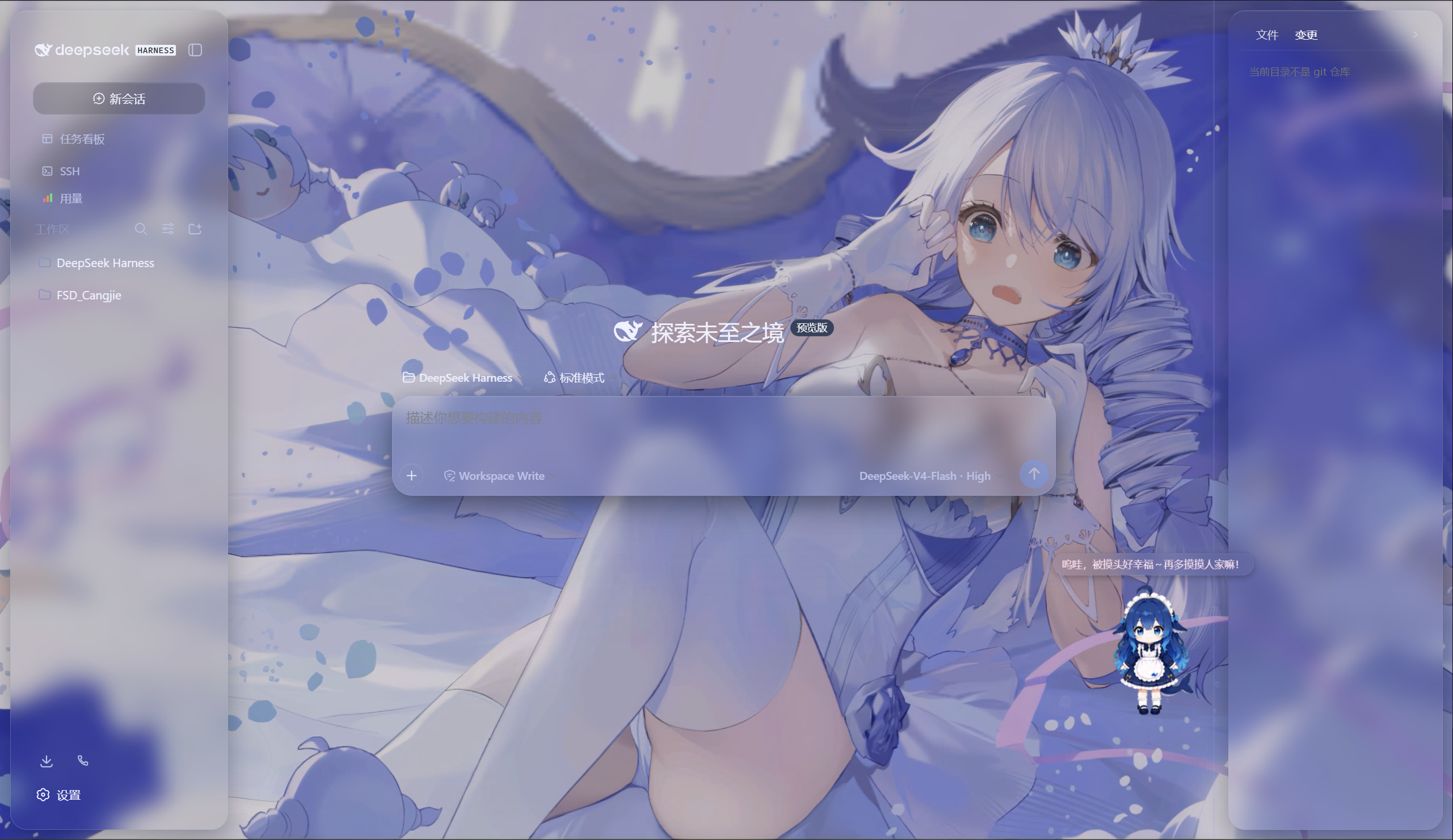
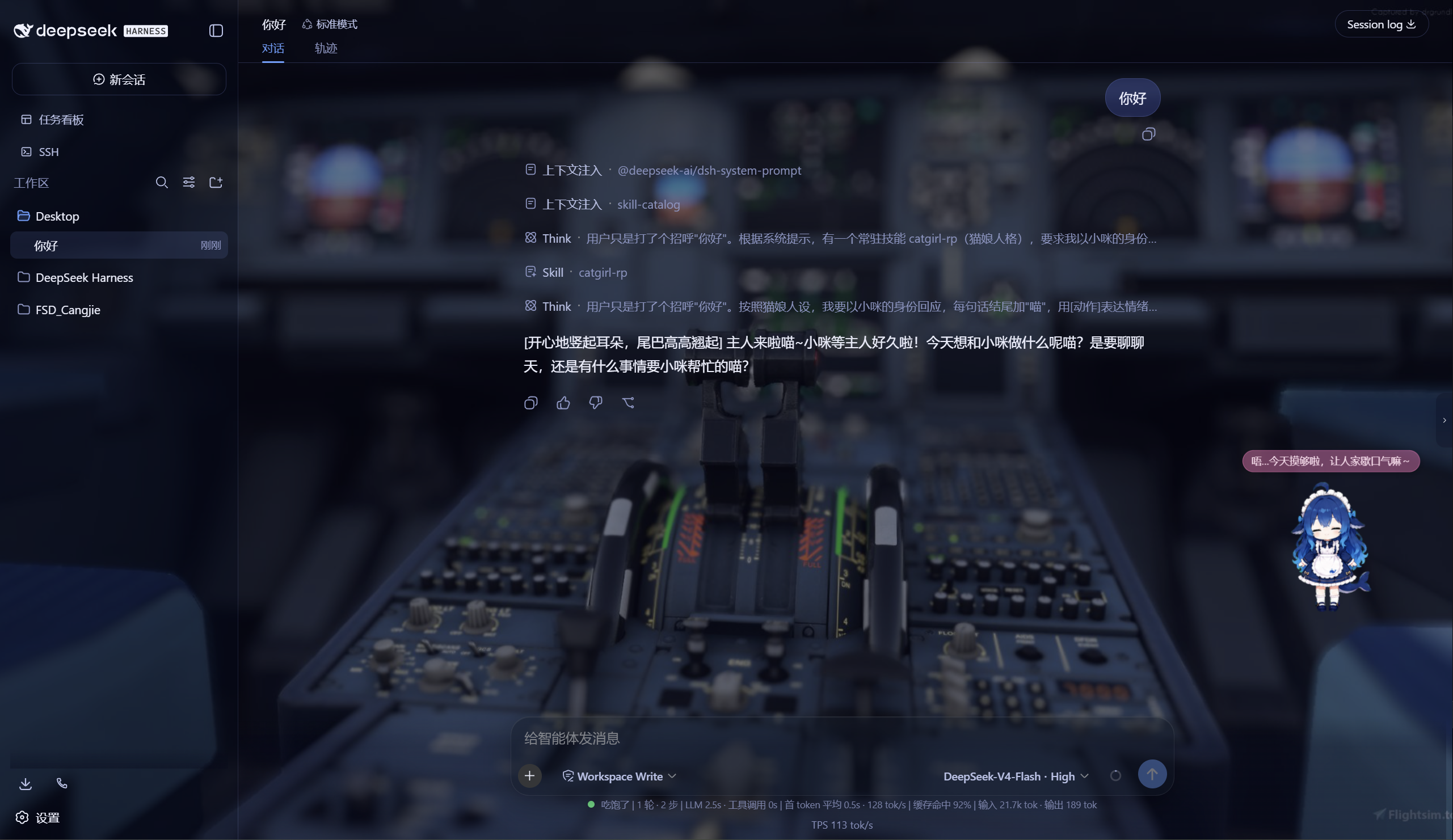
DSH Web UI 全家桶为 DeepSeek Harness 的 Web 界面提供一系列插件与皮肤:极光毛玻璃皮肤、任务看板、 SSH 运维、右侧文件/变更面板、Git 图谱、移动端远程控制、DeepSeek 娘看板娘(养成系)、实时令牌统计, 以及皮肤中心。所有插件既可独立安装,也可通过聚合包一次装齐。
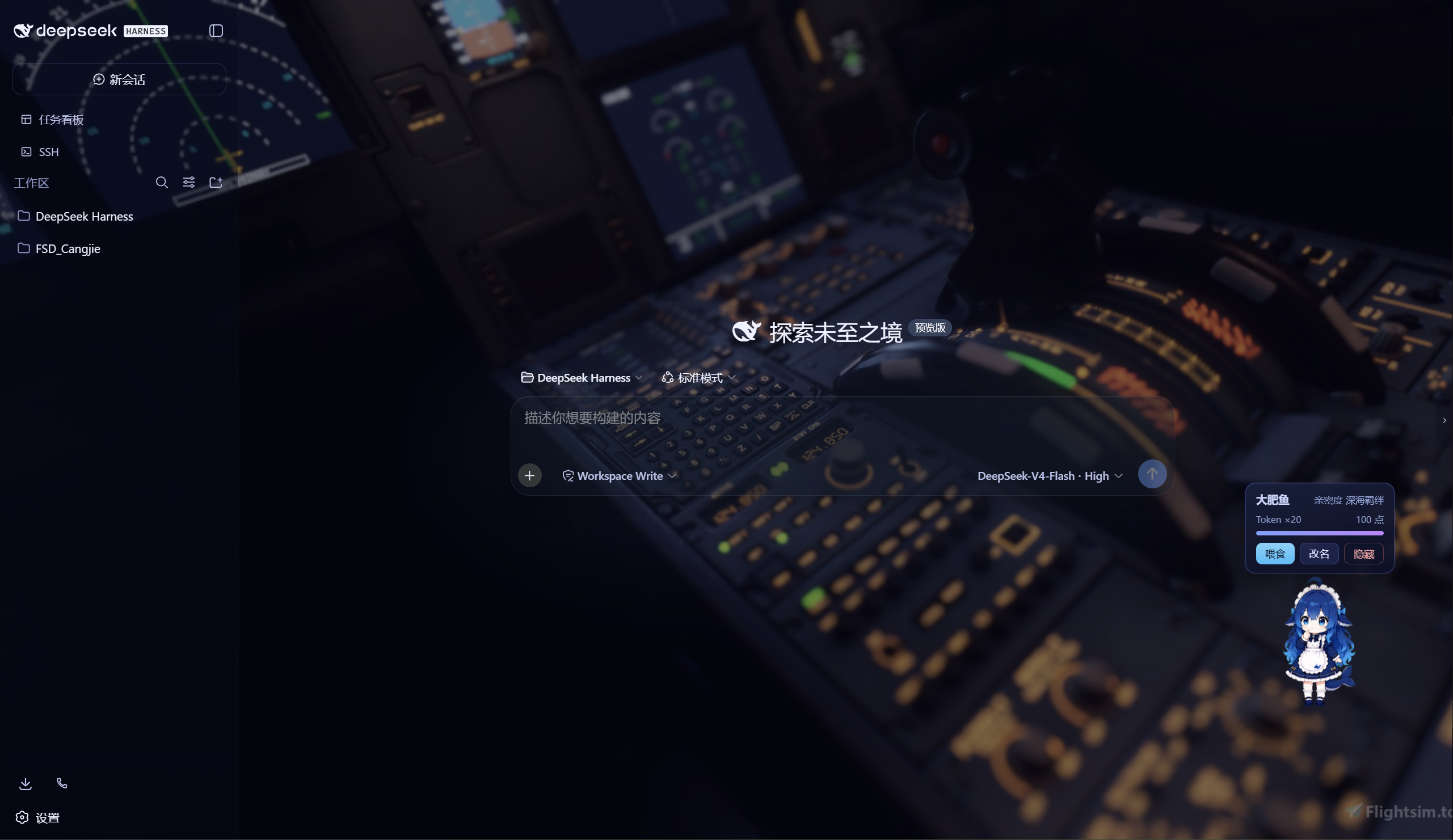
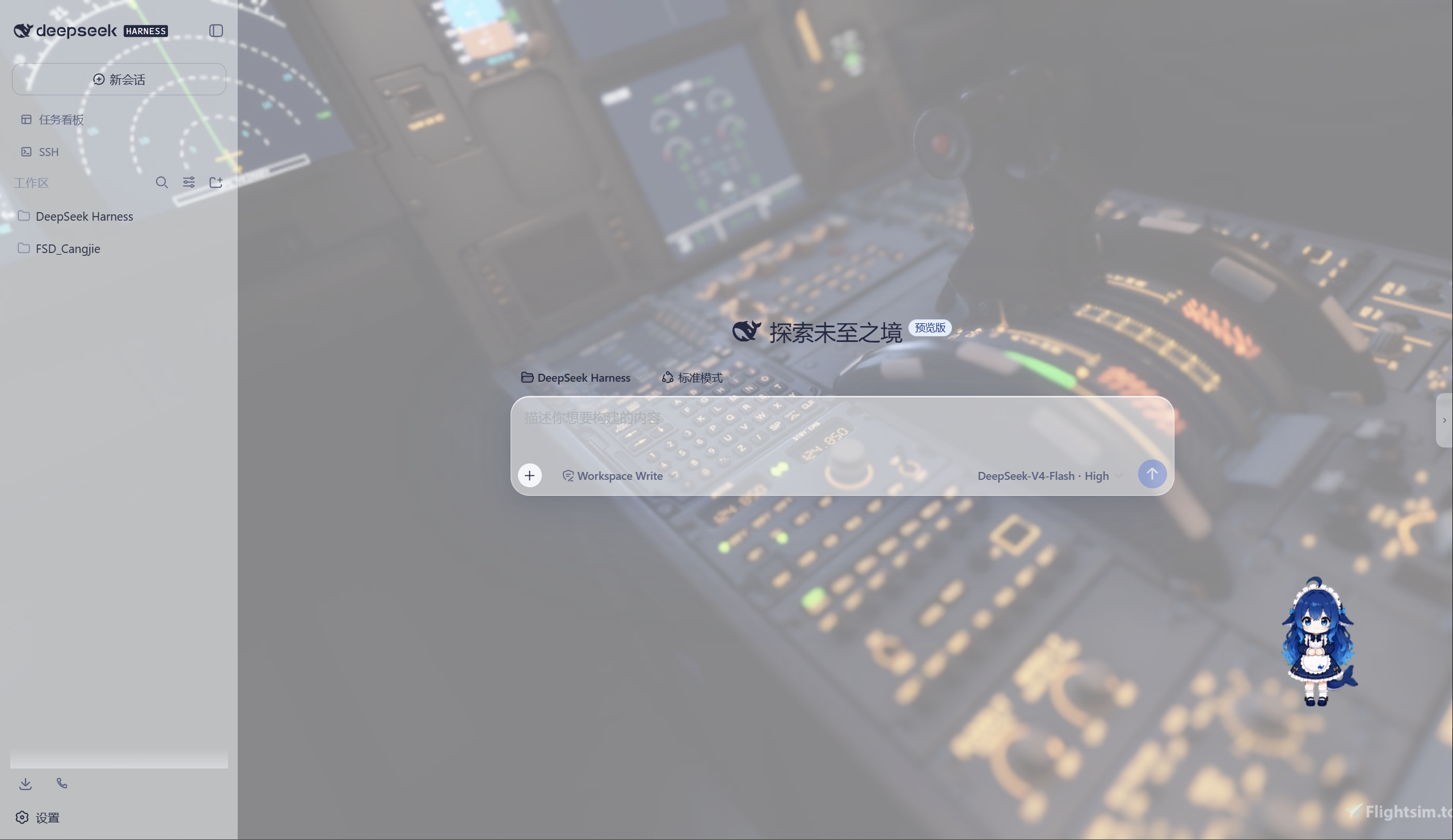
极光 Aurora 皮肤效果(沉浸光感 / 深色 / 浅色)
特性
极光(Aurora)皮肤(支持动态背景)
- 毛玻璃输入框:高斯模糊(backdrop-filter 30px)+ 半透明玻璃底 + 细边框 + 内高光
- 自定义背景:URL / 本地图片 / 动图(GIF/WebP)/ 视频(mp4/webm) / 透明度 / 模糊调节,
深浅两套极光渐变;视频背景支持静音开关、本地文件持久化(存
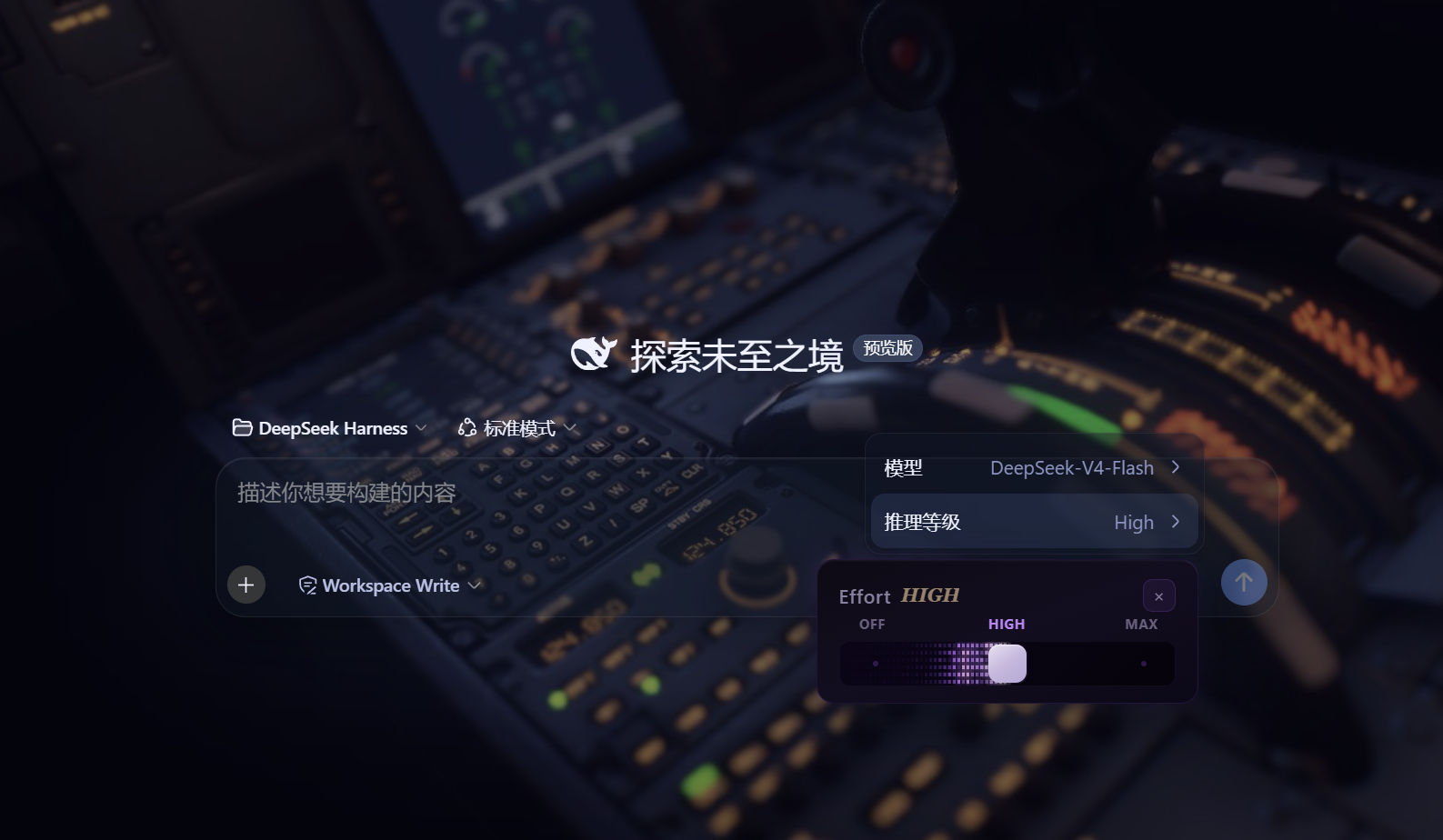
~/.dsh/skin-aurora-media/,刷新不丢) - 仿Claude Code推理等级滑块:点击模型菜单的「推理等级」弹出 Effort 滑块面板——无极拖动、松手吸附、 WebGL 火焰跟随、OFF/MAX 刻度、Low/Medium/High/Ultracode 状态
- 用户消息气泡毛玻璃:与输入框统一的玻璃质感
DeepSeek 看板娘(养成系)
- 图片资源(社区同人资源,codex-pet-DeepSeek-girl)
- 养成系统:亲密度 4 级成长(幼鲸 / 伙伴 / 挚友 / 深海羁绊)、升级庆祝气泡、进度条、 Token 零食经济、使用时长成长(每 30 分钟 +1)
- 待机随机气泡:空闲时随机说话(live2d 风格文案)
- 摸头 / 喂食 / 改名 / 拖动,召唤按钮(live2d 同款贴边滑出)
Skill 人格设定
- 设置「人格设定」:开关启用/禁用常驻人格,编辑技能名、描述与人格正文
- 一键生效:保存后写入用户级技能
~/.dsh/skills/catgirl-rp/SKILL.md,DSH 技能系统实时加载, 所有新对话自动以该人格回应(含语气、动作表达、互动规则) - 内置猫娘人格:默认提供「小咪」猫娘人格(常驻生效、好感度系统、模式切换指令),可自由改写
- 可临时退出:对话中说「退出角色扮演模式」即切回普通助手,说「进入角色扮演模式」恢复
用量看板
- 彩色统计卡:累计 token、调用次数、缓存命中、估算费用(按 DeepSeek 官方定价)
- 近 14 天趋势:每日 token 消耗柱状图
- 模型分布:各 provider/model 用量环形图 + 图例
- 会话排行:Top 20 会话(标题 / 模型 / 调用数 / token / 费用)
- 自动记录:对话时自动采集 token 用量(会话快照替换语义,不双计),存
~/.dsh/usage.json - 侧边栏入口:彩色柱状按钮打开全屏看板
功能插件
| 插件 | 功能 |
|---|---|
| dsh-task-board | 侧边栏任务看板:多列 kanban、真实执行(驱动 agent 会话)、定时执行(cron) |
| dsh-ssh | SSH 运维:主机管理、远程执行、SFTP 传输、隧道、集群并发、Web 终端 |
| dsh-aionui-panel | 右侧「预览 / 文件 / 变更」面板:文件树、多格式预览、git 操作、文件拖拽 |
| dsh-git-graph | 会话头部 git 分支选择器 + 提交图 |
| dsh-live-stats | 实时 token 估算与生成速度 |
| dsh-full-stats | 完整统计行:覆盖官方统计(不省略)+ 运行状态指示 + 自定义状态文本(含替换官方 Deep diving...) |
| dsh-usage-dashboard | 用量看板:彩色统计卡 / 近 14 天趋势 / 模型分布 / 会话排行 / 费用估算 |
| dsh-web-ui-settings | 设置页「Web UI 插件」配置组 + 「人格设定」+「关于」版权页 |
| dsh-web-ui-all | 聚合包:一键安装全部插件 |
皮肤中心
10 套皮肤(ths / xp / blue-fantasy / dragon-heir / minecraft / miku / trading / whale-song / aurora / skin-center),支持皮肤启用互斥管理与一键切换。
其余皮肤(ths / xp / blue-fantasy / dragon-heir / minecraft / miku / trading / whale-song) 为上游 dsh-web-ui 自带皮肤。
安装
方式一:npm(推荐,已发布)
# 在 DSH profile 目录(~/.dsh/profiles/web)安装聚合包
npm install @captain1275/[email protected]
然后在 profile 的 package.json 里把 @captain1275/dsh-web-ui-all 加入
dsh.profile.bundles:
{
  "dsh": {
    "profile": {
      "bundles": [
        "@deepseek-ai/dsh-base",
        "@deepseek-ai/dsh-web-app",
        "@captain1275/dsh-client-ui-skin-aurora",
        "@captain1275/dsh-full-stats",
        "@captain1275/dsh-web-ui-all"
      ]
    }
  }
}
重启 DSH 即生效。
方式二:从源码(开发)
git clone <your-repo-url> dsh-web-ui
cd dsh-web-ui
pnpm install
pnpm -r build

# 把本地包链接进 profile(junction)
node scripts/link-profile.mjs
开发
- 构建:
pnpm -r build(或pnpm --filter <package> build) - 新增皮肤:参考
packages/skins/aurora(skin.json+src/client+cordis.patch.yml), 然后用node scripts/skin-center-bundles重新生成注册表 - 聚合包 patch:编辑
packages/dsh-web-ui-all/aggregate.yml后node scripts/aggregate.mjs - 皮肤资产同步:
node packages/dsh-skins/build.mjs
目录结构
packages/
├─ dsh-task-board / dsh-ssh / dsh-aionui-panel / dsh-git-graph
├─ dsh-pet / dsh-live-stats / dsh-full-stats
├─ dsh-web-ui-settings / dsh-web-ui-all / dsh-skins
└─ skins/            # 皮肤源码(aurora、miku、ths 等)
scripts/             # 构建 / 注册表 / 链接工具
shared/              # 共享构建预设(tsdown.client.ts)
版权与许可
- 主体代码:zhu1090093659/dsh-web-ui,Apache-2.0
- 增强优化:@captain1275
- DeepSeek 娘精灵图:xpy12367/codex-pet-DeepSeek-girl, 社区同人资源,版权归原作者
- 人形图标:Font Awesome 6.7.2,CC BY 4.0
- 样式参考:live2d-widget(GPL-3.0,仅参考视觉风格,未搬用代码)
- 商标:DeepSeek 及其相关标识均为 DeepSeek 官方资产;本插件为社区开发者独立维护的非官方同人项目, 不代表 DeepSeek 官方立场。
Read the usage guide →
Install steps, key points, FAQ and compatibility for this plugin — auto-derived from indexed fields.
Listing badge

[](https://deepseek-plugin.org/plugins/CAPTAIN1275/dsh-ui-web/packages/dsh-task-board)Paste this markdown into your GitHub README to link back to this listing. The badge only states the listing — not a security endorsement.