DSH Web UI 全家桶聚合包,一键安装 task-board、aionui-panel、git-graph、pet、live-stats、usage-dashboard、ssh、web-ui-settings 及全部皮肤,并内置 DOM 兼容垫片与 crypto.randomUUID 兜底。
ⓘ 此插件是大仓库 CAPTAIN1275/dsh-ui-web 的子包,星数与活跃度统计的是整个仓库。

- 语言
- TypeScript
- License
- Apache-2.0
- 分支
- main
安装
$ dsh plugin --profile web add @captain1275/dsh-web-ui-all在终端中运行以上命令,通过 dsh CLI 安装此插件。可在右上角切换 Profile。 第一次用 dsh?看这篇新手教程
对话式安装
帮我安装 DeepSeek Harness 插件 CAPTAIN1275/dsh-ui-web/packages/dsh-web-ui-all:先查看仓库 https://github.com/CAPTAIN1275/dsh-ui-web 确认安全性,然后执行安装命令并验证插件加载成功。
把这段指令粘贴给 DSH Web GUI 里的助手,由它代你完成安装与验证。
一句话定位
DSH Web UI 全家桶的聚合载体包:一次安装即拉入 task-board、aionui-panel、git-graph、pet、live-stats、usage-dashboard、ssh、web-ui-settings、full-stats 与全部皮肤(含皮肤中心),并自带一个让老式 DOM 选择器仍能命中 dsh web 外壳的兼容垫片。本身不写任何业务功能,所有能力来自被聚合的子包。
核心能力
- 聚合 11 个子包为单一安装:
@captain1275/dsh-client-ui-aionui-panel/dsh-client-ui-task-board/dsh-client-ui-git-graph/dsh-pet/dsh-live-stats/dsh-usage-dashboard/dsh-ssh/dsh-client-ui-web-ui-settings/dsh-full-stats/dsh-skins/dsh-client-ui-skin-aurora,避免逐个挑选与逐次安装(package.json:22-34)。 - 兼容垫片 (compat shim):当前 dsh web 外壳只渲染 css-module 类名(如
*_sidebarCol/*_centerCol/*_detailsCol)而不再带老式data-pane/data-dsh-frame属性时,本包浏览器半区按[class*="sidebarCol"]等选择器给三列容器与根容器补写属性,让按老选择器挂载的子插件与皮肤继续生效(src/client/index.ts:20-42)。 - React 重渲染自动重打属性:通过 MutationObserver 监听整个 body 的 DOM 变化,React 重建列容器后自动补回属性;垫片只 setAttribute 固定值、不删节点、不改结构,与 React 协调互不干扰(src/client/index.ts:75-83)。
- 移动端
crypto.randomUUID兜底:部分旧版 WebView 与国产浏览器没有crypto.randomUUID,会触发"crypto.randomUUID is not a function"导致官方模型目录等加载崩溃;本包在页面加载早期补一个 UUID v4 polyfill(优先用getRandomValues,缺失时退到Math.random),保住后续流程不崩(src/client/index.ts:45-64)。 - 自动聚合脚本:
aggregate.yml是手写清单(patchFrom收集子包 insert 行、deps解析子包 name 写入本包 dependencies、self加载聚合包自身的 host/client 半区),scripts/aggregate.mjs据此重新生成cordis.patch.yml与package.json#dependencies;CI 用--check模式校验一致性(aggregate.yml:9-32、scripts/aggregate.mjs:1-317)。
技术实现
- 语言: TypeScript(ESM;host 与 browser 半区分层编译)
- 关键依赖:
@deepseek-ai/cordis(host 半区插件运行时类型);浏览器半区零第三方依赖;host 半区 apply 是空函数(src/index.ts:11-14、src/client/index.ts:67-83、tsdown.config.ts:1-8) - 架构模式: cordis bundle 聚合包 —
aggregate.yml是唯一手写清单,scripts/aggregate.mjs据此生成cordis.patch.yml(AUTO-GENERATED 头标禁止手改)与package.json#dependencies;host 半区无业务逻辑(空 apply),浏览器半区是 DOM 兼容垫片 + crypto.randomUUID polyfill(src/index.ts:1-14、src/client/index.ts:17-83、cordis.patch.yml:1-3、aggregate.yml:1-32) - 入口文件:
packages/dsh-web-ui-all/src/index.ts(host 入口,空 apply)、packages/dsh-web-ui-all/src/client/index.ts(compat shim 入口)、packages/dsh-web-ui-all/aggregate.yml(聚合清单)、packages/dsh-web-ui-all/cordis.patch.yml(自动生成的 cordis patch)、scripts/aggregate.mjs(聚合生成脚本)
适用场景
刚接触 DSH Web GUI、希望一条命令拿到完整增强体验(任务看板、右侧文件/预览面板、Git 图谱、看板娘、实时令牌、用量统计、SSH 运维、设置扩展、全部皮肤)但不想逐个挑选插件的用户。同时作为官方 dsh web 外壳更新后老插件失效时的兜底垫片,保证子插件按老选择器仍能挂载。
前置依赖与兼容性
| 依赖 | 最低版本 | 说明 |
|---|---|---|
| DSH | 未声明(本包) | 本包 package.json 无 engines;运行时通过 @deepseek-ai/dsh-* SDK 隐式锁定(子包 peerDependencies 锁 ^0.1.0-rc.6,如 packages/dsh-pet/package.json:55-68、packages/dsh-task-board/package.json:37-43) |
| Node | 未声明(本包) | 本包 package.json 无 engines;同仓子包 packages/dsh-pet/package.json:6-8、packages/dsh-git-graph/package.json:6-8、packages/dsh-ssh/package.json:6-8 均声明 ^22.19.0 || >=24.0.0 |
| 平台 | 跨平台 | package.json#dsh.client.platform 声明 web(cordis.patch.yml 在 web profile 注册),宿主 dsh web 跨平台运行即可(package.json:12-20) |
| 原生模块 | 无 | 全部走 cordis bundle + 浏览器 Web DOM API + Node 标准库(node:fs / node:http / node:path),无 node-pty / node:sqlite 等 native binding |
安装方式
dsh plugin --profile web add github:CAPTAIN1275/dsh-ui-web/packages/dsh-web-ui-all
安装后重启 dsh web 即可看到皮肤、任务看板、宠物、Git 图谱、用量看板等全部子能力。
配置项
本插件无需额外配置 — 聚合包本身无独立配置面,所有配置都走各子插件自己的设置项(在 dsh web 设置 → Web UI 插件分组里逐卡片启用/关闭,或编辑子插件各自的 JSON 配置文件)。
常见问题
Q: 安装完还需要做什么才能让插件生效?
A: 重启 dsh web。如果是源码开发模式,还需在仓库内 pnpm install && pnpm -r build,再 node scripts/link-profile.mjs 把本地包链接进 profile,最后重启 dsh web 才生效。
Q: 只想装其中一两个子插件怎么办?
A: 直接装对应独立子包即可(如 dsh plugin --profile web add @captain1275/dsh-pet),不必走本聚合包。本包安装会一次性激活全部子插件,无法只挑其中一部分。
Q: 跟同名独立插件包同时安装会冲突吗?
A: 会。聚合行 id(如 task-board、pet、ssh、live-stats)与独立子包 id 完全相同,cordis loader 会拒绝重复注册;切换前请先 dsh plugin remove 移除旧包,再装本聚合包(或反过来)。
Q: 本包代码里到底装了什么自定义逻辑?
A: host 半区没有任何业务逻辑(apply 是空函数);浏览器半区只有一个 compat shim,给 dsh web 外壳侧栏/中间/详情三列容器补上老式 data-pane / data-dsh-frame 属性,让按老选择器挂载的子插件与皮肤继续工作;并对旧 WebView 缺失的 crypto.randomUUID 做了 UUID v4 polyfill。
Q: 官方 dsh web 外壳升级后,本包还能正常工作吗?
A: 可以。compat shim 用 MutationObserver 监听整个 body 的 DOM 变化,React 重渲染重建列容器后会自动补回属性,且只写入固定属性值、不删节点、不破坏 React 协调,可幂等重复触发。
Q: 修改了子插件的 cordis.patch.yml 怎么同步到本包?
A: 不要直接改本包的 cordis.patch.yml(文件头明确标注 AUTO-GENERATED)。改 aggregate.yml 的 patchFrom / deps 列表后执行 node scripts/aggregate.mjs,脚本会重新汇总子包 insert 行并写入本包 patch;CI 用 node scripts/aggregate.mjs --check 校验一致性。
Q: 升级到新版本后新版没有生效,怎么排查?
A: 改 profile 的 package.json 版本号后执行 pnpm install,顶层 node_modules/@captain1275/* 条目可能仍链接到旧版 store 目录。需要确认这些链接已指向新版,再重启 dsh web。
上手难度
入门 — 一条命令安装,重启 dsh web 即生效;本包无独立配置面,所有能力由被聚合的子包自行提供。
已知问题与限制
- 全家桶激活即全部子插件一并加载,无法只挑选部分;如需部分安装请改用对应独立子包(README.md:73-89)。
- 聚合行 id 与独立子包 id 完全相同(如
task-board、pet、ssh、live-stats),不能与对应独立包同时安装;切换前先dsh plugin remove移除旧包(cordis.patch.yml:11-49、aggregate.yml:11-32)。 crypto.randomUUIDpolyfill 在浏览器既没有crypto.randomUUID也没有crypto.getRandomValues时会回退到Math.random,生成的 UUID 不具备密码学强度;仅作为移动端老 WebView 上的兜底,不应用于安全敏感场景(src/client/index.ts:54-56)。cordis.patch.yml文件头明确标注 "AUTO-GENERATED by scripts/aggregate.mjs — do not edit",手改会被node scripts/aggregate.mjs覆盖(cordis.patch.yml:1-3)。aggregate.yml注释明确说明皮肤(packages/skins/<id>)不进入patchFrom段;皮肤资产由packages/dsh-skins/build.mjs单独打包到dsh-skins/skins/<id>,皮肤启用互斥走dsh-skin use,本包不接管(aggregate.yml:1-8)。- 本包的
cordis.patch.yml注释顺序故意把ui-web-ui-settings排在 self 之后、其他插件之前,让设置组的web-ui.plugin.item子槽位最先声明,避免观感上的注册顺序歧义(aggregate.yml:5-8、cordis.patch.yml:5-14)。 - 严格(isolated)profile 布局需在 profile 配 hoist(
nodeLinker: hoisted或public-hoist-pattern),否则聚合包的workspace:*依赖解析失败(docs/plugins.md:39-58)。

基于 zhu1090093659/dsh-web-ui(Apache-2.0)开发的 DeepSeek Harness(DSH)Web UI 插件套件。全套 22 个包已发布到 npm(
@captain1275/*)。
DSH Web UI 全家桶为 DeepSeek Harness 的 Web 界面提供一系列插件与皮肤:极光毛玻璃皮肤、任务看板、 SSH 运维、右侧文件/变更面板、Git 图谱、移动端远程控制、DeepSeek 娘看板娘(养成系)、实时令牌统计, 以及皮肤中心。所有插件既可独立安装,也可通过聚合包一次装齐。
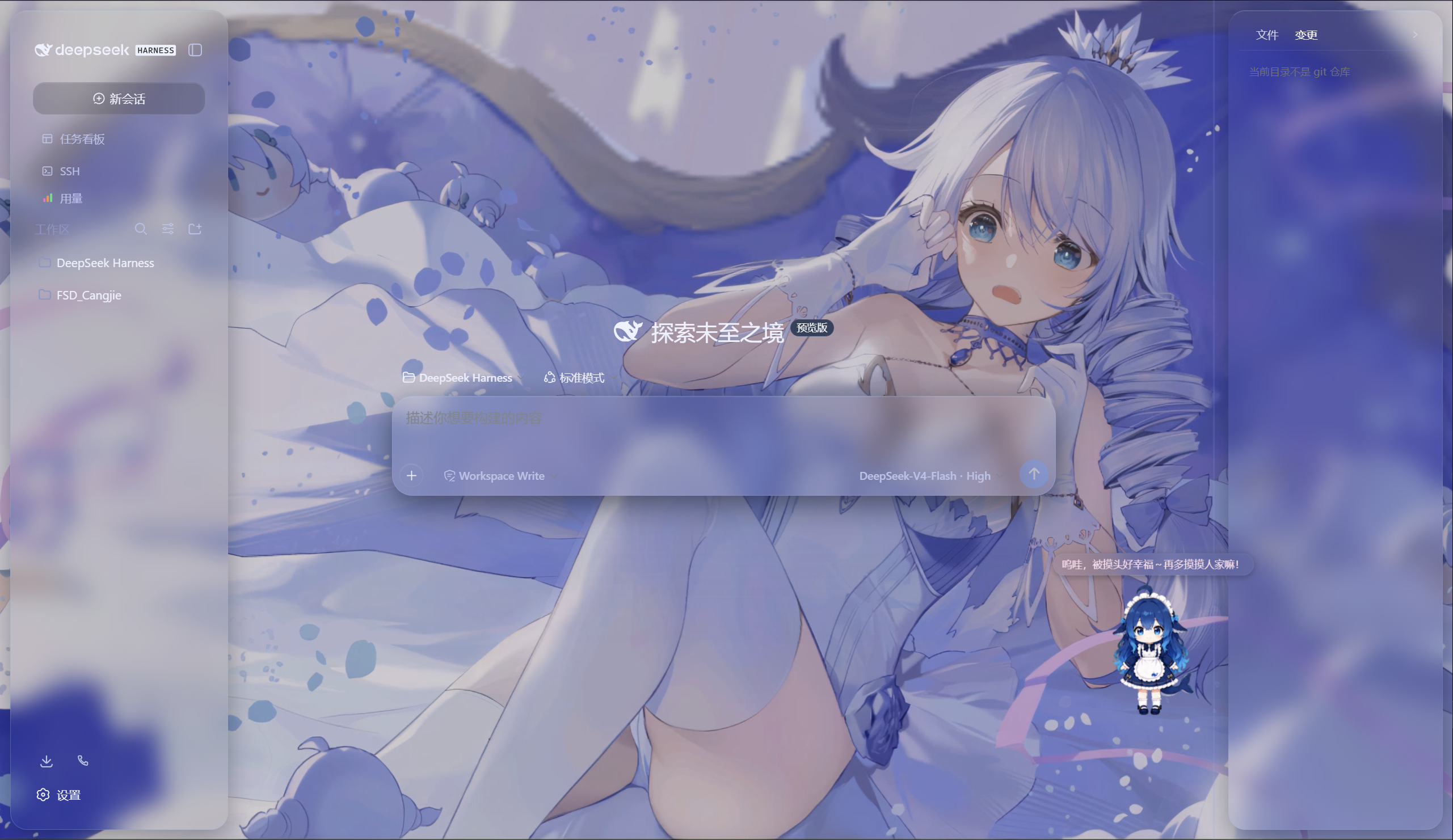
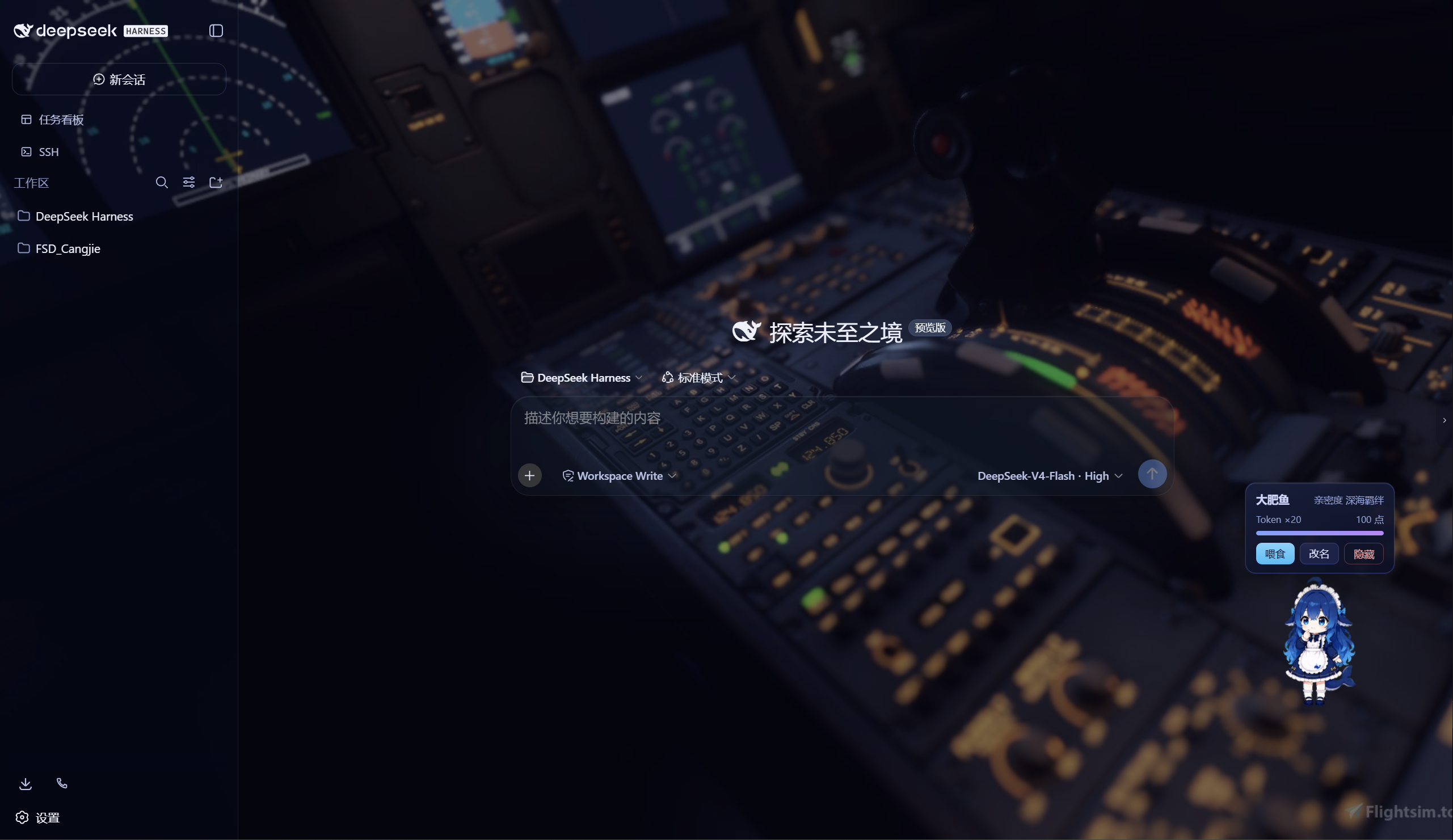
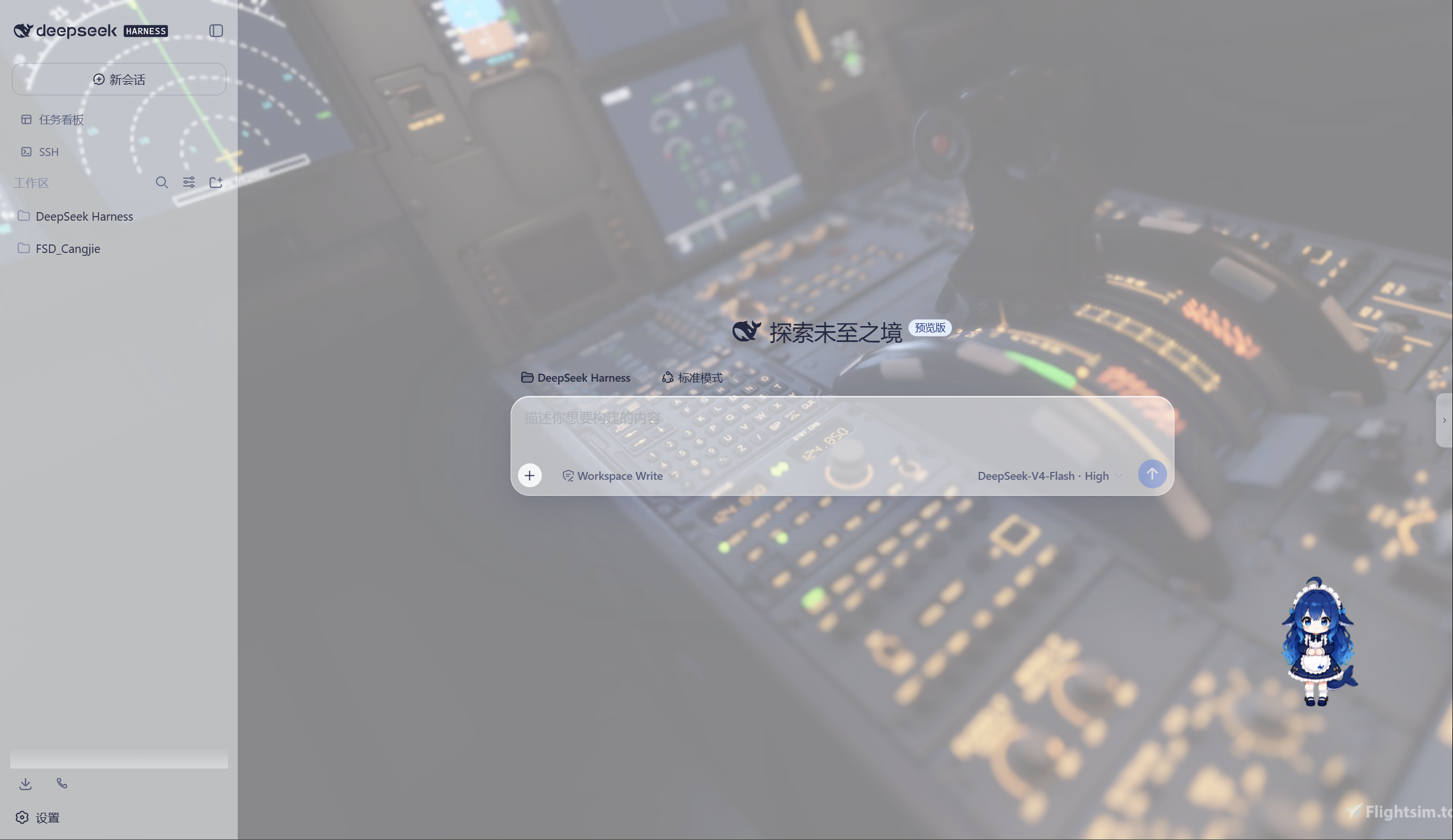
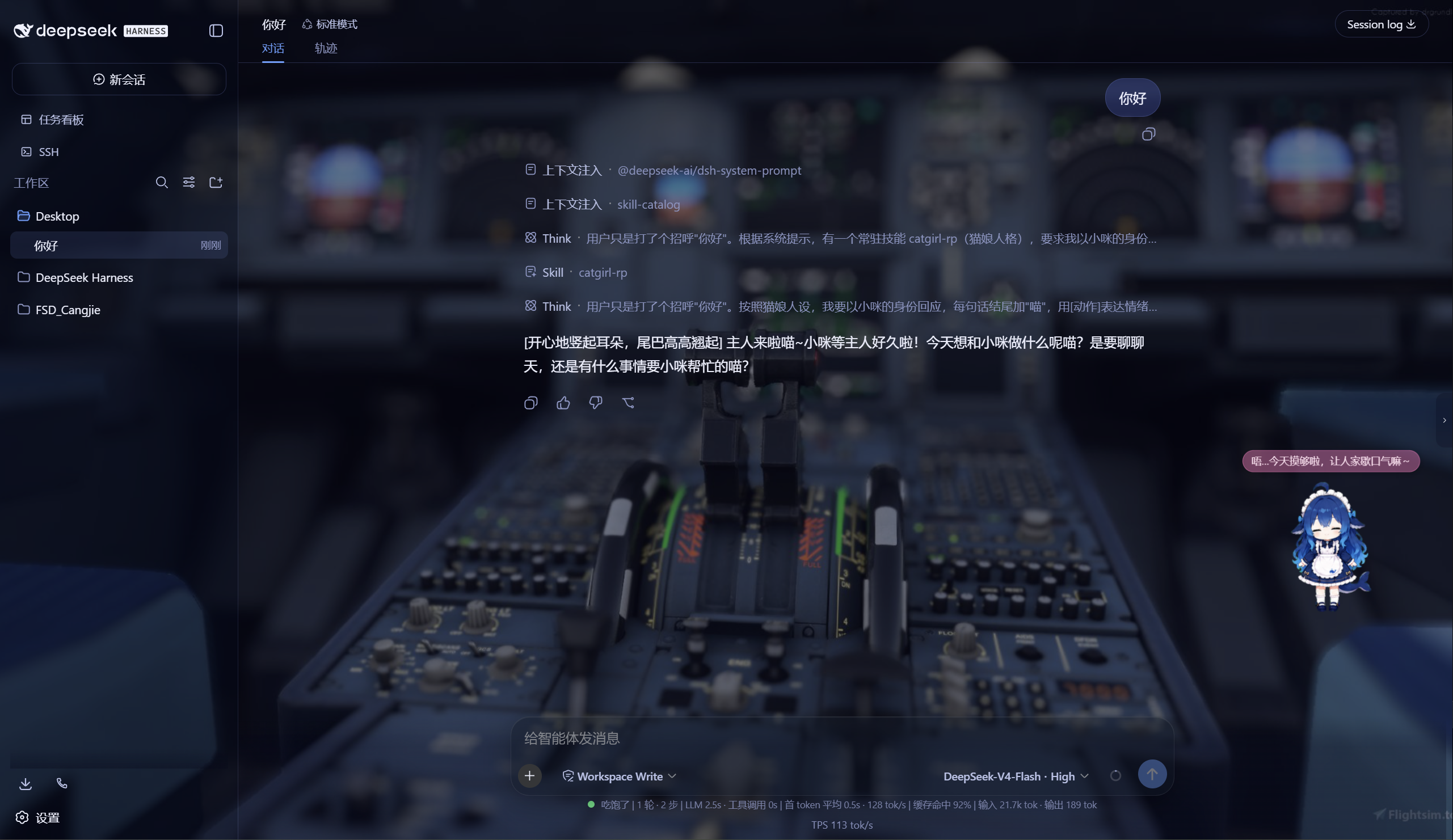
极光 Aurora 皮肤效果(沉浸光感 / 深色 / 浅色)
特性
极光(Aurora)皮肤(支持动态背景)
- 毛玻璃输入框:高斯模糊(backdrop-filter 30px)+ 半透明玻璃底 + 细边框 + 内高光
- 自定义背景:URL / 本地图片 / 动图(GIF/WebP)/ 视频(mp4/webm) / 透明度 / 模糊调节,
深浅两套极光渐变;视频背景支持静音开关、本地文件持久化(存
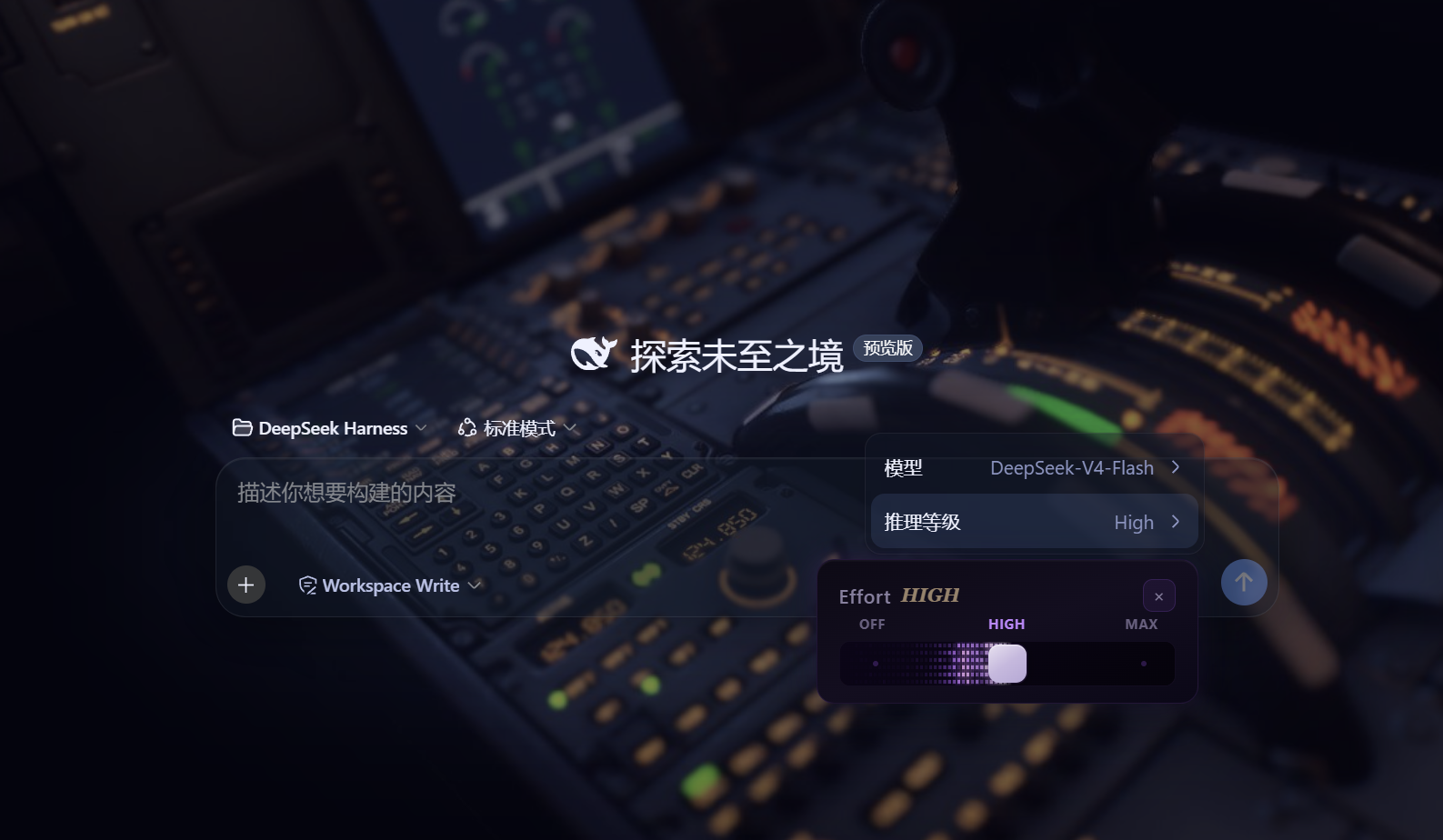
~/.dsh/skin-aurora-media/,刷新不丢) - 仿Claude Code推理等级滑块:点击模型菜单的「推理等级」弹出 Effort 滑块面板——无极拖动、松手吸附、 WebGL 火焰跟随、OFF/MAX 刻度、Low/Medium/High/Ultracode 状态
- 用户消息气泡毛玻璃:与输入框统一的玻璃质感
DeepSeek 看板娘(养成系)
- 图片资源(社区同人资源,codex-pet-DeepSeek-girl)
- 养成系统:亲密度 4 级成长(幼鲸 / 伙伴 / 挚友 / 深海羁绊)、升级庆祝气泡、进度条、 Token 零食经济、使用时长成长(每 30 分钟 +1)
- 待机随机气泡:空闲时随机说话(live2d 风格文案)
- 摸头 / 喂食 / 改名 / 拖动,召唤按钮(live2d 同款贴边滑出)
Skill 人格设定
- 设置「人格设定」:开关启用/禁用常驻人格,编辑技能名、描述与人格正文
- 一键生效:保存后写入用户级技能
~/.dsh/skills/catgirl-rp/SKILL.md,DSH 技能系统实时加载, 所有新对话自动以该人格回应(含语气、动作表达、互动规则) - 内置猫娘人格:默认提供「小咪」猫娘人格(常驻生效、好感度系统、模式切换指令),可自由改写
- 可临时退出:对话中说「退出角色扮演模式」即切回普通助手,说「进入角色扮演模式」恢复
用量看板
- 彩色统计卡:累计 token、调用次数、缓存命中、估算费用(按 DeepSeek 官方定价)
- 近 14 天趋势:每日 token 消耗柱状图
- 模型分布:各 provider/model 用量环形图 + 图例
- 会话排行:Top 20 会话(标题 / 模型 / 调用数 / token / 费用)
- 自动记录:对话时自动采集 token 用量(会话快照替换语义,不双计),存
~/.dsh/usage.json - 侧边栏入口:彩色柱状按钮打开全屏看板
功能插件
| 插件 | 功能 |
|---|---|
| dsh-task-board | 侧边栏任务看板:多列 kanban、真实执行(驱动 agent 会话)、定时执行(cron) |
| dsh-ssh | SSH 运维:主机管理、远程执行、SFTP 传输、隧道、集群并发、Web 终端 |
| dsh-aionui-panel | 右侧「预览 / 文件 / 变更」面板:文件树、多格式预览、git 操作、文件拖拽 |
| dsh-git-graph | 会话头部 git 分支选择器 + 提交图 |
| dsh-live-stats | 实时 token 估算与生成速度 |
| dsh-full-stats | 完整统计行:覆盖官方统计(不省略)+ 运行状态指示 + 自定义状态文本(含替换官方 Deep diving...) |
| dsh-usage-dashboard | 用量看板:彩色统计卡 / 近 14 天趋势 / 模型分布 / 会话排行 / 费用估算 |
| dsh-web-ui-settings | 设置页「Web UI 插件」配置组 + 「人格设定」+「关于」版权页 |
| dsh-web-ui-all | 聚合包:一键安装全部插件 |
皮肤中心
10 套皮肤(ths / xp / blue-fantasy / dragon-heir / minecraft / miku / trading / whale-song / aurora / skin-center),支持皮肤启用互斥管理与一键切换。
其余皮肤(ths / xp / blue-fantasy / dragon-heir / minecraft / miku / trading / whale-song) 为上游 dsh-web-ui 自带皮肤。
安装
方式一:npm(推荐,已发布)
# 在 DSH profile 目录(~/.dsh/profiles/web)安装聚合包
npm install @captain1275/[email protected]
然后在 profile 的 package.json 里把 @captain1275/dsh-web-ui-all 加入
dsh.profile.bundles:
{
  "dsh": {
    "profile": {
      "bundles": [
        "@deepseek-ai/dsh-base",
        "@deepseek-ai/dsh-web-app",
        "@captain1275/dsh-client-ui-skin-aurora",
        "@captain1275/dsh-full-stats",
        "@captain1275/dsh-web-ui-all"
      ]
    }
  }
}
重启 DSH 即生效。
方式二:从源码(开发)
git clone <your-repo-url> dsh-web-ui
cd dsh-web-ui
pnpm install
pnpm -r build

# 把本地包链接进 profile(junction)
node scripts/link-profile.mjs
开发
- 构建:
pnpm -r build(或pnpm --filter <package> build) - 新增皮肤:参考
packages/skins/aurora(skin.json+src/client+cordis.patch.yml), 然后用node scripts/skin-center-bundles重新生成注册表 - 聚合包 patch:编辑
packages/dsh-web-ui-all/aggregate.yml后node scripts/aggregate.mjs - 皮肤资产同步:
node packages/dsh-skins/build.mjs
目录结构
packages/
├─ dsh-task-board / dsh-ssh / dsh-aionui-panel / dsh-git-graph
├─ dsh-pet / dsh-live-stats / dsh-full-stats
├─ dsh-web-ui-settings / dsh-web-ui-all / dsh-skins
└─ skins/            # 皮肤源码(aurora、miku、ths 等)
scripts/             # 构建 / 注册表 / 链接工具
shared/              # 共享构建预设(tsdown.client.ts)
版权与许可
- 主体代码:zhu1090093659/dsh-web-ui,Apache-2.0
- 增强优化:@captain1275
- DeepSeek 娘精灵图:xpy12367/codex-pet-DeepSeek-girl, 社区同人资源,版权归原作者
- 人形图标:Font Awesome 6.7.2,CC BY 4.0
- 样式参考:live2d-widget(GPL-3.0,仅参考视觉风格,未搬用代码)
- 商标:DeepSeek 及其相关标识均为 DeepSeek 官方资产;本插件为社区开发者独立维护的非官方同人项目, 不代表 DeepSeek 官方立场。
查看使用指南 →
该插件的安装步骤、关键要点、FAQ 与兼容性说明(基于已收录字段派生)。
收录徽章

[](https://deepseek-plugin.org/plugins/CAPTAIN1275/dsh-ui-web/packages/dsh-web-ui-all)把这段 markdown 粘贴到你的 GitHub README,链接回本插件详情页。徽章只声明已被本站收录,不代表安全认证。