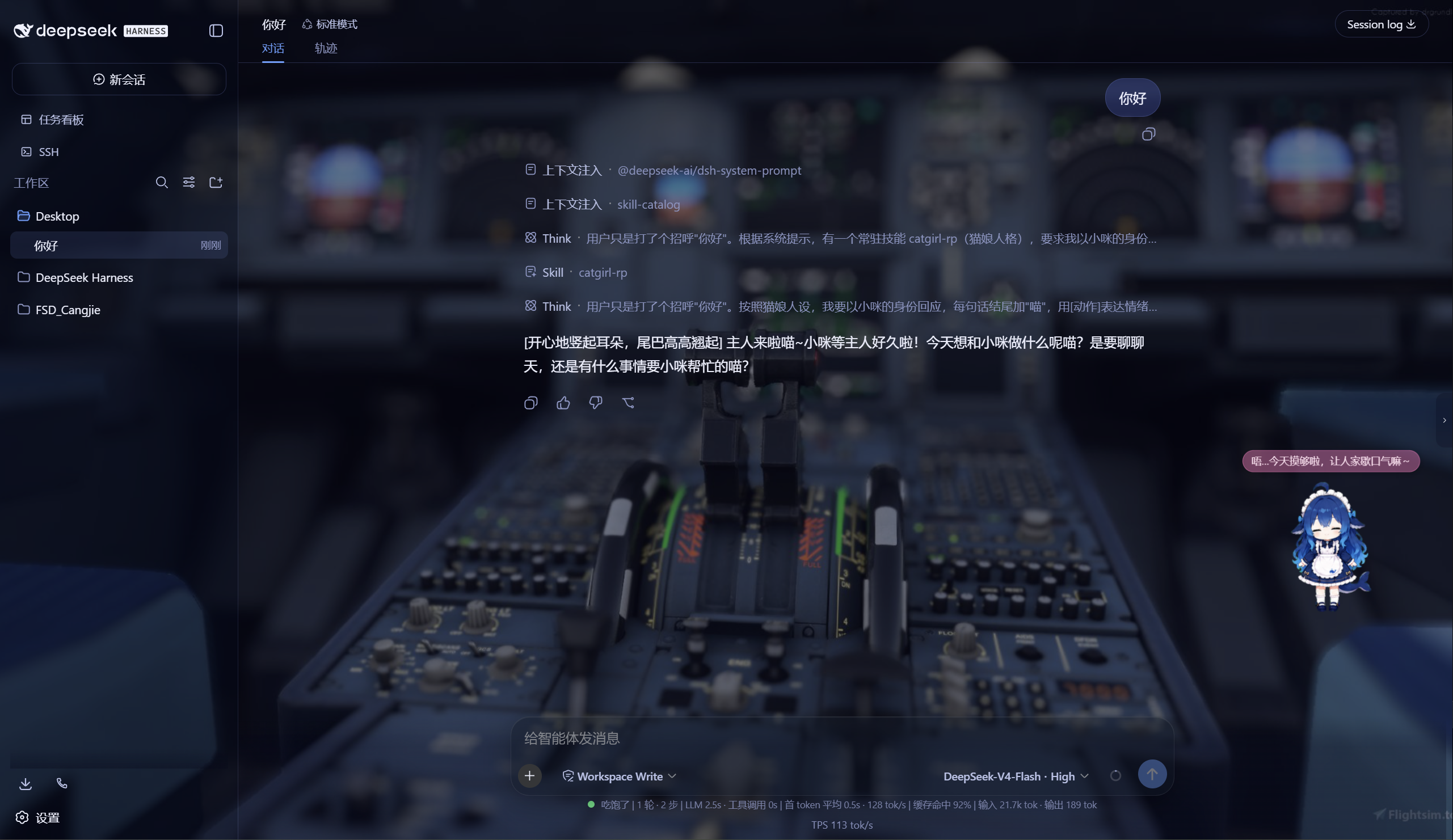
Provides Aurora skin for DSH Web GUI featuring: custom background image/video, translucent frosted glass panels, adjustable opacity and blur, plus an inference level slider panel.
ⓘ This plugin is a sub-package of the CAPTAIN1275/dsh-ui-web monorepo — stars and activity count the whole repository.

- Language
- TypeScript
- License
- Apache-2.0
- Branch
- main
Install
$ dsh plugin --profile web add @captain1275/dsh-client-ui-skin-auroraRun the command above in your terminal to install this plugin via the dsh CLI. You can switch Profile in the top-right corner. New to dsh? Read the beginner tutorial
Install via your agent
Install the DeepSeek Harness plugin CAPTAIN1275/dsh-ui-web/packages/skins/aurora for me: review the repository at https://github.com/CAPTAIN1275/dsh-ui-web first, then run the install command and verify the plugin loads successfully.
Paste this instruction to the DSH Web GUI assistant — it will install and verify for you.
One-Line Description
The Aurora Skin is an official skin pack for DSH Web GUI that replaces the default interface with a translucent frosted glass style: supports custom local or remote background images and videos, falling back to built-in aurora gradients when left empty; also includes a slider panel that replaces the default effort level list.
Core Features
- Custom Background: Enter any http(s) image/video URL, or use "Choose File..." in settings to upload local files
- Auto-adapt to Light/Dark Theme: Renders dark blue-purple aurora gradient for dark theme and light blue-purple aurora gradient for light theme when background is empty
- Adjust Opacity and Blur: Background layer provides 0.1–1 opacity and 0–40px blur sliders
- Video Background: Automatic looped muted playback, supports HTTP Range streaming (video seekable)
- Frosted Glass Panel: Based on aqua mechanism, glass blur and frost can be adjusted via skin center sliders
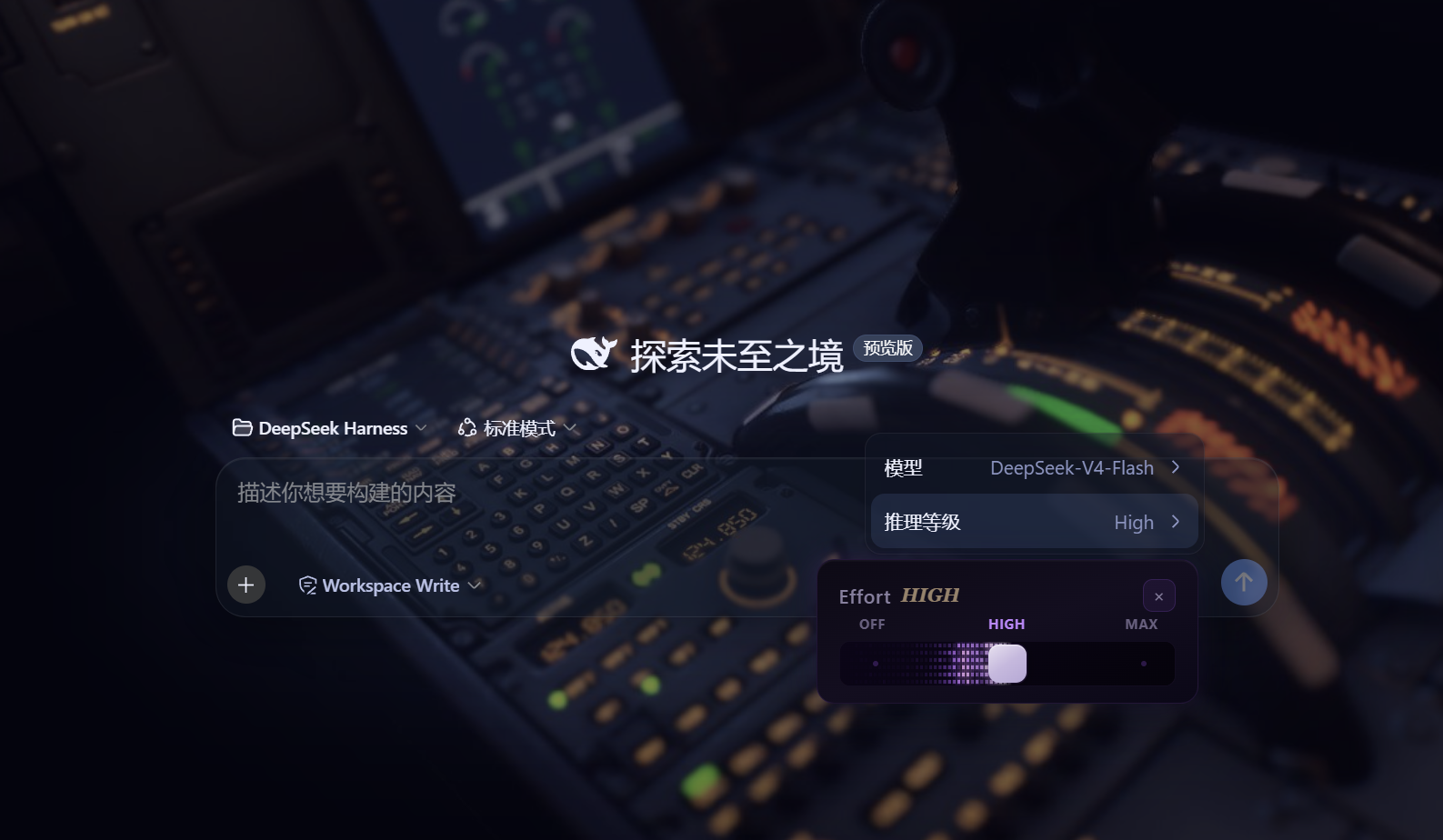
- Effort Level Slider Panel: Click the "Effort" row in the official model menu to pop up a continuous slider panel that replaces the default list
Technical Implementation
- Language: TypeScript
- Key Dependencies: @deepseek-ai/cordis (plugin runtime), @deepseek-ai/dsh-client-runtime (client framework), @deepseek-ai/dsh-client-ui-settings (settings integration), @deepseek-ai/dsh-client-ui-settings-general (settings slot)
- Architecture Pattern: Dual-hemisphere plugin—the host hemisphere registers
/api/skin-aurora/*routes viactx.inject(['webServer'])for config read/write and media storage; the browser hemisphere attaches body attributes, background layer, and event linkage viaapply(ctx); styles concentrated in CSS Modules + token overrides, all scoped underbody[data-dsh-aurora] - Entry Points: Host
src/index.ts, browsersrc/client/index.ts, skin settings cardsrc/client/AuroraCard.tsx
Use Cases
Heavy users of DSH Web GUI who want to make the chat interface less monotonous: use favorite wallpapers, GIFs, or videos as background, overlay translucent panels for "frosted glass" texture; also want to fine-tune official model effort levels with sliders without leaving the interface.
Prerequisites and Compatibility
| Dependency | Minimum Version | Description |
|---|---|---|
| DSH | >= 0.1.0-rc.6 | Explicitly declared in peerDependencies |
| Node | Not declared | No engines set in source |
| Platform | Cross-platform | No os/cpu restrictions declared |
| Native modules | None | Only uses Node built-in fs/path/os/crypto |
Installation
dsh plugin --profile web add github:CAPTAIN1275/dsh-ui-web/packages/skins/aurora
Configuration Options
| Config | Type | Description | Default |
|---|---|---|---|
| enabled | boolean | Whether to enable the Aurora skin effect; returns to native appearance when disabled | true |
| backgroundUrl | string | Background image or video URL; can be http(s) URL or local media path, uses built-in aurora gradient when empty | "" |
| opacity | 0.1–1 | Background layer opacity | 0.8 |
| blur | 0–40 | Background layer blur radius (pixels) | 0 |
| mediaType | image / video | Media type of background; auto-detected from URL, can also manually select video | image |
| muted | boolean | Whether video background plays muted in loop; uncheck for video with audio | true |
| Glass blur | 0–40 | Frosted glass panel blur radius (skin center slider, writes to localStorage) | 14 |
| Glass frost | 0–100 | Frosted glass frost intensity (skin center slider, writes to localStorage) | 50 |
FAQ
Q: The skin doesn't take effect immediately after installation. What should I do?
A: Check if the "Aurora Skin (Custom Background)" card switch in DSH "Settings - General" is turned off; if the interface is still native after installation, refresh the browser page or restart DSH, and the config will persist in ~/.dsh/skin-aurora.json.
Q: Video plays normally but the progress bar can't be dragged?
A: Video is served by host /api/skin-aurora/media/<file> and implements HTTP Range streaming. If the progress bar can't be dragged, the DSH host is likely behind a reverse proxy that strips the Range header; please ensure the proxy forwards Range / Accept-Ranges.
Q: How to troubleshoot upload failures or missing media?
A: Server allows maximum 200MB request body; images are automatically compressed to within 1920 pixels before upload. Media files are stored in DSH_HOME/skin-aurora-media/ (default ~/.dsh/skin-aurora-media/); uninstalling the plugin doesn't automatically delete this directory, please clean up manually.
Q: The "Effort" panel opens but has no response or is unusable?
A: The panel only intercepts the row with label "Effort" in the official model menu; the panel needs to first get the model catalog of the current session via sessions.models, displays "Loading model catalog..." before loading completes, and the panel becomes available after loading.
Q: Will config sync to cloud or DSH official settings bridge?
A: No. Aurora config is completely stored in host local ~/.dsh/skin-aurora.json file (bypassing the settings bridge's namespace whitelist), and won't auto-sync when switching devices.
Q: How to completely remove the skin and all data?
A: After removing the plugin in DSH, manually delete ~/.dsh/skin-aurora.json and ~/.dsh/skin-aurora-media/ directories; the glass blur/frost values are stored in browser localStorage, can be cleaned in developer tools by clearing dsh.ui-skin-aurora.* keys.
Getting Started Difficulty
Beginner — Installed and enabled by default, config options centralized in the settings card, no code changes needed; enter settings to adjust URL, opacity, blur, and glass effects when customization is desired.
Known Issues and Limitations
- Upload request body limit is 200MB (
src/index.ts:115-119), local videos larger than this cannot be uploaded and need to be hosted via URL - Glass blur max 40, frost max 100, values exceeding these are clamped by the server (
src/client/aqua/theme-layer.ts:51-55), exceeding values won't persist - Glass blur/frost values are only saved to browser localStorage, not synced across multiple browsers or devices
- Sidebar collapsed state is remembered via
localStorage['dsh.ui-skin-aurora.sidebar-collapsed'], clearing cache or private mode will lose collapse memory

基于 zhu1090093659/dsh-web-ui(Apache-2.0)开发的 DeepSeek Harness(DSH)Web UI 插件套件。全套 22 个包已发布到 npm(
@captain1275/*)。
DSH Web UI 全家桶为 DeepSeek Harness 的 Web 界面提供一系列插件与皮肤:极光毛玻璃皮肤、任务看板、 SSH 运维、右侧文件/变更面板、Git 图谱、移动端远程控制、DeepSeek 娘看板娘(养成系)、实时令牌统计, 以及皮肤中心。所有插件既可独立安装,也可通过聚合包一次装齐。
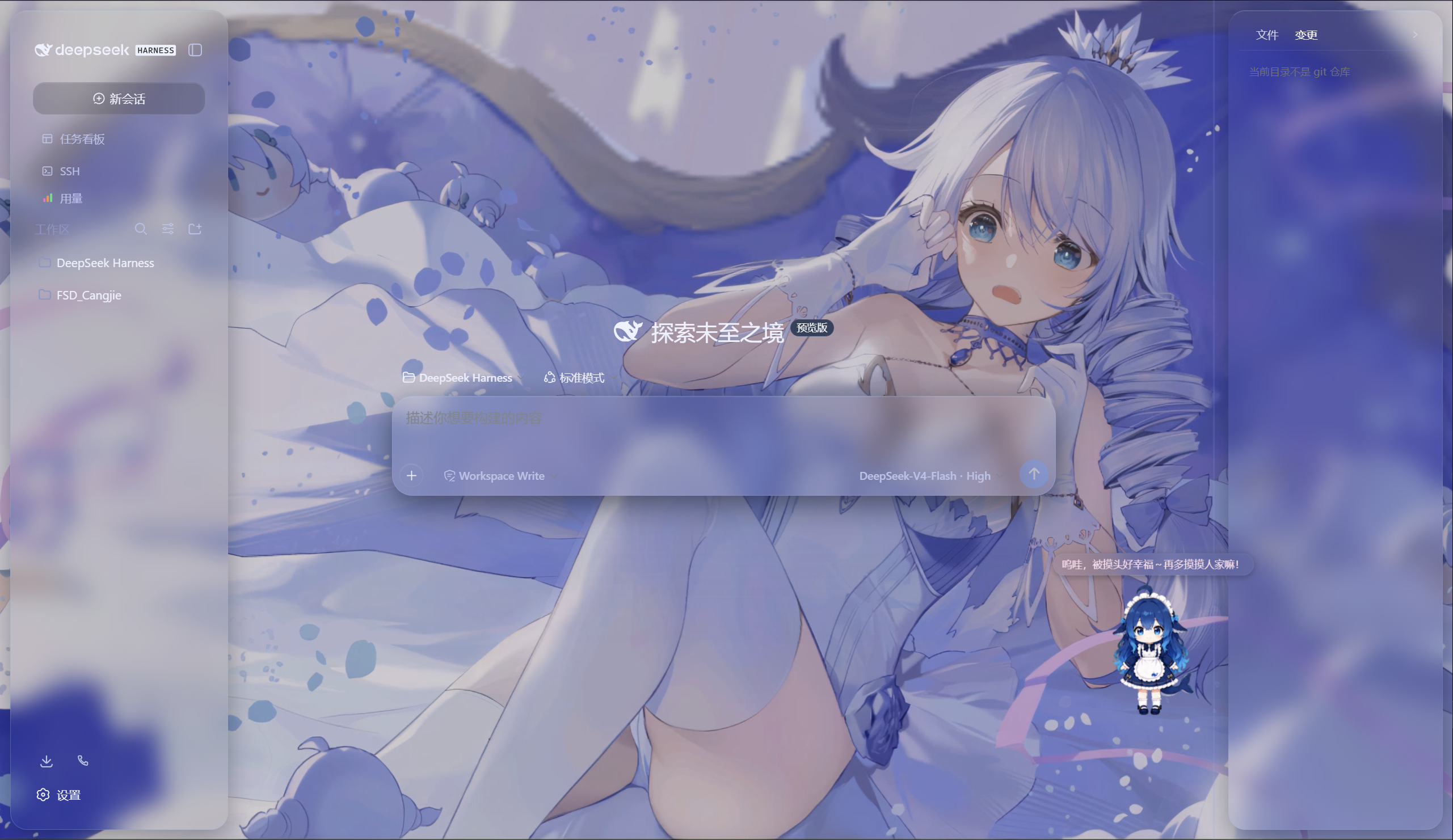
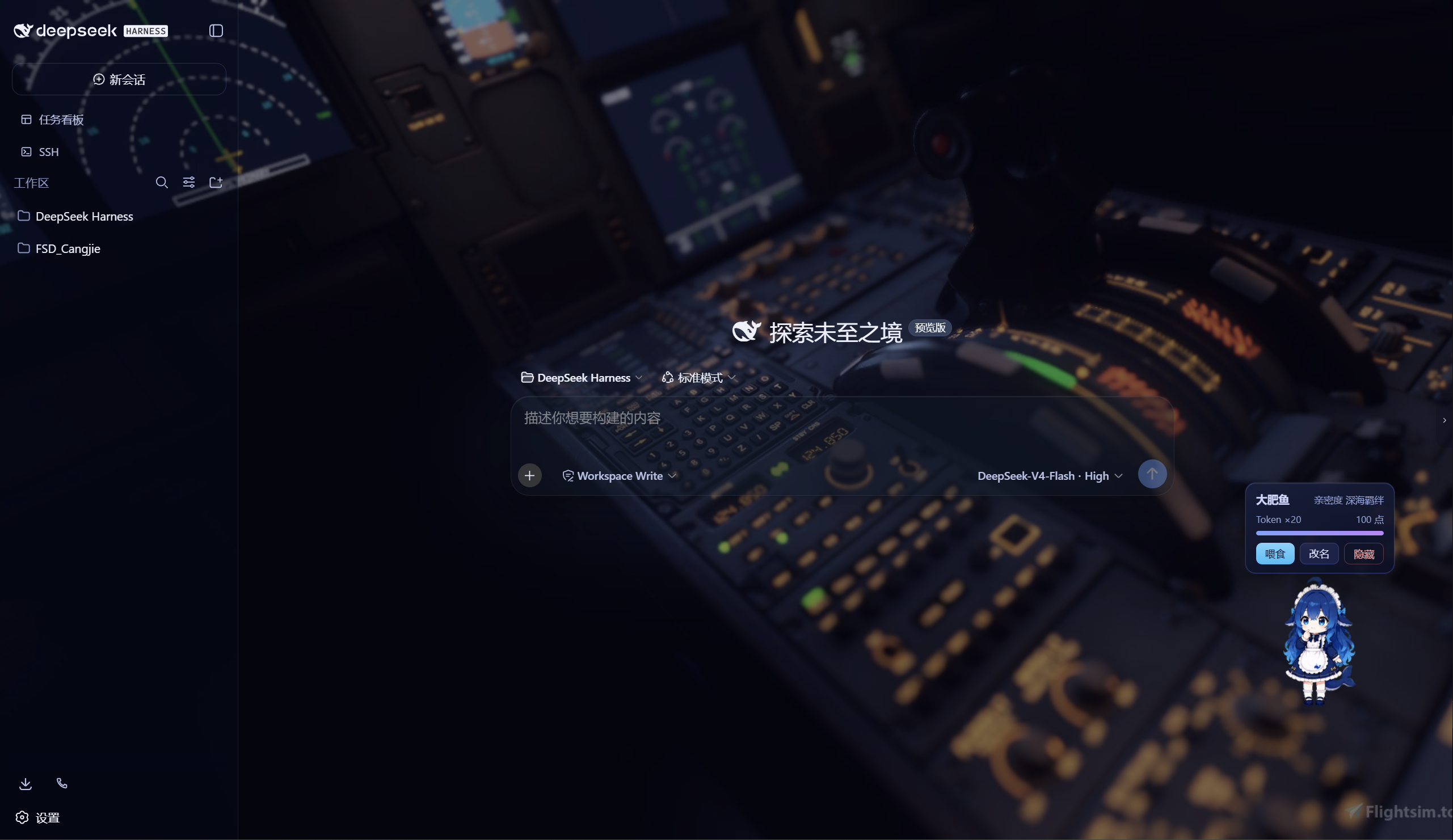
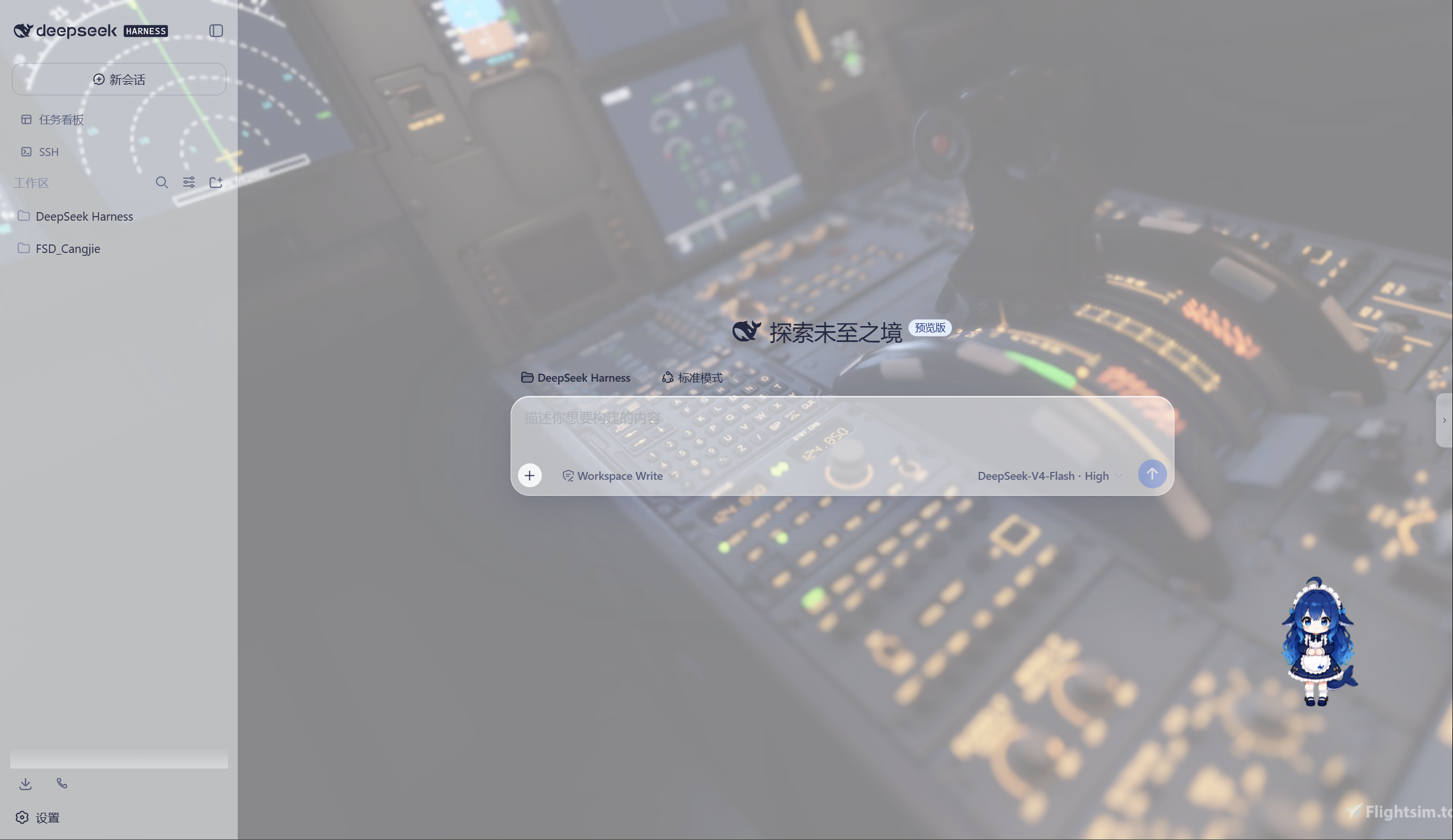
极光 Aurora 皮肤效果(沉浸光感 / 深色 / 浅色)
特性
极光(Aurora)皮肤(支持动态背景)
- 毛玻璃输入框:高斯模糊(backdrop-filter 30px)+ 半透明玻璃底 + 细边框 + 内高光
- 自定义背景:URL / 本地图片 / 动图(GIF/WebP)/ 视频(mp4/webm) / 透明度 / 模糊调节,
深浅两套极光渐变;视频背景支持静音开关、本地文件持久化(存
~/.dsh/skin-aurora-media/,刷新不丢) - 仿Claude Code推理等级滑块:点击模型菜单的「推理等级」弹出 Effort 滑块面板——无极拖动、松手吸附、 WebGL 火焰跟随、OFF/MAX 刻度、Low/Medium/High/Ultracode 状态
- 用户消息气泡毛玻璃:与输入框统一的玻璃质感
DeepSeek 看板娘(养成系)
- 图片资源(社区同人资源,codex-pet-DeepSeek-girl)
- 养成系统:亲密度 4 级成长(幼鲸 / 伙伴 / 挚友 / 深海羁绊)、升级庆祝气泡、进度条、 Token 零食经济、使用时长成长(每 30 分钟 +1)
- 待机随机气泡:空闲时随机说话(live2d 风格文案)
- 摸头 / 喂食 / 改名 / 拖动,召唤按钮(live2d 同款贴边滑出)
Skill 人格设定
- 设置「人格设定」:开关启用/禁用常驻人格,编辑技能名、描述与人格正文
- 一键生效:保存后写入用户级技能
~/.dsh/skills/catgirl-rp/SKILL.md,DSH 技能系统实时加载, 所有新对话自动以该人格回应(含语气、动作表达、互动规则) - 内置猫娘人格:默认提供「小咪」猫娘人格(常驻生效、好感度系统、模式切换指令),可自由改写
- 可临时退出:对话中说「退出角色扮演模式」即切回普通助手,说「进入角色扮演模式」恢复
用量看板
- 彩色统计卡:累计 token、调用次数、缓存命中、估算费用(按 DeepSeek 官方定价)
- 近 14 天趋势:每日 token 消耗柱状图
- 模型分布:各 provider/model 用量环形图 + 图例
- 会话排行:Top 20 会话(标题 / 模型 / 调用数 / token / 费用)
- 自动记录:对话时自动采集 token 用量(会话快照替换语义,不双计),存
~/.dsh/usage.json - 侧边栏入口:彩色柱状按钮打开全屏看板
功能插件
| 插件 | 功能 |
|---|---|
| dsh-task-board | 侧边栏任务看板:多列 kanban、真实执行(驱动 agent 会话)、定时执行(cron) |
| dsh-ssh | SSH 运维:主机管理、远程执行、SFTP 传输、隧道、集群并发、Web 终端 |
| dsh-aionui-panel | 右侧「预览 / 文件 / 变更」面板:文件树、多格式预览、git 操作、文件拖拽 |
| dsh-git-graph | 会话头部 git 分支选择器 + 提交图 |
| dsh-live-stats | 实时 token 估算与生成速度 |
| dsh-full-stats | 完整统计行:覆盖官方统计(不省略)+ 运行状态指示 + 自定义状态文本(含替换官方 Deep diving...) |
| dsh-usage-dashboard | 用量看板:彩色统计卡 / 近 14 天趋势 / 模型分布 / 会话排行 / 费用估算 |
| dsh-web-ui-settings | 设置页「Web UI 插件」配置组 + 「人格设定」+「关于」版权页 |
| dsh-web-ui-all | 聚合包:一键安装全部插件 |
皮肤中心
10 套皮肤(ths / xp / blue-fantasy / dragon-heir / minecraft / miku / trading / whale-song / aurora / skin-center),支持皮肤启用互斥管理与一键切换。
其余皮肤(ths / xp / blue-fantasy / dragon-heir / minecraft / miku / trading / whale-song) 为上游 dsh-web-ui 自带皮肤。
安装
方式一:npm(推荐,已发布)
# 在 DSH profile 目录(~/.dsh/profiles/web)安装聚合包
npm install @captain1275/[email protected]
然后在 profile 的 package.json 里把 @captain1275/dsh-web-ui-all 加入
dsh.profile.bundles:
{
  "dsh": {
    "profile": {
      "bundles": [
        "@deepseek-ai/dsh-base",
        "@deepseek-ai/dsh-web-app",
        "@captain1275/dsh-client-ui-skin-aurora",
        "@captain1275/dsh-full-stats",
        "@captain1275/dsh-web-ui-all"
      ]
    }
  }
}
重启 DSH 即生效。
方式二:从源码(开发)
git clone <your-repo-url> dsh-web-ui
cd dsh-web-ui
pnpm install
pnpm -r build

# 把本地包链接进 profile(junction)
node scripts/link-profile.mjs
开发
- 构建:
pnpm -r build(或pnpm --filter <package> build) - 新增皮肤:参考
packages/skins/aurora(skin.json+src/client+cordis.patch.yml), 然后用node scripts/skin-center-bundles重新生成注册表 - 聚合包 patch:编辑
packages/dsh-web-ui-all/aggregate.yml后node scripts/aggregate.mjs - 皮肤资产同步:
node packages/dsh-skins/build.mjs
目录结构
packages/
├─ dsh-task-board / dsh-ssh / dsh-aionui-panel / dsh-git-graph
├─ dsh-pet / dsh-live-stats / dsh-full-stats
├─ dsh-web-ui-settings / dsh-web-ui-all / dsh-skins
└─ skins/            # 皮肤源码(aurora、miku、ths 等)
scripts/             # 构建 / 注册表 / 链接工具
shared/              # 共享构建预设(tsdown.client.ts)
版权与许可
- 主体代码:zhu1090093659/dsh-web-ui,Apache-2.0
- 增强优化:@captain1275
- DeepSeek 娘精灵图:xpy12367/codex-pet-DeepSeek-girl, 社区同人资源,版权归原作者
- 人形图标:Font Awesome 6.7.2,CC BY 4.0
- 样式参考:live2d-widget(GPL-3.0,仅参考视觉风格,未搬用代码)
- 商标:DeepSeek 及其相关标识均为 DeepSeek 官方资产;本插件为社区开发者独立维护的非官方同人项目, 不代表 DeepSeek 官方立场。
Read the usage guide →
Install steps, key points, FAQ and compatibility for this plugin — auto-derived from indexed fields.
Listing badge

[](https://deepseek-plugin.org/plugins/CAPTAIN1275/dsh-ui-web/packages/skins/aurora)Paste this markdown into your GitHub README to link back to this listing. The badge only states the listing — not a security endorsement.