A Minecraft-themed skin for DSH Web GUI, featuring procedurally-rendered pixelated panoramic skybox, block-style buttons, and sign-style input fields.
ⓘ This plugin is a sub-package of the CAPTAIN1275/dsh-ui-web monorepo — stars and activity count the whole repository.

- Language
- TypeScript
- License
- Apache-2.0
- Branch
- main
Install
$ dsh plugin --profile web add @captain1275/dsh-client-ui-skin-minecraftRun the command above in your terminal to install this plugin via the dsh CLI. You can switch Profile in the top-right corner. New to dsh? Read the beginner tutorial
Install via your agent
Install the DeepSeek Harness plugin CAPTAIN1275/dsh-ui-web/packages/skins/minecraft for me: review the repository at https://github.com/CAPTAIN1275/dsh-ui-web first, then run the install command and verify the plugin loads successfully.
Paste this instruction to the DSH Web GUI assistant — it will install and verify for you.
One-Line Pitch
A skin plugin that gives the DeepSeek Harness (DSH) Web GUI a Minecraft main menu vibe: places a slowly rotating procedurally-drawn pixel panorama skybox behind the interface, turns buttons into gray stone slab blocks, turns input fields into wooden signs with nails, and anchors the overall color scheme to lapis lazuli blue, grass green, lime, and gold sand.
Core Features
- Injects a 3D panorama skybox composed of 6 procedurally drawn SVG pixel scenes (village, lakeside, dense forest, snow peak + sky + grass block) behind the main interface, rotating 90 seconds per revolution around the Y axis to replicate the Minecraft main menu's visual feel
- Renders buttons as MC-style gray stone slab blocks: black borders, bright top surface, dark bottom surface; hover text turns yellow, the entire block sinks 1 pixel when pressed
- Renders input fields and text areas as wooden sign boards with corner iron nails: natural wood gradient + wood grain + dark borders; borders brighten and text turns white when focused
- Transforms panels and sidebars into translucent dark stone slab backgrounds, allowing the rotating panorama skybox to show through panels with data transparency
- Also rewrites the
--dsw-static-*and--dsw-alias-*palettes, remapping the official dark blue palette to lapis lazuli blue and green to grass green, so components read tokens that also fall within the block world - Changes the browser tab's document title to
Minecraft · DeepSeek Online, restoring the original title when the skin is uninstalled
Technical Implementation
- Language: TypeScript
- Key Dependencies:
@deepseek-ai/cordis(effect lifecycle),lightningcss(CSS Modules compilation),tsdown(bundling) - Architecture Pattern: Pure client-side injection; all styles attached under
body[data-dsh-minecraft](dark variant adds[data-ds-dark-theme]), fully reclaimed via Cordisctx.effect()disposer; no cordis services mounted, no events dispatched, no model requests triggered - Entry Files:
src/index.ts(host-side empty shell apply) +src/client/index.ts(browser-sideapply(ctx)containing DOM writing, panorama skybox assembly, SVG data URI generation)
Use Cases
Suitable for players or student users who want the DSH Web interface to look like it's running in Minecraft—wrapping the entire AI conversation tool workspace with pixel block skies and slab UIs. If you're already using another skin, you need to decide whether to switch to this one; skins cannot be stacked.
Prerequisites & Compatibility
| Dependency | Minimum Version | Description |
|---|---|---|
| DSH Web | Running dsh web service (default http://127.0.0.1:3080) | Only affects DSH Web GUI, other profiles unaffected |
| Node.js | >= 18 (build time) | Repository uses pnpm + tsdown; browser-only at runtime |
| pnpm | >= 10 | Package management and build tool; install from source with pnpm install && pnpm -r build |
| Platform | Cross-platform (macOS / Windows / Linux) | Pure frontend injection, no native module dependencies |
Installation
dsh plugin --profile web add github:CAPTAIN1275/dsh-ui-web/packages/skins/minecraft
Configuration
This plugin requires no additional configuration. Skin enablement is mutually exclusive; skin switching is managed by the repository root's dsh-skin tool:
dsh-skin use minecraftenables this skindsh-skin use officialrestores official default appearancedsh-skin listviews skins and current active item
After switching, the config watcher hot-reloads within seconds; refresh the page to take effect.
FAQ
Q: How do I switch back to the official default appearance after installing?
A: Run dsh-skin use official in the terminal; the config watcher hot-reloads within seconds. Refresh the page to restore the original look.
Q: Will this skin work together with other skins?
A: No. Skins are mutually exclusive and managed by the repository's dsh-skin; only one skin can be active at a time.
Q: Will page elements leave residues after uninstallation?
A: No. apply() fully reclaims everything it writes via the Cordis effect disposer, including the data-dsh-minecraft attribute on body, injected panorama skybox (6 faces of stage/skybox), masks, and document title.
Q: What if I get dizzy from all the motion?
A: When the browser has "Reduce Motion" enabled (prefers-reduced-motion), the skin automatically stops the panorama rotation and zeroes out all button and input field transition animations, returning the画面 to static.
Q: Are the panorama skybox assets official original textures?
A: No. Original Mojang panorama textures are copyrighted; all pixel scenes in the skin are procedurally drawn using SVG on 8px blocks (blocky mountains, pixel clouds, blocky trees, mushrooms, pumpkins, birds, flowers, etc.). Each face's assets are generated from seed-based pseudo-random scatter points, ensuring consistent visuals on every refresh.
Q: Will this skin affect DSH Web's functionality?
A: No. The skin only modifies body attributes, injects DOM elements, and rewrites document.title; it doesn't mount cordis services, dispatch events, or touch model requests. It interfaces via CSS variables without interfering with the right-side file panel (aionui), Git graph, or other features that have their own token systems.
Difficulty Level
Beginner — one installation command plus one dsh-skin use minecraft takes effect; panorama skybox, button styles, and color palette are all built-in, requiring no configuration or coding.
Known Issues & Limitations
- The subpackage LICENSE file is BSD-3-Clause, but the
licensefield inpackage.jsonis set toApache-2.0; the two declarations are inconsistent. The LICENSE file's actual content (BSD-3-Clause) takes precedence; it is recommended to align both before redistributing - Mutual exclusive skin switching depends on the repository root's
scripts/dsh-skinscript; it only works when installed from the same repository link. When cloning this subdirectory separately, you need to manually maintain the managed section of~/.dsh/cordis.patch.yml - The installation command in the original README gives
link:<absolute path to this repository>; this wiki provides the GitHub installation form according to plugin market standards; both are equivalent - When installing from GitHub, pnpm >=10 will block the build script; you need to add the printed package key to the profile's
pnpm-workspace.yamlallowBuildslist and retry - No other known issues currently

基于 zhu1090093659/dsh-web-ui(Apache-2.0)开发的 DeepSeek Harness(DSH)Web UI 插件套件。全套 22 个包已发布到 npm(
@captain1275/*)。
DSH Web UI 全家桶为 DeepSeek Harness 的 Web 界面提供一系列插件与皮肤:极光毛玻璃皮肤、任务看板、 SSH 运维、右侧文件/变更面板、Git 图谱、移动端远程控制、DeepSeek 娘看板娘(养成系)、实时令牌统计, 以及皮肤中心。所有插件既可独立安装,也可通过聚合包一次装齐。
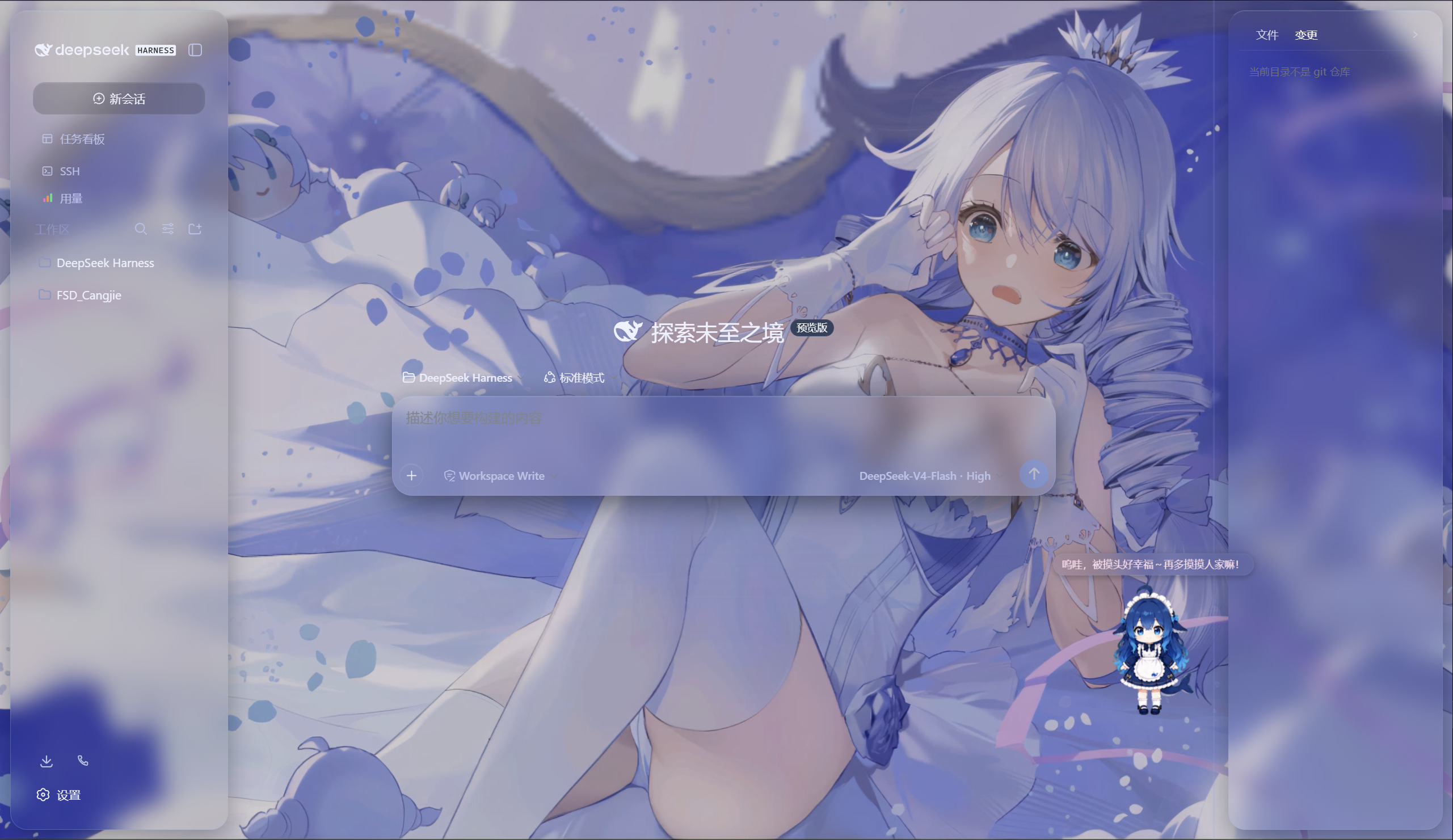
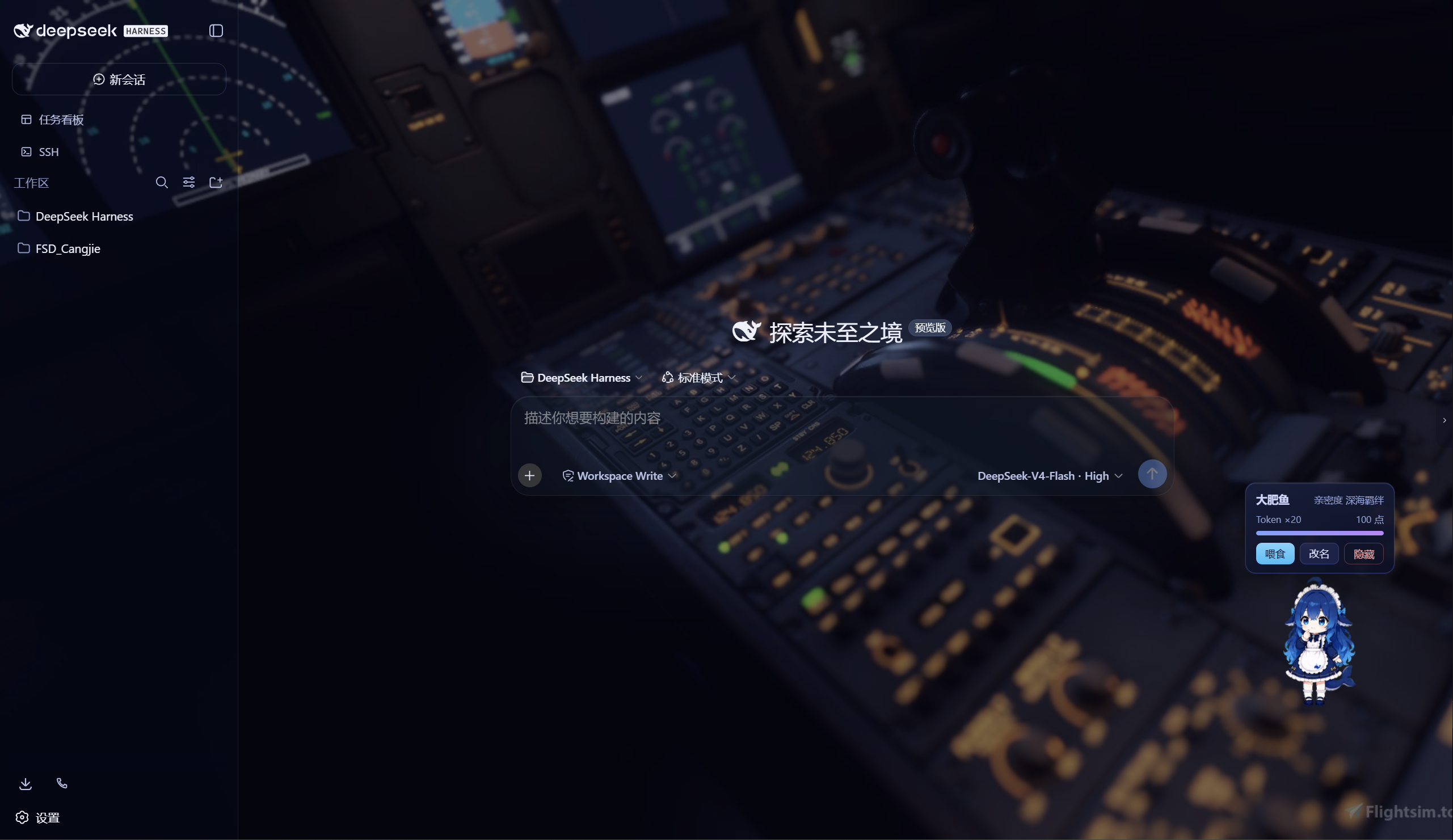
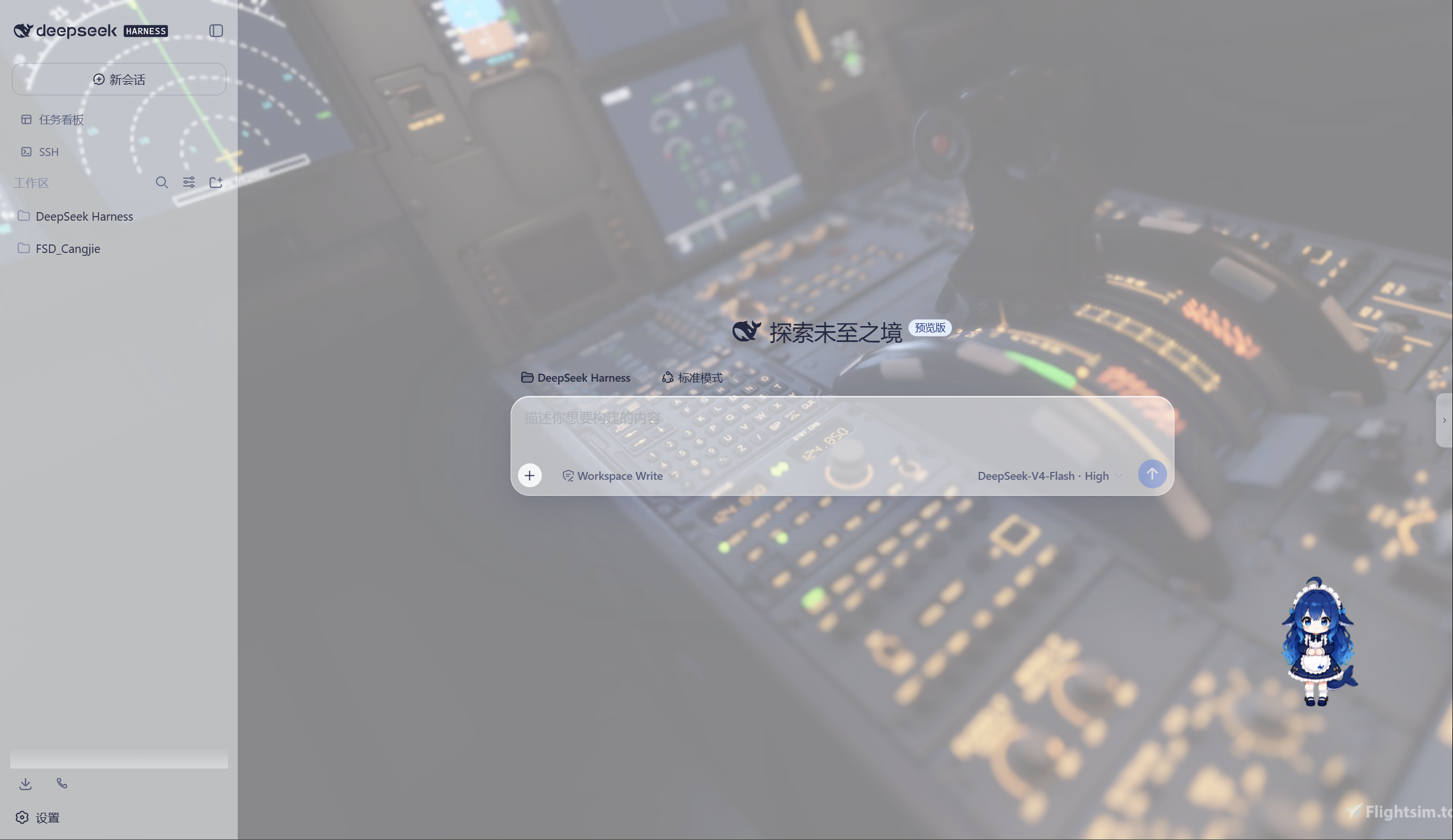
极光 Aurora 皮肤效果(沉浸光感 / 深色 / 浅色)
特性
极光(Aurora)皮肤(支持动态背景)
- 毛玻璃输入框:高斯模糊(backdrop-filter 30px)+ 半透明玻璃底 + 细边框 + 内高光
- 自定义背景:URL / 本地图片 / 动图(GIF/WebP)/ 视频(mp4/webm) / 透明度 / 模糊调节,
深浅两套极光渐变;视频背景支持静音开关、本地文件持久化(存
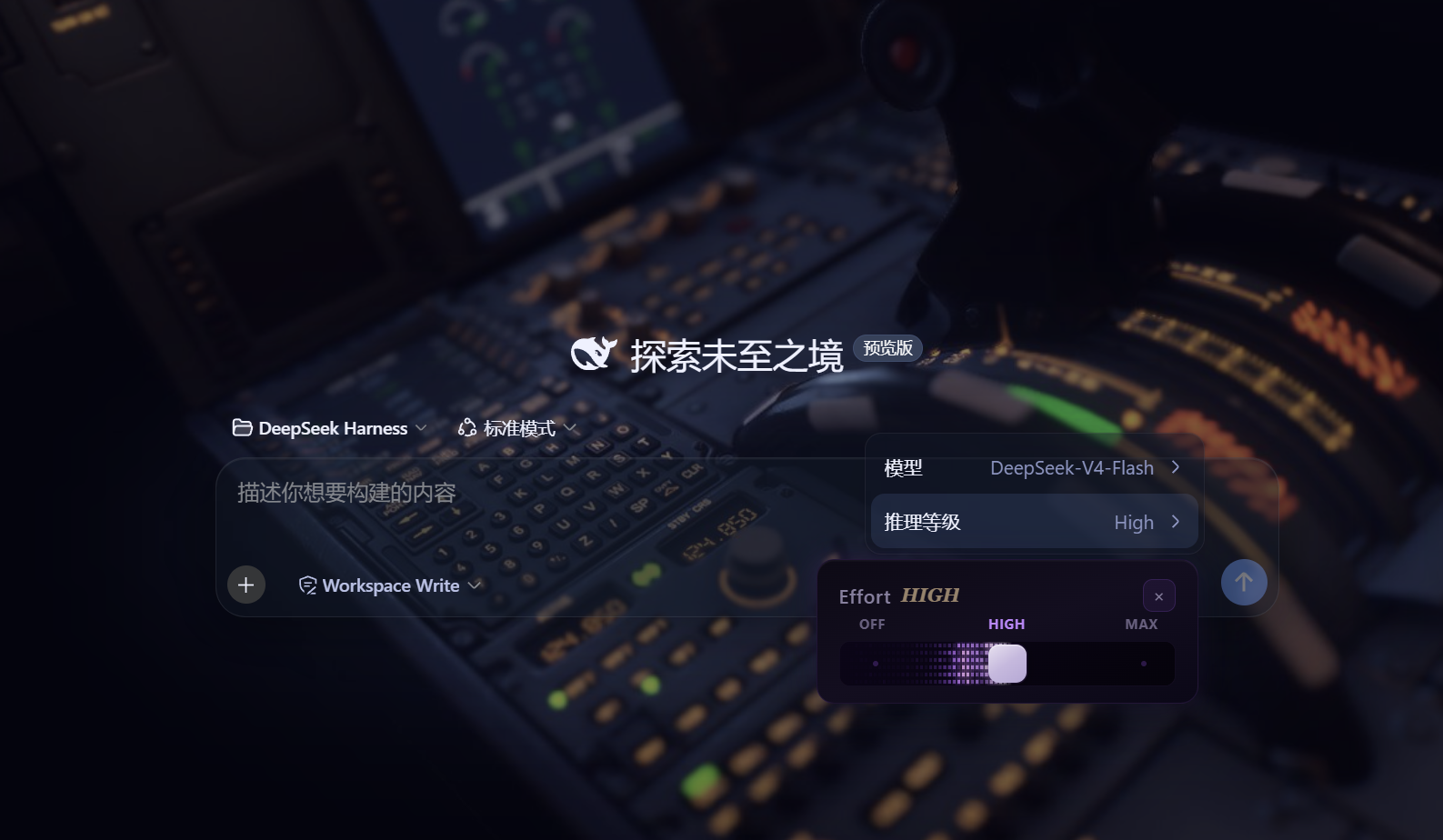
~/.dsh/skin-aurora-media/,刷新不丢) - 仿Claude Code推理等级滑块:点击模型菜单的「推理等级」弹出 Effort 滑块面板——无极拖动、松手吸附、 WebGL 火焰跟随、OFF/MAX 刻度、Low/Medium/High/Ultracode 状态
- 用户消息气泡毛玻璃:与输入框统一的玻璃质感
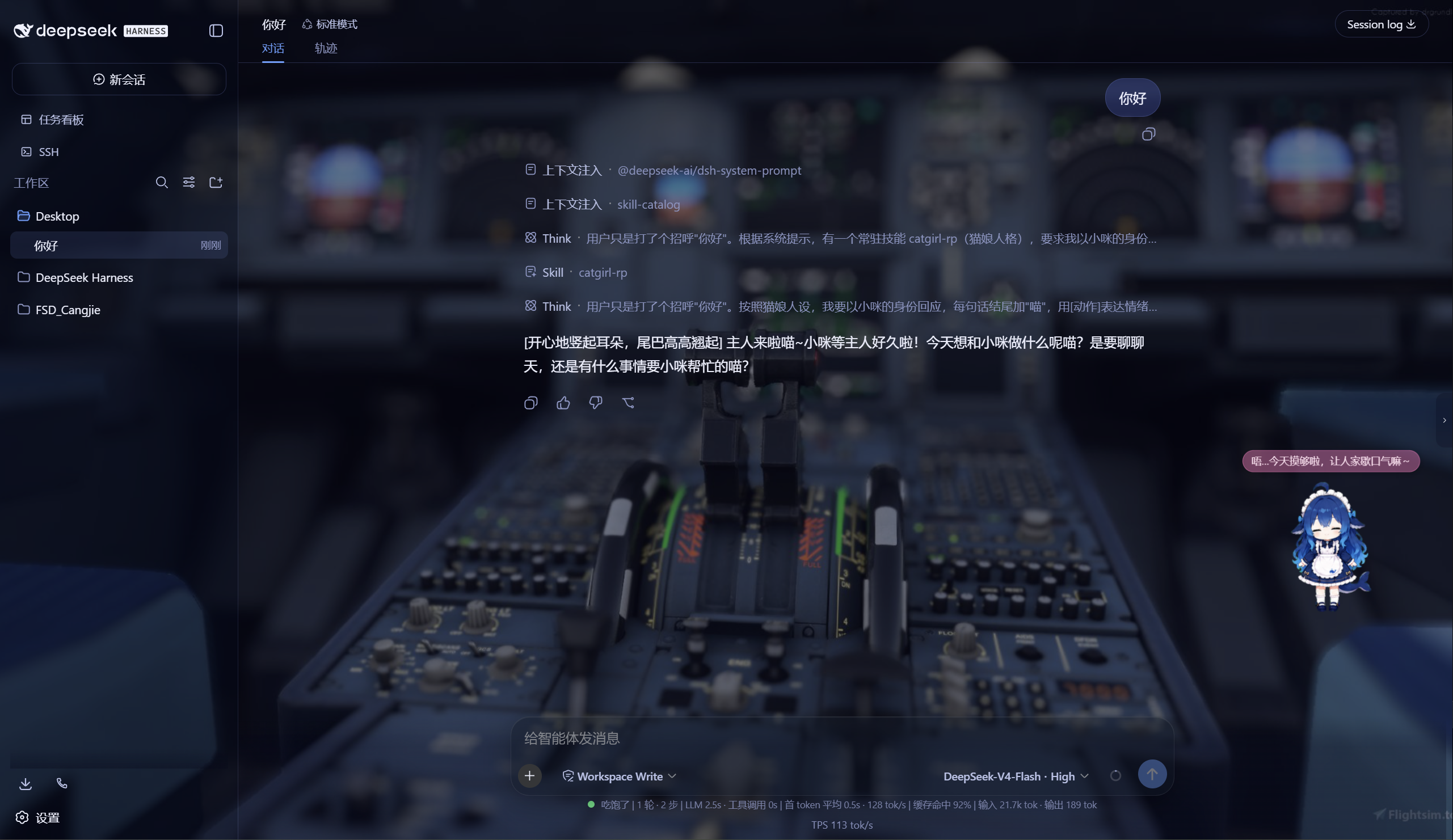
DeepSeek 看板娘(养成系)
- 图片资源(社区同人资源,codex-pet-DeepSeek-girl)
- 养成系统:亲密度 4 级成长(幼鲸 / 伙伴 / 挚友 / 深海羁绊)、升级庆祝气泡、进度条、 Token 零食经济、使用时长成长(每 30 分钟 +1)
- 待机随机气泡:空闲时随机说话(live2d 风格文案)
- 摸头 / 喂食 / 改名 / 拖动,召唤按钮(live2d 同款贴边滑出)
Skill 人格设定
- 设置「人格设定」:开关启用/禁用常驻人格,编辑技能名、描述与人格正文
- 一键生效:保存后写入用户级技能
~/.dsh/skills/catgirl-rp/SKILL.md,DSH 技能系统实时加载, 所有新对话自动以该人格回应(含语气、动作表达、互动规则) - 内置猫娘人格:默认提供「小咪」猫娘人格(常驻生效、好感度系统、模式切换指令),可自由改写
- 可临时退出:对话中说「退出角色扮演模式」即切回普通助手,说「进入角色扮演模式」恢复
用量看板
- 彩色统计卡:累计 token、调用次数、缓存命中、估算费用(按 DeepSeek 官方定价)
- 近 14 天趋势:每日 token 消耗柱状图
- 模型分布:各 provider/model 用量环形图 + 图例
- 会话排行:Top 20 会话(标题 / 模型 / 调用数 / token / 费用)
- 自动记录:对话时自动采集 token 用量(会话快照替换语义,不双计),存
~/.dsh/usage.json - 侧边栏入口:彩色柱状按钮打开全屏看板
功能插件
| 插件 | 功能 |
|---|---|
| dsh-task-board | 侧边栏任务看板:多列 kanban、真实执行(驱动 agent 会话)、定时执行(cron) |
| dsh-ssh | SSH 运维:主机管理、远程执行、SFTP 传输、隧道、集群并发、Web 终端 |
| dsh-aionui-panel | 右侧「预览 / 文件 / 变更」面板:文件树、多格式预览、git 操作、文件拖拽 |
| dsh-git-graph | 会话头部 git 分支选择器 + 提交图 |
| dsh-live-stats | 实时 token 估算与生成速度 |
| dsh-full-stats | 完整统计行:覆盖官方统计(不省略)+ 运行状态指示 + 自定义状态文本(含替换官方 Deep diving...) |
| dsh-usage-dashboard | 用量看板:彩色统计卡 / 近 14 天趋势 / 模型分布 / 会话排行 / 费用估算 |
| dsh-web-ui-settings | 设置页「Web UI 插件」配置组 + 「人格设定」+「关于」版权页 |
| dsh-web-ui-all | 聚合包:一键安装全部插件 |
皮肤中心
10 套皮肤(ths / xp / blue-fantasy / dragon-heir / minecraft / miku / trading / whale-song / aurora / skin-center),支持皮肤启用互斥管理与一键切换。
其余皮肤(ths / xp / blue-fantasy / dragon-heir / minecraft / miku / trading / whale-song) 为上游 dsh-web-ui 自带皮肤。
安装
方式一:npm(推荐,已发布)
# 在 DSH profile 目录(~/.dsh/profiles/web)安装聚合包
npm install @captain1275/[email protected]
然后在 profile 的 package.json 里把 @captain1275/dsh-web-ui-all 加入
dsh.profile.bundles:
{
  "dsh": {
    "profile": {
      "bundles": [
        "@deepseek-ai/dsh-base",
        "@deepseek-ai/dsh-web-app",
        "@captain1275/dsh-client-ui-skin-aurora",
        "@captain1275/dsh-full-stats",
        "@captain1275/dsh-web-ui-all"
      ]
    }
  }
}
重启 DSH 即生效。
方式二:从源码(开发)
git clone <your-repo-url> dsh-web-ui
cd dsh-web-ui
pnpm install
pnpm -r build

# 把本地包链接进 profile(junction)
node scripts/link-profile.mjs
开发
- 构建:
pnpm -r build(或pnpm --filter <package> build) - 新增皮肤:参考
packages/skins/aurora(skin.json+src/client+cordis.patch.yml), 然后用node scripts/skin-center-bundles重新生成注册表 - 聚合包 patch:编辑
packages/dsh-web-ui-all/aggregate.yml后node scripts/aggregate.mjs - 皮肤资产同步:
node packages/dsh-skins/build.mjs
目录结构
packages/
├─ dsh-task-board / dsh-ssh / dsh-aionui-panel / dsh-git-graph
├─ dsh-pet / dsh-live-stats / dsh-full-stats
├─ dsh-web-ui-settings / dsh-web-ui-all / dsh-skins
└─ skins/            # 皮肤源码(aurora、miku、ths 等)
scripts/             # 构建 / 注册表 / 链接工具
shared/              # 共享构建预设(tsdown.client.ts)
版权与许可
- 主体代码:zhu1090093659/dsh-web-ui,Apache-2.0
- 增强优化:@captain1275
- DeepSeek 娘精灵图:xpy12367/codex-pet-DeepSeek-girl, 社区同人资源,版权归原作者
- 人形图标:Font Awesome 6.7.2,CC BY 4.0
- 样式参考:live2d-widget(GPL-3.0,仅参考视觉风格,未搬用代码)
- 商标:DeepSeek 及其相关标识均为 DeepSeek 官方资产;本插件为社区开发者独立维护的非官方同人项目, 不代表 DeepSeek 官方立场。
Read the usage guide →
Install steps, key points, FAQ and compatibility for this plugin — auto-derived from indexed fields.
Listing badge

[](https://deepseek-plugin.org/plugins/CAPTAIN1275/dsh-ui-web/packages/skins/minecraft)Paste this markdown into your GitHub README to link back to this listing. The badge only states the listing — not a security endorsement.