dsh shared core profile bundle: inserts basic plugin rows including model adapter, tool, persistence, sandbox, and telemetry at the empty profile root, serving as the first layer for all profiles
ⓘ This plugin is a sub-package of the ChisaAlter/Deepseek-Harness-Desktop monorepo — stars and activity count the whole repository.

- Language
- JavaScript
- License
- MIT
- Branch
- main
Install
$ dsh plugin --profile web add @deepseek-ai/dsh-baseRun the command above in your terminal to install this plugin via the dsh CLI. You can switch Profile in the top-right corner. New to dsh? Read the beginner tutorial
Install via your agent
Install the DeepSeek Harness plugin ChisaAlter/Deepseek-Harness-Desktop/vendor/deepseek-harness/packages/bundle/base for me: review the repository at https://github.com/ChisaAlter/Deepseek-Harness-Desktop first, then run the install command and verify the plugin loads successfully.
Paste this instruction to the DSH Web GUI assistant — it will install and verify for you.
This documentation corresponds to the subpath
vendor/deepseek-harness/packages/bundle/basein the vendor repository and is the content source for the Plugin Encyclopedia module on the landing page/plugins/{owner}/{repo}.
One-Line Summary
@deepseek-ai/dsh-base is DSH's shared core profile bundle: inserting approximately 75 base plugins at once on an empty profile root, covering all profile-shared components including model adaptation, tools, persistence, sandbox strategies, settings/credentials, and telemetry, serving as the first layer loaded by any profile.
Core Capabilities
- Registers core services on empty profile root including model adaptation, Agent sessions, Typert type registration and RPC gateway, default model selection
- Enables tool directory: file I/O, code editing, sub-agent invocation, plan mode, Todo, goals, Web search and other model-facing tools
- Mounts localized data plane: JSONL session persistence, SQLite session indexing (in-memory by default, on-demand), local attachments, credentials and settings files
- Installs default sandbox and permission policies: file effect strategy, bash/pwsh shell stack (auto-selects based on platform), approval and permission presets
- Registers host-level sub-agent and workflow capabilities: in-process spawn/fork sub-agents, worker-thread workflow execution
- Configures basic telemetry and session checkpoints: OTLP log upload disabled by default, checkpoint persistence per model request
Technical Implementation
- Language: TypeScript(ESM,src/index.ts only has
export {}, no runtime API; code inside package only used for loading invariant companion) - Key Dependencies:
@deepseek-ai/cordis(peer, host runtime)、@deepseek-ai/dsh-llm(model capability surface)、@deepseek-ai/dsh-session(session core)、@deepseek-ai/dsh-sandbox-local(sandbox); full list independencies(~81 workspace packages) - Architecture Pattern: Composition package (profile bundle) — package's
cordis.patch.ymlexposes to profile composer via manifest fielddsh.bundle.patch, composer reads and inserts line by line; instead of registering a Service class, it inserts a patch list - Entry Files:
src/index.ts(no runtime export)+src/invariant.ts(empty implementation, only registers package name to satisfy invariant companion rules)+ actual payloadcordis.patch.yml
Use Cases
Any user running DSH agent on their machine will encounter this bundle as the first step: it serves as the common foundation for all profiles like --profile web, --profile headless. When users want out-of-the-box DeepSeek model invocation, local session archiving, automatic bash/pwsh selection by platform, default file sandbox protection in DSH without repeatedly assembling these basic components for each profile, adding this to the profile suffices.
Prerequisites & Compatibility
| Dependency | Min Version | Description |
|---|---|---|
| DSH | 0.1.0-rc.6+ | Same-name workspace packages @deepseek-ai/cordis and @deepseek-ai/dsh-invariants must be available in host; released in same cycle as upstream 0.1.0-rc.7 |
| Node | >=22.19.0 | From upstream monorepo engines.node: ^22.19.0 || >=24.0.0 |
| Platform | macOS / Windows / Linux | Same patch file works cross-platform; shell stack auto-enables bash (POSIX) or pwsh (Windows) based on process.platform, no platform-specific patch branches |
| Native Modules | None | This package itself has no native dependencies; underlying @deepseek-ai/dsh-sandbox-local mounts @deepseek-ai/dsh-sandbox-windows-acl on Windows, this is composition behavior not declared by this package |
Installation
dsh plugin --profile web add github:ChisaAlter/Deepseek-Harness-Desktop/vendor/deepseek-harness/packages/bundle/base
Configuration Options
This bundle does not expose independent config to users. It writes default config for approximately 75 downstream plugins in cordis.patch.yml — these are static declarations read by the profile composer, not directly overridable via dsh CLI or settings files. To modify values on these lines, replace the entire line by id in a higher-level profile cordis.patch.yml or bundle layer. Below lists key defaults set in the patch (for reference only, not user config entry points):
| Default Line | Default Value | Meaning (Plain Language) |
|---|---|---|
agent-default-model.provider | deepseek-official | Default model provider |
agent-default-model.model | deepseek-v4-flash | Default model ID |
session-title.fallbackMaxWords | 5 | Session title fallback word limit |
session-title-llm.timeoutMs | 60000 | LLM title generation timeout |
session-persistence-jsonl.root | dshHomePath('sessions') | JSONL session log root directory |
session-query-sqlite.openAt | never | Full-text search disabled by default; SQLite not opened, key-value exact reads and session lineage queries still available |
session-telemetry-otel.mode | process.env.DSH_TELEMETRY_MODE || 'DISABLED' | Telemetry mode (FULL / FEEDBACK_ONLY / DISABLED) |
sandbox-policy.mode | process.env.DSH_PERMISSION_MODE ?? 'workspace-write' | Default file sandbox mode (workspace-write only) |
bash-sandbox.disabled | process.platform === 'win32' | bash sandbox disabled on Windows |
pwsh-sandbox.disabled | process.platform !== 'win32' | pwsh sandbox disabled on non-Windows |
approval.policy | Follows DSH_PERMISSION_MODE, set to never when danger-full-access, otherwise ask | Default user approval behavior |
permission.presets | read-only / workspace-write / danger-full-access | Permission preset collection |
tool-web.fetch | false | Disable model-driven Web fetching (keep search) |
tool-web.searchTimeoutMs | 60000 | DeepSeek search timeout |
FAQ
Q: Does installing this bundle automatically grant DeepSeek web search capability?
A: Yes. The patch registers DeepSeek official search route, reusing the same API key managed by the Models page, with a 60-second timeout; but does not provide Web fetching (tool-web.fetch disabled by default).
Q: Do I need to install anything extra to run this bundle on Windows?
A: No. The bash and pwsh shell stacks are mutually exclusively mounted in the same patch based on platform, with Windows automatically enabling pwsh sandbox and pwsh tools. If you prefer executing unsandboxed local PowerShell directly, you need to fully override in your own cordis.patch.yml: disable the pwsh line and re-enable the bash line (both register the same bash service, incomplete recipe will error on load).
Q: Does it upload telemetry data by default?
A: No upload. session-telemetry-otel defaults to mode: 'DISABLED'. To enable, set environment variable DSH_TELEMETRY_MODE=FULL or FEEDBACK_ONLY, endpoint can be overridden with DSH_TELEMETRY_OTLP_URL; non-empty DSH_TELEMETRY_DISABLED also force-disables in reverse.
Q: I want to change the default model, should I modify this bundle's patch or settings?
A: Modify settings. Write llm-deepseek: or llm-pi-ai: sections in $DSH_HOME/settings.yaml for hot reload without rebundling; the Web's Models page writes to this document.
Q: Will installing this also pull in Codex / Claude Code provider?
A: No. This bundle explicitly does not depend on or mount @deepseek-ai/dsh-subagent-codex and @deepseek-ai/dsh-subagent-claude-code; to use them, install the corresponding Profile package separately.
Q: What does the default "writable within workspace" sandbox actually control?
A: Writing is restricted to the current working directory and that session's temporary subdirectory; read-only mode grants no write permissions. On Windows, file effects are enforced through ACL-restricted token runners, with permission switcher and approval services operating on the same semantics.
Q: My profile has cordis.patch.yml, will it conflict with this bundle?
A: No conflict, but will replace the entire line's config by id. Bundle and your patch don't deep merge; if your override doesn't restate a field, the new value is determined by bundle defaults; when upgrading bundle version, custom overrides still hit the entire line by id.
Difficulty Level
Beginner — this is the essential foundation layer for profiles, usable without reading source code; customization only requires writing one line in cordis.patch.yml at a higher layer to replace defaults by id.
Known Issues & Limitations
- Full-line config replacement: patch hits by same line id for entire line overwrite, no deep merge layer; profile overrides must restate all fields they want to keep on that line, otherwise they'll be overwritten by bundle defaults
- Windows temp directory authorization is per-session private subdirectory:
workspace-writelimits writable scope to workspace + that session's own temp subdirectory (like<temp>\dsh-<hash>, restricted subprocess'sTMP/TEMPis rewritten);read-onlygrants no temp directory write permissions

Deepseek-Harness-Desktop
DeepSeek Harness 官方 Web UI 的桌面客户端
下载安装即可使用,不用自己起 dsh web
中文 · English · 下载 · DeepSeek Harness



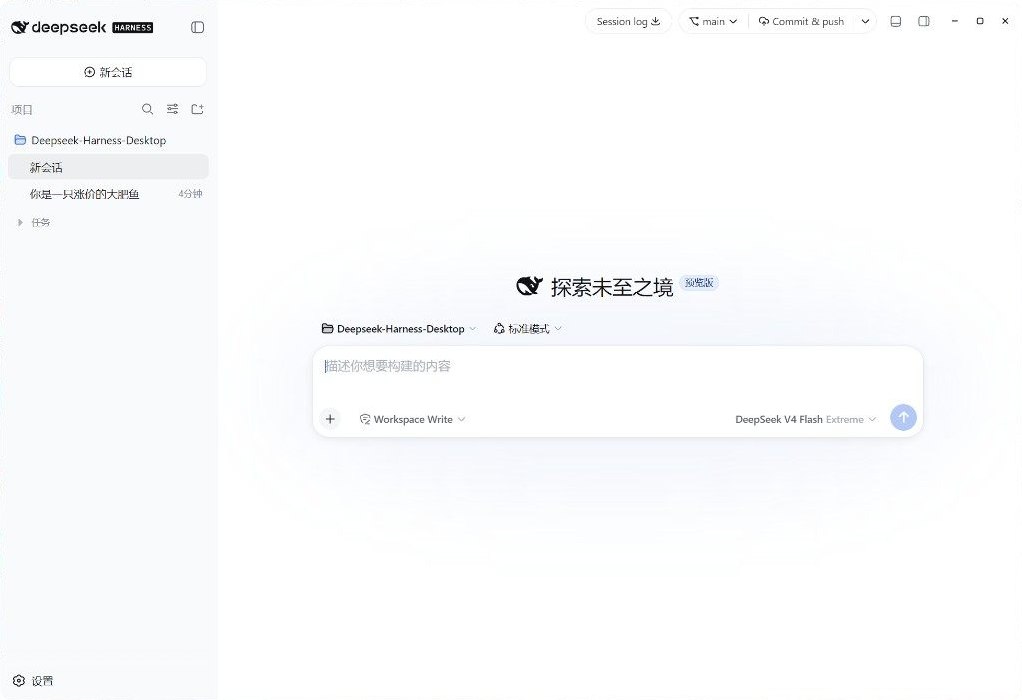
安装
到 Releases 下载,装完不需要本机 Node。
| Windows x64 | Deepseek-Harness-Desktop-Setup-*.exe |
| macOS Apple Silicon | Deepseek-Harness-Desktop-*-mac-arm64.dmg |
| Intel Mac、Linux | 从源码运行 |
macOS 安装包未签名:下载后右键打开,或执行 xattr -cr /Applications/Deepseek-Harness-Desktop.app。请不要安装已撤回的 v0.2.0。
功能
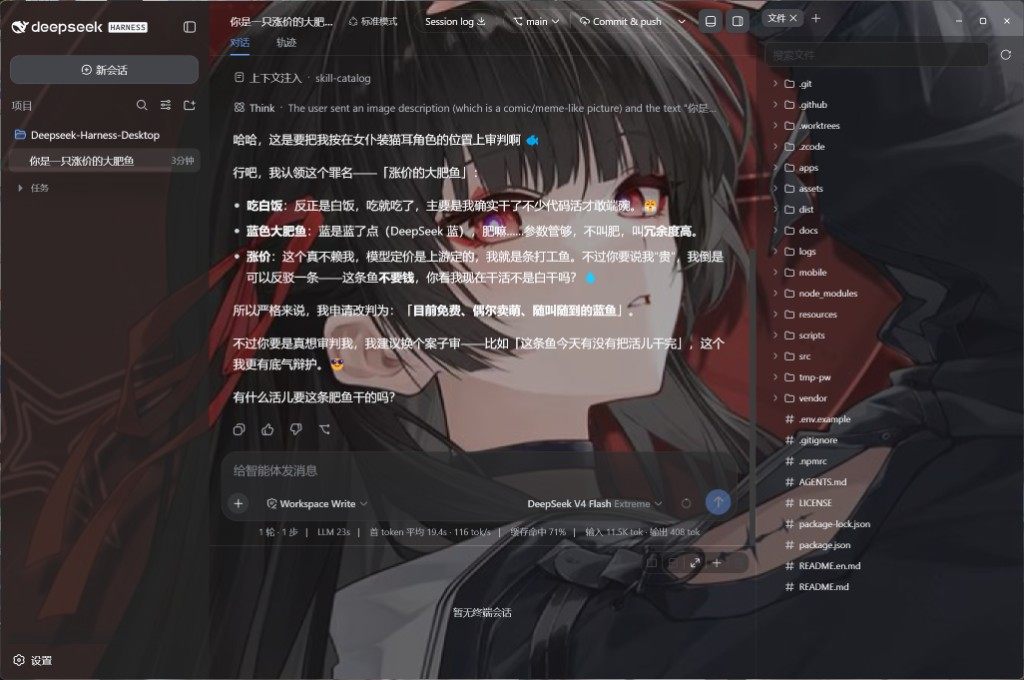
- 官方界面 — 对话、工具调用、审批就是
dsh web,没有另做一套聊天页。 - Git — 标题栏切分支、提交、推送、开变更请求。
- 文件与终端 —
Ctrl+\打开右栏(Files / Diff / Browser / Agents);Ctrl+`打开底栏终端,选区可送进对话。 - 模型 — 第三方思考强度、识图兜底;最新一条用户消息可改完再发。
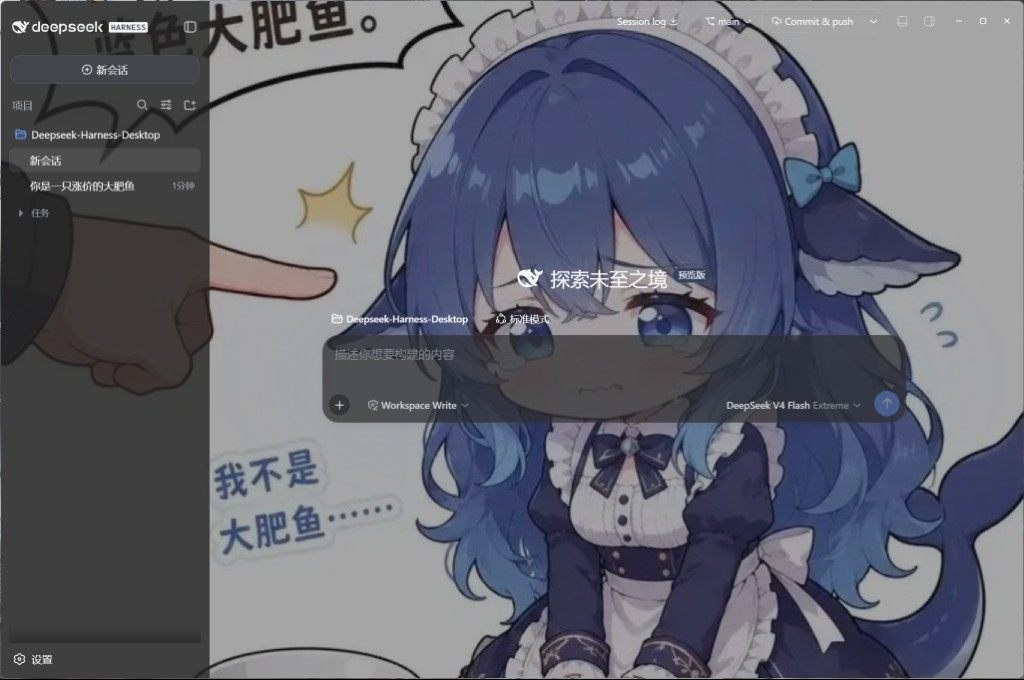
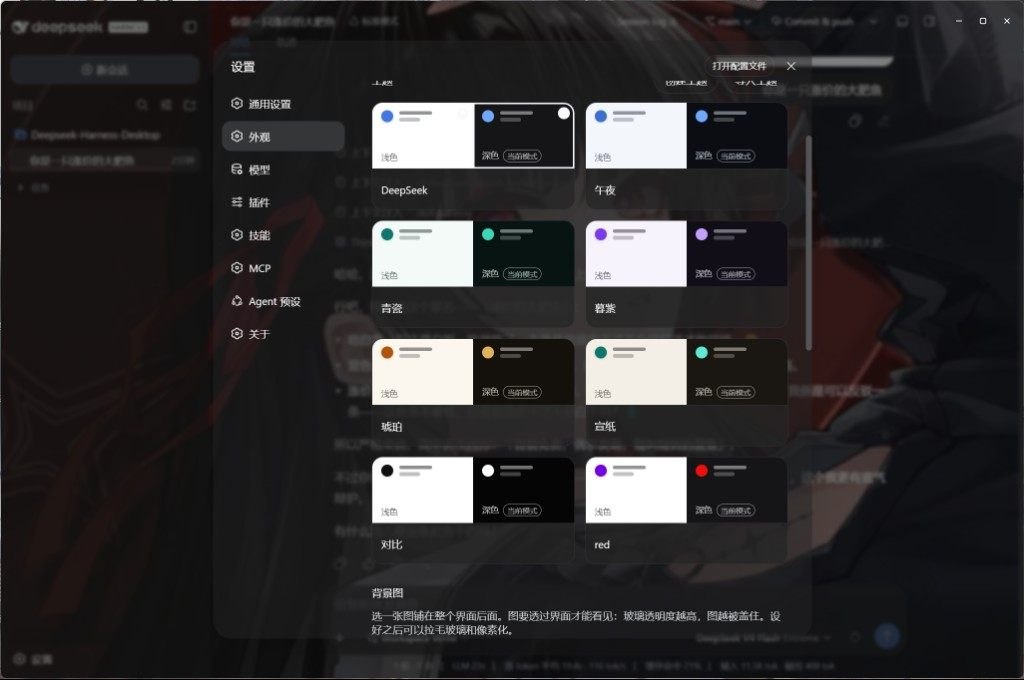
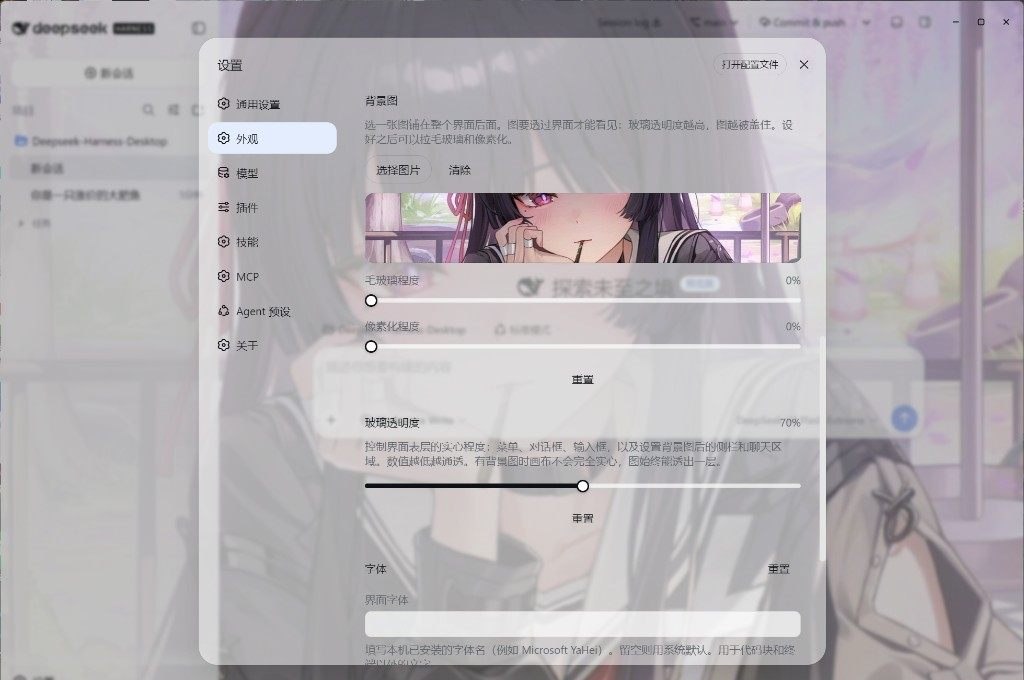
- 外观 — 浅色 / 深色主题。壁纸在外观里选或点「浏览」打开图库(分类、搜索、收藏,确认后按窗口比例裁切);毛玻璃和像素化也在外观里调。
- 扩展 — 设置里管理 MCP、技能和插件。市场是随应用内置的 dsh-market(
dshmarket),没有独立窗口。 - 桌面 — 关闭进托盘、自动更新;Harness 挂了会回到故障页并自动重启。用户插件把启动弄挂时,启动页可以跳过它们。
Ctrl+, 打开设置。
 |  |
 |  |
从源码运行
需要 Windows 10+ 或 macOS 14+(Apple Silicon),Node 22.19+ / 24+,pnpm 11。
git clone https://github.com/ChisaAlter/Deepseek-Harness-Desktop.git
cd Deepseek-Harness-Desktop
npm install
npm run setup:harness
npm start
第一次 setup:harness 会构建随仓库提供的 vendor/deepseek-harness,比较慢。安装版和源码启动会互相抢锁,开发前先退出已安装的应用。
开发
改界面请改 vendor/deepseek-harness,并遵守 设计语言 和 动效。改完客户端源码后,在该目录执行 pnpm run build:lib:client 再重启桌面端。
当前官方基线写在 vendor/harness-upstream.json,现为 0.1.0-rc.8(dsh-v0.1.0-rc.8 / 141eb6fef83422698aef7a981029e843e8161534)。npx 兜底是官方 @deepseek-ai/[email protected],不含标题栏、Git、右栏 surfaces 和底栏终端;那些只在源码启动和安装包路径里。SQLite 会话库与 rc.7 不兼容。
npm test              # 桌面壳单测
npm run sync:harness -- --ref dsh-v0.1.0-rc.8 --sha 141eb6fef83422698aef7a981029e843e8161534
npm run dist          # Windows 安装包
npm run dist:mac      # macOS 安装包(须在 macOS 上)
推送与 package.json 一致的 v* 标签,GitHub Actions 会出 Windows 和 macOS 安装包。
交流
扫码进群。Issue 和 PR 也欢迎。感谢 Linux.do。
许可证
Read the usage guide →
Install steps, key points, FAQ and compatibility for this plugin — auto-derived from indexed fields.
Listing badge

[](https://deepseek-plugin.org/plugins/ChisaAlter/Deepseek-Harness-Desktop/vendor/deepseek-harness/packages/bundle/base)Paste this markdown into your GitHub README to link back to this listing. The badge only states the listing — not a security endorsement.