Deepseek-Harness-Desktop/vendor/deepseek-harness/packages/bundle/headless
DSH One-Time Task Bundle: Delegates command-line tasks to an Agent for execution, writes the final assistant output to stdout, then exits. No port opening or Web UI.
ⓘ This plugin is a sub-package of the ChisaAlter/Deepseek-Harness-Desktop monorepo — stars and activity count the whole repository.

- Language
- JavaScript
- License
- MIT
- Branch
- main
Install
$ dsh plugin --profile web add @deepseek-ai/dsh-headlessRun the command above in your terminal to install this plugin via the dsh CLI. You can switch Profile in the top-right corner. New to dsh? Read the beginner tutorial
Install via your agent
Install the DeepSeek Harness plugin ChisaAlter/Deepseek-Harness-Desktop/vendor/deepseek-harness/packages/bundle/headless for me: review the repository at https://github.com/ChisaAlter/Deepseek-Harness-Desktop first, then run the install command and verify the plugin loads successfully.
Paste this instruction to the DSH Web GUI assistant — it will install and verify for you.
This document corresponds to the
vendor/deepseek-harness/packages/bundle/headlesssubpath in the vendor repository and serves as the content source for the Plugin Encyclopedia module on the landing page/plugins/{owner}/{repo}.
One-Line Pitch
DSH one-shot task execution bundle: Submit a task text via command line, let the built-in Agent execute it, print the final assistant reply to stdout and exit. It doesn't open ports, doesn't bring a Web UI, and doesn't depend on the host layer—it's just a thin patch layered on top of dsh-base.
Core Capabilities
- Parse
dsh --profile headless "<task>"command line, concatenating multi-word positional parameters into a single task; missing or whitespace-only tasks are rejected before startup, the runner won't be activated (src/startup.ts:31-55 / tests/startup.spec.ts) - Create a brand new persistent Agent via
ctx.agents, submit the task as a normal user message, wait for the Agent to naturally return to idle (src/index.ts:111-126) - Flush the session to disk (reusing dsh-base's JSONL session persistence), aggregate events within this execution interval, extract the final non-empty assistant text and write to stdout (src/index.ts:127-129)
- Determine exit code based on final turn/end reason: completed exits 0; other cases (aborted / error / no turn in interval) exit 1; errors also write code and message to stderr (src/index.ts:129-133 / tests/headless.spec.ts:146-179)
- Request exit via the launcher-provided main process hook
ctx.appExit, ensuring no listening ports are opened (src/index.ts:144-149 / README.md:5-7) - Thin overlay on top of dsh-base: override system-prompt persona, disable HMR, set tools mode, append Code Mode worker runtime, and add two plugins headless-startup and headless-runner (cordis.patch.yml:7-35)
Technical Implementation
- Language: TypeScript (ESM source, published as
lib/index.js/lib/types/index.d.ts) - Key Dependencies:
@deepseek-ai/dsh-cmdline(command line & appExit),@deepseek-ai/dsh-code-runtime-worker-thread(Code Mode worker runtime),commander(command line parsing),@deepseek-ai/schemastery(Config validation) - Architecture Pattern: cordis bundle patch —
cordis.patch.ymlinserts several lines on top of dsh-base and rewrites system-prompt / hmr / tools config, then injectsheadless-startup(command line provider) andheadless-runner(task executor) two plugins; runner obtains task text viainject: [headlessStartup], startup injectscmdlineArgsandappExitviaprovideCmdline(cordis.patch.yml:7-35 / src/startup.ts:49-56 / src/index.ts:141-149) - Entry Files:
src/index.ts(headless-runner),src/startup.ts(headless-startup),src/invariant.ts(package invariant placeholder, registered as empty installer)
Use Cases
Users who want to run a natural language task in CI, scripts, or one-off debugging and get a text conclusion—for example, batch running regression prompts, embedding an Agent as a command-line tool into existing workflows, or verifying a prompt in a browserless server environment. This entry records the same upstream implementation that Deepseek-Harness-Desktop vendored the upstream headless bundle into dsh-desktop; it is not a Desktop UI bearer itself.
Prerequisites & Compatibility
| Dependency | Minimum Version | Description |
|---|---|---|
| DSH (launcher) | 0.1.0-rc.7+ | Declares 0.1.0-rc.7 itself (package.json:4); must be invoked via dsh --profile headless launcher, runner strongly depends on launcher's ctx.appExit and ctx.cmdlineArgs (src/index.ts:144-147 / src/startup.ts:13-16) |
| Node.js | ^22.19.0 || >=24.0.0 | Constrained by vendored harness root engines.node; bundle/headless doesn't declare separately (vendor/deepseek-harness/package.json:8-10) |
| Platform | Cross-platform | macOS / Windows / Linux all work; doesn't depend on any native modules or platform-specific binaries (no os/cpu fields in package.json) |
| Native Modules | None | This package introduces no new native modules; underlying sqlite uses :memory: and defaults to off |
Installation
dsh plugin --profile web add github:ChisaAlter/Deepseek-Harness-Desktop/vendor/deepseek-harness/packages/bundle/headless
Configuration
| Config | Type | Description | Default |
|---|---|---|---|
task | String (required) | One-shot task prompt text, injected into ctx.headlessStartup.task by the command line provider then passed to runner; runtime submits the entire text as user message to Agent (src/index.ts:31-38, 122-125 / cordis.patch.yml:31-35) | Provided by caller, no built-in default |
DSH_TOOLS_MODE env variable | native / code / both | Written to tools line mode field via cordis.patch.yml, controls Code Mode and native tools switch; shares same variable when stacked with web (cordis.patch.yml:18-21) | Not set (follows tools plugin schema default) |
FAQ
Q: What's the relationship between this bundle and dsh-base?
A: headless is a thin patch layered on top of dsh-base, not a replacement. It doesn't redundantly register any host, HTTP, Web, or browser capabilities—it only overrides system-prompt persona in dsh-base, disables HMR, forwards tools mode, appends Code Mode worker runtime, and additionally injects two plugins: headless-startup (command line provider) and headless-runner (task executor) (cordis.patch.yml:7-35).
Q: Must use --profile headless to start?
A: Yes. The headless-startup's commander name is dsh --profile headless, and the runner explicitly requires the launcher to provide ctx.appExit; starting with other profiles will lack host hooks and throw immediately at mount time (src/index.ts:144-147 / src/startup.ts:31-41).
Q: How to handle quotes in the task?
A: Just use shell quoting rules—the multi-word positional parameters get concatenated into a single task by the startup parser (src/startup.ts:51-55).
Q: How to debug failures?
A: Check exit code and stderr. Exit code 1 typically corresponds to task not completed (aborted / error / no turn in interval) or startup exceptions; errors print dsh: <code>: <message> to stderr. Direct Agent creation failures, serialization failures, or being released during loader phase also go through stderr → exit 1 path (src/index.ts:85-88, 129-133 / tests/headless.spec.ts:146-217).
Q: Will uninstall affect other profiles?
A: headless is an independent bundle, only loaded when started with --profile headless; other profiles (web, tui, desktop, etc.) each depend on their own bundle patches—deleting this package won't affect their operation (README.md:5 / cordis.patch.yml).
Q: How to provide the model key?
A: Not configured in headless package. Model selection follows dsh-base's agent-default-model, key provided via $DSH_HOME/settings.yaml's llm-deepseek: section or corresponding environment variables; headless just stacks on top (cordis.patch.yml).
Getting Started Difficulty
Beginner — just run dsh --profile headless "<task>" once and it works; this package has no additional configuration surface or persistent UI state.
Known Issues & Limitations
- Can only submit one task; runner has no interactive follow-up entry, exits after Agent naturally returns to idle, won't read stdin or followup again (README.md:19 / src/index.ts:120-129)
ctx.appExitmust be provided by launcher; activating headless-runner outside ofdshlauncher throws immediately at mount phase withthe launcher must provide ctx.appExit before the tree mounts(src/index.ts:144-147 / tests/headless.spec.ts:243-245)- Doesn't hold runtime invariant checks itself —
./invariantregisters an empty installer, covered by launcher end-to-end tests, not audited in-process (src/invariant.ts:18-22) - If tree gets disposed during loader settlement, runner will directly abandon this run and not request exit (src/index.ts:99-104 / tests/headless.spec.ts:220-241)

Deepseek-Harness-Desktop
DeepSeek Harness 官方 Web UI 的桌面客户端
下载安装即可使用,不用自己起 dsh web
中文 · English · 下载 · DeepSeek Harness



安装
到 Releases 下载,装完不需要本机 Node。
| Windows x64 | Deepseek-Harness-Desktop-Setup-*.exe |
| macOS Apple Silicon | Deepseek-Harness-Desktop-*-mac-arm64.dmg |
| Intel Mac、Linux | 从源码运行 |
macOS 安装包未签名:下载后右键打开,或执行 xattr -cr /Applications/Deepseek-Harness-Desktop.app。请不要安装已撤回的 v0.2.0。
功能
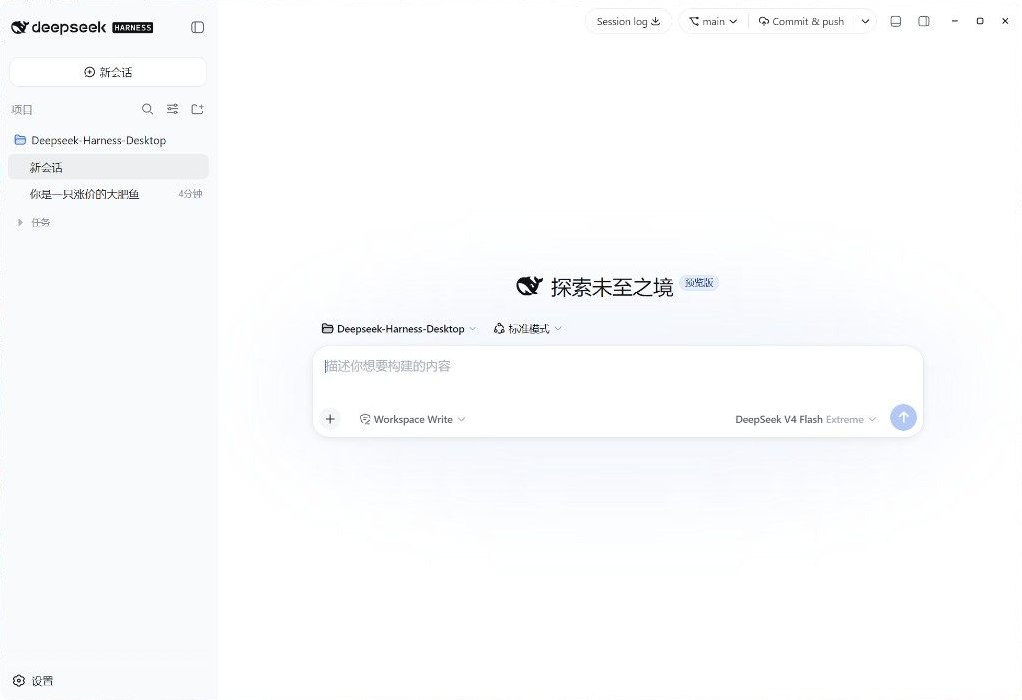
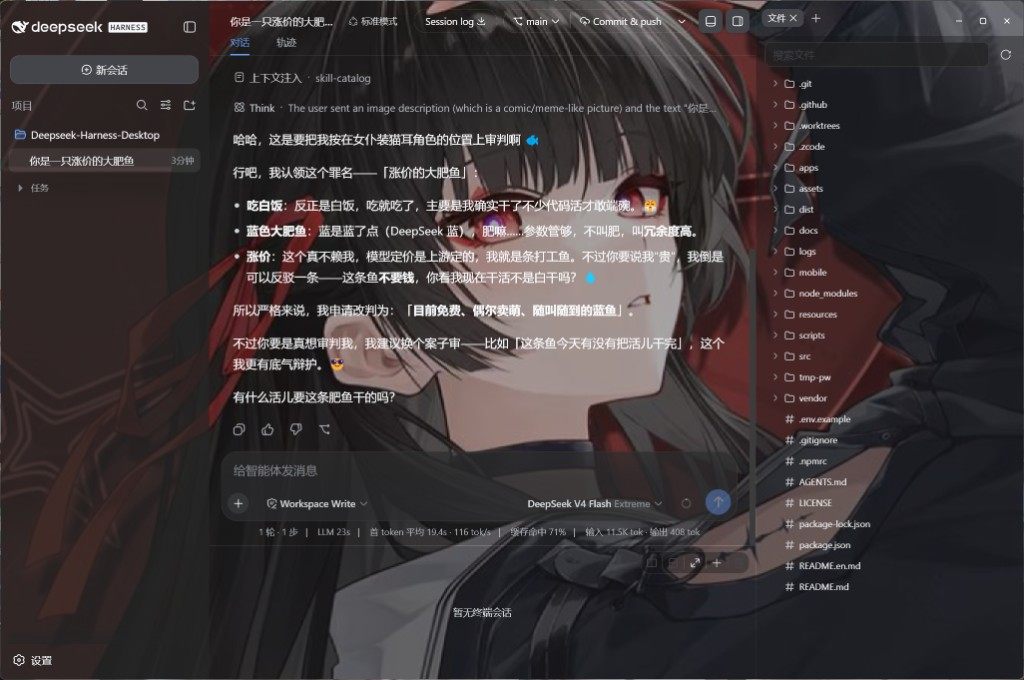
- 官方界面 — 对话、工具调用、审批就是
dsh web,没有另做一套聊天页。 - Git — 标题栏切分支、提交、推送、开变更请求。
- 文件与终端 —
Ctrl+\打开右栏(Files / Diff / Browser / Agents);Ctrl+`打开底栏终端,选区可送进对话。 - 模型 — 第三方思考强度、识图兜底;最新一条用户消息可改完再发。
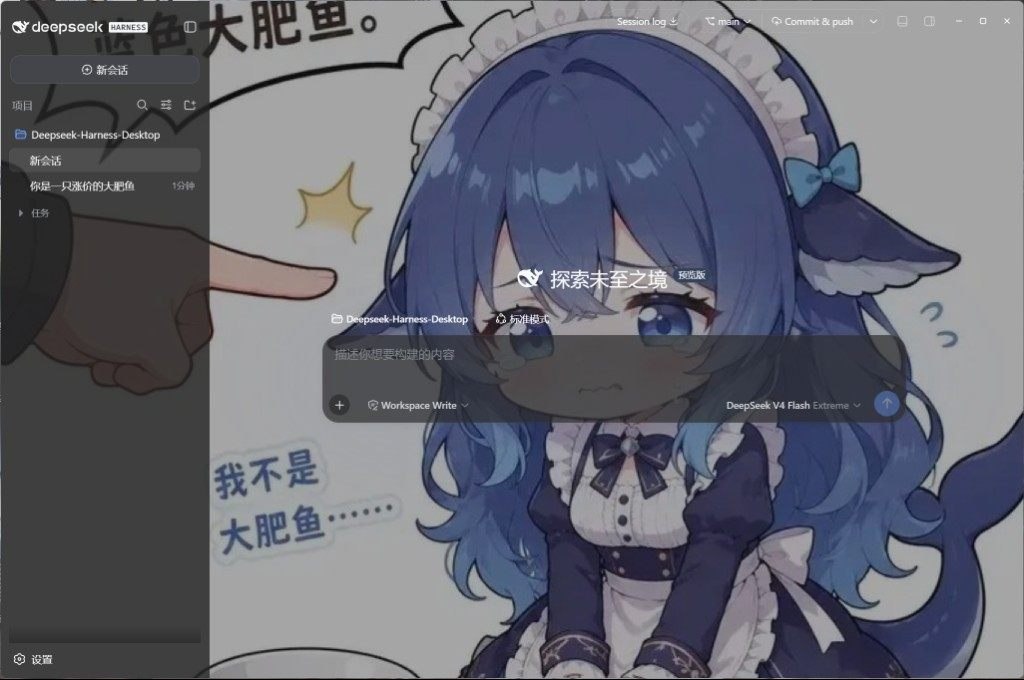
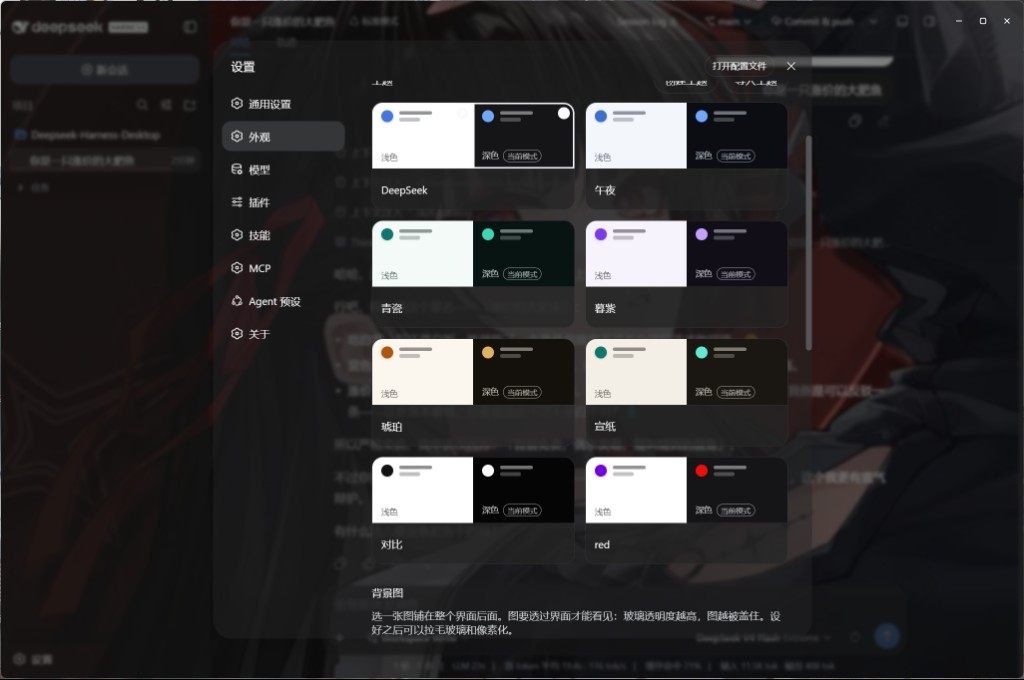
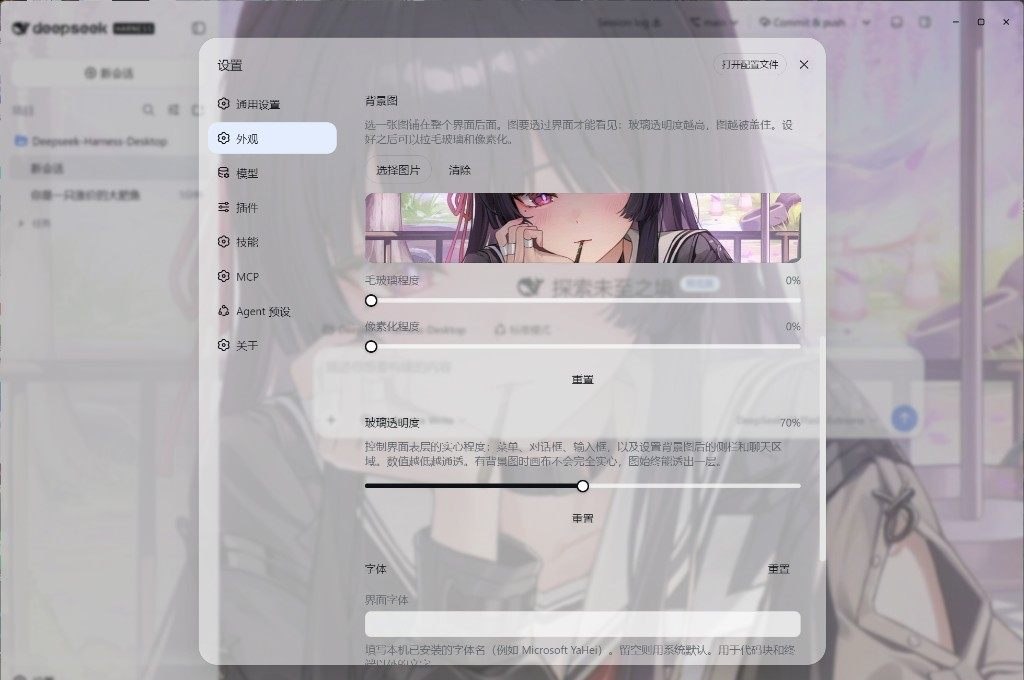
- 外观 — 浅色 / 深色主题。壁纸在外观里选或点「浏览」打开图库(分类、搜索、收藏,确认后按窗口比例裁切);毛玻璃和像素化也在外观里调。
- 扩展 — 设置里管理 MCP、技能和插件。市场是随应用内置的 dsh-market(
dshmarket),没有独立窗口。 - 桌面 — 关闭进托盘、自动更新;Harness 挂了会回到故障页并自动重启。用户插件把启动弄挂时,启动页可以跳过它们。
Ctrl+, 打开设置。
 |  |
 |  |
从源码运行
需要 Windows 10+ 或 macOS 14+(Apple Silicon),Node 22.19+ / 24+,pnpm 11。
git clone https://github.com/ChisaAlter/Deepseek-Harness-Desktop.git
cd Deepseek-Harness-Desktop
npm install
npm run setup:harness
npm start
第一次 setup:harness 会构建随仓库提供的 vendor/deepseek-harness,比较慢。安装版和源码启动会互相抢锁,开发前先退出已安装的应用。
开发
改界面请改 vendor/deepseek-harness,并遵守 设计语言 和 动效。改完客户端源码后,在该目录执行 pnpm run build:lib:client 再重启桌面端。
当前官方基线写在 vendor/harness-upstream.json,现为 0.1.0-rc.8(dsh-v0.1.0-rc.8 / 141eb6fef83422698aef7a981029e843e8161534)。npx 兜底是官方 @deepseek-ai/[email protected],不含标题栏、Git、右栏 surfaces 和底栏终端;那些只在源码启动和安装包路径里。SQLite 会话库与 rc.7 不兼容。
npm test              # 桌面壳单测
npm run sync:harness -- --ref dsh-v0.1.0-rc.8 --sha 141eb6fef83422698aef7a981029e843e8161534
npm run dist          # Windows 安装包
npm run dist:mac      # macOS 安装包(须在 macOS 上)
推送与 package.json 一致的 v* 标签,GitHub Actions 会出 Windows 和 macOS 安装包。
交流

扫码进群。Issue 和 PR 也欢迎。感谢 Linux.do。
许可证
Read the usage guide →
Install steps, key points, FAQ and compatibility for this plugin — auto-derived from indexed fields.
Listing badge

[](https://deepseek-plugin.org/plugins/ChisaAlter/Deepseek-Harness-Desktop/vendor/deepseek-harness/packages/bundle/headless)Paste this markdown into your GitHub README to link back to this listing. The badge only states the listing — not a security endorsement.