Deepseek-Harness-Desktop/vendor/deepseek-harness/packages/bundle/web-app
dsh Web layer package: mounts Web host, Web server, API gateway, browser plugin manifest, and frontend static fallback on base; provides dsh --profile web CLI argument parsing and startup URL output
ⓘ This plugin is a sub-package of the ChisaAlter/Deepseek-Harness-Desktop monorepo — stars and activity count the whole repository.

- Language
- JavaScript
- License
- MIT
- Branch
- main
Install
$ dsh plugin --profile web add @deepseek-ai/dsh-web-appRun the command above in your terminal to install this plugin via the dsh CLI. You can switch Profile in the top-right corner. New to dsh? Read the beginner tutorial
Install via your agent
Install the DeepSeek Harness plugin ChisaAlter/Deepseek-Harness-Desktop/vendor/deepseek-harness/packages/bundle/web-app for me: review the repository at https://github.com/ChisaAlter/Deepseek-Harness-Desktop first, then run the install command and verify the plugin loads successfully.
Paste this instruction to the DSH Web GUI assistant — it will install and verify for you.
This document corresponds to the sub-path
vendor/deepseek-harness/packages/bundle/web-appin the vendor repository and serves as the content source for the Plugin Encyclopedia module on the landing page/plugins/{owner}/{repo}.
One-Line Positioning
@deepseek-ai/dsh-web-app is DSH's browser surface bundle: it mounts a Web server, API gateway, workspace, projection cache, storage, browser plugin manifest, and frontend dist fallback on top of dsh-base, with the built-in web-runtime glue plugin parsing build artifacts, registering web surface prompts with the model, injecting the DSH_WEB_URL bash variable, and printing the dsh web: URL line.
Core Capabilities
- Covers host runtime required for the Web surface above dsh-base: Web server, API gateway, workspace, projection cache, JSON/domain storage, message feedback, directory selector, plugin/MCP/skill inventory
- Mounts browser-side plugin manifest (~40
dsh.clientlines) and a permanently mounted idle client HMR listener chain (idle while waiting for client bundle rewrite duringpnpm run dev:web) - Provides
dsh --profile webcommand-line parsing: parses--host,--port, repeatable--trusted-hostand--help, rejecting--host 0.0.0.0and non-numeric ports - Parses the built frontend dist (
@deepseek-ai/dsh-web-frontend/dist/index.html) and mounts thefrontend-staticfallback - Samples a one-time LAN trust snapshot after binding, providing it as
webRuntimeservice to browser trust barrier and UI endpoint - Registers
app:web-surfacesystem prompt segment andDSH_WEB_URLmanaged bash environment variable, enabling the model to recognize "this GUI" and what "this page" refers to - Prints
dsh web: http://127.0.0.1:<port>URL line after Loader configuration tree settles; includes LAN URL when bound host is full network card - Explicitly disables agent-plane tool rows (bash / pwsh / fs / skill / subagent / workflow / todo / web / goal / plan / compact etc.), leaving these capabilities to be mounted by agent presets on demand per session
Technical Implementation
- Language: TypeScript (ESM, package declares
"type": "module", three entry files:src/index.tsweb-runtime glue plugin +src/startup.tscommand-line provider +src/invariant.tsinvariant companion) - Key Dependencies:
@deepseek-ai/cordis(peer, host runtime),@deepseek-ai/cordis-plugin-loader(peer, profile loading),@deepseek-ai/dsh-system-prompt(peer, prompt registration),@deepseek-ai/dsh-shell-env(peer, managed bash variable); actual patches read by the combiner - Architecture Pattern: Profile bundle -
cordis.patch.ymlexposes via manifest fielddsh.bundle.patch, read by profile combiner and inserted line by line; package also mounts two Cordis runtime plugins:web-startup(regular service plugin, parses CLI and publisheswebStartup) andweb-app(depends onwebServerandwebStartup, publisheswebRuntime) - Entry Files:
src/index.ts:135(apply(), web-runtime glue logic) /src/startup.ts:65(apply(), commander command-line parsing) /cordis.patch.yml:1-473(~60+ lines of patch list, actual product payload)
Applicable Scenarios
When users want to run the DSH official browser interface (the GUI from dsh web) on their own machine, they need to install this bundle along with dsh-base into the profile: it provides Web server, API gateway, workspace, persistence, client plugin manifest, and startup URL output, serving as the essential layering that exposes dsh-base's basic capabilities in browser interaction form; if they just want to run a one-time task without opening the GUI, they should use the adjacent dsh-headless profile instead, which doesn't mount this bundle.
Prerequisites and Compatibility
| Dependency | Minimum Version | Description |
|---|---|---|
| DSH | 0.1.0-rc.6+ | Package version aligns with upstream baseline 0.1.0-rc.7; peers include @deepseek-ai/cordis @deepseek-ai/cordis-plugin-loader @deepseek-ai/dsh-shell-env @deepseek-ai/dsh-invariants @deepseek-ai/dsh-system-prompt must be available in host |
| Node | >=22.19.0 | From upstream monorepo engines.node: `^22.19.0 |
| Platform | macOS / Windows / Linux | Patch has no platform branches, same copy across platforms; CLI parsing leaves port and host validation to commander |
| Native Modules | None | This package doesn't directly import native dependencies; lower-layer bundles use node:sqlite (full-text search, off by default) and node-pty from other bundles / desktop shells |
Installation
dsh plugin --profile web add github:ChisaAlter/Deepseek-Harness-Desktop/vendor/deepseek-harness/packages/bundle/web-app
Configuration
Three Configs declared by the web-runtime glue plugin (src/index.ts) (assigned by cordis.patch.yml top-level):
| Config | Type | Description | Default |
|---|---|---|---|
printUrl | boolean | Whether to print dsh web: http://127.0.0.1:<port> after startup once Loader config tree settles (includes LAN URL when bound to full network card). Non-interactive callers can turn off | true |
surfaceContext | boolean | Whether to register app:web-surface system prompt segment and DSH_WEB_URL managed bash variable; non-GUI callers can turn off to prevent model from misreading context | true |
trustedHosts | string array | Explicit --trusted-host list (hosts or host:port appended to /api browser trust barrier), stacked in CLI argument order | [] |
Four flags parsed by command-line (src/startup.ts), directly accepted by dsh --profile web:
| Flag | Description |
|---|---|
--host <host> | Binding host; for security, 0.0.0.0 is explicitly rejected |
--port <port> | Listening port; 0 lets OS pick an available port; non-numeric throws error immediately |
--trusted-host <authority...> | Repeatable, appends host or host:port to /api browser trust barrier |
-h, --help | Prints help and exits with code 0; in this mode does not publish webStartup, so server won't start |
The patch also contains a set of static default values (
session-query-sqlite.path: ':memory:',message-feedback.maxNoteBytes: 8192,session-projection-cache.writeEveryEvents: 200andwriteIntervalMs: 5000, toolmodetakes env varDSH_TOOLS_MODE,agent-presets.default: standardetc.), which are patch-built-in configurations, not separate user-facing config entries.
FAQ
Q: After installing this bundle, will I get the dsh --profile web browser interface?
A: Yes. The patch mounts webserver, API gateway, workspace, projection cache, storage, browser plugin manifest, and frontend dist fallback, then the web-runtime glue plugin parses build artifacts and prints the dsh web: http://127.0.0.1:3080 URL line.
Q: Do I need to build the frontend dist separately before using it?
A: Yes. The runtime glue plugin locates the dist via require.resolve('@deepseek-ai/dsh-web-frontend/dist/index.html'); if not built, it throws an error directly during activation and prompts to run pnpm run build first, with no fallback to serve from source.
Q: After startup, I want to change port or restrict access to specific hosts only. How should I write it?
A: Use CLI flags: dsh --profile web --port 8080 --host 127.0.0.1, repeatable --trusted-host app.internal to add hostname/IP to /api browser trust barrier; these are parsed by web-startup line during loading phase, not written into patch.
Q: What's the relationship between this bundle and dsh-base?
A: Required layering: base is the common foundation for any profile (model, tools, sandbox, telemetry, persistence), web-app inserts Web-specific host runtime on top of base (webserver, api-gateway, storage, workspace), command-line, and browser plugin manifest, while disabling the agent-plane tool rows from base that will be taken over by agent preset.
Q: Why is --host 0.0.0.0 not allowed?
A: The CLI explicitly rejects this value before publishing webStartup to avoid binding full network card and exposing code execution capability to the entire network; use --host 127.0.0.1 or a specific LAN IP instead.
Q: After startup I can't access the page on LAN IP in browser. What should I do?
A: Add the corresponding LAN network card IP to --trusted-host; both browser trust barrier and UI-listed LAN URL use the same snapshot. Changes are sampled only once at startup; network card changes during runtime won't be re-announced.
Q: Where did the bash / fs / skill tools used by Agent go?
A: These agent-plane tool rows are explicitly disabled: true in the patch, because they're now mounted on demand by agent preset per session. Base's process-level services (shell-env, subagent registry, target service, remote /api gateway, etc.) remain on the host plane and continue to be used by the web surface.
Learning Curve
Beginner — just add it to --profile web to get the official GUI; port/host/trust source changes all use existing CLI flags, no patch modification needed.
Known Issues and Limitations
- Frontend dist must be built first: The runtime glue plugin locates dist via
require.resolve('@deepseek-ai/dsh-web-frontend/dist/index.html')at activation; unbuilt throws error directly and prompts to runpnpm run buildfirst, no fallback to serve from source lanAddressesis a startup snapshot: Network card changes after binding won't be re-announced; printed LAN URL always matches configured trust barrier, requires restart for changes to take effect--host 0.0.0.0not supported: CLI explicitly rejects before publishingwebStartupto avoid exposing RCE capability to entire network; currently not supporting binding all network cards is intentional- Shared HMR not yet enabled: The
hmrline in patch isdisabled: truewith TODO marker ("Re-enable shared HMR for Web after its reload lifecycle is tested"); currently client-hmr is a permanent idle chain, only triggers hot-reload when runningpnpm run dev:webin same checkout - Without trusted-hosts configured, only local machine is trusted: Default
--trusted-hostis empty,hostis127.0.0.1, so LAN/public access will be rejected by /api browser trust barrier, needs explicit declaration to open

Deepseek-Harness-Desktop
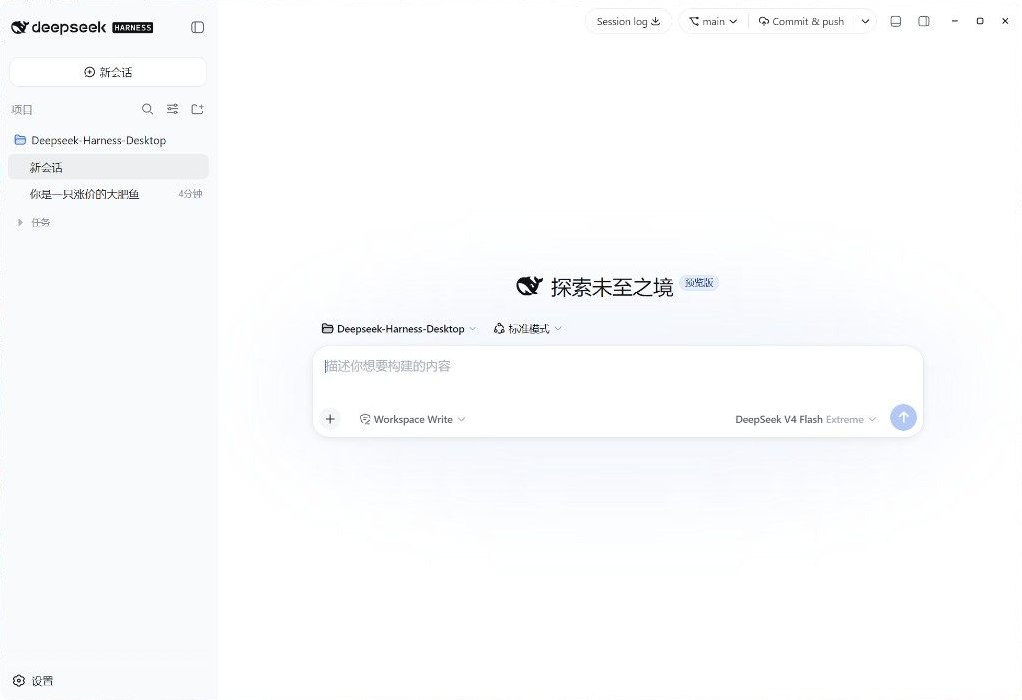
DeepSeek Harness 官方 Web UI 的桌面客户端
下载安装即可使用,不用自己起 dsh web
中文 · English · 下载 · DeepSeek Harness



安装
到 Releases 下载,装完不需要本机 Node。
| Windows x64 | Deepseek-Harness-Desktop-Setup-*.exe |
| macOS Apple Silicon | Deepseek-Harness-Desktop-*-mac-arm64.dmg |
| Intel Mac、Linux | 从源码运行 |
macOS 安装包未签名:下载后右键打开,或执行 xattr -cr /Applications/Deepseek-Harness-Desktop.app。请不要安装已撤回的 v0.2.0。
功能
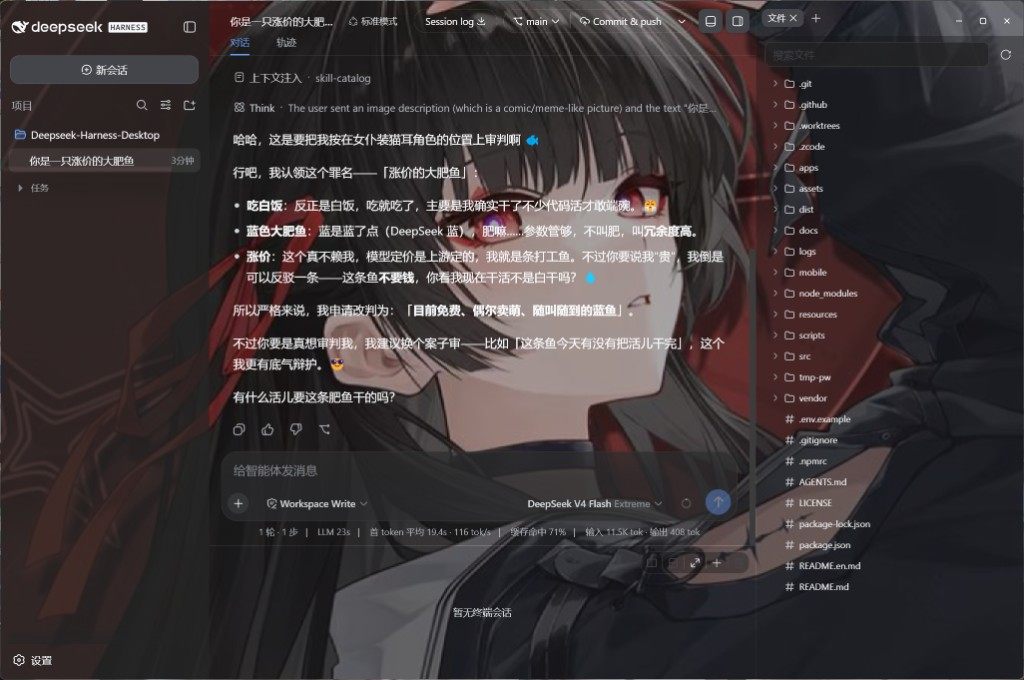
- 官方界面 — 对话、工具调用、审批就是
dsh web,没有另做一套聊天页。 - Git — 标题栏切分支、提交、推送、开变更请求。
- 文件与终端 —
Ctrl+\打开右栏(Files / Diff / Browser / Agents);Ctrl+`打开底栏终端,选区可送进对话。 - 模型 — 第三方思考强度、识图兜底;最新一条用户消息可改完再发。
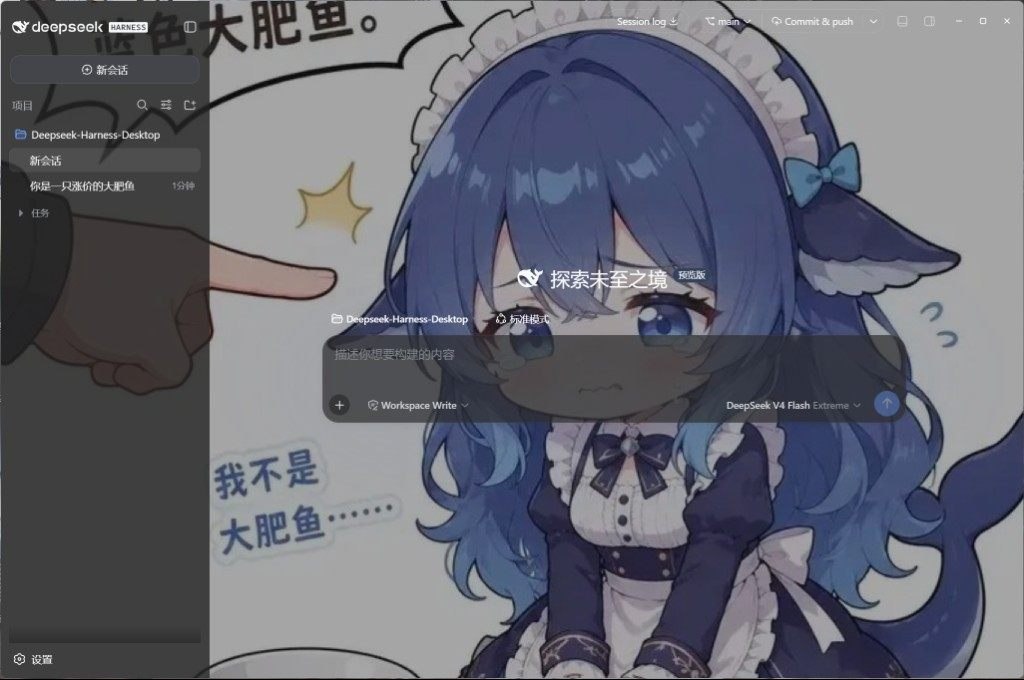
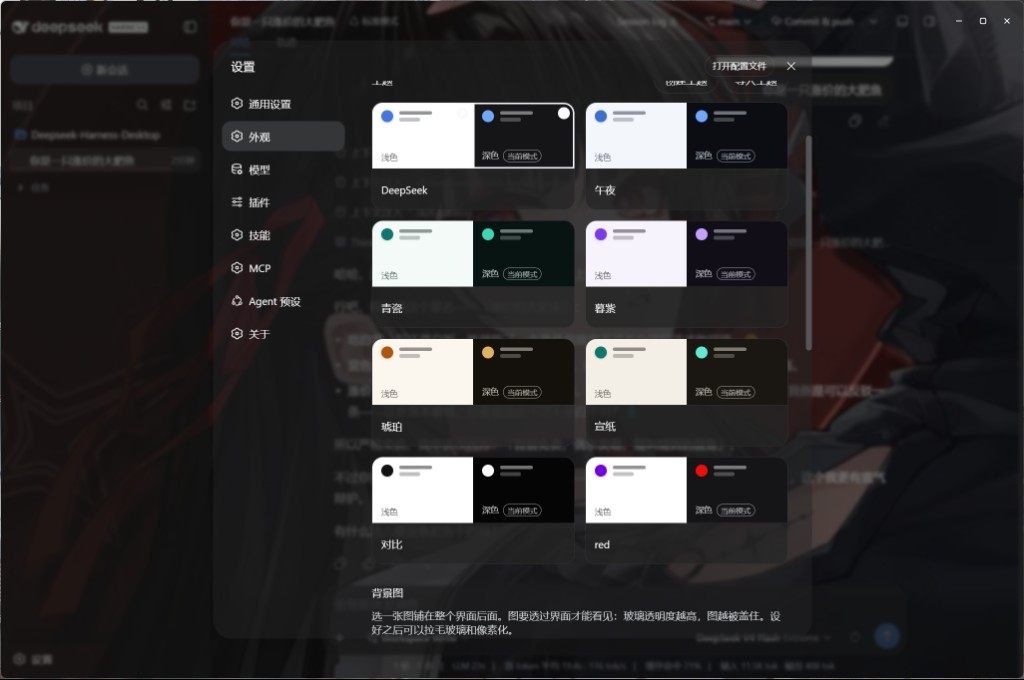
- 外观 — 浅色 / 深色主题。壁纸在外观里选或点「浏览」打开图库(分类、搜索、收藏,确认后按窗口比例裁切);毛玻璃和像素化也在外观里调。
- 扩展 — 设置里管理 MCP、技能和插件。市场是随应用内置的 dsh-market(
dshmarket),没有独立窗口。 - 桌面 — 关闭进托盘、自动更新;Harness 挂了会回到故障页并自动重启。用户插件把启动弄挂时,启动页可以跳过它们。
Ctrl+, 打开设置。
 |  |
 | 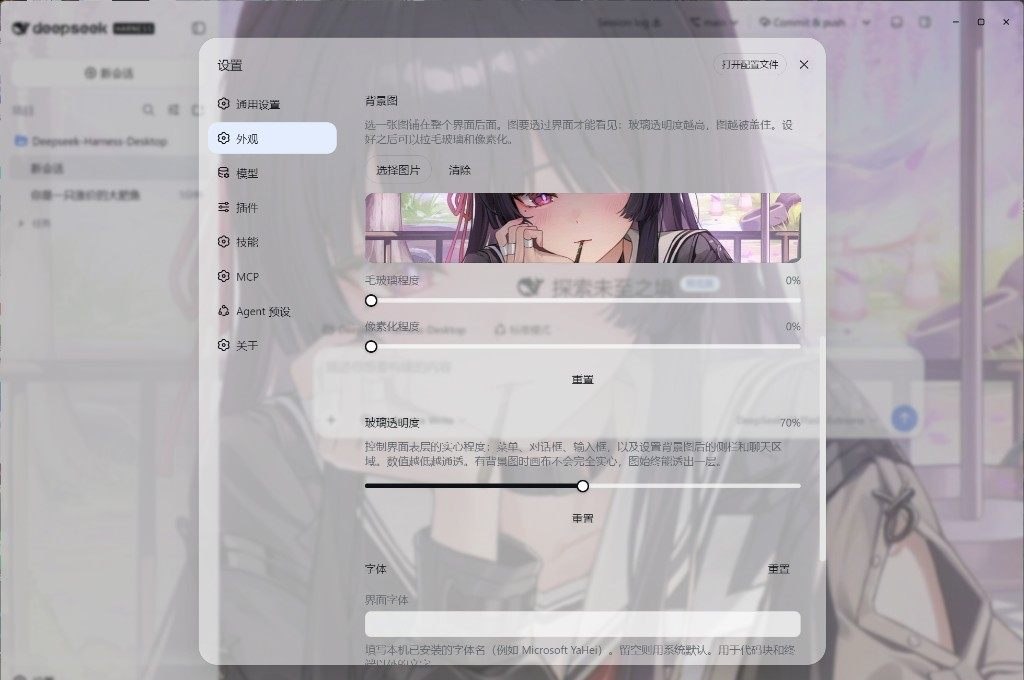 |
从源码运行
需要 Windows 10+ 或 macOS 14+(Apple Silicon),Node 22.19+ / 24+,pnpm 11。
git clone https://github.com/ChisaAlter/Deepseek-Harness-Desktop.git
cd Deepseek-Harness-Desktop
npm install
npm run setup:harness
npm start
第一次 setup:harness 会构建随仓库提供的 vendor/deepseek-harness,比较慢。安装版和源码启动会互相抢锁,开发前先退出已安装的应用。
开发
改界面请改 vendor/deepseek-harness,并遵守 设计语言 和 动效。改完客户端源码后,在该目录执行 pnpm run build:lib:client 再重启桌面端。
当前官方基线写在 vendor/harness-upstream.json,现为 0.1.0-rc.8(dsh-v0.1.0-rc.8 / 141eb6fef83422698aef7a981029e843e8161534)。npx 兜底是官方 @deepseek-ai/[email protected],不含标题栏、Git、右栏 surfaces 和底栏终端;那些只在源码启动和安装包路径里。SQLite 会话库与 rc.7 不兼容。
npm test              # 桌面壳单测
npm run sync:harness -- --ref dsh-v0.1.0-rc.8 --sha 141eb6fef83422698aef7a981029e843e8161534
npm run dist          # Windows 安装包
npm run dist:mac      # macOS 安装包(须在 macOS 上)
推送与 package.json 一致的 v* 标签,GitHub Actions 会出 Windows 和 macOS 安装包。
交流

扫码进群。Issue 和 PR 也欢迎。感谢 Linux.do。
许可证
Read the usage guide →
Install steps, key points, FAQ and compatibility for this plugin — auto-derived from indexed fields.
Listing badge

[](https://deepseek-plugin.org/plugins/ChisaAlter/Deepseek-Harness-Desktop/vendor/deepseek-harness/packages/bundle/web-app)Paste this markdown into your GitHub README to link back to this listing. The badge only states the listing — not a security endorsement.