DSH plugin offers one-click rewrite and voice transcription beside the input field. It invokes LLM to rewrite drafts using 5 modes and multi-model chains, with one-click restart support for failed services.

- Language
- JavaScript
- Branch
- main
Install
$ dsh plugin --profile web add github:Fishsb/dsh-prompt-enhancerRun the command above in your terminal to install this plugin via the dsh CLI. You can switch Profile in the top-right corner. New to dsh? Read the beginner tutorial
Install via your agent
Install the DeepSeek Harness plugin Fishsb/dsh-prompt-enhancer for me: review the repository at https://github.com/Fishsb/dsh-prompt-enhancer first, then run the install command and verify the plugin loads successfully.
Paste this instruction to the DSH Web GUI assistant — it will install and verify for you.
At a Glance
DSH plugin that adds a ✨ one-click rewrite button and 🎤 voice input button beside the input box, rewriting drafts independently via LLM calls based on selected mode and multi-model chain; includes one-click restart chain for DSH anomalies.
Core Capabilities
- Provides ✨ button in DSH Web input box toolbar: clicking triggers independent LLLM call, original text is replaced with enhanced version; can one-click undo if unsatisfied, can cancel during enhancement, slash commands preserve prefix and only optimize the body
- Provides 5 optimization modes: Basic (direct send), Lightweight (local rule analysis), Standard (rules + workspace & session retrieval), Expert (LLM analysis + full retrieval), One-Click Publish (retrieve similar projects + generate Nine-Chapter development specs)
- Built-in multi-model chain: tries sequentially per configuration, automatically switches on failure, supports custom add/delete/reorder, individual toggle for thinking mode and inline connectivity testing
- Provides 🎤 voice input: recording → recognition (cloud Qwen3-ASR / OpenAI-compatible / local offline SenseVoice) → optional filler word removal → fill into draft; auto-stops after 1.2s pause (VAD silence detection), audio processed in memory only without disk writes
- Provides one-click restart for DSH anomalies: when webpage won't open, can generate desktop shortcut (Windows whale icon) for double-click restart, or call directly via command line; auto-identifies service mode (nssm / sc) vs foreground mode
- Multi-language: buttons and text follow DSH interface language (中文 / English)
Technical Implementation
- Language: JavaScript (CommonJS)
- Key Dependencies:
@deepseek-ai/dsh-client-runtime(client runtime) +@deepseek-ai/dsh-client-locale(i18n) +react(UI components) +node:https(outbound & cloud ASR) - Architecture Pattern: Dual half (host + client) Cordis injection; host side integrates plugin ID into profile layer stack via
cordis.patch.yml, client side implements input box rewrite viainputActions.setDraftcontract; service registration provides six major services viactx.provide: enhance / models / update / diagnostics / plugins / config - Entry Files:
lib/index.cjs(host entry, built bybuild-host.mjsfromsrc/host/app.js) +lib/client.cjs(client entry, built fromsrc/client/skeleton.js)
Use Cases
When unfamiliar with phrasing techniques, quickly rewrite rough ideas into structured, complete prompts; or recover from DSH Web anomalies (port not listening, webpage won't open) via command line or desktop shortcut. Users who use editors daily, write, or debug prompts, as well as users deploying DSH on Windows Server/desktop needing remote maintenance, will directly benefit from these two capabilities.
Prerequisites & Compatibility
| Dependency | Min Version | Description |
|---|---|---|
| DSH | ^0.1.0-rc.6 | Declared via peerDependencies, works with @deepseek-ai/dsh-client-runtime and @deepseek-ai/dsh-client-locale for client injection; dsh.client.platform fixed as web, only web profile scans |
| Node.js | >= 22.0.0 | CI workflow uses node-version: 22; engines not explicitly declared |
| Client Contract | Inject inputActions.setDraft | Official web client already satisfies; third-party clients implementing same contract can load, voice input auto-degrades when capability set differs: only setDraft but no insert capability → recognition result appended to draft end; not injected at all → 🎤 disabled with prompt |
| Platform | macOS / Windows / Linux | Windows uses sc / nssm service management; Linux uses systemctl; macOS uses launchctl; unsupported platforms degrade to manual restart prompt |
| Native Modules | None | Only uses Node.js built-ins node:https / node:http / node:fs / node:path / node:child_process / node:os / node:url; local ASR engine (sherpa-onnx) deployed in $DSH_HOME/dsh-prompt-enhancer-asr/ as independent process, not in plugin main package |
Installation
dsh plugin --profile web add github:Fishsb/dsh-prompt-enhancer
Configuration Options
| Config | Type | Description | Default |
|---|---|---|---|
| Optimization Mode | Enum | Basic / Lightweight / Standard / Expert / One-Click Publish | Basic |
| Memory Toggle | Boolean | When enabled, multi-round optimization iterations before sending accumulate as memory chain for next round; clears on send | Off |
| Model Chain | List | Multi-model entries to try in sequence (provider + model + thinking strength), can add/delete/reorder | Default two models (deepseek-v4-flash / deepseek-v4-pro) |
| Custom Models | List | User-added model entries, name + model ID + thinking strength | Empty |
| Thinking Mode | Boolean | Enable chain reasoning on this model (affects time & quota) | Off |
| Context Budget | Number | How much reference material this mode can inject (0 = none; higher = wider range) | Basic 0 / Lightweight 2000 / Standard 4000 / Expert 4000 / One-Click Publish 4000 |
| Timeout | Number | Max wait time for single LLM call (0 = unlimited) | Basic/Lightweight/Standard 30000, Smart/Publish 60000 |
| Output Token Limit | Number | Max tokens for single response (0 = provider default) | Basic/Lightweight/Standard 2000, Smart/Publish 4000 |
| Output Char Limit | Number | Character limit for response collection (0 = no truncation) | Basic/Lightweight/Standard 8000, Smart/Publish 16000 |
| Template Selection | Enum | Template used by this mode: Default (restate only) / Incremental (conservatively supplement missing big logic) / Custom: | Default |
| Custom Templates | List | Multiple custom templates for this mode (each ≤4000 chars, ≤10 per mode) | Empty |
| ASR Engine | Enum | Cloud (Qwen3-ASR / OpenAI-compatible) / Local (SenseVoice offline) | Cloud |
| ASR Language | Enum | Auto / 中文 / English / 日本語 / 한국어 / Cantonese | Auto |
| Auto Stop on Silence | Boolean | Auto-stop recording after 1.2s pause | On |
| Normalize (Remove Fillers) | Boolean | Call LLM to remove "um/ah/uh" etc. after recognition | Off |
| Normalize Model Source | Enum | Follow model config (use one from enhancement chain) / Custom (independent OpenAI-compatible) | Follow model config |
| Port Restart Service Name | String | Service name for sc command on Windows | dsh-web |
| Port Restart Profile | String | DSH profile to use after restart | web |
FAQ
Q: What if the ✨ button doesn't appear in the input box after installation?
A: Confirm installation with dsh web profile (command with --profile web), you must restart dsh web after installation (refreshing browser won't reload host page and client modules). dsh.client.platform is fixed as web in package.json, only web profile scans this bundle.
Q: What happens when clicking ✨ without any models configured?
A: The plugin won't automatically apply any fallback model, host returns NO_MODEL error code and displays "No model configured, please add models in settings" below the button. Initial install inherits base's current model and official DeepSeek's default two models (deepseek-v4-flash / deepseek-v4-pro), which can be deleted or adjusted.
Q: What's the difference between the 5 optimization modes (Basic/Lightweight/Standard/Expert/One-Click Publish)?
A: Basic = direct rewrite, no context reading, fastest; Lightweight = local rule analysis, conservative prompts for missing items, no external context injection; Standard = rule understanding + workspace file & session event retrieval, zero extra LLM cost; Expert = LLM task analysis + full retrieval (docs/code/sessions) injection, most accurate context understanding; One-Click Publish = retrieve similar projects + workspace reference to generate Nine-Chapter development specs, supports multi-round refinement.
Q: What is the memory toggle? Will it keep chat content long-term in the client after enabling?
A: Memory only accumulates during one "optimize → modify → re-optimize" cycle before sending as up to 4 rounds of chain (only memoryRounds in memory), next round inherits history and perceives modification direction. Once message is sent, memory chain immediately clears. When memory is off, all read/write stops; no memory content is persisted locally or in cloud.
Q: How to use "One-Click Restart" to recover DSH when webpage won't open?
A: Plugin settings "Models & Plugins → Port Restart → Desktop" can generate a "Restart DSH" desktop shortcut with whale icon (Windows only), double-click restarts in command window; can also execute directly without generating shortcut: node "...\AppData\Local\dsh-prompt-enhancer\executor\0.1.11\lib\updater-host.cjs" --cli restart --service dsh-web --profile web.
Q: Which recognition engines does voice input support? Does local engine need extra model downloads?
A: Provides dual engines by default: cloud (Qwen3-ASR / OpenAI-compatible /audio/transcriptions) and local (sherpa-onnx + SenseVoice, offline, no upload); plugin install package doesn't carry/download models by default, local engine requires manual download in "Model Config → 🎙 Voice Recognition → Select Local → Click Download in Local Models" (SenseVoice 228MB / Paraformer 137MB), auto hot-loads after download completes.
Q: Why do I still see the plugin page in DSH settings after uninstall?
A: Must restart DSH once after uninstall to fully unload from runtime; if still persists after restart, manually delete $DSH_HOME/dsh-prompt-enhancer and dsh-prompt-enhancer.config.json in DSH installation directory.
Q: Why does DSH Desktop lose settings on every restart?
A: Fixed in v3.2.4 (GitHub Issue #1). DSH Desktop dynamically assigns ports on startup, browser localStorage is isolated by Origin, each restart incorrectly judged as "first install" overwriting user config. Fixed by storing config on disk ($DSH_HOME/dsh-prompt-enhancer.config.json), auto-restores after dynamic port switch.
Difficulty Level
Advanced — requires understanding DSH Web profile installation flow, model chain configuration, context budget and mode differences, and DSH service management (three sets for Windows/Linux/macOS). Usable directly with default config, but fine-tuning requires entering "Models & Plugins" settings page.
Known Issues & Limitations
- When third-party clients don't implement
inputActions.setDraftcontract, ✨ button doesn't show; 🎤 voice input auto-degrades (no insert capability → append to draft end; not injected at all → 🎤 disabled with prompt) - "Undo" button in optimization mode only clickable for short time after applying result; after user modifies draft then clicks ✨, "Undo" becomes "Continue Optimization" (continues from previous round)
- One-click restart only supports "Desktop Shortcut (whale icon)" generation on Windows; macOS/Linux need manual CLI execution
- Local ASR engine's SenseVoice (228MB) / Paraformer (137MB) models actively downloaded by users in settings page, not bundled with plugin; first use of local engine requires manual download
- M2/M3 architecture refactor in progress:
src/host/config.jscommentsTODO(M3): register config schema and migrationshow full Schemastery migration not yet complete, currently backed byconfig-schema.jslightweight validation - Plugin bundle is large (
lib/client.cjs~350KB,lib/shortcut-icon.cjs~43KB), install package downloads whale icon resource simultaneously - Client protocol version fixed as
protocolVersion: 1, incompatible with old versions (≤2.8.3); executor version managed byEXECUTOR_VERSION+ content hash, code changes auto-rebuild - One-click service-ization (nssm equivalent) path for macOS/Linux currently disabled, only Windows provides "nssm service-ization" one-click guide; other platforms' port restart uses foreground process mode
DeepSeek Harness (DSH) 插件。两大核心能力:
- ✨ 提示词增强 — 输入框草稿一键改写,不满意可撤回
- 💬 语音识别 — 说完自动停,云端 / 本地双引擎离线可用,识别结果填入草稿
另附 🔁 DSH 服务异常一键重启(网页打不开也能命令行恢复)。



✨ 两大核心功能
1. 提示词增强(✨)
输入框工具行的 ✨ 按钮触发一次独立 LLM 调用,直接改写当前草稿;可继续优化、可撤回、增强中可取消。
- 一键增强 — ✨ 按钮触发独立 LLM 调用,直接替换草稿;可继续优化、可撤回、增强中可取消
- 5 种优化模式 — 基础(直发)/ 轻量(结合上一轮对话参考)/ 标准(规则 + 检索)/ 专家(任务分析 + 全量检索)/ 一键发布(生成完整开发规格)
- 记忆开关 — 开启后,发送前的多轮「优化→修改→再优化」累积为记忆链,下一轮代入历史并感知修改方向;发送消息即清空,关闭后完全停止读写
- 模型链 — 按序尝试多个模型,可增删改序、开关思考、行内连通性测试
2. 语音识别(💬)
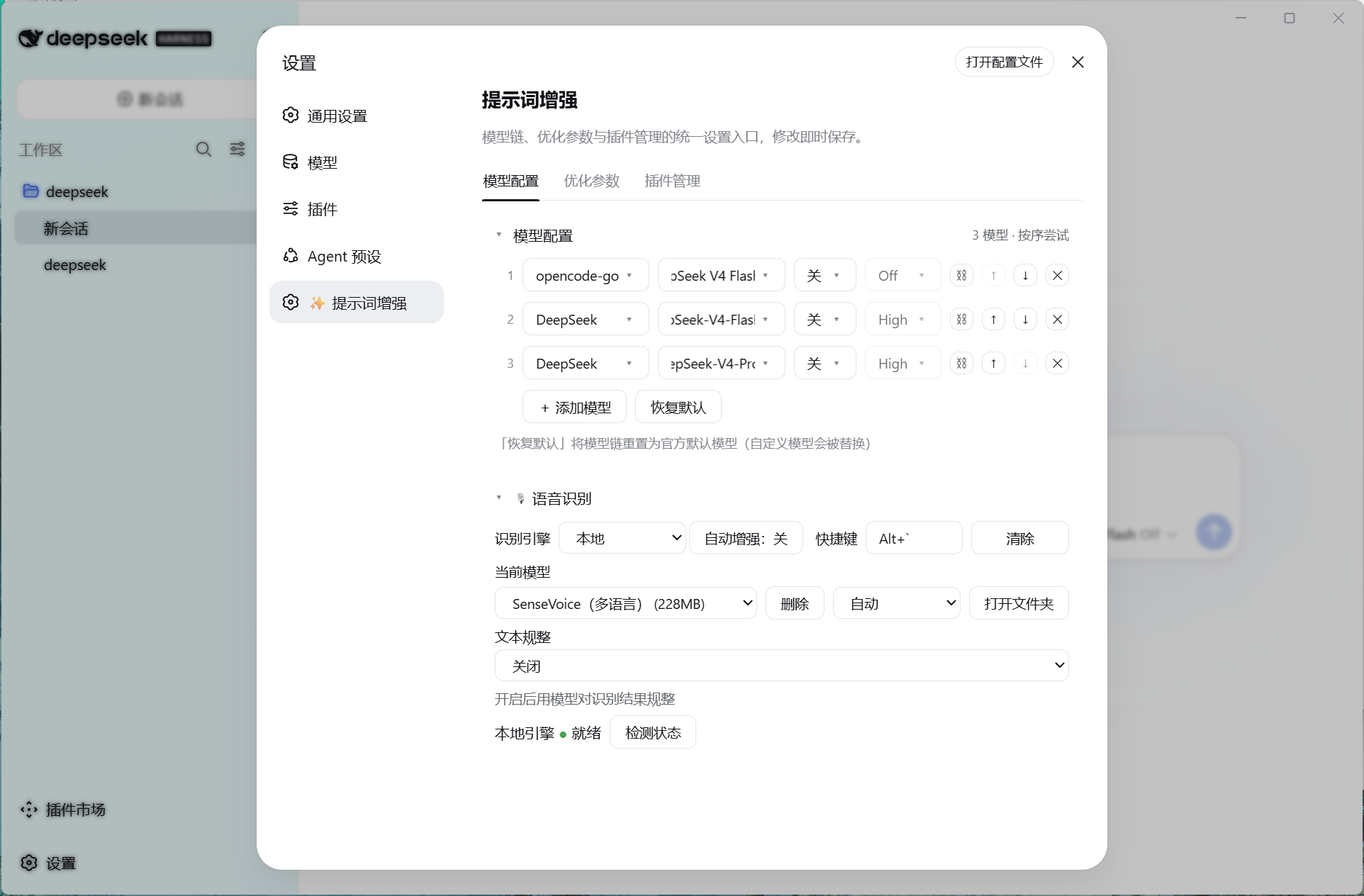
输入框旁的 🎤 录音按钮开始说话,识别(云端 Qwen3-ASR / 本地离线 SenseVoice 双引擎)→ 可选规整(去口水词)→ 填入草稿 → 可一键优化。说完停顿自动停止(VAD 静音检测),录音仅内存中转不落盘。
- 双引擎 — 云端 Qwen3-ASR / 本地离线 SenseVoice(框架 + 可选下载,发布物精简)
- 说完自动停 — VAD 静音检测,无需手动停止
- 快捷键唤醒 — 可录制全局快捷键,点按 / 长按双触发
- 文本规整 — 识别结果可选经基座 LLM 规整,去口语化
- 自动增强 — 开启后识别填入草稿即自动触发提示词增强
🔧 其他能力
- 🌐 多语言 — 按钮与文案跟随 DSH 界面语言(中文 / English)
- 🔁 一键重启(独立功能) — 网页打不开也能重启 DSH:桌面快捷方式(鲸鱼图标)双击,或命令行直接调用;支持服务化重启与进程级降级
🚀 安装
dsh plugin --profile web add github:Fishsb/dsh-prompt-enhancer#v3.3.0
安装后重启 DSH(dsh web),输入框工具行出现 ✨ 按钮即安装成功。
需本机已装 DeepSeek Harness 且
pnpm在 PATH 中。客户端兼容性(语音识别):🎤 语音输入依赖客户端注入
inputActions.setDraft(官方 web client 已满足);第三方客户端若实现同一契约即可加载,能力集不同时语音输入自动降级(无插入能力 → 识别结果追加到草稿末尾;完全不注入 → 🎤 禁用并提示)。本地离线引擎为「框架 + 可选下载」模式:插件安装不携带/不默认下载模型;设置 → 模型配置 → 💬 语音识别 → 引擎选「本地」→ 「本地模型」区点 下载模型(SenseVoice 228MB,带进度显示),下载完成自动生效。详见 docs/map/flow/voice-input.md。
更新 / 卸载:
dsh plugin --profile web update dsh-prompt-enhancer
dsh plugin --profile web remove dsh-prompt-enhancer
卸载后必须重启 DSH 才能从运行中移除。
🔁 一键重启(独立功能)
DSH 服务异常、网页打不开时,仍可一键恢复——不依赖浏览器、不依赖 3080 端口。插件设置「端口重启」确认态点击「桌面」生成带鲸鱼图标的「重启DSH」快捷方式,双击即重启并显示进度;不生成快捷方式也能用,任意命令窗口直接调用:
node "<DSH_HOME>\AppData\Local\dsh-prompt-enhancer\executor\0.1.11\lib\updater-host.cjs" --cli restart --service dsh-web --profile web
📦 库说明
核心逻辑拆分为独立 Node 模块,可复用:lib/shortcut-win.cjs(Windows 快捷方式生成)、lib/updater-host.cjs(CLI 重启 / 更新执行器)、lib/platform-service.cjs(跨平台服务管理)、lib/sys.cjs(环境与路径)。详见各模块头注释。
🎯 使用(提示词增强)
- 输入任意非空文本(斜杠命令保留前缀,只优化正文)
- 点击 ✨ 按钮
- 等待独立 LLM 调用完成,草稿被替换为增强版本
- 不满意点击 可撤回 恢复原文
📸 效果展示
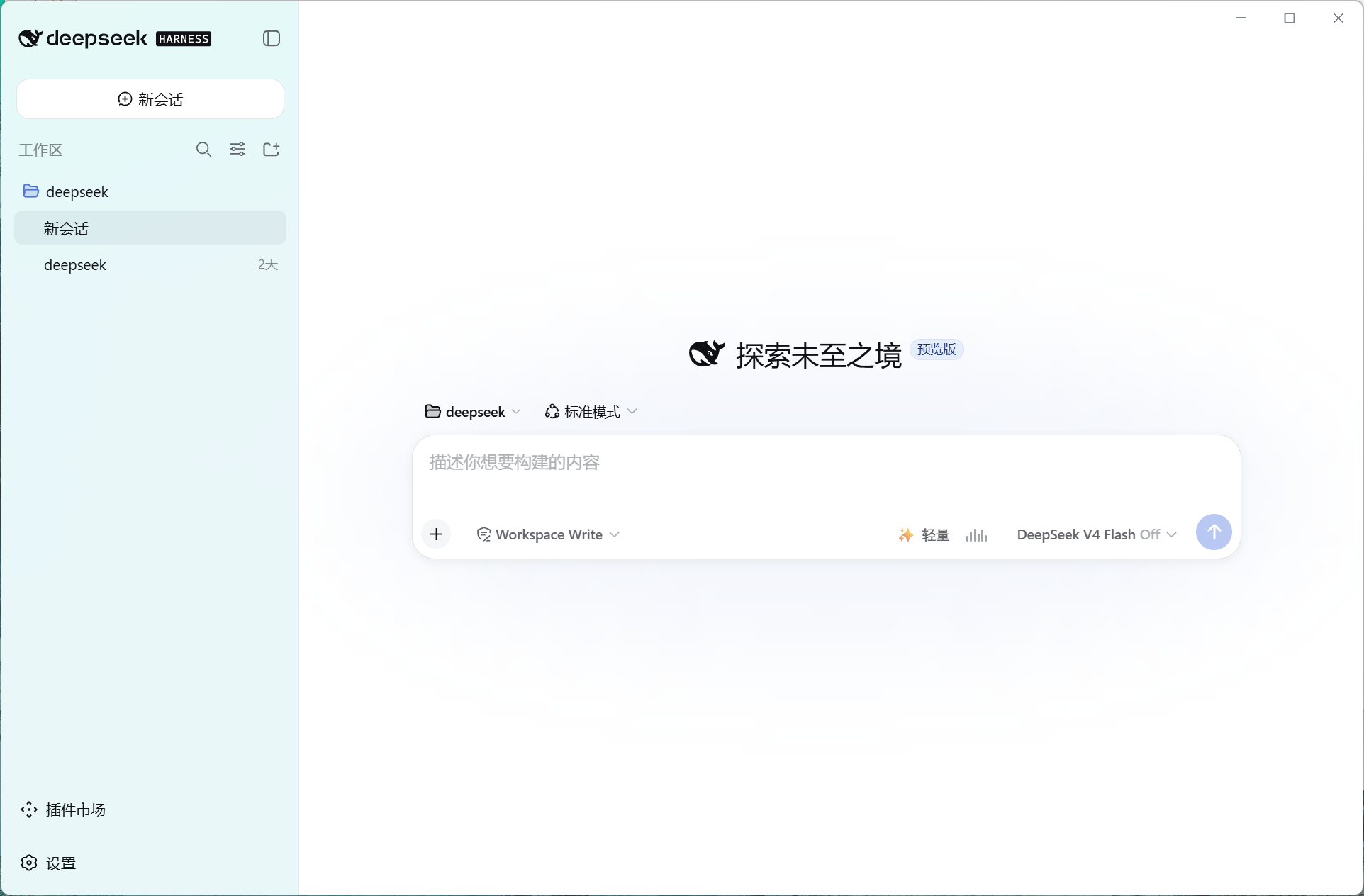
语音识别(输入框 🎤 录音按钮,说完自动停):
语音识别设置(引擎切换 / 快捷键唤醒 / 模型下载 / 文本规整):
⚙️ 配置
设置 →「模型与插件」:
| Tab | 说明 |
|---|---|
| 模型配置 | 配置优化模型链,按序尝试、可增删改序;语音识别段落(引擎切换 / 快捷键唤醒 / 本地模型下载 / 文本规整) |
| 优化参数 | 优化模式 / 记忆开关 / 上下文预算 / 超时与输出上限 / 模板 |
📚 文档
隐私:插件不记录、不上报任何数据;增强结果来自外部 LLM,发送前请自行核对。
Read the usage guide →
Install steps, key points, FAQ and compatibility for this plugin — auto-derived from indexed fields.
Listing badge

[](https://deepseek-plugin.org/plugins/Fishsb/dsh-prompt-enhancer)Paste this markdown into your GitHub README to link back to this listing. The badge only states the listing — not a security endorsement.