Enable DeepSeek Harness to send images with DeepSeek models by automatically invoking a third-party vision model to transcribe images into text before passing to DeepSeek for answering.

- Language
- JavaScript
- License
- MIT
- Branch
- main
Install
$ dsh plugin --profile web add dsh-vision-proxyRun the command above in your terminal to install this plugin via the dsh CLI. You can switch Profile in the top-right corner. New to dsh? Read the beginner tutorial
Install via your agent
Install the DeepSeek Harness plugin Flyvhidbwo/dsh-vision-proxy for me: review the repository at https://github.com/Flyvhidbwo/dsh-vision-proxy first, then run the install command and verify the plugin loads successfully.
Paste this instruction to the DSH Web GUI assistant — it will install and verify for you.
One-Sentence Summary
In DeepSeek Harness, when you select a DeepSeek model, GUI-attached images are natively rejected. This plugin registers a new "DeepSeek + Auto Image Understanding" route: before the request leaves outbound, it automatically sends each image to a third-party vision model to transcribe into structured text, then passes the pure text conversation to DeepSeek for answering — DeepSeek remains the "brain" of the answer, while image understanding serves as an additional capability.
Core Features
- Automatically transcribe GUI-pasted images into text, enabling DeepSeek to answer based on image content
- Supports any OpenAI-compatible vision endpoint: defaults to DashScope qwen3.7-flash, also compatible with QwenCloud International, Zhipu, OpenRouter, and self-hosted gateways
- Auto-detect local Ollama — image understanding stays on-machine without keys or registration
- Multi-model fallback chain: automatically switches to other vendors/endpoints in sequence when the primary model fails
- Content-hash-based image caching within the process — each image is transcribed at most once per process
- Anti-deadlock: 20-second hard timeout for free endpoints, 60-second cooldown for recently failed endpoints to avoid repeated failures
Technical Implementation
- Language: JavaScript (ESM, with JSDoc type annotations)
- Key Dependencies: schemastery (config schema validation), sharp (optional image downsampling), node:crypto (SHA-256 content hashing)
- Architecture Pattern: Injects new entries via
cordis.patch.yml, registers a new LLM route (defaultdeepseek-vision) as a proxy adapter: wraps the existing DeepSeek adapter, overridesinputModalitiesto['text', 'image']inresolveModelto pass attachment pre-check, intercepts image blocks instreamby calling the vision model for transcription before forwarding - Entry Point:
apply(ctx, config)inlib/index.js, auto-loaded by postinstall hook and cordis
Use Cases
In DeepSeek Harness, you've selected a DeepSeek model and want to directly paste screenshots, memes, UI screenshots, code screenshots, etc. to continue asking questions — DeepSeek's official API doesn't accept images, so you'd normally have to "copy to another tool to view the image, then type the description to DeepSeek." This plugin automatically transcribes images to text before the request leaves outbound, letting DeepSeek answer based on the text description, providing an experience close to native multimodal.
Prerequisites & Compatibility
| Dependency | Minimum Version | Description |
|---|---|---|
| DSH | >=0.1.0-rc.6 | Declared via engines.dsh in plugin package; requires cordis.patch.yml injection mechanism |
| Node | >=22.19.0 | Declared via engines.node in plugin package |
| Platform | Cross-platform | macOS / Windows / Linux all supported; on Windows, environment variable changes may not propagate to running processes, so directly writing apiKey is recommended |
| Native Modules | None | sharp is only an optionalDependencies; without it, large images won't be downsampled but other features work normally |
Installation
dsh plugin --profile web add dsh-vision-proxy
Configuration Options
| Config | Type | Description | Default |
|---|---|---|---|
providerId | string | Route ID displayed in model selector | deepseek-vision |
innerProvider | string | Wrapped existing adapter route ID | deepseek-official |
baseURL | string | OpenAI-compatible endpoint for vision model (any vendor, including local Ollama) | DashScope compatible mode |
apiKey | string (secret) | Vision model key; empty falls back to $VISION_API_KEY, then $DASHSCOPE_API_KEY; direct write is most reliable on Windows | empty |
anonymous | boolean | Skip auth header, for registration-free endpoints; subject to 20-second timeout cap | false |
model | string | Vision model ID (e.g., qwen3.7-flash, qwen3-vl-flash, glm-4.6v-flash) | qwen3.7-flash |
maxTokens | number (1-32768) | Vision model single-output limit; give ample room for reasoning models | 4096 |
timeoutMs | number (1000-300000) | Single vision model request timeout; anonymous endpoints are forcibly capped at 20 seconds regardless | 120000 |
maxImagePixels | number (0-100000000) | Images exceeding this pixel count are automatically downsampled before transcription (requires sharp); set to 0 to disable | 4000000 |
marker | string | Prefix marker before each transcribed text, for easy identification | [图片转译] |
failureMode | enum placeholder / error | Behavior when all vision models fail: continue with placeholder text (default) or fail the entire round | placeholder |
autoLocalOllama | boolean | Detect local Ollama on startup, add to fallback chain if found — images stay on machine | true |
localOllamaModel | string | Specify Ollama model ID; empty auto-selects first reported vision model from local | empty |
fallbackModels | array of objects | Custom fallback chain, each can point to different vendors; non-anonymous entries without key are automatically skipped | [] |
FAQ
Q: How to verify it's working after installation?
A: Run dsh --profile web --dump-config | grep dsh-vision-proxy — you should see exactly one plugin entry; then restart dsh web, and the model selector will show the "DeepSeek + Auto Image Understanding" option. When you paste an image into conversation, you should see the [图片转译] marker followed by DeepSeek's answer.
Q: Can I use it without an API key?
A: Yes. The plugin auto-detects local Ollama (http://localhost:11434) by default — if found, it adds Ollama to the top of the fallback chain, keeping images on-machine without registration. If Ollama isn't installed and you have no key, transcription fails quickly within a few seconds with configuration guidance, without deadlocking the conversation.
Q: Why does it say "no API key" even though I exported environment variables on Windows?
A: Windows explorer.exe caches environment variables, so running dsh processes can't read new values. Writing apiKey directly into the plugin config in the profile's cordis.patch.yml is the only reliable method on Windows. dsh rc.6 doesn't read .env files — that's not an alternative.
Q: pnpm ≥ 10 reports "Ignored build scripts" during installation — what to do?
A: Starting with pnpm 10, dependency build scripts are blocked by default. Add allowBuilds: { dsh-vision-proxy: true, sharp: true } to the profile's pnpm-workspace.yaml, then run dsh plugin --profile web add dsh-vision-proxy again to complete bundle registration.
Q: Transcription loses small text details — what can I do?
A: This is a capability limitation of the vision model itself, not a plugin bug. For dense UI screenshots/small text scenarios, consider switching to a stronger model (like qwen3-vl-plus) or increasing maxTokens; you can also downsample images to an appropriate resolution before starting the conversation.
Q: Where is image data uploaded? Is it saved?
A: During transcription, images are sent via base64 over HTTPS to the currently active vision endpoint (configured primary model / detected local Ollama / fallback chain entry). The plugin only performs in-process SHA-256 content caching (200-entry limit), doesn't write to local files, and doesn't upload to any plugin-owned services. For sensitive images, use local Ollama or a self-hosted endpoint.
Q: If all vision endpoints fail, does the entire conversation break?
A: By default, no. With failureMode: placeholder (default), it inserts "[图片转译失败: reason]" placeholder text at the original image location and continues the conversation; failed images are recorded by content hash for 60 seconds, during which no new network requests are made. Only failureMode: error will cause the entire round to fail.
Q: Which vendors or models are available?
A: Any OpenAI-compatible vision endpoint works. The default primary model is DashScope qwen3.7-flash (cheap, fast, no rate limits), also supports QwenCloud International, Zhipu glm-4.6v-flash, OpenRouter, local Ollama, self-hosted gateways; switch the primary model via baseURL/model, and chain multiple vendors via fallbackModels.
Getting Started Difficulty
Beginner — the bundle comes with sensible defaults and works without any configuration: if you have a key, it automatically uses the paid fast lane; if not, it auto-detects local Ollama; if that fails too, it fails quickly instead of deadlocking.
Known Issues & Limitations
- Small text details in dense UI screenshots may be missed in transcription — this is a capability limitation of the vision model itself, not a plugin bug; consider using a stronger model or increasing
maxTokens(README.md:174) - Free anonymous endpoints have strict rate limits; when HTTP 429 occurs, the plugin fails immediately and skips (doesn't retry Retry-After), to prevent deadlocking the entire conversation (lib/index.js:248-255)
- Recently failed endpoints enter a 60-second cooldown and are skipped, avoiding repeated hits on dead endpoints (lib/index.js:62, 390-392)
- Transcription results are only cached in-process (SHA-256, 200-entry limit), invalidated after process restart, and not written to disk (lib/index.js:66, 333)
sharpis an optional dependency; when not installed, images exceeding the pixel threshold won't be downsampled, potentially increasing transcription costs (package.json:58-60)- No third-party anonymous free endpoints are built-in as fallback by default; when needed, you can add
anonymous: trueentries viafallbackModels(README.md:55, lib/index.js:117)
dsh-vision-proxy
保持 DeepSeek 作为对话大脑,图片照样直接发。 为 DeepSeek Harness 打造:GUI 附加图片自动转译,纯文本 DeepSeek 也能识图。







为什么需要它
DeepSeek Harness 原生按模型声明的 inputModalities 决定是否放行图片附件。DeepSeek 的 chat-completions 线路是纯文本的,所以选中 DeepSeek 时附加图片会被原生拒绝。已有的视觉插件提供 view_image 等工具(适用于文件路径),但 GUI 图片附件对纯文本模型依然失败。
本插件补上这个缺口:注册一条新提供商路由(deepseek-vision),包装真正的 DeepSeek 适配器——对外声明支持图片输入(附件预检放行),并在请求流里把每张附加图片转译成文字后再委托给 DeepSeek。对话仍然由 DeepSeek 作答,识图只是附加能力。
用户附加图片 ──▶ deepseek-vision 路由 ──▶ 经 VLM 转译(OCR+版式+细节)
                   │                        │
                   ▼                        ▼
            DeepSeek 作答 ◀── 纯文本对话(图片已替换为 [图片转译] 文字)
特性
- 绝不卡死。匿名端点强制 20 秒超时上限(免费档挂起也拖不住整轮对话);匿名端点遇到 HTTP 429 立即失败(不做无意义的 Retry-After 等待);刚失败(429/超时)的端点进入 60 秒冷却并被跳过。
- 多模型、多厂商。任何 OpenAI 兼容 VLM 端点都行——百炼/Qwen、QwenCloud 国际站、智谱、OpenRouter、本地 Ollama、或你自己的端点。每条
fallbackModels都可以带各自独立的baseURL/model,一个安装即可串联多家。 - 零配置本地路径。
autoLocalOllama(默认开)启动时探测http://localhost:11434,检测到 Ollama 就自动加入降级链——图片不出本机,免 key 免注册。 - 快速且明确的失败。没有 key 也没有本地 Ollama 时,转译在几秒内失败并给出可操作指引(配置
VISION_API_KEY/DASHSCOPE_API_KEY或安装 Ollama)——绝不静默卡住。 - 有 key 自动提速。导出
VISION_API_KEY/DASHSCOPE_API_KEY后自动走你配置的付费端点(默认百炼qwen3.7-flash——快、便宜、不限速;百炼/QwenCloud/智谱/OpenRouter 或任意 OpenAI 兼容端点均可);没有 key 的条目会被跳过而不是失败。 - 安装时一问式确认。
postinstall询问你是否有 VLM API key。非交互环境自动跳过,安装永不卡死。启动时打印 PRIVACY NOTICE 标明当前使用的端点。 - 降级链 + 错误分类。
rate_limit/quota/auth/region/model_not_found/context_too_large/http分类给出可操作提示。 - 内容哈希缓存。转译结果按图片字节的 SHA-256 缓存(进程内,上限 200)——同一张图每个进程最多转译一次,重新附加或换对话也命中。
- 自动降采样(可选)。装有
sharp时,超过maxImagePixels的图片转译前自动缩小——大截图更快;没有 sharp 则优雅降级原图直发。 - 兼容
read_image。原生read_image工具在该路由下同样可用(它的能力门禁读取同一份模型信息)。
支持的模型与厂商
一套配置(baseURL + model,可选 apiKey)覆盖所有后端:
| 场景 | baseURL | model | 说明 |
|---|---|---|---|
| 百炼(国内)——默认主模型 | https://dashscope.aliyuncs.com/compatible-mode/v1 | qwen3.7-flash / qwen3-vl-flash | 便宜、快、不限速。密钥:千问平台 sk-ws-… 或百炼 sk-… |
| 本地 Ollama(自动探测) | http://localhost:11434/v1 | 第一个视觉模型 | 装了就零配置可用;图片不出本机 |
| QwenCloud(国际) | https://dashscope-intl.aliyuncs.com/compatible-mode/v1 | qwen3-vl-plus 等 | 国际版 |
| 智谱(免费档) | https://open.bigmodel.cn/api/paas/v4 | glm-4.6v-flash | 免费档仍需注册智谱(免费)key |
| 任意 OpenAI 兼容端点 | 你的端点 | 你的模型 | OpenRouter、火山 Ark、vLLM、各类网关……插件只讲 /chat/completions |
⚠️ 不再内置任何第三方匿名免费端点作为默认兜底。实测中匿名免费端点(如 OVHcloud AI Endpoints)限速极严且会无响应挂起——作为默认只会复现"卡死"体验。如果你仍想用某个匿名端点,请通过
fallbackModels自行添加并设anonymous: true(20 秒超时上限依然生效)。
价格参考(人民币,百炼国内站 2026-08 参考价)
| 模型 | 输入 | 输出 | 一张 1080p 截图(≈2000 token) |
|---|---|---|---|
| qwen3-vl-flash | ¥0.15/百万 token | ¥1.5/百万 token | ≈ ¥0.0005(约 0.05 分钱) |
| qwen3.7-flash | ¥0.2/百万 token | ¥0.8/百万 token | ≈ ¥0.001(约 0.1 分钱) |
| 本地 Ollama | 免费 | 免费 | ¥0(图片不出本机) |
图片按 token 折算(百炼把图片按分辨率折算成 token,一张 1080p 截图 ≈ 2000 token)。按上面价格,一张图不到 1 厘钱;即使重度使用(每天 100 张)每月也就几块钱,基本可以忽略。本地 Ollama 完全免费。以百炼控制台实时标价为准。
key 读取顺序:配置 apiKey → $VISION_API_KEY → $DASHSCOPE_API_KEY。匿名端点(anonymous: true)和本地主机无需 key;无 key 的非匿名条目自动跳过。
快速开始
dsh plugin --profile web add dsh-vision-proxy
安装时会问你一个问题——你有 VLM API key 吗? 回答 y 走付费快速通道,回答 N(默认)走本地/零配置路径。重启 dsh web,在模型选择器里选 DeepSeek + 自动识图,然后把图片粘贴进任意对话——完事。
pnpm ≥ 10 默认拦截依赖构建脚本——首次安装会以非零码退出并提示 Ignored build scripts: dsh-vision-proxy, sharp。请批准两者(插件的安装确认提示 + sharp 的可选二进制),然后重跑一次安装完成 bundle 注册:
# 写在 profile 的 pnpm-workspace.yaml 里
allowBuilds:
  dsh-vision-proxy: true
  sharp: true
dsh plugin --profile web add dsh-vision-proxy # 批准后重跑
npm 官方源太慢?
dsh plugin --profile web add dsh-vision-proxy --registry=https://registry.npmmirror.com(参数会转发给 pnpm)。
现场演示:真实对话中的识图
一段 deepseek-vision 路由上的真实对话(DeepSeek-V4-Flash 作为大脑):用户粘贴了一张表情包并问 "你看到了什么",图片被 VLM 自动转译,DeepSeek 基于文字完整作答——单步,约 7.6 秒。
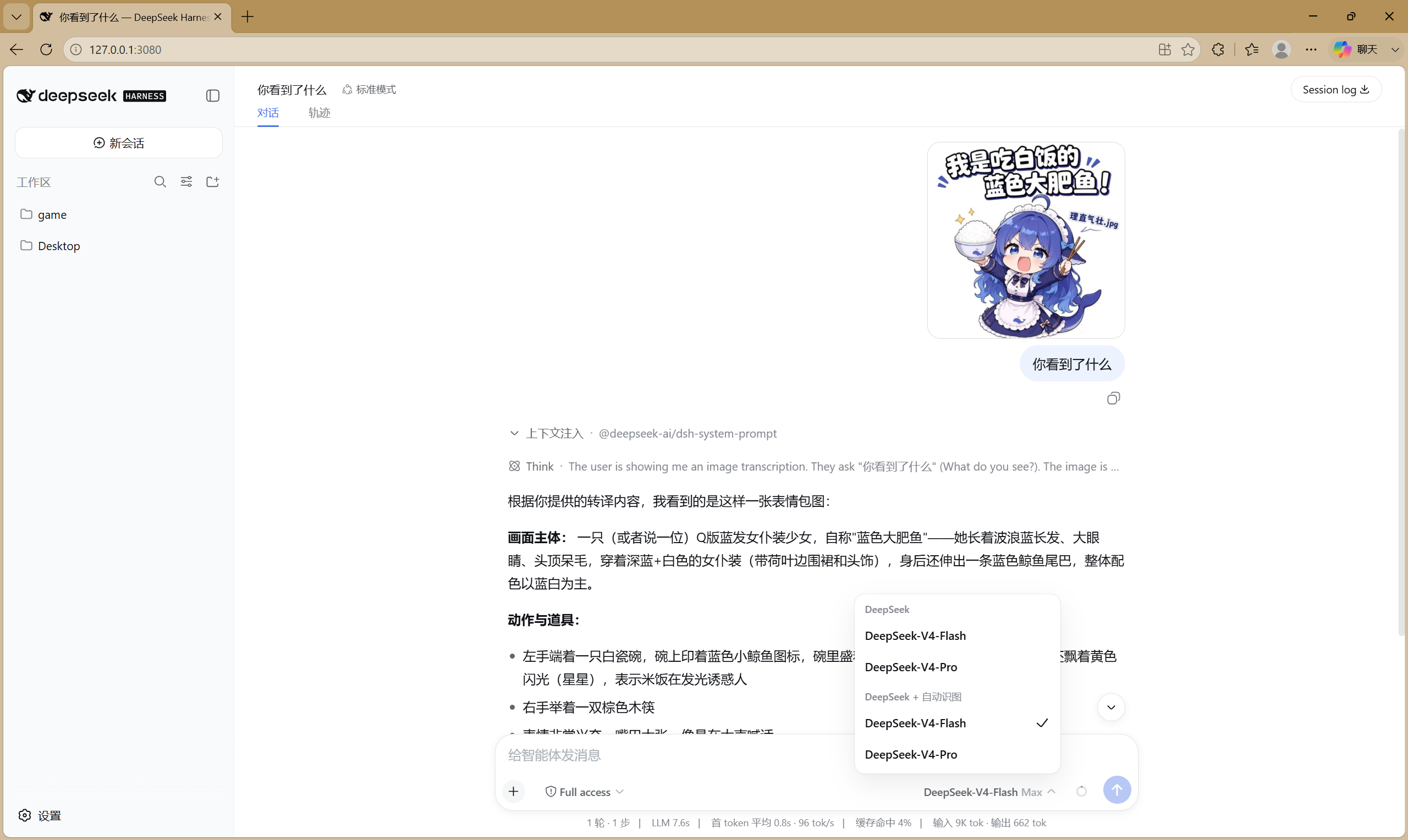
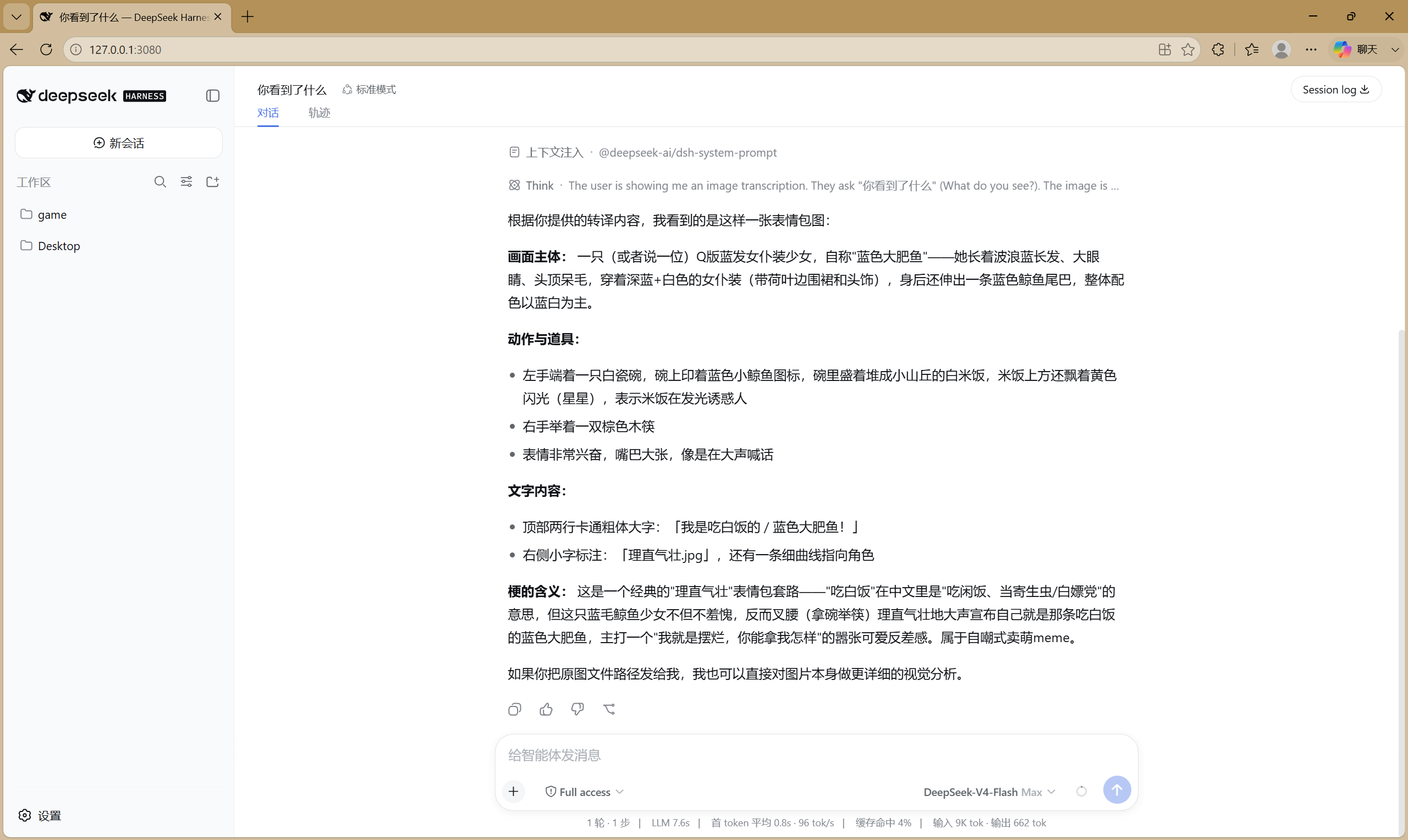
左图:模型选择器显示 deepseek-vision 路由(DeepSeek + 自动识图)已选中——这正是图片附件得以放行的原因。右图:DeepSeek 基于转译文字给出的完整回答。
用户粘贴表情包 + "你看到了什么"
  → 图片块经 VLM 自动转译(OCR + 版式):
      "我是吃白饭的 / 蓝色大肥鱼! (理直气壮.jpg) — Q版蓝发女仆装少女,
       身后蓝鲸尾巴,端碗举筷,表情兴奋"
  → DeepSeek 基于文字对表情包做完整视觉分析
两条自主路径都覆盖:view_image 工具(任意路由,支持文件路径与 URL)和图片块自动转译(deepseek-vision 路由——对话中途附加的图片)。
配置
bundle 已自带合理的默认配置(见上方策略说明),一般无需改动。要覆盖时,请在 profile 中写 id 定向覆盖,不要用 insert(见下方警告):
# $DSH_HOME/profiles/web/cordis.patch.yml —— 用户层覆盖示例
- id: dsh-vision-proxy
  name: 'dsh-vision-proxy'
  config:
    baseURL: https://dashscope.aliyuncs.com/compatible-mode/v1
    apiKey: 'sk-…'          # 或留空读环境变量(Windows 下直写这里最可靠)
    model: qwen3.7-flash
    maxTokens: 4096
    timeoutMs: 120000       # 匿名端点无论如何都会被强制 20s 上限
    maxImagePixels: 4000000
    marker: '[图片转译]'
    autoLocalOllama: true
    fallbackModels: []      # 可自行添加 {model, baseURL, apiKey?, anonymous?, timeoutMs?}
⚠️ 不要写成
- insert: [{id: dsh-vision-proxy, …}]。 dsh 的 patch 语义里insert是往条目列表追加——bundle 自带的条目和你写的同 id 条目会同时存在并被实例化,deepseek-visionadapter 会被注册两次(行为未定义)。顶层- id:条目才会命中既有行并整体替换其config;未列出的键回落到插件 zod schema 的.default()值(如maxTokens=4096、timeoutMs=120000、autoLocalOllama=true),所以只写apiKey/model也能工作。
| 键 | 默认值 | 含义 |
|---|---|---|
providerId | deepseek-vision | 模型选择器中显示的路由 id |
innerProvider | deepseek-official | 被包装的现有适配器路由 |
baseURL | DashScope 兼容模式 | OpenAI 兼容 VLM 端点(任意厂商,含 Ollama) |
apiKey | '' | VLM 密钥;回退读取 $VISION_API_KEY,再回退 $DASHSCOPE_API_KEY。Windows 下环境变量变更可能不生效,直写这里最可靠 |
anonymous | false | 跳过 Authorization 头(用于免注册端点;受 20s 超时上限约束) |
model | qwen3.7-flash | 视觉模型 id(如 Qwen2.5-VL-72B-Instruct、qwen3-vl-flash、glm-4.6v-flash、qwen3-vl:4b) |
maxTokens | 4096 | VLM 输出上限(思考型模型先耗推理 token,预算给足) |
timeoutMs | 120000 | VLM 请求超时(匿名端点无论如何都被强制 20s 上限) |
maxImagePixels | 4000000 | 超过该像素数的图片转译前自动降采样(装有 sharp 时;0 关闭) |
marker | [图片转译] | 每条转译文本前加的前缀标记 |
failureMode | placeholder | 全部 VLM 失败时的行为:placeholder(默认)插入 [图片转译失败: 原因] 文本并继续对话——死端点不会毒化会话;error 则整轮失败(旧行为) |
autoLocalOllama | true | 启动时探测 http://localhost:11434;检测到则前置进降级链 |
localOllamaModel | '' | 指定 Ollama 模型 id;留空自动选本地 Ollama 报告的第一个视觉模型 |
fallbackModels | [] | 降级链:{model, baseURL?, apiKey?, anonymous?, timeoutMs?},每条可指向不同厂商;无 key 的非匿名条目自动跳过 |
Windows 上关于 API key 的说明:
dsh --profile <name> --dump-config会原样打印组合后的配置(写在cordis.patch.yml里的 key 会出现在明文输出中),但另一方面,进程启动后设置的环境变量(explorer.exe 会缓存旧环境)可能永远到不了正在运行的 dsh。如果你明明导出了 key 却看到skipped — no API key,请把apiKey直接写进插件配置——这是 Windows 上唯一可靠的方式。(注意:dsh rc.6 不加载.env文件,那不是替代方案。)
安装后验证
dsh --profile web --dump-config | grep -A3 dsh-vision-proxy # 应恰好一个条目(注意:会明文打印配置,含 key)
- 重启
dsh web→ 模型选择器出现 DeepSeek + 自动识图。 - 向对话粘贴图片 → 应看到
[图片转译]标记后 DeepSeek 作答。 - 没有 key 也没有本地 Ollama 时,回合应在数秒内快速失败并给出指引消息——这就是预期的防卡死行为。
行为说明
- 只有含图片块的消息才会被处理;纯文本对话零开销直达 DeepSeek。
- 匿名端点:20 秒硬超时上限、HTTP 429 立即失败(不重试)、失败后触发 60 秒端点冷却——连发图片不会反复踩坏端点。
- 网络层失败(fetch failed / 连接被拒等)同样进入 60 秒冷却,死端点不会每轮重试。
- 会话永不中毒(
failureMode: placeholder,默认):某张图全部 VLM 失败时插入[图片转译失败: 原因]占位文本并继续对话;失败的图片按内容哈希记忆 60 秒,期间不再发起网络请求。历史里有过图片的会话,即使 VLM 挂掉也能继续纯文字对话。 - 全部链路条目都失败才报错(
failureMode: error时),错误会列出每一次尝试并附可操作指引。 - 转译结果按图片内容哈希进程内缓存(永不落盘)。
- 启动时打印一行摘要——路由 id、被包装的提供商、VLM 模型、端点、超时、maxTokens、failureMode、key 来源与降级列表(key 本身从不打印),外加 PRIVACY NOTICE 和 Ollama 探测结果。
- 测试:16 个单测,GitHub Actions 在 Node 22/24 上运行(含防卡死快速失败、冷却跳过、网络失败冷却、占位模式保活用例)。
- 转译质量:密集 UI 截图可能丢失小字细节——这是视觉模型的能力上限,不是插件 bug。OCR 重度场景建议换更强模型(如
qwen3-vl-plus)或调大maxTokens。
排障
| 现象 | 原因与解决 |
|---|---|
明明导出了 VISION_API_KEY 仍报 skipped — no API key | Windows 在 explorer.exe 里缓存环境变量,运行中的 dsh 读不到新值。把 apiKey 直写进插件配置,重启 dsh |
安装时报 Ignored build scripts: dsh-vision-proxy, sharp | pnpm ≥ 10 默认拦截依赖构建脚本。在 profile 的 pnpm-workspace.yaml 加 allowBuilds: {dsh-vision-proxy: true, sharp: true},然后重跑安装 |
发布当天安装报 ERR_PNPM_MINIMUM_RELEASE_AGE_VIOLATION | pnpm 11 默认 minimumReleaseAge 为 1 天(供应链策略)。在 profile 的 pnpm-workspace.yaml 加 minimumReleaseAge: 0,或给 dsh plugin add 加 --config.minimum-release-age=0,然后重跑 |
匿名端点报 all N vision model(s) failed … rate_limit | 匿名免费档限速极严且可能挂起。配置 key 或改用本地 Ollama |
| 新装无 key 时约 20 秒后失败 | 没有 key 也没有本地 Ollama——这是预期的快速失败路径。安装 Ollama 或配置 key |
| npm 官方源下载慢 | 使用 --registry=https://registry.npmmirror.com(参数转发给 pnpm) |
隐私
转译会把图片字节(base64,HTTPS)发送到配置的 VLM 端点——图片数据会离开你的机器,除非 baseURL 指向本地服务(如 Ollama)。除 harness 自身的附件存储外不持久化任何东西。敏感图片请使用自己的端点或本地模型——或者不安装本插件。
实现原理(给插件开发者)
本插件只使用 rc.6 上稳定的公共接口:
ctx.llm.registration(innerProvider).adapter—— 拿到被包装的适配器;ctx.llm.registerAdapter([providerId], proxyAdapter)—— 注册新路由(无DUPLICATE_ADAPTER冲突);- 代理
resolveModel把inputModalities覆盖为['text', 'image']—— 满足附件预检(api-proxy)与read_image门禁(dsh-tool-fs); - 代理
stream转译图片块(结构{ type: 'image', attachment },字节经ctx.get('attachments').readImage(ref)获取),再yield*原样转发内部适配器的流。
许可证
MIT
Read the usage guide →
Install steps, key points, FAQ and compatibility for this plugin — auto-derived from indexed fields.
Listing badge

[](https://deepseek-plugin.org/plugins/Flyvhidbwo/dsh-vision-proxy)Paste this markdown into your GitHub README to link back to this listing. The badge only states the listing — not a security endorsement.