Provides DSH with DeepSeek session costs, official balance, budget and peak-valley pricing visualization. Supports OpenCode Go and multi-vendor Coding Plan quota queries with one-click official price sync.

- Language
- JavaScript
- License
- MIT
- Branch
- master
Install
$ dsh plugin --profile web add dsh-cost-meterRun the command above in your terminal to install this plugin via the dsh CLI. You can switch Profile in the top-right corner. New to dsh? Read the beginner tutorial
Install via your agent
Install the DeepSeek Harness plugin Han-1413141/dsh-cost-meter for me: review the repository at https://github.com/Han-1413141/dsh-cost-meter first, then run the install command and verify the plugin loads successfully.
Paste this instruction to the DSH Web GUI assistant — it will install and verify for you.
At a Glance
Real-time cost tracking for DeepSeek Harness: monitors current session and historical model call costs, official account balance, budget progress, and peak/off-peak pricing tiers. Optional integration with OpenCode Go subscription and multi-vendor Coding Plan quotas, with one-click sync from the official pricing page.
Core Features
- Real-time session cost accumulation: Plugin captures input, cache read/write, output, and reasoning tokens for each model call, charging per the price list; badge position can be toggled between below the input area and the session title bar
- Global ledger & history: Daily aggregated costs, call counts, and session details, retaining the last N days (default 180); today/month/cumulative cards and Codex-style 26-week daily usage heatmap
- Budget box & overspend alerts: Rounded box at sidebar bottom shows budget, used percentage, today's cost, and cost-to-budget ratio; ≥80% turns yellow, ≥100% turns red, alerts only without blocking calls
- Official account balance: Calls official open platform balance API, reuses the same API Key from model requests; total balance / gifted / top-up breakdown shown in sidebar top or settings page, in-process cache expires per refresh interval
- Multi-tier quota queries: OpenCode Go rolling 5h / this week / this month usage percentages, overlaid with six vendor Coding Plan quotas (Anthropic Claude, Z.ai / 智谱, MiniMax, Kimi / Moonshot, OpenRouter, SiliconFlow)
- One-click official price sync: Scrapes official pricing page to parse base and peak/off-peak rates, auto-writes to price table while preserving historical prices; provides AI prompt document for third-party vendor price manual verification
Technical Implementation
- Language: JavaScript (ESM, TypeScript not enabled; 5
.jssource files underlib/+ single-file browser bundle) - Key dependencies:
zod(config/state schema validation),@deepseek-ai/dsh-credentials(OpenCode Go / Coding Plan / balance Key parsing),@deepseek-ai/dsh-home-paths(ledger root directory resolution) - Architecture pattern: dual-half host plugin. Host half intercepts model stream via
ctx.on('llm/stream', ...)to capture usage blocks and write to ledger per price list;ctx.inject(['sessionProjections'])registerscostUsagesession projection (client prices by current price table);ctx.provide('costMeter', service)exposes ledger snapshot/config/refresh/sync/reset RPC, hand-writtentypertRemotebinding to match Typert gateway validation. Client half is single-file bundle, injects into four slots:conversation.composer.dock,conversation.session.header.actions,sidebar.footer.action,settings.section; styles entirely based on--dsw-*theme variables following light/dark mode - Entry files: host entry
lib/index.js(apply/name = 'cost-meter'); client entrylib/client.js; mount declarationcordis.patch.yml(1 line Loader insertion in web profile) +package.json#dsh.bundle.patch
Use Cases
When DSH users want a visible "ledger feel" for model spending — real-time view of current session and historical cost trends, setting monthly budgets with progress bar alerts, verifying official price tables in settings, checking OpenCode Go and multiple Coding Plan remaining quotas at a glance. This plugin consolidates all measurable dimensions into a single "Cost" settings section, eliminating the need to switch between multiple official consoles.
Prerequisites & Compatibility
| Dependency | Minimum Version | Notes |
|---|---|---|
| DeepSeek Harness (DSH) | 0.1.0-rc.5 | package.json#dshhub.compatibility.dsh declares >=0.1.0-rc.5 |
| Node.js | >=20 | package.json#dshhub.compatibility.node declares >=20 |
| Platform | Cross-platform | No native modules; ledger uses node:fs atomic writes, Key parsing reads pure text files like ~/.local/share/opencode/auth.json, ~/.claude/.credentials.json |
| Native modules | None | All third-party dependencies are pure JS (zod / dsh-credentials / dsh-home-paths) |
| Network | api.deepseek.com (balance), api-docs.deepseek.com (official pricing), opencode.ai (Go quota), six Coding Plan vendor endpoints | Balance strictly whitelist official domains, Keys not sent to other endpoints |
Installation
dsh plugin --profile web add github:Han-1413141/dsh-cost-meter
Configuration Options
Visualized editing by default in Settings → Cost all sections; below is the adjustable field overview (excerpt from lib/store.js:27-95, all fields validated by zod schema in updateConfig RPC and auto-saved instantly with 600ms debounce).
| Config | Type | Description | Default |
|---|---|---|---|
locale | enum | UI language: auto (follow browser) / zh (Simplified Chinese) / en (English) | auto |
position | enum | Session cost badge position: dock (below input area) / header (session title bar) / off (disabled) | dock |
sidebar | boolean | Show today's cost at sidebar bottom | true |
currency / symbol / decimals / exchangeRate | string / string / number(0-10) / number | Display currency and exchange rate (default CNY / ¥ / 4 digits / 7.2), ledger amounts always stored in USD | CNY / ¥ / 4 / 7.2 |
peakEnabled | boolean | Enable peak/off-peak two-tier pricing (UTC 01:00–04:00 and 06:00–10:00 are peak periods, off-peak price = half of peak price) | true |
peakNotice / peakStyle | boolean / enum | Prominent alert during high-price peak periods and period bar style (compact single-line / classic segmented capsule) | true / compact |
priceMatch / priceOverrides / priceTableDisplay | enum / map / map | Unknown model auto-match strategy (auto strip suffix / prefix / family similarity, or exact only), manual match override, per-model whether to display directly in "Price Table" area | auto / {} / {} |
prices.models / prices.default / prices.providers | map / entry / map | DeepSeek and third-party vendor price tables, three buckets (cacheHit/cacheMiss/output) or two-tier shorthand (input/output) both supported; peak/off-peak sub-tiers filled per DeepSeek model structure | Built-in DeepSeek price table + third-party catalog |
budget.enabled / amount / period / customStart / customEnd / detail | boolean / number / enum / date / date / boolean | Budget box master switch and quota, period (day/month/all/custom), detail rows | false / 100 / month / null / null / true |
balance.display / refreshMinutes | enum / number(1-1440) | Balance display position (sidebar / settings / both / off) and auto-refresh interval | both / 5 |
goQuota.enabled / display / refreshMinutes / apiKey / main / detail | boolean / enum / number / string / enum / boolean | OpenCode Go subscription quota master switch, display position, refresh interval, Key (box main quota rolling 5h / weekly / monthly) | true / both / 15 / "" / rolling / true |
corner.enabled / goRolling / goWeekly / goMonthly / budget | boolean × 5 | Bottom-right (composer dock) four independent chips: rolling 5h / this week / this month / budget used % | false / true / true / true / true |
codingPlans.<provider>.enabled / display / refreshMinutes / apiKey | boolean / enum / number / string | Six Coding Plan vendors (anthropic / zai / minimax / kimi / openrouter / siliconflow) independent enable, display position, refresh interval, Key | false / settings / 15 / "" |
usage.position | enum | Token usage statistics display position: cost (inside cost settings section) / general (general settings) / section (standalone section) | cost |
historyDays | number(7-3650) | Ledger retention days | 180 |
FAQ
Q: Is the interface in Chinese or English? Can I switch?
A: Simplified Chinese / English / follow browser (auto) three modes. Default follows browser (zh* → Chinese, others → English), detection result not persisted. Switch in Settings → Cost → Display Settings → Interface Language, entire UI takes effect instantly and auto-saves; balance returned by server and price sync prompts also display in current language.
Q: I don't see balance in the sidebar after installation / display is abnormal. What should I do?
A: Balance depends on DeepSeek API Key in DSH model settings; please configure Key in Settings → Models on first launch or export DEEPSEEK_API_KEY. Balance endpoint strictly only sends to official domain api.deepseek.com, balance query is rejected when baseURL points to non-official domain (model calls unaffected). Balance auto-refreshes every 5 minutes by default, can be disabled in Settings → Cost → Balance display position.
Q: OpenCode Go or Coding Plan quotas disappear automatically / show "not enabled"?
A: Go quota requires DSH credential store or env var OPENCODE_GO_API_KEY, unconfigured shows neutral hint in settings page, won't turn red. Open Settings → Cost → OpenCode Go panel to enable; unsubscribed can disable "Enable" switch. Similar for each Coding Plan: fill Key in corresponding panel or configure env var, disable "Enable" to stop.
Q: How to sync the latest official prices? Will sync overwrite my custom prices?
A: Click "Sync from Official Docs" in Settings → Cost → Data & Sync area, plugin scrapes official pricing page and writes after parsing. Only overwrites same-named model entries listed on official page, custom model entries unaffected; sync reports error and preserves original price table on parse failure, manual edit as fallback.
Q: Will reaching 100% budget stop model calls?
A: No. Budget and overspend alerts only notify without blocking calls; ≥80% turns yellow, ≥100% turns red and shows overspend badge in sidebar bottom budget box. Hard limit requires handling at model layer yourself.
Q: Where is data stored? How to clear all history?
A: Ledger file at $DSH_HOME/storages/cost-meter/ledger.json, retained per historyDays (default 180 days), max 200 session details per day; writes use temp file + atomic rename + 2s debounce. Clear: click "Clear All History" in Settings → Cost → Data & Sync; also can manually delete ledger.json.
Q: How to uninstall?
A: dsh plugin --profile web remove dsh-cost-meter, restart dsh web. Plugin doesn't introduce extra background processes or modify host files; ledger file remains at $DSH_HOME/storages/cost-meter/ledger.json, delete manually if needed.
Q: Page doesn't change after installation/update?
A: Must restart dsh web after plugin installation or update; plugin line, Typert manifest, and client bundle all scanned at startup; only refreshing browser won't reload server-side plugin.
Getting Started Difficulty
Beginner — one dsh plugin add + restart dsh web shows cost panel in sidebar and settings; official price sync requires access to api-docs.deepseek.com. Advanced: read Price Table / Extend Price Table / Multi-provider Model Adaptation (see docs/model-and-plan-adaptation.md) and manually verify non-DeepSeek model prices per vendor.
Known Issues & Limitations
- Official pricing page parsing depends on current page structure: after official redesign, "Sync from Official Docs" reports error and preserves original price table, manual edit as fallback
- Session badge estimates by current price tier: accurate cost based on ledger; historical call costs in ledger precisely recorded per price tier at call time
- Price sync only overwrites same-named model prices listed on official page: custom model entries unaffected
- Balance query enforces official domain whitelist: only
api.deepseek.comaccepted, balance query rejected when baseURL points to non-official domain, model requests unaffected - OpenCode Go quota endpoint is
opencode.ai/zen/go/v1/usage(community docs): when interface structure changes, settings shows error, can disable display in Display Settings - Must restart
dsh webafter plugin install/update: plugin line, Typert manifest, and client bundle all scanned at startup - Third-party Coding Plan partial balance only: Anthropic OAuth, Z.ai / 智谱, MiniMax Token Plan have verified usage endpoints; Kimi Code subscription weekly window / 5-hour window have no public API-Key-ized endpoint, currently displayed as PAYG balance window; 百炼 Coding Plan / OpenAI Codex / Gemini Code Assist / GitHub Copilot personal have no API-Key-ized usage endpoints, not integrated
DeepSeek Harness 会话费用统计插件(界面中英双语)
本会话费用 · 当日费用 · OpenCode Go 订阅额度显示 · 预算与已用百分比 · 官方账户余额 · 自定义 Provider 余额查询(可配任意 HTTP 端点) · 余额三段进度条 · 历史记录 · 峰谷计价时段显示(UTC 01:00–04:00、06:00–10:00 为峰时段) · 峰/谷切换前弹窗与系统通知提醒(位置/提前量/提醒类型可配) · 官方价格一键同步 · 类 Codex Token 用量热图 · 多厂商多模型价格计费(内置 90+ 模型价格目录与自动匹配) · 主流 Coding Plan 额度查询与显示(Anthropic / Z.ai / MiniMax / Kimi / OpenRouter / SiliconFlow / CommandCode / SCNet 八家) · 输入框上方额度横条(预算/Go/Coding Plan 用量一条横排显示,可开关)





English | 中文

功能总览
| 功能 | 位置 | 说明 |
|---|---|---|
| 本会话费用 | 输入区下方 / 会话标题栏 | 实时累计费用 + 输入/缓存/输出 token,位置可配 |
| 官方余额 | 侧边栏顶部 / 设置页(可配) | 总余额 / 赠送 / 充值,自动刷新 + 手动刷新;可选三段进度条(蓝/橙/灰),当日段只统计官方渠道费用(不含 Coding Plan / 自定义 Provider) |
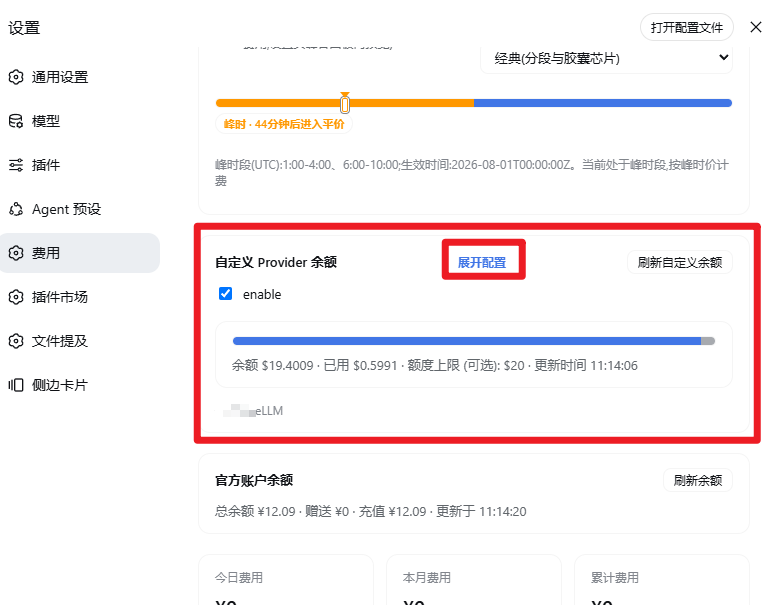
| 自定义 Provider 余额 | 侧边栏 / 设置页(可配) | 可配置 HTTP 查询任意 Provider 余额(LiteLLM 等);中/英名称、币种、extract 规则(点路径 / 数字常量 / add / subtract / divide,divide 适配 NewApi 等 quota 端点,见下方示例);与 Coding Plan 同区可折叠配置 |
| OpenCode Go 额度 | 侧边栏 / 设置页 / 右下角(dock,可配) | 滚动 5 小时 / 本周 / 本月用量百分比与重置时间,三档可分别开关,可同时显示预算已用%;Key 自动发现(DSH 凭据库 OPENCODE_GO_API_KEY / 环境变量 / opencode 登录态)或手动填写 |
| Coding Plan 额度 | 侧边栏 / 设置页(每家可配) | 多厂商 coding plan 订阅额度查询(Anthropic Claude Pro/Max、Z.ai/智谱 GLM、MiniMax Token Plan、Kimi/Moonshot 余额、OpenRouter credits、SiliconFlow 余额、CommandCode 5h/周窗口与月度 Credits 余额),各家独立启用开关、Key、显示位置与刷新间隔(侧边栏卡片与 Go 额度同款,收起窄栏显示百分比),凭据只发往官方端点;无凭据/无订阅为中性提示;SCNet 超算互联网 Token Plan 无 API 额度端点,按官方 Credits 抵扣表由本地账本估算月度用量(无需凭据) |
| 额度横条 | 输入框上方(显示设置可开关) | 一条横排 chips 实时显示预算已用% / Go 主窗口 / 各已启用 Coding Plan 用量窗口(短标签+迷你进度条,≥80% 预警、≥100% 超支,悬停见重置时刻);首次更新弹引导卡由用户自主决定开关;无可用数据自动隐藏 |
| 当日费用 | 侧边栏底部(设置按钮上方) | 「今日 ¥x」,悬停见调用次数与 token 明细 |
| 预算图框 | 侧边栏底部(余额行与设置按钮之间) | 圆角方形图框:预算、已用%、进度条、今日费用与占预算%、已用/额度,≥80% 预警、≥100% 超支 |
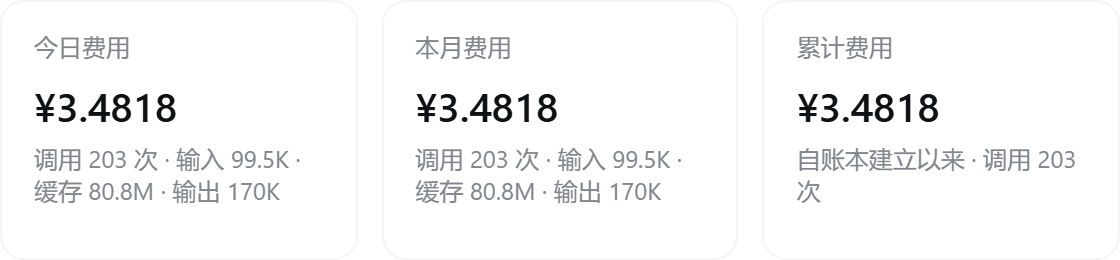
| 汇总卡片 | 设置页 | 今日 / 本月 / 累计费用与调用次数 |
| Token 用量统计 | 设置页(费用设置) | 历史累计 token 总量(输入/缓存/输出/调用)+ 类 Codex 的 26 周每日用量方格热图,横向铺满设置页宽度,悬停见当日明细 |
| 今日会话明细 | 设置页 | 每个会话的调用次数、输入/缓存/输出 token 与费用 |
| 历史记录 | 设置页 | 按天汇总,保留天数可配(默认 180 天) |
| 历史按模型统计回填 | 设置页(按模型统计) | 按模型统计上线前的旧账本自动回放宿主会话日志重建逐模型 token/费用拆分(旧调用按当时基础价),日志已清理的部分归入「早期未分模型」残差行 |
| 导入安装前历史 | 首次启动自动 | 安装/升级后首次启动自动回放宿主全部会话日志,把未装插件时期的对话导入账本(缺失日期整日重建,已有日期只补未知会话,幂等不与实时计费重复;金额按事件时刻历史价回推);设置页保留手动重跑入口 |
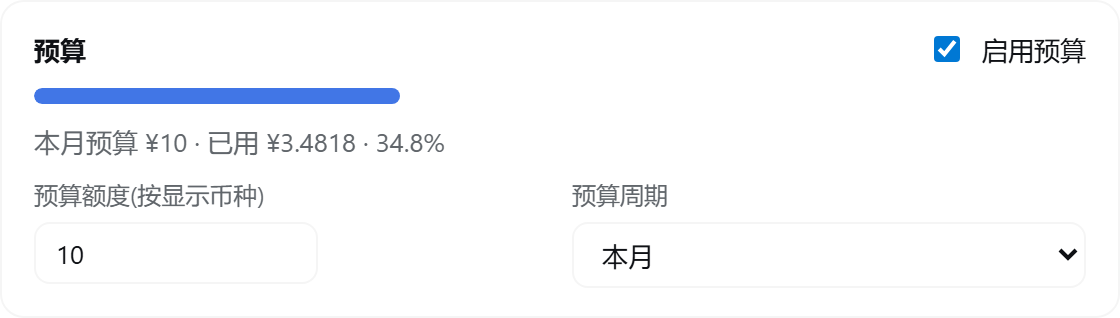
| 预算设置 | 设置页顶部 | 额度、周期(今日/本月/累计/自定义日期区间)、已用% |
| 价格表 | 设置页 | 每模型 谷时/峰时 两档价格(支持 input/output 简写,缓存价自动补齐),增删改自由 |
| 峰谷计价时段显示 | 设置页 / 预算 / 今日费用 | 显示 UTC 峰时段 01:00–04:00、06:00–10:00 与当前档位;展开态显示峰时/平价时段条(当前时段 + 倒计时),收起(rail)态显示竖向峰谷进度条,可单独开关 |
| 峰/谷切换弹窗提醒 | 全局浮层 | 距进入峰/谷时段不足设定提前量(默认 2 分钟,1-30 可配)时全屏色条徽标弹窗(提醒色区分进入峰/谷);弹窗位置可选右下角 / 屏幕中心,提醒类型可选(进入峰 / 进入谷 / 峰和谷),同一切换点只提醒一次;可选同步发送浏览器(系统)通知(页面最小化也能收到,需授权通知权限);设置页峰谷计价面板内配置,并可一键预览弹窗效果(真实组件渲染,文案/位置/通知与实际触发完全一致) |
| 官方价格同步 | 设置页 | 抓取解析官方定价页,一键应用 |
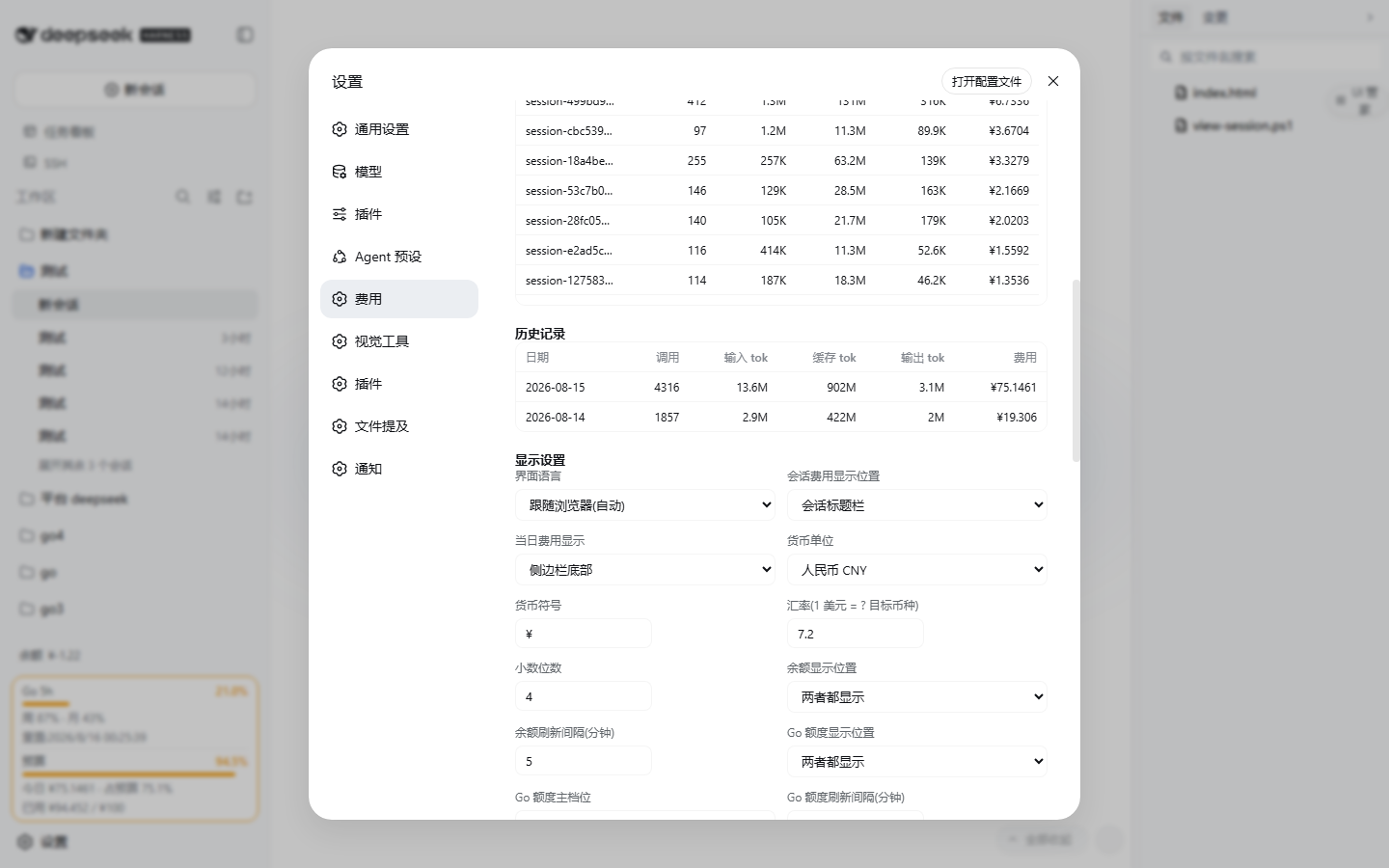
| 界面语言 | 设置页 → 显示设置 | 简体中文 / English / 跟随浏览器(自动);切换即时生效并自动保存 |
| AI 价格同步 | 提示词 | DeepSeek 官方同步;其他 provider 使用已核对的官方价格目录与手动配置 |
| 模型与 Plan 适配说明 | 适配文档 | 各厂商模型计费与 8 家 Coding Plan 的适配矩阵、自动匹配机制与价格来源(English) |
| 峰/谷切换提醒图解 | 提醒文档 | 峰谷切换前弹窗与系统通知的完整图解:效果截图(中/英)、设置项说明与使用建议(English) |
| 多 provider 计费 | 设置页 / 账本 | 支持 OpenAI、Anthropic、Google Gemini、Mistral 等 provider 的 input/output、缓存与 reasoning token 价格,按 provider+model 隔离计费 |
| 模型名自动匹配 | 设置页 / 账本 | 未知模型 id 自动匹配价格表:忽略大小写/空格/横杠/点号与括号附注,归一化等价或请求名包含表内模型名即命中(如 gpt5.6 luna(go));路由 provider(opencode/zen 等)下跨厂商全库查找;可关闭为仅精确;未命中模型可手动指定计费条目 |
| 拓展价格表 | 设置页 → 拓展价格表 | 内置各厂商、按模型家族分类的参考价格目录(点开展开,厂商默认折叠);一键挂载参与计费,挂载的第三方模型默认收入表内可编辑;逐模型「在费用设置直接显示」开关自选哪些模型(含 DeepSeek)在「价格表」区直接显示 |
自定义 Provider 余额配置示例(NewApi 模板)
自定义 Provider 余额的 extract 规则支持四种形式:数字常量、点路径字符串、add/subtract 多路径加减、divide 按 by 除数缩放。divide 适用于 NewApi 等以 quota 整数计量的端点(1 USD = 500000 quota,与 cc-switch 同款换算)。
以 NewApi 的 GET /api/usage/token 为例(响应 { "code": 200, "data": { "total_granted": ..., "total_used": ..., "total_available": ..., "unlimited_quota": false } }):
{
  "enabled": true,
  "display": "both",
  "refreshMinutes": 15,
  "label": "NewApi",
  "labelEn": "NewApi",
  "unit": "USD",
  "request": {
    "url": "https://你的NewApi域名/api/usage/token",
    "method": "GET",
    "headers": { "Authorization": "Bearer {{NEWAPI_API_KEY}}" }
  },
  "extract": {
    "remaining": { "op": "divide", "path": "data.total_available", "by": 500000 },
    "maxBudget": { "op": "divide", "path": "data.total_granted", "by": 500000 },
    "spend": { "op": "divide", "path": "data.total_used", "by": 500000 },
    "unit": "USD"
  }
}
{{NEWAPI_API_KEY}}从 DSH 凭据库或环境变量解析(仅请求头支持占位符,URL 需写死完整地址);- 无限额度 token(
unlimited_quota: true)没有total_available,无法提取remaining,查询会报「remaining is missing or not numeric」——请改用有限额度 token,或在中间层端点换算; - 配置入口:设置 → 费用(额度标签)→「自定义 Provider 余额」展开配置;或直接改
storages/cost-meter/ledger.json的config.customBalance。
双语界面
插件界面(会话徽章、侧边栏余额与预算图框、设置页全部文案)支持简体中文与English:
- 语言可选 简体中文 / English / 跟随浏览器(自动);
- 默认「跟随浏览器」:自动探测浏览器语言(
zh*→ 中文,其余 → 英文),并把探测结果写回配置,服务端消息(余额查询、价格同步等)与界面语言保持一致; - 在 设置 → 费用 → 显示设置 → 界面语言 中切换,切换后整个插件界面即时生效并自动保存;设置页左侧的分节标签也随之切换(费用 / Cost);
- 服务端返回的提示(余额刷新、官方价格同步、配置校验错误等)同样按当前语言输出。
图文演示
截图均取自真实 DeepSeek Harness 实例,默认以中文界面展示;插件界面本身中英双语,可在设置中切换为 English。
主页面
侧边栏底部(自上而下:官方余额 → 额度 / 预算图框 → 设置按钮):
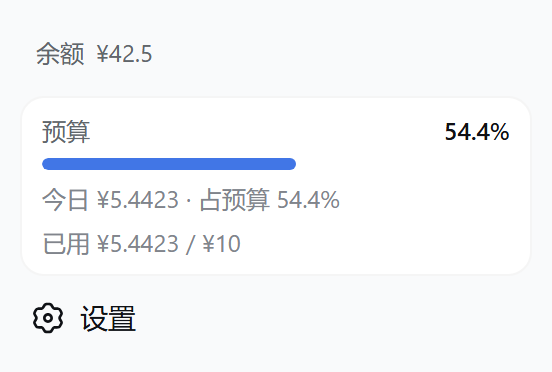
- 余额行显示官方开放平台总余额,悬停可见赠送/充值拆分;开启「余额进度条」后以三段图框展示(蓝=余额,橙=当日,灰=已用);
- 自定义 Provider 余额(如 LiteLLM)可配置 HTTP 查询,侧边栏与设置页同图框样式;
- 未启用预算时,该位置显示「今日 ¥x」徽章。
余额进度条与自定义 Provider 配置:
| 侧边栏进度条 + 显示设置 | 自定义 Provider 余额面板 |
|---|---|
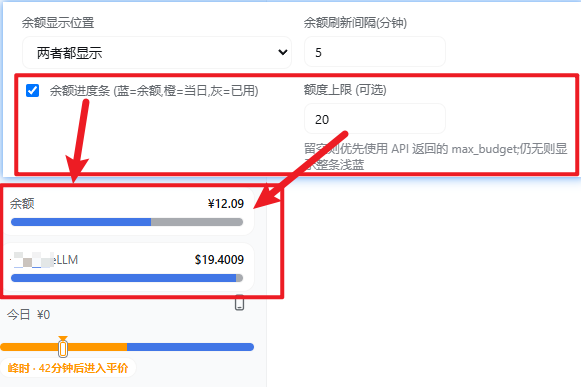 |  |
- 显示设置 →「余额进度条」全局开关;可选「额度上限」覆盖 API 的
max_budget; - 设置 → 费用 →「自定义 Provider 余额」:展开后编辑 URL / Headers(JSON) / extract(JSON)、中/英名称与币种。
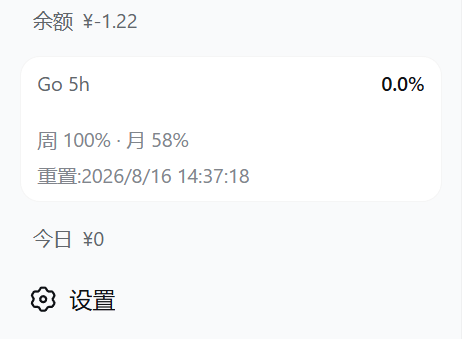
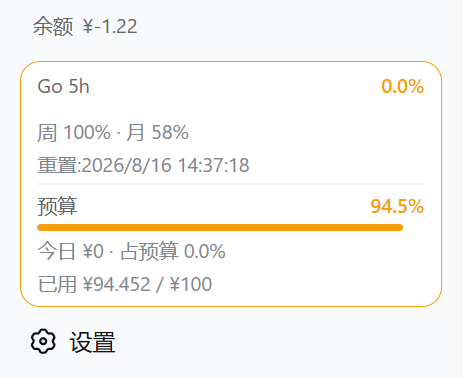
额度 / 预算图框三态(OpenCode Go 额度与预算各自独立开关,同款圆角图框;两者同时开启时自动合并为一张卡片,Go 在上、预算在下,细分隔线、各自保留预警色;「图框详细信息」开关可收起次要行,只保留 标签 + 已用% + 进度条):
| 仅 OpenCode Go 额度 | 仅预算 | 两者合并 |
|---|---|---|
 | 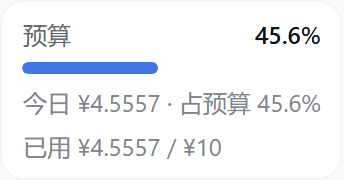 |  |
- 预算图框显示「预算 · 已用% · 进度条 · 今日费用与占预算% · 已用/额度」,≥80% 预警、≥100% 超支;窄栏(rail)模式收窄为百分比方块;
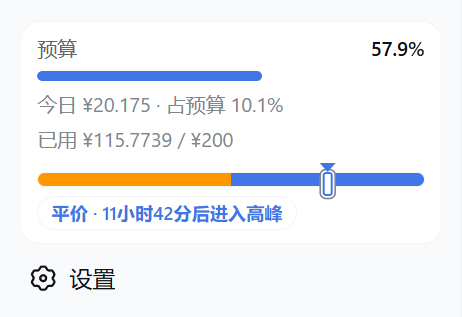
- 峰谷计价时段显示 UTC 峰时段 01:00–04:00、06:00–10:00 与当前档位;预算框与今日费用区域显示单行紧凑时段条——细轨道左橙右蓝、标记线指向当前时段,右侧文字为当前时段与距下次切换的倒计时(30 秒刷新),不显示价格;可在设置中单独关闭,并在「峰谷时段条样式」中切换简洁/经典两种样式;rail 窄栏显示同构的竖向时段条,下方横排短词「峰时 / 平价」,倒计时与完整文案悬停可见;
峰时/平价时段条与收起态竖向进度条:
| 设置页峰谷面板(提示开关/样式切换/预览) | 设置页右下角(dock)显示与图框详细信息 |
|---|---|
 |  |
时段条与收起态竖向条真实 DSH 侧边栏实拍(现行样式),按 UI 类型分组(图示为峰时):
不收起(展开态)——预算框 / 今日费用区域显示单行时段条:
| 简洁 | 经典 |
|---|---|
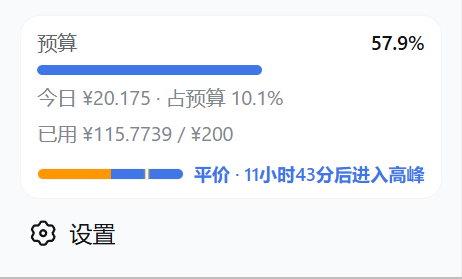 |  |
- 简洁:细轨道左橙右蓝、标记线指向当前时段,右侧短文案「峰时 · N小时后进入平价」;
- 经典:同款轨道与标记线,右侧完整文案「峰时 · 距平价 HH:MM:SS」倒计时(30 秒刷新),不显示价格。
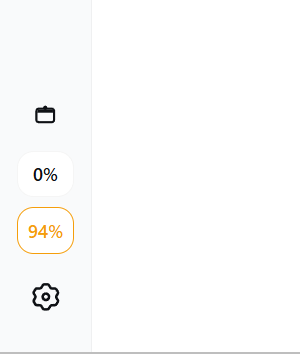
收起(rail 窄栏)——侧边栏底部堆叠竖向时段条,与百分比方块居中对齐:
| 简洁 | 经典 |
|---|---|
 |  |
-
简洁:竖向条下方仅横排短词「峰时 / 平价」;
-
经典:竖向条下方竖排完整文案,含距下次切换的倒计时;两种样式下完整文案均悬停可见。
-
提示遵循
peakNotice/peakEnabled/peakEffectiveAt/peakWindows门控,按 UTC 峰时窗口显示; -
设置 → 费用 → 峰谷计价 下可单独开关「峰时高价时段显著提示」,关闭后展开态时段条与收起态竖向条同时隐藏;
-
上方第一张为设置页峰谷面板截图(提示开关、样式切换与实时预览);时段条与收起态竖向条的实拍效果见上述分组配图;右下角(dock)各项开关与图框详细信息开关见第二张截图。
-
Go 图框按主档位(默认滚动 5 小时,可在显示设置切换周/月)显示已用% 与进度条,下方一行展示其余两档与重置时间:
右下角(dock)额度 / 预算 chips(显示设置中开启,四项独立开关:5h / 周 / 月额度 + 预算已用%):
| 右下角实际显示 | 显示设置(开关位置) |
|---|---|
 | |
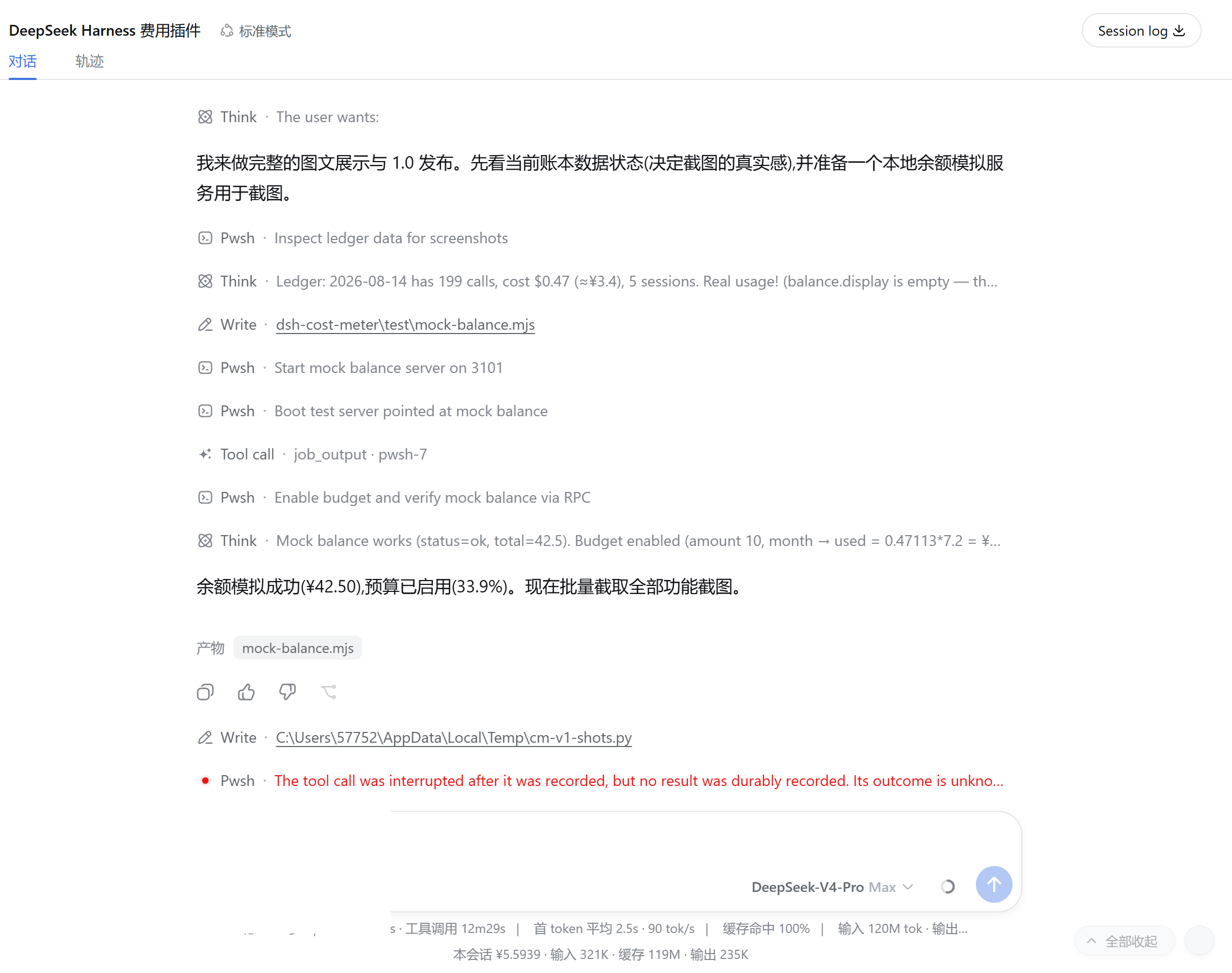
本会话费用(两个位置,可在设置中切换):
| 输入区下方 | 会话标题栏 |
|---|---|
 |  |
上图:本会话 ¥5.5939 · 输入 321K · 缓存 119M · 输出 235K;右图:标题栏徽章「费用 ¥6.1606」(真实会话截图)
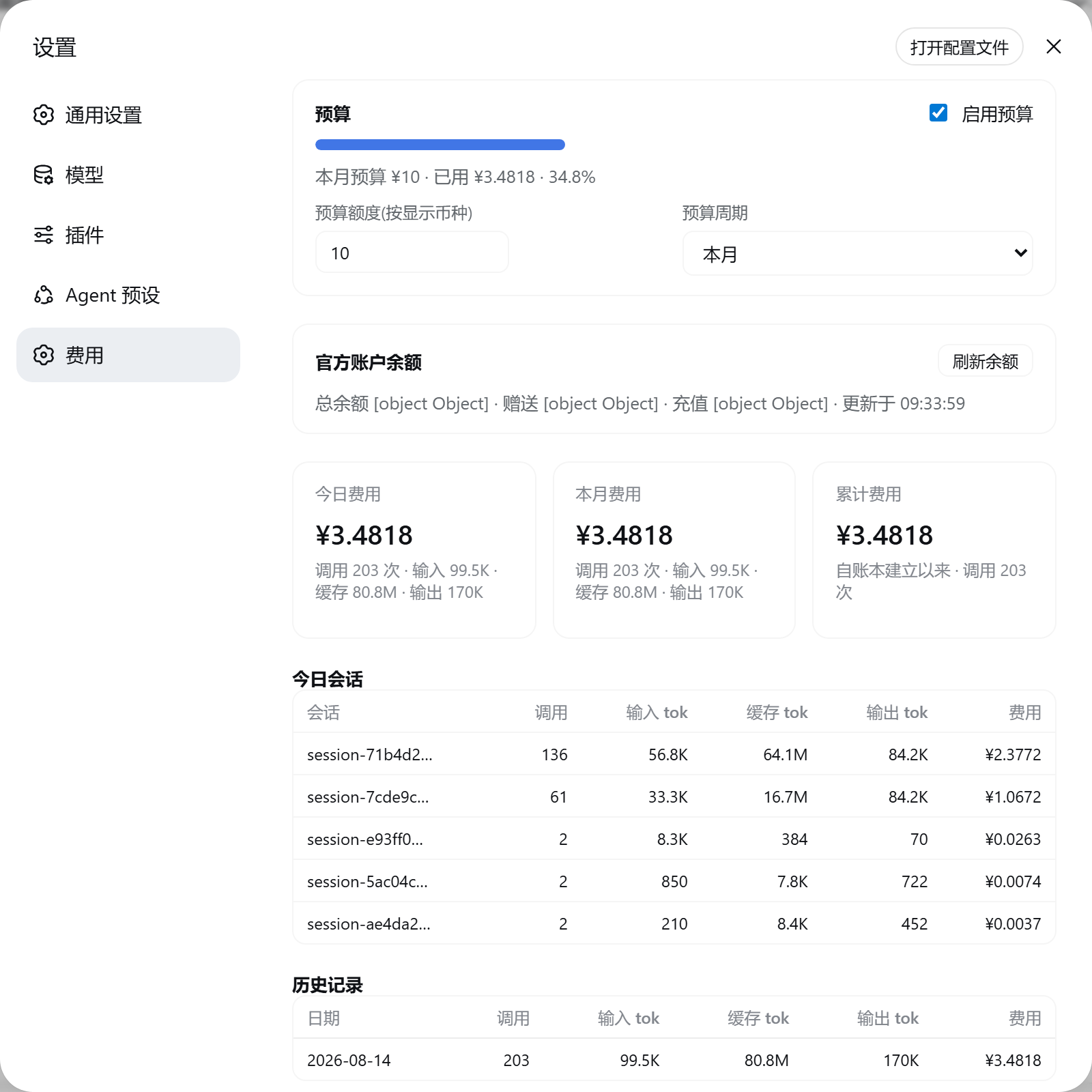
设置 → 费用
概览(OpenCode Go 额度 → 预算 → 余额 → 汇总卡片 → 今日会话 → 历史记录 → 显示设置 → 价格表 → 数据与同步):
OpenCode Go 额度面板(设置页最顶部:三档进度条,主档位高亮,手动刷新;未订阅时为中性提示,可一键关闭):
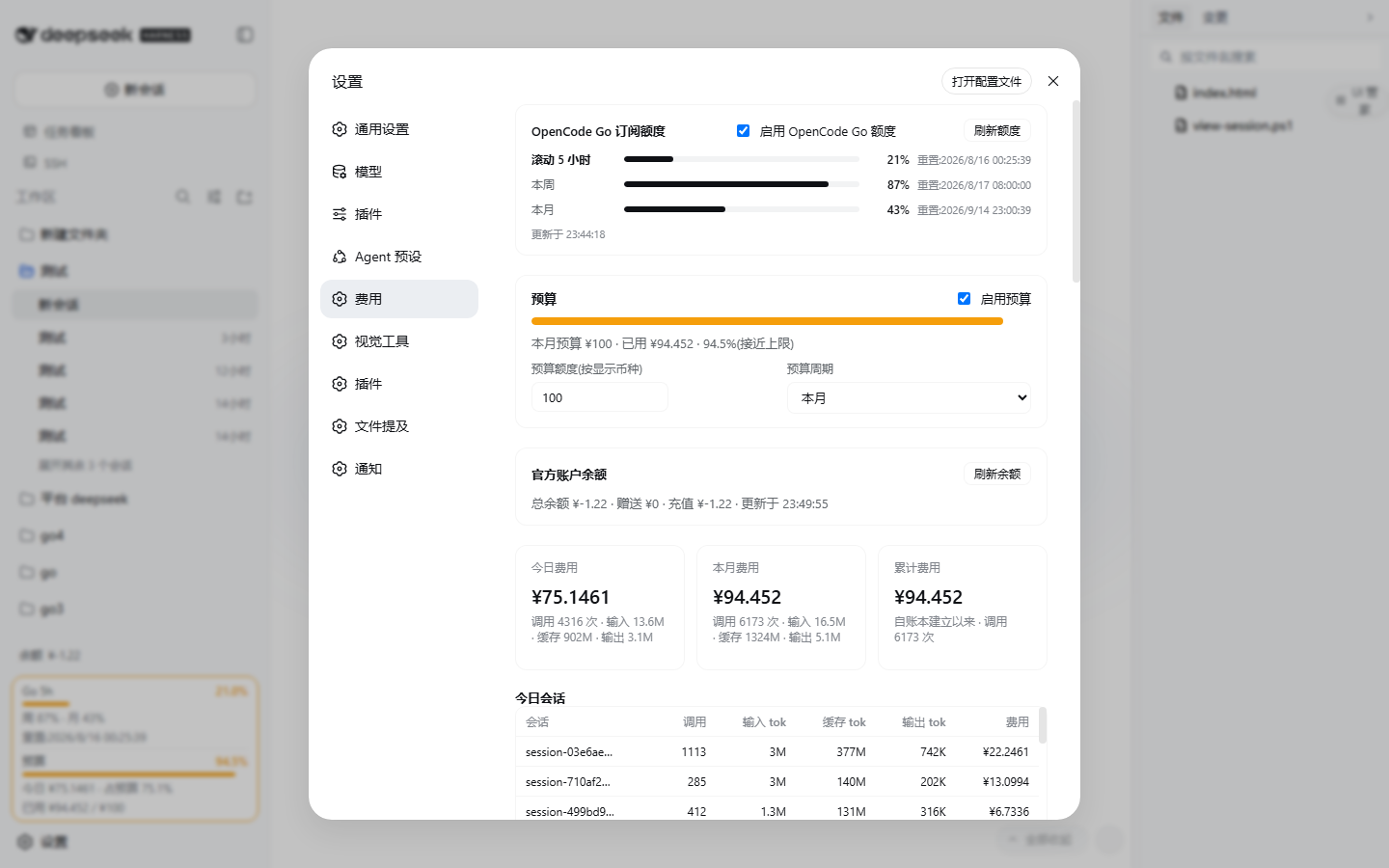
预算面板(含自定义日期区间):
余额面板(总余额/赠送/充值 + 手动刷新):

显示设置(Go 主档位与 Key、右下角 chips、图框详细信息等):
汇总卡片:
Token 用量统计(历史累计总量 + 类 Codex 的 26 周方格热图,横向铺满设置页宽度;无用量日为半透明玻璃格):
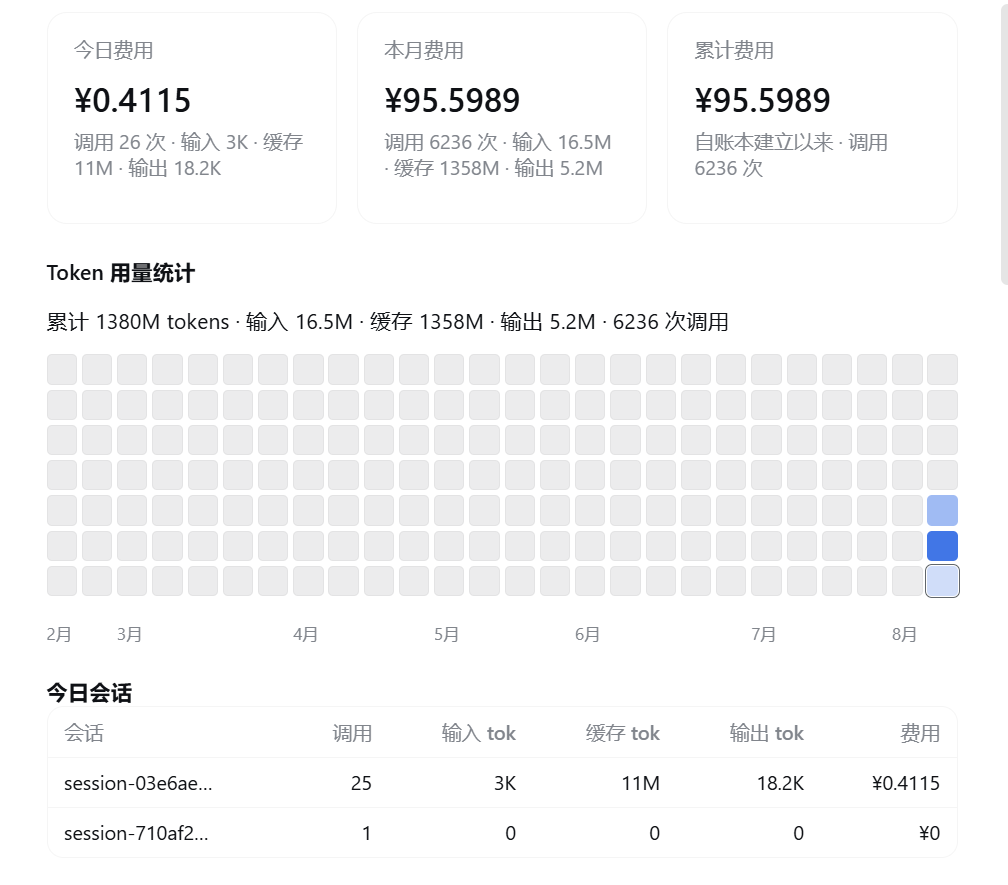
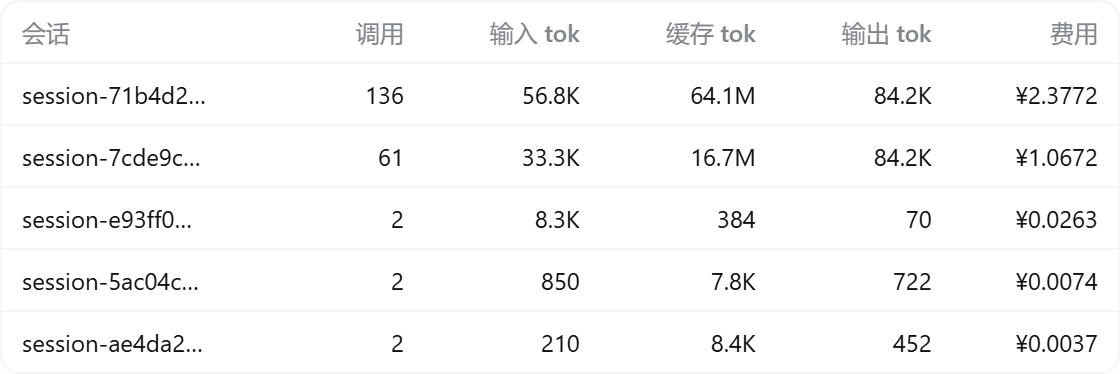
今日会话 / 历史记录(输入、缓存、输出 token 分列):

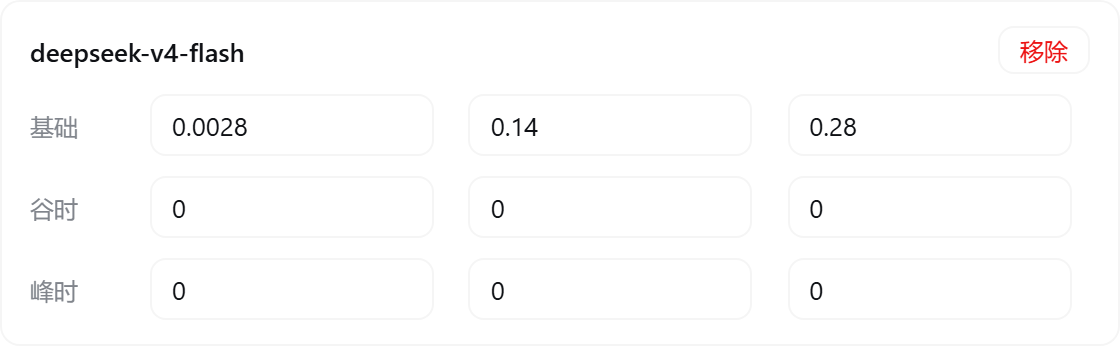
价格表(谷时/峰时两档,支持 input/output 简写,美元 / 1M tokens):
数据与同步(配置即时自动保存 + 官方价格同步 + 清除历史):

安装
需求:Node.js ≥ 20 + DeepSeek Harness(带
dsh plugin命令的版本,npm install -g @deepseek-ai/dsh)。
一键安装(推荐)
npm 包名安装(已发布到 npm registry,始终跟随最新版本;无需 git):
dsh plugin --profile web add dsh-cost-meter
PowerShell 一键脚本(复制整行粘贴回车;自动补齐 pnpm、自动探测 git,无需克隆仓库;安装链固定到发布 tag v1.5.31,建议先下载审阅再运行):
irm https://raw.githubusercontent.com/Han-1413141/dsh-cost-meter/v1.5.31/install.ps1 | iex
或直接命令行(机器上需已有 pnpm 与 git;同样固定到 tag):
dsh plugin --profile web add github:Han-1413141/dsh-cost-meter#v1.5.31
没有 git 时可用 GitHub tag 打包直链:
dsh plugin --profile web add https://github.com/Han-1413141/dsh-cost-meter/archive/refs/tags/v1.5.31.tar.gz
安装后重启 dsh web(插件行、Typert 清单与客户端 bundle 均在启动时扫描):
dsh web
更新 / 卸载
# 更新:发布新版后用新版 install.ps1 重跑(脚本内固定版本随之更新)
dsh plugin --profile web remove dsh-cost-meter  # 卸载
开发者本地调试
git clone https://github.com/Han-1413141/dsh-cost-meter.git
cd <克隆目录的父目录>
dsh plugin --profile web add link:./dsh-cost-meter  # 符号链接,改 lib/client.js 后刷新页面即生效
计费规则
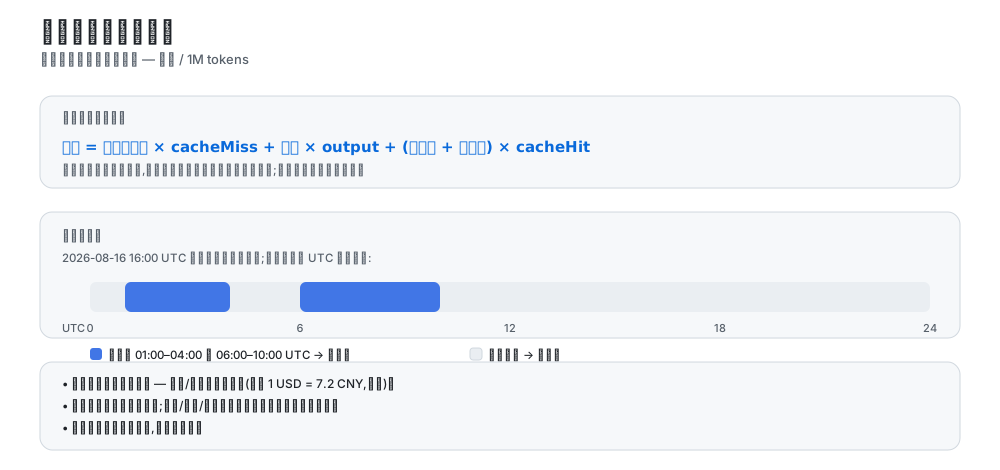
- 价格单位与官方文档一致:美元 / 1M tokens;
- 成本 = 未命中输入 × cache-miss + 输出 × output + (缓存读 + 缓存写) × cache-hit(缓存写沿用官方历史规则按命中价计费);
- 纯峰谷两档计价(2026-08 起官方方案):峰时段(01:00–04:00、06:00–10:00 UTC)按峰时价,其余按谷时价(谷时价 = 峰时价的一半);基础档与谷时档同价,未启用峰谷时按谷时价计;设置页实时显示当前档位(峰时段/谷时段);预算与今日费用区域显示峰时/平价时段条(当前/下一时段与倒计时),收起态显示竖向峰谷进度条;
- 历史计费正确性:2026-08-16 16:00 UTC(峰谷时代分界)之前的调用按当时的基础价计费,之后的调用按峰谷两档;
- 账本金额恒以美元存储,币种/汇率仅影响显示(默认 1 USD = 7.2 CNY,可改);
- 会话徽章与当日/月度/累计、预算一样,按每次调用的实际时刻精确计费(宿主导出的逐次成本);
- 计费来源为每次模型调用的 usage 块(含子代理、压缩、标题等辅助调用),与账单口径一致;
- 预算与超支提示仅提醒,不阻止调用。
数据存储
- 账本:
$DSH_HOME/storages/cost-meter/ledger.json(原子写入 + 2 秒防抖;按historyDays保留,每日最多 200 个会话明细); - 所有设置修改即时自动保存(600ms 防抖),无需手动保存;
- 删除账本文件即可清零,或使用设置页「清除全部历史」。
架构
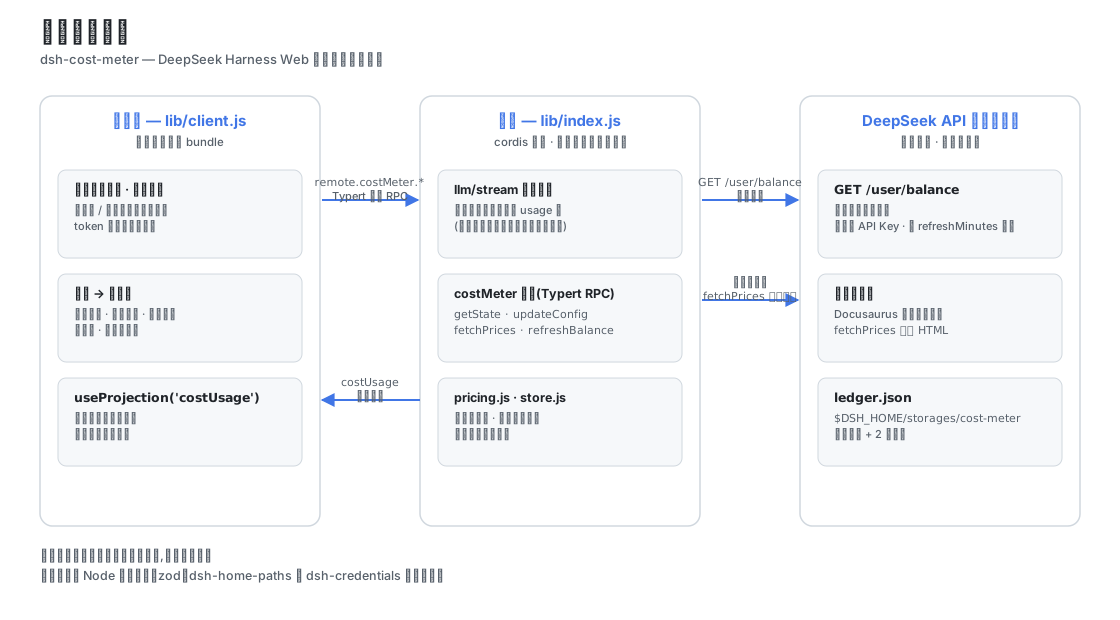
dsh-cost-meter
├── cordis.patch.yml        # bundle 补丁:向 web profile 插入 cost-meter 行
├── install.ps1             # 一键安装/更新脚本(irm … | iex)
├── .github/workflows/      # CI:install-smoke 一键安装冒烟验证
├── package.json            # dsh.bundle 补丁声明 + dsh.client 浏览器声明
└── lib/
    ├── index.js            # 宿主插件:llm/stream 计费包裹、costUsage 会话投影、
    │                       #   costMeter 服务(手写 typertRemote 绑定)、余额查询
    ├── backfill.js         # 历史账本按模型回填:回放会话日志重建旧账本缺失的
    │                       #   byProviderModel(拼接 zstd frame 扫描 + 逐帧解压)
    ├── pricing.js          # 官方价格表、官方页面 HTML 解析、峰谷计费数学
    ├── store.js            # 账本持久化与配置管理($DSH_HOME/storages/cost-meter)
    ├── typert.host.js      # ./typert 导出:Typert 清单(typert-loader 自动注册)
    └── client.js           # ./client 导出:浏览器单文件 bundle(徽章/图框/设置页)
数据通道:
- 本会话费用:宿主注册
costUsage会话投影(纯 token 桶 + 按模型拆分),浏览器经useProjection('costUsage')读取并按当前价格表计价; - 全局账本 / 预算 / 余额 / 配置:
costMeter/getState | updateConfig | fetchPrices | refreshBalance | resetHistory,经 Typert 网关 RPC(remote.costMeter.*); - 余额:调用官方
GET {baseURL}/user/balance,复用模型请求的同一把 API Key(凭证服务/环境变量),进程内缓存按refreshMinutes过期。
插件不导入 cordis/dsh 的 Service/Context 运行时类(仅 Node 内建模块、zod、dsh-home-paths、dsh-credentials 的纯函数),与宿主共享同一运行时实例,无重复依赖风险。
官方价格同步原理
fetchPrices 抓取官方定价页(Docusaurus 服务端预渲染),解析:
- 基础价格表(转置布局:首行 MODEL + 模型 id,价格行标签后紧跟价格);
- 峰谷价格表(每模型两行:OFF-PEAK / PEAK);
- 生效时间(take effect at …)与峰时段窗口(Peak hours are …)。
解析结果写入价格表并持久化;页面结构变化时同步报错并保留原价格,可手动编辑兜底。
AI 价格同步
docs/AI-PRICE-SYNC-PROMPT.md(中文)与 docs/AI-PRICE-SYNC-PROMPT.en.md(English) 提供可直接复制给任意 AI 的提示词: AI 自主读取官方定价 → 输出多模型、分时(基础/谷时/峰时 + 生效时间)价格 JSON → 人工核对后应用(设置页 / RPC / 文件三选一)。适合官方价格变动时自主同步。
开发与验证
corepack pnpm install                                   # 依赖
node --check lib/index.js && node --check lib/pricing.js \
  && node --check lib/store.js && node --check lib/typert.host.js \
  && node --check lib/client.js                         # 语法检查
node test/verify.mjs                                    # 纯模块验证(解析/计费/账本/配置)
node test/mock-balance.mjs                              # (可选)本地余额接口模拟:3101
dsh --profile web --dump-config                         # 组合树校验
dsh --profile web --port 3099                           # 真机启动(观察启动日志与 UI)
已知限制
- 历史按模型回填依赖宿主会话日志仍在盘:日志已被清理的早期调用无法逐模型重建,只能以「未分模型」残差行计入当日合计;
- 官方页面解析依赖当前页面结构;改版后「从官方文档同步价格」会报错,可手动编辑价格表兜底;
- 会话徽章按当前价格档位估算,精确费用以账本为准;
- 价格同步会覆盖官方页面列出的同名模型价格,自定义模型条目不受影响;
- 余额查询需要可访问 api.deepseek.com 的网络与有效 API Key;API Key 只会发往官方域名(baseURL 指向非官方域名时余额查询拒绝请求,模型请求不受影响);
- OpenCode Go 额度接口为 opencode.ai 官方端点(社区文档);接口结构变化时设置页会显示错误,可在显示设置中关闭该显示;
- 安装/更新插件后需重启
dsh web生效。
更新历史
各版本更新总览与社区 issue 处理记录见 docs/UPDATE-HISTORY.md;逐条开发记录见 CHANGELOG.md。
License
MIT © 2026 dsh-cost-meter contributors
Read the usage guide →
Install steps, key points, FAQ and compatibility for this plugin — auto-derived from indexed fields.
Listing badge

[](https://deepseek-plugin.org/plugins/Han-1413141/dsh-cost-meter)Paste this markdown into your GitHub README to link back to this listing. The badge only states the listing — not a security endorsement.