Add a Codex-style model and inference intensity slider control below

- Language
- TypeScript
- License
- MIT
- Branch
- main
Install
$ dsh plugin --profile web add dsh-reasoning-effortRun the command above in your terminal to install this plugin via the dsh CLI. You can switch Profile in the top-right corner. New to dsh? Read the beginner tutorial
Install via your agent
Install the DeepSeek Harness plugin HanaAyane/dsh-reasoning-effort for me: review the repository at https://github.com/HanaAyane/dsh-reasoning-effort first, then run the install command and verify the plugin loads successfully.
Paste this instruction to the DSH Web GUI assistant — it will install and verify for you.
One-Line Description
Adds a Codex-style "Model + Current Reasoning Effort" button below the DSH Web input box. When opened, the top shows a reasoning effort slider with a radiation effect (gears automatically adapt to the current model), while the bottom still shows the native DSH model list. Enabled by default after installation, and the gear status shares the same session with the /model command.
Core Features
- Injects a combined trigger button into the "model seat" slot below the input box (displays current model name + current gear name); clicking to expand the popover shows a reasoning effort slider at the top and the native DSH model list at the bottom
- Slider gears are read entirely from the
reasoning.effortspublicly exposed by the current model in the DSH model directory; when a model has fewer than two gears, the slider is hidden entirely with a message "Current model does not provide reasoning effort gears" — the plugin never invents new gears - When dragging the slider, the button moves continuously following the pointer position and snaps to the nearest gear only on release; on failure it automatically rolls back to the last confirmed gear and displays an error in the status bar
- Gear submission goes through the DSH session interface, reading/writing to the same session directory as the
/modelcommand without conflicts; supports keyboard ←/→/Home/End for switching - The plugin includes an "Effort Declaration Guide" panel: for user-declared models with missing or inconsistent directory gears compared to the knowledge base, it provides a complete copyable YAML entry (including
- id:line, preserving name/contextWindow/maxTokens); after replacing settings.yaml, DSH loads it automatically - Settings → General Settings adds two toggles: "Reasoning Effort Slider" (globally enable/disable) and "Chibi Thumb Slider" (replaces default white thumb with eight-frame running character); both are stored only in browser localStorage
Technical Implementation
- Language: TypeScript (Host half
src/index.ts, Client halfsrc/client/index.tsx), build uses esbuild to bundle client modules,tscoutputs types and Node entry - Key Dependencies:
@deepseek-ai/cordis(plugin runtime),@deepseek-ai/dsh-client-ui-model-selection(session model directory),@deepseek-ai/dsh-client-runtime+dsh-client-ui-slots(frontend slots),@deepseek-ai/schemastery(Host-side settings schema) - Architecture Pattern: Official Bundle Plugin —
cordis.patch.ymlsynthesizes areasoning-effortlayer in the web Profile; the Host half injectssettings,llmservices viaapply(ctx)and registers namespacedsh-reasoning-effort(read-only and diagnostic, never writes), while usingctx.inject(['connection'])to mount a loopback RPC channel/dsh-reasoning-effortonly in web environment; the Client half registers toconversation.input.modelandsettings.general.itemslots viactx.slots.inject - Entry Files:
src/index.ts(Host half, loopback RPC endpointsdiagnose/store) +src/client/index.tsx(Client half, components + preference storage + slider canvas rendering)
Use Cases
Users who want to quickly switch reasoning effort gears like "Off / Low / Medium / High / Max" via slider/keyboard on DSH Web, without typing /model each time; and scenarios where using a custom provider model with missing directory gears need the plugin to provide a directly pasteable reasoningEfforts YAML fragment to complete the declaration. Gear switching status is fully interoperable with native /model, and the native model selector remains usable.
Prerequisites and Compatibility
| Dependency | Minimum Version | Description |
|---|---|---|
| DeepSeek Harness | 0.1.0-rc.6 | peerDependencies lists seven host packages including @deepseek-ai/dsh-client-*, @deepseek-ai/dsh-api-remotes all require ^0.1.0-rc.6; DSH is still in developer preview, upstream UI/service changes may require plugin updates |
| Node.js | >=22.19 | package.json#engines.node explicitly declares >=22.19, mainly used for building (tsc + esbuild) |
| React | ^18.2.0 | peerDependencies.react: "^18.2.0", client components based on React 18 Hooks |
| Profile | Web only | package.json#dsh.client.platform: "web"; the Host half's RPC channel is mounted via ctx.inject(['connection')] only in Web Profile, terminal Profile won't trigger |
| Native Modules | None | No runtime dependencies on node-pty, node:sqlite or other native bindings; only uses browser Canvas / localStorage / fetch |
Installation
dsh plugin --profile web add github:HanaAyane/dsh-reasoning-effort
Configuration Options
| Config | Type | Description | Default |
|---|---|---|---|
dsh-reasoning-effort.entries[] (Host settings.yaml) | Array | Extends gear knowledge base, each entry contains id, provider (* wildcard), model (* wildcard), note, efforts (gear name → endpoint actual value, null means not selectable), optional compat (required only for OpenAI-compatible endpoints, containing thinkingFormat and supportsReasoningEffort). Plugin only generates fragments and prompts, won't automatically write | entries: [] |
Browser localStorage dsh-reasoning-effort.enabled | Boolean | Enable/disable the entire reasoning effort slider enhancement; after disabling, popover immediately returns to native DSH model selector | true |
Browser localStorage dsh-reasoning-effort.chibi-thumb | Boolean | Replaces slider thumb with eight-frame running character animation; user preference takes priority over built-in default | true (since 0.6.1) |
Legacy key @dsh-external/dsh-reasoning-effort.enabled | Boolean | Preference under historic package name, automatically migrated to new key then cleared | — |
FAQ
Q: After installation, I don't see the "Model + Reasoning Effort" button below the input box. What should I do?
A: The plugin loads when the Web Host starts; you must quit and restart the DSH Web Host then refresh the page. If the button still doesn't appear, verify that "Settings → General Settings → Reasoning Effort Slider" is enabled, and the current model exposes at least two reasoning effort gears in the DSH model directory (fewer than two will show "Current model does not provide reasoning effort gears").
Q: The current model doesn't declare reasoning effort gears (e.g., GLM-5.3). What should I do?
A: The model menu will show "View Effort Declaration Guide"; clicking it provides a directly copyable reasoningEfforts full YAML (including - id: line, existing name/contextWindow/maxTokens will be preserved). Copy it, replace the corresponding entry in ~/.dsh/settings.yaml entirely and save — DSH loads automatically without restart. If the knowledge base also has no entry, it provides a general template based on endpoint documentation.
Q: How do I confirm the plugin has loaded?
A: Run dsh --profile web --dump-config; the parsed config should show a line name: dsh-reasoning-effort, corresponding to the bundle layer with id: reasoning-effort. You must manually restart the DSH Web Host after installation — plugins are not hot-loaded at runtime.
Q: How do I uninstall?
A: Run dsh plugin --profile web remove dsh-reasoning-effort, then restart the DSH Web Host again. The native model selector restores automatically; DSH's built-in model directory won't be modified.
Q: Where are the slider toggle and "Chibi Thumb Slider" stored? Will they失效 if I switch browsers?
A: Both toggles are stored only in the current browser's localStorage (keys are dsh-reasoning-effort.enabled and dsh-reasoning-effort.chibi-thumb), not in DSH config files. Switching browsers or clearing browser site data will revert to default state. Legacy key @dsh-external/dsh-reasoning-effort.enabled is automatically migrated.
Q: Alibaba Cloud Bailian endpoint declared gears but still reports 400 error. Why?
A: Alibaba Cloud Bailian's OpenAI-compatible endpoints (maas.aliyuncs.com / dashscope.aliyuncs.com) reject the developer message role; DSH's pi-ai detection treats it as standard OpenAI, and settings.yaml currently cannot override this behavior. The plugin will directly show a warning in the gear declaration guide panel and recommend using the built-in zai route instead.
Learning Curve
Beginner — just install it and you'll see two toggles in "Settings → General Settings" that you can use directly; when supplementing gears for custom providers, just paste according to the YAML template in the README, no coding required.
Known Issues and Limitations
- DSH is still in developer preview (
0.1.0-rc.6), upstream UI or service changes may require plugin updates - Only supports Web Profile; terminal/Cordis-only Profile won't load the Client half, and the Host half's RPC channel is also skipped
- Slider gear count is limited to what the model publicly exposes in the DSH model directory's
reasoning.efforts: hidden entirely when fewer than two gears; the plugin never invents new gears, models with only one gear in the directory (including intentionally sparse data from official) remain unchanged - Slider radiation effect depends on
requestAnimationFrame; under system "Reduce Motion" settings it automatically stops at a stable frame; at high DPR (>2), canvas is cropped to 2x to control rendering cost - Host half ignores structurally invalid entries in
dsh-reasoning-effort.entries(e.g., wrongeffortsfield type) during loading; it won't fail diagnostics due to single bad data, but users must self-verify against schema
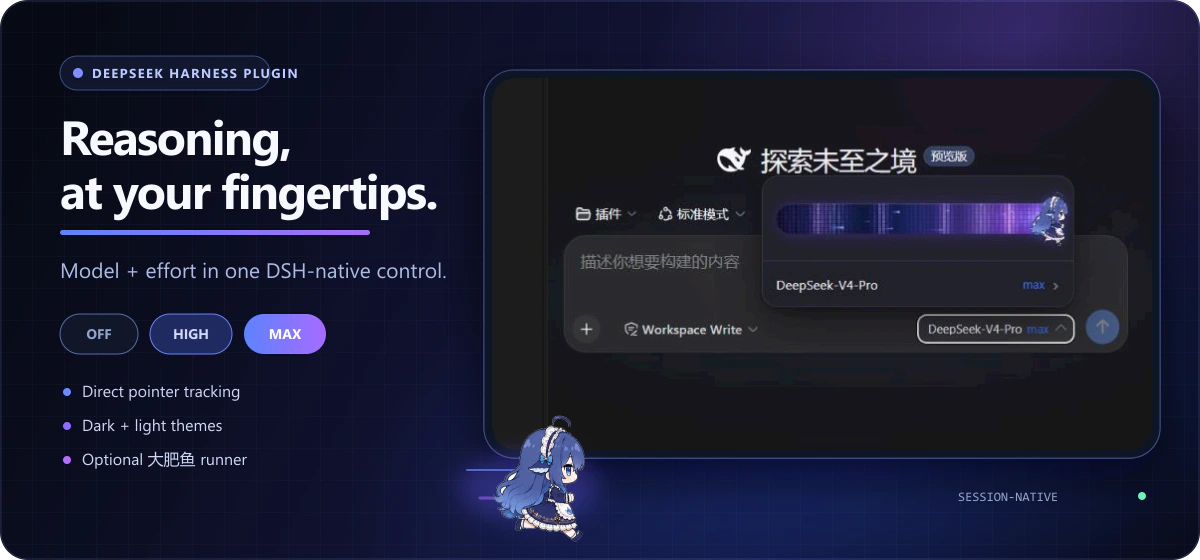



第一次打开插件时,你会在 DSH 输入框下方看到新的模型入口。点击后,弹层上方是推理强度滑块,档位随当前模型自动适配,下方仍然是熟悉的模型选择入口。插件默认启用,并与 DSH 的 /model 命令保持同步。
第一次使用:三步完成
1. 安装插件
让 Agent 安装(推荐)
如果当前 Agent 可以执行终端命令,把下面这段话完整发送给它:
请为 DeepSeek Harness 的 web Profile 安装 dsh-reasoning-effort 插件。

只执行下面两条命令,不要修改其他 Profile:
dsh plugin --profile web add github:HanaAyane/dsh-reasoning-effort#main
dsh --profile web --dump-config

确认输出中出现 dsh-reasoning-effort 后告诉我安装结果。
不要替我关闭或重启正在运行的 DSH;安装完成后提醒我手动重启 DSH Web Host。
Agent 应当返回安装结果,并明确告诉你配置中是否已经出现 dsh-reasoning-effort。
手动安装
也可以自己打开 PowerShell 执行:
dsh plugin --profile web add github:HanaAyane/dsh-reasoning-effort#main
dsh --profile web --dump-config
main 当前版本为 0.6.2,与最新发行 Tag v0.6.2 一致。#main 始终安装最新代码(之后可能包含未发布改动);如需固定在当前版本,可把命令中的 #main 改为 #v0.6.2。
2. 重启 DSH Web Host
插件在 Web Host 启动时载入。安装命令完成后,请结束当前 Host 并重新启动,再刷新 DSH 页面。
3. 打开模型入口
- 新建或打开一个会话。
- 点击输入框下方显示“模型 + 当前强度”的按钮。
- 拖动滑块或点击轨道,释放后会吸附到最近的档位。
- 点击滑块下方的模型行,可以继续进入 DSH 原生模型列表。
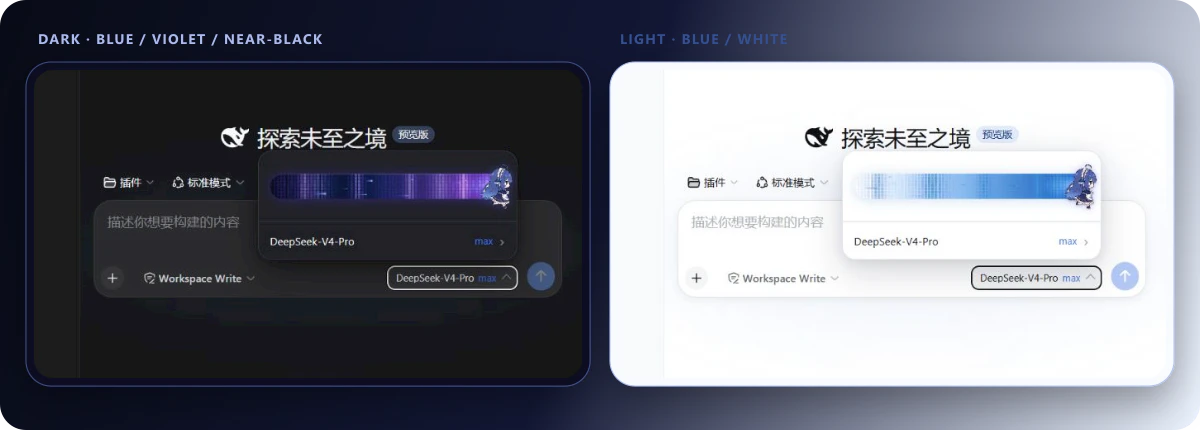
完成后,你看到的效果应当与下面一致:
档位从哪里来
滑块显示的档位完全来自当前模型在 DSH 模型目录中公开的 reasoning.efforts——档数、名称与顺序都由模型决定,插件自动适配。以常见的三档组合为例:
| 档位 | 适合场景 | 体验倾向 |
|---|---|---|
off | 简单问答、改写、快速操作 | 更快 |
high | 日常编程、分析和多步骤任务 | 速度与推理平衡 |
max | 复杂调试、规划和高难度任务 | 更充分的推理 |
DeepSeek 系模型通常公开 off / high / max;GLM coding 系模型(如 GLM-5.2)公开 off / low / medium / high / xhigh 五档。滑块只是提交当前模型公开的 effort 值,不会绕过模型或部署本身的能力限制。模型公开的档位少于两档、或没有声明任何档位时,菜单会显示"当前模型未提供推理强度档位"。
档位指引(自定义 provider)
DSH 内置路由的档位来自 pi-ai 目录,插件完全只读、绝不修改。只有你在 settings.yaml 的 llm-pi-ai 里自己声明的模型,插件才会给指引:
- 打开模型菜单。若当前模型是你自定义声明、且目录读不到档位(或声明与知识库不符),菜单里会出现 查看档位声明指引;
- 面板展示建议档位(知识库命中时,如 GLM-5.2 的 minimal/low/medium/high)、一段可直接复制的完整条目 YAML(含
- id:行,原有 name 等字段自动保留)以及 settings.yaml 的路径; - 复制后用其整体替换 settings.yaml 里对应的
- id:条目(不要复制出第二个llm-pi-ai:根)并保存。DSH 会自动加载;若未生效,重启 Web Host 并刷新页面。
知识库未收录的模型会得到带注释的通用模板,按端点文档填值即可。遇到"端点因 developer 角色拒绝请求"之类的情况,面板会直接给出警告与替代建议(例如阿里云百炼端点建议改用内置 zai 路由)。
内置知识库目前收录 GLM-5.2(minimal/low/medium/high)与 Kimi K3(low/high/max)。要补充其他模型,在 settings.yaml 里追加到插件自己的命名空间即可,条目优先于内置:
dsh-reasoning-effort:
  entries:
    - id: my-model
      provider: "*"          # provider 路由名,* 通配
      model: "my-model-id"   # 模型 id,* 通配
      note: 说明文字
      efforts:               # 档位名 → 端点实际接受的取值
        low: "low"
        high: "high"
        max: "max"
      compat:                # 仅 openai-completions 路由需要
        thinkingFormat: "openai"
        supportsReasoningEffort: true
注意:插件只提供片段,不会替你修改任何配置;内置目录里的档位集合(即使只有一档)也不会被标记——那是上游的刻意数据。
大肥鱼滑块
插件默认启用八帧奔跑小人作为滑块按钮。若想换回纯白按钮:
- 打开 设置 → 通用设置。
- 找到“外观”下方的 大肥鱼滑块。
- 关闭开关,再回到模型入口。
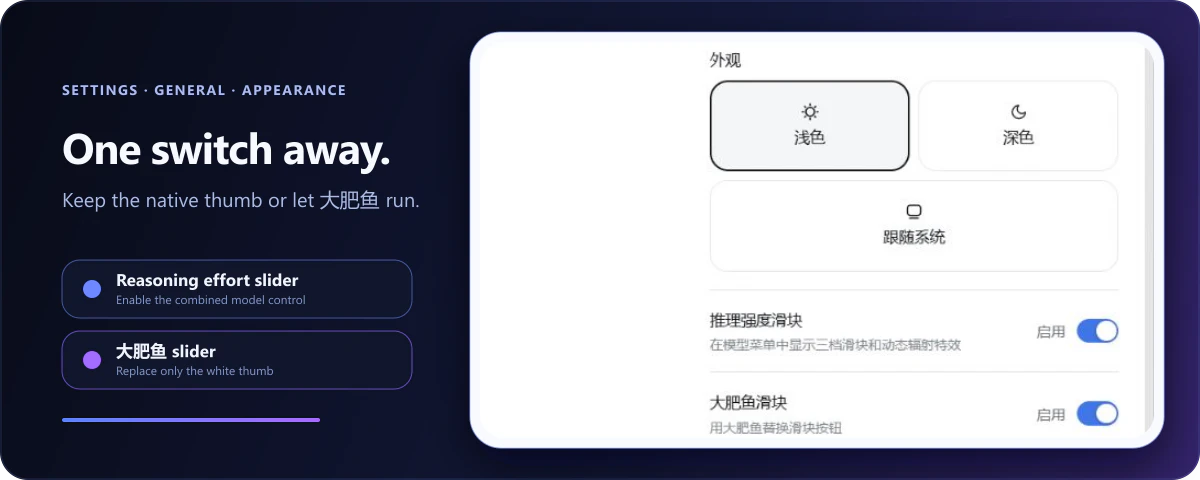
大肥鱼只替换按钮外观,不改变档位吸附、键盘控制、辐射特效或模型选择。拖动时动画会自动加速;系统启用“减少动态效果”后会停留在稳定帧。
同一页面中的 推理强度滑块 总开关可以临时关闭整个增强控件。关闭后无需卸载,DSH 原生模型选择器会立即恢复。两个开关都只保存在当前浏览器。
你会得到什么
- 真正跟手的拖动:按钮按指针位置连续移动,释放后才吸附到有效档位。
- 深浅主题适配:深色为蓝紫黑渐变,浅色为蓝白渐变,强度越高蓝色越深。
- 只向左侧发射的特效:波浪、冲击波、像素辐射、粒子和拖尾不会越过按钮。
- 与 DSH 状态同步:滑块和
/model命令读写同一个会话模型目录。 - 失败自动回滚:更新失败时恢复到上一个已确认档位。
- 无额外网络行为:插件不新增遥测、凭据处理或服务端存储。
常见问题
安装后看不到滑块
请依次确认:
- 安装后已经重启 DSH Web Host。
- 设置 → 通用设置 → 推理强度滑块 处于启用状态。
- 当前模型在 DSH 模型目录中公开了至少两档推理强度(未声明的模型见下一条),且部署没有关闭 thinking。
模型没有声明档位怎么办(如 GLM-5.3)
不在 pi-ai 自带目录中的新模型没有任何推理档位,菜单会显示"当前模型未提供推理强度档位"。此时在 ~/.dsh/settings.yaml 中为它声明档位即可,以 zai coding 路由下的 GLM-5.3 为例:
llm-pi-ai:
  providers:
    zai-coding-cn:
      models:
        - id: glm-5.3
          name: GLM-5.3
          contextWindow: 1000000
          maxTokens: 131072
          reasoningEfforts:   # 键=滑块显示的档位名,值=实际发给 API 的 reasoning_effort
            low: "low"
            high: "high"
            xhigh: "max"
          compat:             # zai 路由检测默认不发 reasoning_effort,需要显式打开
            thinkingFormat: "zai"
            supportsReasoningEffort: true
几点说明:
- 档位名使用 DSH 档位体系(
off/minimal/low/medium/high/xhigh),值是端点实际接受的reasoning_effort取值;off不声明即不可选,适合无法关闭思考的模型。 - 已收录在 pi-ai 目录中的模型(如 GLM-5.2)自动继承档位,无需任何配置。
- 上游目录收录该模型后,手写声明即可删除;手写条目始终优先于目录。
- 提交的档位值最终由 host 校验并发送,插件不会绕过模型或部署的能力限制。
如何确认插件已经载入
运行:
dsh --profile web --dump-config
配置中应当出现 name: dsh-reasoning-effort。
如何卸载
dsh plugin --profile web remove dsh-reasoning-effort
卸载后重启 DSH Web Host,原生模型选择器会自动恢复。
兼容性
| 组件 | 目标版本 |
|---|---|
| DeepSeek Harness packages | 0.1.0-rc.6 |
| Node.js | 22.19+ |
| React | 18.x |
DeepSeek Harness 仍处于开发者预览阶段;上游 UI 或服务变更可能需要同步更新插件。
开发与构建
pnpm install
pnpm run check
pnpm pack
pnpm run check 会进行 TypeScript 校验,并重建 Host 入口与浏览器模块。完整交互与颜色约定见 design/visual-spec.md,安全问题请按照 SECURITY.md 报告。
许可证
MIT © HanaAyane
Read the usage guide →
Install steps, key points, FAQ and compatibility for this plugin — auto-derived from indexed fields.
Listing badge

[](https://deepseek-plugin.org/plugins/HanaAyane/dsh-reasoning-effort)Paste this markdown into your GitHub README to link back to this listing. The badge only states the listing — not a security endorsement.