A TUI frontend for DeepSeek Harness in the terminal, featuring streaming chat, theme/language switching, a plugin marketplace, and first-launch API Key guidance.

- Language
- JavaScript
- License
- MIT
- Branch
- main
Install
$ dsh plugin --profile web add seekttyRun the command above in your terminal to install this plugin via the dsh CLI. You can switch Profile in the top-right corner. New to dsh? Read the beginner tutorial
Install via your agent
Install the DeepSeek Harness plugin Hilbert-beinghappy/seektty for me: review the repository at https://github.com/Hilbert-beinghappy/seektty first, then run the install command and verify the plugin loads successfully.
Paste this instruction to the DSH Web GUI assistant — it will install and verify for you.
One-Line Positioning
SeekTTY is DeepSeek Harness's official standalone terminal Bundle, bringing the entire Harness into the terminal to run—streaming dialogue, tool cards, session management, plugin marketplace, and theme/language switching all done with keyboard shortcuts, no browser required.
Core Capabilities
- Present streaming Markdown conversations, tool call cards (collapsed/expanded/hidden), unified syntax highlighting for code blocks, reasoning content visibility toggle, model retry, and Ctrl+C cancellation within the terminal
- Complete session lifecycle:
/new/resume/rename/fork/archive/export/export md, plus/sessionsbrowsing,/copyto copy previous response - Workspace support (
/workspace): create, select, reorder, logout; switching Agent mode (/mode), model & Provider (/model), or permissions (/permission) automatically starts a new session /pluginhub: list, search, details, install, remove, update, Bundle sorting, source management,/plugin doctordiagnostics; supports npm, Git, tarball, local paths- Independent theme system: UI theme and code theme separately switchable, supports 3–16 color palette generation,
/theme importreads local VS Code JSON/JSONC themes (including TextMate token colors) - Chinese/English bilingual:
/languageswitch; auto-followsLC_ALL/LC_MESSAGES/LANG/LANGUAGE(auto); shareslocale.preferencewith Harness Web - First-launch API Key guidance: when Profile has no available Provider, displays a centered masked input box that only goes through Harness
credentials.set, SeekTTY keeps no logs
Technical Implementation
- Language: TypeScript (ESM,
"type": "module",tsdownbuilds tolib/) - Key Dependencies:
@deepseek-ai/cordis,@deepseek-ai/dsh-host-apiproxy,@deepseek-ai/dsh-host-plugin-inventory,@mariozechner/pi-tui,@shikijs/core - Architecture Pattern: Mounted as a Cordis Profile Bundle (
name: 'tui-runner',cordis.patch.ymldisables Web/browser/HMR/tools and other default behaviors), usesseektty/in-processin-process RPC instead of Web server, supplemented byseektty/attachment-compatto fillimageLimitscompatibility layer for rc.6/rc.7 → rc.8 - Entry Points:
src/index.ts→src/host/index.ts(apply/runstarts terminal Surface) →src/client/index.ts(startTui→surface.ts); global command entrylib/bin.js(deepseek)
Use Cases
Developers writing code daily in the terminal who want to chat with AI, view tool calls, and visualize reasoning like Claude Code, without switching to the browser; or those already used to DSH Web and wanting a keyboard-first workflow. SeekTTY shares the same Profile and Session with the official Web, allowing seamless handoff between both endpoints.
Prerequisites & Compatibility
| Dependency | Minimum Version | Notes |
|---|---|---|
| DeepSeek Harness | 0.1.0-rc.6+ (tested up to 0.1.0-rc.8) | Declared in package.json#dsh.compatibility; old versions via dshCompatibilityError are directly rejected, new versions only show a single line hint without blocking (src/dsh-compat.ts:85-133) |
| Node.js | ^22.19.0 || >=24.0.0 | package.json#engines.node |
| pnpm | 10+ (11.7.0 recommended) | Profile installation uses pnpm; launcher and plugin management both rely on pnpm in PATH (src/bin.ts:175-184) |
| Platform | macOS / Linux / Windows | package.json#os lists darwin/linux/win32; Windows uses pnpm add --global, requires PATHEXT parsing for dsh.cmd (README.md:68-73) |
| Native Modules | None | All JS/TS dependencies, no node-gyp builds |
| Peer Dependency | @deepseek-ai/cordis ^4.0.1 | Provided by host DSH |
Installation
dsh plugin --profile web add github:Hilbert-beinghappy/seektty
The installation command is the unified entry for the plugin marketplace; this plugin's actual Profile name is fixed to
tui(created bybin.tsand launcher on first run), not started viawebProfile.dsh plugin --profile tui add github:Hilbert-beinghappy/seekttyis a more straightforward equivalent写法.
Configuration
SeekTTY doesn't directly accept command-line configuration; behavior toggles all fall under DSH Settings namespace (written via /settings or dsh plugin --profile tui set):
| Config | Type | Description | Default |
|---|---|---|---|
seektty-appearance.theme | string | Current UI theme (dark / light / custom:<id>) | dark |
seektty-appearance.codeTheme | string | Separate code block theme (auto / dark / light / custom:<id>) | auto |
seektty-appearance.customThemes | array | Named custom themes (including UI colors, syntax colors, TextMate rules) | [] |
seektty-behavior.toolCards | collapsed | expanded | hidden | Tool card default state | collapsed |
seektty-behavior.showReasoning | boolean | Whether reasoning content is shown by default | true |
seektty-behavior.desktopNotifications | boolean | Whether to send terminal desktop notifications on round completion or pending approval | false |
seektty-behavior.composerHistoryLimit | number | Input history persistence count (0 = off) | 100 |
seektty-behavior.clipboardFallback | auto | osc52 | off | Clipboard fallback after OSC 52 failure | auto |
seektty-behavior.toolOutputLineLimit | number | Max lines per tool output block (0 = no folding) | 200 |
seektty-behavior.diffContextLines | number | Diff context lines | 3 |
seektty-behavior.keyBindings | object | Override default shortcuts (id → key combo) | {} |
tui-plugin-marketplace.sources | array | Additional marketplace catalog sources (id/label/url/enabled/credentialRef) | [] |
locale.preference | auto | zh | en | UI language; shared with Harness Web | auto |
Common environment variables (affecting launcher and rendering, not Settings):
| Env Variable | Description |
|---|---|
DSH_BIN | Specify dsh executable path; when set, auto-update dsh is disabled (src/bin.ts:71-77 / 222) |
SEEKTTY_UPDATE | auto (default) / check / off / explicit disable value, controls version check on startup and exit (src/bin.ts:45-53) |
SEEKTTY_SPEC | Override default plugin spec (e.g., for local tarball debugging) |
SEEKTTY_STARTUP_TRACE | When 1, outputs startup phase timing to stderr (src/startup-trace.ts:7-11) |
NO_COLOR | Any non-empty value forces terminal into 0-color (plain text) mode (src/client/theme.ts:179) |
FAQ
Q: Launcher says "cannot find dsh", what should I do?
A: This is the standard prompt when launcher detects dsh --version failure (src/bin.ts:175-184). Install pnpm add --global @deepseek-ai/[email protected], or explicitly specify path with DSH_BIN=/path/to/dsh before running deepseek.
Q: dsh is 0.1.0-rc.8, but rc.6/rc.7's imageLimits don't match rc.8, will it error?
A: SeekTTY orders seektty/attachment-compat before api-gateway in cordis.patch.yml:153-155; it only supplements maxImageDimension for the specific rc.6/rc.7 capability shape, leaving native rc.8 objects as-is (src/host/attachment-compat.ts:36-90). So cross-version running requires no manual dsh changes.
Q: Will auto-update block startup?
A: No. maybeAutoUpdate silently catches network and installation failures with try/catch (src/bin.ts:325-348); once DSH_BIN is locked, dsh won't be touched, and SEEKTTY_UPDATE=0 can completely disable it.
Q: Will uninstalling lose sessions or modify dsh?
A: No. dsh plugin --profile tui remove seektty only clears Profile dependencies, Bundle order, and config items; the Profile itself is preserved, sessions remain under $DSH_HOME/profiles/<profile>/sessions/, and dsh installation is untouched (README.md:167-180).
Q: First-launch centered popup needs API Key, will it be written to logs/screenshots?
A: No. SeekTTY only forwards user input to Harness credentials.set; its own logs, settings, and screenshots don't persist this value (README.md:97-110). On first normal send, authentication failure goes through official Provider error path back to user.
Q: Why didn't pasting images in terminal work?
A: macOS uses osascript (optional pngpaste), Linux tries wl-paste/xclip, Windows uses PowerShell Get-Clipboard (README.md:50). Clipboard bitmaps land as temporary PNG before insertion; current defaults v4-flash/v4-pro don't accept images, they'll be rejected according to attachment limits (help.ts:23-32).
Q: Does /theme import require VS Code themes?
A: /theme import accepts local VS Code JSON/JSONC theme files, recursively parses include, maps editor and semantic token colors, TextMate foreground/background/bold/italic/underline/strikethrough rules are portable (README.md:223-227). UI colors aren't replaced; font family/size are ignored (terminal fonts are determined by the grid).
Q: How to auto-resume last session?
A: deepseek --resume resumes the most recent session; deepseek --resume <sessionId> resumes specified session; deepseek --cwd <path> specifies working directory. Restart uses seektty-v1 channel to hand off draft/attachments/cwd/profile (src/host/app-handoff.ts:1-14 / src/host/restart-handoff.ts:1-15).
Learning Curve
Beginner — default config needs no modification, install and use; dive into Settings when you want theme customization, keymap customization, or plugin marketplace catalog extension.
Known Issues & Limitations
- Official
host.describeversion number is a placeholder: rc.6–rc.8 all returnversion: '0.0.1', SeekTTY treats this as "unknown version" and ignores it, doesn't use it as actual version for compatibility判断 (src/dsh-compat.ts:15-21 / 90) - First-launch API Key guidance has edge cases: if official Provider adapter is missing, credential layer is read-only, or Provider inspection fails, SeekTTY directly skips the popup and points to
/settingsand/doctor, won't leave a dead form (README.md:110) - Restart handoff failure "continues as normal startup": if handoff envelope parsing fails or channel/profile/cwd mismatch, only shows one status bar hint, doesn't block startup (src/host/restart-handoff.ts:17-19 / 63-81)
- Dependency updates trigger restart: after plugin add/remove/update/reorder when
restartRequiredis true, host does controlled restart to restore workspace/session/draft/attachments (src/host/profile-plugin-manager.ts:387 / README.md:188-189) - pnpm output containing Token/Key/Secret etc environment variables gets redacted:
InstallerOutputRedactordoes hold + length boundary protection for cross-chunk secrets (src/host/installer-output.ts:31-101) /clarifyonly appears when Clarify Remote Receiver exists: probed via/apichannel; when plugin is absent, command isn't shown and doesn't modify other behavior (src/client/clarify-remote.ts:1-15 / docs/任务书B-seektty-shell.md:7)
English | 中文
SeekTTY brings DeepSeek Harness into the terminal. Run deepseek from a project directory to work in a keyboard-first interface for prompting, code changes, tool calls, session management, model and permission switching, plugin installation, subagent coordination, and runtime diagnostics.
SeekTTY joins Harness as a Profile Bundle and uses its native Agent, Session, model, permission, Settings, Profile, plugin, and persistence services. Every terminal action uses the same Harness state, so upgrades stay focused on the compatibility baseline and adapters.
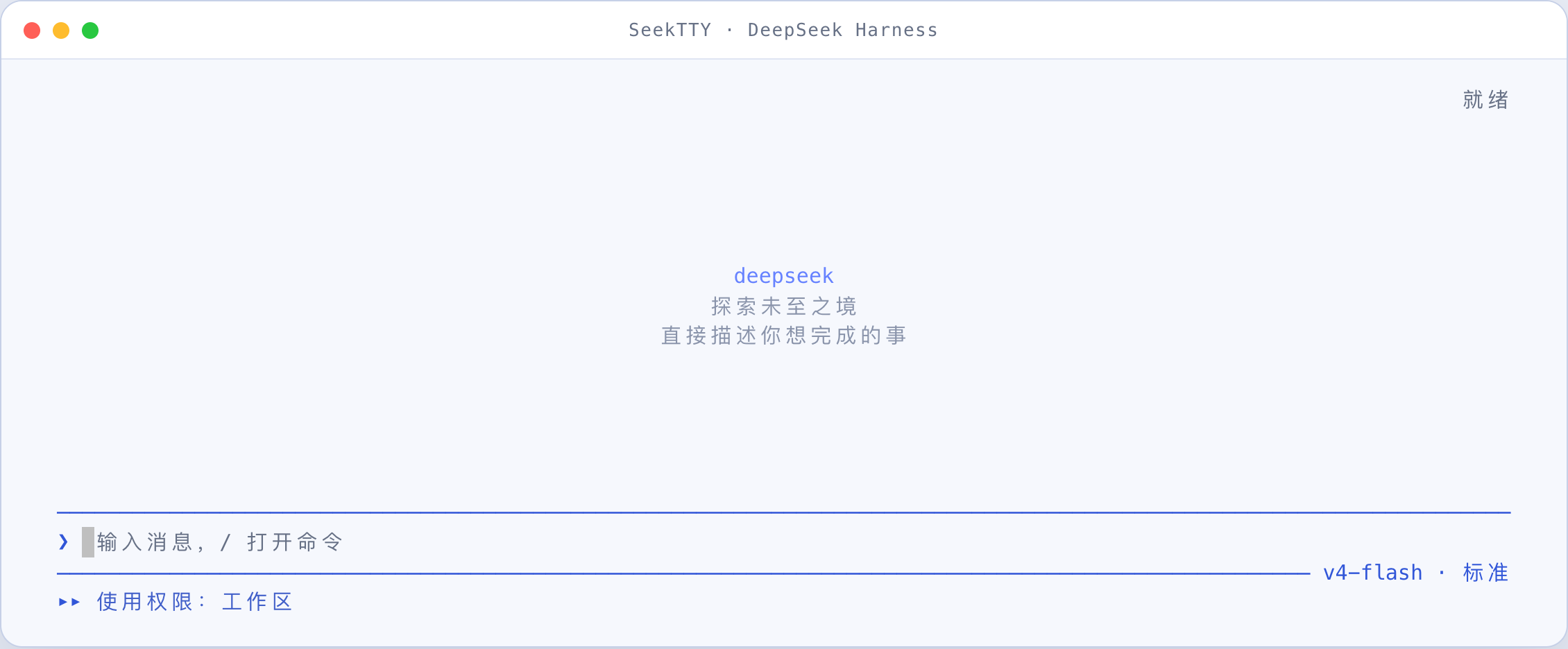
DeepSeek light and dark interfaces
Light theme
Dark theme
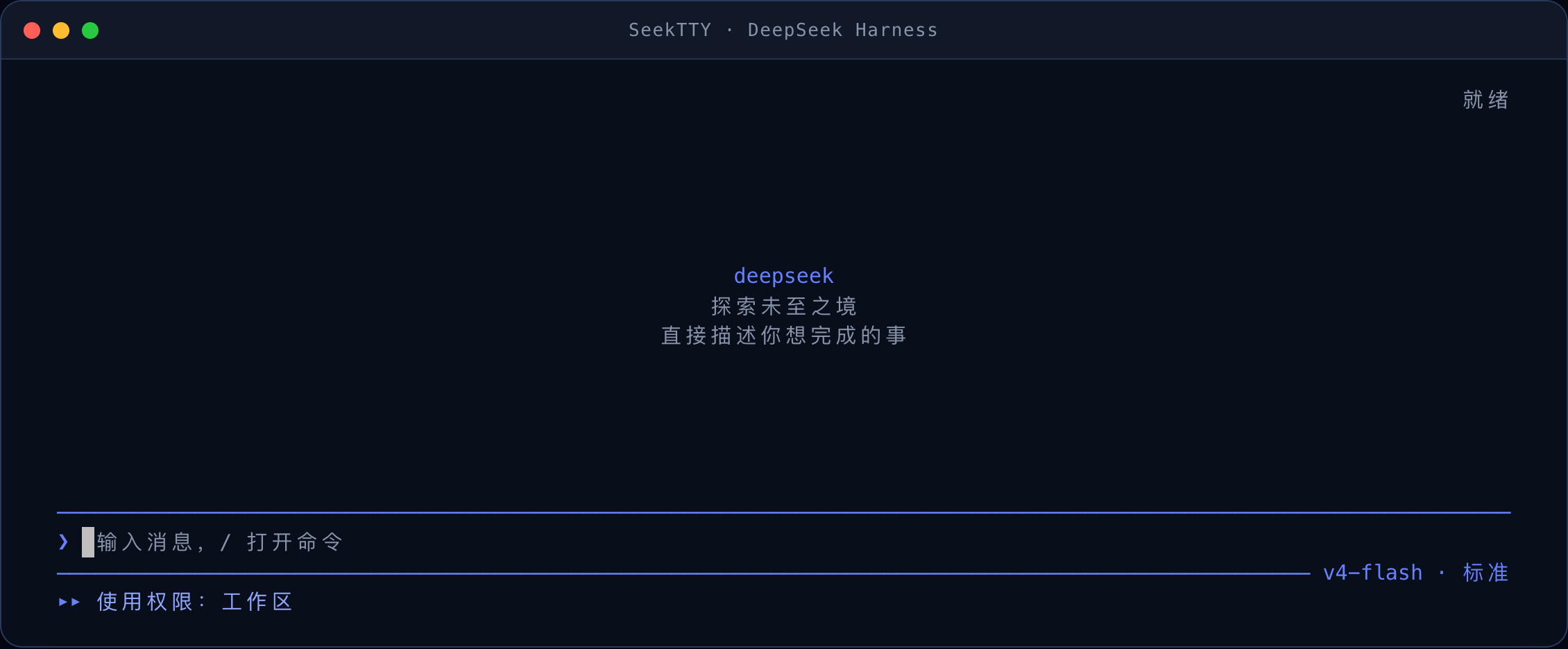
The live view fills the terminal and keeps the composer and status at the bottom. Unused rows remain inside the conversation viewport and disappear as output grows; longer conversations continue into native terminal scrollback.
Custom interface and code themes, including VS Code imports
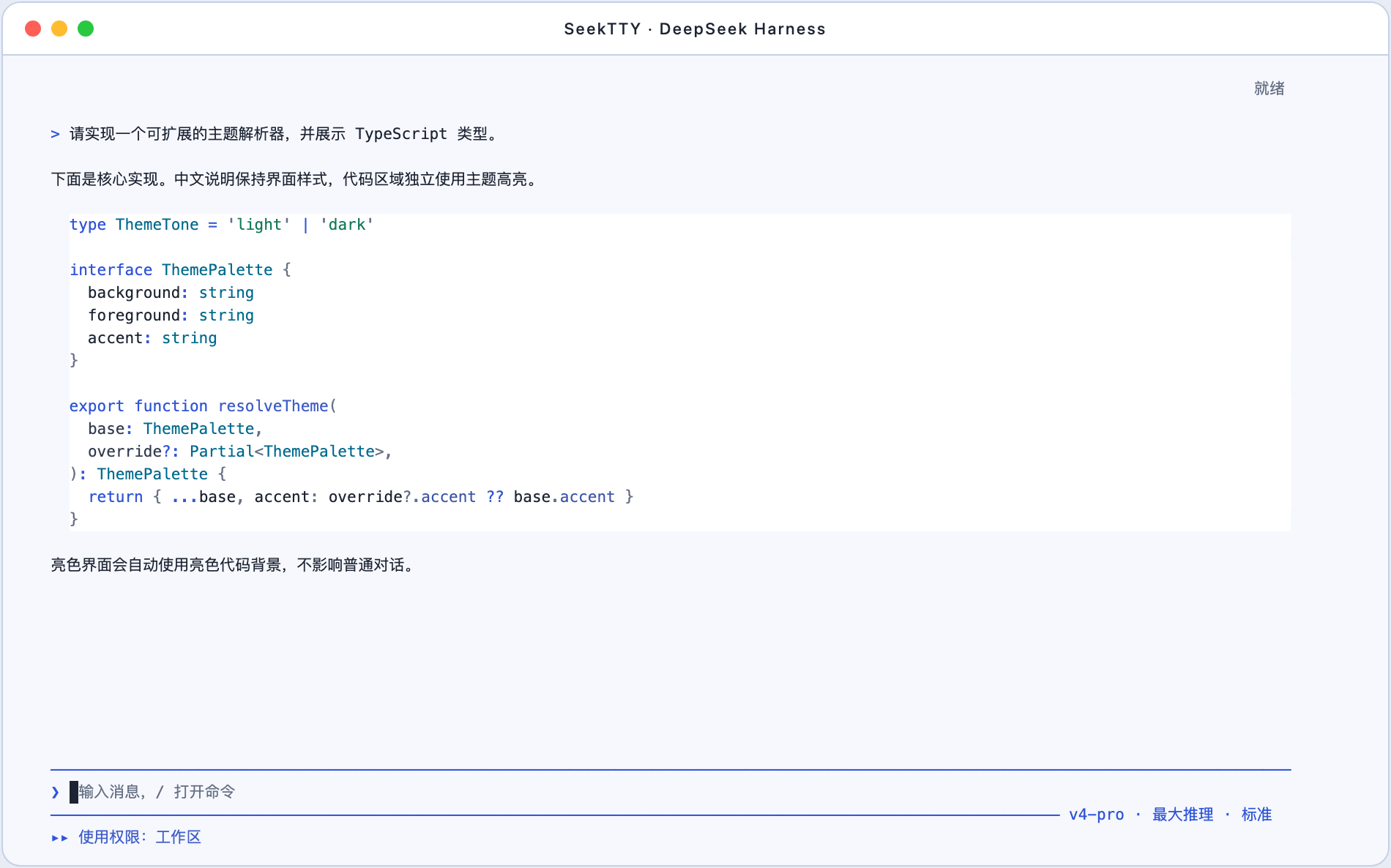
Theme customization is a first-class SeekTTY feature: interface background and text colors are editable, code-block colors and syntax styles are independently editable, and /theme import accepts local VS Code JSON/JSONC themes with portable TextMate token colors. A palette of 3–16 colors can also generate a complete light or dark theme for preview and further adjustment.
TypeScript in the DeepSeek light interface
Tool parameters, file reads, and Diff in the DeepSeek dark interface
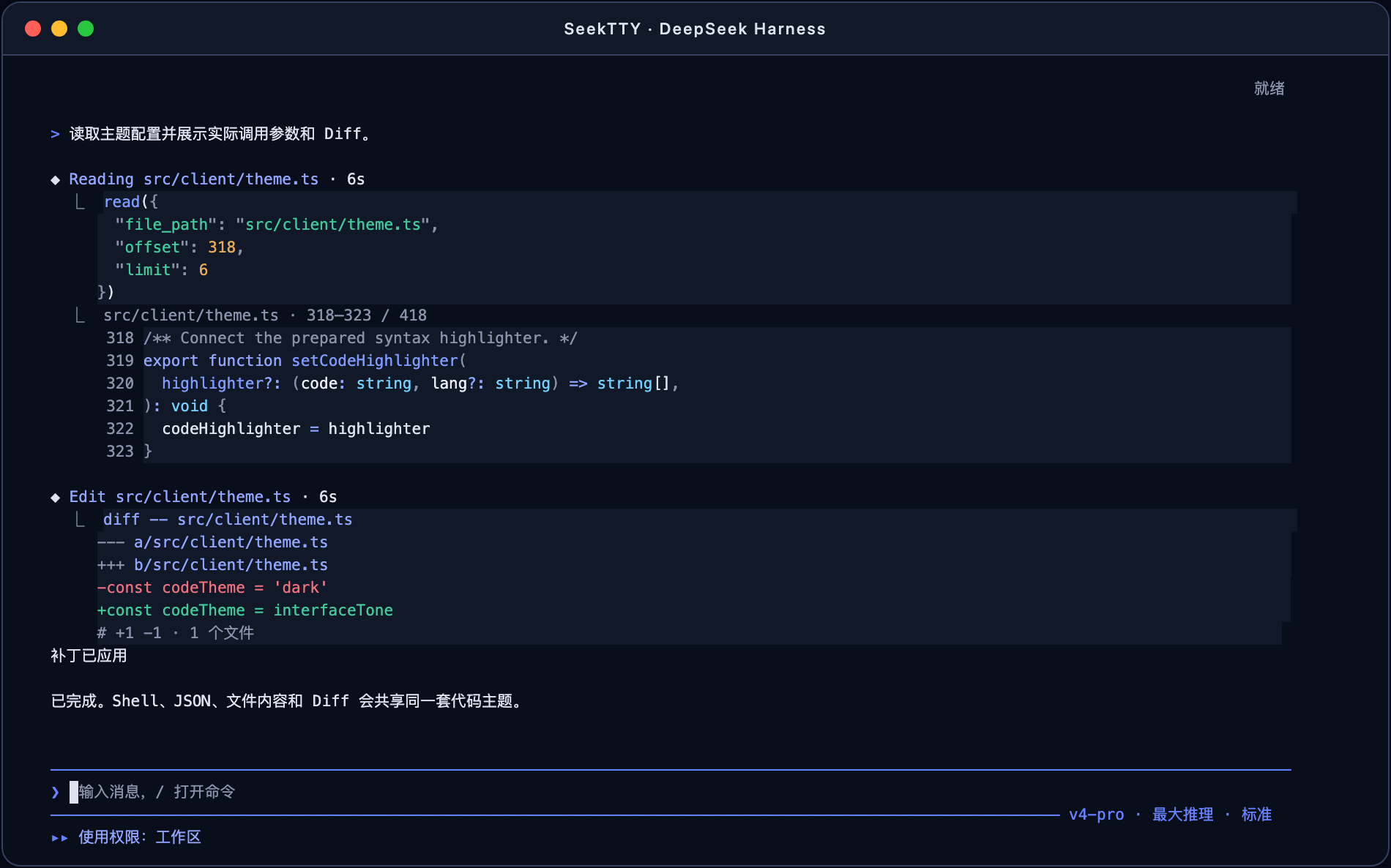
Markdown fences disappear into continuous code surfaces. Assistant code, Shell commands, structured tool parameters, file reads, JSON, and Diff use the same active code theme; ordinary conversation text keeps the interface style. Every code background occupies continuous terminal cells instead of producing disconnected per-line stripes.
Harness capabilities available in the TUI
The current release covers these capabilities:
| Area | Available operations |
|---|---|
| Conversation and runs | Streaming responses, Markdown/GFM, fence-free theme-aware syntax-highlighted code blocks, links, tables, reasoning visibility, collapsed/expanded/hidden tool cards, model retries, compaction, output-limit and error states, and Ctrl+C cancellation |
| Sessions | Create, resume, list, full-text search, rename, fork, archive, copy the last answer, export ZIP, or /export md Markdown |
| Workspaces | Start from the current directory; add, select, rename, unregister, reorder, and reorder sessions within a workspace; unregistering never deletes files or session logs |
| Agent modes | Standard, Code/PTC, Minimal, and Cordis/Create baseline modes plus dynamically registered Agent Presets; switching an active conversation creates a new session in the same workspace |
| Models and Providers | Dynamic Provider, model, and supported reasoning-effort discovery; current route display; per-session switching; catalog, credential, and routing diagnostics |
| Permissions and approvals | Inspect and switch Host permission presets, cycle with Shift+Tab, confirm risky upgrades, allow one tool call, skip further prompts for a tool in this session, or reject |
| Input queue and steering | Queue prompts while the Agent runs, inspect/edit/remove entries, steer one entry or the entire queue into the active turn, and send /steer directly |
| Human interaction | Single choice, multi-select, custom answers, skip, cancel, and plan review; submitting an interaction returns to the latest output while the blocked turn resumes, with /pending recovery when retrying is needed |
| Image attachments | Add PNG, JPEG, GIF, or WebP by pasting an image or file path, or with /attach; macOS reads the clipboard via osascript (optional pngpaste), Linux via wl-paste/xclip, Windows via PowerShell; pending images appear under the composer; enforce Harness count/size limits; render inline when supported and fall back to file metadata otherwise |
| Plan, Goal, Todo, and compaction | Native /plan, /goal, and /compact commands with plan review, goal state, Todo counts, and compaction records in the transcript |
| Tools and produced files | ◆ action · duration headers with live elapsed time and connected invocation code, dynamic tool catalog, parameters, execution-boundary guidance, line-numbered highlighted file reads, highlighted Shell/JSON/Diff views, safe native terminal ANSI, generic fallback cards, session-wide produced-file listing grouped by turn, in-TUI view, path copy, and confirmed external open |
| Subagents | Inspect direct children, activity, tree state, token use, and duration; open continuable or read-only sessions and stop an active child turn |
| Background jobs and workflows | Job type, status, start/end times, duration, and detail views; workflow phases, members, results, and failure states in the transcript |
| Statistics and trajectory | Per-turn steps, LLM/tool time, first-token latency, throughput, cache hit, input/output tokens, model requests, running calls, and structured trajectory inspection |
| Profiles | List, create, copy, switch, and diagnose terminal compatibility; controlled restart restores the workspace, session, unsent draft, and attachments |
| Settings and credentials | First-run API-key setup when no usable Provider exists; enumerate every Settings namespace in the active Profile; dedicated default-model, permission, Agent-mode, and marketplace-source controls; Schema fallback for all other fields; write-only secrets |
| Plugins and marketplace | /plugin center, installed list, search, details, install, remove, update, Bundle ordering, source management, and diagnostics; npm, Git, tarball, and local-path specs |
| Skills and MCP | Dynamic user-invocable Skill discovery and native command insertion; MCP tools, instances, settings, load state, and separate process/remote-service risk information |
| Feedback | Session feedback plus positive/negative Assistant-message ratings, optional notes, and feedback removal |
| Status and diagnostics | Harness, Node, platform, Profile, workspace, session, mode, model, permission, pnpm, plugin state, and actionable diagnostics |
| Themes | Independent interface and code-block themes; automatic code colors follow DeepSeek dark/light; named custom themes, manual colors, 3–16-color generation, and local VS Code JSON/JSONC import with TextMate colors and portable token styles; live preview, contrast warnings, terminal-color fallbacks, and NO_COLOR |
| Interface language | Live Chinese/English switching through /language; the explicit preference is shared with Harness Web through the official locale.preference Settings value, while auto follows the terminal locale |
Models, Providers, Agent Presets, permissions, Host commands, tools, Settings, Skills, MCP, and marketplace sources are discovered from the running Harness. New capabilities registered by upstream or third-party Bundles enter the dynamic catalogs, with Schema controls, structured details, and actionable diagnostics available while dedicated views evolve.
Install the bare command
The repository is public and can be installed directly from GitHub without private-repository authentication. SeekTTY supports macOS, Linux, and Windows. On Windows, install with pnpm add --global as shown below so PATHEXT-aware shims (dsh.cmd) can be resolved.
pnpm add --global github:Hilbert-beinghappy/seektty#v1.2.0
deepseek
deepseek requires DeepSeek Harness (dsh) on PATH, or DSH_BIN pointing at the executable (pnpm add --global @deepseek-ai/[email protected]). On first run, deepseek uses the native dsh plugin command to create the default tui Profile and install this Bundle. Later runs boot the same Profile. Initial tasks, workspaces, Session resume, and custom Profiles are supported:
deepseek "check this project"
deepseek --cwd ../project
deepseek --resume
deepseek --resume <sessionId>
deepseek --profile team-tui
deepseek --version
deepseek --update
The native dsh entry remains available:
dsh plugin --profile tui add github:Hilbert-beinghappy/seektty#v1.2.0
dsh --profile tui
deepseek --update still force-scans and installs. By default deepseek itself is SEEKTTY_UPDATE=auto: on launch it fetches official dsh npm latest (not next or GitHub pre-releases) and the newest SeekTTY GitHub Release, then updates the global dsh install (skipped when DSH_BIN pins the executable) and the SeekTTY Bundle through native dsh plugin add. Local link:/file: installs and SEEKTTY_SPEC overrides are left alone. Network or install failures never block boot. Set SEEKTTY_UPDATE=check to restore a post-session notice, or SEEKTTY_UPDATE=0 to disable.
First-run API key setup
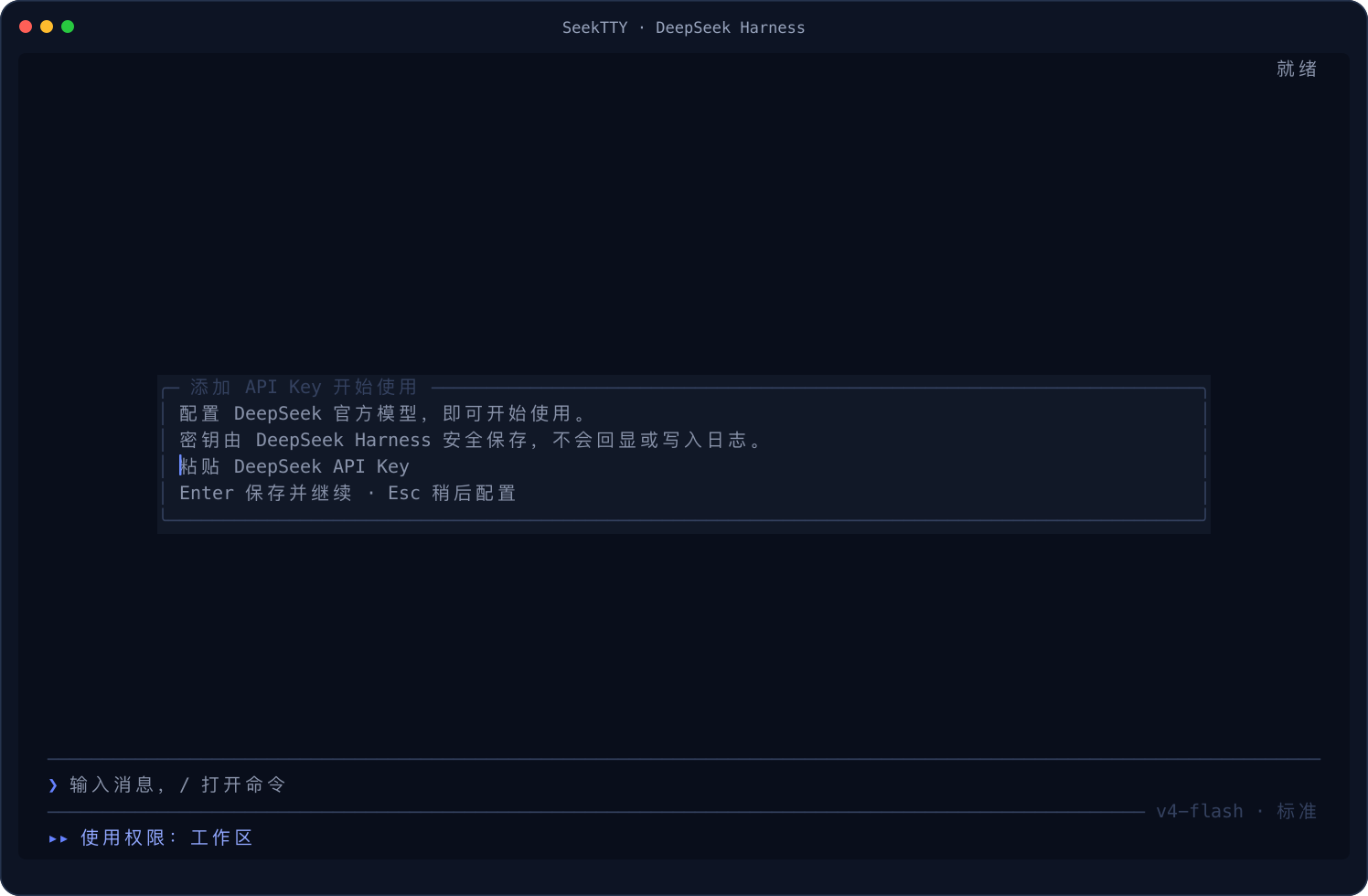
When the active Profile has no usable model Provider, and the official DeepSeek Provider exposes a missing writable credential reference, SeekTTY opens a centered write-only prompt before the first interface frame. An existing environment credential, a credential already stored by Harness, or another active Provider that uses ambient or keyless authentication skips the prompt.
Dark first-run prompt
Light first-run prompt
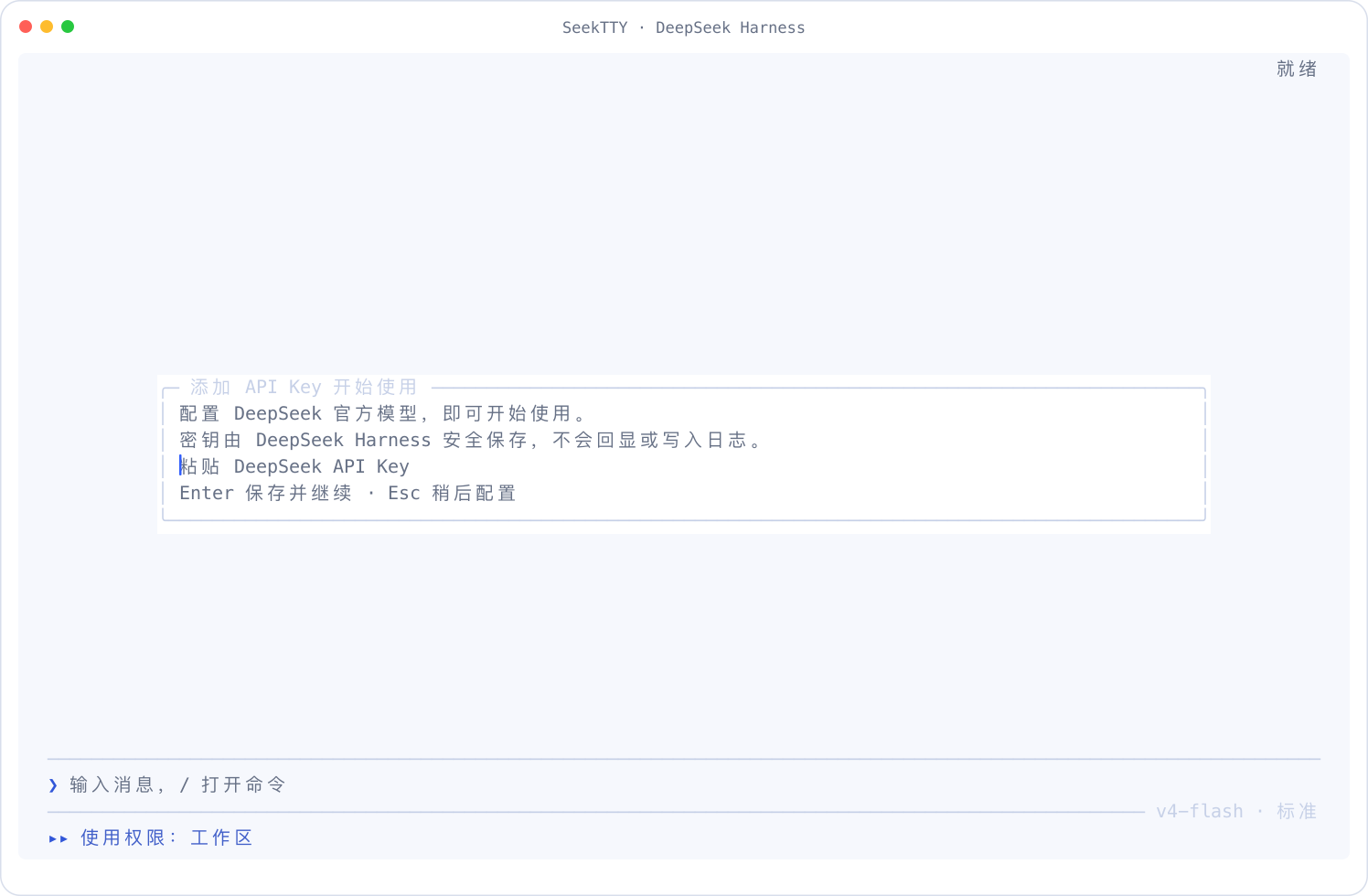
Paste only the API key. Input is masked, and Enter passes the normalized value directly to Harness credentials.set; SeekTTY does not read it back, write a credential file, or place it in settings, logs, screenshots, or Session data. Saving does not send a paid validation request—the first real model request reports any authentication failure through the normal Harness Provider error path.
Escape defers setup without blocking /settings, /plugin, or other local surfaces. Sending a normal prompt, a Skill command, or a prompt with attachments opens the same setup again. An initial deepseek "task", submitted text, and draft attachments remain intact; after a successful save the pending prompt continues automatically, while another deferral restores it to the composer. If Provider inspection is unavailable, the official adapter is absent, or the credential layer is read-only, SeekTTY avoids an unusable form and points to /settings and /doctor while preserving Harness behavior.
Slash commands
Typing / opens a searchable command and Skill menu. It merges SeekTTY commands, Host commands registered for the active Agent, and user-invocable Skills.
| Category | Commands |
|---|---|
| Sessions | /new, /resume, /sessions, /rename, /fork, /archive, /export, /export md, /copy |
| Work environment | /workspace, /profile |
| Agent | /mode, /model, /permission, /plan, /goal, /compact |
| Runtime interaction | /queue, /steer, /attach, /attachments, /pending |
| Runtime content | /tools, /files, /jobs, /subagents, /trajectory |
| Extensions | /plugin, /plugins, /skills, /mcp |
| Configuration and diagnostics | /settings, /language, /theme, /status, /doctor, /feedback, /restart; when [email protected] is healthy, /status shows separately labeled Official, Auxiliary, and Combined (derived) whole-Session usage without changing the official tokenUsage projection |
| Help and exit | /help, /quit, /exit |
/plugin, /workspace, and /profile provide both complete interactive centers and direct subcommands. Unknown commands produce nearby suggestions instead of being sent to the model as ordinary prompts. /clarify is not a stock command: it is added to the local / catalog only while a compatible Clarify 0.2.0 six-method Remote is present. It asks context-specific questions generated from the active Session and current draft, evolves a reviewed preview after every answer, and lets you answer, refine, accept, or cancel. It never shows a permanent grey suggestion line and never auto-sends. Run it from the palette to keep the whole composer as the seed, type /clarify some text, or end an existing draft with a final /clarify token or line. Accepting writes the complete reviewed draft back into the ordinary composer; press Enter yourself only if you want to send it.
Common controls
| Input | Action |
|---|---|
| Left-button drag, then the terminal copy shortcut | Use the terminal's native selection and copy for any visible TUI text (Command+C on macOS; normally Ctrl+Shift+C on Linux and Windows terminals) |
| Mouse wheel / trackpad | Browse the native terminal scrollback while the composer remains active |
/ | Open command and Skill candidates |
| Enter / Shift+Enter | Submit or confirm / insert a newline |
| Tab / Escape | Switch between composer and transcript / return or close the active overlay |
| PgUp / PgDn / Home / End | Page through the transcript, jump to the oldest content, or return to the latest |
| Shift+Tab | Cycle the current permission, confirming full access first |
| Shift+Left / Shift+Right | Jump to the previous or next user turn |
| F1 | Open in-app help |
| Ctrl+P | Open the complete command palette |
| Ctrl+M | Open model selection when the terminal exposes an extended keyboard protocol |
| Ctrl+S | Open session resume |
| Ctrl+O / Ctrl+T | Cycle tool-card display / show or hide reasoning |
| F2 / Ctrl+, / Cmd+, | Open Settings |
| Ctrl+C | Stop the active turn, clear a draft, or confirm exit with a second press |
Migrate from deepseek-tui
Replace the former global package once. The new deepseek launcher then uses native dsh plugin commands to replace the legacy Bundle identity in the target Profile with seektty:
pnpm remove --global deepseek-tui
pnpm add --global github:Hilbert-beinghappy/seektty#v1.2.0
deepseek
Custom Profiles migrate independently on first launch, for example deepseek --profile team-tui. Native dsh-only installations can migrate explicitly:
dsh plugin --profile tui remove deepseek-tui
dsh plugin --profile tui add github:Hilbert-beinghappy/seektty#v1.2.0
Plug and unplug
Removal changes only the target Profile, never the dsh installation:
dsh plugin --profile tui remove seektty
Reinstall with the same native command:
dsh plugin --profile tui add github:Hilbert-beinghappy/seektty#v1.2.0
Installation writes directly to the target Harness Profile dependencies, Bundle order, and pnpm lockfile. TUI /plugin and native dsh plugin operate on that same Profile state.
Plugin center
Bare /plugin opens the current Profile's plugin center, and /plugins is an alias. Direct subcommands include list, search, info, install, remove, update, reorder, source, and doctor.
- Search npm Registry by default, add JSON/HTTP Catalogs, and consume sources registered by other Harness Bundles.
- Install npm names, Git URLs, tarballs, file URLs, and local directories.
- Preflight
dsh.bundle.patch, packed files, the final install spec, build scripts, and the target Profile. - Restart immediately after install, removal, update, or reorder while restoring the workspace, session, draft, and attachments.
- Inspect version, source, publisher, Bundle state, load order, and actionable diagnostics.
Models, settings, and themes
/model discovers Providers, models, and reasoning efforts from Harness and immediately refreshes the effective model shown in the composer. /mode manages Agent Presets, while /permission manages the active session permission; each has a separate runtime meaning.
/settings lists every Settings namespace registered in the current Profile. Default model, default permission, default Agent mode, and marketplace sources have dedicated selectors. Boolean, enum, number, text, JSON, Secret, Credential Ref, and other fields remain editable through the generic Schema UI. It shows inherited values, user overrides, reset actions, and live/restart timing; revision checks protect concurrent writes. Secrets expose only whether a value is configured and use masked input.
SeekTTY terminal copy ships in Chinese and English. /language opens the language selector, and direct forms are available for scripts or quick switching:
/language auto
/language zh
/language en
The selection is stored by the official @deepseek-ai/dsh-client-locale Host plugin as locale.preference, so the TUI and Harness Web use the same explicit preference. auto removes that override: SeekTTY then checks LC_ALL, LC_MESSAGES, LANGUAGE, and LANG, while the browser keeps using its own platform-language fallback. Switching is live and rebuilds the terminal chrome and transcript presentation without changing model, tool, user, Provider, or plugin-authored content.
SeekTTY starts with its DeepSeek dark theme. /theme opens a complete theme center; built-in and named themes can also be managed directly:
/theme dark
/theme light
/theme code [auto|dark|light|<name>]
/theme use <name>
/theme edit [name]
/theme palette [name]
/theme import [name] [local-file]
/theme delete <name>
The interface theme and code-block theme are independent. /theme light, /theme dark, and /theme use <name> select a complete matching interface/code pair. With /theme code auto, code background, foreground, syntax colors, and dark/light direction follow the active interface theme, so DeepSeek light uses light code blocks. /theme code dark, /theme code light, or /theme code <name> explicitly overrides only code until another complete interface theme is selected. /theme edit changes a complete named theme, while /theme palette accepts 3–16 HEX/RGB color codes and builds dark and light candidates.
/theme import reads a local VS Code JSON/JSONC theme, recursively resolves relative include files, maps editor and semantic-token colors, and preserves portable TextMate foreground, background, bold, italic, underline, and strikethrough rules. An imported VS Code theme becomes the active code theme without replacing the current interface theme. Every customization path opens a live preview before saving. Low-contrast colors are never silently replaced; the preview identifies the affected roles and asks for a second confirmation.
Custom themes cover the terminal canvas, panels, selection, text, border, brand and status colors, code background and foreground, and semantic roles for comments, keywords, strings, numbers, constants, functions, types, variables, properties, parameters, operators, punctuation, tags, attributes, and regular expressions. Assistant Markdown code, Shell invocations, structured tool parameters, file reads, JSON, and Diff all use the same code theme. Tool calls render as a compact action/duration header followed by ⎿-connected invocation code; the duration advances from the Harness call timestamp while the tool is active and freezes at settlement. Collapsed cards retain the invocation while expanded cards add results. Common grammars are ready at startup; other supported grammars load on demand and redraw in place. Theme changes recolor existing messages without moving the transcript, losing expanded state, or changing the draft.
The interface selection, independent code selection, and named definitions live in the seektty-appearance Harness Settings namespace under revision protection. /settings can therefore edit the same data through its generic Schema UI. Theme names are case-insensitively unique; overwrites and deletion require confirmation. Deleting an active interface theme returns the interface to DeepSeek dark, while deleting an active code theme returns code to automatic pairing. VS Code font families and sizes are deliberately ignored because the terminal owns the character-grid font; imported bold/italic and related styles apply only to code tokens and never restyle ordinary Chinese, English, system text, or tool titles.
Verified scope
- Isolated install, configuration composition, and PTY boot against official stock
@deepseek-ai/[email protected], plus the add/boot/remove/re-add contract against the declared minimum@deepseek-ai/[email protected]. - Clarify
0.2.0retains historical standalone lifecycle evidence for official dsh rc.6/rc.7/rc.8; the complete dynamic production stack is claimed only for exact0.1.0-rc.8with[email protected]. The three packed tarballs pass native add/boot/remove/re-add,/doctor0 errors/0 warnings, live model-generated questions/options/previews, multi-round preview evolution, review-and-accept into the composer without auto-send, interruption recovery, and privacy checks. - Auxiliary calls persist usage/limits/cancel only in the
auxiliary_runtimestorage domain. Official AgenttokenUsageremains unchanged, while/statusdisplays validatedOfficial,Auxiliary, and derivedCombinedbuckets only when the optional snapshot contract is healthy. - Model listing, Provider/model/reasoning selection, request submission, and Harness error propagation.
- First-run Provider readiness, masked API-key setup, deferral and draft restoration, Harness credential persistence, and restart without another prompt under an isolated
DSH_HOME. - Real dark, light, and palette-generated PTY rendering, independent live interface/code switching, 80/120/160-column layouts, and persistence after restarting the same Profile.
- Chinese/English locale resolution, revision-protected shared preference writes, live terminal switching, and preservation of unknown external content.
- Native removal clears the dependency, Bundle, and config entries; re-add boots again.
- A fresh packed global install, with no workspace development dependencies or duplicate
@deepseek-ai/*packages, exposes baredeepseek, provisions thetuiProfile, and boots through the official dsh module fallback. - A real native
todo_writejourney passes after installation; the package gate also rejects Profile-local copies of official identity-bearing Host packages and verifies that Cordis, API proxy, Session, and tool runtime resolve to the official fallback instance. - Installation, startup, keyboard navigation, and terminal interaction are supported on macOS, Linux, and Windows.
A real first-run session was verified with a valid DeepSeek credential pasted into the masked overlay under an isolated DSH_HOME: v4-flash returned REALCHECK_58597, then used that answer in the next turn to return REALCHECK_58598. Restarting the same Profile did not reopen setup, the Harness credential file was mode 0600, and the credential never appeared in terminal output, screenshots, or the repository. The isolated credential store was removed after verification.
Reusable stock-dsh contract check:
DSH_BIN=/path/to/dsh \
SEEKTTY_SPEC=/path/to/seektty.tgz \
pnpm test:stock
Reusable cross-package doctor check:
CLARIFY_SPEC=/path/to/dsh-plugin-clarify.tgz \
pnpm test:clarify-doctor
Compatibility and upgrades
The tested SeekTTY baseline is official 0.1.0-rc.8; the shell's declared minimum remains official 0.1.0-rc.6, with shell lifecycle coverage on rc.6/rc.7/rc.8. The optional Clarify + Auxiliary production combination is narrower and is verified only on exact rc.8. A newer dsh than tested still boots the shell with a notice, but the auxiliary runtime rejects known versions outside its published range; older than the shell minimum is rejected. The published Bundle does not install a second copy of Cordis or any @deepseek-ai/dsh-* Host package into a Profile: optional peers describe the host contract, while runtime imports resolve through the official $DSH_HOME/profiles/node_modules fallback. This preserves identity-bearing symbols such as the native tool scheduler. Pure client helpers that the official fallback does not ship are bundled instead. The Host plugin seektty/attachment-compat still runs immediately before api-gateway and adapts only the exact valid legacy image-limit capability shape; all other shapes fail closed. Future hosts are matched by capability and unsupported optional features degrade safely. A scheduled workflow scans the official npm latest dist-tag, upgrades development baselines only after pnpm run check, packed-launcher isolation, and the stock-dsh contract pass, then opens a pull request. npm next and GitHub harness pre-releases are not followed.
The source repository and its GitHub Releases are public. No npm-registry package is published; install the tagged GitHub source above or use the tarball attached to the matching Release.
Read the usage guide →
Install steps, key points, FAQ and compatibility for this plugin — auto-derived from indexed fields.
Listing badge

[](https://deepseek-plugin.org/plugins/Hilbert-beinghappy/seektty)Paste this markdown into your GitHub README to link back to this listing. The badge only states the listing — not a security endorsement.