Automatically resumes requests interrupted by network issues in DSH Web UI. Skips and notifies when permanent errors like authentication failures occur.

- Language
- TypeScript
- License
- MIT
- Branch
- main
Install
$ dsh plugin --profile web add dsh-client-auto-continueRun the command above in your terminal to install this plugin via the dsh CLI. You can switch Profile in the top-right corner. New to dsh? Read the beginner tutorial
Install via your agent
Install the DeepSeek Harness plugin HsiangNianian/dsh-auto-continue for me: review the repository at https://github.com/HsiangNianian/dsh-auto-continue first, then run the install command and verify the plugin loads successfully.
Paste this instruction to the DSH Web GUI assistant — it will install and verify for you.
One-Line Description
A plugin for DSH Web UI that automatically resumes when requests are interrupted by network issues—sends "continue" as a regular user message, and skips with notification on permanent errors.
Core Features
- Detects turn completion events and automatically sends "continue" for transient failures (network/timeout/5xx/429) and token limit exceeded
- Adaptive backoff: cooldown increases multiplicatively on consecutive failures (default 20s → 40s → 80s...), avoiding hammering a failing upstream
- Idempotent guard: before resuming, checks the previous tool call status; if tool result is unconfirmed or already completed, adds a hint to the model to avoid duplicate execution
- Loop guard: detects spinning turns in progress (consecutive short sentences, repeated same tool calls, identical messages), automatically cancels and restarts the turn with loop hint text
- Boot/reconnect scan: if host crashes during browser closure leaving interrupted turns, scans and auto-resumes after recovery
- Settings card statistics: today's auto-continue count, skipped count, recovered count, failure count, stopped-at-limit count, loop interrupted count; can classify by error code and one-click reset
- Optional browser notification: popup on auto-continue/abandon/permanent error, can click "Resume Now" or "Pause This Session for 1 Hour"
Technical Implementation
- Language: TypeScript
- Key Dependencies: @deepseek-ai/cordis, @deepseek-ai/schemastery, @deepseek-ai/dsh-settings, @deepseek-ai/dsh-client-runtime
- Architecture: Host-browser dual-half plugin; host-side single-instance engine subscribes to session event stream (
session/event), sends viaagent.followup, cancels viaagent.cancel; browser-side thin shell only provides settings card and SSE state bridge - Entry Files: src/index.ts (host-side) / src/client/index.ts (browser-side)
Use Cases
When running long tasks with DSH Web, network fluctuations or server-side transient 5xx errors interrupt the turn, and the common workaround is manual click to resend. This plugin eliminates that action—as long as the network or server issue is transient, it will automatically resume after a few seconds. Also suitable for scenarios where you return after closing the browser and find the task abandoned—restores immediately upon page load.
Prerequisites & Compatibility
| Dependency | Minimum Version | Description |
|---|---|---|
| DSH | ≥ 0.1.0-rc.7 | Below rc.7, settings card fails to load (list slot ... requires options.id), must upgrade DSH |
| Node.js | ≥ 18 | Required only when building from source; installing prebuilt via dsh plugin add does not require |
| Platform | Cross-platform | Plugin has no native module dependencies, no platform restrictions |
| Native Modules | None | Engine based on in-memory state within host process, no native dependencies like node-pty / sqlite |
Installation
dsh plugin --profile web add github:HsiangNianian/dsh-auto-continue
Configuration Options
| Config | Type | Description | Default |
|---|---|---|---|
| paused | Boolean | Global pause: both real-time and scan stop auto-sending, queued items also cancelled | Off |
| continueText | Text | Message auto-sent after interruption, supports placeholders like {code} {tool} {message} | 继续 |
| continueTextMaxTokens | Text | Text sent when output token limit is reached, supports same placeholders | 继续 |
| guardTools | Boolean | Check previous tool call before resume and add guard hint to avoid duplicate execution | On |
| guardPendingText | Text | Hint text appended when tool result is unconfirmed, supports {tool} placeholder | (上一步工具「{tool}」可能未完成, 先确认状态再继续, 不要重复执行) |
| guardDoneText | Text | Hint text appended when tool succeeded, supports {tool} {result} placeholders | (上一步工具「{tool}」已完成, 结果: {result}; 不要重复执行, 直接继续) |
| graceMs | Number | Grace period waiting for host self-recovery after interruption; if recovered, cancel auto-send (ms) | 3000 |
| cooldownMs | Number | Minimum interval between two auto-"continue" in same session, failed attempts also count (ms) | 20000 |
| maxConsecutive | Number | Upper limit of consecutive auto-"continue" in same session; after exceeded, stops and waits for user intervention or successful turn | 3 |
| scanOnBoot | Boolean | Scan and auto-resume recently interrupted sessions on page startup or reconnection (e.g., host crashed during browser closure) | On |
| scanLimit | Number | At boot scan, max number of most recently updated sessions to check (excluding running and sub-agent sessions) | 8 |
| freshMs | Number | Scan only processes interruptions within this time window (ms) | 900000 (15 minutes) |
| classify | Boolean | Error classification: only auto-recover transient errors; permanent errors like auth/balance/model not found are skipped and notified | On |
| backoffFactor | Number | Multiplier for cooldown interval on consecutive failures | 2 |
| backoffMaxMs | Number | Upper limit for adaptive backoff, prevents waiting too long (ms) | 300000 (5 minutes) |
| notify | Boolean | Browser notification on auto-continue/abandon/permanent error (will request permission on first use) | Off |
| loopGuard | Boolean | Detect spinning turns in progress and auto-cancel restart | On |
| loopShortChars | Number | Model messages shorter than this are considered short sentences (spinning signal) | 40 |
| loopWindowMs | Number | Consecutive short sentences must fall within this time window to count as spinning (ms) | 30000 |
| loopShortCount | Number | How many consecutive short sentences without tool calls in time window triggers spinning loop | 12 |
| loopRepeatText | Number | How many identical messages (any length, strongest signal) triggers spinning loop | 4 |
| loopToolRepeat | Number | How many consecutive calls with same tool + same params + same result triggers infinite loop | 5 |
| loopText | Text | Text sent when loop guard breaks and restarts turn, supports {tool} placeholder | (检测到你可能陷入循环, 请停止重复刚才的动作, 换一种方式继续) |
| verbose | Boolean | Output [auto-continue] logs in browser console | On |
FAQ
Q: Which interruptions trigger auto-resume, which don't?
A: Transient failures (network/timeout/5xx/429) trigger; reaching output token limit also triggers. User-initiated stops (aborted), policy rejections (blocked), and permanent errors (401/403 status codes, or matching auth/credential/balance/quota/model not found/context length exceeded keywords) never resume—they skip and notify.
Q: Will multiple browser tabs send duplicates?
A: No. Since 0.8.0, the engine runs in the host process (src/host/engine.ts), globally single-instance, so multiple tabs won't send duplicates; engine stays on guard duty even when all browser tabs are closed.
Q: Need to restart dsh web to take effect?
A: First enable after install requires restart dsh web. After that, all changes save instantly via settings card (written to ~/.dsh/settings.yaml), taking effect immediately, pages also refresh; if any fields don't take effect, just restart dsh web.
Q: How to manually disable auto-continue?
A: Open "Settings → Plugins", find "Auto Continue" card, turn on global "Pause Auto Continue" switch to cancel all auto-sending in real-time. To pause just one session, click "Pause This Session for 1 Hour" in browser notification, or individually unpause in the "Paused Sessions" list at card bottom.
Q: Do leftover sections in ~/.dsh/settings.yaml need cleanup after uninstall?
A: No cleanup needed. The section remains in config file harmlessly on uninstall; if you want thorough cleanup, manually delete the auto-continue section.
Q: Will loop guard misjudge? Will it restart my manually stopped turns?
A: Won't misjudge your manual stops. Cancellations initiated by loop guard carry internal source marker; engine only auto-restarts on guard cancellations, manual stops trigger no action. Thresholds, time windows, and hint text are all adjustable; if misjudged, loosen loopShortCount / loopWindowMs.
Q: How to write placeholders in hint text?
A: continueText and continueTextMaxTokens support {code} {message} {status} {tool} {turn} {errorCount} {sessionTitle} {elapsed}. Guard text (guardPendingText / guardDoneText / loopText) support {tool} and {result} (result summary). For example, 继续 ({tool}: {code}) renders as 继续 (git push: UPSTREAM).
Difficulty Level
Beginner — One-line install command, works with default config, adjust via settings card with explanations when needed, no coding required.
Known Issues & Limitations
reconnectScanDelayMs(reconnect scan delay, default 5000ms) andreconnectBackoffMs(reconnect backoff, default 3000ms) are legacy fields: no longer used after engine moved to host in 0.8.0, retained only for legacy config compatibility; changing these values has no effect.- Installing on DSH < 0.1.0-rc.7 fails to load due to
settings.plugin.itemslot not supporting keyed registration; need to upgrade DSH first. isTransientFailurematches error keywords via regex (auth, credential, api_key, balance, quota, context length, etc.); if upstream error message uses uncommon wording and doesn't hit 401/403, may be misclassified as transient error triggering pointless retries—can closeclassifyto switch to full resume.- Browser notifications depend on browser Notification API and user authorization; if denied, won't request again.

dsh-auto-continue
DSH Web UI plugin — when a request is interrupted by a network error or any other non-human cause, it automatically types 「继续」 and sends it for you.








English · 中文
What It Does
For DeepSeek Harness (dsh web): whenever a request in the web GUI gets interrupted by a non-human cause, the plugin simulates the user typing 「继续」 and sends it, so the agent keeps working without manual intervention. The message enters the session log exactly like a manual prompt — the model sees it, and the interrupted work resumes. Since 0.8.0 the engine runs inside the host process (single instance), so it keeps watching even with every browser tab closed, and multiple open tabs can never double-send.
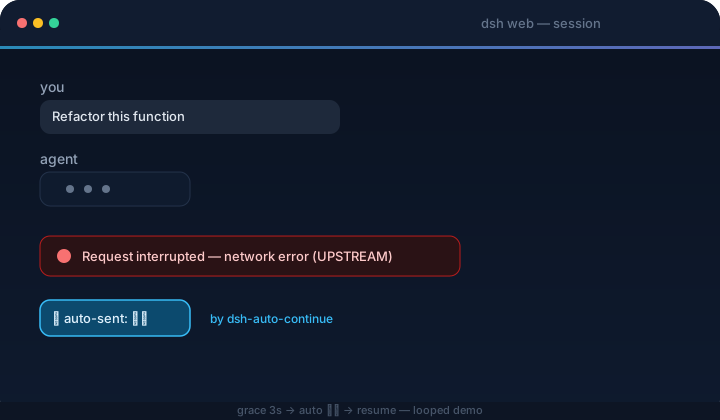
Smart recovery (all configurable):
- Error classification — transient failures (network / timeout / 5xx / 429…) are auto-resumed; permanent ones are skipped and notified, because retrying them never helps. A failure counts as permanent when its HTTP status is 401/403 or its code/message matches auth, credential/API-key, balance/quota, unknown-model, or context-length/overflow keywords. Turn classification off to resume everything
- Adaptive backoff — consecutive failures wait longer each time (cooldown × factor: 20s → 40s → 80s…), capped at the max backoff, instead of hammering a broken upstream
- Templated continue text —
continueTextsupports{code}{message}{status}{tool}{turn}{errorCount}{sessionTitle}{elapsed}placeholders, so the resume message can carry the failure context ("继续 (git push failed: UPSTREAM)"); a separate template fires onmax-tokens(e.g. "继续输出, 不要重复已生成的内容") - Idempotency guard — before resuming, the plugin inspects the last tool call: if its result is unconfirmed (the turn died mid-tool, e.g. a
git pushthat may have gone through), the resume message tells the model to check state first and not to rerun; if the tool is confirmed done, it says so and asks not to repeat it; a failed tool gets no guard (retrying it is the point). Both guard texts are configurable ({tool}/{result}placeholders) - Pause — a global Pause auto-continue toggle in the settings card stops everything (live + scan) instantly; per-session pauses (e.g. via a notification button) suspend only one session until they expire. The Resume now notification button is the one explicit exception: pressing it is the user asking for exactly one send, pause or not
- Notification buttons — notifications carry Resume now (send immediately, ignoring cooldown, the consecutive cap and any pause) and Pause this session 1h actions
- Loop guard — watches running turns too. Three signals trip the guard, which cancels the turn and restarts it with a configurable loop text ("stop repeating, try another way"): the model repeating the exact same message several times (any length — e.g. "Let me test variants of the regex…" ×7), many short messages inside a short time window with no tool call in between (the "Let me read…" spin), or the same tool called repeatedly with the same arguments and the same results (a changed argument or result counts as progress). The cancel carries an internal marker so it is never confused with a user stop — the restart only happens for guard-initiated cancels. Thresholds, the time window and the loop text are configurable
- Stats panel — the settings card shows today's auto-continue count, recoveries, failures, permanent skips, give-ups and loop breaks, broken down by error code, with a one-click reset
- Browser notifications — optional alerts when auto-continue fires, gives up, or hits a permanent error; the browser asks for permission on first use, and nothing is shown again after a denial
It watches the live event streams and reacts to:
| Event | Meaning |
|---|---|
turn/end → error | Turn failed (model / network / timeout, …) |
turn/end → interrupted | Crash-orphaned turn left behind by a host restart (recovered by the startup scan) |
turn/end → max-tokens | Output token ceiling reached |
host/agent-error | Agent failure with no turn position (only network/timeout-class messages auto-resume) |
Never auto-continues: user-aborted turns (aborted) or policy rejections (blocked); live interrupted turn-ends too — that marker is only written by crash repair when the host reloads, so orphaned turns are recovered by the startup scan, not the live path; sessions the host already resumed itself; running sessions or sessions with queued messages; subagent sessions; anything inside the cooldown / consecutive-cap windows (configurable in the settings card, below).
How It Works
The host-side engine subscribes to the session event firehose inside the dsh host process — exactly one engine, regardless of how many tabs are open (the duplicate-send class of bugs cannot exist by construction). On an interruption it waits a grace period (default 3 s) — if the host starts a new turn by itself (turn/start), the auto-continue is cancelled — then sends the configured text through the agent registry (agent.followup, the same queue the Send button uses).
On host boot it also scans the live sessions: a session whose last turn ended with a non-human reason within the scan window (default 15 minutes), with no later turn/start or user message, gets resumed automatically too (e.g. the host crashed while the browser was closed — the agent-loop resumes the session and the engine picks it up).
The browser half is a thin shell: the settings card, plus a status bridge that shows notifications (with Resume now / Pause this session 1h buttons, routed back to the host engine) and feeds the card's stats / paused-sessions panels.
Quick Start
DSH plugins install into a profile (dsh web → web profile). Install, restart dsh web, done.
Requires DSH ≥ 0.1.0-rc.7 — newer versions register the settings card through the keyed
settings.plugin.itemslot; on rc.6 and earlier the plugin fails to load (list slot ... requires options.id). Upgrade dsh first.
From npm (recommended)
Published as dsh-client-auto-continue:
dsh plugin --profile web add dsh-client-auto-continue
dsh web
Directly from GitHub (no clone needed)
Installs straight from the repository's default branch — built artifacts are committed, so no local clone or build step:
dsh plugin --profile web add github:HsiangNianian/dsh-auto-continue
dsh web
This tracks the
mainbranch rather than released tags — great for trying the latest changes, while the npm method above is the stable choice. Switching between install sources is just re-runningdsh plugin --profile web add <other-spec>; the profile dependency is replaced in place.
From this repository
Requires Node.js ≥ 18.
git clone https://github.com/HsiangNianian/dsh-auto-continue.git
cd dsh-auto-continue
npm install
npm run build

# the package carries its own cordis.patch.yml (dsh.bundle.patch),
# so the plugin row registers itself
dsh plugin --profile web add link:$(pwd)

dsh web
Manual (no pnpm / dsh plugin needed)
ln -sfn "$(pwd)" ~/.dsh/profiles/node_modules/dsh-client-auto-continue
# then append to ~/.dsh/profiles/web/cordis.patch.yml:
#   - insert:
#       - id: auto-continue
#         name: 'dsh-client-auto-continue'
dsh web
Switching from a manual install to
dsh plugin add? Remove the manualinsertentry first — the bundle patch registers the row and a duplicate would conflict.
Settings exposure: since DSH 0.1.0-rc.7 the web settings surface is registry-driven — every namespace a plugin registers is served, so the settings card works out of the box, no vendor patch needed (the plugin requires rc.7+, see Quick Start).
Verify & uninstall
dsh --profile web --dump-config | grep auto-continue # config layer mounted
In the browser console (Ctrl/Cmd+Shift+I): [auto-continue] 已启动(文本="继续", …) — every detection and auto-send is logged.
dsh plugin --profile web remove dsh-client-auto-continue   # npm / repo install
# or remove the symlink + the insert entry                  # manual install
dsh web
Configuration
Everything is configurable from the GUI — no file or console edits needed. Open Settings → Plugins and find the dsh-client-auto-continue configuration card, right where every other plugin's config lives. Besides the fields below, the card shows a live stats panel (today's activity with a reset button) and the list of paused sessions (each with a per-session resume button).
Or skip the GUI and edit the config file directly — the engine reads the plugin's section from ~/.dsh/settings.yaml (one shared file for every plugin's sections), so this works in any install, patched or not. The file is watched and re-read automatically, so changes apply live; restart dsh web if a page that was already open doesn't pick them up. Fields you leave out fall back to the defaults in the table below:
auto-continue:
  paused: false
  continueText: '继续'
  continueTextMaxTokens: '继续'
  guardTools: true
  guardPendingText: '(上一步工具「{tool}」可能未完成, 先确认状态再继续, 不要重复执行)'
  guardDoneText: '(上一步工具「{tool}」已完成, 结果: {result}; 不要重复执行, 直接继续)'
  graceMs: 3000
  cooldownMs: 20000
  maxConsecutive: 3
  scanOnBoot: true
  scanLimit: 8
  freshMs: 900000
  verbose: true
  classify: true
  backoffFactor: 2
  backoffMaxMs: 300000
  notify: false
  loopGuard: true
  loopShortChars: 40
  loopWindowMs: 30000
  loopShortCount: 12
  loopRepeatText: 4
  loopToolRepeat: 5
  loopText: '(检测到你可能陷入循环, 请停止重复刚才的动作, 换一种方式继续)'
How the card works:
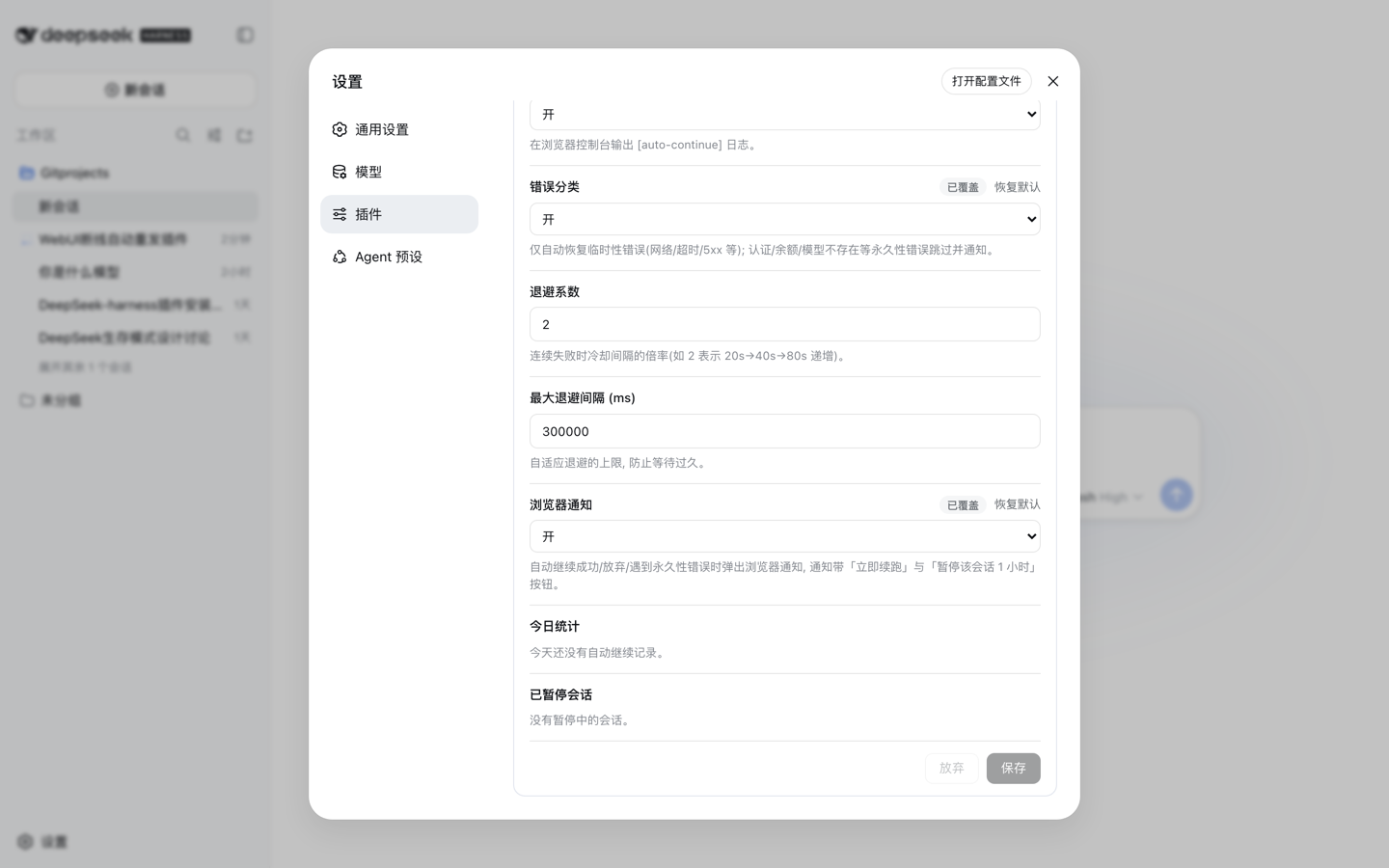
- Edits are staged — nothing reaches the disk until you hit Save; an unsaved badge marks the card while drafts are pending, and Discard drops them
- A field you changed shows an Overridden badge with a per-field Reset to default button that restores the built-in value
- Boolean fields are tri-state: Inherit (use the default) / On / Off
- Invalid drafts (non-numbers, values below the minimum) block the save with a hint
- In a read-only deployment the card shows the stored values but disables every control
- Changes apply immediately after Save and persist in
~/.dsh/settings.yaml(uninstalling the plugin leaves the section behind — harmless, delete it by hand if you like)
| Field | Default | Description |
|---|---|---|
| Pause auto-continue | off | Global pause: no live or scan auto-send fires, queued pending sends are cancelled |
| Continue text | 继续 | Text automatically sent after an interruption |
| Continue text (max tokens) | 继续 | Text sent when the output token ceiling is reached (same placeholders) |
| Idempotency guard | on | Inspect the last tool call before resuming and steer the model (see What It Does) |
| Loop guard | on | Detect a running turn spinning in place and restart it (see What It Does) |
| Short-sentence max (chars) | 40 | A model message shorter than this counts as a short sentence (spinning signal) |
| Short-sentence window (ms) | 30000 | Consecutive short sentences must land inside this window; normal thinking spread over time is not misjudged |
| Short-sentence threshold | 12 | Consecutive short sentences inside the window, with no tool call in between, trip the loop guard |
| Identical message count | 4 | Consecutive identical messages (any length) trip the loop guard — the strongest spinning signal |
| Same-tool repeat count | 5 | Consecutive calls of the same tool with identical arguments and results trip the loop guard |
| Loop text | (检测到你可能陷入循环, 请停止重复刚才的动作, 换一种方式继续) | Text sent after the loop guard restarts a turn; {tool} placeholder |
| Guard text (unconfirmed result) | (上一步工具「{tool}」可能未完成, 先确认状态再继续, 不要重复执行) | Appended when the last tool may have partially executed; {tool} placeholder |
| Guard text (tool succeeded) | (上一步工具「{tool}」已完成, 结果: {result}; 不要重复执行, 直接继续) | Appended when the last tool is confirmed done; {tool} / {result} placeholders |
| Grace period (ms) | 3000 | Wait after an interruption; cancelled if the host recovers on its own |
| Cooldown (ms) | 20000 | Min interval between auto-continues per session (failed attempts count too) |
| Max consecutive | 3 | Max consecutive auto-continues; stops until a user intervenes or a turn completes |
| Scan on load / reconnect | on | Scan recently interrupted sessions on load / reconnect |
| Scan limit | 8 | Max sessions scanned (running / subagent sessions excluded) |
| Scan window (ms) | 900000 | Scan only considers interruptions inside this window |
| Verbose logs | on | [auto-continue] console logs |
| Classify errors | on | Auto-resume transient failures only; auth / balance / model errors are skipped and notified |
| Backoff factor | 2 | Cooldown multiplier per consecutive failure (2 = 20s → 40s → 80s…) |
| Max backoff (ms) | 300000 | Cap on the adaptive backoff interval |
| Browser notifications | off | Notify when auto-continue fires, gives up, or hits a permanent error |
continueText (and continueTextMaxTokens) accept the placeholders {code}, {message}, {status}, {tool} (last tool call before the failure), {turn}, {errorCount} (consecutive failures including this one), {sessionTitle} (from the session list) and {elapsed} (time since the failure, e.g. 1m5s) — e.g. 继续 ({tool}: {code}) becomes 继续 (git push: UPSTREAM). The guard texts accept {tool} and {result} (a truncated excerpt of the last tool output).
Privacy & permissions
The plugin is browser-only and touches no files, credentials, or network beyond the dsh host:
- It opens the same two read-only event streams the web UI already uses (no extra server, no third-party endpoints)
- The engine's only automatic write is
sessions.prompt— the same call the Send button makes — with the text you configured (saving the settings card writes theauto-continuesection of~/.dsh/settings.yamlthrough the normal settings API, exactly like any other setting) - No browser storage at all: the single host-side engine keeps its cooldowns, send caps, pauses and stats in process memory
- Browser notifications are opt-in (
notifysetting) and permission is requested on first use only
Development
npm run typecheck   # tsc --noEmit
npm run build       # lib/client.js + lib/index.js + lib/types
npm run watch       # rebuild on change; host HMR hot-reloads without a page refresh
npm run test        # node tests/simulate-host.mjs — 15 host-side behavioral scenarios
While npm run watch runs, the profile's client-hmr row polls lib/client.js every 500 ms and hot-reloads the plugin in the browser — no server restart needed for code changes.
CI runs dsh-plugin-check on every push to main and every pull request, and gates releases — the tag workflow refuses to publish while the check fails.
Activity

Links
- Repository: github.com/HsiangNianian/dsh-auto-continue
- LINUX DO: linux.do
- DeepSeek Harness: github.com/deepseek-ai/deepseek-harness
- dsh-plugin-check: github.com/omdsh-dev/dsh-plugin-check — health-check your own DSH plugin repos
License

MIT © Hsiang Nianian
Read the usage guide →
Install steps, key points, FAQ and compatibility for this plugin — auto-derived from indexed fields.
Listing badge

[](https://deepseek-plugin.org/plugins/HsiangNianian/dsh-auto-continue)Paste this markdown into your GitHub README to link back to this listing. The badge only states the listing — not a security endorsement.