DSH Web 工作区侧栏替代,顶部全局最近会话 + Workspace→Session 二级菜单 + 面包屑 | DSH Web workspace sidebar replacement: top global recent sessions + Workspace→Session two-level menu + breadcrumbs

- Language
- TypeScript
- License
- NOASSERTION
- Branch
- master
Install
$ dsh plugin --profile web add @huanlin/dsh-plugin-ya-workspace-sidebarRun the command above in your terminal to install this plugin via the dsh CLI. You can switch Profile in the top-right corner. New to dsh? Read the beginner tutorial
Install via your agent
Install the DeepSeek Harness plugin HuanLinOTO/dsh-plugin-ya-workspace-sidebar for me: review the repository at https://github.com/HuanLinOTO/dsh-plugin-ya-workspace-sidebar first, then run the install command and verify the plugin loads successfully.
Paste this instruction to the DSH Web GUI assistant — it will install and verify for you.
ya-workspace-sidebar

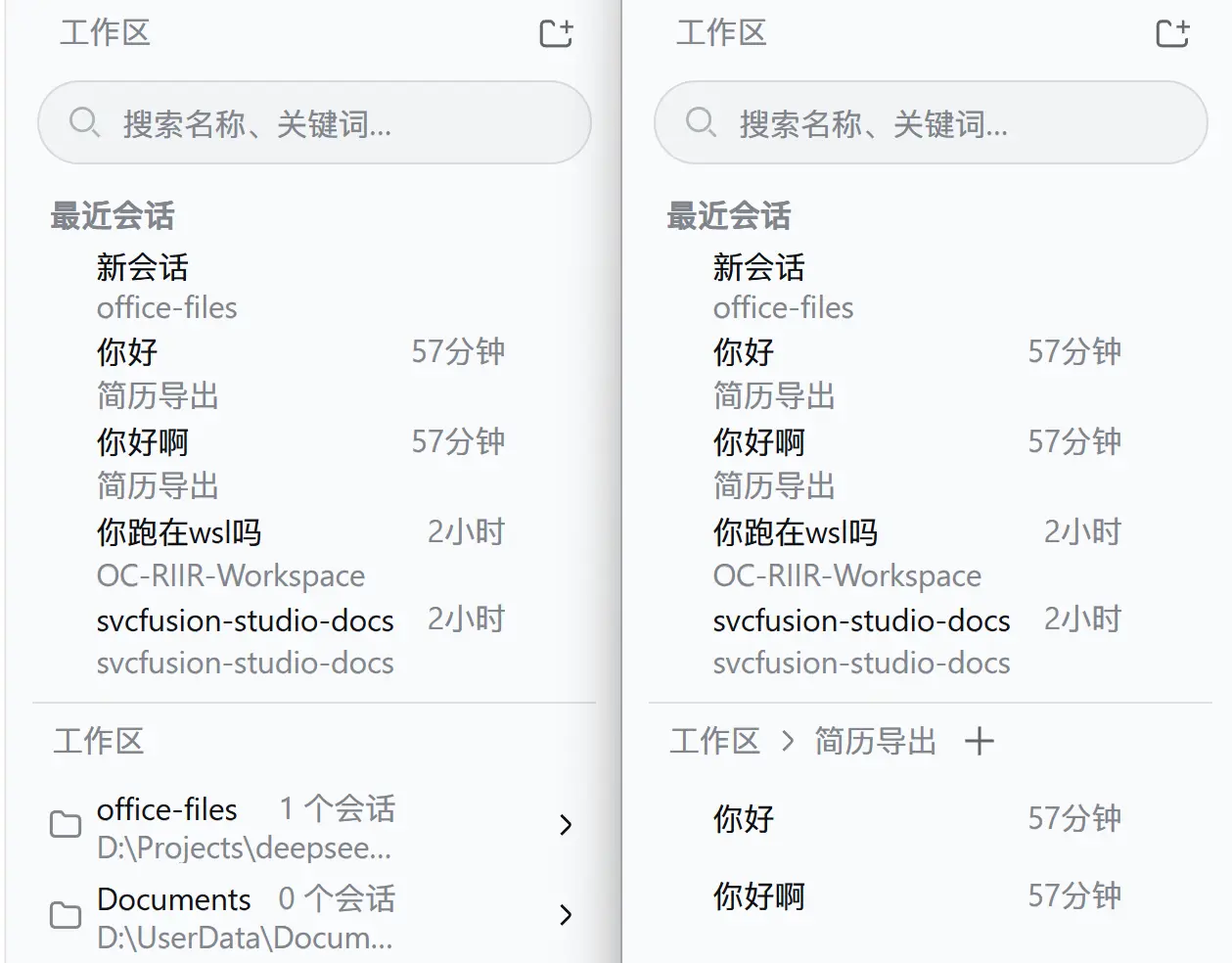
DSH Web 工作区侧栏替代插件。顶部固定展示 5 条全局最近会话,下方使用 Workspace → Session 二级菜单和面包屑导航;选中工作区的会话按本地日历日期分组(今天/昨天/更早),搜索、添加工作区、重命名、删除、Fork 与归档继续使用 DSH 原生 Host 能力。
运行
插件采用 bundle 形式,cordis.patch.yml 会禁用官方 ui-workspace 并插入 @huanlin/dsh-plugin-ya-workspace-sidebar。安装:
# 从 npm 安装(推荐):
dsh plugin --profile web add @huanlin/dsh-plugin-ya-workspace-sidebar

# 本地开发(热更新):
dsh plugin --profile web add "link:D:/Projects/deepseek-harness/ya-workspace-sidebar"
修改源码后重新运行 pnpm run build,再重启 dsh web 并硬刷新浏览器。
开发
pnpm install
pnpm run typecheck
pnpm test
pnpm run build
dsh/ 仅作为类型和行为参考,插件不会修改 DSH checkout。浏览器产物预构建到 lib/client.js,因此仓库发布时必须提交 lib/。
检查
pnpm run typecheck
pnpm test
pnpm run build
构建后确认 lib/index.js、lib/invariant.js、lib/client.js 和 lib/types/ 存在,并确认 lib/client.js 使用 window.__ModuleLoader__.load() 包装。
Read the usage guide →
Install steps, key points, FAQ and compatibility for this plugin — auto-derived from indexed fields.
Listing badge

[](https://deepseek-plugin.org/plugins/HuanLinOTO/dsh-plugin-ya-workspace-sidebar)Paste this markdown into your GitHub README to link back to this listing. The badge only states the listing — not a security endorsement.