Adaptive streaming rendering with smooth follow scrolling for assistant replies and tool results in the DeepSeek Harness web interface, with a "silky streaming" user settings option.

- Language
- JavaScript
- License
- MIT
- Branch
- main
Install
$ dsh plugin --profile web add dsh-smooth-streamRun the command above in your terminal to install this plugin via the dsh CLI. You can switch Profile in the top-right corner. New to dsh? Read the beginner tutorial
Install via your agent
Install the DeepSeek Harness plugin Laplace-bit/dsh-smooth-stream for me: review the repository at https://github.com/Laplace-bit/dsh-smooth-stream first, then run the install command and verify the plugin loads successfully.
Paste this instruction to the DSH Web GUI assistant — it will install and verify for you.
One-Line Pitch
dsh-smooth-stream is a third-party plugin for the DeepSeek Harness (dsh) Web interface that takes over the rendering of assistant responses, Markdown, code blocks, tables, and tool results with a "typewriter"-style adaptive reveal, and smoothly scrolls the page as content grows to prevent long replies from flooding all at once or causing frequent jumps.
Core Capabilities
- Reveals assistant responses (text blocks, Markdown, code blocks, tables) character by character in typewriter rhythm; headings/lists and other structures remain accessible during streaming
- Wraps all chat lines owned by the Agent (Tools, Context, Commands, retries, etc.) with the same follow boundary, keeping multi-line scenarios on a single continuous scroll trajectory
- Dynamically adjusts reveal speed by observing the model's token arrival rate (EMA): slow output is displayed at leisure, fast output keeps pace, and idle periods drain at a capped speed
- Provides a "Smooth Streaming" card in Web UI "Settings → Plugins → Plugin Configuration" to toggle plugin takeover and switch "Auto-Expand Think" preference, both taking effect instantly
- Built-in FPS guardian (30 fps threshold) and
prefers-reduced-motionadaptation: when off-screen with low frame rate or when reduced motion is enabled, displays complete text directly without competing with visible frames for resources - Supports Host's npm package fixed update flow: when detecting profile installation via npm registry, the UI card shows an "Update" button that invokes the same
pnpm update
Technical Implementation
- Language: TypeScript (ESM,
type: module, build tooltsdown) - Key Dependencies:
@deepseek-ai/cordis(Host plugin runtime),@deepseek-ai/schemastery(config Schema),@deepseek-ai/dsh-settings(user-level settings registration),react^18.2.0 (browser rendering layer) - Architecture Pattern: Dual-end Cordis plugin.
src/plugin.tsis the Host end:apply(ctx, config)prints[dsh-smooth-stream] plugin loaded!banner, callswebServer.tapIndexto inject Schema-validated config aswindow.__DSH_SMOOTH_STREAM_CONFIG__inline script intoindex.html, then registers user settings forsmooth-streamnamespace and loopback-only RPC (read/write/trigger npm update).src/client/index.tsis the browser end: reads from inline config, shadowizesassistant-stepviaslotsand wraps other Agent lines in place; user-level preferences sync via the plugin's own loopback RPC, bypassing the third-party namespace default allowlist. - Entry Files:
src/index.ts(Host-side exportsapply/name/Config),src/client/index.ts(clientapply, exports exposed via./clientsubpath)
Use Cases
Users who prefer long-form Markdown, code blocks, tables, or tool call results to progressively appear on DSH—for example, code review scenarios where you want to watch the thinking process unfold as characters appear; or scheme comparison/long-form writing/report generation where the reading rhythm shouldn't be interrupted by一次性 screen-filling. Regular short responses also benefit directly—it replaces Harness's built-in "chunked laying" with a single continuous reveal curve.
Prerequisites & Compatibility
| Dependency | Minimum Version | Description |
|---|---|---|
| DeepSeek Harness (cordis, settings, connection, conversation, UI suite, etc.) | 0.1.0-rc.6+ | From peerDependencies and devDependencies lock values, cordis ^4.0.1 |
| Node.js | ^22.19.0 or >=24.0.0 | From engines.node |
| React | ^18.2.0 | From peerDependencies, used for browser-side rendering |
| Host profile | Web profile (dsh.client.platform: web) | This plugin only registers to cordis.patch.yml for Web host; CLI/Desktop won't be injected |
| Platform | macOS / Windows / Linux (any desktop OS with modern browser) | No os restriction in engines; client is browser with no native module dependencies |
| Native modules | None | Pure frontend rendering + Cordis RPC, no node-pty / node:sqlite, etc. |
Installation
dsh plugin --profile web add github:Laplace-bit/dsh-smooth-stream
Configuration
This plugin contains two types of configuration: profile-level combined configuration (written in cordis.patch.yml, requires Harness restart after changes) and user-level preferences (changed in Web settings card, takes effect instantly).
Profile-level combined configuration (fields validated by Host-side Schema):
| Config | Type | Description | Default |
|---|---|---|---|
mode | typewriter / teleprompter | Compatibility field; both modes currently use the same adaptive reveal engine | typewriter |
preset | realtime / balanced / silky | Reveal rhythm preset: realtime follows model output more closely; balanced is default; silky has maximum buffering and slowest follow | balanced |
revealCharsPerSec | number 5–200 | Legacy field, still loaded but not used at runtime; adaptive engine only follows arrival rate | 80 |
scrollSpeedPxPerSec | number 1–200 | Legacy field, still loaded but not used at runtime; follow uses smooth-damp instead of cruise speed | 48 |
maxScrollSpeedPxPerSec | number 1–2000 | Legacy field, still loaded but no longer used at runtime | 1000 |
User-level preferences (written to dsh user settings document, edited via plugin's own loopback RPC, no restart needed):
| Preference | Type | Description | Default |
|---|---|---|---|
enabled | boolean | Master toggle: when enabled, this plugin takes over response and tool line rendering and follow; when disabled, takeover is reverted, fully falling back to Harness built-in rendering | true |
thinkAutoExpand | boolean | Whether Think blocks auto-expand during streaming and collapse after thinking ends; when disabled, stays folded but can still be manually expanded. This setting has no effect when enabled = false | true |
FAQ
Q: What does this plugin do?
A: It reveals assistant responses on DSH's Web interface character by character in typewriter rhythm, with Markdown structures remaining accessible during streaming; it also takes over scroll follow so multi-line/multi-tool scenarios follow the same visual curve without page jumping.
Q: Is this an official plugin?
A: No. Both the code repository and README clearly state: this project is an independently maintained MIT-licensed plugin with no official affiliation with DeepSeek company.
Q: Does it support prefers-reduced-motion and low frame rates?
A: Yes. When the system has reduced motion enabled (window.matchMedia('(prefers-reduced-motion: reduce)')), it displays complete text directly without taking over follow; during streaming, if frame rate stays below 30 fps and the response is off-screen, reveal is paused by the FPS guardian and resumes when recovered.
Q: How to switch streaming rhythm?
A: In the installed profile's cordis.patch.yml, change config.preset to realtime (closer to model output), balanced (default), or silky (maximum buffering, softest follow), then restart Harness to see the difference.
Q: Is any additional setup needed after installation?
A: Usually no. The npm package comes with pre-built lib/, so no pnpm ≥10 build script authorization needed; after installation completes, run dsh web to start, and Host logs showing [dsh-smooth-stream] plugin loaded! ... indicate successful loading.
Q: How to uninstall?
A: Run dsh plugin --profile web remove dsh-smooth-stream in the dsh source directory; UI returns to Harness built-in rendering, and combined config is also removed.
Q: Can I install from npm?
A: Yes. dsh plugin --profile web add dsh-smooth-stream installs the pre-built artifact of npm package Laplace-bit/[email protected].
Q: How to update to a new version of this plugin?
A: If installation used npm package (not link: / file: local development), the "Smooth Streaming" card in the web UI shows an "Update" button; clicking it runs a fixed pnpm update dsh-smooth-stream in the current profile directory, then prompts to restart Harness; you can also run dsh plugin --profile web update dsh-smooth-stream from the command line.
Q: Can this plugin only be installed on Web profile?
A: Yes. The package.json declares dsh.client.platform as web, and only registers this set of Web-related client packages in the Hook panel: @deepseek-ai/dsh-client-runtime, @deepseek-ai/dsh-client-ui-conversation, @deepseek-ai/dsh-client-locale, @deepseek-ai/dsh-client-connection, @deepseek-ai/dsh-client-ui-settings, @deepseek-ai/dsh-client-ui-settings-plugins; therefore it won't auto-inject into CLI/Desktop or other host faces.
Q: Getting errors or no effect?
A: First check if Host logs show [dsh-smooth-stream] plugin loaded!; if not, the profile likely doesn't have the plugin checked or the browser has been modified. If boot config is invalid (error code shows dsh-smooth-stream: malformed __DSH_SMOOTH_STREAM_CONFIG__), you can clear the config section in cordis.patch.yml to let it re-use defaults.
Difficulty Level
Beginner — Plug and play, works with default configuration; only need to modify cordis.patch.yml or settings card when switching rhythm or disabling plugin, no React/source code changes needed.
Known Issues & Limitations
- Three legacy numeric fields
revealCharsPerSec,scrollSpeedPxPerSec,maxScrollSpeedPxPerSecare still accepted by Schema, but are no longer used at runtime; the adaptive engine only looks atpreset(seesrc/config.ts:20-30); changing these fields won't alter the feel—onlypresettakes effect - When Think block is at the tail of streaming, the root node deliberately skips pre-paint horizontal displacement to avoid exposing blank runway above fixed turn-status in fast-paced reasoning; if you rely on "pre-positioning" experience, you need to disable streaming or the plugin (
src/client/TypewriterAssistantNodeView.tsx:513-522) - A single click of "Update" button only works when profile uses
npm:/ general registry scope declaration;link:/file:local development installs andcatalog:/patch:/portal:/workspace:non-registry specifiers are recognized as non-updatable, and the Update button stays disabled to protect source directory (seesrc/profile-installation.ts:56-77,:100-102) - This plugin is only designed for Web profile and doesn't register for CLI/other host faces; attempting to install on non-web profile won't take effect but won't error either—you need to change the profile back to web yourself (
package.json:65-78)
English | 中文
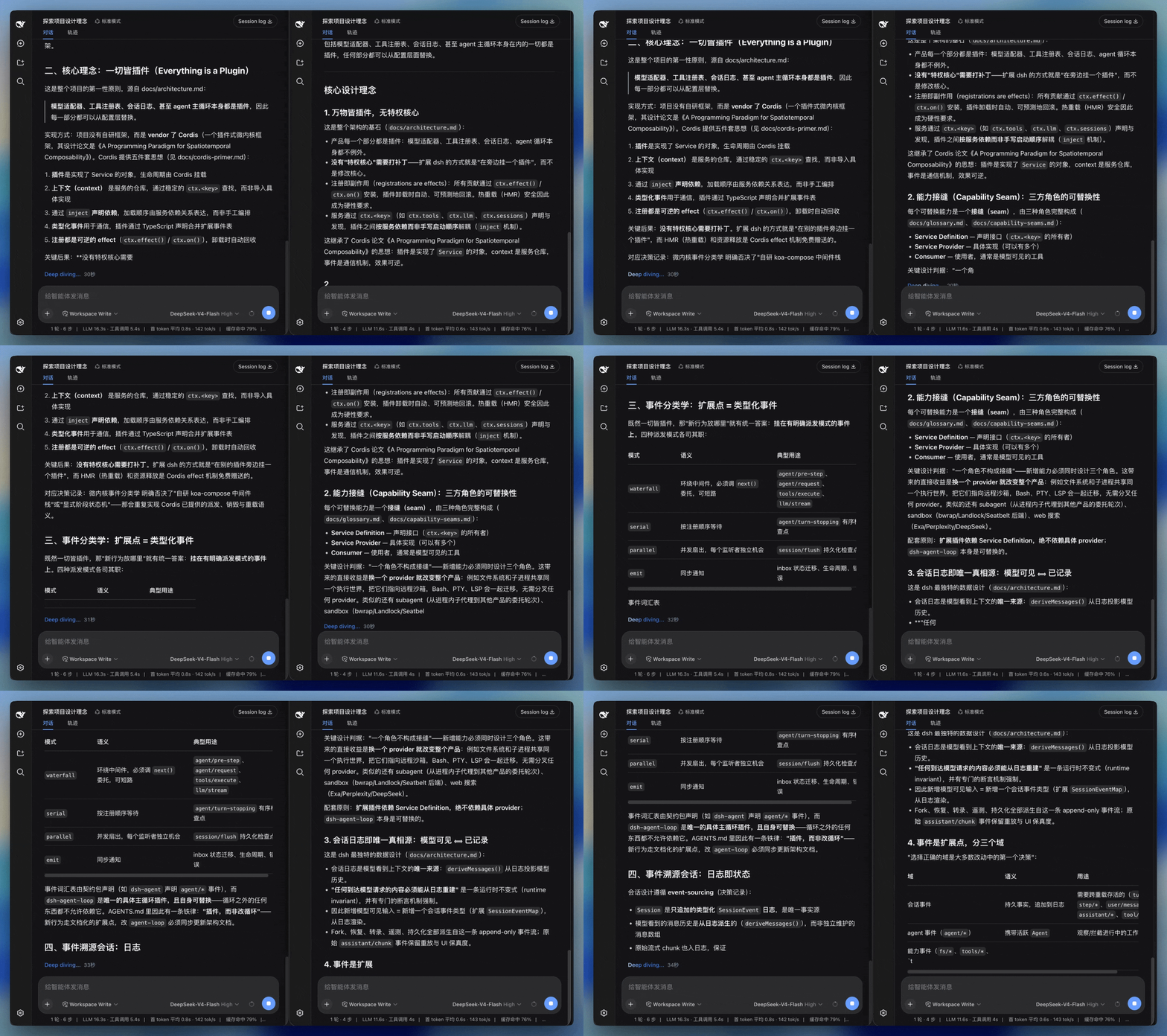
dsh-smooth-stream 为 DeepSeek Harness(dsh)Web UI 带来流畅的流式渲染和丝滑滚动。文字、Markdown、代码块、表格以及工具结果会随着输出自然呈现;内容逐步增长时,页面平稳跟随,整轮回复保持连贯的视觉节奏。
项目主页:https://laplace-bit.github.io/dsh-smooth-stream/
效果
左:默认 Web UI。右:dsh-smooth-stream。
核心体验
- 流畅渲染。 文字边到边呈现,Markdown 结构持续更新,标题、列表、代码块和表格在流式过程中保持自然的阅读状态。
- 丝滑滚动。 内容逐步变高时,页面沿连续的滚动轨迹平稳跟随,视线始终贴着正在生成的内容。
- 统一过渡。 换行、代码块、表格和工具结果使用一致的过渡方式,正文、思考过程与工具输出衔接自然。
- 自适应节奏。 渲染速度会根据输出速度和待显示内容调整,让慢速输出从容呈现,快速输出及时跟上。
安装
在 DeepSeek Harness 源码仓库里:
pnpm dsh plugin --profile web add dsh-smooth-stream
如果 PATH 上已经有 dsh:
dsh plugin --profile web add dsh-smooth-stream
npm 包带预构建的 lib/,无需 pnpm ≥10 的构建脚本授权,直接可装。
启动界面:
pnpm dsh web
Host 日志里应出现 [dsh-smooth-stream] plugin loaded!。
卸载:pnpm dsh plugin --profile web remove dsh-smooth-stream(或 dsh plugin --profile web remove dsh-smooth-stream)。
配置
组合包默认 preset: balanced。要换节拍,在 profile 的 cordis.patch.yml 里改:
preset | 手感 |
|---|---|
realtime | 更贴模型到达 |
balanced | 默认 |
silky | 缓冲更大,追上更慢 |
旧版的 mode、revealCharsPerSec、scrollSpeedPxPerSec 和 maxScrollSpeedPxPerSec 字段仍可被加载,以兼容已有 profile;当前自适应引擎仅使用 preset 调整节拍。
用户设置
在 Web 界面打开 设置 → 插件 → 插件配置,会看到一张 丝滑流式(Smooth stream) 卡片,其中包含:
- 启用丝滑流式渲染(默认开启):开启时由本插件接管回复和工具行的渲染与跟随;关闭后会撤销接管,完整使用 Harness 内置渲染。
- 自动展开思考:控制思考块在流式期间是否自动展开。主开关关闭时此选项不会生效。
“自动展开思考”开启时,思考块会在流式时自动展开、思考结束后收起;关闭后思考块保持折叠,仍可手动点开,且不会被流式状态抢回控制。
这些设置是用户级的持久化偏好,改完即生效,无需重启;会写进 DeepSeek Harness 的用户设置文档,而不是插件的组合配置。
关于与更新
- 版本 / 主页 / 许可证:见本页顶部与 package.json 的
version、homepage、repository、license字段;安装的插件列表可在 设置 → 插件 → 全部 里查看。 - 更新:卡片会显示 Host 当前加载的版本。只有当前 profile 明确把
dsh-smooth-stream声明为 npm 依赖时,更新按钮才会对该 profile 执行固定的包更新,并提示重启 Harness。link:或file:本地开发安装会显示为开发版本,更新按钮会保持禁用,避免覆盖你的源码目录。
也可以通过命令行更新 npm 安装的 profile:
dsh plugin --profile web update dsh-smooth-stream
(也可用 dsh plugin --profile web outdated 查看是否有新版本。)
常见问题
这是 DeepSeek 官方插件吗?
不是。它是面向 DeepSeek Harness(dsh)Web UI 的独立维护项目,采用 MIT 许可证,和 DeepSeek 没有从属关系。
dsh 插件怎么安装?
用内置插件命令:在 dsh 源码目录运行 dsh plugin --profile web add dsh-smooth-stream(见安装)。
能用 npm 安装吗?
能。dsh-smooth-stream 已发布到 npm,dsh plugin --profile web add dsh-smooth-stream 安装的就是预构建的 npm 包。
支持 prefers-reduced-motion 吗?
支持。系统开启减少动态效果时直接显示完整文本、不接管跟随;帧率低于 30 fps 且回复在屏外时,揭示自动暂停、恢复后再补上。

许可证
Read the usage guide →
Install steps, key points, FAQ and compatibility for this plugin — auto-derived from indexed fields.
Listing badge

[](https://deepseek-plugin.org/plugins/Laplace-bit/dsh-smooth-stream)Paste this markdown into your GitHub README to link back to this listing. The badge only states the listing — not a security endorsement.