Added a "Task DAG" entry to the DSH Web session title bar, rendering the current session, delegated sub-agents, and persistent workflows as a real-time navigable dependency graph.

- Language
- JavaScript
- License
- MIT
- Branch
- main
Install
$ dsh plugin --profile web add github:LeemanCheung/dsh-task-dagRun the command above in your terminal to install this plugin via the dsh CLI. You can switch Profile in the top-right corner. New to dsh? Read the beginner tutorial
Install via your agent
Install the DeepSeek Harness plugin LeemanCheung/dsh-task-dag for me: review the repository at https://github.com/LeemanCheung/dsh-task-dag first, then run the install command and verify the plugin loads successfully.
Paste this instruction to the DSH Web GUI assistant — it will install and verify for you.
At a Glance
Add a "Task DAG" entry to the DSH Web session title bar that renders the current session, its delegated sub-agents, and persistent workflow nodes into a top-down dependency graph. Nodes are draggable and clickable for navigation—a visualization tool for troubleshooting "what sub-tasks were derived from this task and which step are they at."
Core Capabilities
- Real-time Topology: Converts DSH's existing client projection into a top-down DAG; the graph refreshes when session state changes without Host-side polling
- Persistent Workflow Recovery: After DSH restarts, reconstructs workflow stages and members from workflow-run session nodes, preserving context without loss
- Workflow Grouping: Collapses workflow members under workflow nodes to avoid drawing duplicate direct edges from the root session to members
- Direct Navigation: Click (or press Enter/Space) on healthy sub-agent nodes still in the Session list to jump directly to the corresponding session
- Canvas Controls: Switch between "Fit All" and "Original Size Scrollable" views; drag empty areas to pan the canvas
- Node Drag Repositioning: Drag nodes to re-layout; edges follow in real-time; adjusted positions persist when the current Session is closed and reopened
- State Visualization: Colors are restrained to business blue/success green/error red/warning amber四种; other levels are expressed through spacing, fonts, borders, and line styles
- Safe Uninstallation: UI and styles are registered through Cordis lifecycle; completely removed when the plugin is uninstalled with no DOM residue
Technical Implementation
- Language: JavaScript (src/client.js uses CommonJS, src/graph-model.js uses ESM, scripts/build.mjs uses ESM)
- Key Dependencies:
@deepseek-ai/dsh-client-runtime/@deepseek-ai/dsh-client-locale/@deepseek-ai/dsh-client-ui-conversation/@deepseek-ai/dsh-client-ui-primitives/@deepseek-ai/dsh-client-ui-workflow-run/react^18.2.0 - Architecture Pattern: Pure Cordis client plugin;
cordis.patch.ymlregisters a plugin namedtask-dagin the host;apply(ctx)injectsTaskDagActioninto the session title bar viactx.slots.inject('conversation.session.header.actions'), usesctx.effectto register stylesheets and Chinese/English dictionaries, and collapses the catalog viactx.sessions.setSubagentCatalogOpenwhen closing the panel; the DAG is computed by pure functionsbuildGraph+graphLayout, with UI rendered via React + ReactDOM Portal todocument.body - Entry Files:
src/client.js(UI components) +src/graph-model.js(bloodline normalization, workflow grouping, deterministic vertical layout), bundled byscripts/build.mjsinto browser-loadablelib/client.js
Use Cases
For users responsible for managing multi-Agent collaboration sessions: when a Session spawns many one-off sub-agents or persistent sub-agents, and you want to instantly see "which step is still running, who spawned whom, and which workflow stage they belong to." Suitable for demo scenarios and on-site troubleshooting of complex multi-step tasks, avoiding the need to scroll back and forth in the sub-session list.
Prerequisites & Compatibility
| Dependency | Minimum Version | Description |
|---|---|---|
| DSH | Not declared | package.json does not declare dsh version dependency; dsh.client.platform explicitly set to web, only Web profile available |
| Node.js | >= 20 | package.json engines.node declares >=20; development recommends 20.19+ / 22.13+ / 24+, CI currently uses Node 22 |
| Platform | Web | package.json dsh.client.platform is web; browser-based read-only visualization, CLI / Desktop profile not supported |
| Native Modules | None | Only uses DSH client runtime + React 18, no native dependencies introduced |
Installation
dsh plugin --profile web add github:LeemanCheung/dsh-task-dag
Configuration
No additional configuration required. After installation, restart dsh web once, and the "Task DAG" entry will appear in the session title bar—no files or environment variables need to be edited.
FAQ
Q: I don't see the "Task DAG" entry in the session after installation. What should I do?
A: Confirm the profile is web (add --profile web to the command). First-time installation requires restarting the dsh web process and refreshing the browser page; subsequent enablements or upgrades typically don't require a restart.
Q: Clicking a node doesn't open the corresponding session. What should I do?
A: Only sub-agent nodes that still appear in the DSH Session list are navigable; if a session is archived, deleted, or not currently visible, its node won't respond to clicks. Use the "Refresh" button in the panel to re-fetch the sub-agent catalog.
Q: I dragged nodes to adjust their positions. Will they persist for the next session?
A: Positions are only preserved in the current page's React state for the current Session. After switching to another Session, refreshing the page, or restarting DSH, it will return to the plugin's deterministic auto-layout; the workflow topology itself is still rebuilt from persistent workflow-run data.
Q: Does this plugin read my files, make network requests, or inject prompts?
A: No. This is a read-only visualization plugin that runs entirely in the browser; it doesn't read workspace files, send network requests, register model tools, or persist session content or credentials. See SECURITY.md for details.
Q: Is CLI or Desktop profile supported?
A: No. package.json dsh.client.platform explicitly declares "web", and cordis.patch.yml only registers a client-side plugin with no node-side implementation.
Q: The status or labels in the graph look outdated. What should I do?
A: The panel automatically fetches the observed sub-agent catalog upon opening; if there's a discrepancy, click the "Refresh" button in the toolbar to fetch again. Workflow nodes are always driven by persistent data projection; the refresh button won't rearrange workflow ownership.
Q: How do I uninstall?
A: Run dsh plugin --profile web remove dsh-task-dag, then restart dsh web once.
Ease of Use
Beginner — Plug and play with no config files or environment variables; click the entry to open the graph, drag nodes, click to navigate, and other interactions are all GUI-based—no code or command-line operations required.
Known Issues & Limitations
- Layout preservation is bounded: manually dragged node positions are only stored in the current page's React state for the current Session; switching Sessions, refreshing the page, or restarting DSH returns to deterministic auto-layout, see source code at
src/client.js:549useEffect(() => { setNodePositions({}); }, [sessionId]) - Workflow member attribution uses "last resolved workflow" to overwrite previous attribution and status, so if the same sub-agent is referenced by multiple workflows simultaneously, it will be grouped under the last resolved workflow, see source code at
src/graph-model.js:170-175 - Projection discards orphans that cannot be traced to the current Session, missing parent node chains, and circular bloodlines, while still generating deterministic vertical levels for legitimate deep dependency chains, see source code at
src/graph-model.js:72-91 - Status colors are intentionally limited to business blue, success green, error red, and warning amber四种; other levels (workflow vs sub-agent vs root session) are distinguished only by icons, spacing, borders, and line styles, see source code at
src/client.js:69(zh dictionarystatus.*) andREADME.md:71 - No focus trap: when the panel is open, only
Escapeto close and return focus to the entry button; keyboard dragging of panel, canvas, or nodes is not supported, see source code atsrc/client.js:558-568andREADME.md:69 - Current check pipeline (
npm run check) only covers syntax, pure model unit tests, and jsdom smoke testing; theme visuals, responsive layout, focus, and uninstallation behavior in real profiles still require manual or browser E2E verification, see source code atREADME.md:114-115
dsh-task-dag
A live task topology for DeepSeek Harness Web.
See Sessions, delegated subagents, and durable workflows as one navigable DAG.




English · 中文
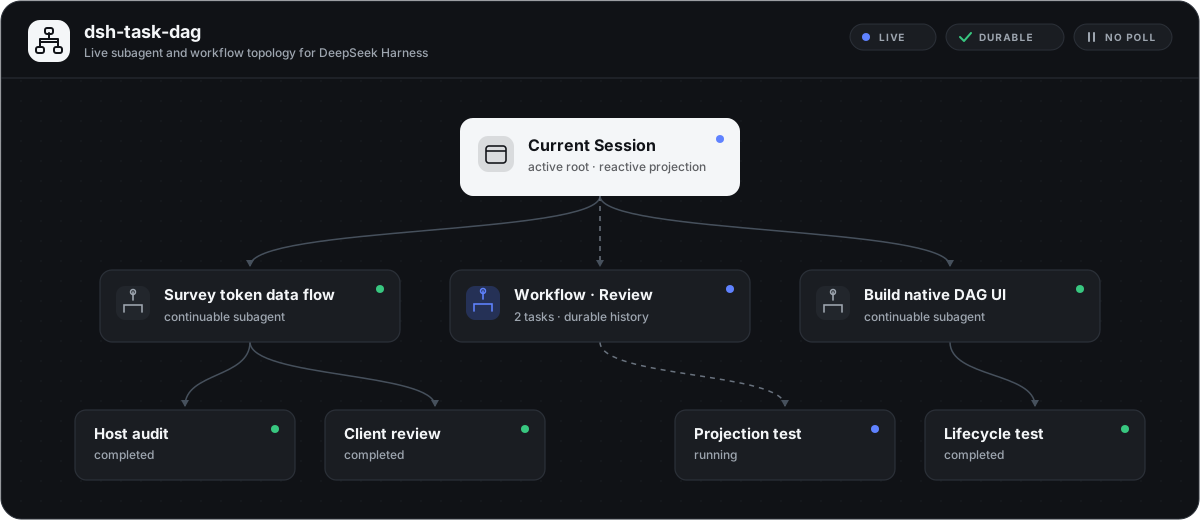
At a glance
dsh-task-dag turns DSH's existing Client projections into a top-to-bottom dependency graph. It keeps no parallel workflow database and sends no polling requests: when Session state changes, the graph changes with it.
| Capability | Behavior |
|---|---|
| Live topology | Reacts to Session and subagent catalog snapshots without Host polling. |
| Durable workflows | Reconstructs workflow phases and members from workflow-run Conversation Nodes after restart. |
| Clear ownership | Groups workflow members under workflow nodes instead of drawing duplicate root-to-child edges. |
| Direct navigation | Opens healthy, list-visible subagent Sessions from their graph nodes. |
| Canvas control | Fits the whole graph or pans the original-size canvas; nodes can be dragged and keep their rearranged positions while the current Session panel is reopened. |
| Bounded layout persistence | Manual node positions live only in the current page's current-Session React state; switching Sessions, refreshing the page, or restarting DSH restores deterministic automatic layout. Workflow topology itself is rebuilt from durable Conversation Nodes. |
| Robust projection | Rejects broken or cyclic lineage while retaining deterministic layers for valid deep dependency chains. |
| Native presentation | Uses DSH theme semantics, restrained status colors, and custom SVG icons in light and dark modes. |
| Lifecycle safe | Registers UI and styles through Cordis lifecycle ownership and removes them on unload. |
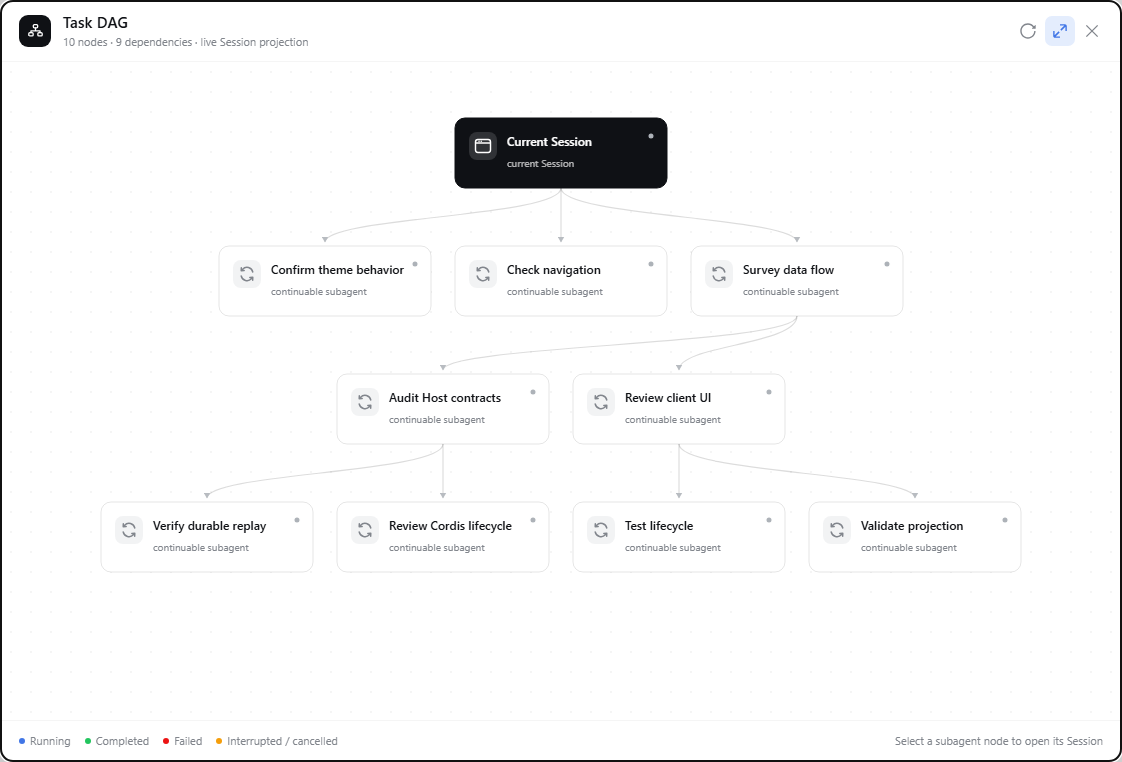
Live screenshot
Captured from a running DSH Web Session with task labels anonymized. The panel, layout, edges, controls, and status presentation are the actual plugin UI.
Install
dsh plugin --profile web add github:LeemanCheung/dsh-task-dag
Restart the current DSH Web process once after the first installation, then refresh the page. The Task DAG action appears in the Session header.
For a version-pinned installation:
dsh plugin --profile web add github:LeemanCheung/dsh-task-dag#v1.2.0
Using the graph
| Action | Result |
|---|---|
| Select Task DAG | Opens the Session-scoped graph panel, enables the related parent catalogs, and refreshes them. |
| Drag empty canvas | Pans the scrollable original-size canvas. |
| Drag a node | Rearranges it while its edges stay in sync; the layout survives close and reopen for the current Session. |
Select a subagent node, or press Enter / Space on it | Opens that Session when it is available in the Session list. |
| Toggle fit mode | Switches between a whole-graph overview and the original scrollable canvas. |
| Refresh | Refreshes observed subagent catalogs; workflow nodes remain projection-driven. |
| Drag the title bar | Repositions the panel without capturing toolbar controls. |
Press Escape or select close | Closes the panel and restores focus to the trigger. The dialog has no focus trap and does not offer keyboard dragging for the panel, canvas, or nodes. |
Status colors are deliberately limited to business blue, success green, error red, and warning amber. All other hierarchy is expressed through spacing, typography, borders, and line styles.
Architecture
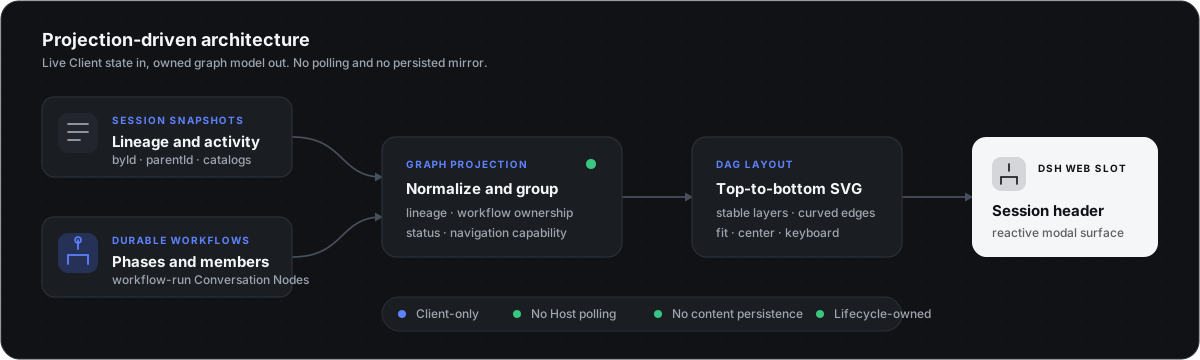
The browser plugin combines three durable Client-facing sources:
SessionListState.byIdandparentIdprovide subagent lineage.SessionListState.subagentsByParentprovides labels, modes, activity, and catalog health.workflow-runConversation Nodes provide workflow phases, members, and outcomes.
The package-owned graph-model Module normalizes lineage, inserts workflow grouping nodes, derives navigation capability, and lays out stable vertical layers. The UI Module renders that projection into conversation.session.header.actions.
There is no process-local workflow cache, model prompt contribution, model tool, Host RPC endpoint, or polling loop.
Projection boundaries
Only descendants that can be traced to the current Session through origin: "subagent" lineage are shown. Orphans, missing-parent chains, and cycles are ignored. A catalog's running activity takes precedence over a completed Session summary; workflow members use their workflow-run status; unknown statuses render as historical/idle. If the same member appears in more than one workflow, the last parsed workflow membership owns its displayed grouping and status.
Security and permissions
This is a browser-only, read-only visualization plugin. It does not read workspace files, execute commands, open network connections, register model tools, or persist Session content and credentials.
See SECURITY.md for the reporting policy and complete trust boundaries. Private vulnerability reporting is enabled for the repository.
Development
The runtime package declares Node.js 20+. For development and the pinned jsdom test stack, use Node.js 20.19+, 22.13+, or 24+; CI currently runs Node.js 22.
npm install
npm run check
The check pipeline:
- validates source syntax and the pure graph-model Module;
- runs graph-model unit tests for lineage, workflow grouping, deterministic layout, and deep chains;
- rebuilds and validates the precompiled browser module;
- runs jsdom interaction smoke tests for controls, canvas panning, persistent node dragging, and node navigation;
- verifies in CI that committed
lib/client.jsis reproducible from source.
These are pure-model and jsdom smoke checks, not a full DSH Web end-to-end suite. Theme fidelity, responsive layout, complete focus behavior, and unload behavior in a real profile still need manual or browser-E2E verification.
scripts/build.mjs embeds src/graph-model.js, src/client.js, and src/style.css into the committed lib/client.js. Do not edit that generated file directly: change src/, then run npm run build or npm run check before committing.
Troubleshooting
| Symptom | Check |
|---|---|
| Task DAG is missing | Confirm this is the Web profile, restart dsh web, and refresh the page. |
| A node cannot open | Only Sessions that remain visible in DSH's Session list are navigable. |
| Child status/labels look stale | Select Refresh to refresh observed subagent catalogs. |
Remove
dsh plugin --profile web remove dsh-task-dag
License
MIT © LeemanCheung
Read the usage guide →
Install steps, key points, FAQ and compatibility for this plugin — auto-derived from indexed fields.
Listing badge

[](https://deepseek-plugin.org/plugins/LeemanCheung/dsh-task-dag)Paste this markdown into your GitHub README to link back to this listing. The badge only states the listing — not a security endorsement.