Added a "Model Pro" page in DSH Web settings for centrally managing model entries from various providers (context, output, input modality, inference tier), with one-click parameter copy from the built-in catalog.

- Language
- JavaScript
- License
- MIT
- Branch
- main
Install
$ dsh plugin --profile web add github:LiangYin233/dsh-provider-model-configuratorRun the command above in your terminal to install this plugin via the dsh CLI. You can switch Profile in the top-right corner. New to dsh? Read the beginner tutorial
Install via your agent
Install the DeepSeek Harness plugin LiangYin233/dsh-provider-model-configurator for me: review the repository at https://github.com/LiangYin233/dsh-provider-model-configurator first, then run the install command and verify the plugin loads successfully.
Paste this instruction to the DSH Web GUI assistant — it will install and verify for you.
One-Sentence Description
Adds a "Model Pro" page to DSH Web Settings that centralizes viewing, creating, editing, copying, and deleting model entries under each configured provider. Supports setting context window, max output, input modality, reasoning effort levels, and inference distribution compatibility toggles, with one-click parameter copying from the built-in llm-pi-ai model catalog.
Core Features
- List explicit model entries under configured providers with current configuration summary, supporting one-click entry into edit or delete mode (src/host/index.js:147-207)
- Create new model: manually set display name, context window, max output, input modality (text/image), reasoning effort level, and compatibility toggle after entering model ID (src/host/index.js:210-325)
- Copy & Fill: Top "Use Model Preset" button opens source selector to choose a model from built-in catalog or another provider, pre-filling context, output, modality, and reasoning effort into the form (src/client/page.tsx:431-480)
- Reasoning effort controlled dropdown: Enumerated values limited to
off / minimal / low / medium / high / xhigh / max, each level requires actual request field value (wire value) to avoid typos (src/shared/thinking.js:13-14 / src/host/index.js:255-263) - Inference distribution compatibility toggle: Can explicitly write
thinkingFormat(openai / deepseek / openrouter / together / zai / qwen / string-thinking / ant-ling) andsupportsReasoningEffort(true / false / unset), only read by openai-completions inference distribution (src/shared/thinking.js:16-17 / src/host/index.js:267-283) - Unset fields maintain "inherit from catalog" semantics: empty / unchecked fields will not write explicit default values, will inherit from catalog entries when applying configuration next time (src/client/model.ts:18-48 / src/host/index.js:310-313)
Technical Implementation
- Language: TypeScript (Client:
src/client/page.tsx/static.tsx/dynamic.ts) + JavaScript (Host:src/host/index.js/dynamic.js/contract.js); build with esbuild (package.json:46-48) - Key Dependencies:
@deepseek-ai/cordis(plugin runtime),@deepseek-ai/dsh-typert-protocol+@deepseek-ai/dsh-typert-registry(Host RPC & strict schema),@deepseek-ai/dsh-client-runtime+dsh-client-ui-slots(frontend slots & remote calls),@deepseek-ai/dsh-client-locale(zh/en dictionaries) (package.json:53-69) - Architecture Pattern: Dual-half Cordis Bundle plugin —
cordis.patch.ymlmountsdsh-provider-model-configuratorat web Profile bundle layer; Host half instantiatesModelConfiguratorRuntime(inherits fromTypertRemoteService) inapply(ctx), and registers 6 strict descriptors viactx.typert.register(TYPERT_MANIFEST); Client half gets Remote handle viactx.remote.$mount, and registers "Model Pro" page viaslots.inject('settings.section', ...)(slot order = 11) (src/host/index.js:384-387 / src/client/static.tsx:43-87 / cordis.patch.yml:4-6) - Entry Files: Host entry
lib/index.js(built fromsrc/host/index.js); Client entrylib/client.js(built fromsrc/client/static.tsx); also dynamic plugin versionsrc/host/dynamic.js+dist/dynamic-client-body.js(fromsrc/client/dynamic.ts) as side track for cordis_define dynamic activation (src/host/dynamic.js:14 / src/client/dynamic.ts:7)
Use Cases
After using DSH Web for a while, users have already set up several providers through the Models page (DeepSeek / Alibaba Cloud Bailian / self-hosted OpenAI compatible endpoints, etc.), but each model entry's context window, reasoning effort, and inference distribution compatibility toggle either require manual settings.yaml edits, or are limited by fields provided by DSH's built-in UI. This plugin moves "modifying a model entry" to the settings page in form format, and allows copying parameters directly from similar models in the built-in catalog, eliminating the need to check documentation or browse settings.yaml.
Prerequisites & Compatibility
| Dependency | Minimum Version | Description |
|---|---|---|
| DSH | >=0.0.1 (declared in dsh.plugin.json#engines.dsh) | Actually requires host to have llm-pi-ai adapter loaded, and satisfy peerDependencies: @deepseek-ai/cordis ^4.0.1-rc.1, @deepseek-ai/dsh-typert-protocol, @deepseek-ai/dsh-typert-registry, @deepseek-ai/dsh-client-runtime, @deepseek-ai/dsh-client-ui-slots, @deepseek-ai/dsh-client-locale, @deepseek-ai/dsh-api-gateway (package.json:53-69 / dsh.plugin.json:6-8) |
| Node | ^22.19 or >=24 | Declared in package.json#engines.node (package.json:50-52) |
| Platform | Cross-platform | Only operates on Web (dsh.client.platform = "web"), no platform check in source code |
| Native Modules | None | Source code and dependencies are pure JS / TS |
Installation
dsh plugin --profile web add github:LiangYin233/dsh-provider-model-configurator
Configuration Options
This plugin requires no additional configuration. All "target provider list / context / reasoning effort / write toggle" required by the page are read from the host's loaded llm-pi-ai adapter and settings.writable state. After host configuration is complete, it can be used directly in the settings page.
Fields operable within the plugin (when editing a model entry in "Model Pro" page):
| Field | Type | Description | Default Value |
|---|---|---|---|
| Model ID (id) | String | Unique identifier for the entry, required when creating, cannot be changed when editing | Empty |
| Display Name (name) | String | Friendly name displayed in model list; leave empty to not write this field | Empty (inherit from catalog) |
| Context Window (contextWindow) | Integer (>0) | In tokens | Empty (inherit from catalog) |
| Max Output (maxTokens) | Integer (>0) | In tokens | Empty (inherit from catalog) |
| Input Modality (input) | Enum checkboxes text / image | Marks what input modalities the model accepts; checking "unset" means not writing this field | Unset (inherit from catalog) |
| Reasoning Effort (reasoningEfforts) | One of off / levels / unset | off = mark as non-reasoning model; levels = check at least one of off / minimal / low / medium / high / xhigh / max and fill in wire value; unset = do not write this field | Unset (inherit from catalog) |
| Compat: Thinking Format (compat.thinkingFormat) | Enum | openai / deepseek / openrouter / together / zai / qwen / string-thinking / ant-ling / unset; only read by openai-completions inference distribution | Unset (auto-detect) |
| Compat: Accept reasoning_effort (compat.supportsReasoningEffort) | Boolean / Unset | Only read by openai-completions inference distribution | Unset (auto-detect) |
FAQ
Q: After installation, where do I access this page?
A: After installation, restart the Web service and refresh the page. "Model Pro" entry will appear in Settings → left navigation bar (located after Models page). Click to enter (src/client/static.tsx:13-14).
Q: What is the relationship between this page and DSH's built-in Models settings page?
A: It only modifies entries in the existing "provider model list" (context, max output, input modality, reasoning effort, inference distribution compatibility toggles). It doesn't create providers, modify API keys, or replace the Models page's provider creation flow. The plugin reads the target list from providers you already created in the Models page (src/host/index.js:147-207).
Q: How does the "Use Model Preset" button work?
A: Clicking "Use Model Preset" opens a popup, first select source provider, then select model. Registered providers use llm.listModels, unregistered (dormant) providers use llm.discoverModels to read catalog metadata. After selection, context, output, modality, and reasoning effort are pre-filled into the form, which can be further modified manually (src/host/index.js:69-93).
Q: When editing an existing model, what happens to fields not shown in the form?
A: They are preserved. The plugin only overwrites fields you fill in (name, contextWindow, maxTokens, input, reasoningEfforts, compat). Other fields (like description, tools) remain unchanged. If you leave a field empty in the form, that field will be deleted from the old entry and revert to catalog inheritance, not keep the old value (src/host/index.js:308-313).
Q: What happens when deleting the last model entry of a provider?
A: For built-in catalog providers, the explicit list will be cleared and revert to built-in catalog. For custom providers, the plugin will refuse to delete and prompt "Must keep at least one explicit model entry" (src/host/index.js:355-365).
Q: What is the relationship between reasoning effort levels and thinking format?
A: Reasoning effort levels are what the model itself declares as "thinking intensity" (one of off / minimal / low / medium / high / xhigh / max + corresponding wire value). thinkingFormat / supportsReasoningEffort only affect how inference distribution maps these levels to request fields on the openai-completions path. Default values are auto-detected from catalog entries or baseURL (src/shared/thinking.js:13-17).
Q: What happens when the plugin is in read-only mode (settings.writable=false)?
A: A "Current setting is read-only" warning appears at the top. All edit / delete / apply config buttons will be disabled. Remote calls will be directly rejected by host and return "Settings read-only, cannot write model configuration" (src/host/index.js:215).
Difficulty Level
Beginner — The page is a regular form with all options exposed via dropdowns or input boxes. Users don't need to understand internal concepts like Typert / settings.mutate / llm-pi-ai adapters. The only advanced point to understand is the "unset (inherit from catalog)" semantics, to avoid mistaking empty for deleting values.
Known Issues & Limitations
- Once a built-in catalog provider has explicit model entries written to its list, subsequent catalog updates won't automatically merge into that list. Only after deleting all explicit entries will it revert to the built-in catalog (README.md:34 / src/host/index.js:288-302)
- When deleting to zero explicit entries, custom (non-catalog) providers retain a hard limit of at least one entry, cannot be completely cleared (src/host/index.js:355-365)
- The form only exposes fields like name / contextWindow / maxTokens / input / reasoningEfforts / compat. Fields like description and tools in model entries cannot be edited through this page, can only be preserved or deleted (src/host/index.js:308-313)
- This plugin only operates on Web platform (
dsh.client.platform: "web"). Desktop / terminal hosts don't use the settings.section slot (package.json:18-26) - Version 0.3.9's
dsh.plugin.json#engines.dshis declared as>=0.0.1, very loose. Actual usability is constrained by peerDependencies (cordis ^4.0.1-rc.1, dsh-typert-protocol, dsh-typert-registry, etc.) (package.json:53-69 / dsh.plugin.json:6-8)
一个 DeepSeek Harness (DSH) 插件:在独立设置页「模型 Pro / Model Pro」中集中查看、新建、编辑、复制与删除已配置提供商下的模型条目——上下文窗口、最大输出、输入模态、推理档位与推理兼容开关。还可以从内置的 llm-pi-ai 模型列表读取您所需要配置的模型的上下文参数、最大Token,无需自行填写、手动查询。
界面预览
| 模型 Pro 设置页 | 复制来源选择器 |
|---|---|
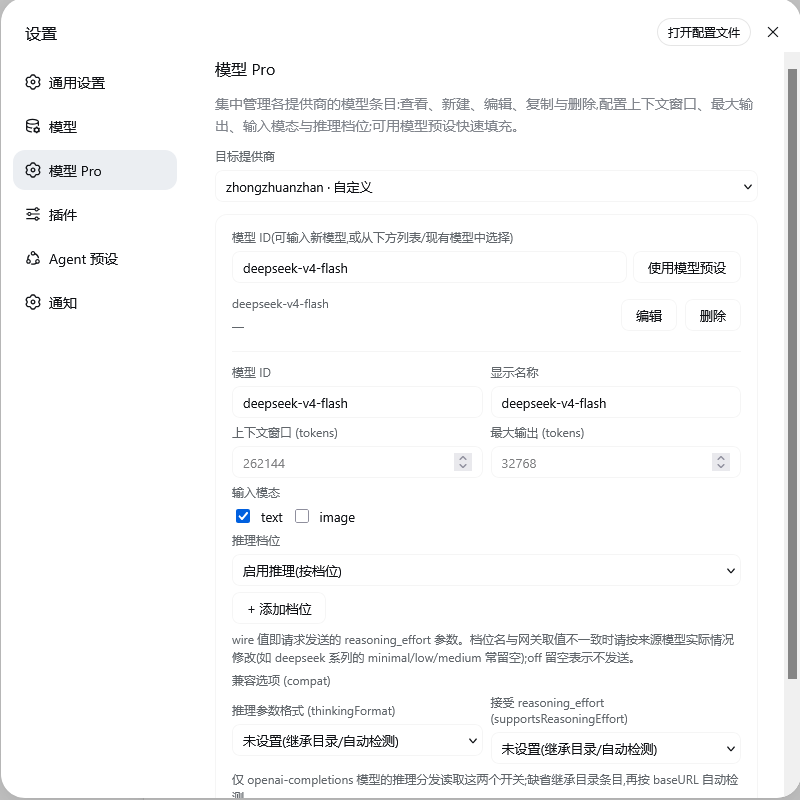 | 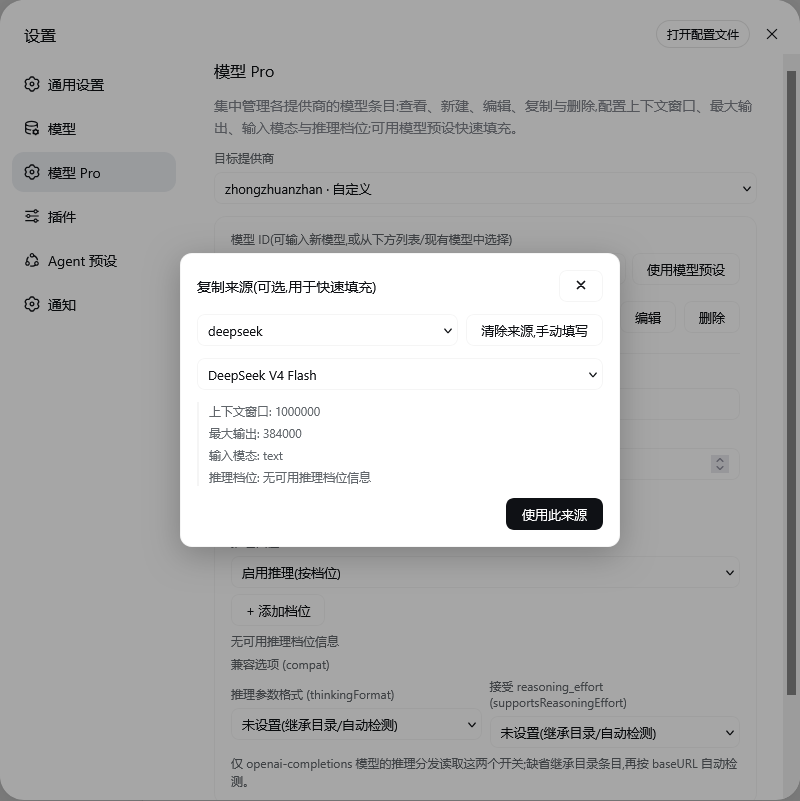 |
安装
# 从 GitHub 安装
dsh plugin --profile web add github:LiangYin233/dsh-provider-model-configurator#v0.3.9

# 或从 GitHub tarball 安装
dsh plugin --profile web add https://github.com/LiangYin233/dsh-provider-model-configurator/archive/refs/tags/v0.3.9.tar.gz

# 或从本地打包安装
npm pack
dsh plugin --profile web add ./dsh-provider-model-configurator-0.3.9.tgz
安装后重启 Web 服务器并刷新页面,打开设置 → 左侧导航「模型 Pro」(Models 页之后)。
功能
- 选择目标提供商,列出其显式模型条目与配置摘要,可编辑 / 删除;
- 新建:输入模型 ID,手动填写显示名、上下文窗口、最大输出、输入模态(text/image)、推理档位(档位 → wire 值,
off留空 = 不发送);推理档位与输入模态均支持「未设置(继承目录)」,避免把未配置的字段写成显式默认值; - 复制填充:「使用模型预设」打开来源选择器,从预设目录或其他提供商挑一个模型快速填充表单;
- 兼容开关 (compat):编辑
thinkingFormat(openai / deepseek / openrouter / together / zai / qwen / string-thinking / ant-ling)与supportsReasoningEffort(true / false / 未设置),供 openai-completions 推理分发读取;
目录快照行为:在尚未显式配置模型列表的目录提供商上新建/应用模型时,插件会把内置目录的当前模型列表整体写入为该提供商的显式条目(目录中已有的 ID 原地更新,新 ID 追加),之后再编辑均基于这份显式列表;目录后续更新不会自动合并进已快照的列表。目录提供商若删到零个显式条目,则回退为内置目录(未快照)状态。
仓库结构
├── package.json        bundle 清单(dsh.bundle.patch / dsh.client / exports)
├── cordis.patch.yml    bundle patch:挂载 dsh-provider-model-configurator
├── dsh.plugin.json     插件元数据(id / version / main)
├── docs/               界面截图(README 预览用)
├── lib/                构建产物(随包发布,由 build.mjs 生成)
│   ├── index.js        ← src/host/index.js
│   ├── contract.js     ← src/host/contract.js
│   └── client.js       ← src/client/static.tsx
├── shared/             构建产物:src/shared/thinking.js(共享常量;lib/contract.js
│                       运行时按 ../shared/thinking.js 解析到包根目录)
├── src/
│   ├── host/           Host 半区源码(index.js 静态 / dynamic.js 动态插件)
│   ├── client/         Client 半区源码(page.tsx / model.ts / page.css / locales/)
│   └── shared/         thinking.js — 推理档位 / 推理格式常量的单一来源
├── scripts/
│   └── check-dynamic.mjs  动态半区语法校验 + 常量同步校验(npm run check 执行)
├── build.mjs           esbuild 构建(lib/ 与 dist/dynamic-client-body.js)
└── tsconfig.json
License
MIT
鸣谢
Read the usage guide →
Install steps, key points, FAQ and compatibility for this plugin — auto-derived from indexed fields.
Listing badge

[](https://deepseek-plugin.org/plugins/LiangYin233/dsh-provider-model-configurator)Paste this markdown into your GitHub README to link back to this listing. The badge only states the listing — not a security endorsement.