Provides a Codex-style user interface for chat interactions.
ⓘ This plugin is a sub-package of the MichengAI/dsh-codex-ui monorepo — stars and activity count the whole repository.

- Language
- TypeScript
- License
- Apache-2.0
- Branch
- main
Install
$ dsh plugin --profile web add @michengai/dsh-codex-suiteRun the command above in your terminal to install this plugin via the dsh CLI. You can switch Profile in the top-right corner. New to dsh? Read the beginner tutorial
Install via your agent
Install the DeepSeek Harness plugin MichengAI/dsh-codex-ui/packages/dsh-codex-suite for me: review the repository at https://github.com/MichengAI/dsh-codex-ui first, then run the install command and verify the plugin loads successfully.
Paste this instruction to the DSH Web GUI assistant — it will install and verify for you.
一句话定位
DSH Codex Suite 是一个一键安装的插件聚合包,把 Codex 风格侧栏、专家管理、技能管理、归档管理、IM 助理和定时任务 6 个插件统一装进同一个 profile,适合希望一次获得 DSH Web 完整增强体验的用户。
核心能力
- 一键安装 6 个子插件:Codex UI、专家、技能、归档、IM 助理、定时任务
- 替换 DSH 默认侧栏为 Codex 风格侧栏,接管工作区与会话树
- 替换默认工作区与会话投影为归档管理版本,提供永久删除和归档会话管理
- 在「设置」中新增「连接器」与「关于」分区,展示配套插件状态并支持一键安装缺失项
- 注册 6 个子插件到同一 profile,版本相互锁定,避免浮动
latest带来的不确定性 - 把会话投影缓存改为每 200 事件或 5 秒写一次盘,并把自动化任务的并发、超时与历史保留参数显式注入
技术实现
- 语言: YAML (聚合清单) + TypeScript (子插件源码,不在本包内)
- 关键依赖:
@michengai/dsh-codex-ui、@michengai/dsh-agency-agents、@michengai/dsh-skills-manager、@michengai/dsh-archive-manager、@michengai/dsh-im-connect、@michengai/dsh-automation - 架构模式: Cordis patch 聚合——通过
cordis.patch.yml集中声明disabled与insert,把多个子插件一次性挂到同一 profile;子插件本身是独立 npm 包,本包只负责锁定版本与统一注册 - 入口文件:
packages/dsh-codex-suite/cordis.patch.yml(54 行),由 DSH 在 profile 顶层解析
适用场景
已经在使用 DeepSeek Harness Web 并希望一次性获得完整 Codex 风格增强体验的用户,尤其是想同时获得 Codex 侧栏、专家与技能管理、归档清理、IM 助理接入和定时任务能力的场景。如果你只需要换侧栏 UI,建议直接装 @michengai/dsh-codex-ui 独立包。
前置依赖与兼容性
| 依赖 | 最低版本 | 说明 |
|---|---|---|
| DSH Web | >=0.1.0-rc.0 <0.2.0 | 聚合包基于该区间子包构建,dshmarket/自动化等模块依赖该运行时 |
| Node.js | >=22.0.0 | 从源码二次开发或本地构建时需要 |
| 平台 | Web | dsh.client.platform 显式声明为 web,不适用于 Desktop 或 CLI 独立部署 |
| 原生模块 | 无 | 仅使用 Node 内置模块 (fs/promises、crypto、child_process 等),无需要平台编译的依赖 |
| pnpm 布局 | nodeLinker: hoisted | 严格隔离布局下子包可能安装成功但启动时无法解析 |
安装方式
dsh plugin --profile web add github:MichengAI/dsh-codex-ui/packages/dsh-codex-suite
配置项
本插件在 cordis.patch.yml 中直接为两个子插件注入了运行时参数,普通用户通常无需修改:
| 配置 | 类型 | 说明 | 默认值 |
|---|---|---|---|
session-projection-cache-archive-manager.writeEveryEvents | number | 会话投影缓存每累计多少事件写盘一次 | 200 |
session-projection-cache-archive-manager.writeIntervalMs | number | 会话投影缓存写盘的时间间隔(毫秒) | 5000 |
dsh-automation.maxConcurrentRuns | number | 定时任务同时最多并发运行几个 | 2 |
dsh-automation.runTimeoutMinutes | number | 单次定时任务运行的超时时间(分钟) | 60 |
dsh-automation.misfireGraceMinutes | number | 错过的定时任务在多少分钟内仍允许补跑 | 15 |
dsh-automation.historyLimit | number | 定时任务历史记录最多保留多少条 | 200 |
常见问题
Q: 这个聚合包和单独装 dsh-codex-ui 有什么区别?
A: 单独装 dsh-codex-ui 只会得到 Codex 风格侧栏;装聚合包会一次性装好侧栏、专家、技能、归档、IM 助理、定时任务 6 个插件,且版本互相锁定。如果只需要侧栏功能,推荐独立安装。
Q: 已经单独装了 6 个插件里的某一个,可以直接再装聚合包吗?
A: 不可以。聚合包和单独安装互斥。两套 patch 会冲突,需要先卸载已安装的 6 个子插件中的全部,再装聚合包。
Q: 安装时报"无法解析子包"或启动时报 patch 找不到,怎么办?
A: 通常是 pnpm 严格隔离布局导致的。本聚合包的 patch 从 profile 顶层解析子插件,需要在 profile 的 pnpm-workspace.yaml 设置 nodeLinker: hoisted 后重新安装。
Q: dshmarket(插件市场)在这个聚合包里吗?
A: 不在。dshmarket 是可选功能,需要时单独安装即可。
Q: 装完后怎么验证 6 个插件都生效?
A: 运行 dsh --profile web --dump-config,配置输出中应该同时包含 codex-ui、agency-agents、skills-manager、archive-manager、im-connect、dsh-automation,再重启 DSH Web 并硬刷新浏览器。
Q: 怎么升级子插件?
A: 不要单独升级某个子插件。聚合包会把每个子插件锁到经过验证的精确版本,需要升级时等待并安装聚合包的新版本。
Q: 怎么完全卸载这个聚合包?
A: 通过 dsh plugin --profile web remove @michengai/dsh-codex-suite 移除;它带的 6 个子插件会被一并移除,然后重启 DSH Web 即可恢复官方默认侧栏等界面。
上手难度
入门 — 复制一行安装命令、重启 DSH Web、硬刷新浏览器即可看到效果,无需任何代码或配置修改。
已知问题与限制
- 与单独安装的 6 个子插件互斥:同一 profile 不要同时存在两套 patch,会导致侧栏和工作区服务冲突
- 严格 pnpm 隔离布局下,子包可能安装成功但启动时无法解析,需要把 profile 的
pnpm-workspace.yaml改为nodeLinker: hoisted dshmarket(插件市场)不在聚合包内,需要时单独安装- 0.2.78 版本曾因动画切换问题回退宿主侧栏宽度动画,0.2.79 修复了窄轨图标居中和漂移问题;升级到最新套件版本可避免
- 子插件升级通过发布新聚合包版本统一交付,不会在用户安装时动态解析浮动
latest - 严格 pnpm 模式下,部分子包(如
agency-agents、skills-manager)会被 DSH 标记为 optional,首次安装时若网络抖动可能提示"可选依赖跳过",不影响主体功能
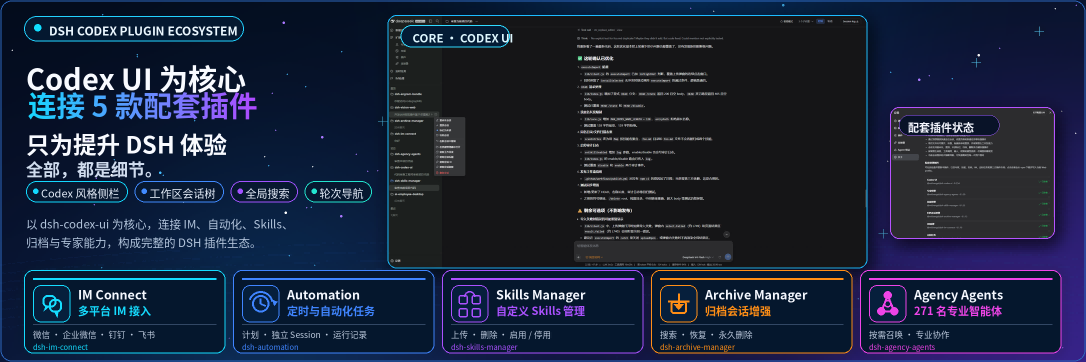
DSH Codex UI
Rebuild the DeepSeek Harness Web sidebar, workspace tree, search, and turn navigation in a Codex-style layout




DSH Codex UI is a community-maintained DeepSeek Harness (DSH) plugin, not an official DeepSeek AI product. It uses public DSH slots only and does not modify host source code or conversation data.
Features
- Replace the default sidebar through the official
sidebarslot and keepsidebar.workspaces,sidebar.settings, andsidebar.footer.action. - Provide a Codex-style header with brand wordmark, sidebar collapse, and global search.
- List workspaces and conversations with expand/collapse, drag reorder, project pinning, unread dots, and running-state indicators.
- Add project and conversation menus for rename, pin, unread, archive, fork, open folder, copy, and delete.
- Restyle the conversation column and composer card, and add a compact turn navigator on the current session.
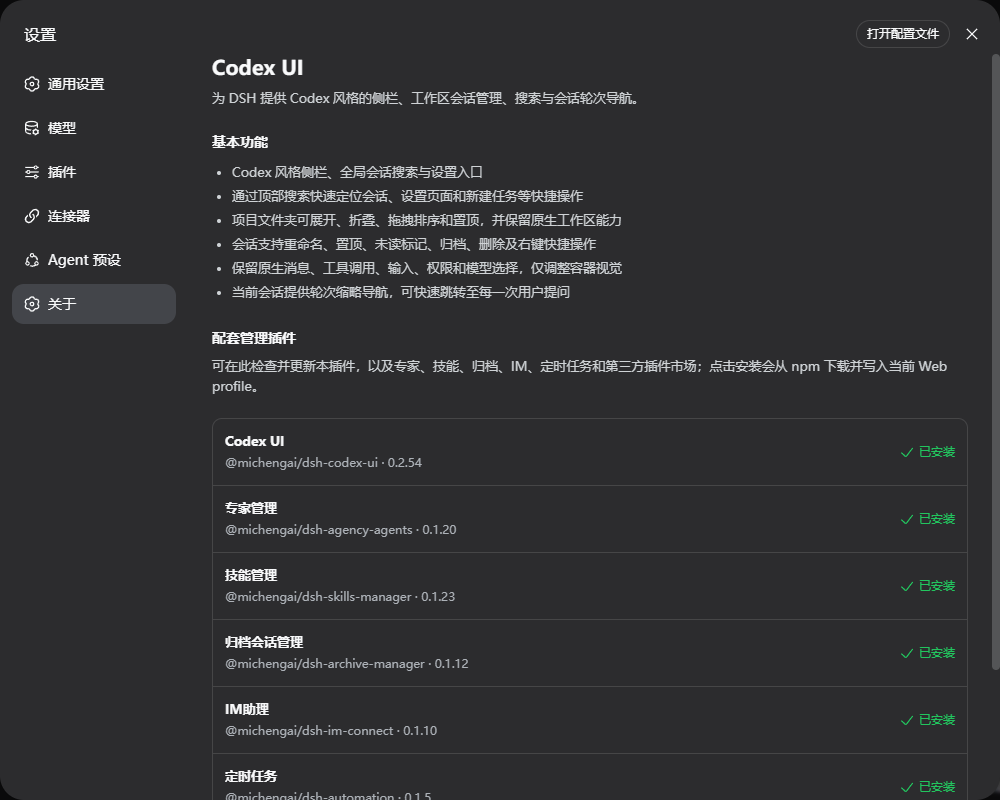
- Show companion-plugin status in Settings → About, and install the missing pieces from npm.
Screenshots
Light theme: Codex-style sidebar, workspace tree, and conversation column.
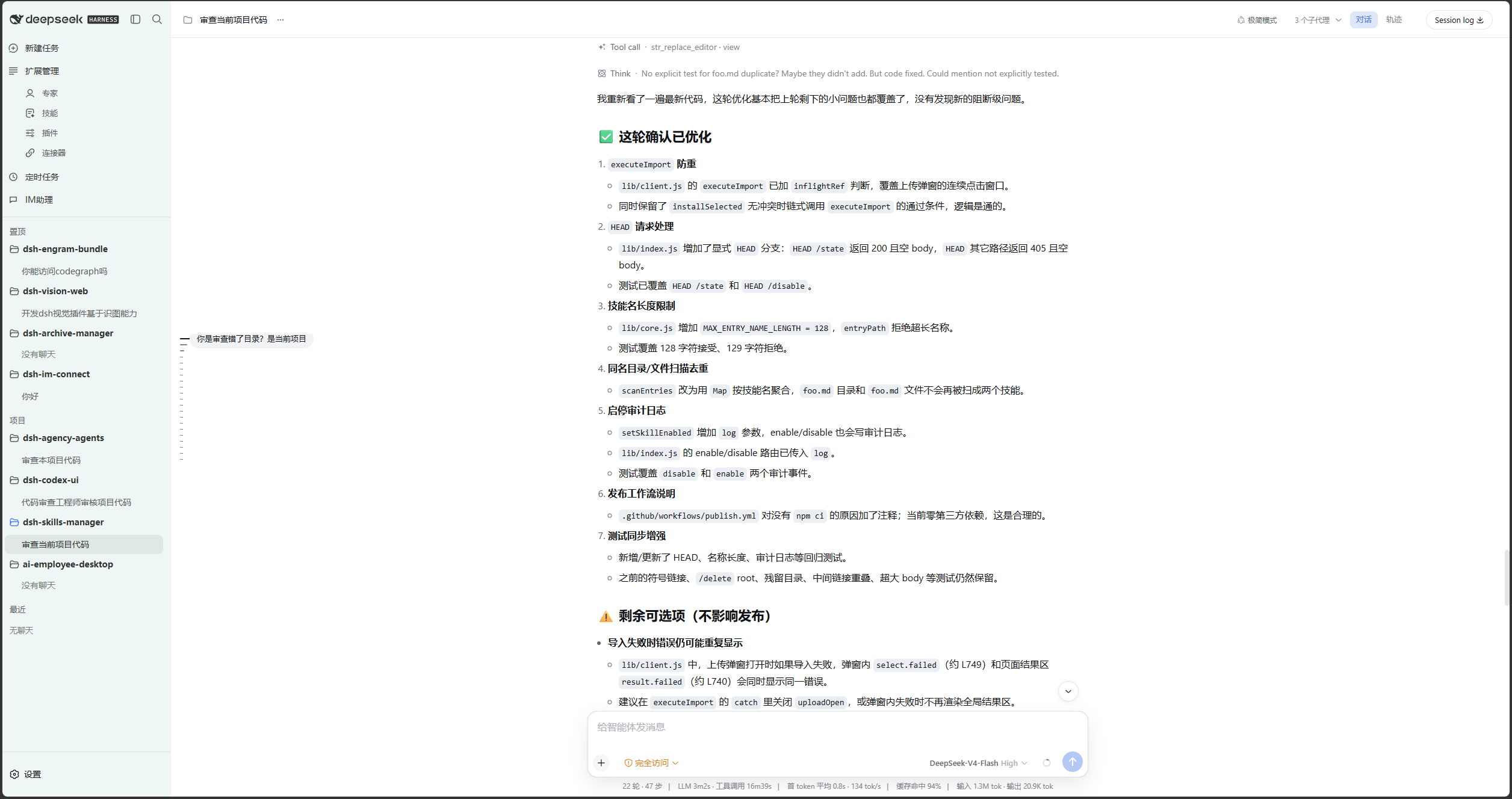
Dark theme: the same layout with Codex dark tokens.
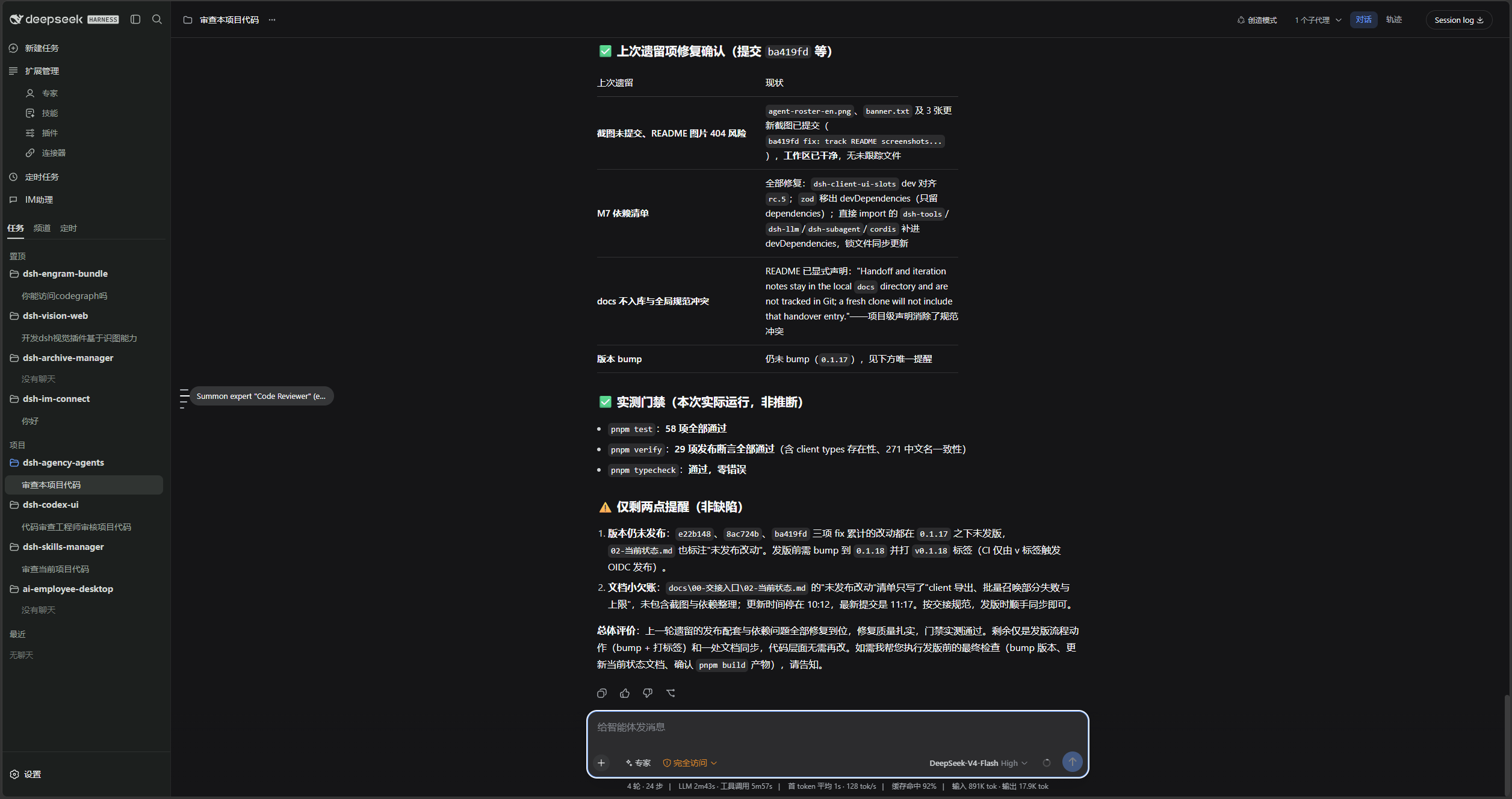
Conversation menu: rename, pin, unread, archive, fork, copy, and delete.
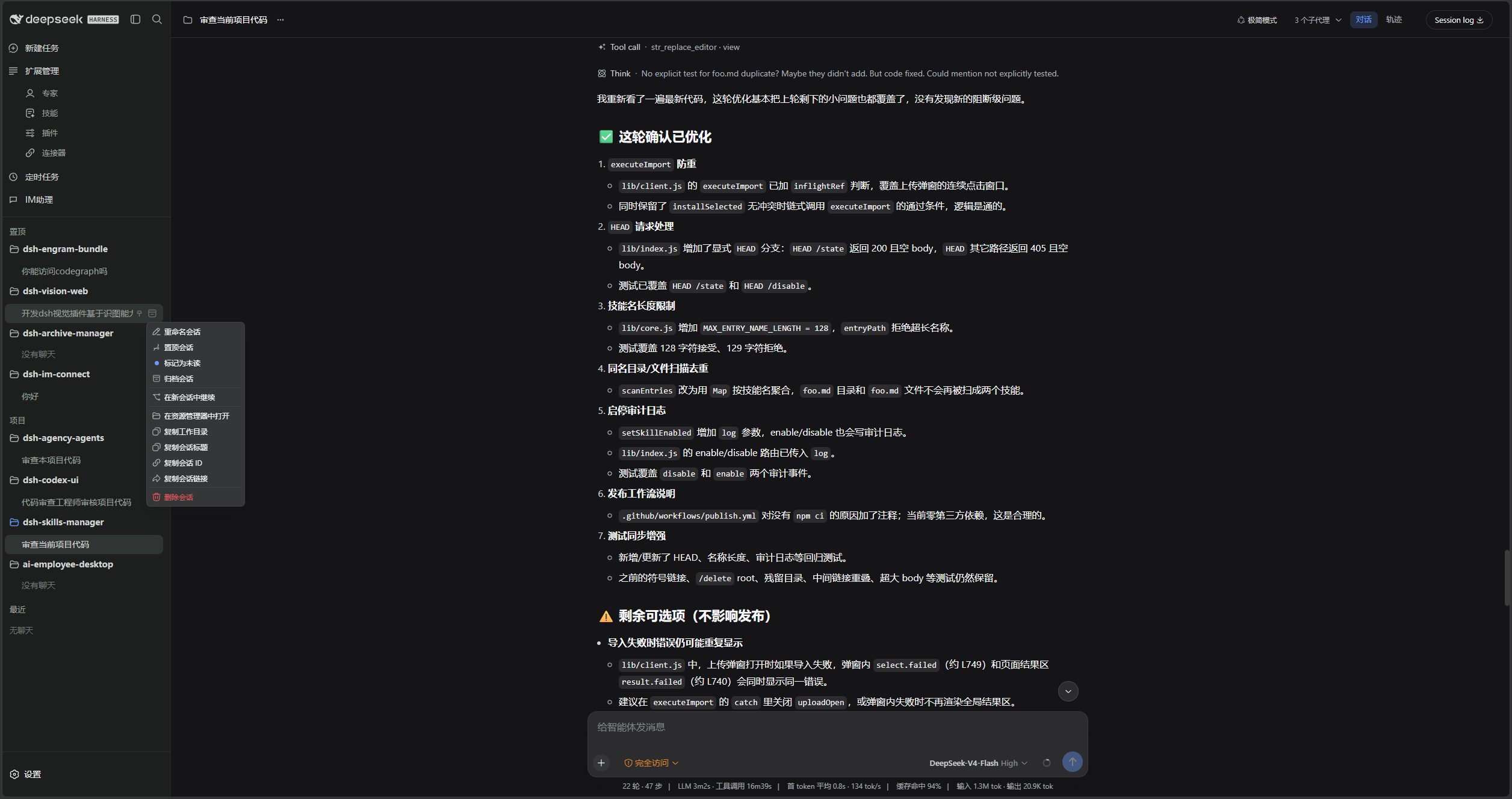
Settings → About lists the companion plugins and their install state.
Prerequisites
- A working DeepSeek Harness Web installation with
dshavailable in PowerShell. - Examples use the
webprofile; replace it with the target profile. - Source installation and development require Node.js 22+ and pnpm. Installing from npm does not require running
pnpm installin an arbitrary directory.
Plugin combo
@michengai/dsh-codex-suite is the one-click combo. It installs these six plugins into the same profile:
| Plugin | npm package | Role |
|---|---|---|
| Codex UI | @michengai/dsh-codex-ui | Codex-style sidebar, workspace tree, search, and turn navigation |
| Expert management | @michengai/dsh-agency-agents | Settings page opened from Experts |
| Skill management | @michengai/dsh-skills-manager | Settings page opened from Skills |
| Archive management | @michengai/dsh-archive-manager | Permanent deletion and archived-session management |
| IM Assistant | @michengai/dsh-im-connect | IM settings and the Channels tab |
| Scheduled tasks | @michengai/dsh-automation | Scheduled-task settings and the Schedule tab |
dshmarket stays optional. When it is installed, Plugins opens the market first.
Do not install the suite and the individual plugins in the same profile. The two patch sets conflict.
DSH product ecosystem
Codex UI can be installed independently or used through the desktop app or Web suite. They share the same DSH core but serve different ways of working:
| Product | Relationship to Codex UI |
|---|---|
| DeepSeek Harness | The host runtime that provides models, sessions, tools, and the plugin system |
| DSH Codex Desktop | A ready-to-install desktop product with Codex UI and the other five feature products built in |
| DSH Codex Suite | A one-click suite for existing DSH Web environments that installs Codex UI and the other five feature products |
| Six feature products | Codex UI · IM Connect · Automation · Skills Manager · Archive Manager · Agency Agents |
Installation
dsh plugin add forwards to pnpm add in the profile directory. Without a version and official registry, a local mirror or minimum-release-age policy can leave you on an older build.
Ask another agent to install the suite
Copy one of the sentences below into DSH, Codex, or WorkBuddy and let that agent install the combo into your local web profile.
From npm:
Install the latest DSH plugin suite @michengai/dsh-codex-suite into my local web profile using the official npm registry: dsh plugin --profile web add @michengai/dsh-codex-suite@latest --registry=https://registry.npmjs.org/. Then run dsh --profile web --dump-config, confirm codex-ui, agency-agents, skills-manager, archive-manager, im-connect, and dsh-automation are mounted, and remind me to restart DSH Web and hard-refresh the browser.
UI only:
Install the latest DSH plugin @michengai/dsh-codex-ui into my local web profile using the official npm registry: dsh plugin --profile web add @michengai/dsh-codex-ui@latest --registry=https://registry.npmjs.org/. Then run dsh --profile web --dump-config, confirm codex-ui is mounted, and remind me to restart DSH Web and hard-refresh the browser.
| Product | How to use it |
|---|---|
| DSH | Send one of the sentences above to the current session. |
| Codex | Send one of the sentences above to Codex and let it install locally. |
| WorkBuddy | Send one of the sentences above to WorkBuddy. |
If dsh is not on PATH, replace the leading dsh with npx --yes @deepseek-ai/dsh.
Install the complete suite
This is the one-click combo. Run it from any PowerShell directory:
[Console]::OutputEncoding = [System.Text.Encoding]::UTF8
$OutputEncoding = [System.Text.Encoding]::UTF8
dsh plugin --profile web add @michengai/dsh-codex-suite@latest --registry=https://registry.npmjs.org/
dsh --profile web --dump-config
To pin a release, replace @latest with a version such as @0.1.0.
Restart DSH Web and hard-refresh the browser. If the profile already has any of the six plugins installed individually, uninstall those plugins first.
Install Codex UI only
[Console]::OutputEncoding = [System.Text.Encoding]::UTF8
$OutputEncoding = [System.Text.Encoding]::UTF8
dsh plugin --profile web add @michengai/dsh-codex-ui@latest --registry=https://registry.npmjs.org/
dsh --profile web --dump-config
The plugin takes over the default sidebar through cordis.patch.yml. Uninstalling restores the default sidebar.
Install from source
Use this for debugging or unpublished changes. The cloned directory becomes the plugin source path:
[Console]::OutputEncoding = [System.Text.Encoding]::UTF8
$OutputEncoding = [System.Text.Encoding]::UTF8
Set-Location D:\Repository\deepseek-harness-plugin
git clone https://github.com/MichengAI/dsh-codex-ui.git
Set-Location .\dsh-codex-ui
pnpm install --frozen-lockfile
pnpm build
dsh plugin --profile web add .
dsh --profile web --dump-config
Restart DSH Web and hard-refresh the browser. Do not copy dist manually; local installation reads both package metadata and cordis.patch.yml.
Usage
Open DSH Web. The left navigation is rendered by this plugin.
| Goal | Action |
|---|---|
| Start a conversation | Select New task, or use a workspace + / New conversation action. |
| Find a conversation or setting | Use the header search field and choose a session, Settings page, or quick action. |
| Collapse the sidebar | Use the header panel button. The expand control stays on the collapsed rail. |
| Pin a workspace | Drag it into Pinned, or use Pin project in the project menu. |
| Manage a conversation | Open the conversation menu to rename, pin, mark unread, archive, fork, copy, or delete. |
| Jump between turns | Use the turn marks on the left of the current conversation. |
| Inspect connectors | Open Settings → Connectors. Addresses, commands, and credentials are never shown. |
| Check companion plugins | Open Settings → About to install or update the combo plugins. |
Deleting a workspace registration does not delete its folder or conversation records. Pinned and unread state is stored only in the current browser.
Persistence and safety limits
| Data | Storage | Scope |
|---|---|---|
| Pinned workspaces | localStorage key dsh-codex-ui.pinned-workspace-ids | Current browser only |
| Pinned conversations | localStorage key dsh.session-pins.v1 | Current browser only |
| Unread conversations | localStorage key dsh.session-unread.v1 | Current browser only |
| Conversation records | DSH host services | Unchanged by this plugin |
- The plugin uses only public DSH slots and services.
- It does not modify host source code or the conversation data model.
- Permanent deletion of archived conversations is provided by
@michengai/dsh-archive-manager. - The Connectors directory never exposes addresses, commands, or credentials.
Secondary development
- src\index.ts: host entry and the non-sensitive Connectors directory endpoint.
- src\client\index.ts: client entry for sidebar, workspace tree, turn navigation, and Settings sections.
- src\client\CodexSidebar.tsx: sidebar shell, search panel, and visual styles.
- src\client\CodexWorkspaceBrowser.tsx: workspace and conversation interactions.
tests\*.assert.tsandtests\*.spec.ts: interaction, visual, and runtime integration checks.
After changing src, rebuild, test, and install from the local directory:
[Console]::OutputEncoding = [System.Text.Encoding]::UTF8
$OutputEncoding = [System.Text.Encoding]::UTF8
pnpm build
pnpm test
dsh plugin --profile web add .
New features should reuse existing DSH slots and public services. Do not depend on private host DOM or write conversation records.
Verification
[Console]::OutputEncoding = [System.Text.Encoding]::UTF8
$OutputEncoding = [System.Text.Encoding]::UTF8
pnpm build
pnpm test
License
This project is licensed under Apache License 2.0. Conversation-management workflow is informed by Semidia/dsh-session-manager, but this plugin is implemented independently through public DSH slots and services.
Read the usage guide →
Install steps, key points, FAQ and compatibility for this plugin — auto-derived from indexed fields.
Listing badge

[](https://deepseek-plugin.org/plugins/MichengAI/dsh-codex-ui/packages/dsh-codex-suite)Paste this markdown into your GitHub README to link back to this listing. The badge only states the listing — not a security endorsement.