Provides a UI panel to monitor subagent activities and statuses within DeepSeek Harness, offering real-time visibility into agent operations.

- Language
- TypeScript
- License
- MIT
- Branch
- master
Install
$ dsh plugin --profile web add @leetoners/dsh-ui-subagent-monitorRun the command above in your terminal to install this plugin via the dsh CLI. You can switch Profile in the top-right corner. New to dsh? Read the beginner tutorial
Install via your agent
Install the DeepSeek Harness plugin Mombrane/dsh-subagent-monitor for me: review the repository at https://github.com/Mombrane/dsh-subagent-monitor first, then run the install command and verify the plugin loads successfully.
Paste this instruction to the DSH Web GUI assistant — it will install and verify for you.
一句话定位
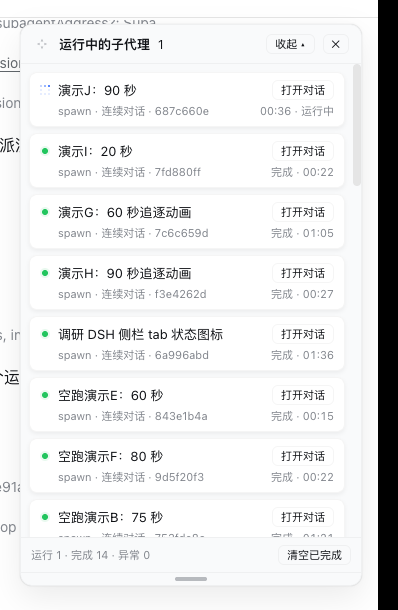
在 DSH Web 界面侧栏底部加入「子代理」入口,并在屏幕右上角常驻一块卡片面板,实时展示当前会话派生出的每一个子代理的运行状态、耗时和跳转入口。
核心能力
- 在侧栏底部增加一个带运行中数量徽标的「子代理」按钮,点击或自动展开面板
- 在屏幕右上角常驻卡片列表,每个子代理一行卡片,显示状态点、名称、运行模式、耗时
- 区分七种运行状态:运行中(蓝色追逐动画+实时秒表)、完成(绿点+耗时)、失败(红点)、已打断、令牌上限、已拒绝(琥珀点),以及中性「已结束」用于历史回填
- 实时刷新(每秒向节点半身拉取一次快照),刷新浏览器或重启服务后面板自动恢复
- 面板标题左侧的拖动柄可移动面板,底部拖动柄可调整高度;位置跨会话保留,高度按会话分别记忆,双击复位
- 点击卡片「打开对话」跳转到该子代理会话;在子代理会话内,面板提供「← 主会话」一键返回
技术实现
- 语言: TypeScript
- 关键依赖: @deepseek-ai/cordis(插件运行时)、@deepseek-ai/dsh-client-runtime(客户端上下文)、@deepseek-ai/dsh-subagent(子代理事件源)、react(UI 渲染)
- 架构模式: 双半身结构。Node 半身(src/index.ts)以全局模式监听
subagent/start与subagent/end事件、把每个 run 沿父会话链归因到根会话,再注册GET /api/subagent-monitor/snapshot回环路由供浏览器拉取;Browser 半身(src/client/index.ts)通过 Cordis slots 在sidebar.footer.action注册「子代理」入口、在shell.overlay注册常驻面板,使用 1 秒轮询 +useSyncExternalStore驱动重渲染 - 入口文件:
src/index.ts(Node 半身)、src/client/index.ts(Browser 半身)、src/client/panel.tsx(面板与触发器组件)
适用场景
想让 DSH Web 用户一眼看清「我的 Agent 现在派了哪些子代理、各自跑到哪一步」的场合——尤其是当 Agent 在主会话中频繁派生长任务(一句话文件统计、代码搜索、连续对话等)时,无需进入每个子代理会话就能从面板实时观察进度、看清耗时、跳转到关心的子任务。
前置依赖与兼容性
| 依赖 | 最低版本 | 说明 |
|---|---|---|
| DSH (Cordis 组合) | >= 0.1.0-rc.0 | 需宿主为 DSH Web 组合;peerDependencies 声明 cordis >= 0.1.0 |
| @deepseek-ai/dsh-client-runtime | >= 0.1.0-rc.0 | 浏览器半身的客户端运行时 |
| @deepseek-ai/dsh-session | >= 0.1.0-rc.0 | 提供 sessions 服务,用于「打开对话」跳转 |
| @deepseek-ai/dsh-subagent | >= 0.1.0-rc.0 | 子代理事件源(start/end) |
| @deepseek-ai/dsh-host-webserver | >= 0.1.0-rc.0 | 节点半身挂载 HTTP 路由所需的 Web 服务 |
| @deepseek-ai/dsh-client-ui-layout / -sidebar / -slots | >= 0.1.0-rc.0 | 浏览器 UI 框架(侧栏、布局、slot 注册) |
| React | ^18.2.0 | 面板 UI 渲染(dependencies) |
| 平台 | 跨平台 | 仅依赖 DSH Web 平台(package.json dsh.client.platform=web),不限操作系统 |
| Node | 未声明 | 源码中未显式声明 engines.node |
安装方式
dsh plugin --profile web add github:Mombrane/dsh-subagent-monitor
配置项
本插件无需额外配置。源码中未声明任何 Schema/Config/env 配置项;面板布局(位置、高度)通过用户拖动后由 localStorage 自动记忆。
常见问题
Q: 刷新页面后面板会消失吗?
A: 不会。面板是组合中的常驻行,每次页面加载都会自动恢复,由 Browser 半身每秒轮询 Node 半身 GET /api/subagent-monitor/snapshot 拉取快照。
Q: 「完成」和「已结束」这两种状态有什么区别?
A: 「完成」是面板在本次生命周期内实时观测到的成功结局(绿色状态点 + 耗时);「已结束」是服务重启前创建的子代理历史回填行,因为没有观测到结局事件,归类为中性灰色状态点,结局未知。
Q: 面板最多能保留多少条记录?
A: 每个根会话最多保留 200 条记录(src/index.ts 中的 MAX_PER_ROOT),超出后按最旧的已结束行淘汰,运行中的不会被淘汰。
Q: 面板位置和高度会被记住吗?跨会话共享还是按会话隔离?
A: 都会记住,但策略不同:位置写入全局 dsh-smn.panel-position.v1 单键,所有会话共用同一位置;高度写入 dsh-smn.panel-height.v2.<sessionId>,按会话分别记忆,切换会话互不影响。刷新页面或重启浏览器后恢复;双击对应拖动柄可复位。
Q: 这个面板的安全边界是怎样的?可以暴露在公网吗?
A: 轮询路由 GET /api/subagent-monitor/snapshot 直接挂在 DSH Web 服务端口下、面向回环地址、无鉴权。仅建议本地或内网环境使用;如果必须对外暴露,应在网关层对该路径做访问控制。
Q: 子代理卡片能直接跳到对话吗?怎么从子代理会话返回?
A: 卡片右侧有「打开对话」按钮,点击会调用宿主会话服务打开该子代理会话;进入子代理会话后面板头部会出现「← 主会话」按钮,一键返回上一级。
Q: 移动端能用吗?
A: 视口 ≤768px 时面板默认不弹出(避免遮挡移动屏幕),但侧栏「子代理」入口仍保留,可手动点击展开。
Q: 怎么卸载?
A: 运行 dsh plugin --profile web remove github:Mombrane/dsh-subagent-monitor,然后重启 dsh web 即可彻底移除该组合行。
上手难度
入门 — 安装即用、不需要任何配置项,权限在普通用户层面(侧栏入口 + 右上角面板 + 拖动/缩放)就够。
已知问题与限制
- 轮询路由
/api/subagent-monitor/snapshot面向回环地址、无鉴权,仅适合本地或内网使用,公网部署存在被同网段用户枚举子代理信息的风险(README.md:113 与 src/index.ts:165-177 注册的webServer.register暴露的 handler) - 轮询间隔固定为 1 秒,不可配置;高密度子代理场景下浏览器每秒都会发起同源请求(src/client/panel.tsx:315-322)
- 浏览器面板对历史回填行无法补齐结局事件,归类为「已结束」中性状态,与真实状态可能不一致(src/index.ts:148-149 与 src/client/panel.tsx:96)
- Node 半身对超过 MAX_PER_ROOT(200)的已结束行做淘汰,运行中的行不会被淘汰;长时间跑大量短任务后历史会被截断(src/index.ts:67-82)
- 拖动位置/高度时跨会话保留策略对部分用户可能是「反直觉」行为(位置共享、高度隔离),需要双击拖动柄才能复位到默认(src/client/panel.tsx:432-437, 464-468)
🤖 dsh-subagent-monitor
DeepSeek Harness (DSH) Web 扩展插件 · 子代理实时运行监视面板


中文 | English
✨ 是什么
在 DSH Web 界面侧栏底部加一个「子代理」入口,并在屏幕右上角常驻一块卡片式面板,实时展示当前会话派生的每一个子代理的运行状态。
┌─ ⤢ 运行中的子代理 ──────────── [收起 ▴] [✕] ┐
│ ┌─────────────────────────────────────┐ │
│ │ 🔵 统计 ui 目录 TS 文件数   [打开对话] │ │
│ │    one-shot · 1a2b3c4d   运行中 · 00:42 │ │
│ └─────────────────────────────────────┘ │
│ ┌─────────────────────────────────────┐ │
│ │ 🟢 演示子代理:统计文件类型  [打开对话] │ │
│ │    spawn · 2b3c4d5e    完成 · 03:12  │ │
│ └─────────────────────────────────────┘ │
│  运行 1 · 完成 1 · 异常 0    [清空已完成] │
│ ════════════════════════════════════════ │ ← 拖动调整高度
└─────────────────────────────────────────┘
标题左侧
⤢四角箭头拖动柄移动面板位置,底部═拖动柄调整面板高度;两者均记忆,双击复位。
🎯 特性
| 特性 | 说明 |
|---|---|
| 🟢 实时状态 | 运行中(🔵 蓝色像素追逐动画,与 DSH 侧栏状态点同款 + 秒表)、完成(绿点 + 光晕)、失败、已打断、令牌上限、已拒绝 |
| 🃏 卡片化列表 | 每个子代理一张圆角卡片;「打开对话」在右侧,状态与耗时在第二行 |
| 🌲 树形缩进 | 孙代子代理卡片向右缩进 |
| 🔙 一键返回 | 进入子代理会话后,面板出现「← 主会话」按钮 |
| 🖐 自由摆放 | 标题左侧四角箭头拖动柄移动面板,位置自动记忆(跨会话保留);双击复位 |
| 📏 高度可调 | 底部拖动柄调整面板高度,高度按会话记忆;双击复位 |
| 🔄 刷新自恢复 | 常驻组合,页面刷新 / 服务重启后自动恢复 |
| 📱 移动端友好 | ≤768px 视口默认不弹出,侧栏按钮仍可手动打开 |
📦 安装
方式 A · npm 安装(推荐,一行命令)
dsh plugin --profile <your-profile> add @leetoners/dsh-ui-subagent-monitor
✅ 已发布
v0.2.0(GitHub Actions 构建并签名,SLSA provenance 可验)。
方式 B · GitHub 直装
dsh plugin --profile <your-profile> add github:Mombrane/dsh-subagent-monitor
# 首次安装若提示允许构建脚本,按提示在 profile 的 pnpm-workspace.yaml 中确认即可
重启 dsh web 即生效。本仓库同时是 DSH 客户端插件(dsh.client)与 组合 bundle(dsh.bundle + cordis.patch.yml),并随附预构建 lib/。
方式 C · DSH 源码仓库内联(适合二次开发)
# 1. 复制本仓库 src/ 为 <dsh>/packages/client/ui-subagent-monitor/
# 2. <dsh>/packages/bundle/web-app/package.json 加依赖
"@leetoners/dsh-ui-subagent-monitor": "workspace:*"
# 3. <dsh>/packages/bundle/web-app/cordis.patch.yml(ui-subagent 行之后)
- id: ui-subagent-monitor
  name: '@leetoners/dsh-ui-subagent-monitor'
# 4. 构建 + 重启
pnpm install && pnpm --filter @leetoners/dsh-ui-subagent-monitor bundle
# 重启 dsh web
还需在
<dsh>/tsconfig.client.json的references中加入本包路径,并将本包tsdown.config.ts改为引用主仓预设(import { clientBundle } from '../tsdown.client.ts')。
🏷️ 状态图例
| 状态 | 含义 |
|---|---|
| 🔵 运行中 | 正在执行,蓝色像素追逐动画(与 DSH 侧栏 tab 进行态同款)+ 实时秒表 |
| 🟢 完成 | 面板实时见证其成功结束,显示耗时(绿点 + 光晕) |
| ⚪ 已结束 | 历史回填行:服务重启前创建,结局未观测(成功/失败未知) |
| 🔴 失败 | 错误结束(红点 + 光晕) |
| 🟠 已打断 / 令牌上限 / 已拒绝 | 被中止 / 达到 token 上限 / 请求被拒绝(琥珀点 + 光晕) |
❓ FAQ
刷新页面会消失吗? 不会。面板是组合中的常驻行,页面每次加载自动恢复。
「完成」和「已结束」有什么区别? 🟢 是面板实时观测到的成功结局;⚪ 是服务重启前的历史记录,结局未观测。
面板有多大的容量? 每个根会话最多保留 200 条,超出淘汰最旧的已结束行。
面板位置和高度会记住吗? 会,且两者记忆策略不同:位置跨会话保留(所有会话共用同一位置);高度按会话分别记忆(localStorage 键带会话 ID,切换会话互不影响);刷新页面 / 重启浏览器后恢复;双击拖动柄恢复默认。
安全吗? 轮询路由 /api/subagent-monitor/snapshot 面向回环地址、无鉴权,仅建议本地/内网使用。
🌐 生态收录
| 渠道 | 状态 |
|---|---|
| GitHub topics | dsh-plugin、deepseek-harness(Oh-My-DSH 每 4 小时自动同步) |
| Oh-My-DSH 插件目录 | PR #8 待维护者合并 |
| awesome-dsh-plugin | ✅ 已收录(commit c7ad36e9,PR #675 已合并) |
📋 变更日志
完整变更历史见 CHANGELOG.md。当前版本 0.2.0(与 package.json 对齐)。
📖 架构文档
设计决策(为什么常驻、为什么自建轮询路由、事件归因模型)与数据流细节见 ARCHITECTURE.md。
📄 License
MIT © Mombrane
Read the usage guide →
Install steps, key points, FAQ and compatibility for this plugin — auto-derived from indexed fields.
Listing badge

[](https://deepseek-plugin.org/plugins/Mombrane/dsh-subagent-monitor)Paste this markdown into your GitHub README to link back to this listing. The badge only states the listing — not a security endorsement.