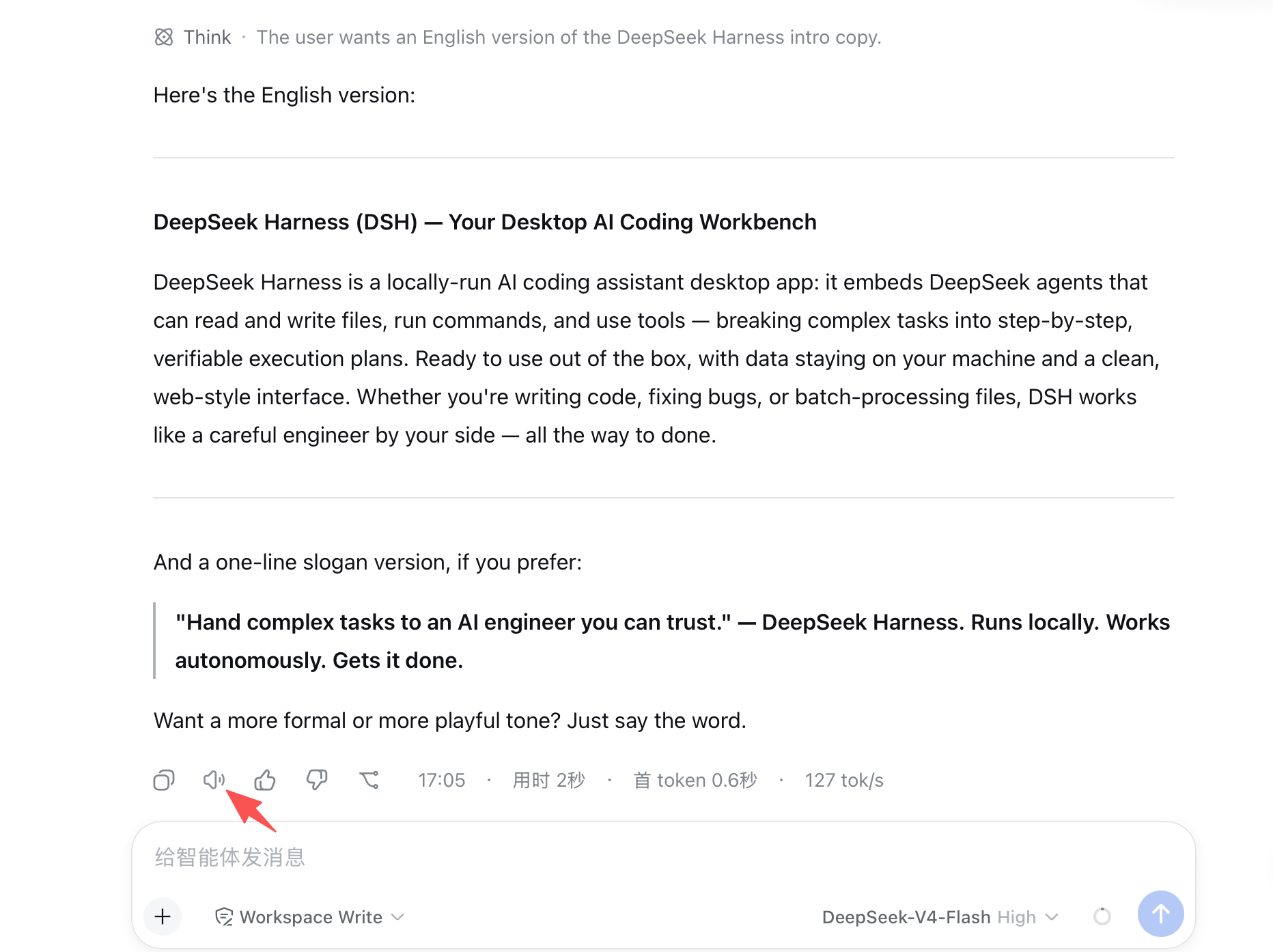
Adds a 🔊 tap-to-read button to each AI response in DSH conversations, using Doubao TTS natural voice (BYOK, key stored locally in macOS engine only).

- Language
- Swift
- License
- MIT
- Branch
- main
Install
$ dsh plugin --profile web add dsh-omi-voiceRun the command above in your terminal to install this plugin via the dsh CLI. You can switch Profile in the top-right corner. New to dsh? Read the beginner tutorial
Install via your agent
Install the DeepSeek Harness plugin PolinniZhong/dsh-omi-voice for me: review the repository at https://github.com/PolinniZhong/dsh-omi-voice first, then run the install command and verify the plugin loads successfully.
Paste this instruction to the DSH Web GUI assistant — it will install and verify for you.
One-Line Pitch
Add a 🔊 button next to every AI response in DeepSeek Harness. Click it to have the local Omi engine call Doubao TTS 1.0 to read out the final response text. The Doubao API Key stays in your own Mac's Keychain (BYOK).
Core Features
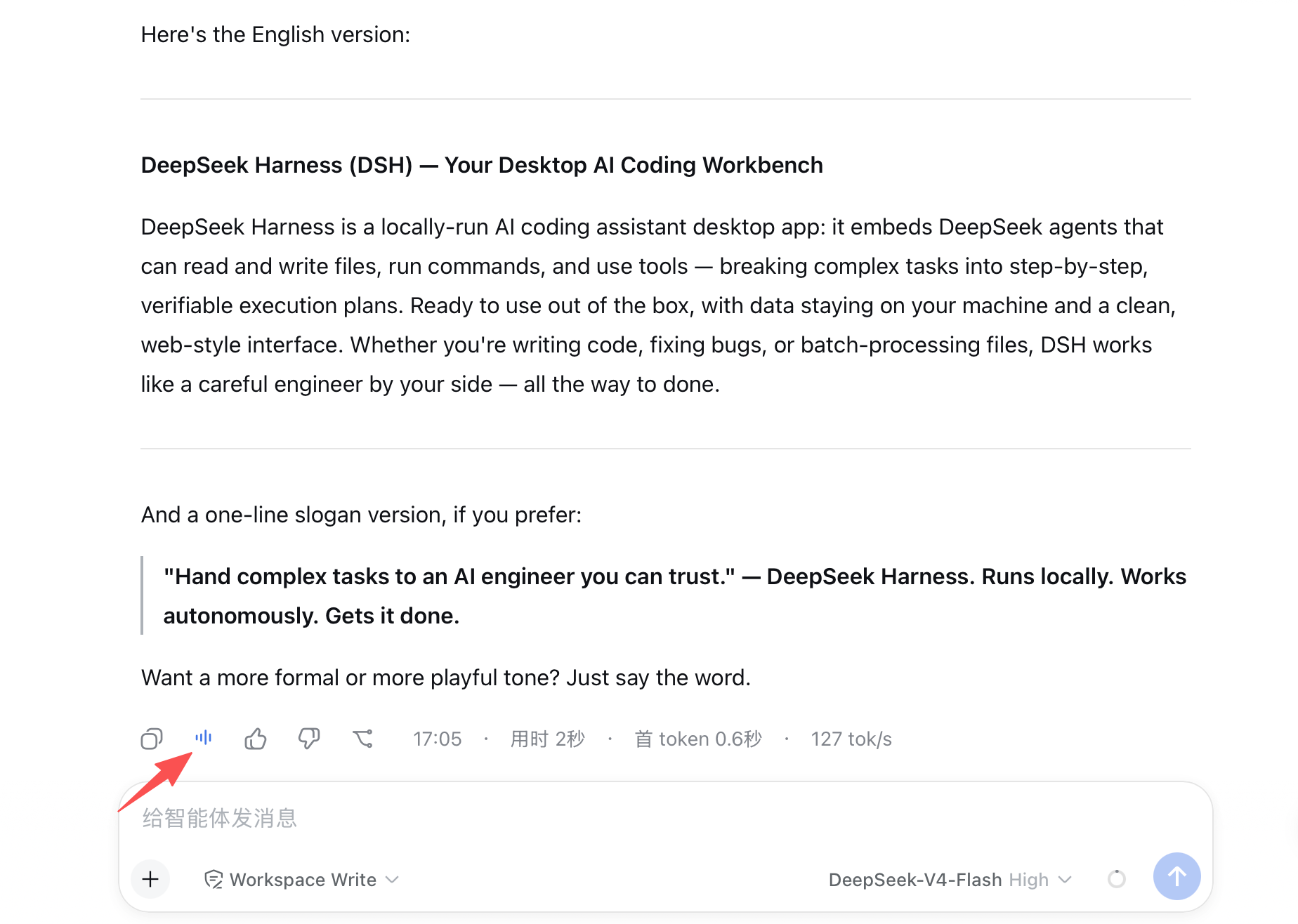
- Inject a three-state 🔊 button next to each assistant response: click once to read, click again while playing to pause, click again to resume from pause position
- Only read the final response body; tool call logs, thinking processes, command executions, pure code fences, pure tables, and box drawings/ASCII graphics are filtered by the engine before the request. Button shows as disabled when there's nothing to read
- Engine actively polls
/v1/statusto sync play/pause/failed/idle states. Show specific failure reason toast on read failure. Button auto-resets after engine disconnection - All text and playback control goes through local
127.0.0.1:8765HTTP protocol. Plugin side does not store or touch the Doubao Key - Engine implements cost control: 3-second deduplication for identical text, 300ms throttle for any read, in-process LRU cache of 3 items/≤5MB, pure memory cleared on exit
Technical Implementation
- Language: JavaScript (plugin side, runs in browser) + Swift 6 (Omi engine, separate source repo directory)
- Key Dependencies: No runtime dependencies (
dependenciesinpackage.jsonis empty); browser side uses DSH built-in React; engine uses Foundation / AVFoundation / Network / Swift Concurrency - Architecture Pattern: DSH cordis client plugin, mounted via
cordis.patch.ymlwith minimal Node placeholder entry,exports["./client"]+dsh.client.platform: webtriggers client bundle auto-load; client registers read-aloud button component toconversation.chat.assistant-actionsslot (client/lib/client.js:247-258), does not modify host Node side logic - Entry Files: Plugin entry
host/lib/index.js(placeholder) + client entryclient/lib/client.js; engine entriesengine/Sources/ReadAloudConfig/main.swiftandengine/Sources/ReadAloudService/main.swift, HTTP service inengine/Sources/ReadAloudService/LocalTTSService.swift
Use Cases
When you want to "listen" instead of "read" long DSH responses, replay AI answers while doing housework/commuting, or want visually impaired/low-vision users to hear AI answers on desktop. The cost is keeping an unsigned Omi engine running on your Mac and paying Doubao's per-character billing.
Prerequisites and Compatibility
| Dependency | Min Version | Description |
|---|---|---|
DeepSeek Harness (dsh web) | Not declared | Plugin client injects via dsh.client.platform: web; Node entry is empty placeholder, package.json does not declare dshWorkshop / engines version |
| Node | Not declared | package.json does not declare engines.node; host/lib/index.js only serves as placeholder export |
| OS | macOS 13+ Apple Silicon | Engine engine/Package.swift:6 declares platforms: [.macOS(.v13)]; engine/README.md:15 and engine/CHANGELOG.md:101 further restrict to Apple Silicon Mac, Windows/Linux engine unavailable |
| Xcode Command Line Tools | No fixed version | Engine needs to be built from source with swiftc and codesign (engine/README.md:15, engine/build/build-service.sh) |
| Doubao TTS 1.0 Service | Console enable "Speech Synthesis 1.0" | BYOK, need to create Access Key associated with this service in Volcano Engine console and fill in Omi engine settings page |
| Native Modules | None | Plugin dependencies: {}, no node:sqlite / node-pty etc. |
Installation
dsh plugin --profile web add github:PolinniZhong/dsh-omi-voice
The engine (
engine/, macOS menu bar App) needs to be separately built perengine/README.mdanddittoto~/Applications/Omi DSH.app. This repo's plugin install command won't install the engine for you.
Configuration
| Config | Type | Description | Default |
|---|---|---|---|
| Engine HTTP Address | localStorage string (key dsh-omi-voice/engineBase) | Base URL for plugin to call engine, e.g. to override when Omi engine port is changed or forwarded via SSH | http://127.0.0.1:8765 (client/lib/client.js:58-65) |
Doubao API Key, current voice, speech rate, etc. are managed by Omi engine independently and not in this plugin's config items; this plugin does not implement DSH cordis style
ctx.configSchema.
FAQ
Q: Clicking 🔊 prompts "Omi DSH engine not detected" - what to do?
A: Engine is not running or closed. Open "Omi DSH" (Applications folder or ⌘+space search "Omi"), recommend checking "App Preferences > Launch at Login" in settings.
Q: Prompt says "Please configure Doubao API Key in Omi settings page first" - how to handle?
A: Engine is running but Key not saved. Open Omi settings page "API Key" item, follow README "Get Doubao API Key" three steps to enable "Speech Synthesis 1.0" in Volcano Engine console, create associated Access Key and fill it in; plugin itself has no Key input entry.
Q: Button is gray, clicking does nothing?
A: This response has no readable content after engine filtering (pure code, pure table, pure box drawing/ASCII graphics). Starting from v0.1.1, button shows as disabled and hover says "This response has no readable content", no Doubao request will be made.
Q: Can I switch Doubao voice? Is there voice selection UI in plugin?
A: No voice UI on plugin side, v1 protocol only returns current voice field; switching needs to be done in Omi engine settings page "Voice ID". Voice list endpoint /v1/voices is marked as v1.1 reserved in protocol.
Q: Is Windows or Linux supported?
A: Not supported. Omi engine only targets macOS 13+ Apple Silicon, needs to be built from source; although plugin JS part can load in any dsh web, without macOS engine there's no sound output.
Q: What's the difference from zero-config read-aloud plugins (like dsh-voice-chat)?
A: Zero-config types usually use system TTS, no Key needed, robotic voice, read entire paragraphs; this plugin uses Doubao TTS 1.0 natural voice, only reads final response and filters noise content, cost is BYOK per-character billing, needs Omi engine running locally.
Q: Where is data stored? Does it write chat history?
A: Engine does not save read text to disk, does not write history, does not callback any remote endpoints; plugin only communicates via 127.0.0.1. PRIVACY.md and docs/API.md §5 clearly state text and Key are not sent externally.
Q: How to uninstall?
A: Use dsh plugin --profile web remove github:PolinniZhong/dsh-omi-voice to remove plugin, then rm -rf "$HOME/Applications/Omi DSH.app" to delete engine; plugin uninstall also cleans up old version residual localStorage items (dsh-omi-voice/settings, dsh-omi-voice/autoSeq/*) at client.js:46-55 startup.
Getting Started Difficulty
Beginner — the plugin itself only exposes one button and optional engine address override. But to make it actually produce sound requires completing three extra things: build unsigned engine on Mac, apply for Doubao Access Key, fill into Omi settings page.
Known Issues and Limitations
- Engine only supports macOS 13+ Apple Silicon (
engine/Package.swift:6,engine/CHANGELOG.md:101), Windows / Linux have no corresponding build artifacts - Engine is currently "macOS Source Build Developer Preview", not completed Developer ID signing, notarization, installer distribution (
engine/SECURITY.md:24, multiple declarations inengine/CHANGELOG.md), needs evaluation in isolated development environment - Protocol v1 does not implement long text auto-segmentation and prefetch, needs to wait for v1.1 (
engine/CHANGELOG.md:103,docs/API.md:23); current text plays in ≤900 UTF-8 byte natural segments sequentially - Protocol v1 has no authentication token, any local process can call engine to trigger read; current impact is only "local speaker makes sound", both
docs/API.md:172andengine/CHANGELOG.md:104note that if local file reading is supported later, token must be added - Starting from v0.1.1, auto-read and 📢 toggle removed (
CHANGELOG.md:13), deliberately only click-to-read remains; product decision, please do not re-introduce - Current Keychain access strategy targets unsigned local development packages (
engine/CHANGELOG.md:105),正式签名版本需要迁移到 Data Protection Keychain 与正式 Access Group
dsh-omi-voice
沉浸式听朗读 · 豆包音质
点一下 🔊,把 AI 回复用豆包的自然音色念给你听——无需复制,不做自动朗读
DeepSeek Harness 插件 · BYOK · MIT

让 DeepSeek Harness(DSH)桌面端里的 AI 回复,用豆包自然音色读给你听。语音由你本机常驻的 Omi 引擎合成,豆包 API Key 只留在你自己的钥匙串里(BYOK)。
快速概览
| 项目 | 说明 |
|---|---|
| 插件名称 | dsh-omi-voice |
| 适配平台 | DeepSeek Harness(dsh web,含桌面端)+ macOS 上的 Omi 引擎 v0.1.2+ |
| 解决的问题 | DSH 内置朗读(系统语音 / Edge TTS)音色机械、像上个时代的播报腔;通用剪贴板工具又要先复制再读 |
| 工作方式 | 点回复旁 🔊 朗读/暂停/继续;只读最终回答,工具日志/代码/表格/图形朗读前自动过滤 |
| 语音能力 | 豆包 TTS 1.0(seed-tts-1.0),自然中文音色,支持暂停/继续(从暂停处续播) |
| 隐私特性 | API Key 存入 Omi 引擎的 macOS Keychain;插件零 Key;仅本机 127.0.0.1 通信 |
| 成本 | BYOK,按字符计费;内存 LRU 缓存 + 去重,避免重复请求 |
| 开源协议 | MIT License |
三步开始朗读
- 安装插件 + 构建并打开 Omi 引擎(见下方「获取豆包 API Key」与「安装」)。
- 在 Omi 引擎设置页保存一次豆包 API Key。
- 在 DSH 对话里点 AI 回复旁的 🔊,即可朗读。
flowchart LR
    A[点 🔊] --> B[插件取回复的最终回答文本]
    B --> C[POST 127.0.0.1:8765/v1/speak]
    C --> D[Omi 引擎清洗 + 分段]
    D --> E[豆包 TTS 流式合成]
    E --> F[本机扬声器播放]
获取豆包 API Key(新手必读)
本插件是 BYOK(自带 Key):豆包语音由你自己的火山引擎账户按字符计费。三步拿到 Key:
第 1 步 · 找到「豆包语音」:登录火山引擎控制台,进入「豆包语音」(语音技术)服务。
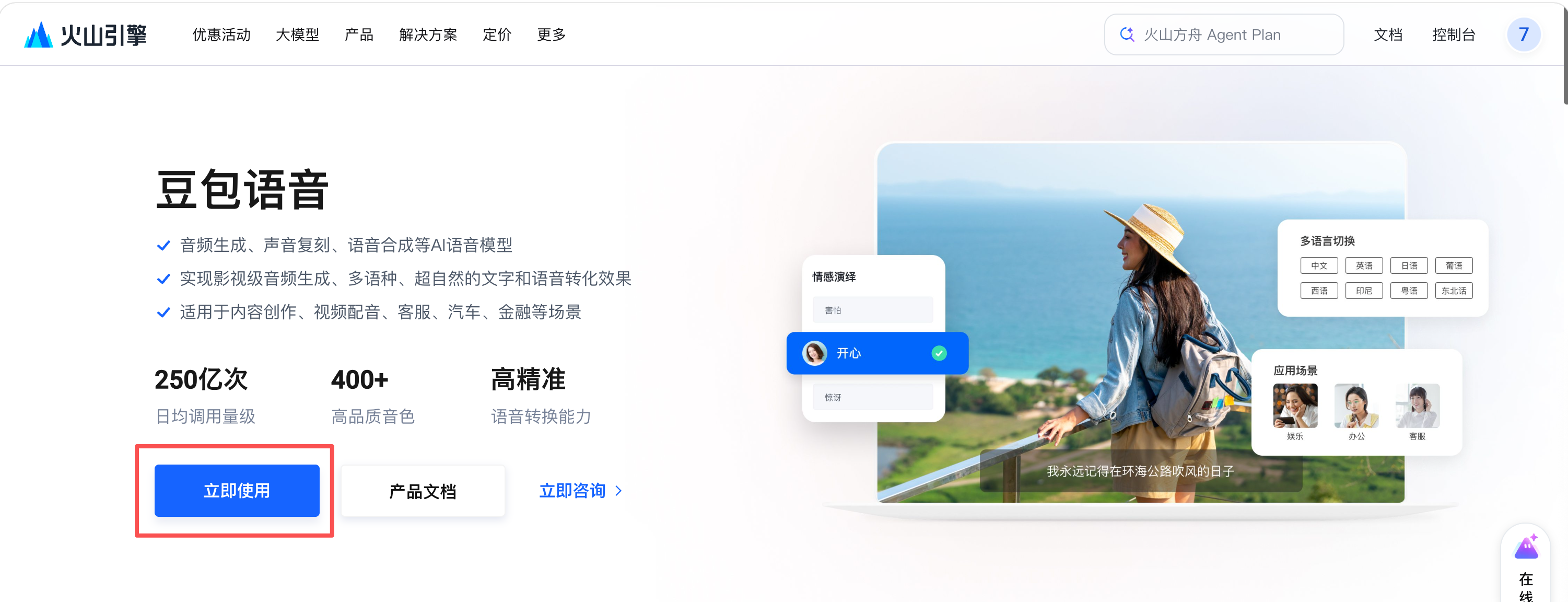
第 2 步 · 开通「语音合成 1.0」:在产品列表里开通「语音合成大模型 / 语音合成 1.0」。
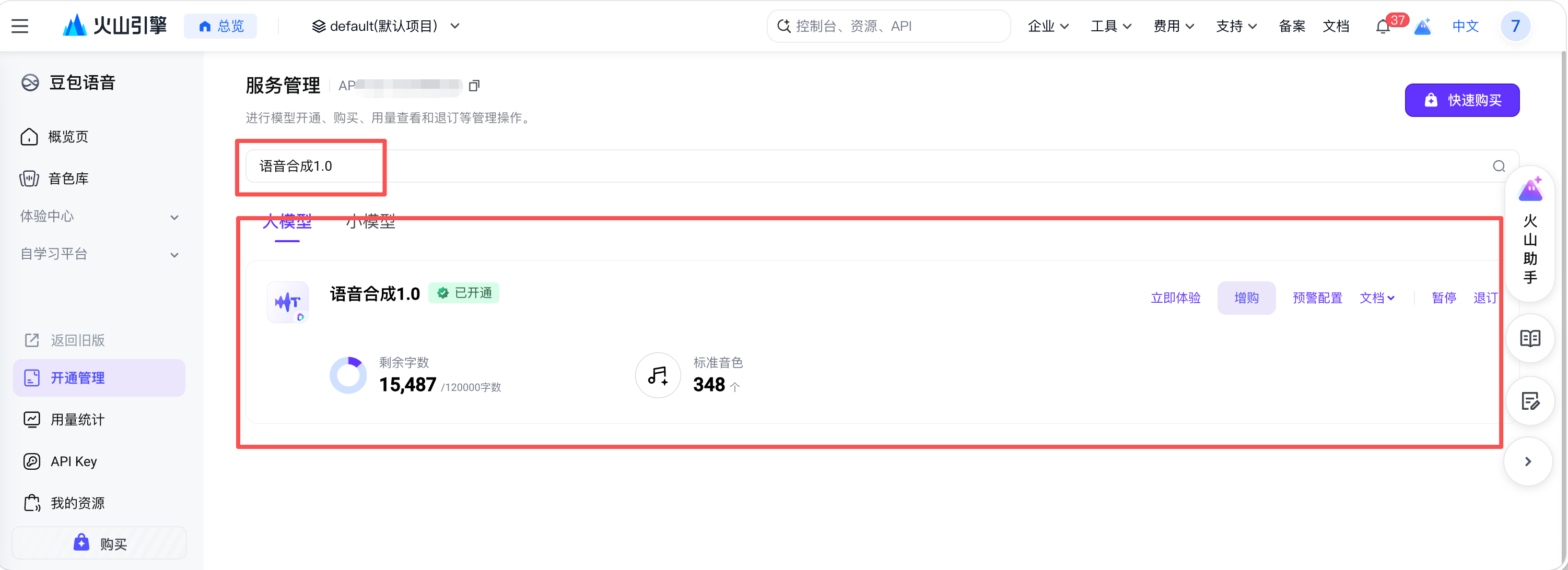
第 3 步 · 创建 API Key:创建 Access Key 时,关联第 2 步开通的「语音合成 1.0」服务;把得到的 API Key 填进 Omi 引擎「设置 > API Key」并保存。
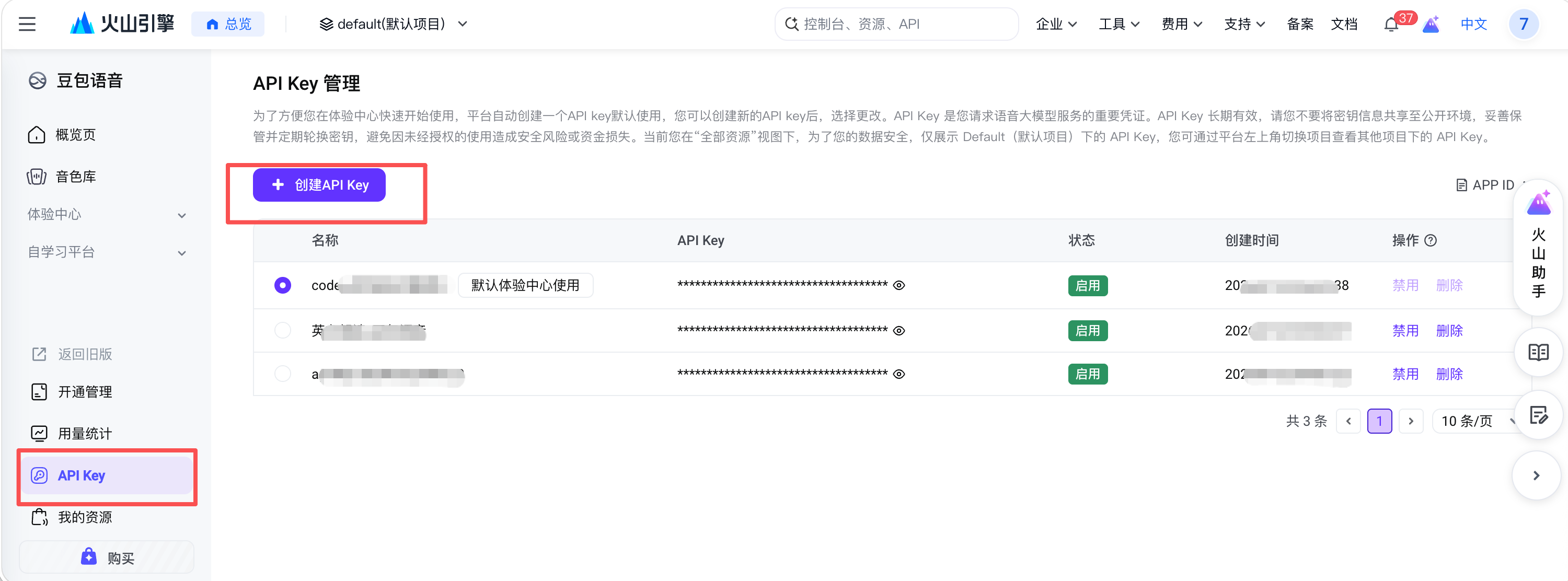
API Key 只保存进 Omi 引擎的 macOS Keychain,插件侧零 Key、不出本机。
安装
dsh plugin --profile web add "github:PolinniZhong/dsh-omi-voice#v0.1.2&path:/"
本地开发可直接装目录:
dsh plugin --profile web add /path/to/dsh-omi-voice
引擎(Omi DSH)构建见 engine/README.md:./engine/build/build-service.sh 后 ditto 到 ~/Applications/Omi DSH.app。
使用
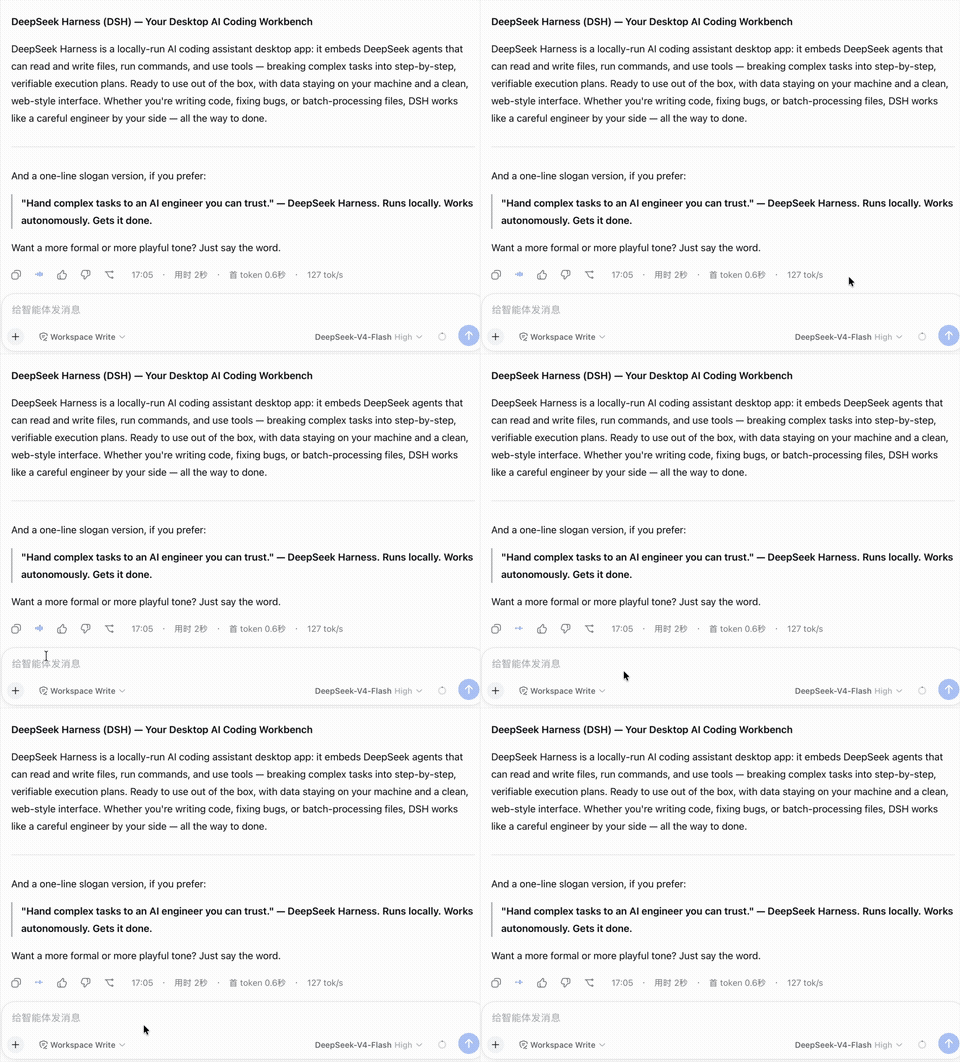
- 🔊 点读;播放中再点 = 暂停,再点 = 从暂停处继续;点其它消息的 🔊 = 打断并读新的。
- 只读最终回答:工具执行日志、思考过程不会读;代码围栏、表格、纯图形(盒绘/ASCII)在请求前过滤,回复若只有这些内容,按钮呈禁用态并提示"没有可朗读的内容"。
- 引擎未启动 / 未配置 Key 时,点击会给出明确提示(含去哪打开 Omi)。
成本透明
豆包 TTS(seed-tts-1.0)按字符数计费,由你在火山引擎账户自行承担。为此:
- 只有手动点 🔊 才合成,不自动朗读;
- 引擎对相同文本 3 秒内去重,且进程内 LRU 缓存最近 3 条(≤5MB、纯内存、退出即清),重复朗读不重复计费;
- 纯表格/纯代码等无有效内容不发请求(
invalid_text)。
架构与协议
插件只是"遥控器":播放、变速、暂停/继续、缓存、文本清洗全部在 Omi 引擎内完成。协议见 docs/API.md(/v1/status、/v1/speak、/v1/pause、/v1/resume、/v1/stop)。
FAQ
| 问题 | 回答 |
|---|---|
| 点 🔊 提示"未检测到 Omi DSH 引擎" | 打开应用「Omi DSH」(~/Applications 或 ⌘空格 搜 "Omi"),建议开「开机启动」 |
| 提示"请先在 Omi 设置页配置豆包 API Key" | 打开「Omi DSH」设置,按上文「获取豆包 API Key」填一次并保存 |
| 按钮是灰的 / 点它没反应 | 这条回复没有可朗读的内容(纯代码/表格/图形),已自动过滤 |
| 音色能换吗 | 在 Omi 设置页「音色 ID」改(当前插件不提供音色 UI) |
| 支持 Windows 吗 | 暂不支持:Omi 引擎仅 macOS Apple Silicon |
| 和 dsh-voice-chat 的区别 | 它零 Key 零成本但用系统机械音色;本插件用豆包自然音色,代价是 BYOK 按字符计费 |
相关
- 引擎:本仓库
engine/(Omi DSH 本地引擎,Swift 源码 + 构建脚本) - 生态:awesome-dsh-plugin
项目文档
- AGENTS.md — 给 AI 编码代理的项目说明(Codex 约定)
- docs/DESIGN.md — 架构与设计
- docs/DECISIONS.md — 设计决策记录
- docs/MEMORY.md — 长期知识库(坑/结论)
- docs/HANDOFF.md — 交接与续作
- docs/API.md — 本地协议
License
MIT
Read the usage guide →
Install steps, key points, FAQ and compatibility for this plugin — auto-derived from indexed fields.
Listing badge

[](https://deepseek-plugin.org/plugins/PolinniZhong/dsh-omi-voice)Paste this markdown into your GitHub README to link back to this listing. The badge only states the listing — not a security endorsement.